9M2PJU
amateur radio
dx cluster
DXing
ham radio
security
amateur radio, communication infrastructure, cybersecurity, dx cluster, dx spider, emergency communications, ham radio, ham radio safety, ham radio technology, network security, packet radio, radio cluster management, Radio communication, radio enthusiasts, radio network security, radio networking, radio operations, radio technology, technical ham radio
9M2PJU
0 Comments
Securing Your DX Cluster: Essential Measures to Minimize Attacks
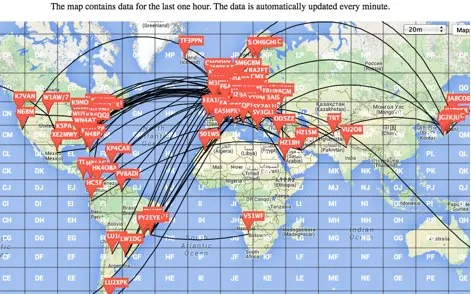
Understanding DX Spider in Amateur Radio 📻
Amateur radio, often called “ham radio,” is a fascinating hobby that connects enthusiasts across the globe through wireless communication. At the heart of this global network lies sophisticated software like DX Spider, a critical tool that revolutionizes how radio operators share information and track contacts worldwide.
What is DX Spider? 🤔
DX Spider is an open-source cluster software that serves as a sophisticated communication hub for amateur radio operators. Developed by a community of passionate ham radio enthusiasts, it provides a robust platform for:
- Real-time sharing of radio station spots
- Tracking rare DX (long-distance) contacts
- Facilitating global communication across multiple network nodes
- Providing a collaborative platform for radio enthusiasts
The Importance of Network Security 🔒
In the interconnected world of amateur radio, security is not just a technical requirement—it’s a community responsibility. An unsecured DX Spider node can:
- Introduce vulnerabilities to the entire amateur radio network
- Allow unauthorized access and potential misuse
- Compromise the integrity of communication channels
- Risk disrupting valuable communication infrastructure
Who Should Read This Guide? 👥
This comprehensive security guide is essential for:
- DX Spider node system operators (sysops)
Essential Security Measures for DX Spider Clusters 🛡️
1. Keep Your Cluster Software Updated 🆕
Regularly updating your DX Spider software is the first line of defense against potential security threats.
Why Updates Matter:
- Patch known vulnerabilities
- Improve system performance
- Add new security features
- Ensure compatibility with latest network standards
Update Procedure:
- Download the Update Verification Script
wget -q https://raw.githubusercontent.com/EA3CV/dxspider_info/main/check_build.pl - Move the Script to Appropriate Directory
mv check_build.pl /spider/local_cmd/ - Automate Version Checks with Crontab
- Edit the crontab file:
nano /spider/local_cmd/crontab - Add automated update check:
18 03 * * 1,2,3,4,5 spawn('cd /spider/local_cmd; wget -q https://raw.githubusercontent.com/EA3CV/dxspider_info/main/check_build.pl -O /spider/local_cmd/check_build.pl')
- Edit the crontab file:
2. Limit and Secure Node Connections 🔗
Controlling network connections is crucial for maintaining system integrity and preventing network overload.
Connection Best Practices:
- Limit connections to 4-6 trusted nodes
- Use strong, unique passwords
- Verify the reputation of connected nodes
Connection Setup Procedure:
- Coordinate with Partner Node Sysop 🤝
- Establish trust
- Agree on secure connection parameters
- Configure Connection in DX Spider Console
set/register <partner_call> set/spider <partner_call> set/password <partner_call> <strong_password> - Edit Connection Configuration File
nano /spider/connects/<partner_call> - Add Password Authentication
'word:' '<your_secure_password>'
3. Identify and Avoid Insecure Nodes 🚫
Protect your network by being selective about node connections.
Red Flags: Avoid Nodes That:
- Run outdated or unsupported software versions 🕰️
- Allow unrestricted spot submissions 📡
- Lack proper user connection logging 🔄
- Have connections with other known insecure nodes 🌐
Evaluation Checklist:
- Request software version information
- Check node connection logs
- Verify authentication mechanisms
- Assess overall network hygiene
4. Implement Strict User Registration 👥
Controlling user access is fundamental to maintaining a secure DX Spider cluster.
Registration Benefits:
- Prevent unauthorized spot submissions
- Create accountability
- Reduce spam and network abuse
- Enhance overall network trust
User Registration Procedure:
- Modify Startup Configuration
nano /spider/scripts/startup - Set Security Variables
set/var $main::reqreg = 1 # Restrict spotting to registered users set/var $main::passwdreq = 0 # Password required for spot submission - Register Users
set/register <callsign> set/password <callsign> <secure_password> - Password Distribution
- Use secure communication channels
- Send credentials via encrypted email
- Use private messaging platforms
- Avoid public communication methods
Additional Security Recommendations 🛡️
Monitoring and Logging
- Implement comprehensive logging
- Regularly review connection logs
- Set up alerts for suspicious activities
Backup and Recovery
- Maintain regular system backups
- Create disaster recovery plans
- Test restoration procedures periodically
Community Collaboration
- Stay informed about network security trends
- Participate in amateur radio security forums
- Share best practices with fellow sysops
Conclusion 🏁
Securing your DX Spider cluster is an ongoing commitment to the amateur radio community. By implementing these comprehensive security measures, you contribute to a more robust, reliable, and trustworthy global communication network.
Original Guide Compiled By: Mikel EA2CW
Stay Secure, Stay Connected! 73 👋




Post Comment