Understanding the Linux Boot Process: From Power On to Login
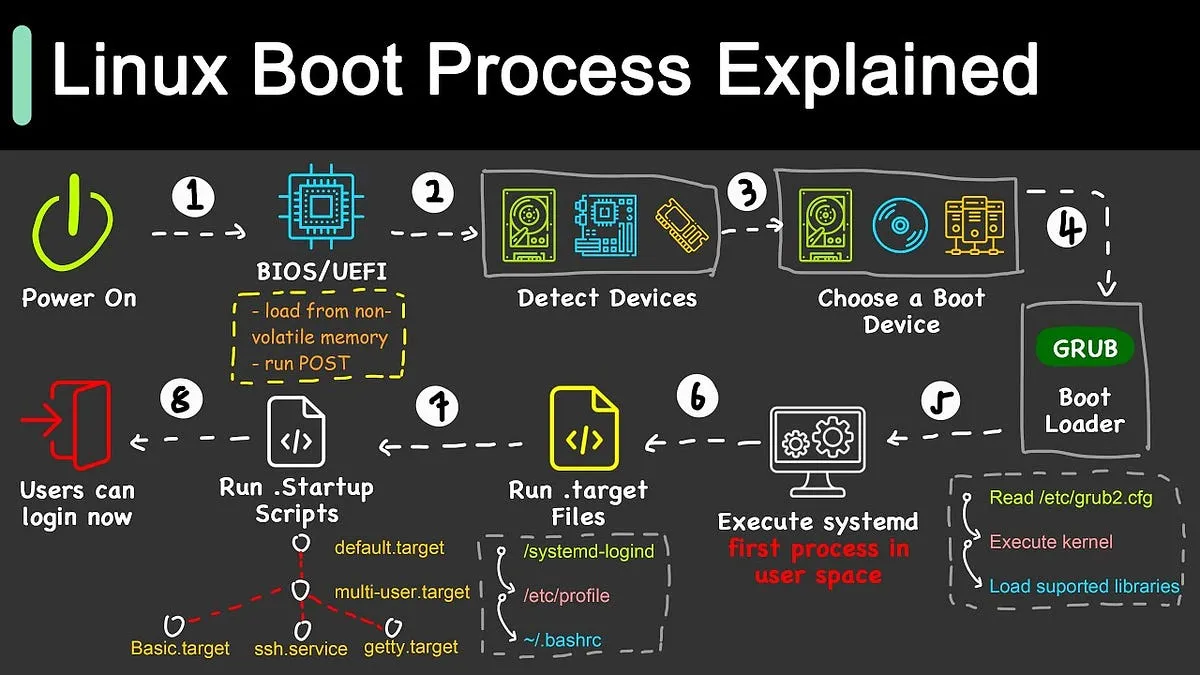
Whether you’re a seasoned sysadmin or just diving into Linux, understanding the boot process is key to mastering how your system starts up. The Linux boot process is a fascinating journey that transforms powered-off hardware into a fully operational system. In this post, we’ll walk through the entire boot sequence, breaking down each stage with technical clarity.
🔌 Stage 1: BIOS or UEFI – The System’s First Breath
The process begins the moment you press the power button.
BIOS (Legacy Systems)
- POST (Power-On Self Test) is triggered to check RAM, CPU, keyboard, and basic hardware.
- Searches for a bootable device by scanning the boot order (HDD, SSD, USB, etc.).
- Once a bootable device is found, BIOS reads the Master Boot Record (MBR), which contains the bootloader.
UEFI (Modern Systems)
- Replaces BIOS with a more advanced firmware interface.
- Reads the EFI System Partition (ESP), which contains EFI applications like
GRUB.efi. - Supports Secure Boot, GUID Partition Table (GPT), and faster booting.
📝 Note: UEFI is now the standard for most modern hardware.
💽 Stage 2: Bootloader – The Linux Gatekeeper
The bootloader is the program that loads and starts the Linux kernel.
Common Bootloaders:
- GRUB (GRand Unified Bootloader) – Most common in Linux systems.
- systemd-boot – Lightweight bootloader for UEFI systems.
- LILO (older systems) – Largely deprecated.
The bootloader:
- Loads the selected kernel image (e.g.,
/boot/vmlinuz-linux). - Loads the initramfs/initrd – a temporary root filesystem used during early boot.
- Passes control and parameters (e.g., root device path, kernel options) to the kernel.
Example of GRUB config:
linux /boot/vmlinuz-6.1.0 root=/dev/sda2 ro quiet splash
initrd /boot/initrd.img-6.1.0
🧠 Stage 3: Kernel Initialization – The Heart of Linux
Now, the Linux kernel takes control.
What the Kernel Does:
- Sets up low-level system components: memory management, I/O scheduling, and CPU initialization.
- Loads drivers for essential hardware (from initramfs).
- Mounts the real root filesystem (e.g., from ext4, btrfs, XFS).
- Starts the
initprocess (PID 1) – the first user-space program.
If anything goes wrong here (like missing root filesystem), you’ll see a kernel panic.
⚙️ Stage 4: Init System – Orchestrating the System Startup
The init system is the “conductor” that starts all necessary services.
Common Init Systems:
- systemd (default on most modern distros like Debian, Ubuntu, Fedora)
- SysVinit (traditional)
- OpenRC (used in Alpine, Gentoo)
If using systemd, it:
- Reads unit files from
/etc/systemd/system/and/usr/lib/systemd/system/. - Mounts local filesystems, activates swap, configures networking.
- Starts system services like
sshd,NetworkManager,cron, and more.
You can inspect boot performance using:
systemd-analyze
🔐 Stage 5: Login Prompt – Ready for Action
Once all services are up and running:
- CLI systems:
gettyspawns login prompts on virtual terminals (e.g., tty1–tty6). - GUI systems: A Display Manager (GDM, LightDM, SDDM) launches, leading to your graphical desktop environment (GNOME, KDE, etc.).
After login, the system is fully operational, ready for your commands or applications.
🗺️ Visual Summary of the Linux Boot Flow
[ Power On ]
     ↓
[ BIOS / UEFI ]
     ↓
[ Bootloader (GRUB/systemd-boot) ]
     ↓
[ Kernel + initramfs ]
     ↓
[ Init system (systemd, etc.) ]
     ↓
[ System Services + Targets ]
     ↓
[ Login Prompt / GUI ]
🛠 Bonus: Useful Commands to Explore Boot
- View last boot duration:
systemd-analyze - See the breakdown of each service’s boot time:
systemd-analyze blame - Inspect boot logs:
journalctl -b
🧠 Final Thoughts
The Linux boot process may seem complex, but each stage is logically structured to ensure a flexible, powerful, and modular startup system. Whether you’re debugging a failed boot or optimizing your boot time, understanding this process equips you with the tools to handle your system like a pro.
If you’re using Linux in embedded projects, servers, or even on low-power SBCs like Raspberry Pi, this knowledge becomes even more critical.




Post Comment