amateur radio
ham radio
radio amatur
APRS messaging software, bluetooth ham radio, GA-5WB programming, ham radio packet BBS, ham radio software, ham radio speech to text, ham radio terminal, ham radio whisper, HTCommander, open source ham radio tools, radio control tool, UV-Pro control, Vero VR-N7500 bluetooth, Windows ham radio, Winlink desktop client
9M2PJU
0 Comments
HTCommander: A Powerful Control Tool for Modern Handheld Radios
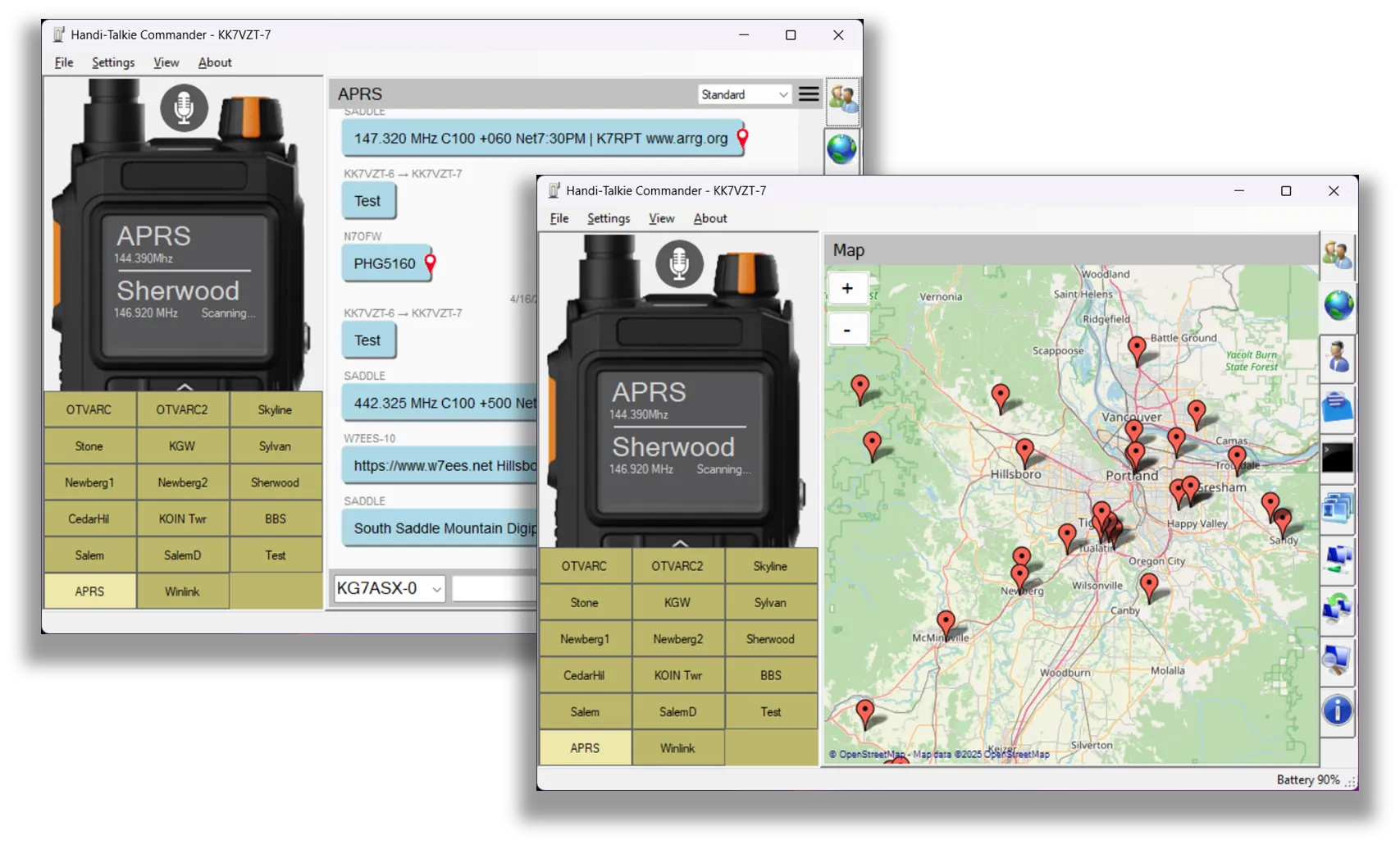
If you’re a licensed amateur radio operator with a Bluetooth-capable handheld like the UV-Pro or Vero VR-N7500, you might be missing out on what your radio can really do.
Enter HTCommander, a free and open-source desktop application that lets you control, program, and extend your radio’s functionality right from your Windows PC. Whether you’re into APRS, Winlink messaging, speech tools, or just want to organize your channels more efficiently — HTCommander does it all, and then some.
👉 Official GitHub Page: https://github.com/Ylianst/HTCommander
🎛 What is HTCommander?
HTCommander is a control utility for several Bluetooth-capable radios, including:
- BTech UV-Pro
- RadioOddity GA-5WB (untested)
- Vero VR-N76, VR-N7500, VR-N7600 (some untested)
It works on Windows x64 and lets you interact with your radio using a clean interface, over Bluetooth. This is not just about frequency or memory channels — HTCommander taps into APRS, Winlink, and even experimental features like torrent-based file transfer over FM packet radio.
🔥 Key Features
Here’s what HTCommander can currently do — and the list keeps growing:
- Bluetooth Audio Support
Talk and listen using your PC’s microphone, speakers, or headset. - Speech-to-Text + Text-to-Speech
Powered by OpenAI Whisper and Windows’ built-in TTS engine. - Channel Programming
Drag-and-drop channels, import/export configs, or build from scratch. - APRS Integration
Send/receive messages, weather queries, and even view APRS stations on OpenStreetMap. - Winlink Email Client
Compose, send, and receive email (including attachments!) via packet radio. - Terminal + BBS Mode
Communicate using AX.25 terminal features or play a built-in text adventure game via packet. - File Sharing Over RF
Use a torrent-like protocol over 1200 baud AFSK to share files with others. - Packet Capture + Decoder
Listen to the air and capture live packets for review or debugging.
🧩 Designed for Real Ham Use
This tool isn’t just a UI wrapper. It’s built with real ham needs in mind. HTCommander makes minimal use of internet connectivity — only to fetch map tiles and check for updates. Everything else happens locally. That means no phoning home, no telemetry, and no fluff.
It’s actively developed and inspired by the decoding work of hams like Kyle Husmann (KC3SLD) and based in part on the BenLink Bluetooth protocol reverse engineering project.
📦 Installation & Setup
- Go to the GitHub page:
👉 https://github.com/Ylianst/HTCommander - Download the latest MSI installer for Windows x64.
- Pair your radio via Bluetooth. Note: Some radios require two services to be paired in sequence.
- Launch the app and explore. If your PC doesn’t have Bluetooth, grab a cheap USB BLE dongle.
The setup process is straightforward, but do read the pairing instructions in the README if you’re new to Bluetooth-enabled radios.
🎥 Want to See It in Action?
The GitHub page includes a demonstration video that walks you through HTCommander’s core features — perfect if you’re unsure whether it’ll work for your rig or use case.
Final Thoughts
HTCommander feels like the kind of tool the ham community has needed for a long time: a modern, open, and actively maintained control center for newer radios. From APRS to speech tools to file transfer experiments — it pushes the boundaries of what your HT can do.
If you’re using any of the supported radios, it’s well worth checking out.
🔗 Download or contribute here: https://github.com/Ylianst/HTCommander




Post Comment