amateur radio
ham radio
radio amatur
SDR
software defined radio
web SDR
AI noise reduction SDR, digital modes FT8, FT8 without virtual cable, ham radio software, Hermes Lite, low latency SDR, neural noise reduction, OpenHPSDR, PSK31 decoder, SDR for Linux, SDR for Raspberry Pi, SDR for Windows, SDR touch UI, SDR transmit receive, SDR with built-in digital modes, SDRPlay, software defined radio, SparkSDR, SSB compression, WSPR software
9M2PJU
2 Comments
SparkSDR: The All-in-One SDR App for Serious Radio Enthusiasts
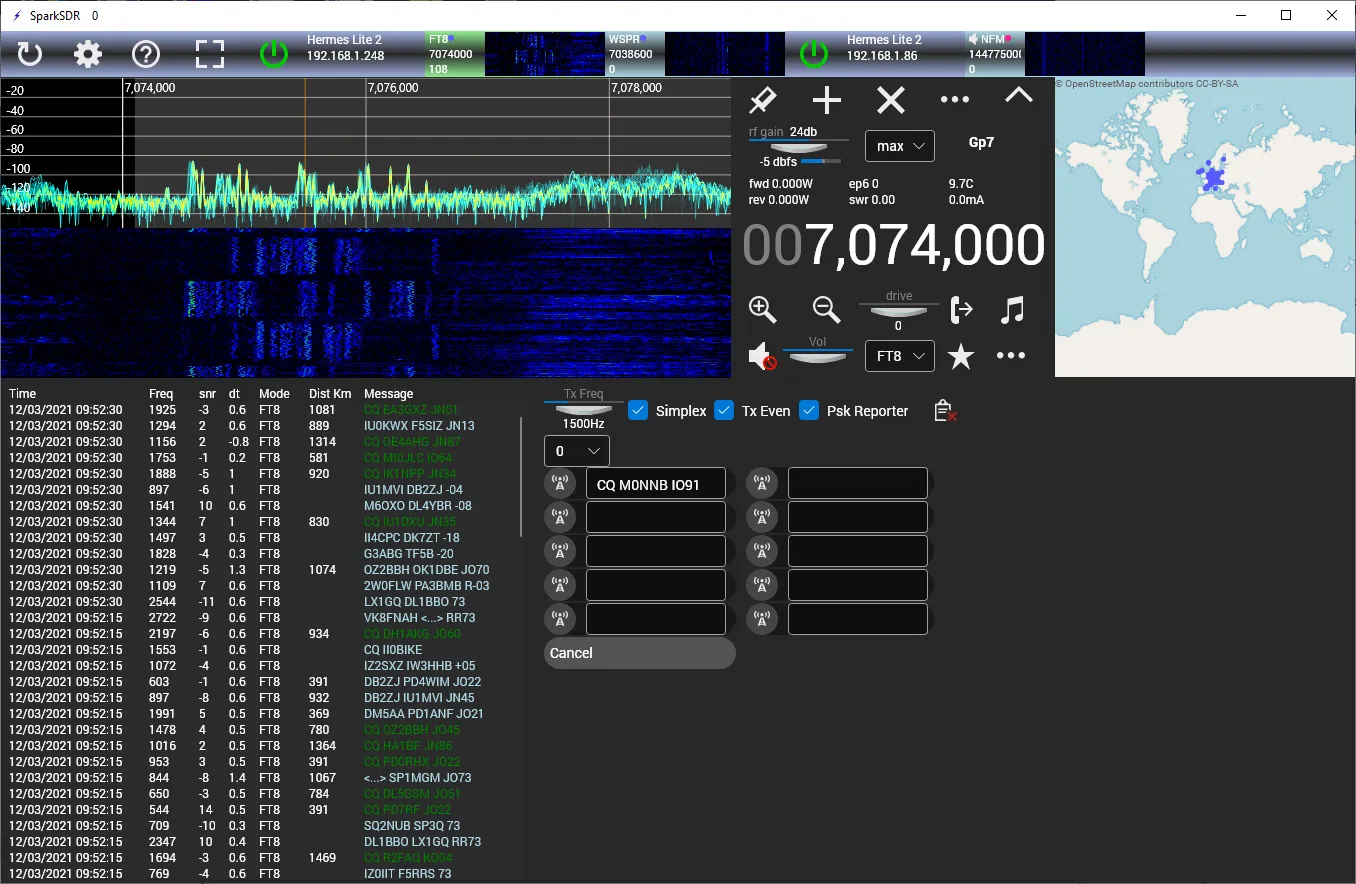
Whether you’re deep into digital modes, exploring HF bands, or just getting started with software-defined radios (SDR), SparkSDR is a game-changer you should know about.
Developed by M0NNB, SparkSDR is a cross-platform SDR application designed to work seamlessly with Hermes Lite, Red Pitaya, Apache Labs radios, and even SDRplay.
🌍 Works Across Platforms
One of SparkSDR’s standout features is its flexibility. It runs smoothly on:
- 🪟 Windows 7 and up
- 🐧 Linux (x64 and ARM, including Raspberry Pi!)
- 🍎 macOS
So no matter what system you’re using, SparkSDR has you covered.
🎧 Why SparkSDR Rocks
Here’s why operators around the world are switching to SparkSDR:
🧠 Smart, Built-in Digital Modes
No more messing around with virtual audio cables or COM port routing! SparkSDR comes fully loaded with built-in support for popular digi modes like:
- FT8 / FT4 / FST4 / FST4W
- JT65 / JT9
- WSPR
- PSK31
You can monitor and decode multiple modes simultaneously using virtual receivers that share the available slices of your SDR.
🎙️ Exceptional Audio and DSP
SparkSDR features low-latency audio and a cutting-edge DSP chain. Plus, it supports SSB compression using a controlled envelope clipping algorithm for crisp, punchy audio on transmit.
🧽 AI-Powered Noise Reduction
Tired of fighting with background static? SparkSDR includes neural network-based noise reduction, making weak signals easier to pull from the noise floor.
📱 Touch-Friendly UI
Running SparkSDR on a tablet or touchscreen PC? No problem. The UI is designed to be intuitive and touch-friendly, perfect for portable setups or ham shack touchscreens.
🎛️ MIDI + CW Keying
Integrate your MIDI controller to run the rig like a pro studio mixer, or hook up a low-latency CW keyer and start pounding brass with confidence.
⏱️ Built-in Time Sync
It even supports frequency correction using NTP, so your rig stays right on frequency — ideal for weak-signal digital modes like WSPR or FT8.
⚠️ Note on Transmit Support
Currently, transmit capability is available only with Hermes Lite devices. However, receive functions work across other OpenHPSDR-compatible radios. Some advanced features (like filter switching) may vary depending on the radio.
💬 Join the Community
SparkSDR has an active user community. Need help? Want to share tips? Join the SparkSDR Google Group and get involved!
If you’re looking for a modern, powerful, and intelligent SDR app that simplifies your shack and boosts your digital game, SparkSDR is absolutely worth checking out.
👉 Visit the official site to download SparkSDR and dive in!





2 comments