asset management
docker
free open source software
information technologies
aplikasi docker, aplikasi pengurusan aset, aplikasi sumber terbuka, asset management, asset tracker, docker app, dumbassets, inventory tracking, maintenance tracker, open source, pengurusan aset, penjejak waranti, penjejakan inventori, penjejakan penyelenggaraan, simple asset tracker, sistem aset mudah, warranty tracker
9M2PJU
0 Comments
DumbAssets: The Stupid Simple Way to Track Your Stuff
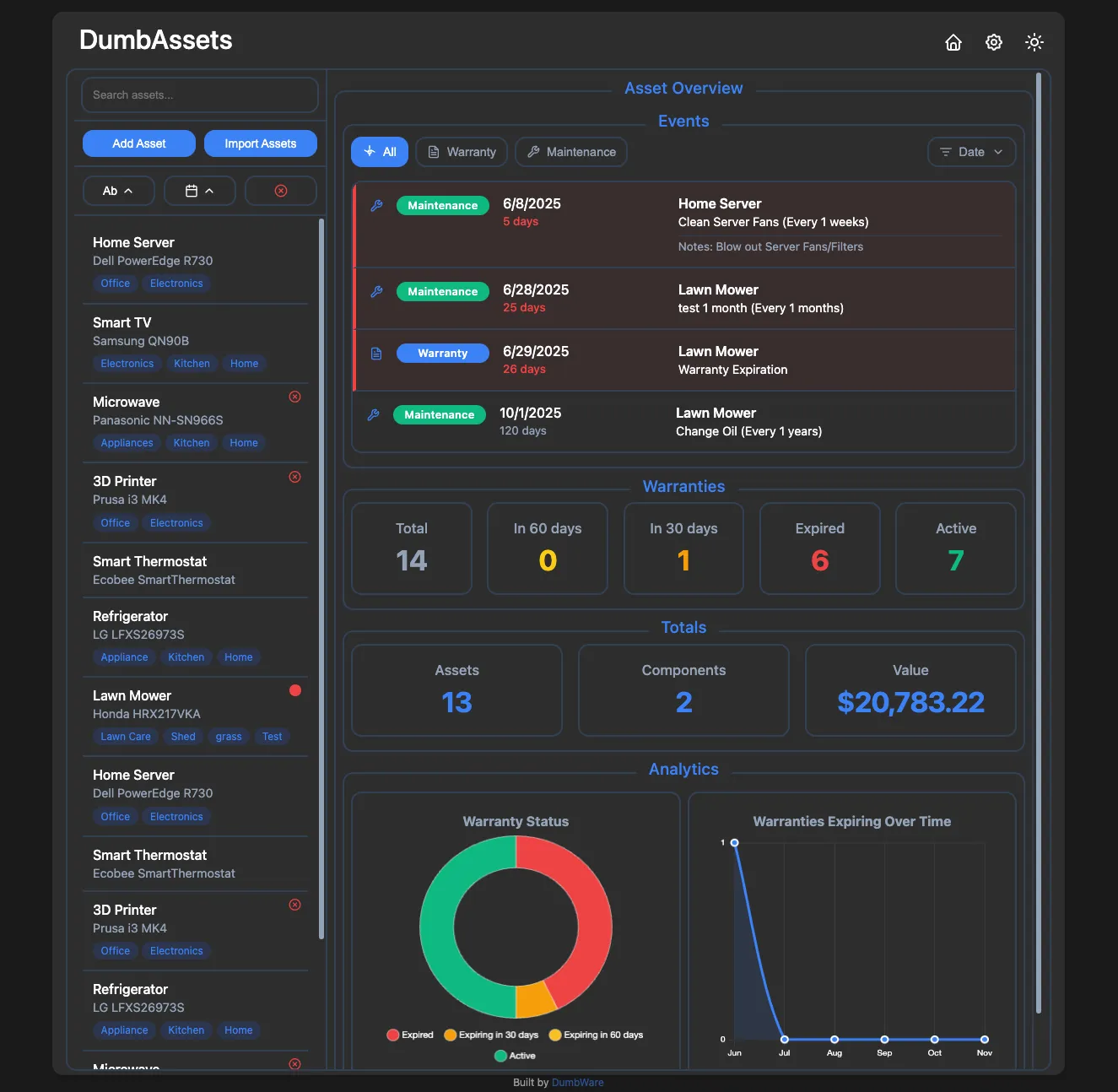
Let’s be honest — most asset management tools are overkill for what you really need. If you’re like me and just want a dead-simple way to keep track of physical assets, receipts, warranties, and routine maintenance, DumbAssets might be exactly what you’ve been looking for.
It’s called DumbAssets for a reason: it’s purposely simple, delightfully dumb, and just works.
🚀 What Is DumbAssets?
DumbAssets is a lightweight, self-hosted asset tracker that helps you stay on top of:
- Your physical assets (computers, equipment, tools, whatever)
- Their components and sub-components
- Warranty periods and expiration alerts
- Maintenance schedules
- Receipts and photos — all neatly organized
No cloud dependencies, no account signups, no nonsense.
🛠️ Getting Started (It’s Stupid Easy)
You’ve got a few options depending on how much you like typing commands.
🐳 Option 1: Docker (For Dummies)
If you’ve got Docker installed, this is all you need:
docker run -p 3000:3000 -v ./data:/app/data dumbwareio/dumbassets:latest
Then open http://localhost:3000 in your browser, and you’re off. Start adding assets, upload your receipts, and set those maintenance reminders. That’s it. Seriously.
⚙️ Option 2: Docker Compose (For Dummies Who Like Customizing)
Want more control over your setup? Create a docker-compose.yml like this:
services:
  dumbassets:
    container_name: dumbassets
    image: dumbwareio/dumbassets:latest
    restart: unless-stopped
    ports:
      - ${DUMBASSETS_PORT:-3000}:3000
    volumes:
      - ${DUMBASSETS_DATA_PATH:-./data}:/app/data
    environment:
      NODE_ENV: ${DUMBASSETS_NODE_ENV:-production}
      DEBUG: ${DUMBASSETS_DEBUG:-true}
      SITE_TITLE: ${DUMBASSETS_SITE_TITLE:-DumbAssets}
      BASE_URL: ${DUMBASSETS_BASE_URL:-http://localhost:3000}
      DUMBASSETS_PIN: ${DUMBASSETS_PIN:-1234}
      ALLOWED_ORIGINS: ${DUMBASSETS_ALLOWED_ORIGINS:-*}
      APPRISE_URL: ${DUMBASSETS_APPRISE_URL:-}
Then run:
docker compose up -d
Visit http://localhost:3000, and go from there.
👨💻 Option 3: Run It Locally (For Developers)
Prefer to poke around the code? No problem:
git clone https://github.com/yourusername/DumbAssets.git
cd DumbAssets
npm install
npm start
Head to http://localhost:3000 and you’re in.
✨ Why Use DumbAssets?
Here’s a quick look at what’s built-in:
- Track assets with serial numbers, models, purchase dates, and more
- Organize components and sub-components in a hierarchy
- Upload photos and receipts (stored locally)
- Search everything easily — by name, model, serial, or description
- Get notified before warranties expire or maintenance is due
- Add tags for smarter sorting
- Light/Dark mode with your preference saved
- Apprise integration (for Discord, Telegram, ntfy, etc.)
- PIN authentication with brute-force protection
- Runs beautifully in Docker — or bare metal if you prefer
🔧 Configuration Basics
DumbAssets is configured using environment variables. Here are a few you might tweak:
| Variable | Description | Default |
|---|---|---|
PORT | Server port | 3000 |
DUMBASSETS_PIN | Optional PIN login | 1234 |
BASE_URL | The base URL of your instance | http://localhost:3000 |
APPRISE_URL | For pushing notifications | (optional) |
SITE_TITLE | App name shown in the UI | DumbAssets |
ALLOWED_ORIGINS | Who can access your instance | * |
DEMO_MODE | Enables read-only public mode | false |
And everything lives in simple JSON files under /data:
Assets.json— your core asset dataSubAssets.json— all components and relationshipsImages/— uploaded photosReceipts/— uploaded filesconfig.json— notification and system config
🔐 Security Features That Matter
- PIN authentication (any 4+ digit code)
- Constant-time comparison to prevent timing attacks
- Lockout after too many failed attempts
- No PIN stored in the browser
- Secure cookies and session handling
- Rate limiting built in
🔍 Under the Hood
Here’s a peek at the stack:
- Backend: Node.js + Express
- Frontend: Vanilla JS (ES6+)
- Container: Docker + Alpine
- Uploads: Handled via Multer
- Scheduling: node-cron for sending alerts
And some notable dependencies:
express,cors,multer,uuid,dotenv,sharp,helmet,express-rate-limit,fs-extra, and more.
🤝 Want to Contribute?
Pull requests are welcome! Here’s the quick rundown:
- Fork the repo
- Create a branch:
git checkout -b feature/cool-idea - Commit using Conventional Commits
- Push and open a PR
Check the Development Guide in the repo for more info.
Final Thoughts
DumbAssets is perfect for anyone who just wants a clean, local-first, no-fuss asset tracker. Whether you’re a tech-savvy DIYer or an IT person managing office equipment, it saves time and stays out of your way.
So go ahead — spin it up, add your stuff, and enjoy how dumb easy it really is.





Post Comment