home lab
home networking
internet
networking
router
alamat ip, amateur radio, cidr notation, home lab, home network, ip addressing, ipv4 subnet, lan setup, makmal rumah, network performance, network planning, network setup, network tips, pelayan rumah, perancangan rangkaian, poc radio, prestasi rangkaian, radio amatur, rangkaian lan, rangkaian rumah, router pintar, router tips, small network, smart home, subnet ipv4, subnet mask, subnetting, tetapan rangkaian, tips rangkaian, ujian rangkaian
9M2PJU
0 Comments
Should You Use /24 or /28 for Your Home Network?
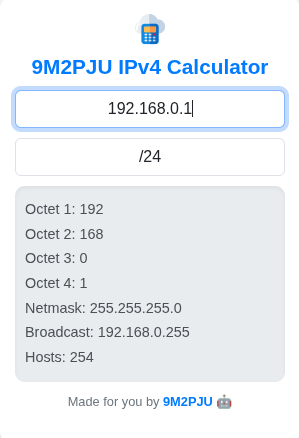
When setting up a home network, most people don’t give much thought to subnetting. The router hands out IPs, devices connect, and everything just works—until one day it doesn’t. Maybe you run out of IPs. Maybe you want to segment traffic. Or maybe you’re setting up a lab and realize it’s time to understand what /24 and /28 really mean.
So the question is: Which subnet is right for a home network? /24 or /28?
🤔 What Do /24 and /28 Even Mean?
These are CIDR notations (Classless Inter-Domain Routing), and they define how many IP addresses are available in a network.
/24means 256 total addresses (usually 254 usable)./28means 16 total addresses (14 usable).
Every device connected to your network—phone, laptop, smart TV, printer, camera—needs an IP. So, the smaller the subnet, the fewer devices you can connect.
💡 When to Use /28 at Home
A /28 subnet gives you 14 usable IP addresses. That’s perfect for:
- A small home with just a few key devices.
- People who like strict control over IP allocation.
- Home labs simulating enterprise setups.
- Isolated VLANs or testing environments.
It forces you to keep your network lean, which can be a good thing if you’re security-conscious or just like having everything well-organized.
Example Devices:
- Router
- 2 smartphones
- 1 PC
- 1 printer
- 1 smart TV
- 1 tablet
That’s already 7 IPs used. Throw in a NAS, a few smart lights, or a guest phone and you’re bumping into the limit fast.
🧰 When /24 Makes More Sense
A /24 subnet gives you 254 usable IPs. That may sound like overkill, but in modern homes, it’s surprisingly easy to fill up space over time:
- Smart bulbs, thermostats, plugs, and security cameras
- Gaming consoles, smart speakers, tablets, laptops
- IoT devices, home servers, development boards like Raspberry Pi
- Guest network users
If you plan on expanding, or just don’t want to stress about running out of IPs, a /24 is the safer bet.
Use /24 if you:
- Have 15+ devices (or will soon).
- Want to set static IPs without worrying about clashes.
- Plan to run a homelab or host services (NAS, VPN, Docker).
- Use VLANs and may subnet different ranges in the future.
⚡ Does Subnet Size Affect Network Speed?
This is a common question, and the answer is:
No, subnet size doesn’t directly impact your internet or local network speed.
The size of your subnet—whether it’s /28, /24, or something else—only determines how many IP addresses are available. It doesn’t affect:
- Download or upload speeds
- Ping or latency
- File transfer speeds
- Internet responsiveness
Those are controlled by:
- Your ISP speed
- Router performance
- Network congestion
- Wired vs. wireless connections
🧠 But There Are Some Indirect Factors:
- Broadcast traffic: Larger subnets like
/24may have slightly more broadcast traffic (like ARP or DHCP), but for home use, it’s negligible. - Segmentation and isolation: Smaller subnets can help isolate devices in advanced setups (VLANs, guest networks), which might lead to smoother performance.
- Security and simplicity: Smaller subnets limit accidental overuse and are easier to manage in tightly controlled environments.
But unless you’re running 100+ devices or complex routing rules, you likely won’t notice any difference in speed between /24 and /28.
📈 Real-World Use: Home Labs and Amateur Radio
If you’re into amateur radio or running a home lab, a /24 subnet gives you a comfortable space to play.
It also makes things easier when testing services like Pi-hole, WireGuard, or self-hosted apps, where fixed IPs are helpful.
🧠 Final Thoughts
While /28 might be enough for small or tightly controlled setups, most home users will benefit from the flexibility of /24. It keeps things simple, scalable, and headache-free.
🔑 TL;DR:
- Use
/28if you’re experimenting, want tight control, or only need <15 devices. - Use
/24for everyday home networks, smart home setups, and homelabs. - Subnet size doesn’t affect network speed — but smart planning does.
Still not sure which one’s right for you? Start with /24. You can always subnet it later if needed. And if you’re the type who’s reading this—chances are you’ll be adding more gear soon anyway.





Post Comment