Lazyssh: Tame Your Server Farm with Terminal-Based SSH Management
Are you tired of juggling countless SSH commands, remembering obscure IP addresses, or fumbling with scp for file transfers? If you’re managing a fleet of servers, whether for development, staging, or production, you know the pain. But what if there was a better way?
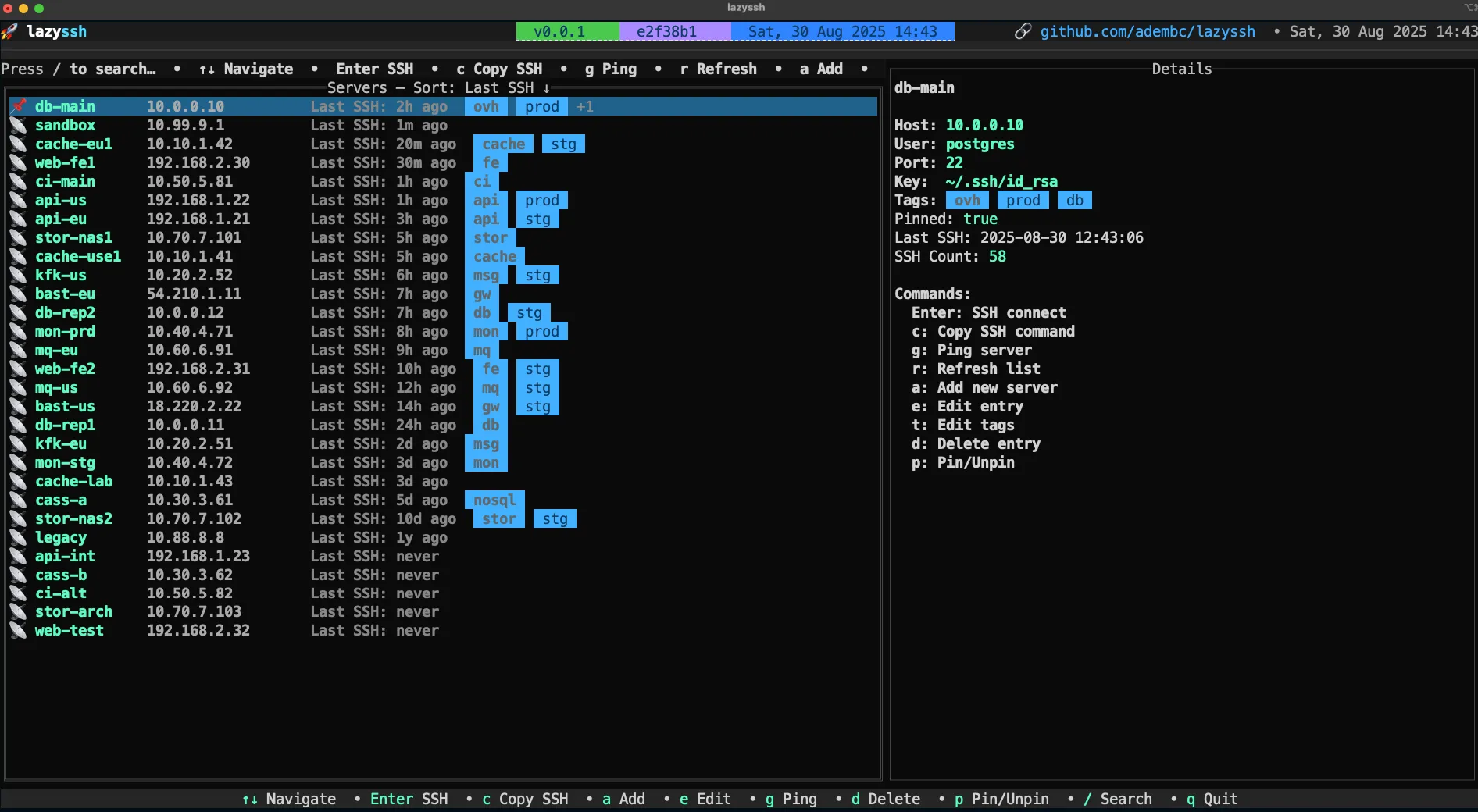
Inspired by the intuitive power of tools like lazydocker and k9s, Lazyssh emerges as your new best friend for navigating, connecting to, and managing your servers directly from the comfort of your terminal. Built with Go, Lazyssh transforms your ~/.ssh/config file into a dynamic, interactive dashboard, making server management a breeze.
✨ What Makes Lazyssh a Game-Changer?
Lazyssh isn’t just another SSH client; it’s a comprehensive TUI (Terminal User Interface) wrapper that puts you in control with a clean, keyboard-driven interface.
Effortless Server Management
- See All Your Servers: Lazyssh reads and beautifully displays all entries from your
~/.ssh/configin a scrollable, easy-to-read list. - Add & Edit with Ease: Forget manual file editing. Add new servers or modify existing ones directly from the UI with a comprehensive, tabbed interface for all your SSH configuration needs.
- Safety First: Delete server entries safely, knowing that Lazyssh handles your
ssh_configwith care, including automatic backups. - Stay Organized: Pin your favorite servers to the top, tag them (e.g.,
prod,dev,test) for quick filtering, and sort them by alias or last SSH connection. - Check Status: Ping servers to quickly ascertain their reachability.
Lightning-Fast Server Navigation
- Fuzzy Search: Find any server instantly by alias, IP, or tags with powerful fuzzy search.
- One-Key SSH: Hit
Enterand you’re connected. It’s that simple. - Clipboard Integration: Copy SSH commands to your clipboard with a single keypress.
Advanced SSH Configuration at Your Fingertips
Lazyssh brings the full power of OpenSSH to a user-friendly interface.
- Port Forwarding: Easily set up
LocalForward,RemoteForward, andDynamicForwardconnections. - Connection Multiplexing: Speed up subsequent connections with built-in multiplexing support.
- Comprehensive Authentication: Configure public key, password, and agent forwarding options.
- Security & Proxy Settings: Dive into ciphers, MACs, key exchange algorithms, and flexible
ProxyJumporProxyCommandconfigurations. - Tabbed Interface: All these extensive options are neatly organized into intuitive tabs like Basic, Connection, Forwarding, Authentication, and Advanced.
Smart Key Management (Upcoming)
Future versions of Lazyssh promise even more powerful key management features, including:
- Copying files between local and remote servers with an easy picker UI.
- SSH Key Deployment: Automatically append public keys to
~/.ssh/authorized_keys, generate new keypairs, and support default local public keys.
🛡️ Security You Can Trust
One of the most important aspects of any SSH tool is security, and Lazyssh excels here:
- No New Risks: Lazyssh is a UI/TUI wrapper around your existing
~/.ssh/configand leverages your system’s nativesshbinary (OpenSSH) for all connections. - Privacy Preserved: Private keys, passwords, and credentials are never stored, transmitted, or modified by Lazyssh itself.
- Config Safety: Lazyssh implements non-destructive writes, preserving your comments and formatting. It also creates atomic writes and robust backup mechanisms (one-time original backup and rolling timestamped backups) before any changes are made.
📦 Get Started with Lazyssh Today!
Ready to streamline your SSH workflow? Installation is simple:
Option 1: Homebrew (macOS)
Bash
brew install Adembc/homebrew-tap/lazyssh
Option 2: Download Binary from Releases
Grab the latest version for your OS/ARCH from GitHub Releases. A convenient snippet is provided in the README to automate this process.
Option 3: Build from Source
If you prefer building from source:
Bash
git clone https://github.com/Adembc/lazyssh.git
cd lazyssh
make build
./bin/lazyssh
# Or run directly
make run
⌨️ Master Lazyssh with Simple Key Bindings
Lazyssh is designed for keyboard efficiency. Here are some essential bindings:
↑↓/jk: Navigate serversEnter: SSH into selected serverc: Copy SSH command to clipboardg: Ping selected servera: Add servere: Edit serverd: Delete serverp: Pin/Unpin serversq: Quit
(A hint bar at the top of the list provides context-aware shortcuts!)
🤝 Contribute and Support
Lazyssh is an open-source project, and contributions are highly welcome! Whether you spot a bug, have a feature request, or want to submit a pull request (following the semantic PR guidelines), your input helps make Lazyssh better.
Lazyssh is built with the excellent tview and tcell libraries, a testament to the power of the Go ecosystem for creating robust terminal applications. Say goodbye to SSH headaches and embrace the efficiency of Lazyssh.









Post Comment