amateur radio
linux
open source
Technology
9M2PJU, encrypted sync, GPUI, ham radio linux, MobaXterm alternative, NyaTerm, OTP manager, PuTTY alternative, RDP client, remote terminal, Rust terminal, serial console, SFTP client, SSH client, Tabby alternative, Telnet client, VNC client, WebDAV sync, WindTerm alternative, Zed editor
9M2PJU
0 Comments
NyaTerm: A Modern Remote Terminal Workspace for SSH, SFTP, Serial and RDP
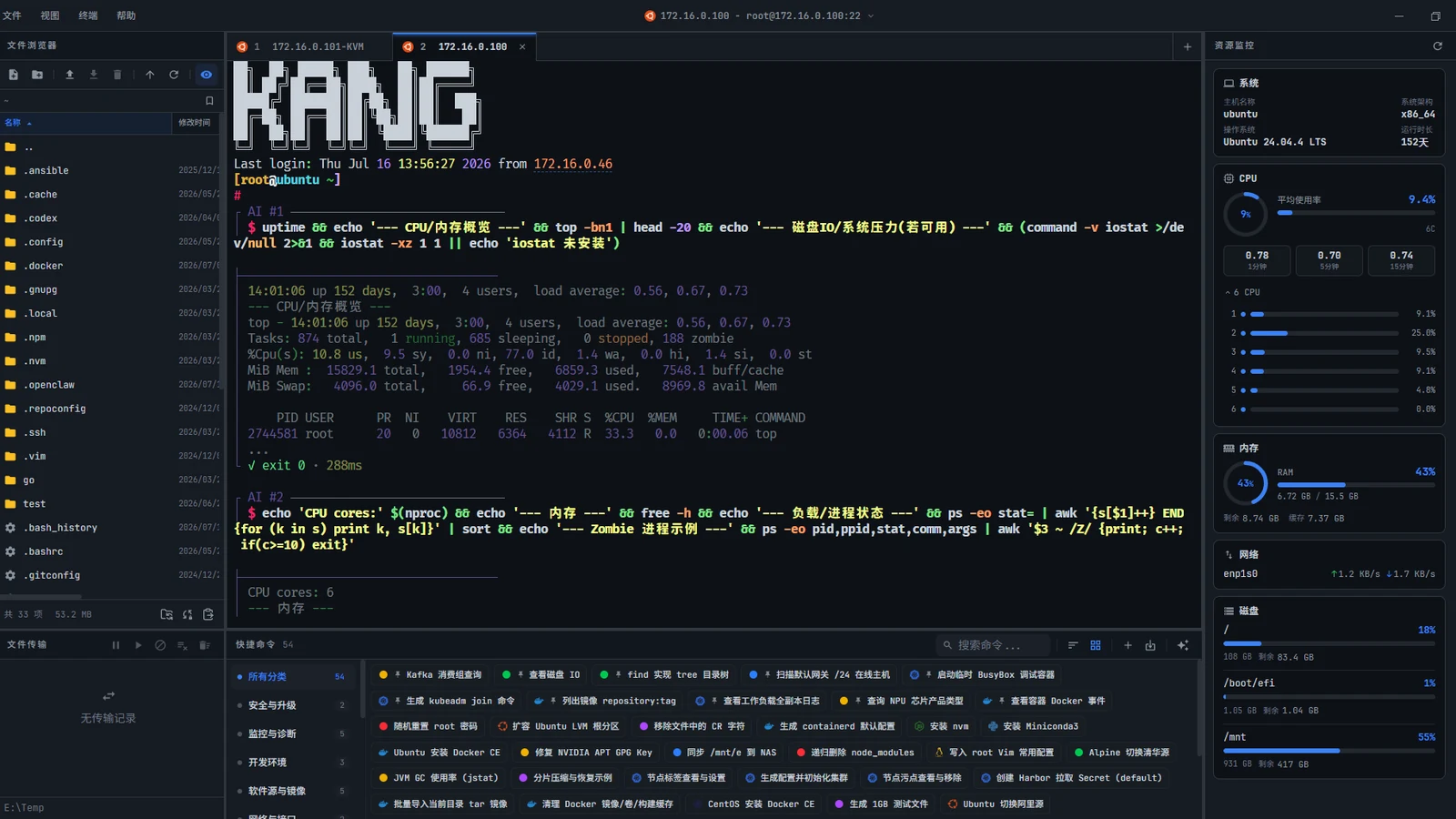
TL;DR: NyaTerm is a free MIT-licensed remote terminal workspace built in Rust on the GPUI framework that puts SSH, local shells, Telnet, Serial, RDP and VNC sessions, an SFTP browser with transfer queue, tunnels, OTP codes and encrypted sync into one fast native desktop client for Windows, macOS and Linux. About 2,200 stars and 4,100 commits at the time of writing, with session import from Xshell, MobaXterm and WindTerm. Full install guide, feature tour, architecture breakdown and honest limits inside.
What NyaTerm Is
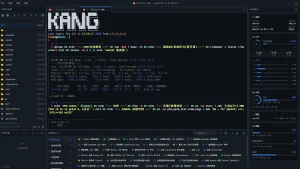
NyaTerm remote terminal workspace is a native desktop client for SSH-centred operations and mixed terminal workflows, written in Rust on the GPUI interface framework, that combines terminal sessions, file transfer, remote monitoring and encrypted configuration sync in a single application window.
Unpack that in plain terms. Most engineers live in three or four separate tools: one SSH client for servers, another program for file transfer, a serial console for routers and embedded boards, a remote desktop viewer for Windows boxes, and a password manager plus an authenticator app holding the keys to all of it. NyaTerm folds that whole desk into one workspace with tabs, horizontal and vertical splits, side panels for files, network, security, sync and notes, and an AI assistant panel for generating commands and explaining output. It isn’t a shell replacement, the project says so explicitly. It connects to remote shells, local shells, Telnet endpoints and serial devices, and leaves the shells themselves alone.
The project lives at https://github.com/nyakang/nyaterm, MIT licensed, with installers and documentation at https://nyaterm.app. The numbers signal a healthy project: roughly 2,200 stars, 207 forks, 66 open issues against more than 4,100 commits, plus a Discord community, a WeChat group and a contributors wall. Downloads come from the site or the releases page, with Windows exe and portable zip, macOS dmg plus a Homebrew cask, and Linux deb, AppImage and rpm plus a community AUR package.
Why Another Terminal Client
The terminal client shelf looks crowded until you sort it by architecture and incentives, and then the gap NyaTerm fills becomes obvious.
PuTTY is the old reliable. Free, tiny, and essentially frozen in design since the early 2000s. It speaks SSH, Telnet and serial well, stores sessions, and asks nothing of your GPU or your wallet. What it never became is a workspace. One window per connection, no tabs in the classic build, no file transfer beyond PSCP on the command line, no sync, no scripting worth mentioning. For one router it is perfect. For forty servers it is window-management Tetris.
MobaXterm went the other direction and won a generation of Windows sysadmins. Tabs, embedded X server, SFTP browser beside the terminal, serial, RDP and VNC in one window, macros and a portable edition. The catch is the licence. The Home edition is free with session limits, the Professional edition is per-user paid software, and the whole thing is closed source from one vendor. When the vendor roadmap drifts from your needs, your only vote is your wallet.
WindTerm showed what a free integrated workspace could feel like, with a fast terminal, SFTP, serial, and a famous spring-latch aesthetic, then stalled. Its repository went quiet, binaries lagged, and users who built workflows on it started asking what happens when an unaudited closed-source-feeling binary stops shipping updates. The trust question matters for a tool that holds your SSH keys.
Tabby answered with open source and plugins, but on Electron. A browser engine per window buys easy cross-platform UI at the price of hundreds of megabytes of RAM and a startup time you can feel. On a modern desktop that is tolerable. On a field laptop from 2018 with sixteen tabs open it isn’t.
Then Zed proved a third path. Its GPUI framework renders native-feeling interfaces on the GPU with Rust performance and startup times measured in milliseconds, not seconds. NyaTerm takes that bet for the terminal world: a Rust workspace of a dozen crates, one native client per OS, no browser engine, no Java runtime, no Electron. The credits file names the lineage honestly: WindTerm inspired the design, Tabby supplied design ideas, Alacritty contributed terminal emulation components, and russh provides the Rust SSH implementation. Standing on those shoulders beats reinventing any of them.
Sessions and Workspace
The session model is the heart of the app, so start there. Six session types cover the realistic remote-access spread: SSH for Linux and Unix servers, local terminal for the machine under your fingers, Telnet for legacy lab gear, serial for routers, boards and embedded devices, and RDP plus VNC panes for graphical remote desktops. Serial sessions expose port, baud rate, data bits, parity, stop bits and a backspace mode selector for Ctrl-H versus DEL, the kind of detail that decides whether a console session is usable or garbage. VNC currently handles direct TCP with no-auth or classic VNC auth, Raw, ZRLE, Tight and Tight JPEG encodings, window scaling, bounded reconnects and Latin-1 clipboard exchange.
Everything lives in a multi-tab workspace with horizontal and vertical splits, tab drag docking and layout restoration, so a router console, two server shells and an SFTP browser can share one window as one task. An activity bar on each side hosts panels for file explorer, network, security and auth, sync and backup, AI assistant, notes, saved connections, active sessions, command history, asset monitoring, resource monitoring, GPU monitor, process manager and Docker manager. Saved connections carry folders, icons, metadata, duplication and reconnect, with a command palette and session quick switcher for jumping between dozens of open sessions by typing. Temporary SSH links open one-off connections from a pasted ssh URL or ssh command line without polluting the saved list. Input sync groups broadcast typed input to several sessions at once, which is how you restart the same service on eight nodes without scripting. Child windows keep settings, connection wizards, quick-command editing and remote file editing out of the way, and tray support with minimize-to-tray suits a jump-box workflow.
Two thoughtful touches stand out. First, background image customization with cover, contain, stretch and tile sizing plus content opacity control, because people who live in a terminal care what it looks like. Second, notes with tree navigation, autosave and sync-aware persistence, so runbooks sit next to the sessions they describe instead of in a separate wiki tab you forget to open during an outage.
Terminal Experience
A pretty frame means nothing if the terminal itself is weak, and this is where the Alacritty DNA shows. Terminal search covers result navigation, history, copy and paste, context menus and selected-text actions. Command history offers fuzzy suggestions with length filters and stays quiet inside interactive programs. Unicode grapheme rendering handles emoji, combining marks and zero-width-joiner sequences instead of drawing tofu boxes. An optional gutter shows line numbers and timestamps, action links turn IPv4 addresses, host-colon-port strings and archive filenames clickable, and keyword highlighting ships with expanded presets, custom rules and JSON import.
Daily ergonomics get the details right. Terminal zoom, workspace padding, font weight controls, native IME support for CJK input, image path paste handling, clear-terminal action, online search and translation straight from selected text, session recording for audits, configurable scrollback, SSH keep-alive so NAT gateways stop eating idle sessions, and large-output protection so a runaway cat of a gigabyte log doesn’t freeze the UI. Zmodem transfers run directly from the terminal and land in the same transfer queue as SFTP jobs. A confirmation dialog guards closing all sessions, and keyboard shortcuts are customizable including the Telnet and serial backspace behaviour.
SFTP and File Workflows
File work is where all-in-one clients earn their keep, and NyaTerm treats it as a first-class pane rather than a bolt-on. The built-in SFTP explorer rides beside the SSH session with upload, download, rename, move, delete, properties, new file and folder creation, and OpenSSH-compatible symlink actions. Folder upload and download, multi-select, an editable path bar, and manual or automatic sync with the terminal working directory keep the two views coherent. The transfer queue shows speeds and supports pause, resume, cancel, retry, duplicate-target handling, timestamp preservation and configurable concurrency, with channel concurrency limiting and automatic retry on transient channel-open failures.
Two workflows deserve special mention. Remote files open in your local editor and saved changes upload back through a watcher-driven auto-upload flow with content fingerprinting, so only real content changes trigger re-upload instead of every save event. And a multi-tab read-only preview handles text, JSON, Markdown, CSV and TSV, images and PDF with per-tab session labels, zoom, rotate and fit controls plus paged PDF rendering, decoded off the render thread with per-format size limits so one monster file can’t wedge the interface. External drag and drop on Windows and reveal-in-file-manager for completed Zmodem transfers round out the edges.
Security, Authentication and Networking
A terminal workspace is a crown-jewels application, so read this section as an audit checklist. Authentication covers passwords, private keys, host-key verification and encrypted local persistence. Credentials support regex-based terminal auto-fill for those login banners that never match a standard prompt. OTP management handles TOTP and HOTP with QR import and SSH auto-fill, collapsing the authenticator app into the session. Per-connection SSH algorithm preferences offer Compatible, Secure and Custom modes with security-risk labels on key exchange, ciphers, MACs and host keys, so legacy gear gets a conscious downgrade instead of a silent one. Proxies span SOCKS5, HTTP and ProxyCommand, jump hosts include cycle prevention, tunnels cover local, remote and dynamic forwarding, and SSH X11 forwarding serves environments with a local X server.
Hygiene controls complete the picture. Screen lock plus idle app lock, a master password guarding storage, sync, backup, import and export, diagnostics settings with local log management and exportable bundles. Sync itself demands the master password before anything moves.
Sync, Backup and Migration
Configuration portability decides whether a tool survives a laptop replacement, and NyaTerm over-invests here in a good way. Encrypted cloud sync and backup run through WebDAV, S3-compatible storage and GitHub Gist, all gated on the master password, with startup sync checks, debounced auto-push after local changes, scheduled backups with retention, manual test, push, pull and backup actions, remote restore and snapshot-level conflict resolution. The full-app encrypted .nya format exports everything for portable moves.
Migration paths acknowledge reality. Session import reads Xshell, MobaXterm and WindTerm definitions plus NyaTerm JSON, which is exactly the on-ramp a team needs when standardizing. One caution from the docs: moving from 1.x to 2.0 on Windows portable and old MSI installs needs a manual upgrade with a full data and key backup first, replacing the complete portable payload while preserving the data directory, or uninstalling the old MSI before installing the NSIS build. Replacing only the main executable is insufficient.
AI Assistant Where It Is Useful
The AI panel splits into two modes with a clear risk model. Ask mode answers one-off questions: generate a command, explain selected output, analyze an error. Agent mode runs multi-step work in an observe-decide-run loop against the active terminal, with inline capture of a configurable number of output lines, session mentions via at-sign to pull other sessions into context, and structured command cards carrying risk levels, execution controls and optional save-to-quick-command. Approved command execution tools gate the dangerous steps, with a separate final-answer step after terminal work completes. Providers include built-ins, manual model entries, credential groups and custom OpenAI-compatible endpoints, and recent-output actions explain the latest terminal output without manual copying. High-impact commands hit approval gates with safer alternatives suggested. It is assistance with a brake pedal, not autopilot.
Under the Hood: Rust, GPUI and Twelve Crates
The repository structure reads like a textbook Rust workspace. Nyaterm-app holds the native entry point and assets, nyaterm-desktop composes the application and feature state, nyaterm-core keeps UI-independent domain models and policies, nyaterm-terminal owns the state machine and parsing with nyaterm-terminal-gpui handling layout, input and painting, nyaterm-transport covers SSH, PTY, SFTP, Telnet, serial and transfers, nyaterm-store handles persistence and database compatibility, nyaterm-ui shares controls and theme integration, nyaterm-remote-desktop plus the isolated IronRDP and VNC helper processes cover graphical sessions over typed IPC, and nyaterm-otp implements one-time passwords. The docs site is Docusaurus in the same monorepo. Contributors build with a stable Rust toolchain via rustup plus platform GPUI dependencies, then run the app crate directly with cargo. The AGENTS.md and CLAUDE.md files in the repo root show an AI-assisted contribution workflow, which matches the fast commit cadence.
RDP and VNC isolation deserves a note. Running the IronRDP protocol helper and the VNC helper in separate processes means a protocol parser bug crashes a helper, not your twelve-tab workspace. That’s the same blast-radius thinking behind browser sandboxing, applied to remote desktop.
Installing NyaTerm in Minutes
Grab the latest build from https://nyaterm.app or the releases page. Windows takes the exe installer or the portable zip where data lives in the adjacent data directory. MacOS takes the dmg dragged into Applications or the Homebrew cask from the nyakang tap with brew install. Linux takes deb, AppImage or rpm, and Arch users have the community nyaterm-bin package in the AUR. Supported floors are Windows 10 and 11 on x64 and arm64, macOS 12 and newer on Intel and Apple Silicon, and Ubuntu 20.04 and newer, Fedora 36 and newer, Arch and similar distributions. One macOS wrinkle: the app isn’t yet Apple-signed, so a damaged-app warning needs sudo xattr minus c and r on the bundle before first launch. GPUI Help Check Updates uses signed manifests for supported install types, while Homebrew and deb or rpm installs update through their own package managers.
NyaTerm Against the Usual Suspects
| Item | NyaTerm | MobaXterm | Tabby | WindTerm | PuTTY | SecureCRT |
|---|---|---|---|---|---|---|
| License and source | MIT, fully open | Proprietary, paid Pro tier | MIT, open with plugins | Free of charge, source quiet | MIT, open source | Proprietary, paid |
| Interface stack | Rust plus GPUI native, GPU rendered | Native Windows | Electron browser engine | Native, framework closed | Native Win32 | Native |
| SSH, Telnet, serial, SFTP | Yes, all four plus tunnels | Yes, plus X server | SSH, Telnet, serial, SFTP | Yes, all four | SSH, Telnet, serial, SCP via tools | Yes, all plus scripting |
| RDP and VNC panes | Yes, isolated helper processes | Yes, embedded | Via plugins and profiles | Partial | No | Yes |
| Session sync and backup | Encrypted WebDAV, S3, Gist plus .nya files | Settings export, cloud limited | Cloud vault plus local config | Local profiles | Registry or files | Cloud plus local |
| OTP and credential autofill | Built in TOTP and HOTP | Password vault | SSH vault plus MFA notes | Basic | No | Credential vault |
| AI assistance | Built in Ask and Agent modes | None | AI plugins | None | None | None |
| Resource weight | Light native process | Medium | Heavy Electron | Light | Featherweight | Medium |
| Best for | Open source all-in-one remote workspace | Windows admins wanting everything bundled | Plugin tinkerers who accept Electron | Speed fans comfortable with stalled upstream | Single quick connections | Enterprises buying support contracts |
The honest read: PuTTY still wins the five-second connection, MobaXterm still wins the Windows everything bundle, and Tabby still wins plugin variety. NyaTerm wins the combination of native speed, open licence, genuinely integrated file and auth workflows, and encrypted bring-your-own-storage sync. It’s the client you standardize a team on when the SSH keys matter as much as the sessions.
Why Hams Should Care
Radio shacks are full of boxes with shells. A Raspberry Pi running Direwolf or a DX cluster node, a NanoVNA-adjacent controller, a home server hosting logging and QSL automation, a club repeater controller reachable over a VPN, a serial console on a TNC or a microcontroller project. NyaTerm maps onto that spread without asking you to change tools per box. SSH into the Pi farm with key auth and keep-alive, SFTP edited config files back and forth with the auto-upload flow, serial straight into a router or a USB console cable for a headless node, tunnels to reach a web dashboard on a remote subnet, OTP for the accounts that guard public-facing services. Input sync groups push the same update command to every node at once. Session recording keeps an audit trail of what changed during an EmComm exercise. Notes hold the runbook beside the sessions. And the whole configuration syncs encrypted through your own WebDAV or S3 bucket, so a replacement field laptop becomes your station again after one restore instead of an evening of retyping hostnames.
Honest Limits
No beta-grade project is finished, and the docs admit the rough edges. The 2.0 migration needs manual care on older Windows installs. The macOS build lacks Apple signing, which will scare newcomers until the quarantine command runs. VNC auth and encodings cover the common cases, not every exotic server. The AI Agent loop is powerful enough to deserve respect: approval gates exist because a confident model with shell access is a footgun without them. Review the per-connection algorithm labels before downgrading anything to Compatible for old gear, and keep the master password somewhere a house fire can’t eat. Sixty-six open issues at the time of writing is normal for the velocity, but skim them before betting an expedition on a niche feature like Tight JPEG clipboard paths.
Sources and Further Reading
- NyaTerm repository: https://github.com/nyakang/nyaterm
- NyaTerm releases: https://github.com/nyakang/nyaterm/releases
- NyaTerm official site and downloads: https://nyaterm.app
- NyaTerm documentation: https://nyaterm.app/docs/
- NyaTerm Homebrew tap: https://github.com/nyakang/homebrew-nyaterm
- Nyaterm-bin on the AUR: https://aur.archlinux.org/packages/nyaterm-bin
- WindTerm, design inspiration: https://github.com/kingToolbox/WindTerm
- Tabby terminal: https://github.com/Eugeny/tabby
- Alacritty terminal emulator: https://github.com/alacritty/alacritty
- Russh SSH library: https://github.com/warp-tech/russh
73 de 9M2PJU






Post Comment