amateur radio
android
open source
Technology
Android TV, catch-up TV, Downloader, EmComm, EPG, Fire TV, Forge TV, Google TV, IPTV player, IPTV Smarters alternative, live sports, M3U player, multiscreen, parental controls, PiP, programme guide, shack TV, Stalker portal, TiviMate alternative, TMDB, WebDAV sync, Xtream Codes
9M2PJU
0 Comments
Forge TV: The IPTV Player That Makes Android TV Feel Like a Real Set-Top Box
TL;DR: Forge TV is a fast IPTV player for Android TV and Google TV that turns playlists you already own into a proper television service: a time-grid programme guide with catch-up and reminders, a sports tab with live scores beside the match, a poster-wall movie and series library, four-way multiscreen, and encrypted sync across every TV through storage you own. It plays M3U links and files, Xtream Codes logins and Stalker portals, runs on Android 6.0 and up including slow sticks, needs no account and runs no vendor servers, and installs in minutes by sideloading one APK (Downloader code 7186344) with self-updates built in. Version 1.2.5 adds a Live now sports list and full-size match details. It ships no channels of its own, so bring a lawful playlist, and for a shack, clubhouse or EmComm monitoring corner it is one of the nicest front ends you can put on a big screen.
What Is Forge TV?
Forge TV is an IPTV player for Android TV and Google TV that plays playlists you supply yourself and presents them with the polish of a real broadcast set-top box.
That one sentence carries the whole product. Forge TV sells no subscriptions, bundles no channels, and runs no streaming servers. You bring an M3U link or file, an Xtream Codes login, or a Stalker portal login from a service you’re entitled to use, and Forge TV turns it into a living-room experience: Home screen with Continue watching, a time-grid guide with a now line, catch-up and Start over where the provider keeps an archive, a sports hub with live scores, a movie and series library with cast pages and trailers, picture-in-picture and four-way multiscreen, profiles with parental PIN, and encrypted sync that keeps every TV in the house identical. The project site is https://forgetv.app/, downloads come from the same site plus a GitHub releases page, and the current release at the time of writing is Standalone 1.2.5, published 3 November 2026. It is free to download and try, with any future pricing to be announced separately.
Live TV and Programme Guide: The Heart of the App
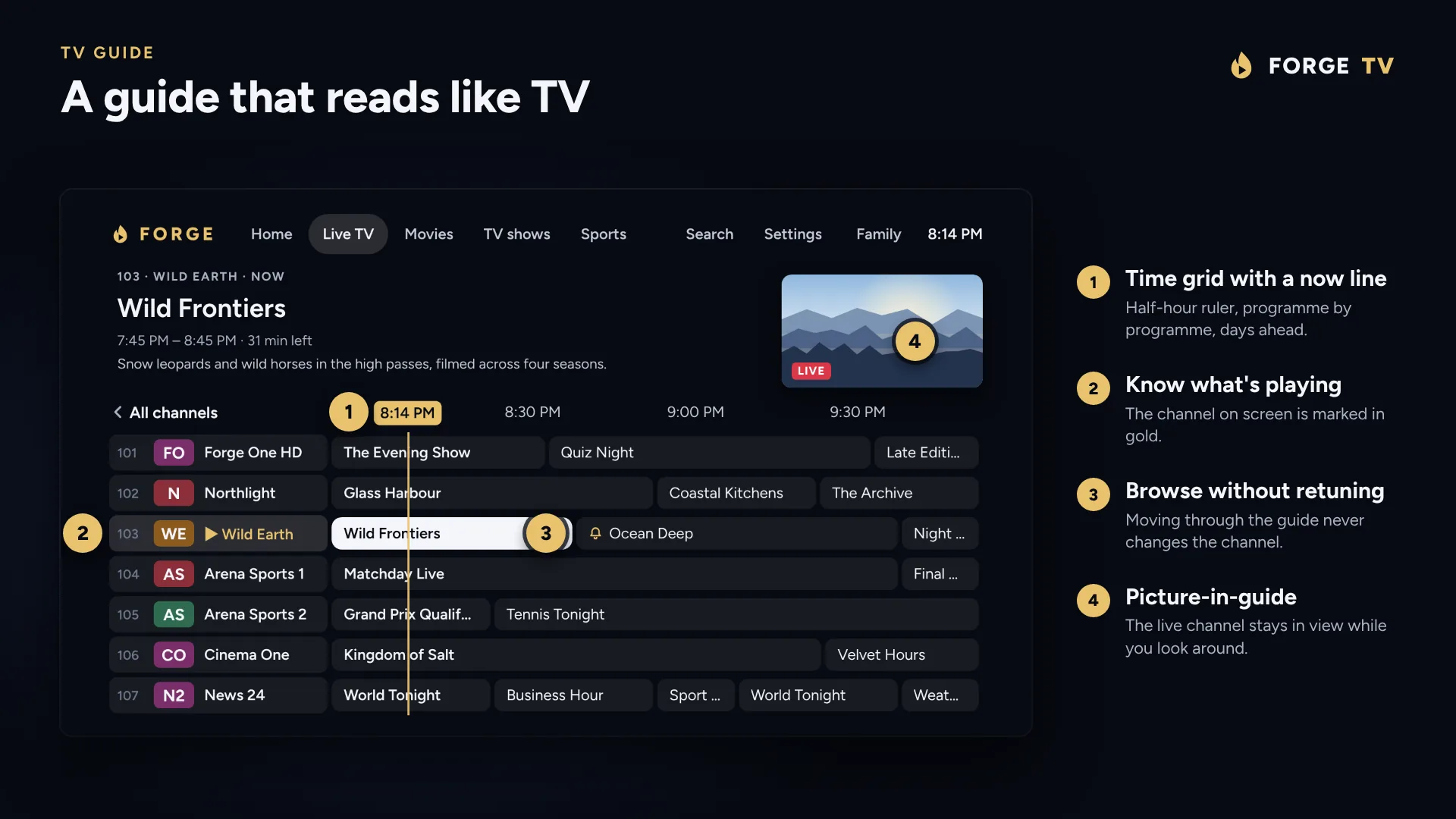
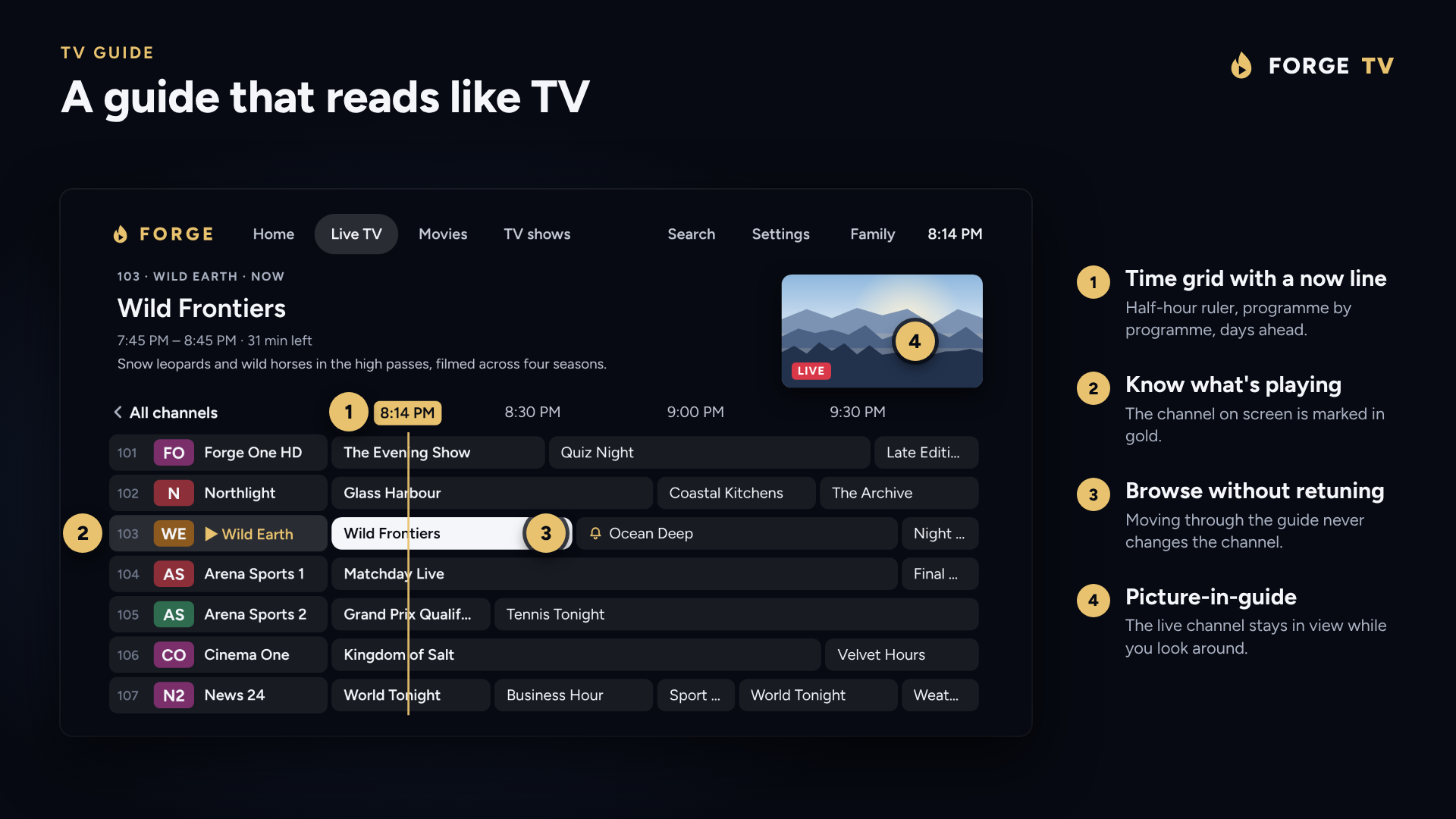
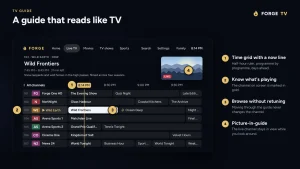
Most IPTV players treat the channel list as a spreadsheet. Forge TV treats it as television, and the difference shows the moment the guide opens.
The default view is a time-grid guide with a now line, the same left-to-right, top-to-bottom layout as a cable or satellite box: channels down the side, programmes stretching into the evening, one press of OK to watch. If a household prefers something simpler there’s a Now and next view instead. Navigation follows television conventions end to end: number keys jump straight to a channel, Channel up and down step through, a Last channel recall snaps back to what you were watching, an info banner describes the current programme, and holding Down on live TV opens the player options bar.
Around that core sits the machinery that makes a giant playlist usable:
- Categories, favourites and recently watched tame playlists with tens of thousands of channels.
- One unified search covers channels, programmes, movies and shows together, and it ignores spaces, hyphens and accents so a title typed on a remote still matches.
- Voice search uses the remote microphone key: say a channel or programme name and the guide finds it.
- Guide data comes from the playlist XMLTV feed, with a second guide filling in channels the first one misses, plus a time offset setting for providers whose listings sit in the wrong time zone. When a channel shows the wrong listings entirely, you can assign its guide channel by hand.
- Channels and categories can be renamed, hidden, reordered and locked, and those edits survive playlist refreshes instead of being wiped out the next time the provider updates.
- Catch-up and Start over work on channels whose provider keeps an archive, so a programme that already started can be watched from the beginning or pulled from the last few days.
- Programme reminders prompt when a show is about to start, with the option to change channel automatically.
Two details deserve emphasis for anyone who has fought IPTV apps on cheap hardware. First, the app opens on Home with the last channel starting immediately as it launches, so the TV behaves like a TV instead of a loading screen. Second, the whole interface is engineered for slow boxes: the guide opens straight away, channel changes are fast with a configurable start-up buffer, dropped streams reconnect by themselves, and Android 6.0 is the minimum supported version, which keeps decade-old sticks and boxes in play.
Home Screen: Pick Up Where You Left Off
Open Forge TV and you land on Home, not a settings page. The channel you were watching sits beside a live preview with what is on now, and below it run the rows that make a service feel personal: Continue watching for movies and episodes with progress, resume, start over and remove; favourite channels; recently watched; and recommended series and movies picked per profile from viewing history. Each profile keeps its own favourites, history and Continue watching, with an optional Who is watching picker at start-up for shared household TVs.
Movies and TV Shows: A Proper Library, Not a Folder List
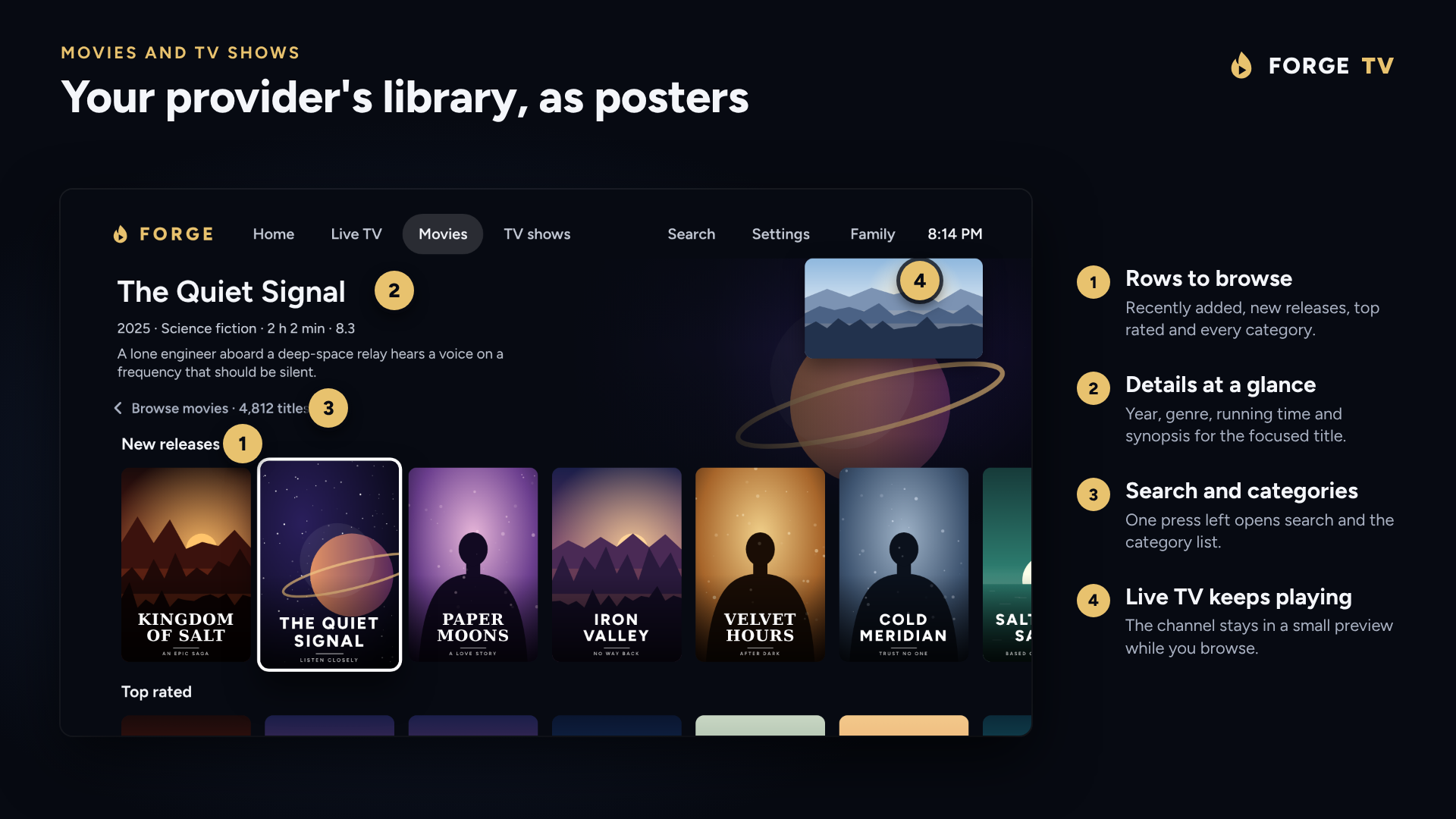
Provider VOD libraries are usually dumped into the app as endless text lists. Forge TV renders them as rows of posters: recently added, new releases, top rated and every category the provider supplies.
Every film gets a full title page with logo, backdrop, age rating for the country you choose, picture quality badge, cast, director and a Trailer button that plays inside the app. TV shows open on a page with seasons and a single button that carries on from the next episode, episodes appear as widescreen stills with progress bars, and finished titles can be marked watched or hidden behind an Unwatched only switch. Ratings are labelled as TMDB data, missing synopses fall back to TVmaze or Wikipedia, and a Tidy names feature strips provider tags such as country prefixes, VIP labels and release tags off titles so the library reads cleanly. End-of-episode behaviour is handled properly too: Skip intro appears where intro timings exist via TheIntroDB, and an Up next countdown runs over the credits.
Sports Tab and Live Scores: The Standout Feature
The Sports tab is the feature that separates Forge TV from nearly every competing player. Open it to browse every sport week, day by day: fixtures grouped by sport and league, each game annotated with how many of your own channels show it. Press OK on a match to tune in or jump to it in the guide.
Followed teams and leagues gather under My favourites, game reminders fire at the start or 5 or 15 minutes before, and a preferred-channel ranking makes a live game tune the best available feed automatically. While a match plays, the optional live sports screen shrinks the picture to show scores, scorers and per-sport statistics beside the stream in a detailed or compact scoreboard, with free browsing of other matches and a hold-OK shortcut that jumps straight to another channel showing the same game.
Two anti-spoiler mechanisms show real thought. A score delay holds live data back so results don’t spoil a stream running minutes behind, and the match clock follows your picture with goals withheld until you catch up. Release 1.2.5 extends this further: hold OK on a live or finished game for full-size Match details, everything respects the score delay, and a new Live now list at the top of Sports gathers every game on right now that has a channel in your playlist, grouped by sport and refreshing by itself.
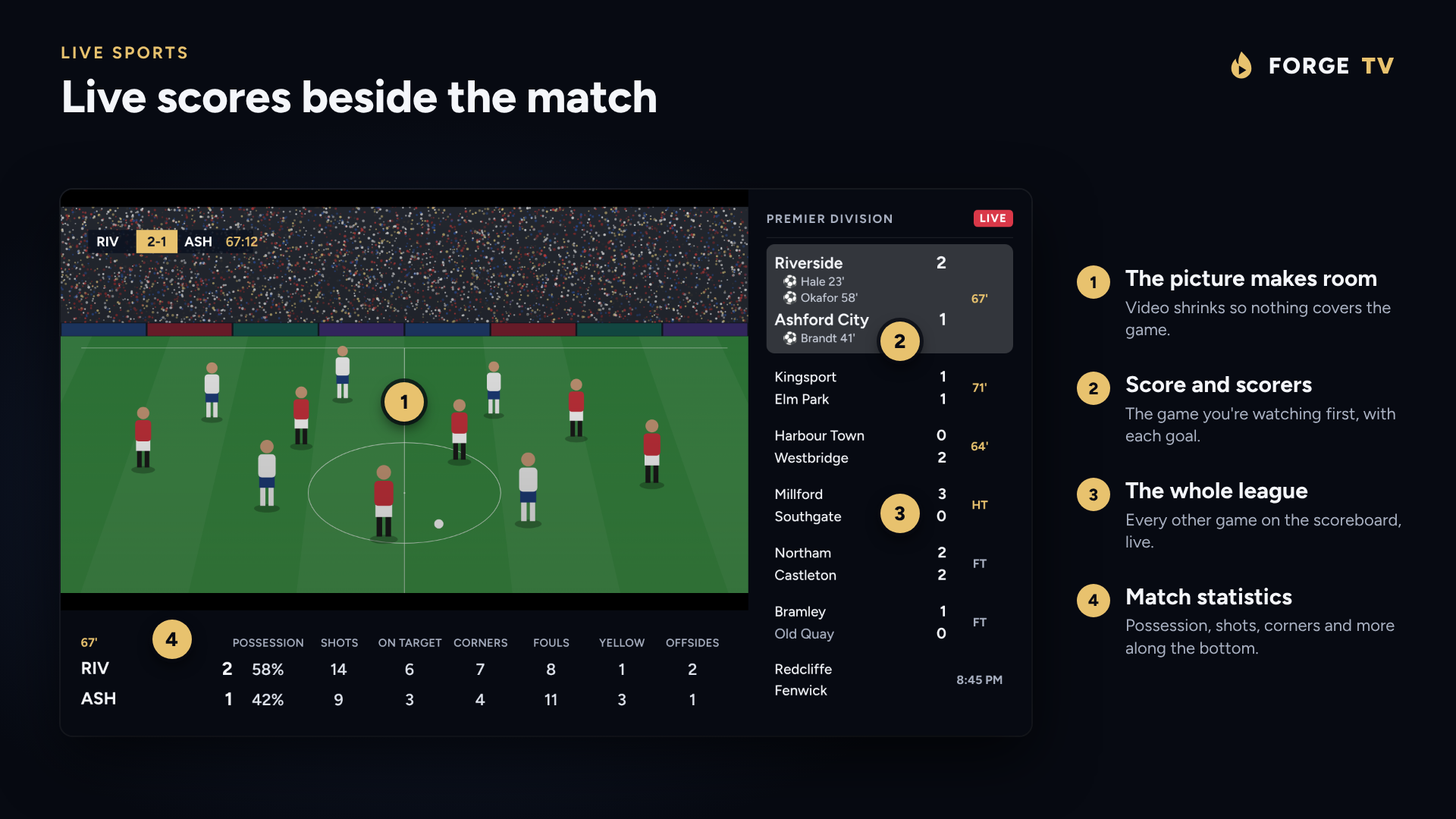
One honest caveat, stated on the site itself: scores, statistics, channel matches and reminders depend on available sports data, guide listings, the playlist and network connectivity. Forge TV provides no broadcasts of its own.
Playlists and Sources: M3U, Xtream Codes and Stalker
Forge TV speaks the three playlist dialects that cover practically the whole provider market:
- M3U or M3U8 links and files for providers that hand out playlist URLs.
- Xtream Codes logins, checked for validity before they’re saved.
- Stalker portals (Ministra and MAG style) for portal-based services.
Several playlists can live side by side, each showing channel count, last update and a green, red or grey status light reporting whether its server answers. You can set one default playlist for live TV and another for movies and shows, gather channels from every playlist into your own cross-playlist groups, and choose the live stream type per playlist between MPEG-TS and HLS. First-run users may skip adding a playlist entirely and look around the app first, which is a welcoming touch most players skip.
Player, Multiscreen and Playback
The player is where long viewing sessions are won or lost, and Forge TV equips it thoroughly:
- Picture in picture floats a small second channel over live TV, movies and episodes.
- Multiscreen plays two, three or four live channels at once, each from any playlist, with sound assigned to the picture you choose. The app warns when screens share one account that allows fewer simultaneous streams, which saves mysterious disconnects.
- Audio and subtitle tracks are named in plain language with SDH and audio description marked, remembered per film and per series, with preferred languages, audio sync adjustment, playback speed from 0.5x to 2x, subtitle styling including High contrast and Large print, and Dolby and DTS passed through to a soundbar or decoded on the TV.
- Picture controls cover Fit, Zoom or Stretch globally or per channel, frame-rate matching, and a playback-details readout for diagnosing jerky video.
- Any channel can be handed to another player such as VLC or MX Player when a tricky stream needs it.
- A sleep timer runs from 15 minutes to 2 hours, and remappable buttons put favourite actions on the coloured keys or any other key.
Sync, Backup and the Phone Companion
Multi-TV households usually suffer through configuring every box separately. Forge TV answers with two mechanisms.
Sync between TVs keeps playlists, favourites, profiles and settings identical on every set through a single encrypted file stored where you choose: a private app folder on Dropbox or a WebDAV server you run, such as Nextcloud or a NAS. The file is encrypted on the TV with your passphrase before it ever leaves the device. So the storage server never sees playlist logins, and a recovery key is shown once at setup. Changes from two TVs merge rather than clobber each other, a deletion never wipes out an edit, syncing happens when the app opens or on demand, and updates from another device are only applied when nothing is playing.
Backup and restore packs playlists, settings, favourites, channel edits, profiles and Continue watching into one file moved by USB stick, cloud drive or phone. Restores are validated in full before anything changes, and an interrupted restore is finished or rolled back on next start. So a corrupt file can’t brick a working setup.
The phone companion removes the worst part of TV apps, typing credentials with a remote. Scan a QR code on the TV and the phone browser opens a companion page with nothing to install: add playlists, change settings, reorder favourites and show or hide categories from the sofa. Pairing uses a code shown only on the TV and paired phones can be unlinked at any time.
Profiles, Parental Controls and Customisation
Profiles give every household member separate favourites, history and Continue watching, with an optional Who is watching prompt at launch. A parental PIN locks whole categories out of the guide, search and channel changes, and the PIN itself is stored as a salted hash rather than plaintext. Cosmetic control runs deep: icon or word top menus, guide channels as logo plus name, logo only or name only, five steps of menu opacity from see-through to solid for popups and the player menu, boot straight into the app when the TV starts, a custom name per TV, and live TV opening on a chosen category. Remote behaviour adapts too: Right on live TV jumps back to the previous channel, Left and Right step through option lists in settings, and in lists Right sends an item to the top while Left sends it to the bottom.
Accessibility is covered better than average: full touch and mouse support for phones and tablets, operation on Meta Quest, Android XR and Pico VR headsets in a panel, and TalkBack screen-reader support through the guide, forms and player buttons.
Privacy and Updates: No Account, No Vendor Servers
The privacy story is simple and verifiable in design: playlists, logins, favourites and guide data stay on the TV, streams play straight from the provider, and Forge TV runs no servers holding user data and requires no account with the developer. Updates arrive inside the app a few seconds after launch with Update now, Later or Skip this version options, adjustable under Settings and About. Releases are signed with the same key so each installs over the current version with playlists, profiles and settings intact. The parental PIN hashing, the passphrase-encrypted sync file and the explicit bring-your-own-content stance (the app contains no channels or streams, and users are responsible for what they play) complete a posture that asks for minimal trust.
Installing Forge TV in Minutes
Forge TV ships as a direct APK download rather than a store listing, so installation is a one-time sideload, after which the built-in updater takes over:
- Download the APK from the official download page on the TV itself or on a computer.
- Get it onto the TV with the free Downloader app (enter code 7186344), a USB stick, or
adb installfrom a computer. - Allow the install when Android asks to permit apps from that source. Enable it only for sources you trust.
- Open Forge TV and add a playlist, typed on the TV or pushed from the phone companion.
Release files and version history live on the GitHub releases page. Compatibility spans Android TV and Google TV boxes, sticks and televisions on Android 6.0 or later, plus phones, tablets and supported Android-based VR headsets, though the exact sideload steps vary by device.
Setting Up a Playlist and Fixing Common Problems
Setup follows four steps: install and open the app, pick M3U URL, M3U file or Xtream Codes, enter the details, and let channels and the guide load. Two fixes solve most first-day complaints:
- Channels buffer or refuse to start: open Settings, Playlists, pick the playlist and switch its Live stream type to HLS. Stream quality still depends on the source, device and network, but the container switch clears a large share of failures.
- Guide times look wrong: open Settings, Guide and adjust the display and time-offset settings, then confirm the playlist actually supplies listings worth displaying.
Never share playlist credentials in public feedback or support posts, and keep backup files somewhere safe since they can contain logins.
Forge TV Against the Competition
The Android TV IPTV player field has established names, so here is how Forge TV positions against them:
| Feature | Forge TV 1.2.5 | TiviMate | IPTV Smarters Pro | Sparkle TV |
|---|---|---|---|---|
| Price model | Free to download and try, future pricing TBA | Freemium, premium unlock per device or lifetime | Free app, provider-branded builds | Paid app, one-time purchase |
| Playlist formats | M3U, Xtream Codes, Stalker portals | M3U, Xtream Codes, Stalker | M3U, Xtream Codes | M3U, Xtream Codes |
| Time-grid EPG | Yes, plus Now and next view | Yes, highly configurable | Basic grid | Yes, clean grid |
| Catch-up and Start over | Yes, provider dependent | Yes, provider dependent | Yes, provider dependent | Yes, provider dependent |
| Sports hub with live scores | Yes, fixtures, favourites, score delay, Live now | No native sports data hub | No native sports data hub | No native sports data hub |
| Movie library with trailers and cast pages | Yes, TMDB plus TVmaze and Wikipedia fallback | Basic VOD browsing | Yes, solid VOD layout | Good VOD browsing |
| Multiscreen | Up to 4 channels plus PiP | Up to 4 with premium favourites sync | Multi-screen on selected builds | Up to 4 picture modes |
| Multi-TV sync | Yes, encrypted file on own WebDAV or Dropbox | Yes, cloud sync with premium account | No true multi-device sync | Backup and restore only |
| Phone companion, no install | Yes, browser based QR pairing | Companion app for playlists | No equivalent | No equivalent |
| Account required | No, no vendor servers | Account for premium sync | Varies by build | No account |
| Minimum Android | 6.0 | 5.0 | 4.4 to 5.0 depending on build | 4.4 |
| VR headset and TalkBack support | Yes | No VR focus | No VR focus | No VR focus |
The honest summary: TiviMate remains the customisation king with the largest community, Smarters wins on provider branding, and Sparkle wins on minimalist speed. Forge TV wins on the sports hub, the encrypted bring-your-own-storage sync, the no-account privacy posture and the remote-first polish, which is a distinctive combination nothing else offers in one package.
Who Should Install It: The Shack Angle
This is a ham radio blog, so here is the shack case. A television in the shack or clubhouse usually shows contest live-streams, satellite passes, news during EmComm monitoring, or sport during Field Day downtime, and the usual IPTV app makes guests ask how anything works. Forge TV fixes that: boot straight into the app, last channel already playing, a guide readable from the sofa, a sports tab the whole clubhouse understands, parental PIN locking categories nobody needs to see, and one synced configuration across the shack TV, the clubhouse TV and the portable Field Day box via a Nextcloud instance the club already runs. Profiles keep the contest weekend Continue watching separate from daily viewing. The sub-3-watt-class efficiency story belongs to other posts on this site, but the operational pattern is the same: one remote, zero typing, everything where a visitor expects it.
Honest Limitations
No review is complete without the other side. Forge TV is Android only, so there’s no native Apple TV, iOS, Samsung Tizen, LG webOS or desktop Windows build; mixed-device households will run something else elsewhere. Distribution is direct-APK sideload, which raises the entry bar versus one-click store installs and asks users to trust the signing key continuity. Version 1.2.5 is still early-days software from a small project, so the sports data, recommendations and trailer coverage can vary and the long-term pricing is explicitly undecided. The app screenshots on the official site are mockups drawn to match the layout rather than TV captures, so judge the interface from the trial itself. Catch-up, Start over, archive depth and stream reliability all depend on the provider, and there’s no DVR recording feature advertised. Lose the sync passphrase and recovery key and the encrypted sync file is unreadable by design. None of these are disqualifiers, but go in with eyes open: try it free with your own playlist before committing the whole house.
Sources and Further Reading
- Forge TV official site: https://forgetv.app/
- Features and screenshots: https://forgetv.app/features.html
- Download and install: https://forgetv.app/download.html
- Playlist setup guide: https://forgetv.app/setup.html
- Live sports features: https://forgetv.app/sports.html
- Remote-control guide: https://forgetv.app/how-to.html
- Frequently asked questions: https://forgetv.app/faq.html
- GitHub releases and version history: https://github.com/tomdonegan/forge-standalone-releases/releases
- TiviMate official site and feature comparison reference: https://tivimate.com/
- IPTV Smarters Pro on Google Play: https://play.google.com/store/apps/details?id=com.corey.smartersplayer
- Sparkle TV official site: https://www.sparkleplayer.com/
73 de 9M2PJU. Put the big screen to work, keep the remote in one hand, work everyone.

Post Comment