amateur radio
linux
open source
Technology
Ableton Link, AppImage, automix, beat grid, club events, DDJ-FLX4, DDJ-FLX6, Demucs, DJ software, GPL, hamfest, harmonic mixing, Icecast, MIDI controller, mixing software, Mixxx alternative, open source DJ, openDJ, rekordbox alternative, Rust, stems, Traktor Kontrol, VirtualDJ alternative
9M2PJU
0 Comments
openDJ: Free Open Source DJ and Mixing Software Built with Rust
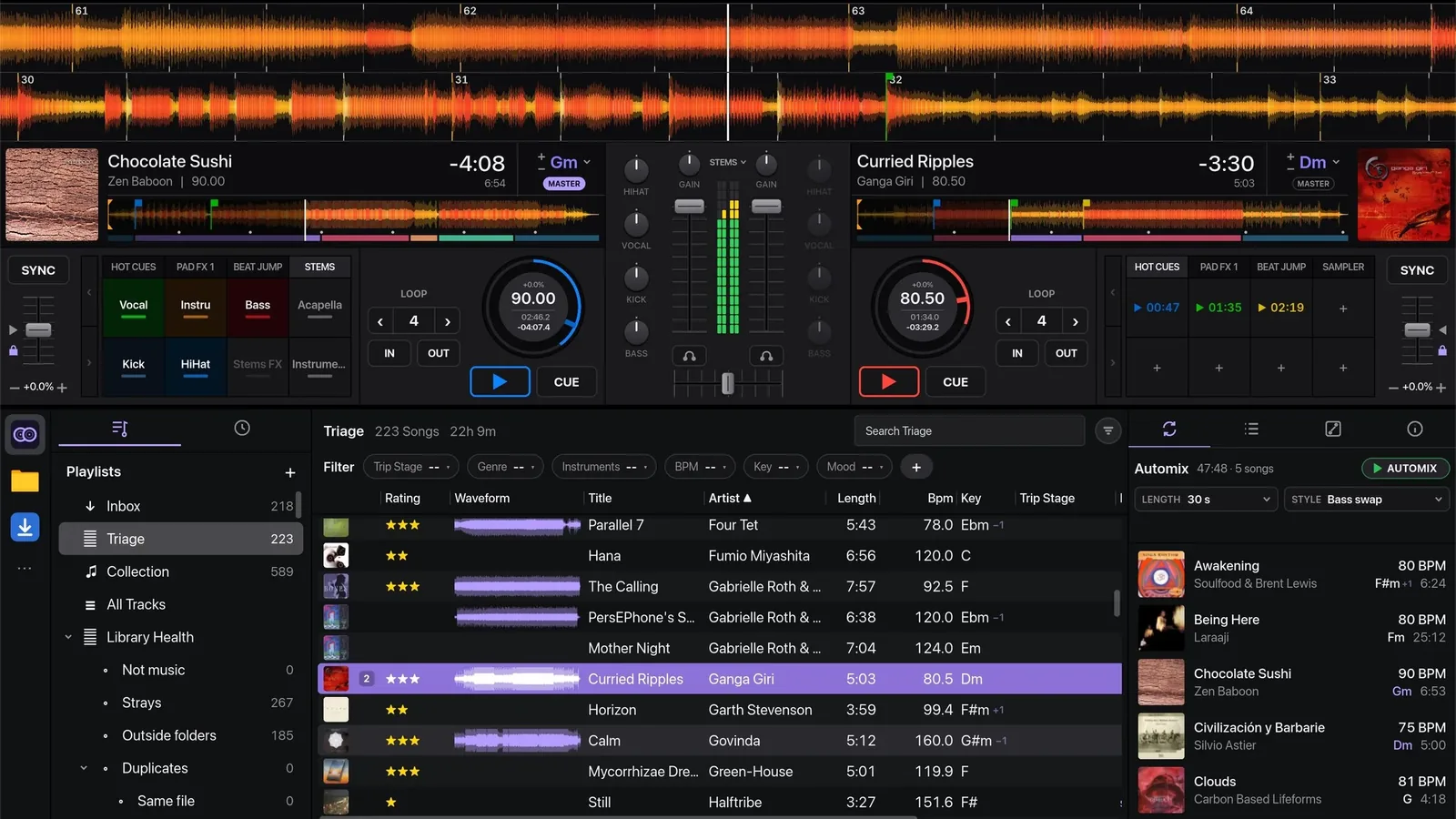
TL;DR: openDJ is free open source DJ software built in Rust for macOS, Linux and Windows that gives beginners and working DJs four decks, a full mixer with beat-synced effects, neural beat grids with harmonic mixing hints, one-click stems, a collection manager that merges duplicates and fixes tags, automix for hands-free sets, Icecast and Shoutcast broadcasting, and plug-and-play support for most MIDI controllers through Mixxx mappings plus a click-to-map wizard. It is in beta at version 0.4.7, reads libraries imported from rekordbox, VirtualDJ and Mixxx, browses Spotify, TIDAL, Apple Music, SoundCloud and Mixcloud playlists, and installs as a signed macOS app, a Windows installer or portable build, or a self-updating Linux AppImage. Sources are GPL-2.0-or-later and built apps ship under GPL-3.0. For amateur radio clubs it doubles as hamfest PA software: automix background music, microphone talkover for announcements, and one-click internet radio streaming of the event.
What Is openDJ?
OpenDJ is a free, open source DJ and mixing application for macOS and Linux, with a Windows preview build, written in Rust and designed to be fast, pleasant to use, and great at automix for DJs just starting out and experienced DJs alike.
The project lives at https://github.com/sebastian-beca/opendj and is the work of Sebastian Beca, a DJ and software engineer who started it as an experiment and builds it in the open with 434 commits so far, full release notes per version, and a public roadmap. At the time of writing the latest release is v0.4.7 from November 2026, the project holds 26 stars and 3 forks, and it is explicitly in beta: the app itself asks for feedback through Settings and Feedback, credits every tester whose report shapes a release, and lets users vote feature requests up with a thumbs-up so the most wanted work gets built first.

Decks, Mixer and Effects: The Business End
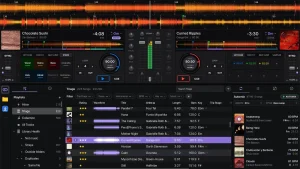
The core of openDJ is a two or four deck layout with everything a working DJ touches every set:
- Two decks with hot cues (eight colours), loops including saved loops, beat jumps, sync with quantize, key lock and key shift, plus jog wheels whose outer rim bends pitch and springs back.
- Four-deck layout in djay style with strips ordered 3, 1, 2, 4, each carrying its own EQ, fader, transport, loops, sync, tempo, pads and FX, with per-deck crossfader assignment and sync that picks its leader across all four. Two-deck controllers get deck 3 and 4 switches with LEDs included.
- Mixer with gain, 3-band EQ, filter, channel faders, crossfader with on and off switch, headphone cue that follows the loaded deck like VirtualDJ, master plus phones plus booth plus cue-mix levels, and a VirtualDJ-style pitch reset triangle beside each tempo fader.
- Effects: four beat-synced effect units with echo, reverb, filter, flanger, gate and more loaded into an FX bar under the decks, a Beat FX send with tap tempo and tail release driven by DDJ-FLX4 hardware sections, and Color FX on each filter knob (Filter, Space, Dub Echo, Noise, Crush).
- Fast GPU waveforms coloured by frequency with smooth scrolling, bar numbers, phrase detection (intro, build, drop, chorus, break, outro) shown as a coloured bar under each overview, and mini waveforms in the track list.
- Microphone and aux inputs with dedicated gain, EQ, fader and effect unit, automatic or manual talkover ducking, and both inputs included in recordings.
- Look-ahead limiter on the master at minus 0.5 dBFS so a hot mix never clips the output.
Beat Grids, Keys and Harmonic Mixing That Holds Up
Beat grids are where DJ software earns or loses trust, and openDJ over-invests here:
- Neural beat and downbeat detection from Beat This! Puts bar 1 on a real downbeat, holds grids steady unless a track genuinely drifts, and marks tempo-changing grids with a tilde before the BPM. The default 60 to 180 BPM range stops slow ambient tracks reading double tempo.
- Grid repair tools: a metronome in the deck grid menu clicks every grid beat (accent on bar 1) through the deck fader, crossfader and cue so grids can be checked by ear, Bar 1 here re-anchors the downbeat without moving the rest, grids can be locked, and every BPM readout shows its origin (Detected, Edited, From VirtualDJ, From Mixxx).
- Key detection with harmonic mixing hints: the browser tints compatible keys lilac, key mixing runs in Harmonic mode (4 compatible keys) or Fuzzy mode (6 keys ignoring the letter), Match key on load shifts an incoming track the smallest step that mixes, and keys a semitone away get a dim plus or minus 1 mark compared against what the playing deck actually sounds like.
- Sync that behaves: synced decks hold phase through quantized jumps and play commands, stay steady when the master deck loads a new track, and a lone synced deck takes over as master.
Collection: A Library That Cleans Itself
OpenDJ calls personal tracks the collection, and version 0.4 turned library management into a headline feature:
- Stages workflow: Inbox to In Prep to Play Ready, with tracks sent along by menu or drag and drop, background analysis in Triage, and optional on-disk moves with full undo.
- Collection Health pages for duplicates (grouped copies with smart keep rules, batch merge, quarantine with undo), junk in names (track numbers, URLs, Official Video tags, underscores, remixes moved to their own fields, all reviewed in a tick-box table), genre merging, tag lookup from MusicBrainz with AcoustID sound matching plus Discogs label data, cover art search embedding images at least 600 px, low bitrate and missing metadata checks, and stray or missing files.
- Crates, playlists, smart lists and sets: nesting folders, filter chips for genre, BPM, key, rating, colour and year that save as smart lists, custom tag fields searchable by name, resizable and reorderable columns, Albums wall with gapless Play Album through automix, and Mixed Sets folders.
- Fast search with field operators such as crate:name, key filters and junk finding, plus drop files from the file manager straight onto a deck.
Stems, Sampler and Recording
Modern DJ sets lean on stems and samples, and openDJ ships both:
- Stems on load: every loaded track separates while it plays starting from the cue point using Spleeter 4stems models, and Prepare High Quality Stems renders studio-grade HTDemucs (Meta) stems in the background and swaps them in. Native Instruments stem files play directly, or any track splits when Demucs is installed. Eight STEMS pads cover Vocal, Instru, Bass, Acapella, Kick, HiHat, Stems FX and Instrumental.
- 16-pad sampler with per-pad level and play modes (one shot, hold, on and off, loop), sample packs with headphone preview, drag and drop of files or tracks onto pads, and pad reordering.
- Mix recording from the REC button to WAV or FLAC in the Recordings folder with a cue tracklist and a control-change log, and a crash keeps whatever recorded so far.
- USB export writes sticks for Pioneer players, still experimental and untested on hardware at the time of writing.
Automix and Broadcasting: Hands-Free Sets On Air
Automix is a design priority rather than an afterthought: multiple lengths and styles, gapless 0 second option, reorderable queue with drag to and from decks, loop release on the outgoing deck, crossfader lock while automix runs (shown in green with a padlock so nothing breaks the mix by accident), and operation confined to decks 1 and 2.
Release 0.4.7 adds broadcasting: an ON AIR section streams to Icecast and Shoutcast servers with now-playing titles, keychain-stored passwords, a loudness meter and a minus 1 dBTP limiter. Known limits are stated plainly: MP3 for titles for now, with AAC, RTMP and WebRTC planned later. For a club or community station this turns the DJ laptop into a transmit chain in one click.
Controllers: Mixxx Mappings, HID Wheels and Click-to-Map
Controller support is openDJ’s smartest shortcut: it reuses Mixxx controller mappings, so most MIDI controllers Mixxx supports work the moment they plug in. Since 0.4.7 that includes USB HID controllers with Mixxx HID mappings: Native Instruments Traktor Kontrol S2 (MK1 to MK3), S3, S4 (MK2, MK3), F1, Z1 and MX2. The project thanks Mixxx directly in the README while noting it’s a separate project, not affiliated or endorsed.
Beyond plug and play:
- Own Pioneer DDJ-FLX6 mapping (four decks, Beta) plus Beta-labelled drawings for DDJ-400, DDJ-200, DDJ-SB3, Mixtrack Platinum FX, Mixtrack Pro FX and DJControl Inpulse 500, with the DDJ-FLX4 fully mapped across hot cues, pad FX, beat jump, sampler, beat loop down to 1/16, keyboard, key shift and loop roll.
- Mapping import from VirtualDJ (controllers and keyboard), Traktor .tsi, rekordbox .midi.csv and djay Pro, with unmappable rows greyed and explained, and export to openDJ or Mixxx .midi.xml format.
- Map mode: click a control on screen, move one on the hardware, done, with Keep both, Undo and Done on the bar. Quick map walks a bare controller through standard controls for 2 or 4 decks and copies deck 1 across.
- Controller Editor groups every control by function with layer, MIDI message, LED and options, supports soft takeover with hollow hardware-position markers, and duplicates mappings as personal copies.
- Numark V7 support and a mapping wizard that learns jog wheels in both directions arrived in the 0.4.7 cycle, and testers whose controller misbehaves get priority fixes.
Switching From rekordbox, VirtualDJ, Mixxx, Traktor or djay
Migration gets first-run treatment instead of a wiki footnote:
- Library import from rekordbox 6 and 7 (master.db or XML), Mixxx and VirtualDJ brings tags, stars, colours, named and coloured hot cues, memory cues, saved loops, beat grids, playlists and history, converts rekordbox phrases and tags to openDJ equivalents, offers a tick-box list tree, matches existing tracks by artist, title and length to avoid duplicates, and keeps streamed tracks as greyed placeholders until the file lands in the collection.
- Guided tour on first start sets up audio with a per-output test tone, the controller and music folders, then walks through a first mix on screen or hardware, every step skippable.
- Streaming browse: Spotify, TIDAL, Apple Music, SoundCloud and Mixcloud playlists, likes and favourites (sign in with your own developer app), playable where the collection holds the file, opened in the browser otherwise, with Change Match correction, Copy to openDJ list building, wanted lists, and download hooks for add-on sources such as Soulseek. An Internet Archive source adds freely licensed music with covers. Nothing streams or downloads from the big services directly: browse only.
Installing openDJ
- macOS (Apple Silicon and Intel, macOS 11 or newer): signed and notarized, self-updating from 0.3.0 on, otherwise unzip and move to Applications.
- Windows (preview, 64-bit Windows 10 and 11): per-user setup exe with self-update, or portable zip. Unsigned, so SmartScreen needs More info then Run anyway. ASIO devices list beside Windows Audio. ARM runs through emulation.
- Linux (x86_64, glibc 2.35 or newer such as Ubuntu 22.04 plus, Fedora 36 plus, Debian 12 plus): self-updating AppImage (chmod plus x and run) or tarball with bin/opendj. Needs ALSA and a Vulkan driver. A Flatpak packaging directory is in the repo.
- Build from source: recent stable Rust, CMake and a C++ compiler, plus fontconfig, xkbcommon, ALSA, udev and libclang dev packages on Linux, then cargo run –release. Set OPENDJ_MUSIC to point at another folder.
openDJ Against the Competition
| Feature | openDJ 0.4.7 | Mixxx | rekordbox | VirtualDJ | djay Pro |
|---|---|---|---|---|---|
| Price | Free, GPL | Free, GPL | Free tier plus subscription | Free tier plus licence | Subscription |
| Decks | Up to 4 | Up to 4 | Up to 4 | Up to 99 | Up to 4 |
| Neural beat grids | Yes, Beat This! | Manual plus analysis | Yes | Yes | Yes |
| Stems | Yes, Spleeter plus HTDemucs | Experimental | Yes, paid tiers | Yes, Stems 2.0 | Yes, Neural Mix |
| Automix quality | Headline feature | Basic | Basic | Strong | Strong, Automix AI |
| Broadcast to Icecast | Yes, 0.4.7 | Yes | No | Yes | No |
| Streaming services | Browse only | Selected services | Full streaming | Full streaming | Full streaming |
| Controller mappings reuse | Mixxx mappings native | Native set | Pioneer focus | Widest support | Curated support |
| Library import | rekordbox, VDJ, Mixxx | Manual | Industry hub | Industry hub | Manual |
| Platform | macOS, Linux, Win preview | macOS, Linux, Windows | macOS, Windows | macOS, Windows | Apple plus Win, Android, iOS |
The honest summary: Mixxx remains the veteran free choice with deeper maturity, rekordbox owns the Pioneer club pipeline, VirtualDJ has the widest controller and karaoke reach, and djay leads on mobile and streaming integration. OpenDJ wins on modern feel, automix depth, collection clean-up tooling, Rust performance, and a migration path that treats switchers as first-class users rather than afterthoughts.
Name Check: Not the LDAP OpenDJ
One caution for searchers: OpenDJ was also the name of Sun Microsystems and later ForgeRock directory server (LDAP) software from the 2000s and 2010s. This project by Sebastian Beca is unrelated: a from-scratch DJ application sharing only the name. If results mention replication topologies and access control lists, that’s the other OpenDJ.
Who Should Try It: The Ham Radio Angle
A club station or hamfest always needs music and announcements between talks, and openDJ fits that job unusually well. Automix runs background music for hours unattended through the PA while organisers set up, the microphone channel with talkover ducking handles prize-draw announcements without touching mixer gains, mix recording archives the whole day, and the 0.4.7 Icecast broadcast streams the event to members who couldn’t travel. Ableton Link syncs bumper music with a video slide laptop on the same network, and the whole setup costs nothing but a laptop and a controller many members already own. For SOTA or POTA activators, a prepped automix playlist plus recording turns the drive out into a finished activation video soundtrack.
Honest Limitations
The beta label is real. Windows is a preview: unsigned and less tested than macOS and Linux. Streaming is browse only with stores still coming, USB export for Pioneer players is experimental, controllers marked Beta haven’t all touched hardware, automix uses decks 1 and 2 only, and testers report through a young issue tracker (13 open issues, 5 open pull requests at the time of writing). Star and fork counts are small, the bus factor is essentially one developer plus testers, and long-term maintenance depends on community growth. None of this disqualifies a free download: import a copy of the library, map the controller, and judge it on one real set before trusting a paid gig to it.
Sources and Further Reading
- OpenDJ GitHub repository, README and docs: https://github.com/sebastian-beca/opendj
- Latest release and downloads: https://github.com/sebastian-beca/opendj/releases/latest
- All releases and changelogs: https://github.com/sebastian-beca/opendj/releases
- Issue tracker and feature votes: https://github.com/sebastian-beca/opendj/issues
- R/MIXXX announcement thread: https://www.reddit.com/r/MIXXX/comments/1xcbebp/opendj_opensource_dj_and_mixing_software_inspired/
- Mixxx controller compatibility reference: https://mixxx.org
- Beat This! Neural beat tracker: https://github.com/CPJKU/beat_this
- Slint UI toolkit and licensing: https://slint.dev
- Icecast internet radio software: https://icecast.org
- Internet Archive audio: https://archive.org/details/audio
73 de 9M2PJU. Cue the intro track, ride the crossfader, work everyone.


Post Comment