amateur radio
android
open source
Technology
Bluetooth BLE, CAN bus, CAN-FD, comma.ai, dash apps, DashKit, DashPilot, EmComm, ESP32-S3, instrument cluster, Kotlin, MIT license, mobile operating, openpilot, Rive, S3XY Buttons alternative, SwiftUI, Tesla dashboard, Tesla Model 3, Tesla Model Y, Teslogic alternative
9M2PJU
0 Comments
DashPilot: Turn Your Phone into a Real-Time Tesla Dashboard with Open Source DashKit
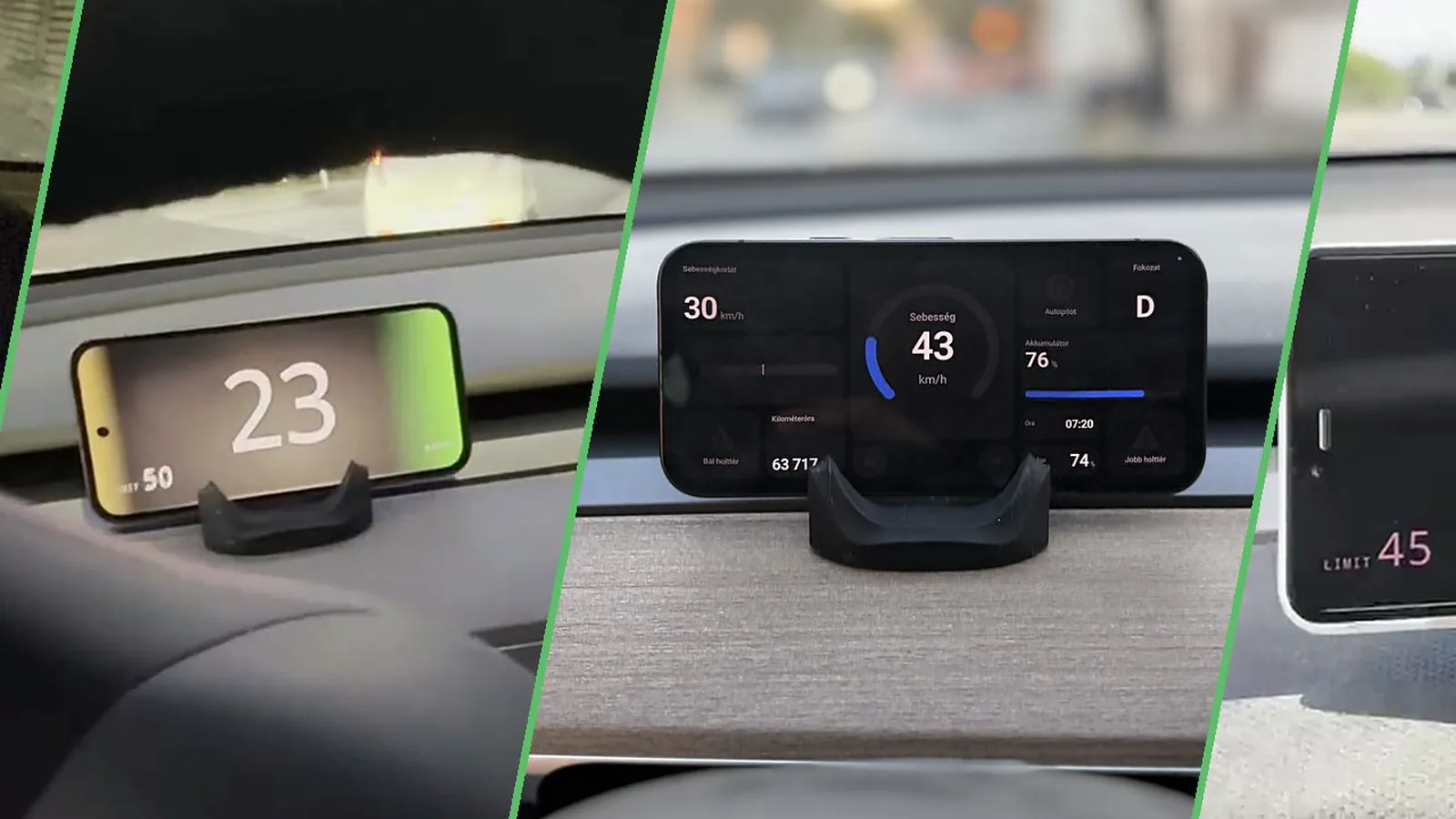
TL;DR: DashPilot is a free open source companion app for DashKit that turns a phone into a real-time Tesla instrument cluster. A compact DashKit module taps the Tesla CAN harness and streams live car data over Bluetooth Low Energy to the phone, which draws speed, gear, blinkers, blind spots, cruise set speed, speed limit and battery in customizable dash apps built as web pages or Rive animations, including dashboards you write yourself. Through the same link the app controls the frunk, trunk, charge port, mirrors and climate, and runs automations such as keeping climate on after you leave and stopping Autopilot from forcing wipers to auto. It supports Model 3 and Model Y from 2019 to 2024 plus the 2025-plus Juniper, ships for Android via Google Play and iOS via TestFlight under the MIT license, and even runs a $250 contest for the best community dashboard. For radio amateurs who live on ESP32 hardware and mobile operating, it’s the open phone-mount cluster the Tesla should have shipped with.
What Is DashPilot?
DashPilot is the open source companion app for DashKit that turns a phone into a real-time Tesla dashboard, drawing live speed, gear, blind spot, Autopilot state and battery from the car over Bluetooth Low Energy.
The project lives at https://github.com/softwiredtech/dashpilot from Softwired Technologies Kft of Pecs, Hungary, and is half of a two-part open system. DashKit is the hardware: a compact sealed module with two independent CAN-FD interfaces, an ESP32-S3 with 16 MB flash, an RGB status LED and BLE 5 that plugs into the Tesla wiring harness and disappears behind the trim. DashPilot is the software: a native phone app (Kotlin with Jetpack Compose on Android, SwiftUI on iOS) that receives the CAN stream and renders the cluster, sends commands back to the car, and hosts automations. Both repos are MIT licensed with a combined 266 app commits and an active Discord where the community decodes signals, trades dashboards and helps with installs. Orders for the hardware are open with shipping to the EU, UK, US, Canada and Australia.

Why a Phone Cluster: The Missing Tesla Display
Tesla Model 3 and Model Y ship with a single centre screen and no instrument cluster ahead of the driver. Checking speed means glancing right, and Autopilot, blind spot and limit information lives in screen corners. Owners have answered with aftermarket mini displays, HUD add-ons and button kits, most of them closed boxes with fixed firmware.
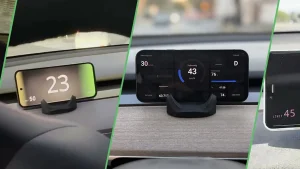
DashPilot takes the opposite approach. The phone most drivers already mount on the dash becomes the cluster, positioned above the wheel, fed by real CAN data at real-time rates rather than the delayed polling of cloud telemetry APIs. Because the dashboards are user-replaceable web apps and Rive files, the cluster can look like anything: a neon arc gauge set, a retro LCD, a minimal giant speed number, or a dense gauge grid. Real drive footage on the project site shows drivers swapping Retro for Ambient at traffic lights, which captures the appeal better than any spec sheet.
What the Dash Shows and Controls
Through DashKit the app reads the car buses and displays speed, gear, blinkers, blind spots, cruise set speed, speed limit, battery state and more, updating live as you drive. The same link reaches back into the car:
- Direct controls: frunk, trunk, charge port, mirrors and climate from the phone.
- Climate stays on: keeps air conditioning running for a set time after leaving the car, then shuts off, for dogs, groceries or hot climates.
- Wipers stay off: an off setting holds when Autopilot or cruise engages instead of being forced back to auto, a long-standing Tesla annoyance fixed in software.
- AC swing: sweeps the dash vents side to side like an oscillating fan for driver, passenger or both.
- Battery preheat scheduling: warms the pack from the app before unplugging so range and regen are ready.
- Multi-finger taps: three, four and five finger taps on the infotainment screen mapped to actions such as the glovebox, rear fan or AC swing.
These automations run on DashKit hardware with DashPilot as the configuration surface, so they keep working with the phone in a pocket.
Dash Apps: Dashboards You Can Write Yourself
The most distinctive software decision is that dashboards aren’t baked into the app. Each dash app is either a standard web app in HTML, CSS and JavaScript or a Rive animation file, receiving live car state under documented CarState keys, with the built-in Retro, Ambient and gauge dashboards as working examples. Building your own takes the documented path:
- Read the dash-apps README for the data contract.
- Serve a web dash app from a computer on the local network, or export a Rive file.
- On the phone open Settings then Developer and choose Load dash app from URL or Load Rive File.
- Set the data source to Demo on the home screen for simulated driving data and iterate without touching the car.
To seed the ecosystem the project runs a Dash App Contest with a $250 prize for the best community dashboard, submissions open until October 30. The contributing guide asks for small isolated pull requests with stack prefixes such as android, ios, dash-apps or bridge, and states plainly that AI-written code is welcome as long as the author understands every line submitted.
Data Sources: DashKit, Demo, comma and WebSocket
DashPilot abstracts where car data comes from, with four sources:
| Source | What it is | Status |
|---|---|---|
| DashKit | Live CAN data from the DashKit module over BLE | Primary, actively developed |
| Demo | Built-in loop of simulated driving data | Built in, no hardware needed |
| comma | Reads the car through a comma device running openpilot | Works, not actively maintained |
| WebSocket | Reads CarState JSON snapshots from your own server at ws://ip:8080, Android debug builds only | Developer tool for recorded or generated drives |
The WebSocket source deserves a note for tinkerers: the server sends one full JSON snapshot per message as often as it likes, using CarState keys such as egoSpeed, gear, leftBlinker, adasOn, accSetSpeed and fusedSpeedLimit, with missing keys reading as zero or false. Values go out in metric (odometer in km, temperatures in C, limits in km/h) and the app converts for imperial users, while egoSpeed and accSetSpeed display as sent. Record a commute once through DashKit, replay it over WebSocket forever, and dashboard development never needs the driveway.
The comma path reuses the bridge folder: C++ car connection and CAN decoding shared with openpilot-style devices.
The Hardware Under the Trim: ESP32-S3 with Dual CAN-FD
DashKit firmware at softwiredtech/dashkit-firmware is a CAN-to-BLE bridge for ESP32-S3 built on ESP-IDF v5.4.4 as a submodule with FreeRTOS microsecond frame timestamps and over-the-air updates. The headline specs from cardashkit.com/specs:
- CAN: two independent CAN-FD buses via MCP2518FD controllers on a 40 MHz reference, CAN 2.0B plus CAN FD to ISO 11898-2, up to 64-byte payloads, 11-bit and 29-bit identifiers, 500 kbps nominal with bit-rate switching to 2 Mbps data rates.
- Compute: Espressif ESP32-S3, 16 MB flash, open source firmware with OTA.
- Wireless: BLE 5 with 2M PHY and up to 512-byte MTU to the phone.
- Physical: compact round module with RGB status LED, GPIO pinout published (SPI on 10 to 13, CAN interrupt on 9, LEDs on 39 to 41), tucks behind the trim with a vehicle harness.
- Vehicles: Tesla Model 3 and Model Y 2019 to 2024 plus Model Y Juniper 2025 and newer, with more models on the community roadmap.
Building firmware needs macOS with Homebrew, cmake, ninja and dfu-util, the ESP-IDF export script, then idf.py set-target esp32s3, build, and flash monitor. Verbose CAN logging flips on with one sdkconfig flag.
Installing and Trying It Without a Car
- Android: install from Google Play, or open dashpilot-android in Android Studio to build; dash apps copy into the build automatically.
- iOS: join via TestFlight, or open dashpilot-ios in Xcode to build with a build phase copying the dash apps.
- No-car trial: set the data source to Demo and the app plays simulated driving, so dashboard design and app evaluation need no Tesla at all.
- Hardware install: instructions at cardashkit.com/install cover tapping the CAN harness and pairing over BLE.
The full overview video on the project YouTube channel walks through real drives with several dashboards, and Discord is the support channel of choice.
DashPilot Against the Alternatives
| Feature | DashPilot plus DashKit | Teslogic | S3XY Buttons plus app | Hansshow mini display |
|---|---|---|---|---|
| Price model | Open hardware plus free MIT app | Paid kit plus app | Paid buttons plus app | Paid display unit |
| Data path | Direct CAN-FD over BLE | Direct CAN over BLE | CAN commander module | Direct CAN harness |
| Dashes replaceable | Yes, web or Rive, user-made | Fixed styles | Fixed widgets | Fixed firmware UI |
| Car controls | Frunk, trunk, port, mirrors, climate | Selected shortcuts | Extensive button actions | Limited |
| Automations | Wipers, climate, swing, preheat, taps | Some | Extensive via commander | Few |
| Source open | Yes, app plus firmware MIT | Closed | Closed | Closed |
| Car support | Model 3 and Y incl. Juniper | Model 3 and Y | 3, Y, S, X, Cybertruck | Model 3 and Y |
| No-car demo mode | Yes, built-in simulation | No | No | No |
The honest summary: Teslogic and Hansshow suit drivers wanting a fixed display with minimal fuss, and S3XY Buttons owns the physical-shortcut niche across more models. DashPilot wins for open source owners who want the cluster itself to be hackable, automations shaped by a community rather than a vendor backlog, and a demo mode that lets anyone evaluate the software tonight.
Who Should Try It: The Ham Radio Angle
Mobile operators already mount a phone for APRS, logging or repeater directories, and Tesla drivers add the missing cluster on the same mount. The deeper appeal for this audience is the hardware philosophy: an ESP32-S3, open firmware, published GPIO, BLE services and a JSON data contract are exactly the stack hams already build with for LoRa APRS trackers, fox hunt beacons and shack automation. A club running a Field Day support Tesla can show live pack and speed data on the dash phone while the APRS tablet rides alongside, and EmComm drivers gain climate-stays-on for gear staged in a hot car. Even without the hardware, the Demo source plus the WebSocket replay path make DashPilot a pleasant sandbox for anyone learning CAN concepts before touching a real bus.
Honest Limitations
The boundaries are clear. Only Model 3 and Y are supported, with wider coverage dependent on community decoding work. The comma data source is unmaintained, WebSocket input is Android debug only, and the $250 contest underlines how young the dash-app ecosystem is at 11 stars and 7 forks. Hardware installation means touching the vehicle harness, which carries warranty and safety implications no blog post can waive: follow the official install guide, disconnect correctly, and treat airbag-zone trim with respect. Cloud telemetry fans should note there is deliberately no remote tracking here; the link is local BLE by design.
Sources and Further Reading
- DashPilot app repository: https://github.com/softwiredtech/dashpilot
- DashKit firmware repository: https://github.com/softwiredtech/dashkit-firmware
- DashKit product site: https://cardashkit.com
- Dashboards show: https://cardashkit.com/dashboards
- Hardware specifications: https://cardashkit.com/specs
- Install guide: https://cardashkit.com/install
- Dash apps README and CarState contract: https://github.com/softwiredtech/dashpilot/blob/main/dash-apps/README.md
- Dash App Contest: https://github.com/softwiredtech/dashpilot/blob/main/dash-apps/contest/README.md
- DashPilot on Google Play: https://play.google.com/store/apps/details?id=com.softwiredtech.dashpilot
- DashPilot on TestFlight: https://testflight.apple.com/join/hXTwZmh5
- Softwired Technologies on YouTube: https://www.youtube.com/@SoftwiredTechnologies
- Community Discord: https://discord.gg/naTZgwVqvA
- Rive interactive graphics: https://rive.app
- Comma.ai openpilot: https://comma.ai
73 de 9M2PJU. Mount the phone, watch the bus, work everyone.


Post Comment