APRS-WTSAPP: Sending WhatsApp Messages from Amateur Radio via APRS
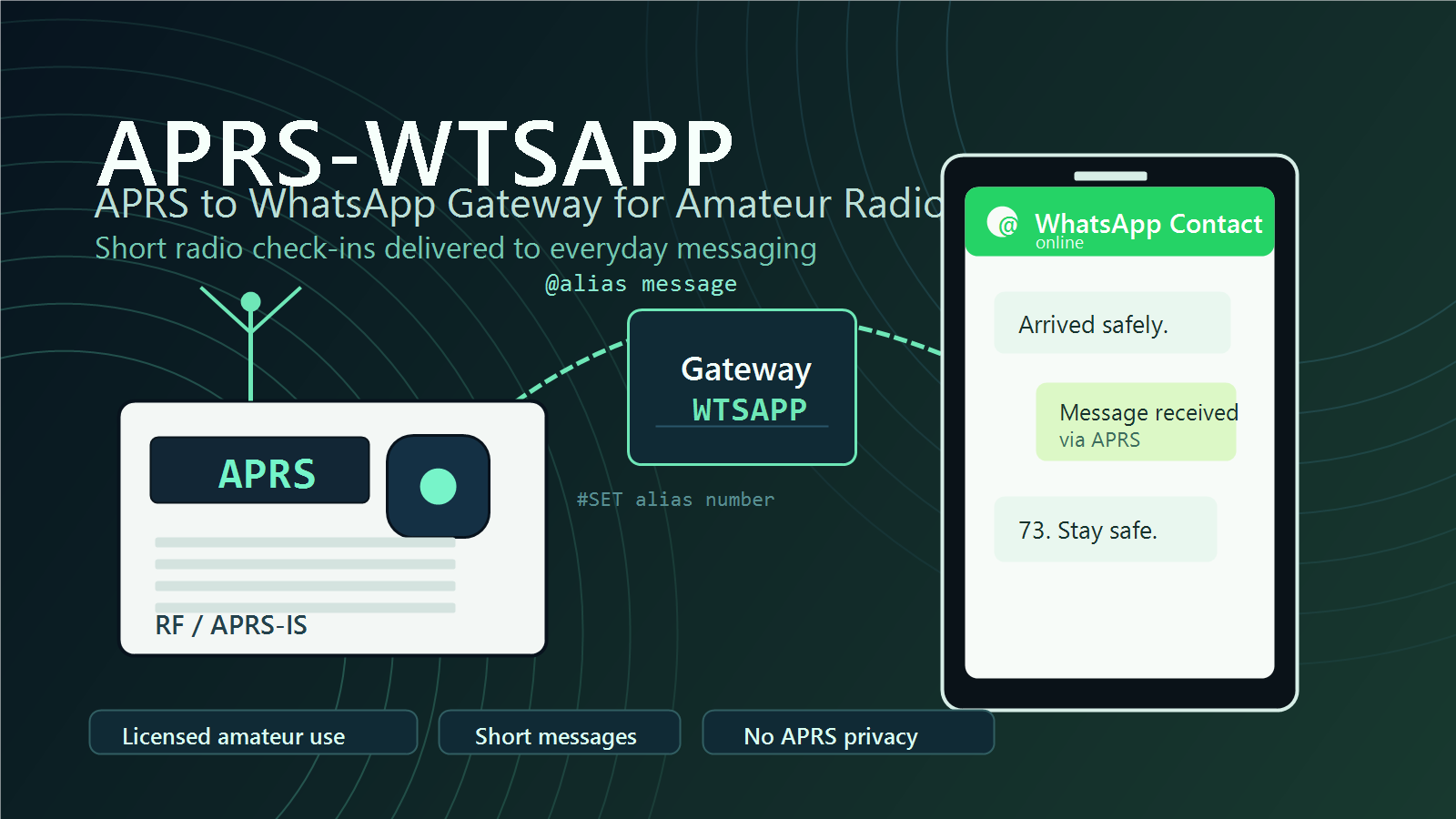
For Amateur radio operators, APRS has long been one of the most useful tools for short digital messaging, position reporting, and lightweight communication over radio. It is simple, efficient, and widely supported by radios, digipeaters, iGates, and APRS-IS infrastructure around the world. But APRS also has one obvious limitation: most family members and friends outside the amateur radio community do not monitor APRS.
That is where APRS-WTSAPP comes in.
APRS-WTSAPP is an APRS-to-WhatsApp gateway designed to help licensed radio amateurs send short messages from their radios to loved ones on WhatsApp. It acts as a bridge between the amateur radio APRS network and one of the most commonly used messaging platforms in the world. The idea is simple: a licensed amateur sends an APRS message to the gateway, and the gateway forwards that message to a WhatsApp recipient.
The service is especially useful for operators who may be away from normal mobile coverage but still have access to APRS through RF or APRS-IS. It is not intended to replace emergency communications equipment, satellite messengers, or reliable commercial communication systems. Instead, it offers a lightweight way to check in, send short updates, and maintain contact when ordinary connectivity is limited.
What APRS-WTSAPP Does
APRS-WTSAPP allows licensed amateur radio operators to send WhatsApp messages by addressing APRS messages to the gateway callsign or service name WTSAPP.
The concept is similar to earlier APRS messaging gateways such as SMSGTE, which allowed APRS users to send text messages through SMS. APRS-WTSAPP applies a similar idea to WhatsApp.
A typical use case might look like this: an amateur radio operator is traveling, hiking, operating portable, or otherwise outside normal mobile coverage. If they can reach APRS, they can send a short message through the gateway to a family member or friend on WhatsApp. The recipient can also reply, provided there is an active conversation session.
The gateway is built around short, practical messages rather than long conversations. It is intended for check-ins and essential communication, not as a replacement for everyday chat apps.
How to Send a WhatsApp Message from APRS
Messages to the gateway use a simple format. To send a WhatsApp message, the APRS message must begin with the @ symbol, followed by either an international phone number or a saved alias, then the message body.
The basic format is:
@[international phone number or alias] [message body]For example, to send the message “this is my message” to the international number +123-456-7890, the APRS message would be:
To: WTSAPP
Message: @+123-456-7890 this is my message
The same message can also be sent without dashes:
To: WTSAPP
Message: @+1234567890 this is my message
Phone numbers must be written in international format if the destination is outside the United States. That means the number should start with the country code. Numbers may include dashes and may begin with a plus sign. If a number does not use international format, the gateway treats it as a United States number.
Using Aliases
Typing full phone numbers over APRS can be inconvenient, especially from a radio keypad. APRS-WTSAPP supports aliases to make this easier.
An alias is a short name that points to a phone number. Once created, the alias can be used instead of typing the full number every time.
To create an alias, use the #SET command:
To: WTSAPP
Message: #SET me +123-456-7890
After that, a message can be sent using the alias:
To: WTSAPP
Message: @me this is my message
Aliases must be single-word entries. If an alias looks exactly like a phone number, it will be considered invalid. This prevents confusion between aliases and actual phone numbers.
To remove an alias, use the #RM command:
To: WTSAPP
Message: #RM me
This alias system is one of the most practical parts of the gateway. It makes APRS messaging faster, reduces typing errors, and allows operators to save commonly used contacts.
Conversation Mode
APRS-WTSAPP also supports a conversation mode. After a user sends an initial message with the @ symbol and establishes a destination, follow-up messages can be sent without repeating the phone number or alias.
For example, after sending:
To: WTSAPP
Message: @me I arrived at the campsite
A follow-up message can simply be:
To: WTSAPP
Message: Weather is good and radio is working
The gateway will send that follow-up message to the same destination.
Conversation mode lasts for one hour. After that, the operator must use the @ format again to establish the destination. If the operator is messaging multiple recipients, the safer practice is to always include the @ destination so the message goes to the correct person.
This feature makes short exchanges much more natural while still keeping the system simple enough for APRS.
Commands and Error Messages
APRS-WTSAPP recognizes two main command formats:
@destination messagefor sending messages, and:
#command command bodyfor gateway commands.
The currently documented commands are:
#SETto create or update an alias, and:
#RMto remove an alias.
The gateway may return error messages when something is wrong. Common errors include rate-limit warnings, missing destination information, invalid commands, incorrectly formatted alias commands, or replies from WhatsApp users when no active session exists.
For example, if an APRS user sends a message without first setting a destination, the gateway may report that there is no conversation to follow up. If a message starts with # but does not match a known command, it will be treated as an invalid command. If a WhatsApp recipient replies after the active session has expired, the gateway may report that no active session was found.
These status messages are important. Users should watch for them and wait for delivery confirmations, especially when operating over RF where APRS coverage may be inconsistent.
Rate Limits
The service includes rate limits to protect the gateway and keep it usable for everyone.
The documented user rate limit is:
50 messages per 10 minutes per callsignThere is also a server-wide rate limit for the whole service, affecting all users combined. WhatsApp replies are also rate-limited, with a maximum rate of 50 messages per 10 minutes.
These limits are reasonable for the intended purpose of the gateway. APRS-WTSAPP is designed for short check-ins and limited communication, not high-volume chatting.
Reliability and Practical Use
APRS-WTSAPP depends on several systems working together: the user’s radio, APRS coverage, APRS-IS, the gateway software, internet connectivity, and the WhatsApp delivery mechanism. Any one of these can fail or become unreliable.
Radio communication can be affected by terrain, distance, antenna setup, weather, network congestion, and local APRS coverage. Some areas have excellent APRS infrastructure, while others have little or none. Even when a message leaves the radio successfully, the path through APRS-IS and the gateway still matters.
The project documentation is very clear about this: users should not rely on APRS-WTSAPP as their only means of communication in remote or risky situations. It should not be treated as an emergency service. For serious backcountry travel or life-safety communication, users should rely on proper emergency-capable tools such as a satellite phone, Garmin inReach, PLB, or similar dedicated equipment.
The best way to use APRS-WTSAPP is carefully and sparingly: send one message, wait for confirmation, and avoid flooding the system. It is a check-in tool, not a replacement for full-time messaging.
Privacy and Amateur Radio Rules
Users must remember that APRS is amateur radio. Messages sent over APRS are not private. They may be transmitted over RF, gated to APRS-IS, displayed on public APRS websites, and stored in databases.
For that reason, operators should never send sensitive personal information through APRS-WTSAPP. Anything transmitted over amateur radio should be considered public.
Licensed amateur operators are also responsible for following the rules of their own country. In the United States, this means FCC amateur radio rules. In other countries, operators must follow the equivalent local regulations.
Because this is an amateur radio service, it must not be used for commercial or business communication. It is intended only for non-profit, personal amateur radio use.
Availability and Project Status
APRS-WTSAPP is described as a personal project with a limited budget. The maintainer notes that the service does not use a verified WhatsApp Business account, because that would require a registered company that can be verified through Facebook. As a result, heavy traffic could put the WhatsApp number at risk of being banned.
Users are encouraged to have recipients add the gateway number as a contact, which may help reduce the chance of the service being flagged.
The project has gone through several updates, including bug fixes, clearer documentation, MongoDB support, alias support, and changes to the message delivery library. A status page has also been added.
Final Thoughts
APRS-WTSAPP is a clever and practical bridge between amateur radio and modern messaging. It gives licensed operators a way to reach non-radio users through WhatsApp using APRS messages, while keeping the format simple enough to use from a radio.
Its strengths are clear: short check-ins, alias support, conversation mode, replies from WhatsApp users, and compatibility with the existing APRS ecosystem. Its limits are just as important: no privacy, no guarantee of delivery, rate limits, dependence on multiple networks, and no suitability as a primary emergency communication method.
Used responsibly, APRS-WTSAPP can be a valuable tool for amateur operators who want a simple way to stay in touch when ordinary connectivity is limited. It is not a magic replacement for reliable communication systems, but as a lightweight APRS-to-WhatsApp gateway, it fills a very real and useful niche in the amateur radio world.







Post Comment