amateur radio
ARES
emergency communication
ham radio
RACES
radio amatur
amateur radio EmComm dashboard, amateur radio net control, amateur radio preparedness, disaster communications, EmComm net control software, emergency communications app, emergency net management, emergency radio communications, field communications, ham radio dashboard, ham radio emergency communications, ham radio logging app, IARU message form, offline EmComm app, radio operator tools
9M2PJU
0 Comments
9M2PJU Amateur Radio EmComm Dashboard: A Practical Tool for Emergency Communications
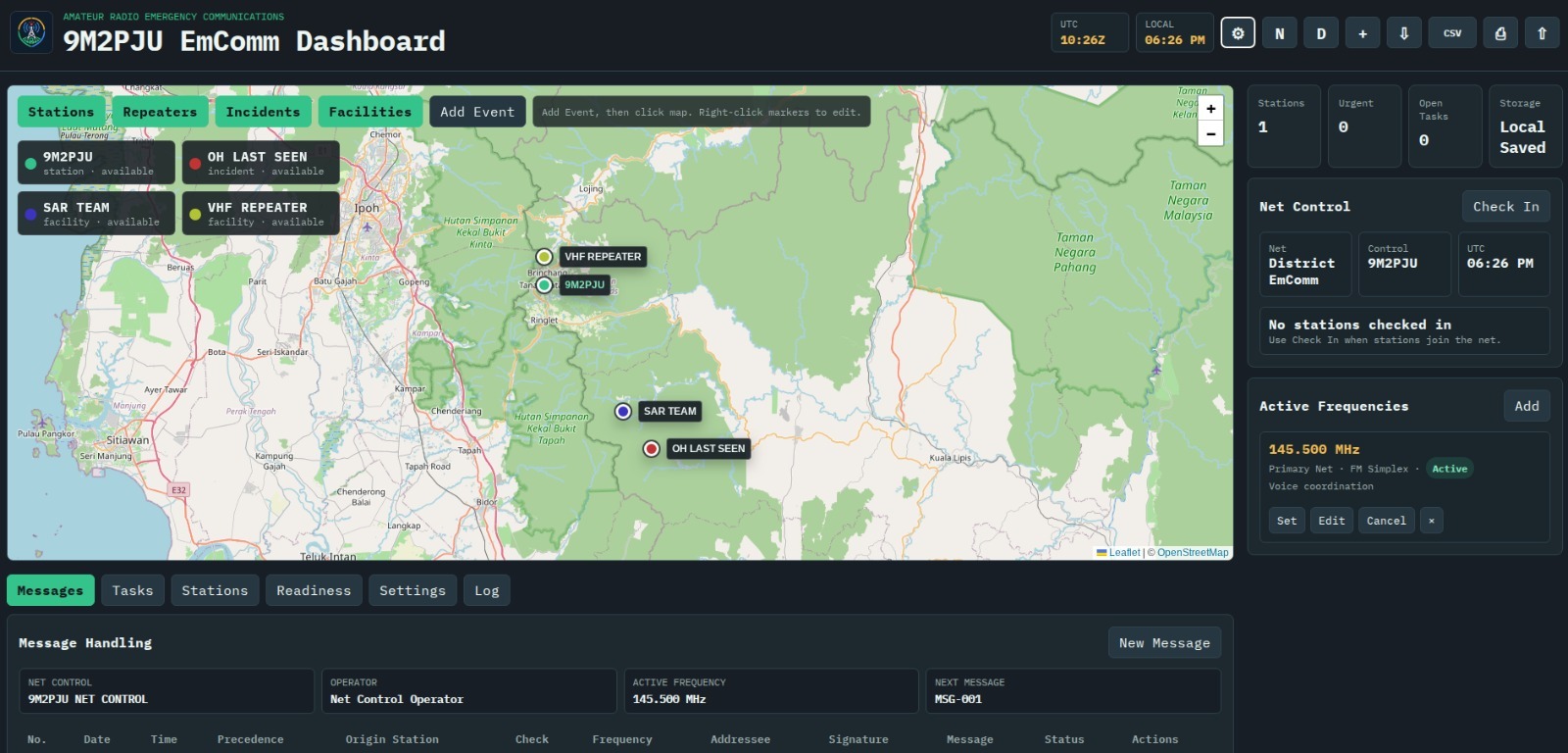
When emergency communications work becomes active, the biggest challenge is rarely just getting on the air. The harder job is staying organized while information moves quickly: stations checking in, messages being passed, repeaters being verified, field teams reporting conditions, and net control trying to maintain a clear operational picture.
The 9M2PJU Amateur Radio EmComm Dashboard was built for exactly that environment. It is a browser-based emergency communications dashboard designed for amateur radio operators who need a practical, lightweight, and field-friendly way to manage a net, track operational activity, and preserve an accurate record of what happened.
This is not a decorative dashboard. It is an operating tool.
A Dashboard Designed Around Real EmComm Work
Emergency communications depends on discipline. Callsigns must be clear. Message numbers must be consistent. Traffic needs precedence, handling status, origin details, delivery state, and a log trail. Operators need to know which stations are available, which frequencies are active, which tasks are open, and where incidents or facilities are located.
The 9M2PJU EmComm Dashboard brings those pieces into one workspace.
At the center of the app is an operational map powered by Leaflet and OpenStreetMap. Stations, repeaters, facilities, and incidents can be displayed as live operational objects, not just static map pins. A net control station can quickly see where field teams are located, where a relief centre is operating, whether a repeater is online, or where an urgent incident report has been logged.
Beside the map, the net control panel summarizes the current operating picture: checked-in stations, active frequencies, urgent traffic, open tasks, storage status, and local/UTC time. It gives the operator the kind of fast-glance information that matters during a busy net.
Formal Message Handling Built In
One of the strongest parts of the dashboard is its message handling workflow.
The app supports structured formal traffic records with message numbers, precedence, origin station, word count check, place of origin, filing time, filing date, addressee, signature, message text, delivery status, operator received-from, and operator sent-to fields. It also includes an IARU-style printable message form, making it useful for operators who need to preserve traffic in a familiar emergency telecommunications format.
This matters because formal traffic is easy to mishandle under pressure. A message that sounds simple on the radio can become ambiguous if the receiving station fails to record the exact text, origin, priority, or delivery status. By giving each message a structured record, the dashboard helps operators maintain clarity and accountability.
The app also auto-counts message words, supports status changes such as drafted, sent, acknowledged, delivered, or canceled, and links messages back into the broader incident workspace.
Mapping, Tasks, Readiness, and Logs
Emergency communications is more than passing messages. It is coordination.
The dashboard includes a tasking board for assignments such as field checks, repeater backup power confirmation, supply requests, and situation reports. Each task can carry an assignee, priority, status, and location.
The readiness section tracks operational resources: batteries, repeater power, printed forms, equipment, and other items that affect whether the station can keep operating. This turns preparedness from a vague mental checklist into visible operational data.
The station directory keeps participating stations and roles close to the incident workspace, while the operational log records important actions over time. That log is especially valuable after the event, when operators may need to reconstruct what happened, when it happened, and who handled it.
Built for the Browser, Useful in the Field
The technical design is intentionally lightweight. The app is built with Vite, plain JavaScript, HTML, CSS, Leaflet, and browser storage. There is no backend server required.
That design choice is important. In an emergency communications setting, complexity is a liability. A tool that depends on a database server, account system, or fragile network connection may fail exactly when it is needed most. This dashboard keeps the operational state in the browser using local storage, and it supports JSON import/export so data can be backed up, moved, or restored.
It also includes CSV export for operational records, making it easier to share messages, tasks, readiness information, station data, and logs outside the app.
The app is installable as a progressive web app and includes a service worker for offline support. After the first successful load, the application shell and saved local data remain available even when connectivity becomes unreliable. Live map tiles still depend on network access unless already cached, but the core operating workspace remains usable.
Why This Matters for Amateur Radio Operators
Amateur radio emergency communications is often described in terms of radios, antennas, batteries, and frequencies. Those are essential, but they are only part of the job.
The real value of an EmComm operator is the ability to move accurate information under difficult conditions. That requires structure. It requires logs. It requires repeatable message handling. It requires knowing who is on frequency, what resources are available, and which tasks still need attention.
The 9M2PJU Amateur Radio EmComm Dashboard supports that discipline without trying to replace local procedures, national society guidance, licensing requirements, or served-agency instructions. Instead, it gives operators a practical digital workspace that reinforces good operating habits.
It is simple enough to run in a browser, but focused enough to support real net control activity.
A Practical Step Toward Better Preparedness
The best emergency tools are the ones operators can practice with before they are needed. This dashboard includes demo data, a new incident workflow, editable station settings, configurable frequencies, local persistence, import/export, and print support. That makes it useful not only during live operations, but also for training exercises, club drills, simulated emergency tests, and personal preparedness.
For a local amateur radio group, this kind of app can become a shared operating reference: a place to teach message discipline, rehearse net control procedures, track field assignments, and understand how information should flow during an incident.
The 9M2PJU EmComm Dashboard shows how modern web technology can support traditional radio operations without making them more complicated. It respects the fundamentals of emergency communications: clarity, reliability, accountability, and readiness.
In the field, those qualities matter more than flash. And that is exactly where this app feels strongest.
Sure — here’s a stronger promotional ending you can add to the blog post:
Try It, Use It, and Help Improve It
The 9M2PJU Amateur Radio EmComm Dashboard is built for radio amateurs, emergency communicators, clubs, and training groups who want a simple but capable tool for managing emergency communications activity.
If you are involved in amateur radio, net control, field operations, emergency drills, or preparedness exercises, give the app a try. Load the demo data, create a new incident workspace, add stations, pass a few test messages, export the log, and see how it fits into your operating style.
This project will become better with real operator feedback. Every club, district, and EmComm group has slightly different procedures, so comments and suggestions are very welcome. Useful feedback might include:
- What works well during a simulated net or training exercise
- What fields should be added or simplified
- How the message form can better match local practice
- What export formats would be useful
- What offline features would help in the field
- What improvements would make it easier for new operators
The goal is to make this dashboard practical, reliable, and useful for real emergency communications work. Try it during your next radio exercise, share it with your group, and send comments for improvement.
Good tools are built through use. This app is ready for operators to test, challenge, and help shape into something even more useful for the amateur radio emergency communications community.




Post Comment