Android Memory Extension: Should You Turn It Off or Set a GB Value?
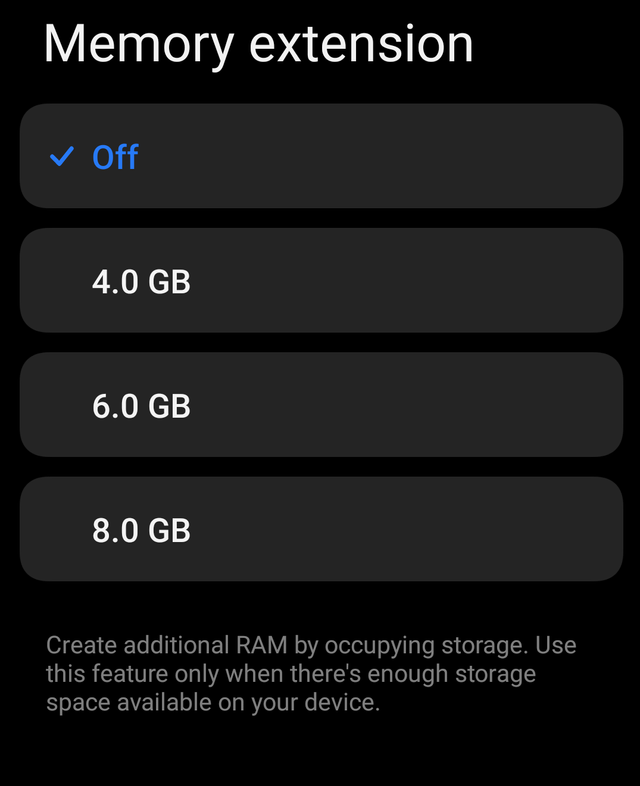
Many Android phones now include a feature called Memory Extension, RAM Expansion, Virtual RAM, RAM Plus, or something similar. It sounds exciting: your phone can “add” extra RAM by using part of your internal storage.
But should you actually use it?
The short answer: sometimes, but not always. Memory extension can help certain phones keep more apps open, but it is not the same as real RAM. On some devices, turning it off can make the phone feel smoother.
What Is Memory Extension?
Memory extension uses a portion of your phone’s internal storage as extra temporary memory. For example, if your phone has 6 GB of RAM and you set memory extension to 4 GB, the system may advertise something like “6 GB + 4 GB RAM.”
That does not mean your phone now has 10 GB of real RAM.
Real RAM is very fast. Internal storage is much slower, even on modern phones with fast UFS storage. Memory extension is more like an overflow area. When the phone is under pressure, Android can move less-active app data into this virtual memory space instead of closing the app completely.
When Memory Extension Can Help
Memory extension is useful when your phone has limited physical RAM and you often switch between apps.
You may want to turn it on if:
- Your phone has 3 GB or 4 GB RAM
- Apps reload often when you switch back to them
- You use many lightweight apps at once, such as WhatsApp, Telegram, browser, email, notes, and maps
- Your phone has fast internal storage
- You care more about keeping apps open than maximum speed
For entry-level phones, memory extension can reduce app reloads. It may make multitasking feel more convenient, especially if the phone normally closes background apps too aggressively.
A good setting for these phones is usually 2 GB to 4 GB, depending on what options your phone provides.
When You Should Turn It Off
You should consider turning memory extension off if your phone already has enough RAM.
Turn it off if:
- Your phone has 8 GB, 12 GB, or more RAM
- The phone feels slower after enabling it
- Apps stutter when switching
- Games perform worse
- Your storage is almost full
- You mostly use one or two apps at a time
- You want the cleanest, most responsive performance
On phones with plenty of real RAM, memory extension often brings little benefit. In some cases, it can add unnecessary background storage activity and make performance feel less crisp.
For many mid-range and flagship phones, especially those with 8 GB RAM or more, turning it off is often the better choice.
What GB Value Should You Choose?
If your phone lets you choose the amount of memory extension, avoid automatically selecting the highest number. More is not always better.
A practical guide:
| Physical RAM | Suggested Setting |
|---|---|
| 3 GB RAM | 2 GB to 3 GB |
| 4 GB RAM | 2 GB to 4 GB |
| 6 GB RAM | 2 GB, or off if performance is fine |
| 8 GB RAM | Off, or 2 GB if apps reload often |
| 12 GB+ RAM | Off |
The best value depends on your phone’s storage speed, Android version, and how aggressively the manufacturer manages background apps.
Is More Virtual RAM Better?
Not necessarily.
Setting memory extension to a large value does not magically make your phone faster. It only gives the system more room to store inactive memory pages. If the phone relies too much on virtual RAM, performance can feel slower because storage is not as fast as real RAM.
A high value may help keep more apps technically “open,” but those apps may not resume instantly. For gaming, camera use, video editing, or heavy apps, real RAM matters much more.
Does Memory Extension Damage Storage?
For normal users, memory extension is unlikely to quickly damage modern phone storage. However, it can increase read and write activity. Internal storage has a limited write lifespan, though modern devices are designed to handle many years of normal use.
The bigger practical issue is not damage. It is performance. If your phone has slower storage, memory extension can make the device feel less responsive under load.
Best Rule of Thumb
Use memory extension only if it solves a problem.
If your apps keep reloading and your phone has low RAM, turn it on and try a modest value such as 2 GB or 4 GB.
If your phone already feels smooth, or it has 8 GB RAM or more, leave memory extension off.
How to Test It Yourself
The best setting is the one that works on your phone. Try this simple test:
- Use your phone normally for a day with memory extension off.
- Notice whether apps reload often.
- Turn memory extension on with a small value, such as 2 GB.
- Use the phone for another day.
- Compare app switching, gaming, battery, and general smoothness.
If app switching improves without slowing the phone, keep it on. If the phone feels heavier or laggier, turn it off.
Final Recommendation
For most users:
- Low-RAM phones: turn it on, use 2 GB to 4 GB.
- 6 GB RAM phones: test both; use 2 GB if needed.
- 8 GB RAM or more: usually turn it off.
- Gaming phones or performance-focused users: usually turn it off.
- Heavy multitaskers on budget phones: turn it on.
Memory extension is not fake, but it is often misunderstood. It is a helper for low-memory situations, not a replacement for real RAM. The best setting is not the biggest number; it is the smallest setting that actually improves your daily use.






Post Comment