amateur radio
ham radio
radio amatur
chirp spread spectrum, css modulation, digital modes, ESP32 firmware, ESP32 FT8, ESP32 ham radio, ESP32 LoRa, ESP32 transceiver, ESP32 web server, ESP32-S3, ft8, FT8 application layer, FT8 over LoRa, FT8 protocol, FT8 QSO, FT8 state machine, ft8-lora, G5LSI, ham radio digital modes, Heltec WiFi LoRa 32 V3, indrusiak, lora, LoRa FT8, LoRa ham radio, LoRa PHY, LoRa transceiver, platformio, SSD1306 OLED, SX1262, SX1262 radio, weak signal modes
9M2PJU
0 Comments
FT8 over LoRa: a novel rehousing of the FT8 protocol onto a LoRa physical layer
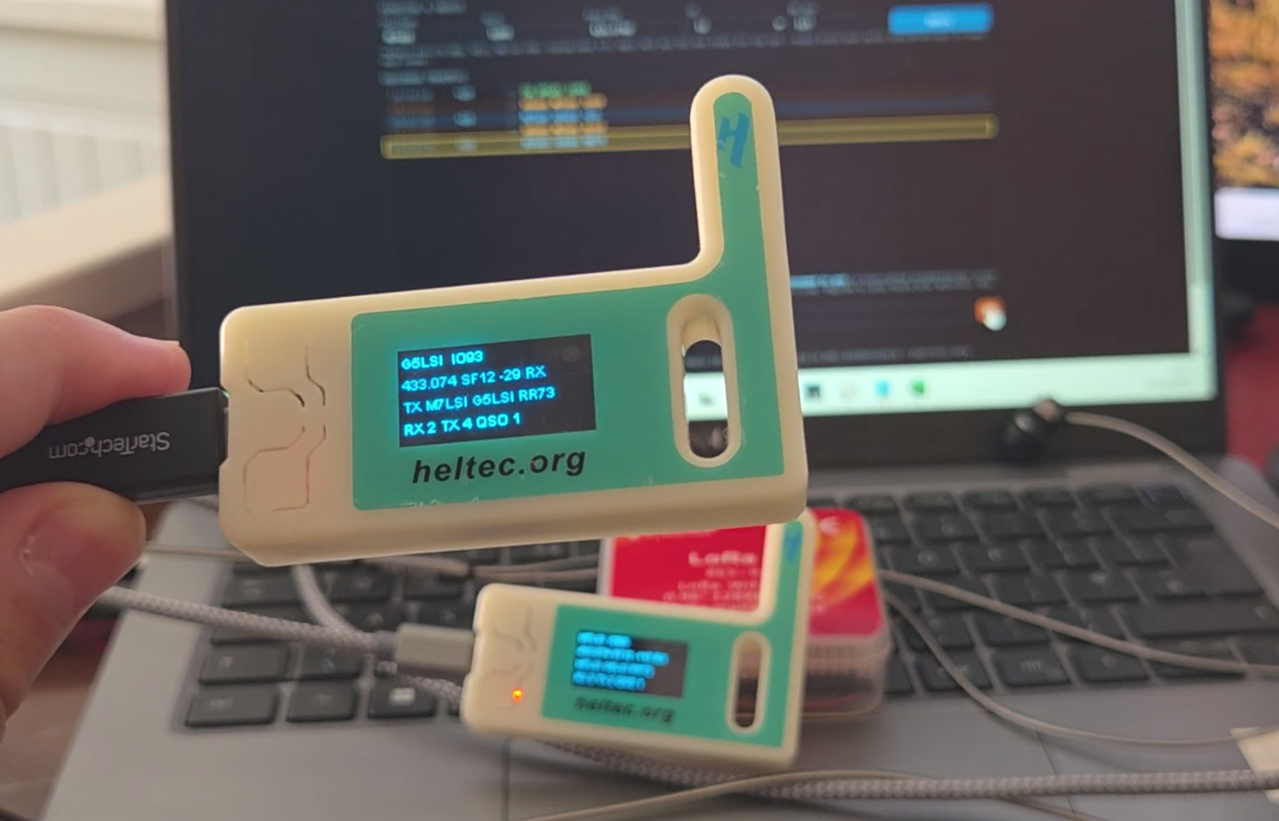
A new project by Leandro Soares Indrusiak (G5LSI), published under the name ft8-lora, does something that is conceptually simple but, as far as I can tell, has not been packaged into a flash-and-go firmware before. It takes the FT8 application layer, the message grammar and QSO state machine that hams know from WSJT-X, and runs it over a LoRa link instead of the FT8 physical layer. The result is a self-contained, web-controlled FT8-style transceiver built on a Heltec WiFi LoRa 32 V3 board, with no PC required and no FT8 waveform involved.
The project is Apache-2.0 licensed, has a 54-check test suite, and ships prebuilt firmware you can flash to a blank board in one shot. Before recommending it or critiquing it, it is worth being precise about what it actually is, because the name invites a misunderstanding the author has explicitly tried to head off in the README.
What it is, and what it is not
The phrase “FT8 over LoRa” needs unpacking. Real FT8, as defined by Joe Taylor (K1JT) and the WSJT-X team, is a physical layer: an 8-FSK waveform transmitted in 15-second slots, with a 79-symbol Costas/LDPC structure that decodes down to roughly -24 dB S/N. That waveform is what gives FT8 its legendary weak-signal performanc
e. The SX1262 radio on the Heltec board cannot synthesise that waveform, and the firmware does not attempt to.
What the firmware does instead is carry the FT8 application layer as plain ASCII text inside ordinary LoRa packets. The standard message exchange is preserved: CQ, then call plus grid, then a signed dB signal report, then an R-report, then RR73 or 73. Maidenhead grid locators are used. Per-QSO logging and ADIF exportare supported. The QSO state machine handles both roles, calling CQ and answering one, and it auto-fills replies the way WSJT-X does.
The signal report is not a measured signal-to-noise ratio. It is synthesised from the LoRa RSSI of the received frame, mapped through anchors at -120 dBm to -23 and -28 dBm to +23, at roughly 2 dB per unit, clamped. The author is candid that these anchors are a guess at a useful dynamic range for 433 MHz LoRa, not a calibrated mapping. Anyone using the project for serious comparison work should treat the reports as relative indicators, not lab-grade measurements.
The author draws the parallel himself: this is the same idea as LoRa-APRS, where a well-known ham application protocol is re-housed onto a LoRa physical layer. APRS over LoRa is not APRS over 1200 baud AFSK, and FT8 over LoRa is not FT8 over the WSJT-X waveform. Both preserve the protocol semantics while substituting the PHY.
Hardware and bring-up
The target board is the Heltec WiFi LoRa 32 V3, which pairs an ESP32-S3 with an SX1262 radio and an SSD1306 128×64 OLED. The README documents the pin map and the bring-up sequence that the author found necessary, including the order of SPI initialisation before radio begin, the module wiring, the DIO2 RF switch, the TCXO on DIO3 at 1.8 V, and boosted RX gain. The OLED is driven through Vext on GPIO36 (low equals on), with a reset pulse on GPIO21 and I2C on SDA 17 and SCL 18 at address 0x3c.
This level of detail in a README is a good sign. ESP32 LoRa boards are notorious for bring-up friction, and the fact that the author has written down the exact sequence that works for this board saves anyone replicating the build from re-discovering it.
Using it
After flashing, the board starts an open WiFi access point named FT8LoRa-XXXX. You connect to it from a phone or laptop, browse to http://192.168.4.1/, and you are in the UI. From there you set your callsign (default G5LSI), grid (default IO93), frequency (default 439.9125 MHz, the UK-coordinated 70cm LoRa channel), spreading factor (default SF12), and bandwidth (default 125 kHz), then apply. All boards in a net must share frequency, SF, and bandwidth.
The web UI is WSJT-X-like in feel. A scrolling window shows decoded traffic with UTC time, the dB report derived from RSSI, the raw RSSI, and the message. CQ lines are green and clickable. Lines addressed to you are blue and clickable. Your own transmissions echo in amber so you can see the full exchange in one place.
There is a TX field where you type a message and press TX (or Enter) to transmit immediately. The text stays in the field so you can retransmit by pressing TX again. An Answer button generates the appropriate reply to the highlighted line, whether that is answering a CQ or continuing a QSO addressed to you, and puts it in theTX field. A CQ button loads the standard CQ message. Neither button transmits on its own; they only compose. Incoming replies to your own callsign also auto-fill theTX field. A Reset QSO button clears the current contact context.
A finished QSO, meaning one that has reached RR73 or 73, is logged automatically. Export ADIF opens a log file in a new page that you save and import into your logger. The OLED shows your callsign and grid on line 0, status on line 1, the latest message addressed to you (or your latest transmit, whichever is newer) on line 2,and RX, TX, and QSO counters on line 3.
Important departures from real FT8
Two design decisions deserve to be flagged because they change the operating character of the mode, and a user who expects WSJT-X behaviour will be surprised.
First, transmission is immediate. Pressing TX sends the frame at once. Real FT8 is slotted to even or odd 15-second boundaries, and that slotting is part of what makes the mode work, because it lets many stations share a channel through time-division and lets decoders integrate coherently. Nothing in this firmware enforces slots or alternation. For a small net of cooperating stations this is fine. For a crowded channel it would be chaos. The author acknowledges this directly in the README.
Second, the signal report is derived from RSSI, not from a decoded S/N ratio. In real FT8 the report reflects the decoded SNR of the waveform, which is meaningfulfor propagation comparison. Here the report reflects the LoRa RSSI of the received frame, mapped through an uncalibrated anchor. It is a number that looks like an FT8 report and behaves like one in the QSO state machine, but it does not carry the same physical meaning. The author is explicit about this and labels the anchors as a guess.
There are also fixed net parameters that must match across all boards in a net: coding rate 4/5, sync word 0x12, preamble 8, CRC on, and 14 dBm TX. These are compile-time defines, so a net can agree on different values, but they are not negotiable at runtime.
Architecture and testing
One of the more interesting architectural choices is that all protocol interpretation lives in pure JavaScript that runs in the browser and under Node. The firmware itself never parses FT8 semantics. It moves bytes and renders status. The protocol brain, in test/ft8.js, provides field predicates, the RSSI-to-report mapping, a message parser, the QSO state machine, auto-fill, completion detection, and de-duplicated logging. The same code runs in the browser for live operationand under Node for the test suite, which is 54 checks and reportedly all passing.
This separation is good engineering. The protocol logic is testable without hardware, and the firmware stays small. The web UI is generated from an HTML shell with a splice point and the JavaScript brain spliced in verbatim, then packed into a PROGMEM header. The README includes the regeneration script so you can rebuild the header from source.
The HTTP API is straightforward: GET endpoints for status, received traffic, and the log, POST endpoints for configuration, transmission, and log management, and a GET for the ADIF file. All POSTs use application/x-www-form-urlencoded, which the ESP32 WebServer parses reliably.
Security considerations
The access point is open by default, and the optional HTTP Basic auth is off by default. The author’s reasoning is that on an open AP the auth gate adds no real protection, and its 401 and retry handshake can itself break POSTs, so it starts disabled. Anyone deploying this in an environment where the WiFi is exposed should turn auth back on by setting WWW_AUTH to 1 in main.cpp, and should also consider that an open AP means anyone in range can connect and transmit. For a demonstration net at a hamfest or a private experiment at home this is fine. For a shared or semi-public deployment it warrants attention.
Timestamps are UTC taken from the browser clock at log time, because the board has no RTC and no NTP. This is a reasonable choice for a self-contained device, butit means the log timestamp depends on the client clock being correct. If you log from a phone with the wrong time, the ADIF record will be wrong.
Who is this for
The honest answer is that this is a project for experimenters, not a replacement for WSJT-X. If you want to work DX on the HF bands with weak-signal performance, this is not the tool. If you want to run FT8 from a shack PC with a real radio, this is not the tool. If you want a self-contained, battery-friendly, web-controlled FT8-style transceiver for local nets on 70cm, perhaps for a club demonstration, a field day experiment, a mesh-style contact between two points, or just to understand how the FT8 protocol layer works by seeing it implemented in a different physical context, this is an interesting and well-documented way to do it.
The project is young, with one contributor and no releases published at the time of writing. The README is unusually thorough, the test suite is a positive signal, and the prebuilt firmware lowers the barrier to entry considerably. The author has been careful to distinguish what the project is from what it is not, which is more than many hobby projects manage.
73,
9M2PJU




Post Comment