amateur radio
digital mode
FT8
ham radio
parks on the air
POTA
sota
summits on the air
amateur radio, Android FT8, CAT control Android, digital modes, field activation, field radio setup, FT4, ft8, FT8 Android, FT8 app, FT8 phone, FT8 without computer, FT8 without laptop, FT8CN, FT8TW, ham radio, JS8, lightweight ham radio, minimalist ham radio, outdoor ham radio, park activation, phone-based FT8, portable FT8 setup, portable ham radio, portable operating, POTA, POTA activation, POTA gear, QRP portable, radio control app, sota, SOTA activation, SOTA gear, summit activation
9M2PJU
0 Comments
Running FT8 from your phone in the field: a look at FT8TW
If you’ve ever done a SOTA or POTA activation, you know the gear creep. You start with “just the radio and an antenna” and end up with a laptop, a tangle of USB cables, a soundcard interface, a power bank for the laptop, a second power bank for the soundcard, and a backpack that weighs more than the radio. By the time you’reset up, the weather window has closed and you’re cold. On a POTA activation in a park you might have a picnic table, but you’ve still lugged a laptop and three cables to a bench that would rather hold a sandwich.
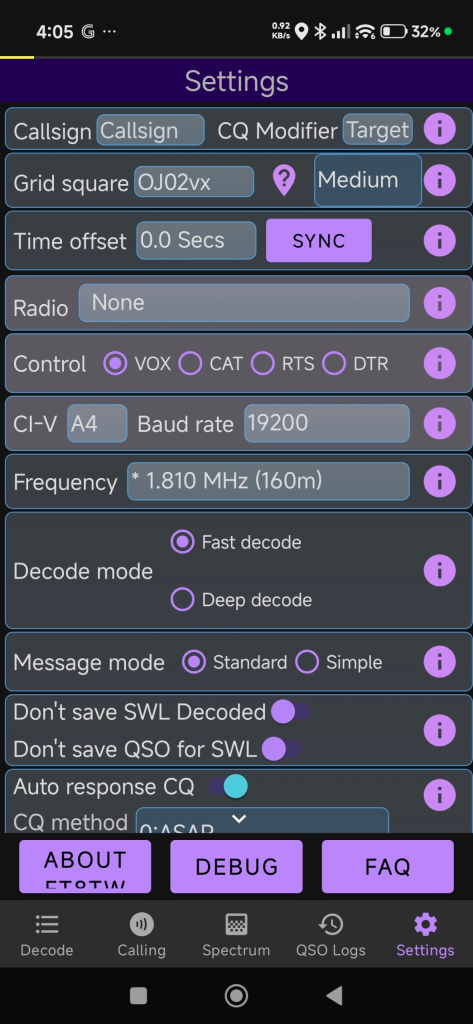
FT8TW is one of the answers to that problem. It’s an Android app that runs FT8 directly on your phone, no computer, no interface box, no cable salad. Radio, battery, antenna, phone. That’s the kit.
What it is
FT8TW is a fork of FT8CN (https://github.com/N0BOY/FT8CN), the original Android FT8 app by BG7YOZ and N0BOY. The fork is maintained by BV6LC (danleetw), a Taiwanese ham who built it for his own field activations in the mountains and then released it for everyone.
The fork’s focus is explicit and narrow: make activations faster and safer to set up and tear down. That’s not a marketing line. it’s the actual design intent. In bad weather on a summit, the difference between a 90-second pack-up and a 10-minute pack-up is the difference between a dry radio and a wet one, and between staying warm and getting hypothermic. In a park, the calculus is less survival-oriented but the convenience is the same: less gear means more time on the air and less time fiddling in the parking lot. FT8TW is built around that use case.
Why it matters for field activating
The conventional FT8 setup assumes you have a table, a chair, and shelter. None of those exist on most summits. On a POTA activation you might get the table, but you’ve still dragged a laptop and a fistful of cables to a park bench. Anything that removes a piece of equipment from the chain is a real improvement, not aconvenience.
Concretely, with FT8TW you can:
• Run FT8 / FT4 / JS8 from your phone
• Control supported radios directly from the phone
• Skip the laptop, the signalink, and the USB hub
• Pack the whole station in under a minute when the weather turns or the park closes at dusk
The trade-off is the usual one for phone-based operating: you’re at the mercy of your phone’s battery and audio path, and the UI is more cramped than a desktop app. For a planned, long session from a fixed shack, a computer is still the better tool. For a two-hour activation on a windy ridge, or an evening POTA session from a folding chair, the phone wins.
Where to get it
There are three release channels on GitHub:
• Stable — recommended for actual activations. Use this one.
• Test — for users willing to help find bugs.
• Debug — only if BV6LC specifically asks you to run it.
Releases: https://github.com/danleetw/FT8TW/releases
It’s also on Google Play: https://play.google.com/store/apps/details?id=com.bg7yoz.ft8tw
Don’t sideload it from random sites. The README is explicit about this and it’s good advice, a “modified” FT8 app from an unknown source is exactly the kind of thing you don’t want touching your radio’s CAT control.
Reporting issues
BV6LC is upfront about his situation: he’s not retired, his kid is in school, and this is a spare-time project. That means issue reports need to be actual issue
reports, not “it crashed again” with no context. If you use it and hit a bug, take the time to write down:
• what you were doing when it broke
• what exactly happened
• a screenshot or short screen recording if possible
Issues go on GitHub: https://github.com/danleetw/FT8TW/issues Facebook group: https://www.facebook.com/groups/2460163917688075
There’s also a YouTube playlist with usage tips: https://www.youtube.com/playlist?list=PLrXZ1U6SCKfWc8pYtKHpirGeyk5XCOdfp
A note on the manual
The user manual lives at https://danleetw.github.io/FT8TW and BV6LC is openly looking for volunteers to help write and maintain it. If you’ve used the app enough to know it well and you can write clearly, this is a high-leverage way to contribute, documentation is usually the bottleneck for open-source ham projects, and a good manual multiplies the number of people who can use the software successfully.
Credit where it’s due
FT8TW wouldn’t exist without FT8CN by BG7YOZ and N0BOY. The fork is a specialization of their work, not a replacement. If you want the upstream, full-featured version, it’s at https://github.com/N0BOY/FT8CN.
My take
I haven’t run FT8TW myself from a summit or a park yet, but the design philosophy resonates. The best field gear is the gear that disappears — that you don’t have tothink about while you’re trying to make contacts before the cloud rolls in or the sun sets behind the trees. Anything that removes a cable and a device from the chain is moving in the right direction. If you’re a SOTA or POTA operator already carrying an Android phone, it’s worth a serious look.
73,
9M2PJU




Post Comment