VoxDMR: Get on DMR Without a Radio Using Native AMBE+2 and BrandMeister Direct Connect
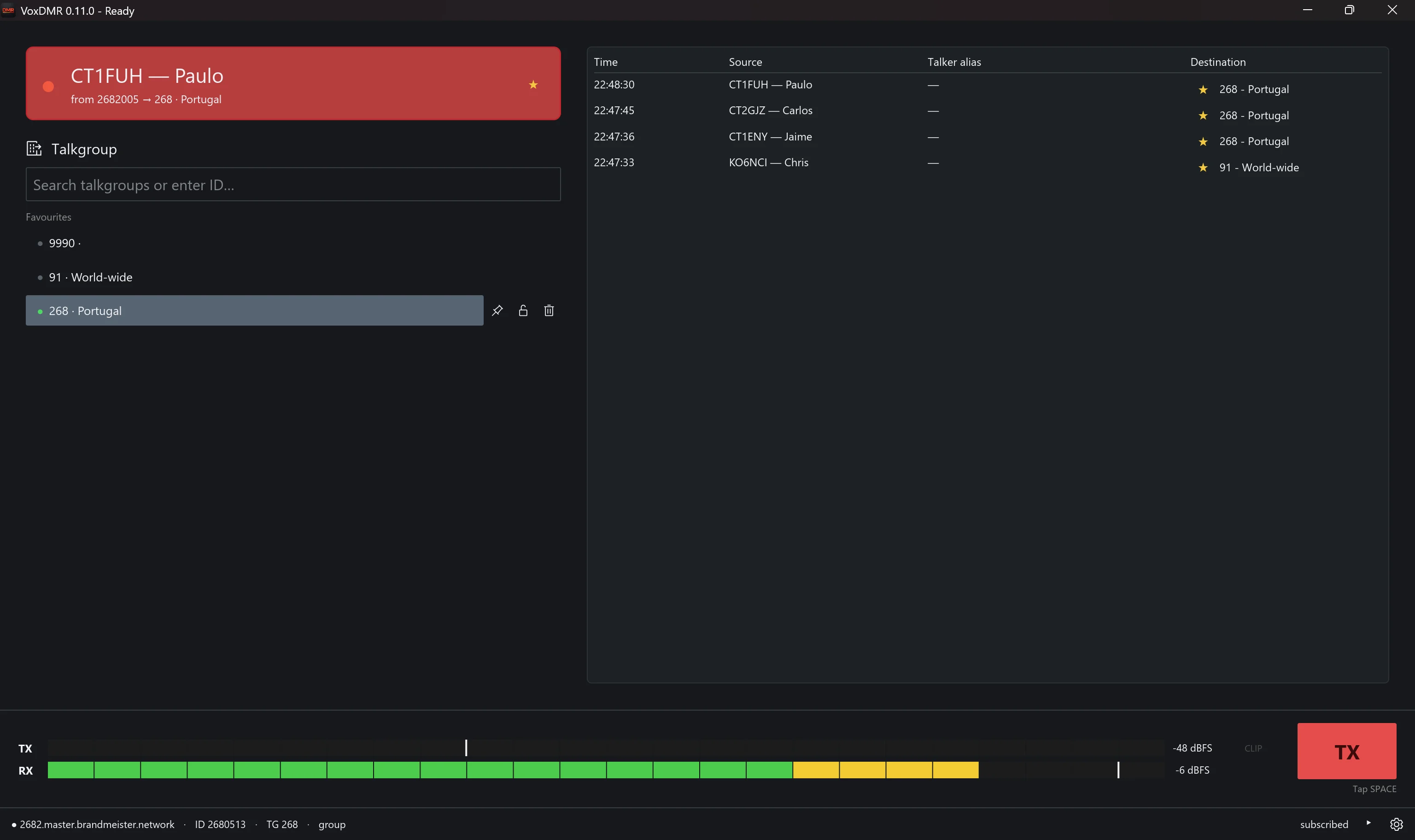
TL;DR: VoxDMR by João Calado (CT7BLE) is a free, modern, cross-platform Digital Mobile Radio (DMR) client application for Android, Windows, macOS (Apple Silicon), and Linux. It connects directly to BrandMeister (via the native Rewind terminal protocol) and other networks (such as TGIF, FreeDMR, and ADN Systems via the open Homebrew protocol) over Wi-Fi or mobile data without requiring a physical radio or MMDVM/Pi-Star hotspot. Featuring bit-exact AMBE+2 vocoder emulation, dedicated PoC radio hardware support (with physical PTT and rotary knob assignment across 35+ devices), a distraction-free Car Mode, and zero telemetry or subscriptions, VoxDMR delivers an authentic DMR experience anywhere with an internet connection.
What Is VoxDMR?
VoxDMR is a free, cross-platform digital voice client for amateur radio operators that connects PCs, Macs, smartphones, and dedicated PoC cellular radios directly to DMR networks like BrandMeister and TGIF using software-emulated AMBE+2 vocoders without physical transceivers or MMDVM hotspots.
+-----------------------------------------------------------------------------------------+
|                                  VoxDMR SYSTEM TOPOLOGY                                 |
+-----------------------------------------------------------------------------------------+

 [ Client Devices ]                  [ VoxDMR Core Engine ]               [ DMR Server Networks ]
 ┌────────────────────────┐          ┌────────────────────────────┐       ┌──────────────────────┐
 │ Android Smartphone     │          │ Direct Protocol Engines:   │       │ BrandMeister Network │
 │ (Google Play / Sideload│ ──IP────►│ - BrandMeister Rewind      │ ────► │ (Direct Master IP)   │
 └────────────────────────┘          │   Terminal Protocol        │       └──────────────────────┘
 ┌────────────────────────┐          │ - Open Homebrew (HB)       │       ┌──────────────────────┐
 │ Dedicated PoC Handsets │          │   Repeater Protocol        │ ────► │ TGIF Network Master  │
 │ (Hytera P50, Inrico)   │ ──IP────►│                            │       └──────────────────────┘
 └────────────────────────┘          ├────────────────────────────┤       ┌──────────────────────┐
 ┌────────────────────────┐          │ Emulated AMBE+2 Vocoder    │ ────► │ FreeDMR / ADN /      │
 │ Desktop Workstations   │          │ (MD-380 Firmware Core)     │       │ HBLink Reflectors    │
 │ (Linux, Win10/11, macOS│ ──IP────►│                            │       └──────────────────────┘
 └────────────────────────┘          ├────────────────────────────┤
                                     │ User Features:             │
                                     │ - BrandMeister TG Database │
                                     │ - PTT & Latch Modes        │
                                     │ - Android Car Mode UI      │
                                     │ - Zero Telemetry & Tracking│
                                     └────────────────────────────┘
Entering the world of Digital Mobile Radio (DMR) has historically required a steep investment: purchasing a dedicated digital handheld transceiver (such as an Anytone, Motorola, or Tytera), programming complex codeplugs with frequencies, color codes, and time slots, and purchasing an MMDVM-based personal hotspot (like a Pi-Star, OpenSpot, or JumboSpot).
If an amateur radio operator is traveling, staying in a hotel where RF antennas cannot be deployed, or simply exploring local talkgroups before buying hardware, physical radios present hurdles.
VoxDMR solves this by placing a full-featured, standalone DMR terminal directly on your desktop, smartphone, or dedicated cellular radio.
VoxDMR vs Traditional DMR Access Solutions
To understand how VoxDMR compares with existing software clients and physical DMR hardware, let us examine their architectural differences:
| Solution | Hardware Required | Platforms Supported | DMR Network Protocols | Vocoder Architecture | PoC Radio Support | Cost & Licensing |
|---|---|---|---|---|---|---|
| VoxDMR (CT7BLE) | None (Internet) | Android, Win, macOS, Linux | BrandMeister Rewind + HB | Emulated AMBE+2 Core | 35+ Radio Profiles | Free (No Ads) |
| DroidStar (AD8DP / Mod) | None (Internet) | Android, iOS, Linux, Win (Separate) | Homebrew / MMDVM Host | External Plugin / Emulated | Basic Key Map | Open Source (GPLv2) |
| BlueDV (PA7LIM) | None or ThumbDV USB | Windows, iOS, Android | DMRplus, BrandMeister | AMBE-3000 Hardware or Software | Minimal | Free (Closed Source) |
| MMDVM / Pi-Star Hotspot + HT | Hotspot + DMR Handheld | Raspberry Pi Embedded OS | Homebrew MMDVM Gateway | RF Air Interface | N/A (RF only) | $70-$150 (Hardware) |
| WebDMR / OpenBridge Gateway | Server Infrastructure | Web Browser (HTTP Audio) | OpenBridge Web Gateway | Server-side Transcoding | N/A (Browser) | Server Dependent |
Key Architectural Highlights of VoxDMR
VoxDMR combines modern UI design with robust network protocols:
+─────────────────────────────────────────────────────────────────────────────────────────+
|                               VOXDMR CORE FUNCTIONALITY                                 |
+─────────────────────────────────────────────────────────────────────────────────────────+

  1. Dual Protocol Connectivity
     - BrandMeister Rewind: High-efficiency native terminal protocol.
     - Open Homebrew (HB): Direct compatibility with TGIF, FreeDMR, and ADN Systems.
     - Profile Management: Store multiple network profiles with custom DMR IDs and passwords.

  2. Bit-Exact Software AMBE+2 Vocoder
     - Official MD-380 firmware emulated locally in software.
     - SHA-256 verified download on first launch.
     - Authentic over-the-air voice fidelity identical to physical DMR transceivers.

  3. Cross-Platform Desktop & Mobile Parity
     - Single unified UI across Linux, Windows 10/11, macOS Apple Silicon, and Android.
     - Linux AppImage & self-contained static binary (libasound2 / ALSA).
     - Standalone signed DMG for macOS (M1/M2/M3 Apple Silicon).

  4. Dedicated PoC Radio Integration
     - Native physical PTT key mapping, rotary talkgroup knob tuning, and side-key actions.
     - Standalone 32-bit (armeabi-v7a) APK for non-Play Store legacy PoC devices.
     - Accessibility service for backgrounded and lock-screen PTT operation.
1. Dual Protocol Engine: Rewind & Homebrew
Rather than relying on local RF loopbacks or heavy intermediate transcoders, VoxDMR communicates directly with master servers:
- BrandMeister Rewind Protocol: Connects to BrandMeister masters via the lightweight Rewind terminal protocol, allowing instant talkgroup subscriptions and lower connection overhead.
- Open Homebrew (HB) Protocol: Communicates via the standard Homebrew protocol utilized by Pi-Star, TGIF, FreeDMR, and HBLink networks.
- Server Profiles: Allows users to switch between BrandMeister, local regional FreeDMR reflectors, and TGIF talkgroups with a single click or tap.
2. Emulated AMBE+2 Vocoder Core
DMR uses the proprietary AMBE+2 voice compression algorithm. To provide authentic digital voice quality without requiring expensive external USB vocoder dongles (such as the DVStick30 or ThumbDV), VoxDMR runs the official Tytera MD-380 firmware vocoder in software emulation.
- On initial startup, the setup wizard downloads the firmware binary directly from trusted repositories (
md380.organd GitHub). - The image is validated against a strict SHA-256 checksum before execution.
- The result is crisp, authentic DMR audio identical to physical commercial transceivers.
3. Dedicated Push-to-Talk over Cellular (PoC) Hardware Support
A major breakthrough in VoxDMR is its extensive integration with Android-based PoC (Push-to-Talk over Cellular) radio handsets.
Many hams use rugged PoC radios (such as the Hytera P50, Inrico T320/S200/S100, KSUN ZL65, Talkpod, and Retevis models) as dedicated network walkie-talkies. VoxDMR supports over 35 distinct PoC devices:
- Physical PTT Key: Dedicated side PTT buttons trigger transmissions instantly.
- Rotary Channel Knobs: Rotary selector switches can be assigned directly to step through your saved DMR talkgroup favorites.
- Programmable Side Keys: Assign custom functions (such as Car Mode toggle or profile switching) to hardware side buttons.
- 32-Bit APK Build: Provides a dedicated
armeabi-v7abuild for older Android 7/8/9 devices without Google Play Services. - Background & Lock-Screen PTT: Uses an integrated Android accessibility service to allow PTT keying even when the screen is locked or the app is in the background.
User Interface Tour: Desktop, Mobile, and Car Mode
VoxDMR delivers a consistent visual experience across all platforms.
+-----------------------------------------------------------------------------------------+
|                               VOXDMR DESKTOP MAIN WINDOW                                |
+-----------------------------------------------------------------------------------------+
 [ Profile: BrandMeister Master ] [ ID: 5020123 ] [ Callsign: 9M2PJU ] [ Status: CONNECTED]
 ┌───────────────────────────────────────┬───────────────────────────────────────────────┐
 │ Talkgroup Browser & Favorites         │ Active Reception / Transmission Scope         │
 │ ┌───────────────────────────────────┐ │ ┌───────────────────────────────────────────┐ │
 │ │ Search: [ 91          ] (Worldwide)│ │ │ Talkgroup: TG 91 (Worldwide)              │ │
 │ ├───────────────────────────────────┤ │ │ Callsign:  9M2PJU - Piju (Kuala Lumpur)   │ │
 │ │ ⭐ TG 91   - Worldwide (Active)   │ │ │ Location:  Malaysia (CQ Zone 28)          │ │
 │ │ ⭐ TG 92   - Europe               │ │ ├───────────────────────────────────────────┤ │
 │ │ ⭐ TG 502  - Malaysia National    │ │ │ Audio Level Meter: [========--------] 0 dB│ │
 │ │ ⭐ TG 5021 - Central Net          │ │ ├───────────────────────────────────────────┤ │
 │ │ ⭐ TG 3100 - USA Nationwide       │ │ │ [ PUSH TO TALK ] (Spacebar / Latch Mode)  │ │
 │ └───────────────────────────────────┘ │ └───────────────────────────────────────────┘ │
 └───────────────────────────────────────┴───────────────────────────────────────────────┘
1. Interactive Talkgroup Management
- Instant Search & Autocomplete: Search thousands of talkgroups dynamically from the integrated BrandMeister database by name, country, or numeric ID.
- Live Activity Indicators: View real-time visual activity dots next to favorite talkgroups to see which nets are currently active before tuning.
- Private Calling: Initiate direct one-to-one private calls to individual DMR IDs.
2. Flexible PTT Operation
- Standard Push-to-Talk (Hold): Press and hold the Spacebar, mouse button, or hardware PoC key to transmit; release to listen.
- Latch / Toggle Mode: Tap once to open the mic, tap again to return to receive. Ideal for net control operations and long check-ins.
- Audio Routing & Gain Tuning: Features -12 to +12 dB input/output gain sliders and optional RX Automatic Gain Control (AGC).
+-----------------------------------------------------------------------------------------+
|                                VOXDMR ANDROID CAR MODE                                  |
+-----------------------------------------------------------------------------------------+
  ┌─────────────────────────────────────────────────────────────────────────────────────┐
  │                                                                                     │
  │                                     TG 502                                          │
  │                           [ MALAYSIA NATIONAL ]                                     │
  │                                                                                     │
  │                                  9M2PJU                                             │
  │                               PIJU - KUALA LUMPUR                                   │
  │                                                                                     │
  │   [ RECEIVING ] ────────────────────────────────────────── [ TIME: 00:14 ]          │
  │                                                                                     │
  │   ┌─────────────────────────────────────────────────────────────────────────────┐   │
  │   │ [ FAVORITE: TG 91 ]     [ FAVORITE: TG 502 ]     [ FAVORITE: TG 5021 ]      │   │
  │   └─────────────────────────────────────────────────────────────────────────────┘   │
  └─────────────────────────────────────────────────────────────────────────────────────┘
3. Android Car Mode
Designed specifically for mobile operators on the road, Car Mode replaces cluttered settings with an oversized, high-contrast dashboard:
- Large Callsign Display: Shows the transmitting station’s callsign and name across the full width of the screen.
- High-Contrast Status Cards: Clear visual states (Grey for Idle Listening, Warm Accent for Receiving, and Bold Red for ON AIR Transmission).
- Favorites Quick Rail: Switch talkgroups with a single thumb tap or hardware D-pad without taking your eyes off the road.
Step-by-Step Setup Guide
Getting started with VoxDMR takes under two minutes.
+─────────────────────────────────────────────────────────────────────────────────────────+
|                               VOXDMR SETUP WALKTHROUGH                                  |
+─────────────────────────────────────────────────────────────────────────────────────────+

  Step 1: Download & Install
  ──────────────────────────
  - Android: Install from Google Play Store or sideload APK from GitHub Releases.
  - Windows: Download and run VoxDMR-windows-x86_64.exe (No installer required).
  - macOS: Download VoxDMR-macos.dmg (Apple Silicon native build).
  - Linux: Download VoxDMR-linux-x86_64.AppImage and make executable (chmod +x).

  Step 2: First-Launch Setup Wizard
  ─────────────────────────────────
  1. Vocoder Download: Accept the MD-380 AMBE+2 firmware download.
  2. Identity: Enter your Callsign and 7-digit DMR ID (from RadioID.net).
  3. Server Profile: Select BrandMeister and enter your Hotspot Security Password
     (configured in BrandMeister SelfCare, NOT your portal login password).
  4. Talkgroup Selection: Choose your default talkgroup (e.g. TG 91 or TG 502).
  5. Audio Check: Test your microphone and speaker levels.
Frequently Asked Questions (FAQ)
Do I need a ham radio license to use VoxDMR?
Yes. Connecting to BrandMeister, TGIF, and other DMR networks requires a valid amateur radio operator license and a registered 7-digit DMR ID from RadioID.net.
Do I need a physical radio or MMDVM hotspot?
No. VoxDMR connects directly over your internet connection (Wi-Fi, Ethernet, or cellular data) using BrandMeister Rewind and Homebrew protocols, bypassing the need for RF hardware.
How does VoxDMR handle the AMBE+2 vocoder?
VoxDMR downloads the official MD-380 firmware binary on first launch (SHA-256 verified) and emulates the hardware AMBE+2 vocoder in software, delivering authentic audio without paid add-ons.
Can I install VoxDMR on dedicated Android PoC radios?
Yes. VoxDMR supports over 35 PoC radios (Hytera, Inrico, KSUN, Talkpod) with physical PTT button mapping, rotary channel knobs, and a dedicated 32-bit standalone APK for legacy devices.
Does VoxDMR track user data or require a subscription?
No. VoxDMR is completely free with no user accounts, third-party analytics, telemetry, advertisements, or paid tiers. All configuration profiles are stored locally on your device.
Sources and Further Reading
- VoxDMR Official Project Portal: voxdmr.com
- VoxDMR Documentation & Guides: voxdmr.com/docs
- Tested PoC Radios Directory: voxdmr.com/radios
- VoxDMR GitHub Releases Repository: github.com/jcalado/voxdmr-site
- BrandMeister DMR Network Portal: brandmeister.network
- RadioID Amateur Radio DMR Identification: radioid.net
- FreeDMR Open Digital Voice Network: freedmr.uk
- TGIF DMR Network Portal: tgif.network
73 de 9M2PJU


Post Comment