PropMon: Build N4MI’s ESP32-S3 AMOLED HF Propagation Monitor for Ham Radio
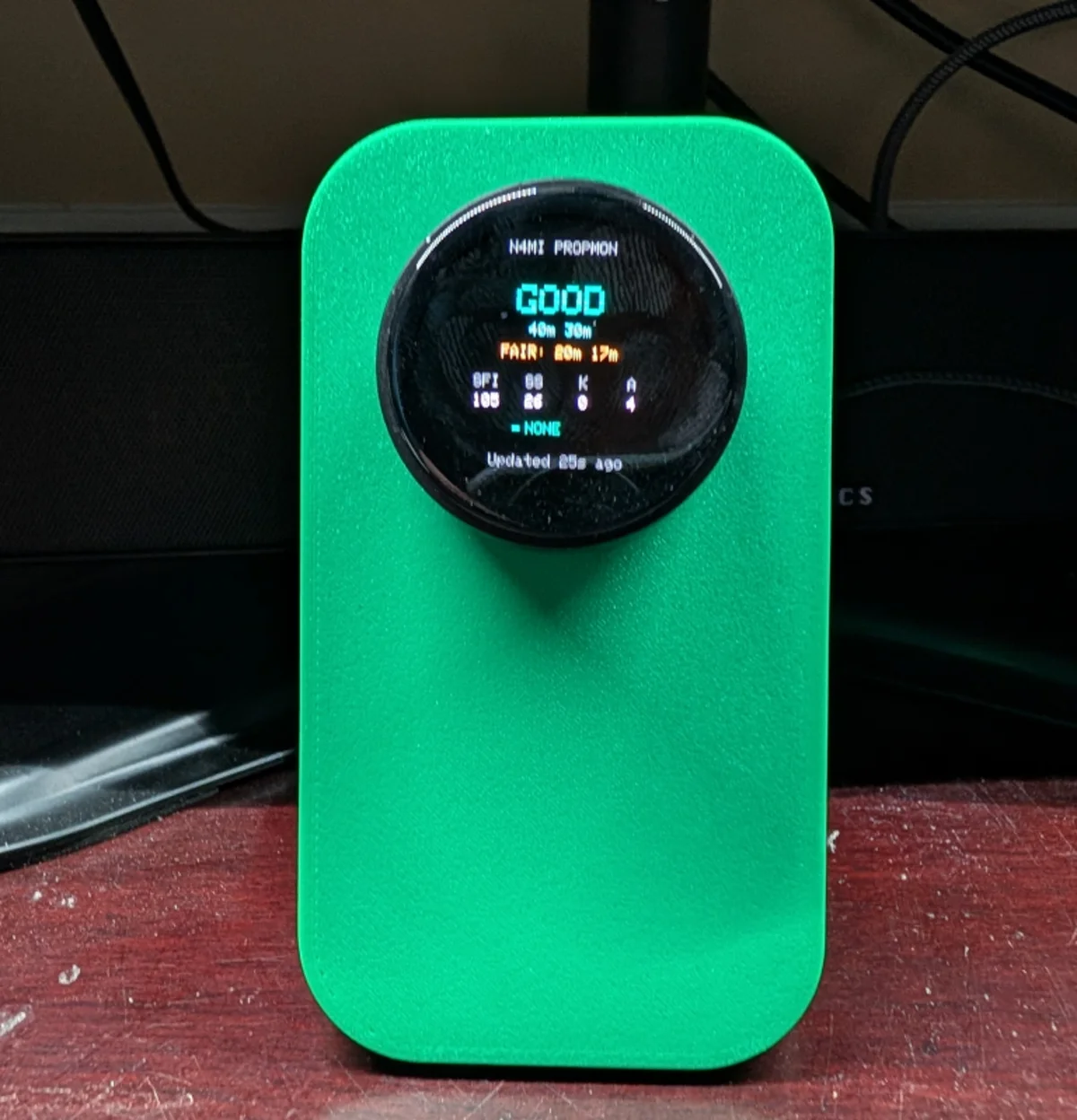
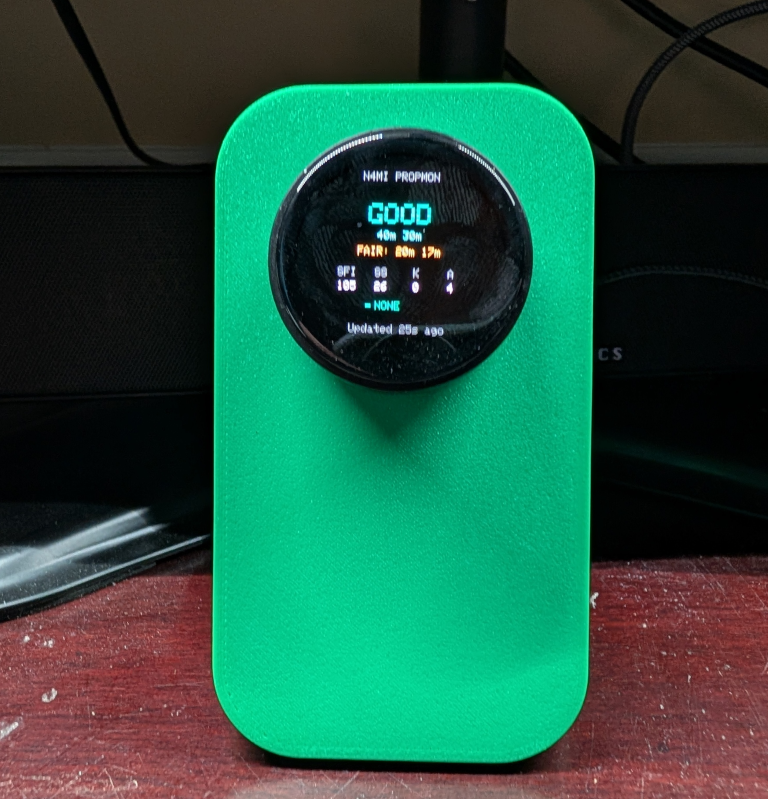
TL;DR: PropMon by Dan Marshall (N4MI) is an open source amateur radio desk instrument built on the LilyGO T-Encoder Pro (ESP32-S3, 390×390 round AMOLED display, and rotary encoder). Designed to answer the core operational question “Can I make the contact?”, PropMon continuously evaluates High Frequency (HF) band conditions across 160m through 6m, tracks solar indices (SFI, Sunspot Number, K-index, A-index, X-ray flare class, solar wind speed), and surfaces active space weather and tower wind alerts. Backed by a lightweight self-hosted Docker service that digests data from HamQSL, NOAA SWPC, WeatherFlow Tempest, and the NWS, PropMon brings instant ionospheric situational awareness to the operating desk without requiring a computer screen or browser tab.
What Is PropMon?
PropMon is an open source amateur radio desk instrument built on the LilyGO T-Encoder Pro that displays real-time HF band propagation conditions, solar indices, and severe space weather alerts on a 390×390 round AMOLED display using a physical rotary encoder.
+-----------------------------------------------------------------------------------------+
|                                  PROPMON SYSTEM TOPOLOGY                                |
+-----------------------------------------------------------------------------------------+

 [ External Data Providers ]            [ Self-Hosted Docker Backend ]       [ Ham Shack Display ]
 ┌────────────────────────┐              ┌──────────────────────────┐         ┌────────────────────────┐
 │ HamQSL (N0NBH XML)     │              │ PropMon Service (Docker) │         │ LilyGO T-Encoder Pro   │
 │ Solar & HF Band Status │ ──HTTP─────► │ - Ingests 4 data feeds   │         │ (ESP32-S3 + 8MB PSRAM) │
 └────────────────────────┘              │ - Solar day/night rating │         │                        │
 ┌────────────────────────┐              │ - 160m-6m tier assessment│         │ 390x390 Round AMOLED   │
 │ NOAA SWPC              │ ──HTTP─────► │ - Space weather alerts   │         │ (CO5300 Controller)    │
 │ K-index, Geomag Storms │              │ - Tempest wind gusts     │         │                        │
 └────────────────────────┘              │ - Single flat JSON API   │◄──Wi-Fi─│ 4 Rotary Knob Screens: │
 ┌────────────────────────┐              └──────────────────────────┘         │ 1. Overview Summary    │
 │ WeatherFlow Tempest    │ ──UDP/REST─►                                      │ 2. 10 HF Bands Roster  │
 │ Local Tower Wind Speed │                                                   │ 3. Solar & Space Index │
 └────────────────────────┘                                                   │ 4. Active Alerts       │
 ┌────────────────────────┐                                                   │                        │
 │ National Weather Serv. │ ──HTTP─────►                                      │ Ambient Alert Banner & │
 │ NWS Weather Alerts     │                                                   │ Captive Wi-Fi Portal   │
 └────────────────────────┘                                                   └────────────────────────┘
Every HF operator knows the routine: before tuning across 20 meters or spinning the VFO looking for DX, you open a web browser to check solar conditions. You look up the Solar Flux Index (SFI), inspect the planetary K-index for geomagnetic disturbances, and review propagation charts from HamQSL or VOACAP.
While web dashboards and computer widgets are common, they add friction. When operating digital modes like FT8, logging contest QSOs, or adjusting an antenna tuner, switching windows to inspect solar weather interrupts your focus. Worse, shack computers are routinely powered off or put to sleep when you are simply relaxing at the workbench.
Dan Marshall (N4MI) designed PropMon as the founding project of the N4MI Desktop Instrument Series. PropMon treats ionospheric physics not as a website to browse, but as a physical gauge on the operating desk. Built inside a compact 3D-printed enclosure powered by an ESP32-S3 and a vibrant round AMOLED screen, PropMon is always on, silent, and accessible with a quick twist of a tactile rotary knob.
PropMon vs Traditional Propagation Monitoring Methods
To understand why a dedicated physical instrument alters your shack workflow, consider how PropMon compares with conventional methods:
| Monitoring Method | Hardware Form Factor | Display Type & Technology | Always-On Reliability | Navigation & User Interface | Space Weather Alerts | Cognitive Distraction |
|---|---|---|---|---|---|---|
| PropMon (N4MI) | Dedicated Desk Gauge (T-Encoder) | 390×390 Round AMOLED (CO5300) | 100% Always On (NAS API) | Tactile Rotary Knob + Button | Ambient Banner & Badge | Zero (At-a-Glance) |
| HamClock (WB0OEW) | Dedicated Pi / Inovato Screen | 800×480 or HDMI Display (TFT / IPS) | High (If Dedicated Pi Running) | Touchscreen / Cursor | Full NOAA Planetary Charts | Low (Wide Wall Display) |
| Web Browser Tabs (QRZ / HamQSL) | Primary PC Workstation | Computer Monitor (LCD) | Zero (Tied to PC Power) | Mouse Clicking & Tab Hunting | Manual Page Refresh | High (Window Switching) |
| Smartphone Apps (Solar Activity) | Handheld Mobile Phone | Phone Screen (OLED / LCD) | Intermittent (App Sleep) | Touch Gestures & Swiping | Push Popups | Medium (Screen Lock/Notif) |
| Transceiver Scope (Icom / Yaesu) | Rig Built-in Display | Transceiver Screen | High (When Rig Powered) | Rig Buttons / Multi-Knob | None (RF-Only Activity) | Low (Band-Only Scope) |
While comprehensive platforms like HamClock excel as large wall clocks or second-monitor dashboards, PropMon fills a different niche: a small, palm-sized instrument positioned directly beside your rig’s VFO dial. It requires zero desktop space, uses virtually no power, and communicates band health instantly through bold color-coded typography.
Hardware Platform: LilyGO T-Encoder Pro
PropMon is built on the LilyGO T-Encoder Pro, an integrated embedded development platform designed specifically for smart rotary dial interfaces.
+─────────────────────────────────────────────────────────────────────────────────────────+
|                       LILYGO T-ENCODER PRO TECHNICAL PROFILE                            |
+─────────────────────────────────────────────────────────────────────────────────────────+

  Microcontroller:    Espressif ESP32-S3 (Xtensa Dual-Core 32-bit LX7 @ 240 MHz)
  Memory:             512 KB Internal SRAM, 16 MB Flash, 8 MB Octal PSRAM (OPI)
  Display Panel:      1.4-inch Round AMOLED Display
  Resolution:         390 x 390 Pixels (True Circular Viewport, High PPI)
  Display Driver:     CO5300 (or legacy SH8601 controller depending on hardware batch)
  Interface:          QSPI Display Bus for High-Framerate Rendering
  Rotary Input:       Incremental 24-Pulse Rotary Encoder with Push-Button Switch
  Wireless:           2.4 GHz Wi-Fi (802.11 b/g/n) and Bluetooth 5.0 LE
  Power Interface:    USB Type-C (Supports native USB-CDC and flashing)
  Form Factor:        Circular Dial Form Factor, Desktop 3D-Printed Angled Stand
+-----------------------------------------------------------------------+
| LilyGO T-Encoder Pro Component Map |
+-----------------------------------------------------------------------+
┌────────────────────────┐
│ 390x390 Round AMOLED │
│ True Black Background │
│ High Contrast Colors │
└───────────┬────────────┘
│
┌─────────────┴─────────────┐
│ Rotary Encoder Ring │
│ (Rotate: Cycle Screens │
│ Press: Force Refresh │
│ Long Hold: Setup Portal) │
└─────────────┬─────────────┘
│
┌─────────────┴─────────────┐
│ ESP32-S3 Core & 8MB PSRAM │
│ Wi-Fi + Arduino_GFX │
└─────────────┬─────────────┘
│
┌─────────────┴─────────────┐
│ USB-C Power & Data Port │
└───────────────────────────┘The AMOLED Advantage
Unlike traditional TFT or IPS LCDs with edge-lit LED backlights that bleed light into black letterboxing, AMOLED technology provides per-pixel illumination. Pixels representing deep black are turned completely off, delivering infinite contrast ratios and zero glow in a dimly lit ham shack.
Display Controller Pitfall: CO5300 vs SH8601
A critical discovery documented by N4MI involves LilyGO’s hardware manufacturing revisions. The T-Encoder Pro has shipped with two different AMOLED display controller ICs:
- Newer production boards use the CO5300 controller.
- Earlier production batches used the SH8601 controller.
The firmware defaults to Arduino_CO5300. If you flash the firmware onto your unit and observe clean serial output over USB but a completely blank screen, your board is likely equipped with the SH8601 revision. Swapping the display driver class in include/display_driver.h immediately resolves the blank screen.
Backend Architecture: Decoupling Propagation from the Shack PC
One of the most instructive design decisions in PropMon is how it fetches data.
Many maker projects attempt to fetch XML and parse heavy JSON directly from third-party APIs on the microcontroller itself. Dan Marshall rejected this pattern for two reasons:
- Microcontroller Fragility: When external websites change formatting, rotate TLS certificates, or rate-limit IP addresses, microcontrollers hard-crash, brick their network stack, or fill heap memory.
- Shack PC Dependency: Running an API server on the primary shack computer means the desk instrument goes dark whenever the PC is rebooted or shut down.
+─────────────────────────────────────────────────────────────────────────────────────────+
|                               PROPMON BACKEND DATA FLOW                                 |
+─────────────────────────────────────────────────────────────────────────────────────────+

  [ External Data Feeds ]
  HamQSL (Solar XML) + NOAA SWPC + WeatherFlow Tempest + NWS Alerts
                     │
                     ▼
  ┌───────────────────────────────────────────────────────────┐
  │ PropMon Backend Service (Docker container on Home NAS)    │
  │ - Scheduled ingestion cron (5 to 15 minute timers)        │
  │ - Robust error handling and offline caching               │
  │ - Solar day/night band rating engine                      │
  │ - Dynamic sunset/sunrise calculation for 160m/80m         │
  │ - Serves clean, single-point REST JSON on local LAN       │
  └─────────────────────────────┬─────────────────────────────┘
                                │ Flat JSON payload over LAN
                                ▼
  ┌───────────────────────────────────────────────────────────┐
  │ LilyGO T-Encoder Pro Display Unit                         │
  │ - Zero parsing overhead                                   │
  │ - Robust staleness color indicator                        │
  │ - Smooth UI frame rendering without network lockups       │
  └───────────────────────────────────────────────────────────┘
The Dedicated Docker Service
Dan deployed a lightweight Python backend service named PropMon on his always-on home NAS using Docker and Portainer (part of the streamdeck-hamradio repository).
The service runs four background ingestion tasks:
- HamQSL Scraper: Ingests Paul Herrman’s (N0NBH) authoritative XML feed, extracting Solar Flux Index, Sunspot Number, A-Index, K-Index, X-Ray flux, and baseline day/night band ratings.
- NOAA SWPC Client: Monitors planetary K-index trends and geomagnetic storm watches (G1 through G5 scale).
- WeatherFlow Tempest Integration: Queries the operator’s local on-site Tempest weather station via UDP/REST, tracking wind gusts that could endanger antenna towers.
- National Weather Service (NWS): Ingests severe convective storm and high wind warnings for the local county.
The backend digests these disparate feeds, applies domain logic, and serves a single, validated JSON endpoint to the LAN.
The 160-Meter Daylight Bug: A Lesson in Seasonal Ionospheric Physics
During bench testing, Dan noticed a puzzling anomaly: at 5:00 PM on a bright summer afternoon in Georgia, PropMon’s Bands screen declared 160 meters GOOD.
On the 1.8 MHz top band, daytime solar radiation charges the ionospheric D-layer, causing extreme signal absorption. In full daylight, 160 meters is virtually unusable for skywave communication. A rating of “GOOD” was physically impossible.
Investigating the backend revealed the culprit: the rating engine used a static, year-round UTC clock that assumed dusk occurred between 6:00 PM and 9:00 PM Eastern Time. While that approximation works during short winter days, in mid-summer the sun remains high in the sky well past 8:00 PM. A hardcoded clock allowed summer daylight to masquerade as nighttime propagation.
Dan resolved the issue by introducing dynamic solar ephemeris calculations based on station coordinates. The backend now accurately calculates true solar elevation, ensuring low bands (160m and 80m) remain rated POOR until true astronomical twilight settles over the path.
Exploring the Rotary Interface
The T-Encoder Pro uses a single rotary knob with a center push button. PropMon organizes all information into four primary rotating screens, plus a configuration view and an ambient alert overlay.
+-----------------------------------------------------------------------+
|                         PROPMON DISPLAY SCREENS                       |
+-----------------------------------------------------------------------+

        [ OVERVIEW ]                     [ BANDS ]
      ┌──────────────┐                 ┌──────────────┐
      │  PROPAGATION │                 │ 160m  80m  ● │
      │   CONDITIONS │                 │  60m  40m  ● │
      │     FAIR     │                 │  30m  20m  ● │
      │   (6 BANDS)  │                 │  17m  15m  ● │
      │ 4 Bands POOR │                 │  12m  10m  ● │
      └──────────────┘                 └──────────────┘

         [ SOLAR ]                      [ ALERTS ]
      ┌──────────────┐                 ┌──────────────┐
      │ SFI: 168     │                 │ TOWER WIND   │
      │ SSN: 142     │                 │ GUST 42 MPH  │
      │ K-Index: 2   │                 │ NWS WARNING  │
      │ A-Index: 7   │                 │              │
      │ X-Ray: C1.4  │                 │ ALL CLEAR    │
      └──────────────┘                 └──────────────┘
1. Screen 1: The Overview
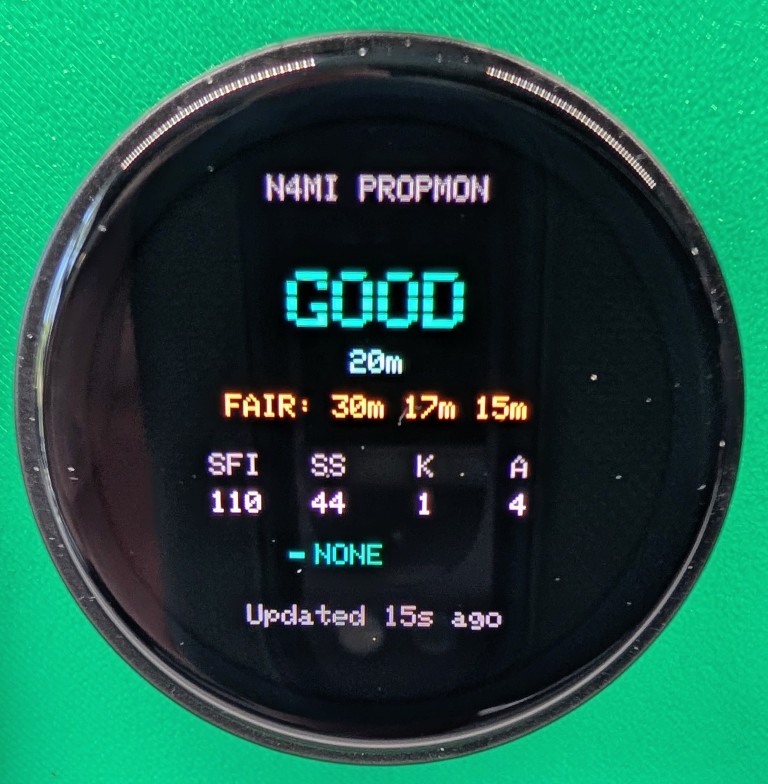
The Overview screen gives you an instant, high-level summary of the entire HF spectrum:
- Headline Tier: Identifies which operational tier has the highest concentration of open bands right now (GOOD, FAIR, or POOR).
- Tier Tally: Displays the band count (e.g.,
FAIR (6 BANDS)). - Secondary Tier Summary: Directly beneath, it notes the secondary status (e.g.,
4 Bands POOR). - Timestamp & Staleness: The bottom footer shows the time of the last update. If Wi-Fi fails or the backend stops refreshing, the footer changes color to warn you of stale data.
2. Screen 2: All 10 HF Bands
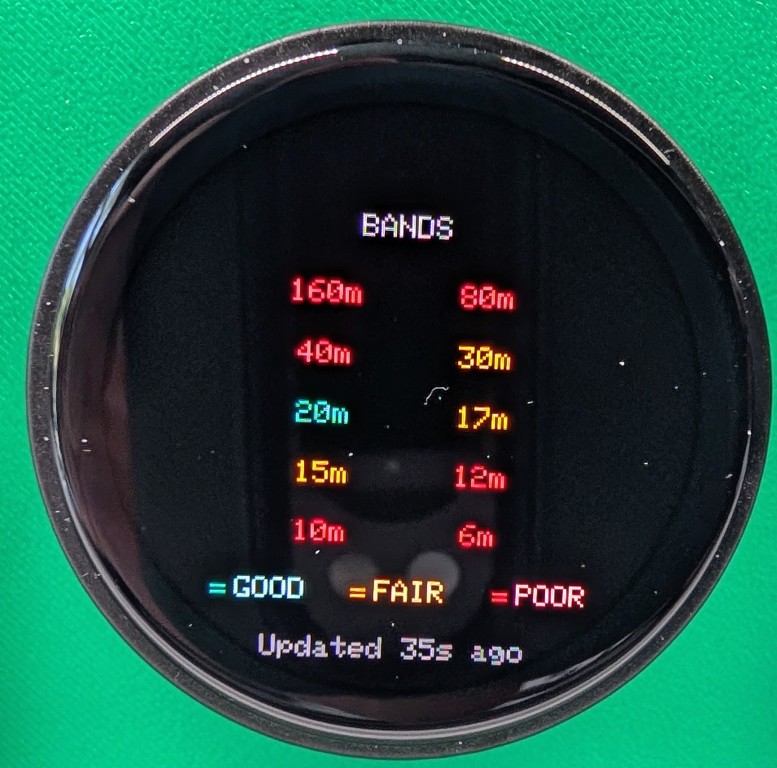
Turning the knob one click clockwise opens the Bands screen, displaying all ten amateur HF allocations in fixed vertical order:
- 160m, 80m, 60m, 40m, 30m, 20m, 17m, 15m, 12m, and 10m.
- Each band is paired with a distinct color-coded status badge:
- Green: GOOD (strong openings expected)
- Amber: FAIR (marginal conditions, high power or digital modes recommended)
- Red: POOR (high absorption, low ionization, or closed band)
Because the band order is locked, your eye learns to read the display in a fraction of a second.
3. Screen 3: Solar and Space Indices
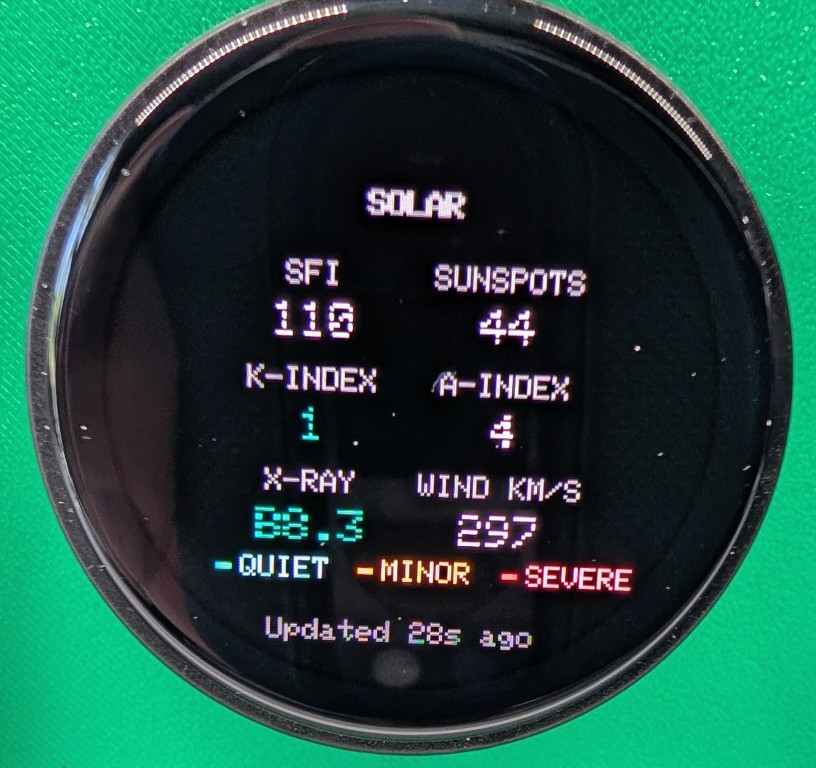
Rotating to Screen 3 reveals the underlying astrophysics driving the ionosphere:
- Solar Flux Index (SFI): The 10.7 cm solar radio flux measurement. SFI values above 150 typically signal excellent high-band (15m, 12m, 10m) ionization.
- Sunspot Number (SSN): Daily count of visible sunspots across the solar disk.
- Planetary K-Index: Quasi-logarithmic measure of geomagnetic disturbance (0 to 9). Values of 0-2 represent quiet, stable conditions; values of 4 or higher signify geomagnetic storms that disrupt polar and high-latitude paths.
- A-Index: Linear daily geomagnetic index derived from magnetometer networks.
- X-Ray Background & Flares: Displays real-time GOES satellite X-ray classifications (A, B, C, M, or X class). An escalating M- or X-class solar flare triggers sudden ionospheric disturbances (SID) that cause daylight radio blackouts.
- Solar Wind Speed: Expressed in kilometers per second (km/s), showing the velocity of the solar plasma stream buffeting Earth’s magnetosphere.
4. Screen 4: Active Alerts
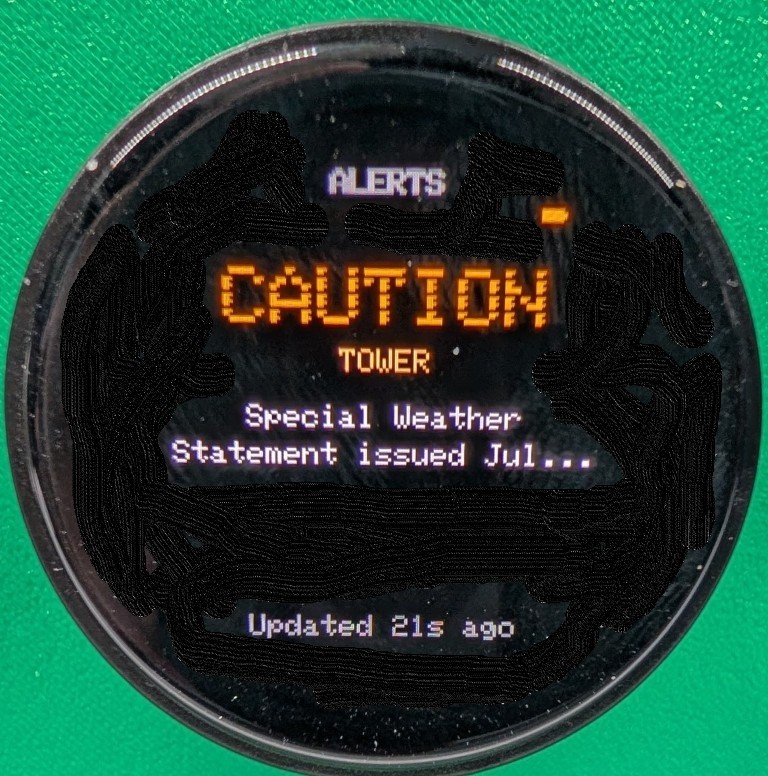
Screen 4 aggregates physical threats to your station and operations:
- Geomagnetic Storm Warnings: Alerts for coronal mass ejections (CMEs) or coronal hole high-speed streams impacting Earth.
- Tower Wind Alerts: Integrates with local WeatherFlow Tempest sensors. If wind gusts exceed station safety thresholds (e.g., 40+ mph), PropMon headlines the warning, prompting you to crank down telescopic towers or park directional yagis into the wind.
- All Clear State: When conditions are benign, the screen rests in a calm, green “ALL CLEAR” state.
5. Ambient Alert Banners and Persistent Badges
You do not have to be parked on the Alerts screen to catch severe space weather or rising winds.
PropMon incorporates a global alert notification engine:
- If a new alert is received or an existing condition worsens, a high-contrast ambient banner slides across the top of the display for several seconds, regardless of which screen you are viewing.
- Once the banner dismisses, a persistent alert badge remains visible in the screen header until the underlying condition clears.
+─────────────────────────────────────────────────────────────────────────────────────────+
|                              PROPMON AMBIENT ALERT OVERLAY                              |
+─────────────────────────────────────────────────────────────────────────────────────────+

      [ Normal Screen View ]                  [ High Wind / CME Event ]
        ┌──────────────┐                          ┌──────────────┐
        │ 160m  80m  ● │                          │ ! G3 STORM ! │ ◄── Temporary Banner
        │  60m  40m  ● │                          ├──────────────┤
        │  30m  20m  ● │ ───────Event Trigger───► │ 160m  80m  ● │
        │  17m  15m  ● │                          │  60m  40m  ● │
        │  12m  10m  ● │                          │ [!] Persistent Badge
        └──────────────┘                          └──────────────┘
On-Device Wi-Fi Setup via Captive Portal
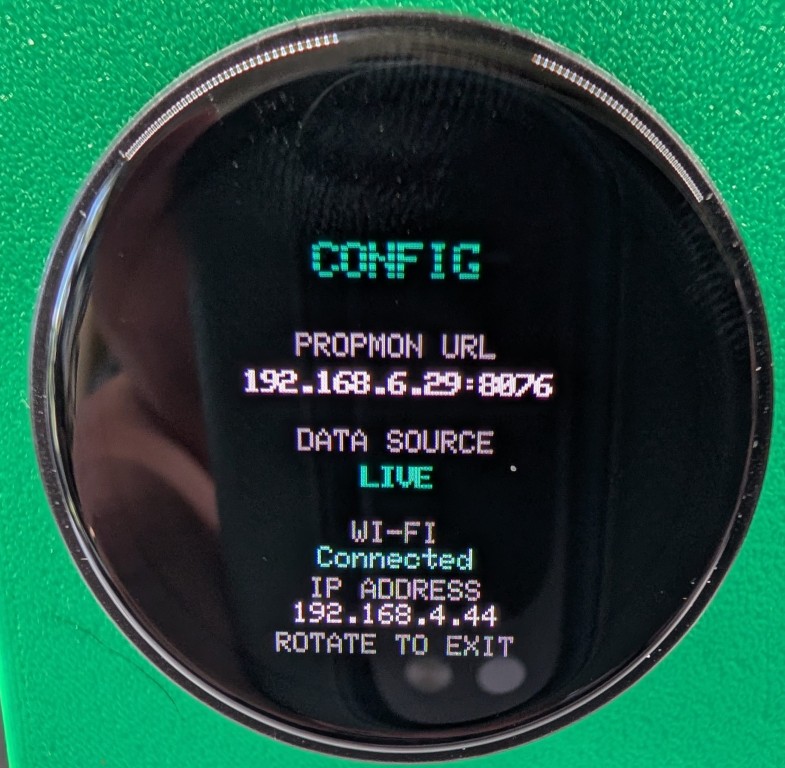
Early prototype builds required embedding home Wi-Fi credentials into include/wifi_credentials.h before flashing. To make PropMon easy to replicate for other operators, N4MI engineered a standalone captive portal on-boarding system (wifi_portal.cpp).
+─────────────────────────────────────────────────────────────────────────────────────────+
|                           CAPTIVE PORTAL ON-BOARDING WORKFLOW                           |
+─────────────────────────────────────────────────────────────────────────────────────────+

  [ LilyGO Dial ]                    [ Network Subsystem ]              [ User Smartphone ]
  ┌──────────────────┐               ┌──────────────────┐               ┌──────────────────┐
  │ Operator holds   │               │ Starts softAP    │               │ Phone connects to│
  │ knob for >3 sec  │ ────────────► │ "PropMon-Setup"  │ ────────────► │ "PropMon-Setup"  │
  └──────────────────┘               └──────────────────┘               └────────┬─────────┘
                                                                                 │
                                                                                 ▼
  ┌──────────────────┐               ┌──────────────────┐               ┌──────────────────┐
  │ Reboots and      │               │ Writes SSID &    │               │ Web portal opens;│
  │ joins home Wi-Fi │ ◄──────────── │ Password to NVS  │ ◄──HTTP POST─ │ selects SSID and │
  └──────────────────┘               └──────────────────┘               │ inputs password  │
                                                                        └──────────────────┘
When you hold down the rotary encoder button for more than 3 seconds:
- The ESP32-S3 starts a standalone Wi-Fi Access Point named
PropMon-Setup. - A captive DNS server intercepts all smartphone web requests, automatically opening a clean setup portal.
- The page presents a live list of scanned local 2.4 GHz SSIDs. You tap your home network, enter the WPA2 passphrase, and submit.
- The ESP32 writes the credentials into Non-Volatile Storage (NVS) and reboots, connecting directly to your home LAN.
During development, Dan tackled two subtle Wi-Fi bugs:
- The “False Success” Connection Bug: The device initially displayed “Connected!” before verifying that the supplied password was actually accepted by the router. Dan caught this by deliberately testing bad passwords, refining the state machine to validate DHCP lease acquisition before saving to NVS.
- Wi-Fi Radio Resource Contention: The ESP32 radio cannot reliably scan for surrounding networks while actively running an open SoftAP. The firmware now conducts an initial scan, caches the SSID list in memory, and then brings up the captive portal.
Firmware Build and Toolchain Configuration
PropMon is compiled using PlatformIO with the pioarduino platform fork.
Standard upstream PlatformIO espressif32 lacks support for the bleeding-edge ESP32 Arduino Core versions needed by LilyGO’s latest AMOLED panel drivers.
PlatformIO Configuration (platformio.ini)
[env:lilygo-t-encoder-pro]
platform = https://github.com/pioarduino/platform-espressif32/releases/download/51.03.07/platform-espressif32.zip
board = esp32-s3-devkitc-1
framework = arduino

board_build.partitions = default_8MB.csv
board_upload.flash_size = 16MB
board_build.flash_size = 16MB
board_build.arduino.memory_type = qio_opi

build_flags =
    -DARDUINO_USB_CDC_ON_BOOT=1
    -DBOARD_HAS_PSRAM

lib_deps =
    https://github.com/moononournation/Arduino_GFX.git
    bblanchon/ArduinoJson@^7.0.0
Notice that Arduino_GFX is fetched directly from the upstream repository without pinning an obsolete version, ensuring support for the Arduino_CO5300 display driver class.
Step-by-Step Build and Deployment Guide
Phase 1: Deploying the PropMon Backend Container
1. Open Portainer on your home NAS or server, create a new stack named propmon, and paste the Docker Compose definition:
version: "3.8"

services:
  propmon:
    image: python:3.11-slim
    container_name: propmon
    restart: unless-stopped
    ports:
      - "8076:8076"
    environment:
      - PORT=8076
      - STATION_LAT=33.4504            # Replace with your station coordinates
      - STATION_LON=-82.1981
      - TEMPEST_TOKEN=your_token_here # Optional: WeatherFlow Tempest API token
      - TEMPEST_DEVICE_ID=your_id     # Optional: WeatherFlow Tempest Device ID
      - NWS_STATION=KAGS              # Local NWS reporting station
    command: >
      bash -c "pip install flask requests &&
               git clone https://github.com/N4MI73/streamdeck-hamradio.git /app &&
               python /app/propmon/propmon_service.py"
2. Deploy the stack and verify that the endpoint returns valid JSON:
curl http://<nas-ip>:8076/api/instrument/propagationPhase 2: Building and Flashing the Hardware
1. Clone the firmware repository:
git clone https://github.com/N4MI73/n4mi-propagation-monitor.git
cd n4mi-propagation-monitor
2. Open the directory in VS Code with PlatformIO installed.
3. Edit include/config.h to point to your NAS backend IP address:
#pragma once

#define PROPMON_HOST "192.168.1.50"
#define PROPMON_PORT 8076
#define PROPMON_PATH "/api/instrument/propagation"
4. Connect the LilyGO T-Encoder Pro to your computer via USB-C.
5. Compile and flash the firmware:
platformio run -t upload6. Open the serial console to monitor initialization:
platformio device monitor -b 1152007. When prompted on screen, hold down the rotary knob to open PropMon-Setup, connect your phone, select your home Wi-Fi, and save your credentials.
The N4MI Desktop Instrument Ecosystem
+─────────────────────────────────────────────────────────────────────────────────────────+
|                              THE N4MI DESK INSTRUMENT TRIAD                             |
+─────────────────────────────────────────────────────────────────────────────────────────+

  ┌─────────────────────────┐   ┌─────────────────────────┐   ┌─────────────────────────┐
  │         PROPMON         │   │         APRSMON         │   │         DXMON           │
  │   (Propagation Unit)    │   │      (Local Activity)   │   │      (DX Hunter)        │
  ├─────────────────────────┤   ├─────────────────────────┤   ├─────────────────────────┤
  │ Round AMOLED / Rotary   │   │ Round AMOLED / Rotary   │   │ 4.3" Capacitive Touch   │
  │ "Can I make the contact?│   │ "What's around me?"     │   │ "Is my target active?"  │
  │ Solar Flux, K-index,    │   │ Local weather, APRS     │   │ Watched DXpeditions,    │
  │ Band Conditions (160-6m)│   │ stations, mobile count  │   │ Needed DXCC, Azimuth    │
  └────────────┬────────────┘   └─────────────────────────┘   └────────────▲────────────┘
               │                                                           │
               └─────────────── PropMon Propagation API Link ──────────────┘
PropMon is not an isolated gadget; it serves as the foundational data provider for the entire N4MI ecosystem:
- As a Standalone Instrument: It lives on your desk, giving you constant ambient awareness of space weather.
- As an API Source for DXMon: When Dan Marshall built DXMon (the wide touchscreen DX monitor), he did not write redundant solar scraping code. DXMon queries PropMon’s API over the local network, placing live green, amber, or red propagation condition dots right next to incoming DX cluster spots.
Frequently Asked Questions (FAQ)
What hardware does PropMon run on?
PropMon runs on the LilyGO T-Encoder Pro, featuring an ESP32-S3 microcontroller, 8MB PSRAM, a 390×390 circular AMOLED display, and a physical rotary encoder with a center push button.
Does PropMon require an active PC in the ham shack?
No. PropMon communicates over Wi-Fi with a lightweight Python backend running in Docker on an always-on NAS or Raspberry Pi. Your operating PC can remain completely powered off.
What should I do if my screen stays black after flashing?
The LilyGO T-Encoder Pro has shipped with two different AMOLED display drivers: the newer CO5300 and the older SH8601. If your serial console shows normal boot output but the screen is blank, switch the driver class in include/display_driver.h from Arduino_CO5300 to Arduino_SH8601.
How does PropMon alert operators to severe space weather?
PropMon uses an ambient alert engine. When an M- or X-class solar flare, geomagnetic storm (high K-index), or severe tower wind gust is detected, a temporary banner overlays across the screen, followed by a persistent badge that stays visible on all screens until cleared.
Can PropMon share its data with other shack appliances?
Yes. The companion backend service outputs a flat, standardized JSON REST endpoint on your local network. Other appliances, including Dan Marshall’s DXMon touchscreen monitor, consume this endpoint to display real-time propagation dots next to DX spots.
Sources and Further Reading
- PropMon Firmware Repository: N4MI73/n4mi-propagation-monitor on GitHub
- PropMon Backend Service Repository: N4MI73/streamdeck-hamradio on GitHub
- N4MI Project Overview: PropMon – A Desktop Propagation Monitor (n4mi.tech)
- Sibling Instrument (DXMon): N4MI73/n4mi-dx-monitor on GitHub
- Sibling Instrument (APRSMon): N4MI73/n4mi-aprs-monitor on GitHub
- Hardware Dial Platform: LilyGO T-Encoder Pro Product Specifications
- Solar Propagation Data Provider: HamQSL Solar XML Service by Paul Herrman (N0NBH)
- Space Weather Authority: NOAA Space Weather Prediction Center (SWPC)
73 de 9M2PJU



Post Comment