PandaOS on M5Stack Cardputer ADV: AI Chat, WiFi Toolkit, LoRa and GNSS in Your Pocket
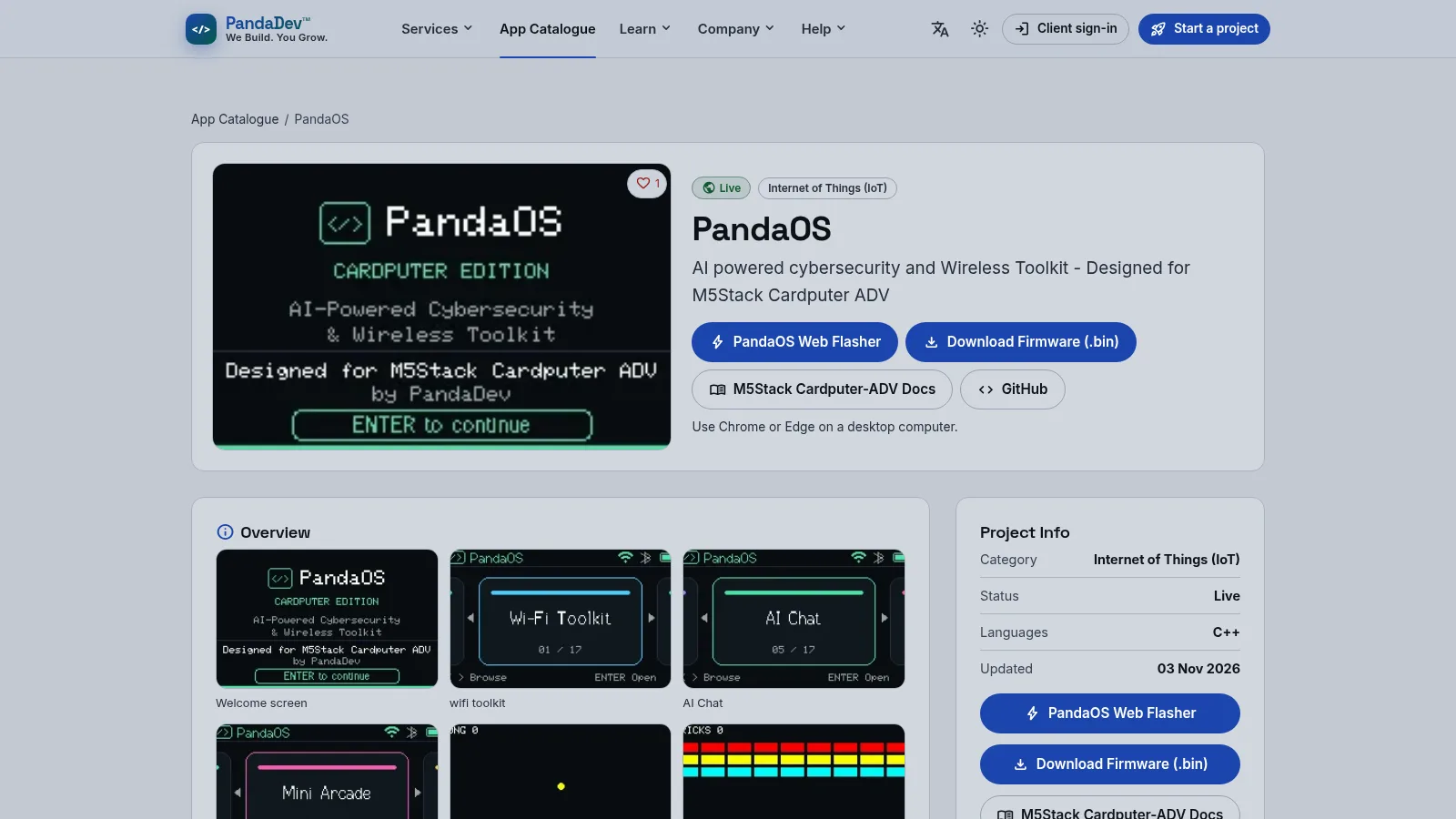
TL;DR: PandaOS 0.5.0 is standalone firmware for the M5Stack Cardputer ADV that packs AI chat, WiFi toolkit, BLE tools, LoRa messaging, GNSS tools, voice recording, internet radio and ten games into one pocket computer. Flash it in a browser, add a microSD card and an OpenRouter key, and use it for field site surveys, LoRa tests, GNSS logging and training. Install steps, ham workflows and honest limits inside.
What PandaOS Is
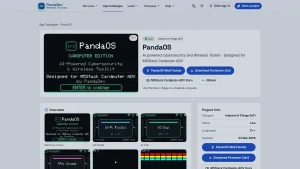
PandaOS is standalone Cardputer ADV firmware by PandaDev LLC that combines AI chat, WiFi and BLE tools, LoRa messaging, GNSS utilities, voice recording, SD music playback and internet radio with local SD storage and no cloud account.
If you own an M5Stack Cardputer ADV and you have only run the factory demo or UiFlow2 examples, PandaOS is the first firmware that makes the little 56 key computer feel like a finished product. You power it on, you get a welcome screen with an ENTER to continue prompt, and from there you browse a numbered launcher. Item 01 of 17 is the WiFi Toolkit. Item 05 of 17 is AI Chat. Between them sits a Mini Arcade with ten local games that keep high scores on the SD card. Further along are LoRa Actions, AI Settings, voice tools, radio streaming and storage utilities.
Version 0.5.0 is the current factory install package, released 2026-11-02 for the Cardputer ADV only. It’s a 2.7 MB merged binary flashed at offset 0x0 for an 8 MB ESP32-S3 in DIO mode at 80 MHz. The SHA-256 published on the install page is 16b044385854c8a3f72075368dc316dfc442187fa00e1fe19f24a44a5bdbe524. A factory install resets internal settings including saved WiFi, but it doesn’t format the SD card. PandaOS creates and maintains its own folders and files on first boot.
There is no PandaOS Cloud account and no subscription. That design choice matters for radio amateurs. Your AI key is your own OpenRouter key, your files stay on your own microSD card, notifications stay local, and the device works as a field tool rather than a terminal for someone else service.
The original PandaOS source is proprietary to PandaDev LLC. Third party components keep their own licenses. That is different from Bruce, Marauder or GhostESP, which are fully open source. Keep that distinction in mind when you decide what to run on your hardware.
The Cardputer ADV Hardware in Plain Terms
You can’t understand PandaOS without understanding the Cardputer ADV it runs on. This firmware doesn’t support the original Cardputer. It is ADV only.
The Cardputer ADV is built around the Stamp-S3A core module with an ESP32-S3FN8 dual core Xtensa LX7 running at 240 MHz and 8 MB of flash. The screen is a 1.14 inch ST7789V2 LCD at 240 by 135 pixels. Input is a 56 key minimalist keyboard in a 4 by 14 matrix with a 160 gf key feel, handled through a TCA8418RTWR expander. That keyboard is the reason PandaOS can offer real chat, real settings and real file tools instead of the three button menus you get on a typical ESP32 dongle.
Audio is a step above most pocket ESP32 devices. An ES8311 codec, a high SNR MEMS microphone, an NS4150B amplifier with a 1 W speaker, plus a 3.5 mm jack for headphones or an external speaker. PandaOS uses that chain for voice recording, WAV and MP3 playback from SD, and internet radio streaming.
The rest of the board reads like a field kit list. A BMI270 6 axis motion sensor, an infrared emitter, a microSD slot, a HY2.0-4P Grove port and an EXT 2.54-14P expansion bus for sensors and peripherals, a 1500 mAh battery with an independent side power switch, magnets in the base for metal attachment, LEGO hole compatibility and a lanyard hole. Standby current with the switch OFF is quoted at 0.23 uA at 4.2 V. Operating current is around 120.2 mA, rising to 132.3 mA on WiFi and 154.6 mA on BLE.
For radio work the two ports that matter most are Grove and EXT. Grove gives you GND, 5 V and GPIO G1 plus G2 for a quick sensor or GPS add on. The EXT bus exposes reset, interrupt, SPI on G40 plus G14 plus G39 plus G5, I2C on G8 plus G9, and UART TX on G13 plus RX on G15, along with 5 V rails. The official pin map and schematics are published in the Cardputer ADV docs, which you should bookmark before you plug anything into those headers.
The product comparison table in the same docs is worth reading. The ADV moves from the older Stamp-S3 to Stamp-S3A, improves the antenna design, consolidates to a single 1500 mAh cell, switches audio to ES8311 plus NS4150B, adds the 3.5 mm jack, adds the BMI270 IMU, moves the keyboard expander to TCA8418RTWR, and adds the EXT bus. Those changes explain why PandaOS targets ADV only. The audio path, the keyboard scanning and the power logic aren’t identical to the original Cardputer.
PandaOS 0.5.0 Feature Tour
The catalogue page lists nine headline groups. Here is what each one means in practice.
AI Chat With Your Own OpenRouter Key
AI Chat is a chat client that talks to models through the OpenRouter API over HTTPS with TLS. You supply your own key in AI Settings. There’s no shared PandaDev key and no metered PandaDev account in the middle.
The practical flow is simple. Connect the Cardputer ADV to WiFi, enter your OpenRouter key once, pick a model string your key can access, and type on the physical keyboard. The 240 by 135 screen scrolls a few lines at a time, so this is for short questions and short answers, not long document review.
For hams the honest uses are exam study, quick formula checks, antenna math, band plan lookups and code debugging at the bench. Ask for a dipole length for 7.150 MHz, ask why your PlatformIO build fails on a missing M5Unified header, or ask for a mnemonic for resistor color codes. Don’t treat it as a substitute for a license manual or a safety reference. RF exposure, mains wiring and battery charging answers should always be checked against primary sources.
Because the key lives on your device and traffic goes straight to OpenRouter, you can rotate or revoke the key at any time from your OpenRouter dashboard. Don’t paste a key with a high spending limit into a portable device you lend out. Use a capped key for field use.
WiFi Toolkit and Captive Portal Training Tools
The WiFi Toolkit is the section most radio amateurs will open first. The screenshots show a dedicated WiFi Toolkit browser with numbered pages, which suggests a multi tool layout rather than a single scanner.
Expect the standard ESP32-S3 toolkit pattern. Network scanning with SSID, RSSI, channel and security type, connection management with saved networks, signal inspection as you walk a site, and local captive portal training tools for learning how portals behave. The catalogue explicitly calls out local captive portal training tools, which is a careful way of saying you can study portal flows in a lab setting on your own hardware.
For ham and EmComm use, the legal and useful job is site survey. Walk a hall, a campsite or a field day site with the Cardputer ADV and map where 2.4 GHz is congested, which channel your AREDN or ham mesh node should use, where the club router signal dies behind a wall, and where to place an access point for logging laptops. Pair that with a notebook and you have a coverage sketch in ten minutes.
What this isn’t: a license to probe networks you don’t own, to capture traffic from other people, or to run deauth or jamming style tests. An ESP32-S3 can’t do everything a laptop with a monitor mode adapter can, but the rules are the same everywhere. Only test your own lab network, only with written permission on any shared network, and keep 2.4 GHz tests short because the same spectrum carries Bluetooth, RC links and some telemetry.
Bluetooth Low Energy Tools
The BLE section covers Bluetooth Low Energy scanning and interaction tools on the ESP32-S3 native radio. Typical tasks are advertising scans, device name and RSSI lists, service discovery on your own beacons, and signal strength walks to find a lost tag or tracker.
In the shack this is useful for boring but real jobs. Find which BLE sensor is which when you have three identical temperature beacons, check that a BLE tracker in a go box still advertises after months in storage, or confirm that a phone plus tracker pair actually sees each other before you drive to a site. It also pairs well with the WiFi survey above, because 2.4 GHz WiFi and BLE share spectrum and a crowded band affects both.
LoRa Messaging and Raw Packet Tools
LoRa Actions is the section to watch if you come from the amateur LoRa world. PandaOS lists LoRa messaging and raw packet tools, with compatible hardware required. The ESP32-S3 inside the Cardputer ADV has no LoRa radio on its own, so this means an external LoRa module through Grove, EXT or USB serial, depending on how PandaDev wired the support.
The catalogue is honest about maturity. LoRa peer reception and range testing remain pending in 0.5.0. Treat the current LoRa side as messaging and packet inspection to learn with, not as a finished APRS or Meshtastic replacement.
For hams, the right mental model is a lab companion, not a tracker. Use it to send short test messages between two bench nodes, to inspect raw packets while you learn spreading factor and coding rate tradeoffs, and to practice message discipline before you touch a real APRS or LoRa APRS frequency. All RF rules still apply. Only transmit with a suitable module and antenna, only on frequencies you’re allowed to use in Malaysia, and never on 144.525 MHz APRS or other amateur allocations unless you hold the right license and your station ID and behavior comply with MCMC rules. If you only want to learn, keep the module in a test mode or use a dummy load and an attenuator.
GNSS Tools With Compatible Hardware
GNSS tools also need compatible hardware. The Cardputer ADV has no onboard GPS receiver, so this means an external GNSS module, typically a serial NMEA unit on Grove or EXT.
Once connected, the expected tools are position readouts, satellite counts, NMEA inspection and location logging to SD. That feeds directly into portable operating. Log your SOTA summit grid, stamp a POTA activation with time and coordinates, record a field day antenna test location, or time stamp voice notes with a position fix. The TinyGPSPlus library in the tech stack is a strong hint that NMEA parsing follows the familiar Arduino pattern, which makes it easier to compare PandaOS behavior against your own logger sketches.
Remember that phone GPS will usually beat a cheap serial module for cold start time and urban accuracy. The value here isn’t replacing your phone. It is having position on the same device that holds your notes, your voice memos and your packet tests, all on one SD card.
Voice Recording and SD WAV Plus MP3 Playback
The ES8311 plus MEMS microphone plus NS4150B chain exists so PandaOS can record voice and play WAV and MP3 files from microSD. The minimp3 component in the tech stack points to lightweight MP3 decoding on the ESP32-S3, which fits the 8 MB flash and the small screen model.
Practical uses are everywhere in amateur radio. Record a contest exchange to check your own phonetics later. Dictate antenna measurements while both hands hold a tape measure on a mast. Save a net control briefing as an audio note. Keep a folder of MP3 training audio, such as Morse practice files or club talk recordings, on the same card that holds your settings. The 3.5 mm jack means you can monitor privately in a shared room or feed audio to an external speaker at a club night.
Use a decent branded microSD card and keep a backup. These cards die at the worst moment, usually right after an activation. PandaOS doesn’t format your card on install, but you should still copy the card before a major trip.
Internet Radio
Internet radio streaming over WiFi turns the Cardputer ADV into a bench companion. News, music or talk while you solder, wind toroids or sort connectors. It also doubles as a WiFi throughput test. If a stream stutters in one corner of the hall but plays cleanly three meters away, you just found where not to put the logging laptop.
Streaming needs a stable 2.4 GHz connection because the ESP32-S3 in this board is 2.4 GHz only. It won’t see 5 GHz access points. That is normal for ESP32-S3 and not a PandaOS bug. Plan your field hotspot the same way. Use 2.4 GHz for the Cardputer ADV and keep 5 GHz for laptops that support it.
Local Notifications and SD Storage
Local notifications plus SD storage sounds dull until you run a real event. Timers for antenna checks, reminders to ID, prompts to rotate a battery, and a local log of what happened, all without internet. Because storage is FAT32 on microSD, you can pull the card, read it on any laptop, and archive the activation folder alongside your ADIF log and photos.
Keep the card organized from day one. One folder per outing, file names with date and summit or park reference, and a small text file with the station setup. Future you’ll be grateful when award managers ask for details months later.
Ten Free On Device Games With Local SD Scores
The Mini Arcade ships ten local games with scores stored on SD. The screenshots confirm Pong style play, a Breaker style brick game, and Snake. These aren’t filler. On a 240 by 135 screen with a real keyboard, they serve three jobs. They prove the display, keys, speaker and SD path all work after a flash. They keep new operators busy while firmware or maps load elsewhere. And they make the Cardputer ADV approachable at a club table, where a kid who plays Snake today asks about antennas tomorrow.
Technology Stack and What It Tells You
The published stack is C Plus Plus on Arduino Framework with ESP-IDF underneath, built with PlatformIO, running FreeRTOS on ESP32-S3, using M5Cardputer plus M5Unified plus M5GFX for hardware abstraction and graphics, RadioLib for radio work, TinyGPSPlus for GNSS parsing, ArduinoJson for config and API payloads, minimp3 for audio, WiFi plus BLE plus LoRa plus GNSS over SPI plus I2C plus I2S, HTTPS with TLS for OpenRouter, and FAT32 microSD storage.
Each choice leaves a fingerprint. Arduino Framework plus PlatformIO means a familiar build for anyone who has compiled M5Cardputer examples before. The M5 libraries are maintained at M5Cardputer and M5Unified. FreeRTOS means the audio, display, network and key scanning can live in separate tasks instead of blocking each other. RadioLib is the same library many LoRa APRS trackers use, so behavior should feel familiar if you have touched the richonguzman LoRa APRS or 9M2PJU tracker world. TinyGPSPlus means standard NMEA sentences. ArduinoJson means settings files you can actually read on a laptop. Minimp3 means MP3 without a heavyweight decoder. HTTPS with TLS for OpenRouter is the right call, because an AI key must never travel in clear text.
The ESP32-S3 itself is documented by Espressif. Dual core 240 MHz, native USB, vector instructions for signal work, and 2.4 GHz WiFi plus BLE 5. That is plenty for chat, tools and games, but it isn’t a laptop. Long TLS handshakes, large JSON payloads and big MP3 files will remind you of the limits. Keep files small, keep prompts short, and let the device do one streaming job at a time.
Requirements Before You Flash
PandaOS 0.5.0 is for M5Stack Cardputer ADV only. The original Cardputer isn’t supported. Check the model marking on your unit and the comparison table in the official docs before you download anything.
You need a compatible microSD card for file storage and audio. The catalogue doesn’t name a size limit, so use a known good 16 GB or 32 GB FAT32 card from a major brand for best compatibility. Avoid exotic exFAT only cards and avoid ancient 2 GB cards with worn out sectors.
You need compatible LoRa and GNSS hardware only if you want those sections to do anything. WiFi, BLE, games, voice recording, music playback, internet radio and AI chat don’t need extra radios. Don’t buy a LoRa module until you confirm which interface and frequency variant PandaOS 0.5.0 expects for your region.
You need WiFi and a personal OpenRouter key for AI Chat. Everything else works offline after flashing, subject to internet for radio streaming and AI.
You need a data capable USB cable, a desktop Chrome or Edge browser with Web Serial for the one click install, and five quiet minutes. A factory install resets internal settings including saved WiFi, so copy your SSID list or take a photo of your settings screen first. Your SD card isn’t formatted by the installer, but back it up anyway. Good operators back up before every firmware change.
The publisher is PandaDev LLC. The project hub is the PandaOS catalogue page and the code facing presence is PandaDev on GitHub. The install flow lives at the PandaOS Web Flasher.
Installation Walkthrough
There are two paths. The Web Flasher is easiest. The manual binary is best when you want to verify a hash or flash from the command line.
Option A: Web Flasher in Chrome or Edge
- Back up your microSD card to a laptop. Note your saved WiFi networks.
- Switch the Cardputer ADV side switch OFF and disconnect USB.
- Open the Web Flasher on a desktop computer in Chrome or Edge. Web Serial needs HTTPS or localhost, so a desktop browser is required. Mobile browsers won’t work.
- Connect the Cardputer ADV by USB with a data cable, not a charge only cable. Close other serial monitors, including Arduino IDE, PlatformIO monitor and any terminal holding the port.
- Tick the confirmation that you understand this factory install resets Cardputer settings.
- Select the serial port when prompted and start the flash. Don’t touch the cable until the page reports success.
- On first boot, let PandaOS create its folders on the SD card. Then reconnect WiFi and enter your OpenRouter key in AI Settings if you plan to use AI Chat.
If the port never appears, use connection recovery. Switch OFF, disconnect USB, hold G0, reconnect USB while holding G0, release G0, select the new serial port and retry. That is standard ESP32-S3 download mode and it’s also described in the M5Stack docs.
Option B: Manual Download and Command Line Flash
Download the factory binary from the catalogue page. For 0.5.0 the file is pandaos-0.5.0-factory.bin at 2.7 MB. The published SHA-256 is 16b044385854c8a3f72075368dc316dfc442187fa00e1fe19f24a44a5bdbe524. Check the hash on your laptop before you flash. On Linux use sha256sum pandaos-0.5.0-factory.bin and compare the string exactly.
Flash the merged file at offset 0x0 on ESP32-S3 with DIO mode, 80 MHz frequency and 8 MB size. With esptool that looks like a single write flash at zero offset with those parameters. With PlatformIO or Arduino tooling, match the board profile to an 8 MB ESP32-S3 with the same flash mode and frequency. If you mix modes, the board may boot loop or show a blank screen even though the write reported success.
After flashing, boot once with the SD card inserted so PandaOS can lay down its directory structure. Then verify sound, keys, WiFi scan and SD write before you depend on the device in the field.
PandaOS for Radio Amateurs: Practical Workflows
PandaOS is sold as a cybersecurity and wireless toolkit, not as ham software. That is fine. Many of the best shack tools weren’t built for hams. Here is how to bend it to amateur work without breaking rules or expectations.
Field Day and Portable Site Survey Kit
Pack the Cardputer ADV with PandaOS as your survey computer. On arrival, run a WiFi scan from the operating tent, from the mess tent and from the car park. Note channels, RSSI and which SSIDs belong to your own team. Pick a clear 2.4 GHz channel for your logging network. Use internet radio as a soak test for ten minutes. If audio drops in one spot, move the hotspot. Log everything in a text file on the SD card with timestamps. You now have a repeatable site record for next year.
SOTA and POTA Pocket Companion
For a summit or park, the Cardputer ADV is a notebook that also tells time, plays training audio and records voice. Preload MP3 Morse practice or club briefing audio. Carry a text file with the summit reference, grid, access notes and emergency numbers. Use GNSS tools with an external module to capture the activation coordinates. Record a short voice memo after each contact batch while details are fresh. Back at home, merge those notes with your ADIF log. The keyboard beats a phone touchscreen in rain, with gloves, or in bright sun.
LoRa Learning Bench Before You Touch Ham Frequencies
Use LoRa Actions as a classroom. Learn what spreading factor does to air time, why coding rate matters, what a raw packet looks like, and how message length affects reliability. Keep early tests on ISM hardware with the stock antenna on the bench, at low power, with short messages. Only move to amateur LoRa APRS hardware and frequencies when you understand addressing, paths and ID rules, and only with the correct license. Malaysia has no shortcut here. An unlicensed LoRa test on an amateur frequency is still an unlicensed transmission.
EmComm Training Nights
The captive portal training tools plus WiFi survey plus local notifications make a tidy training package. Teach new volunteers how a shelter portal behaves, how to pick a working access point, how to document a network on paper when the internet is down, and how to set timers for hourly check ins. Run the whole evening on local SD files with no cloud dependency. That no cloud design is exactly what you want to demonstrate for emergency thinking.
Club Table Demo That Actually Draws People
Put the Cardputer ADV on the club table running PandaOS with sound on low. Let visitors play Snake, then show WiFi scan, then show AI chat answering a dipole length question, then play a short club net recording from SD. Each step takes under a minute and each step starts a conversation. Kids remember the game. New hams remember the antenna math. Committee members remember the local storage story.
PandaOS Versus Other ESP32 Pocket Firmware
No single ESP32 firmware does everything. Use this table to pick the right tool for the night.
| Area | PandaOS 0.5.0 | Bruce | ESP32 Marauder | GhostESP | Stock M5 Demo |
|---|---|---|---|---|---|
| License model | Proprietary core, third party parts keep own licenses | Open source AGPL 3.0 | Open source GPL 3.0 | Open source, ESP-IDF native | Vendor demo, M5 permissive parts |
| Target hardware | Cardputer ADV only | Many ESP32 plus S3 plus CYD plus Cardputer builds | Many ESP32 plus S3 plus devkit plus display builds | Many ESP32 targets, native IDF | Cardputer ADV specific |
| Display and keys | 240 by 135 plus 56 key keyboard | Depends on build, touch plus buttons | Depends on build, often small TFT | Depends on build | Basic demo screens |
| WiFi tools | Scan plus connection plus portal training focus | Broad audit plus portal plus wardriving | Classic Layer 2 audit plus PCAP plus Evil Portal | Advanced audit plus PCAP plus Wireshark stream | Simple connect demo |
| BLE tools | Scan and interaction basics | BadBLE plus spam plus recon | Wardriving plus spam plus skimmer detect | BadBLE plus drone ID plus spam | Minimal or none |
| LoRa | Messaging plus raw packet, peer RX pending | Sub GHz capture plus replay on CC1101 builds | Limited LoRa on some builds | Sub GHz scan plus Flipper compat | None |
| GNSS | Tools with external module | GPS wardriving with module | NMEA plus WiGLE CSV logging | Depends on build | None |
| AI chat | Built in via own OpenRouter key | None | None | Lua scripting, no chat | None |
| Audio | Voice record plus WAV plus MP3 plus internet radio | Depends on build, not the focus | Not the focus | Not the focus | Basic beep plus demo |
| Games | Ten with SD high scores | Light extras, not the focus | Light extras | Ghostchi companion game | Demos, not games |
| Best for | Pocket computer plus study plus survey | Multi protocol audit on many boards | WiFi audit classic with PCAP | Power user wireless lab | Out of box smoke test |
If your goal is learning wireless concepts on one tidy device with a keyboard, PandaOS is strong. If your goal is deep WiFi audit with PCAP export, Marauder or GhostESP on suitable hardware is stronger. If your goal is Sub GHz RF capture with a CC1101 today, Bruce on a supported board is stronger. Many of us end up with two cards or two devices, one for PandaOS daily carry and one for open source RF lab work.
Honest Limits You Should Know Before You Buy Hardware
Every good review includes the rough edges. Here are the ones that matter for 0.5.0.
The core is proprietary. You can use it, flash it and keep files locally, but you can’t audit or fork the main source the way you can with Bruce or Marauder. If fully open source matters to your club policy, that alone may decide the question.
It is Cardputer ADV only. An original Cardputer, a CYD, a T-Deck or a generic S3 devkit won’t run this binary. Don’t try to force it. You’ll waste an evening and you may need a full reflash to recover.
LoRa peer reception and range testing remain pending. The catalogue says this plainly. Buy LoRa hardware for learning, not for a planned deployment on PandaOS alone. For real APRS or Meshtastic field work, keep a dedicated tracker with mature firmware.
LoRa and GNSS need compatible extra hardware. Out of the box you get WiFi, BLE, games, audio and AI chat, but not position or LoRa range. Budget for the module, a proper antenna for the right band, cables and a stable mount. A LoRa module with the wrong antenna is a dummy load that also breaks the law if you transmit.
AI chat needs WiFi and a paid style key model. OpenRouter is a usage based API. A short study session costs little, but streaming long answers on a tiny screen wastes tokens and time. Set a spending cap in OpenRouter, use a short prompt style, and keep the key scoped to what you need.
The screen is small by design. A 240 by 135 LCD is readable for tools and games, but it isn’t a logbook screen or a map screen. Use PandaOS for capture and quick checks, then review files on a laptop.
Battery life follows radio use. Audio plus WiFi plus full brightness drains the 1500 mAh cell faster than idle. For a full day out, carry a power bank and a data cable, dim the display, and close streaming when you aren’t actively testing.
Quick Start Checklist for Hams
- Confirm you have a Cardputer ADV, not an original Cardputer.
- Buy or prepare a branded FAT32 microSD card and back it up.
- Read the Cardputer ADV docs sections on download mode, charging with power ON, and the 3.5 mm jack muting the speaker.
- Flash 0.5.0 from the PandaOS catalogue page or the Web Flasher. Verify the SHA-256 on a manual download.
- Boot once with SD inserted, connect WiFi, set time if offered, test a WiFi scan and a short voice recording.
- Add an OpenRouter key only if you want AI chat. Use a capped key.
- Create one folder per outing on SD with date, summit or park reference, and station notes.
- Add LoRa or GNSS modules later, only after you confirm interface and band support for 0.5.0.
- Keep the factory demo binary or a known good backup so you can always return the board to stock.
Why This Matters for the Shack
The shack computer used to be a noisy desktop under the bench. Then it became a laptop on the bench. Then a Raspberry Pi behind the monitor. PandaOS plus Cardputer ADV points to the next step, a pocket computer that does quick jobs without booting anything bigger.
It won’t replace a logger, a cluster client or a digital mode chain. It doesn’t need to. It handles the small jobs that interrupt real radio work. What channel is clear. What is my grid here. Did I record that net. What length was that dipole again. Is this cable data capable. Those five minute questions eat operating time when you have to dig out a laptop. A keyboard computer that boots in seconds and keeps everything on SD earns its place in the go box fast.
For Malaysian portable operators the fit is natural. A summit trail, an island park, a contest tent and a training hall all reward light kit, local storage and no account dependency. PandaOS isn’t ham software, but it behaves like good field software. Small screen, physical keys, local files, fast boot, and tools that work with the network you have today.
Sources and Further Reading
- PandaOS catalogue page with features, requirements and version notes
- PandaOS Web Flasher with factory install steps and SHA-256
- M5Stack Cardputer ADV official documentation and specs
- PandaDev on GitHub
- M5Cardputer Arduino driver library
- M5Unified hardware abstraction library
- M5GFX display and graphics library
- RadioLib universal radio library
- TinyGPSPlus NMEA parser
- ArduinoJson serialization library
- OpenRouter unified AI API
- ESP32-S3 product page by Espressif
- PlatformIO embedded build system
- FreeRTOS real time kernel
73 de 9M2PJU

Post Comment