Dockge: A Sleek, Self-Hosted Docker Stack Manager for Compose Lovers
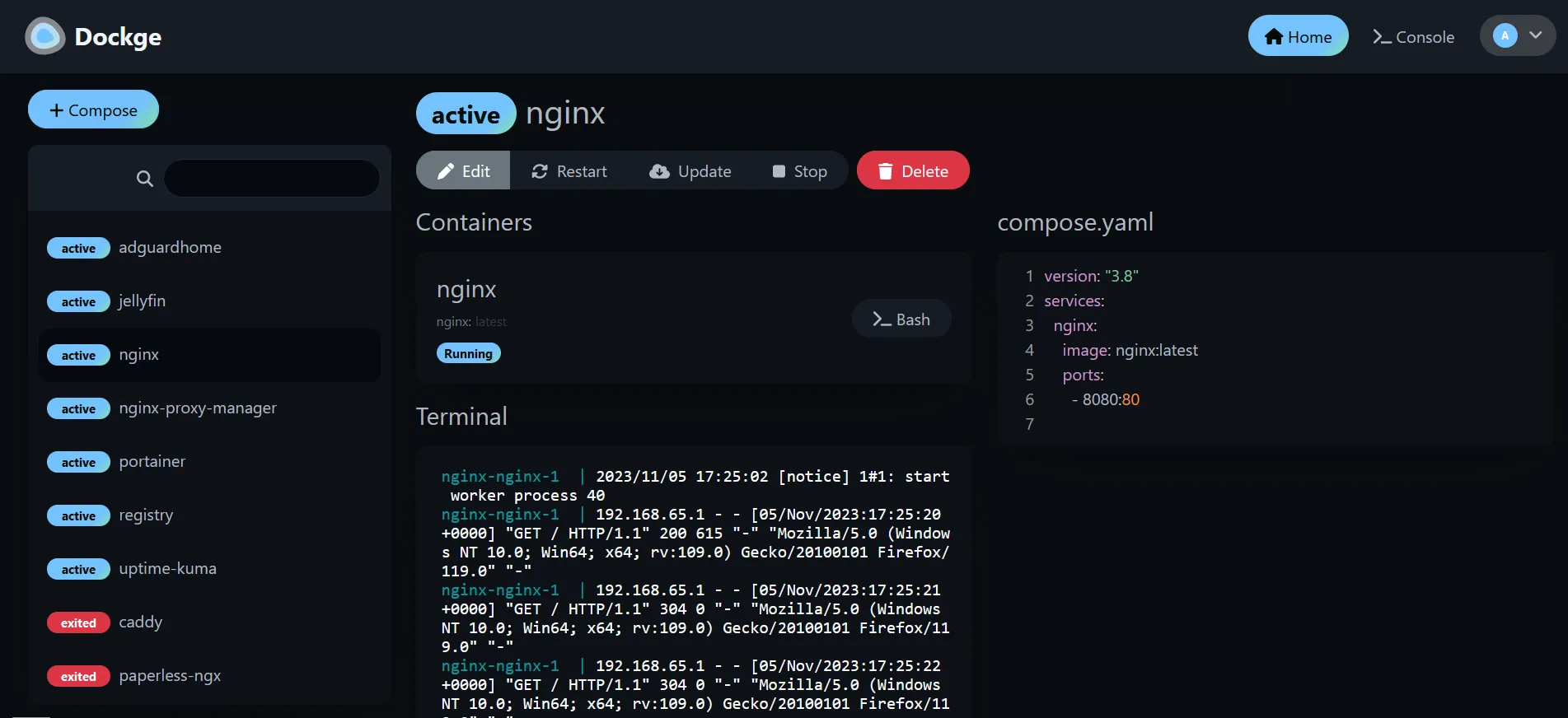
If you’ve ever felt overwhelmed managing multiple Docker stacks or wanted a more intuitive interface than raw CLI commands-Dockge might be your new favorite tool.
Dockge is a modern, elegant, and fully self-hosted manager built specifically for docker-compose users. It’s designed for those who want power and simplicity in a single place, without losing control over their YAML files or containers.
✨ What Makes Dockge Special?
Unlike some heavier solutions, Dockge sticks to doing one thing-and does it really well: managing your compose.yaml stacks. Whether you’re starting, stopping, editing, or updating services, Dockge keeps it real-time and responsive.
Here’s what you get out of the box:
- Create, edit, start, stop, and delete your Docker stacks from a single UI.
- Update Docker images with just a few clicks.
- Interactive YAML editor for hands-on control.
- Built-in Web Terminal for direct command-line access.
- Multiple Agent Support to manage stacks across different hosts (since v1.4.0).
- Convert
docker runcommands into Compose YAML in seconds. - File-based management – Dockge never hijacks your files; they’re still on disk and usable via CLI.
It’s reactive, lightweight, and honestly-kind of fun to use. Think Uptime Kuma, but for Docker Compose.
🛠️ Easy Installation with Docker
Getting started with Dockge is straightforward:
# Create folders for stacks and Dockge's own files
mkdir -p /opt/stacks /opt/dockge
cd /opt/dockge

# Download the default compose.yaml
curl https://raw.githubusercontent.com/louislam/dockge/master/compose.yaml --output compose.yaml

# Start it up
docker compose up -d
Access it via your browser at http://localhost:5001, and you’re good to go!
You can also generate a custom compose.yaml file with your preferred port and stack directory via the interactive generator here: dockge.kuma.pet
🤝 Why Dockge Exists
The developer behind Dockge originally used Portainer but wanted something snappier and more focused on stacks. Dockge doesn’t try to replace Portainer entirely-it just makes managing Docker Compose setups smoother and less frustrating.
If all your infrastructure is compose.yaml-driven, Dockge is likely the best fit. But if you need to juggle volumes, networks, or standalone containers, keeping Portainer around might still be helpful.
🧩 Use Cases and Compatibility
Dockge is a great fit if:
- You’re self-hosting multiple services with Docker Compose.
- You like visual feedback and responsive interfaces.
- You want fine control without bloated features.
Supported OS and platforms include:
- ✅ Ubuntu / Debian Bullseye+ / Raspbian Bullseye+
- ✅ CentOS, Fedora, Arch
- ❌ Not yet supported on Windows
- ✅ Architectures:
armv7,arm64,amd64
🔄 Updating Dockge
Updating is easy too:
cd /opt/dockge
docker compose pull && docker compose up -d
Just like that, you’re on the latest version.
Whether you’re a seasoned homelabber or just getting started with Docker, Dockge brings clarity and simplicity to Compose stack management. The UI is gorgeous, performance is fast, and setup is a breeze. You’ll wonder why you didn’t use it sooner.
👉 Explore the GitHub repo: github.com/louislam/dockge
🎥 Watch the overview video: Dockge Demo
💬 Bonus: Frequently Asked Questions
- Can I use Dockge with Portainer? Yes, they can run side-by-side.
- Can I manage existing stacks? Absolutely-just move your YAML files into
/opt/stacks/<stack-name>/compose.yamland click Scan Stacks Folder. - Does it support single container management? Not directly-Dockge is purpose-built for Compose.
⭐ Final Thoughts
Dockge is a powerful tool that does one thing extremely well: give you full visual control of your Docker Compose stacks. It doesn’t try to be everything-and that’s what makes it great.






Post Comment