USB-C DeskRadar Live ADS-B Flight Tracker: Sonar Grid Radar Gadget for Your Desk
USB-C DeskRadar Live ADS-B Flight Tracker: Sonar Grid Radar Gadget for Your Desk
TL;DR: The USB-C DeskRadar Live ADS-B Flight Tracker (buy on AliExpress here) is a ready-built desktop gadget that shows live aircraft traffic on a round sonar-style radar screen in a black 3D-printed desk stand. Listing photos show two display modes: a green-phosphor sweep scope with range, distance, and altitude readouts, and a compass-oriented tagged mode with live flight numbers, leader vectors, and a 30km range ring. Powered over USB-C, it is shack decor, an avgeek gift, and a handy companion to a real ADS-B feeder station.
There is a special class of gadget that earns its desk space by doing exactly one thing beautifully. A live radar scope that paints real airliners overhead in glowing green phosphor is firmly in that class. The DeskRadar gadget takes the ADS-B tracking hobby, normally a browser tab or a wall-mounted Pi project, and shrinks it to a palm-sized round display on a desk stand that looks like miniature air traffic control equipment.
In this guide we examine what the listing shows, explain how this class of tracker works, what to verify before ordering, and why radio amateurs and feeders will enjoy it most.
What Is the USB-C DeskRadar Flight Tracker?
The USB-C DeskRadar is a pre-built desktop ornament that displays live ADS-B aircraft traffic as an animated sonar-style radar on a round color screen housed in a 3D-printed desk stand, powered over USB-C.
+-----------------------------------------------------------------------------------+
|                           DESKRADAR GADGET AT A GLANCE                            |
+-----------------------------------------------------------------------------------+
|                                                                                   |
|   +---------------------------+       +---------------------------------------+   |
|   |   ROUND RADAR DISPLAY     |       |   3D-PRINTED DESK STAND CASE          |   |
|   |   Sonar grid + range rings|       |   Black lollipop profile              |   |
|   |   Rotating sweep trail    |       |   Round bezel + stable base           |   |
|   |   Aircraft chevron plots  |       |   Home and office friendly            |   |
|   +---------------------------+       +---------------------------------------+   |
|               |                                       |                         |
|   +---------------------------------------------------------------------------------+ |
|   |   TWO DISPLAY MODES VISIBLE IN LISTING PHOTOS                                   | |
|   |   Sweep scope: SNJ77 at 20km, 2827m + compass arrow                             | |
|   |   Tagged map: JAO1EX, ANA69, SFJ25, CSH895, UAL198, ADO78 + 30km ring           | |
|   +---------------------------------------------------------------------------------+ |
|               |                                       |                         |
|   +---------------------------+       +---------------------------------------+   |
|   |   USB-C POWER             |       |   LIVE ADS-B DATA                     |   |
|   |   Single cable from any   |       |   Real flight numbers and positions   |   |
|   |   USB port or charger     |       |   Check listing for source details    |   |
|   +---------------------------+       +---------------------------------------+   |
|                                                                                   |
+-----------------------------------------------------------------------------------+
What the Listing Photos Show
Since this is a finished product and not a kit, the photos are the specification. Here is what can be confirmed visually:
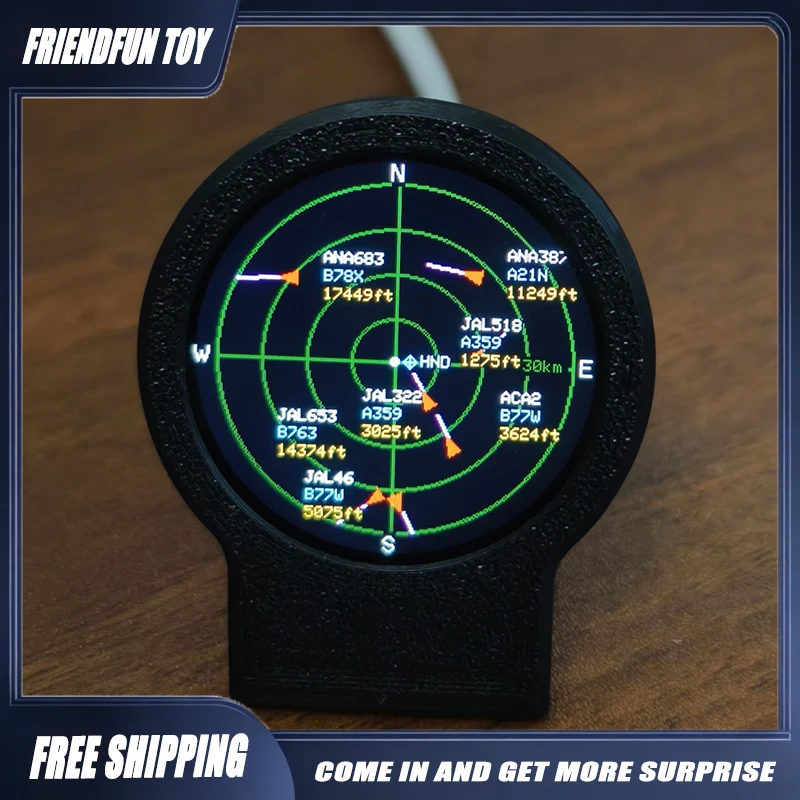
- Round color display with a classic green radar palette on black. Range rings, crosshairs, and a rotating sweep with fading trail reproduce the phosphor look.
- Sweep scope mode: aircraft render as small light chevrons, with a selected-target readout showing callsign SNJ77, distance 20km, and altitude 2827m, plus a circular compass direction arrow.
- Tagged compass mode: cardinal labels N, E, S, W around the bezel edge, a 30km outer range ring, live flight tags (JAO1EX, ANA69, SFJ25, CSH895, UAL198, ADO78, SNJ77), orange target chevrons with pink and white leader vectors, and an altitude tag (206m on ANA69, clearly a low departure or arrival).
- 3D-printed stand case: matte black, visible layer texture, round bezel flowing into a rectangular desk base. Compact enough for a crowded shack shelf.
- USB-C power cable visible at the top of the unit. One cable, no batteries to change, no wall wart mystery.
- Real traffic, not a demo loop: the Japanese carrier tags (ANA, StarFlyer SFJ) and mixed altitudes are consistent with live airspace, likely photographed under Tokyo-area coverage.
The 30km ring and 20km contact in the photos set honest expectations: this is a local air picture, the dozen or so closest aircraft, rendered large and readable rather than a cluttered continental map.
How This Class of Gadget Works
A desk radar can’t hear 1090 MHz by itself at this size and price. Devices in this class get their plots over Wi-Fi from the internet, in one of two common architectures:
- Aggregator API polling: the gadget joins your Wi-Fi and periodically queries a community ADS-B aggregator (services such as adsb.lol, ADS-B Exchange derivatives, or OpenSky-style APIs) for aircraft near configured coordinates, then plots relative bearing and distance on the round scope.
- Local feed display: some firmware variants poll a local dump1090 or readsb JSON endpoint on your home network, showing exactly what your own RTL-SDR antenna decodes.
Which path this listing uses matters for setup: API polling needs Wi-Fi credentials plus coordinates entry (often via a captive portal or phone app), while a local-feed variant needs a feeder station on the same LAN. Check the listing Q and A and buyer reviews for the exact setup flow before ordering, and confirm whether any data subscription or API key is required. The core appeal is identical either way: zero-maintenance live plots on a gorgeous round scope.
Why Radio Amateurs Will Love It
1. The Perfect Companion to Your ADS-B Feeder
If you already feed adsb.fi, ADS-B Exchange, or Flightradar24 from an RTL-SDR and a rooftop collinear, this gadget closes the loop: your antenna hears the aircraft, the network aggregates them, and the desk scope paints them back. It turns invisible RF work into ambient room art. Guests finally see what the coax on the roof is for.
2. Shack Decor with a Purpose
A HamClock shows the ionosphere, a DX cluster board shows spots, and the DeskRadar shows the air. Three small displays, three live pictures, one wall of situational awareness. The green phosphor aesthetic matches classic rig lighting better than any LCD dashboard.
3. Event and Field-Day Conversation Piece
Put it on the club table at field day or a public demo. Kids who ignore a waterfall display will crowd around a radar scope with airplanes on it, and every one of them is a future licensee. Ask them to find the lowest aircraft, then explain altitude, range rings, and 1090 MHzADS-B squitters.
4. Motivation to Build the Real Station
A desk scope showing network data naturally leads to the next question: how do I show my own receptions? That path runs through an RTL-SDR dongle, a 1090 MHz filter and LNA, a homebrew collinear, and a readsb feeder, one of the cheapest complete radio projects available. The gadget is the gateway; the antenna on the roof is the destination.
5. The Ideal Avgeek and Ham Gift
Licensed or not, pilots, spotters, and scanner listeners all understand a radar screen instantly. No assembly, no firmware flashing, USB-C power from any phone charger: it is giftable to non-technical family in a way a Pi project never is. Keep the link handy for the holidays.
Setup Expectations
Based on the product class and listing, expect a flow like this:
- Unbox the stand unit and connect USB-C power from a charger or PC port.
- Join the gadget to your 2.4 GHz Wi-Fi following the seller instructions (leaflet or listing page).
- Set your location or let it auto-locate so the scope centers on your sky.
- Watch plots appear as the sweep passes. Dense terminal areas fill within a minute; quiet rural skies take longer.
- Reposition for viewing angle. The round TFT looks best near head-on, like most small LCDs.
If traffic never appears, the usual culprits are 5 GHz-only Wi-Fi, captive-portal networks, or firewall-blocked aggregator endpoints. Message the seller with your order number. Accessory sellers in this niche are typically responsive because setup questions dominate their reviews.
Buying Checklist for This AliExpress Listing
- Confirm the data source and any ongoing requirements in the listing text or seller Q and A. No subscription should be assumed; verify.
- Read recent buyer reviews with photos. They confirm live traffic in your region and reveal setup quirks faster than any description.
- Check the shipped bundle. Stand, pre-assembled unit, and cable should be included. Confirm if a USB charger is in the box or bring your own 5V supply.
- Plan the USB-C power. Any phone charger, powered hub, or shack 5V rail works. Cable-route it behind the stand for a clean desk.
- Consider delivery time. AliExpress standard shipping varies by country. Order early if it’s a gift.
- Check price and availability here: s.click.aliexpress.com/e/_c4NtnyGV.
How It Compares
| Solution | Display | Data source | Effort | Best for |
|---|---|---|---|---|
| USB-C DeskRadar gadget | Round sonar scope, desk stand, zero config hardware | Network ADS-B (confirm listing) | Low: unbox, Wi-Fi, watch | Gift, shack decor, instant gratification |
| FlightScnr Pi round display | 4inch 720×720 touch radar, maps, ATC audio, web portal | FR24, adsb.fi, local dump1090, AIS, weather | Medium: print, assemble, flash, keys | Hobbyist who wants touch, maps, and local feed |
| PiAware plus SkyAware map | Browser map on any screen | Own RTL-SDR decoder plus FlightAware net | Medium: decoder plus feeder setup | Feeding FlightAware with full local detail |
| tar1090 local map | Browser, any device | Own decoder only | Low to medium | Pure local RF visualization |
| Phone flight tracker apps | Phone screen | Aggregator networks | None: install app | Portable spotting with full details |
The DeskRadar wins on immediacy and charm: no build, no keys, no admin, just radar. It cedes depth to Pi projects and phone apps, which is exactly the right trade for a desk ornament.
Honest Notes
- Specs beyond the photos are unverified. Screen size, controller chipset, Wi-Fi setup method, and refresh rate aren’t confirmed from the listing text. Treat the photos as the specification.
- It complements, not replaces, a receiver. Plots arrive over the network, not from an onboard 1090 MHz tuner. For your own RF, build the RTL-SDR feeder alongside it.
- Small screen, lean detail. Callsign, distance, altitude, and vectors only. Full flight histories and vertical profiles stay on phone and PC apps.
- Wi-Fi dependent. No network means frozen scope. Position it within solid 2.4 GHz coverage.
- Marketplace variance. Stand finish, cable length, and firmware revision can vary between batches. Buyer review photos are your ground truth.
Frequently Asked Questions
What exactly is the DeskRadar gadget?
It’s a pre-built USB-C powered desktop display in a 3D-printed stand that shows live ADS-B aircraft as a sonar-style radar with sweep, range rings, and flight tags.
Does it need an antenna or radio receiver?
No. It receives plotted traffic over Wi-Fi from network ADS-B data. Pair it with your own RTL-SDR feeder station for the full radio experience.
What do the two screen modes show?
A sweep scope with selected-target distance and altitude readout, plus a compass-tagged mode with live flight numbers, leader vectors, and a 30km range ring.
Is it hard to set up?
Expect Wi-Fi setup plus location configuration per seller instructions, then automatic plots. Confirm data requirements in the listing before ordering.
Where should I buy it?
Order through this link: s.click.aliexpress.com/e/_c4NtnyGV.
Conclusion
Not every shack addition needs a serial console and a config file. The USB-C DeskRadar earns its place the old-fashioned way: it delights everyone who sees it, runs silently on a single cable, and quietly teaches everyone in the room what ADS-B tracking is. For feeders it visualizes the network they help build, for clubs it is demo-night gold, and for avgeek family it’s the rare radio-adjacent gift that needs no explanation.
Order through the link above, clear a spot between the rig and the HamClock, plug in USB-C, and watch your local sky sweep by in green phosphor.
73, and enjoy the scope.
Sources and Further Reading
- USB-C DeskRadar Product Listing (AliExpress): https://www.aliexpress.com/item/1005013234320336.html?gatewayAdapt=usa2glo4itemAdapt
- Buy on AliExpress: https://s.click.aliexpress.com/e/_c4NtnyGV
- FlightScnr Pi Round Display Tracker Project: https://github.com/yashmulgaonkar/FlightScnr_Pi
- adsb.fi Community ADS-B Network: https://adsb.fi
- readsb ADS-B Decoder: https://github.com/wiedehopf/readsb
- dump1090 ADS-B Decoder: https://github.com/flightaware/dump1090
- HamRadio.my Open Source Tools and Tech Guides: https://hamradio.my/
- About 9M2PJU Station Profile and Software Projects: https://hamradio.my/about/





Post Comment