voacap-skill: Bringing Point-to-Point HF Propagation Modeling into AI Terminals and Claude Code
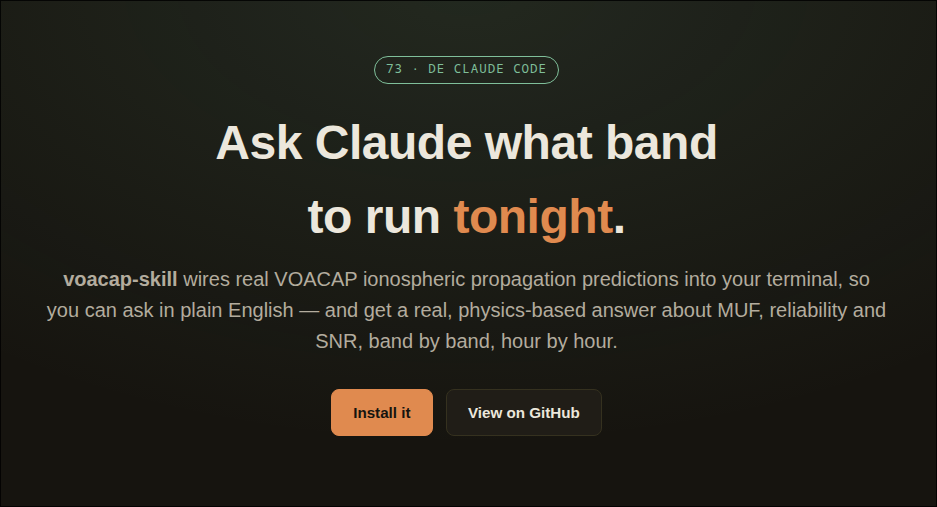
TL;DR: voacap-skill by Reid (N0RC) is an open-source tool and Claude Code plugin that bridges the gold-standard NTIA/ITS VOACAP (Voice of America Coverage Analysis Program) ionospheric propagation engine into modern terminal AI assistants. By compiling and running the native FORTRAN prediction core (
voacaplon Linux/macOS orvoacapw.exeon Windows) in the background, it translates natural language queries into point-to-point circuit predictions, delivering physics-based reliability (REL), signal-to-noise ratios (SNR), and Maximum Usable Frequency (MUF) tables hour by hour.
Predicting High Frequency (HF) ionospheric propagation has always required balancing physics with practical experience. For decades, radio amateurs, contest operators, and DXpedition organizers have relied on solar indices (Solar Flux Index, Sunspot Number, Planetary A and K indices) and specialized software to decide when to move between 80m, 40m, 20m, 15m, and 10m.
At the center of professional ionospheric modeling stands VOACAP (Voice of America Coverage Analysis Program), the definitive point-to-point ray-tracing and ionospheric absorption model developed by the US Department of Commerce’s NTIA/ITS. While web portals like VOACAP Online have made the engine accessible, using it during day-to-day station operations or DX planning still required opening a web browser, typing coordinates, selecting antenna models, and interpreting dense multi-parameter matrix charts.
The voacap-skill project created by amateur radio operator Reid (N0RC) on GitHub and hosted at reid-n0rc.github.io/voacap-skill transforms how operators interact with propagation modeling. By packaging the native VOACAP FORTRAN engine as an automated, agentic skill for Claude Code and command-line scripts, it allows operators to ask conversational questions and receive exact, physics-backed circuit calculations inside their development terminal or radio workbench.
What is voacap-skill?
voacap-skill is an open-source software extension and Claude Code plugin that automates point-to-point HF propagation predictions using the NTIA/ITS VOACAP engine to deliver circuit reliability, signal-to-noise ratios, and usable frequency band recommendations through natural language.
+-------------------------------------------------------------------------+
|                       voacap-skill System Architecture                  |
+-------------------------------------------------------------------------+
| User Query: "What is the best band from Seattle to Tokyo at 0300Z?"     |
+------------------------------------+------------------------------------+
                                     |
+------------------------------------v------------------------------------+
|               Claude Code / Terminal AI Agent Runtime                   |
|  - Parses natural language location names, coordinates, and antennas    |
|  - Identifies month, sunspot number (SSN), power, and target bands      |
+------------------------------------+------------------------------------+
                                     |
+------------------------------------v------------------------------------+
|               voacap_predict.py Python Wrapper Script                   |
|  - Calculates great-circle bearing and distance                         |
|  - Generates ASCII VOACAP CARD input file (CIRCUIT, SYSTEM, ANTENNA)    |
|  - Enforces FORTRAN filename (<=20 char) & path limits (<=128 char)     |
+------------------------------------+------------------------------------+
                                     |
+------------------------------------v------------------------------------+
|               Native VOACAP FORTRAN Physics Engine                      |
|  [macOS / Linux: voacapl (GFortran)]     [Windows: voacapw.exe (NTIA)]  |
|  - Ionospheric electron density profile modeling (F2, F1, E, D layers)  |
|  - Ray-tracing, multi-hop geometry, ionospheric D-layer absorption      |
+------------------------------------+------------------------------------+
                                     |
+------------------------------------v------------------------------------+
|               Output Parser & Formatter Engine                          |
|  - Extracts REL (Reliability 0.0 - 1.0), SNR (dB), and MUF (MHz)        |
|  - Formats 24-hour UTC table or structured JSON stream                  |
+------------------------------------+------------------------------------+
                                     |
+------------------------------------v------------------------------------+
| Final Response: "Run 20m (14 MHz) at 0300Z: 88% REL, +42 dB SNR above   |
|                 noise floor. 15m is closing with MUF at 16.2 MHz."      |
+-------------------------------------------------------------------------+
Rather than querying a static lookup table or an approximate rule of thumb, voacap-skill executes the genuine VOACAP numerical routines in milliseconds, returning actionable insights tailored to specific transmitter powers, antenna types, and solar activity levels.
The Physics Under the Hood: Why VOACAP Remains the Gold Standard
To understand why voacap-skill is so powerful, it helps to review what the VOACAP engine does behind the scenes:
+-------------------------------------------------------------------------+
|                  The Ionospheric Ray-Tracing Layers                     |
+-------------------------------------------------------------------------+
|  F2 Layer (250-400 km) -> Primary reflector for long-distance DX       |
|  F1 Layer (150-250 km) -> Daytime splitting layer                      |
|  E  Layer (90-150 km)  -> Short-hop reflection & Sporadic-E             |
|  D  Layer (60-90 km)   -> Daytime signal absorber (causes 80/40m fade) |
+------------------------------------+------------------------------------+
                                     |
+------------------------------------v------------------------------------+
|                      Core VOACAP Metrics Output                         |
+-------------------------------------------------------------------------+
| 1. REL (Circuit Reliability)  -> Probability of signal exceeding SNR req|
| 2. SNR (Signal-to-Noise Ratio)-> Signal strength over local noise in dB |
| 3. MUF (Max Usable Frequency) -> Upper frequency cutoff for path        |
| 4. LUF (Low Usable Frequency) -> Lower frequency limit due to absorption|
+-------------------------------------------------------------------------+
1. Ionospheric Electron Density Profiles
VOACAP models the ionosphere as spherical layers (D, E, F1, and F2). Using historical ionosonde data, geomagnetic mapping, month, and Smoothed Sunspot Number (SSN), it calculates the critical frequencies (foF2, foE) and virtual reflection heights along the great-circle path between the transmitter and receiver.
2. Multi-Hop Ray Path Geometry
The engine evaluates dozens of possible propagation modes (e.g., 1F2, 2F2, 3F2, 1E, 2E, mixed E/F hops) and computes the take-off angles required at both antennas.
3. Non-Deviative Ionospheric Absorption
During daylight hours, solar ultraviolet and X-ray radiation ionize the lower D-layer. Low frequencies (1.8 MHz to 7 MHz) suffer severe signal attenuation as electrons collide with neutral atmospheric molecules. VOACAP calculates this absorption in decibels, determining the Lowest Usable Frequency (LUF).
4. Key VOACAP Telemetry Metrics
- REL (Circuit Reliability): The predicted fraction of days during the month that the circuit will achieve the required Signal-to-Noise Ratio threshold (e.g., 0.7 to 1.0 indicates a stable circuit; below 0.3 means high difficulty).
- SNR (Signal-to-Noise Ratio): The expected signal level above median man-made, atmospheric, and galactic noise at the receiving location, measured in decibels (dB-Hz).
- MUF (Maximum Usable Frequency): The highest frequency that the ionosphere can refract back to earth along the circuit path for 50% of the days in the month.
How voacap-skill Solves the Interface Problem
While VOACAP’s physics are unmatched, its interface historically presented major hurdles:
- FORTRAN Legacy Constraints: The underlying code (
voacapw.for) requires strict, fixed-width ASCII input cards with exact column alignment and enforces rigid limitations (such as the 20-character filename buffer limit in theANTCALCsubroutine and 128-character root path limits). - Platform Dependencies: Running VOACAP natively on modern Unix environments required compiling Jim Watson’s
voacaplGFortran port and initializing specialized data directories (~/itshfbc). - Context Switching: Hams operating in the shack or planning projects in code editors had to leave their workspace, open web browsers, manually re-enter coordinates, and transcribe results.
voacap-skill bridges this gap seamlessly:
+-------------------------------------------------------------------------+
|                  voacap-skill Platform & Execution Flow                 |
+-----------------------------------+-------------------------------------+
| macOS / Linux Environment         | Windows Environment                 |
+-----------------------------------+-------------------------------------+
| - Auto-clones jawatson/voacapl    | - Downloads native NTIA/ITS engine  |
| - Compiles via GFortran & Automake| - Installs silently into C:\itshfbc |
| - Populates ~/itshfbc database    | - Executes native voacapw.exe       |
+-----------------------------------+-------------------------------------+
                                    |
+-----------------------------------v-------------------------------------+
| Unified Python CLI Bridge (`voacap_predict.py`)                         |
| - Standardized CLI arguments (--tx-lat, --rx-lat, --month, --ssn, etc.) |
| - Structured JSON or human-readable ASCII terminal matrix output        |
| - Agentic skill integration for Claude Code, Antigravity, and terminals |
+-------------------------------------------------------------------------+
Installation and Quick Start Guide
voacap-skill can be installed directly as a plugin inside Claude Code, or run as a standalone Python command-line tool.
+-------------------------------------------------------------------------+
|                         Installation Workflow                           |
+-------------------------------------------------------------------------+
| Option 1: Claude Code Plugin Marketplace                                |
| /plugin marketplace add Reid-n0rc/voacap-skill                          |
| /plugin install voacap                                                  |
+------------------------------------+------------------------------------+
                                     |
+------------------------------------v------------------------------------+
| Option 2: Standalone Git Clone & Manual Build                           |
| git clone https://github.com/Reid-n0rc/voacap-skill.git                 |
| cd voacap-skill && ./skills/voacap/scripts/setup.sh                     |
+------------------------------------+------------------------------------+
                                     |
+------------------------------------v------------------------------------+
| Execute Prediction:                                                     |
| python3 skills/voacap/scripts/voacap_predict.py \                       |
|   --tx-name "Kuala Lumpur" --tx-lat 3.14 --tx-lon 101.69 \              |
|   --rx-name "London" --rx-lat 51.50 --rx-lon -0.13 \                   |
|   --month 10 --ssn 120 --freqs 7.1 14.1 21.2 28.5                       |
+-------------------------------------------------------------------------+
1. Claude Code Plugin Installation
If you use Claude Code, install the skill directly from the plugin marketplace:
/plugin marketplace add Reid-n0rc/voacap-skill
/plugin install voacap
Upon launching a session, the plugin’s SessionStart hook checks your environment and automatically builds voacapl on Linux/macOS or installs the NTIA binary on Windows.
2. Manual CLI Installation (Linux / macOS)
To use voacap-skill directly in bash or custom automation scripts:
# Install system build tools
sudo apt update && sudo apt install git gfortran automake autoconf python3

# Clone repository and build engine
git clone https://github.com/Reid-n0rc/voacap-skill.git
cd voacap-skill
./skills/voacap/scripts/setup.sh
3. Running a Command-Line Prediction
You can test point-to-point circuits directly with the Python CLI:
python3 skills/voacap/scripts/voacap_predict.py \
  --tx-name "Seattle" --tx-lat 47.60 --tx-lon -122.33 \
  --rx-name "Tokyo" --rx-lat 35.68 --rx-lon 139.76 \
  --month 10 --ssn 110 \
  --tx-power-kw 0.1 \
  --freqs 7.1 14.1 21.2 28.5
The output returns an hourly 24-hour UTC table showing the highest-performing band, predicted reliability, and SNR for each frequency:
UTC   Best     7.1 MHz      14.1 MHz     21.2 MHz     28.5 MHz
----------------------------------------------------------------
00    14.1     0.02 / -14   0.84 / +38   0.62 / +22   0.10 / -05
01    14.1     0.00 / -22   0.91 / +42   0.78 / +28   0.25 / +08
02    14.1     0.00 / -25   0.89 / +40   0.71 / +24   0.15 / +02
03    14.1     0.00 / -28   0.82 / +36   0.55 / +18   0.05 / -08
...
Practical Amateur Radio Use Cases
Having VOACAP accessible via conversational AI opens up powerful operational scenarios for the ham shack:
+-------------------------------------------------------------------------+
|                  Real-World Amateur Radio Applications                  |
+-------------------------------------------------------------------------+
| 1. Contest Strategy & Band Changing                                     |
|    "When will 15m open from Ohio to Western Europe during CQ WW?"       |
+------------------------------------+------------------------------------+
| 2. DXpedition Multi-Continent Scheduling                                |
|    "Build an hourly matrix from 3B8 to work both NA and JA stations."   |
+------------------------------------+------------------------------------+
| 3. Grayline Propagation Planning                                        |
|    "Check 40m and 30m reliability along sunrise/sunset grayline paths." |
+------------------------------------+------------------------------------+
| 4. Hardware Upgrade Gut-Check                                           |
|    "Compare 100W vs 1 kW reliability on 80m transatlantic circuits."    |
+-------------------------------------------------------------------------+
1. Contest Planning and Run-Band Selection
Before a major contest weekend (such as CQ WW DX or ARRL International DX), ask Claude to model your target multiplier regions across 24 hours. The skill lets you identify the exact hour when 20m will hand off to 15m or 10m, optimizing operating schedules.
2. DXpedition Multi-Target Matrix Generation
DXpeditions operating from rare entities often need to serve Europe, North America, and Asia simultaneously. By running the skill against multiple destination coordinates, operators can construct a complete band-by-hour operating schedule to avoid wasting time calling on closed paths.
3. Grayline Low-Band Analysis
Grayline propagation along the terminator line provides exceptional low-loss openings on 160m, 80m, and 40m. You can prompt the AI to compare sunrise and sunset windows between distant stations, identifying brief 30-minute propagation peaks.
4. Station Hardware & Power Evaluations
Wondering if investing in a 1,000-watt linear amplifier will actually make a difference on a challenging circuit? By changing the --tx-power-kw parameter from 0.1 (100W) to 1.0 (1 kW), you can directly observe how many decibels of SNR improvement you will gain and whether circuit reliability jumps from marginal to solid.
Comparison Matrix: Propagation Tools & Methods
| Feature / Tool | voacap-skill (N0RC) | VOACAP Online (Web) | HamClock / Space Weather | WSPR / PSKreporter |
|---|---|---|---|---|
| Underlying Engine | Native NTIA/ITS VOACAP core | NTIA/ITS VOACAP web backend | NOAA Space Weather Prediction Center | Real-time crowd-sourced receiver spots |
| User Interface | Conversational AI & Terminal CLI | Interactive browser GUI & maps | LCD/TFT hardware display widget | Interactive live map & spot queries |
| Output Type | Predictive 24-hr REL, SNR, MUF | Graphical area & matrix plots | Real-time SFI, K-index, MUF gauges | Historical real-time observed spots |
| Automation & Scripting | Python API, JSON export, LLM skills | Manual form submission | Static display / widget API | REST / WebSocket spot feeds |
| Prediction vs Reality | Physics-based long-term model | Physics-based long-term model | Current solar/geomagnetic state | Empirical live packet reception |
| Primary Strength | Instant natural language queries | Visual graphical contour maps | At-a-glance shack monitoring | Verifying live band openings now |
Frequently Asked Questions (FAQ)
What is voacap-skill?
voacap-skill is an open-source tool and Claude Code plugin by N0RC that runs point-to-point HF propagation predictions using the NTIA/ITS VOACAP FORTRAN engine directly from terminal AI assistant sessions.
What is the difference between REL, SNR, and MUF?
REL is circuit reliability (fraction of days achieving required signal quality), SNR is signal strength above noise in decibels, and MUF is the Maximum Usable Frequency supported by the ionospheric path.
Does voacap-skill require an active internet connection to run predictions?
No. After the initial build of voacapl and its data directory, all VOACAP propagation calculations run locally on your computer’s CPU without requiring external API calls or web access.
Can I run voacap-skill on Windows?
Yes. On Windows, the setup script automatically downloads and installs the native NTIA/ITS voacapw.exe binary, allowing identical terminal prediction capabilities.
How is VOACAP modeling different from live spots on PSKreporter?
VOACAP calculates theoretical physics-based circuit reliability and ionospheric absorption based on solar cycles and antenna models, whereas PSKreporter displays historical, real-time observed transmissions.
Summary: Modernizing Classic Propagation Physics for the AI Era
The voacap-skill project demonstrates how modern AI toolchains and classic scientific software can merge effectively. By wrapping decades of validated ionospheric physics into a clean, automated terminal skill, Reid (N0RC) has made professional-grade HF propagation modeling as effortless as asking a question in your terminal.
Whether you are plotting contest strategy, scheduling a DXpedition, or testing antenna configurations, voacap-skill puts the full power of VOACAP directly at your fingertips.
73 from 9M2PJU.
Sources and Further Reading
- voacap-skill GitHub Repository – Source code, setup scripts, and documentation.
- voacap-skill Official Website – Project overview, usage tutorials, and examples.
- VOACAP Online – Web-based VOACAP HF propagation prediction service.
- voacapl Linux/GFortran Port – Jim Watson’s open-source Linux port of NTIA/ITS VOACAP.
- NTIA/ITS Institute for Telecommunication Sciences – US Department of Commerce telecommunications research.
- Claude Code Documentation – Anthropic’s agentic command-line interface.
- 9M2PJU HF Propagation Prediction Tool – Online web prediction platform for Malaysian and worldwide radio amateurs.



Post Comment