amateur radio
android
Technology
amateur radio training, Android Morse app, cw, CW training, dit dah timing, Farnsworth timing, FISTS, flashlight Morse, haptics, learn Morse code, LICW, morse code, Morse Code Tap and Translate, Morse practice app, Morse translator, Morse tree, Ray.Lee, SKCC, straight key, WPM
9M2PJU
0 Comments
Morse Code Tap and Translate: Learn Morse Rhythm on Android for Ham Radio
Morse Code Tap and Translate: Learn Morse Rhythm on Android for Ham Radio
TL;DR: Morse Code: Tap and Translate by Ray.Lee is a free Android app that teaches Morse through tapping: a visual Morse tree decodes each tap live, guided rhythm drills train press length and pauses from 5 WPM up, a text converter plays anything back, and messages can go out over sound, haptics, or the flashlight. Updated October 2026 with tone controls and speed guidance. Perfect first key before a real rig.
What Is Morse Code Tap and Translate
Morse Code: Tap and Translate is an Android trainer that turns your phone screen into a practice key. Tap dots and dashes on the big blue button, watch them decode into letters through a visual Morse tree, then graduate to guided rhythm drills, a type-to-Morse converter, and playback through the speaker, vibration motor, or camera flash. The developer is independent maker Ray.Lee of Seoul, South Korea, and the app’s latest update landed 18 October 2026 with tone controls and learning speed guidance.
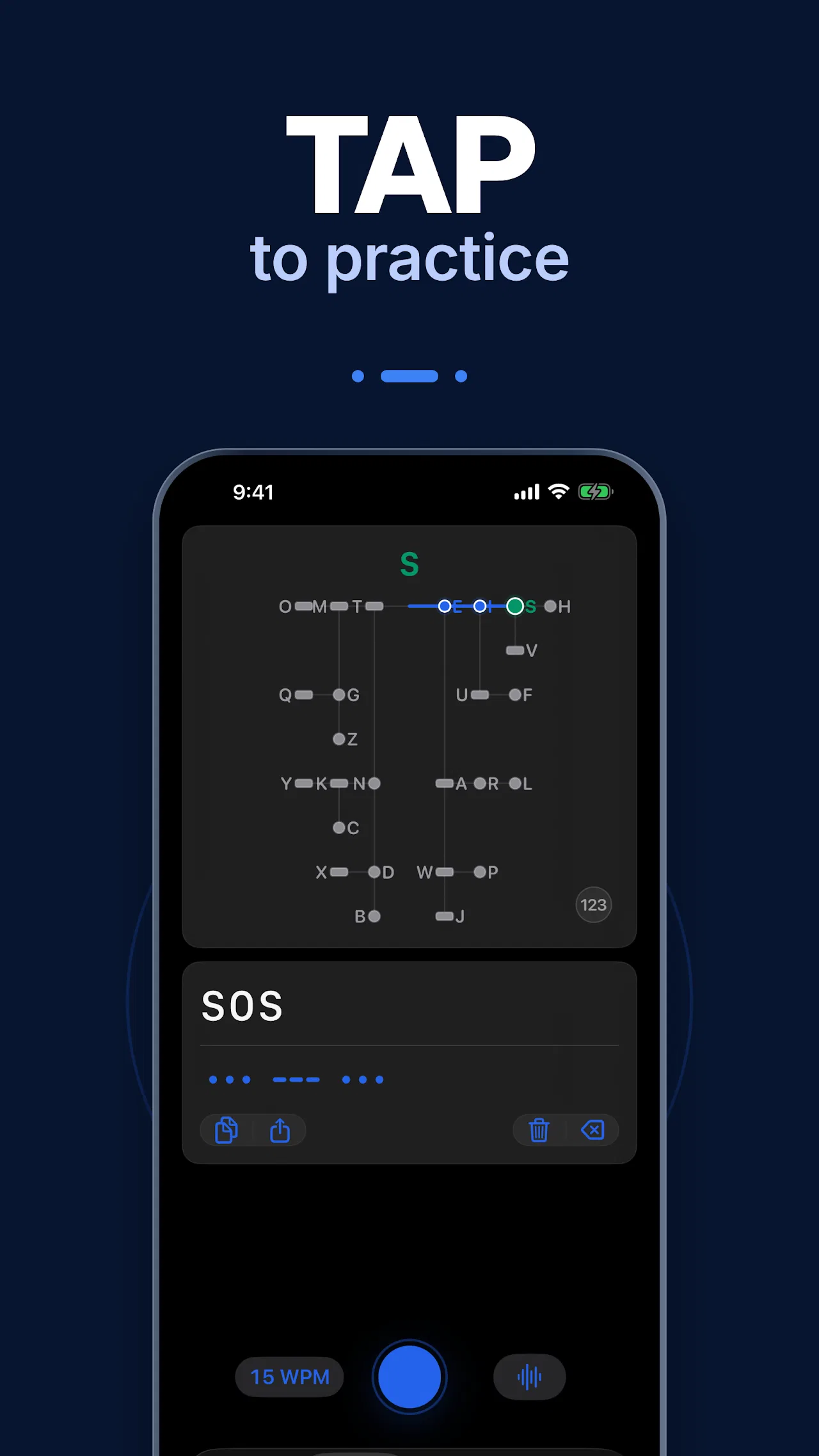
The main practice screen above is the heart of the app. Taps trace a glowing path down the Morse tree (E to I to S here), the decoded text builds up below (SOS), and the big blue key plus a 15 WPM badge set the pace. It’s the fastest possible loop from finger to letter.
Why Hams Should Still Learn Morse
Morse hasn’t been an exam requirement for years, yet CW is everywhere on the bands: SKCC and FISTS sprints fill the calendar, SOTA and POTA activators run CW from summits because a tiny key beats a microphone for weight and battery, and CW slices through weak-signal conditions where SSB fails. For emergency communication it remains the mode of last resort that needs almost no infrastructure. Learning it through an app first means your first on-air QSO starts with rhythm already in your fingers, and Elmers everywhere will tell you rhythm learned early beats speed learned late.
The Four Screens
1. Tap to Practice: the Morse Tree
Explore the visual tree and see each tapped sequence decode into a character. The tree is the classic binary map of the code: go left for a dit, right for a dah, and every leaf is a letter, digit, or the 123 keypad for numbers and punctuation. Because you watch the path light up as you tap, the tree stops being a chart to memorize and becomes a place you navigate by feel. Copy and share buttons sit under the decoded text, with trash and backspace for corrections.
2. Follow the Rhythm: Guided Timing Drills
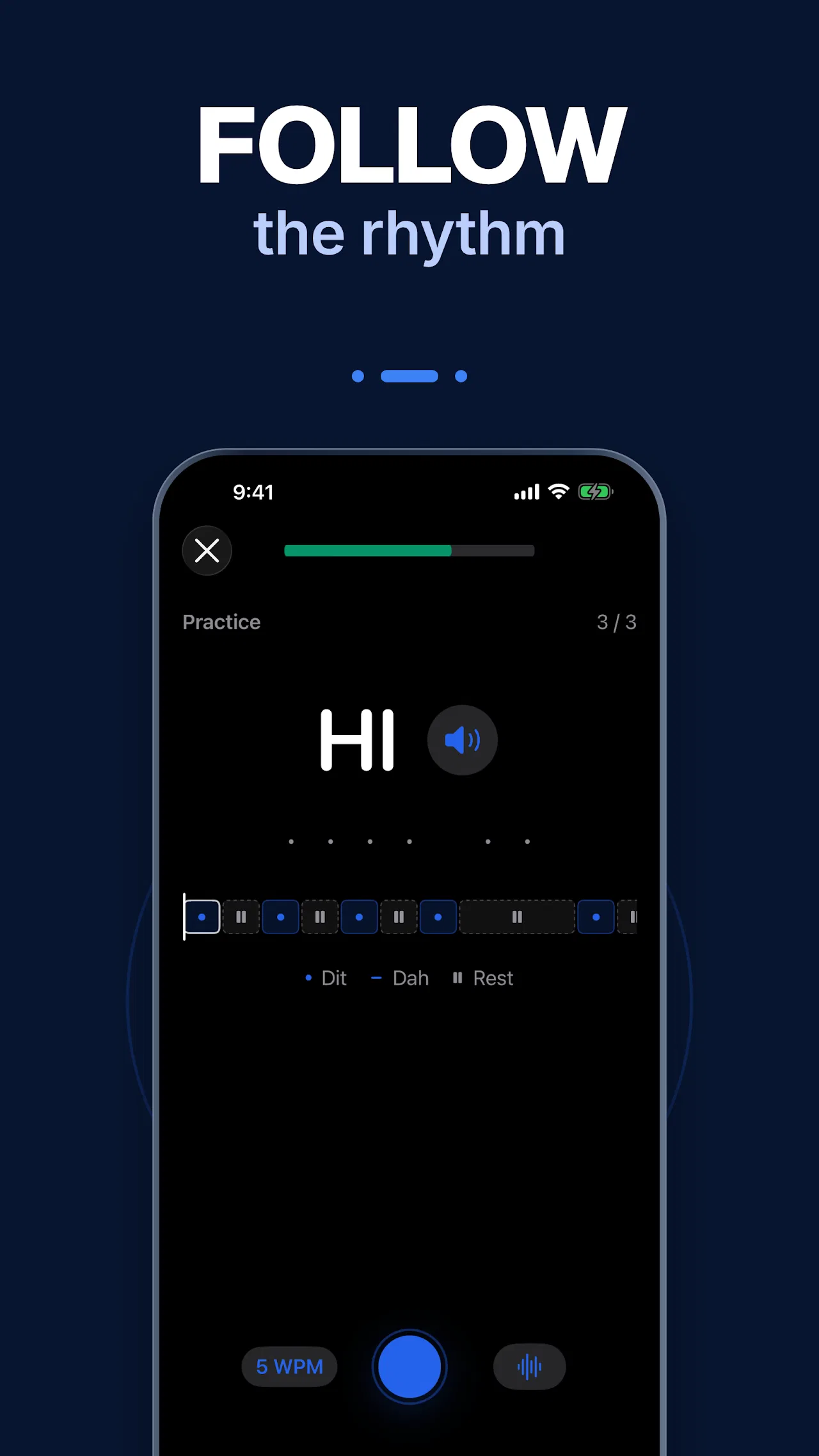
This is the screen that separates the app from flashcard-style trainers. Listen first, then tap along with a visual guide that shows exactly how long to press and when to rest. The timeline marks dits, dahs, and rests as colored blocks, the drill counter tracks progress (3 of 3 here), and practice starts at a gentle 5 WPM. Newcomers learn the single hardest CW skill early: gaps matter as much as marks. Progress runs from single letters to phrases and short conversations.
3. Turn Text into Morse
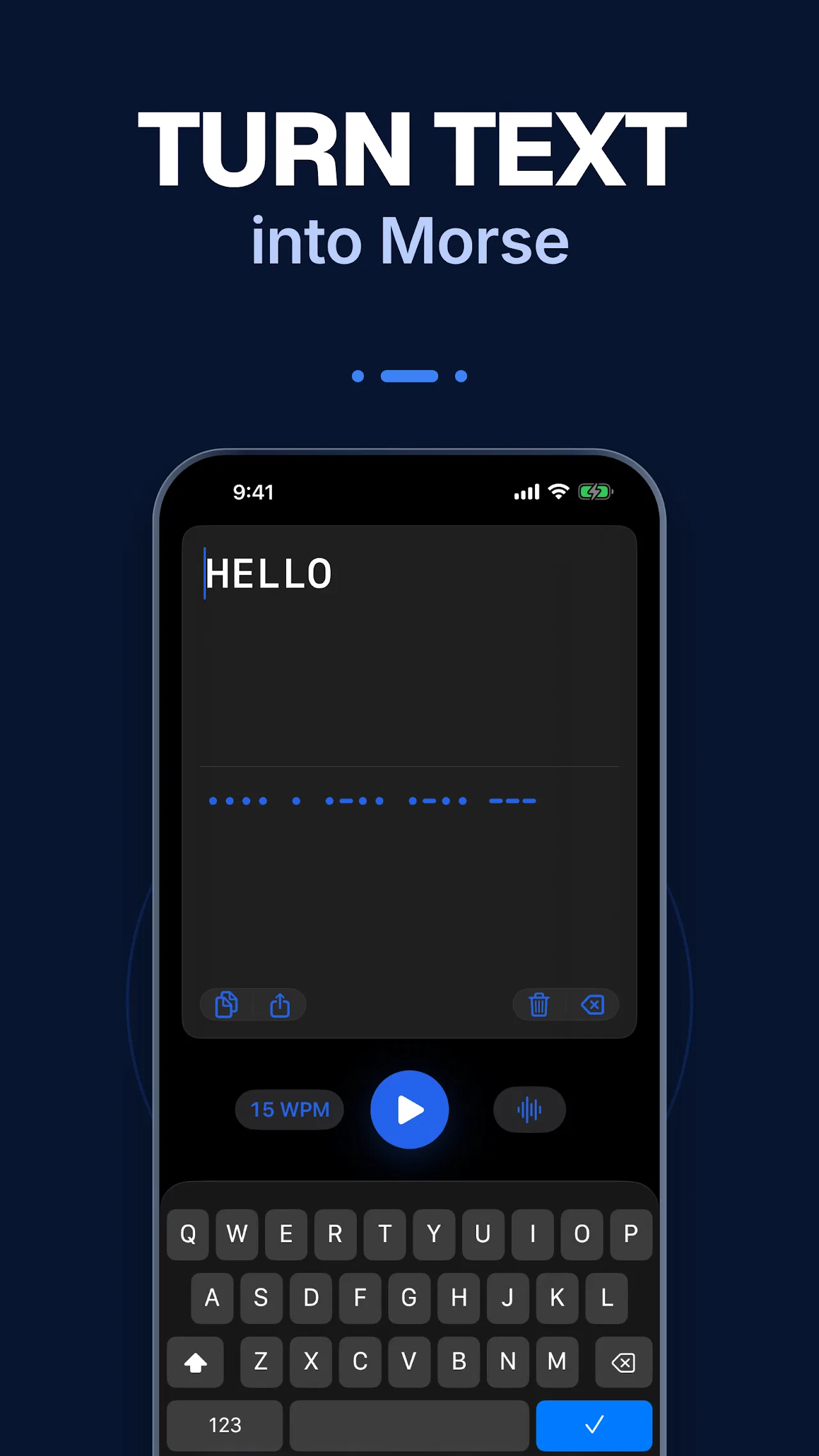
Type anything and the app converts it as you type, ready to copy or play back at your own pace with the big play button. Use it to check your own sending (tap it, then compare against the converter), to prepare a practice script, or to settle arguments about the correct pattern for punctuation. The 15 WPM badge here shows the playback speed control that the October 2026 update refined with learning speed guidance.
4. Send with Sound and Light
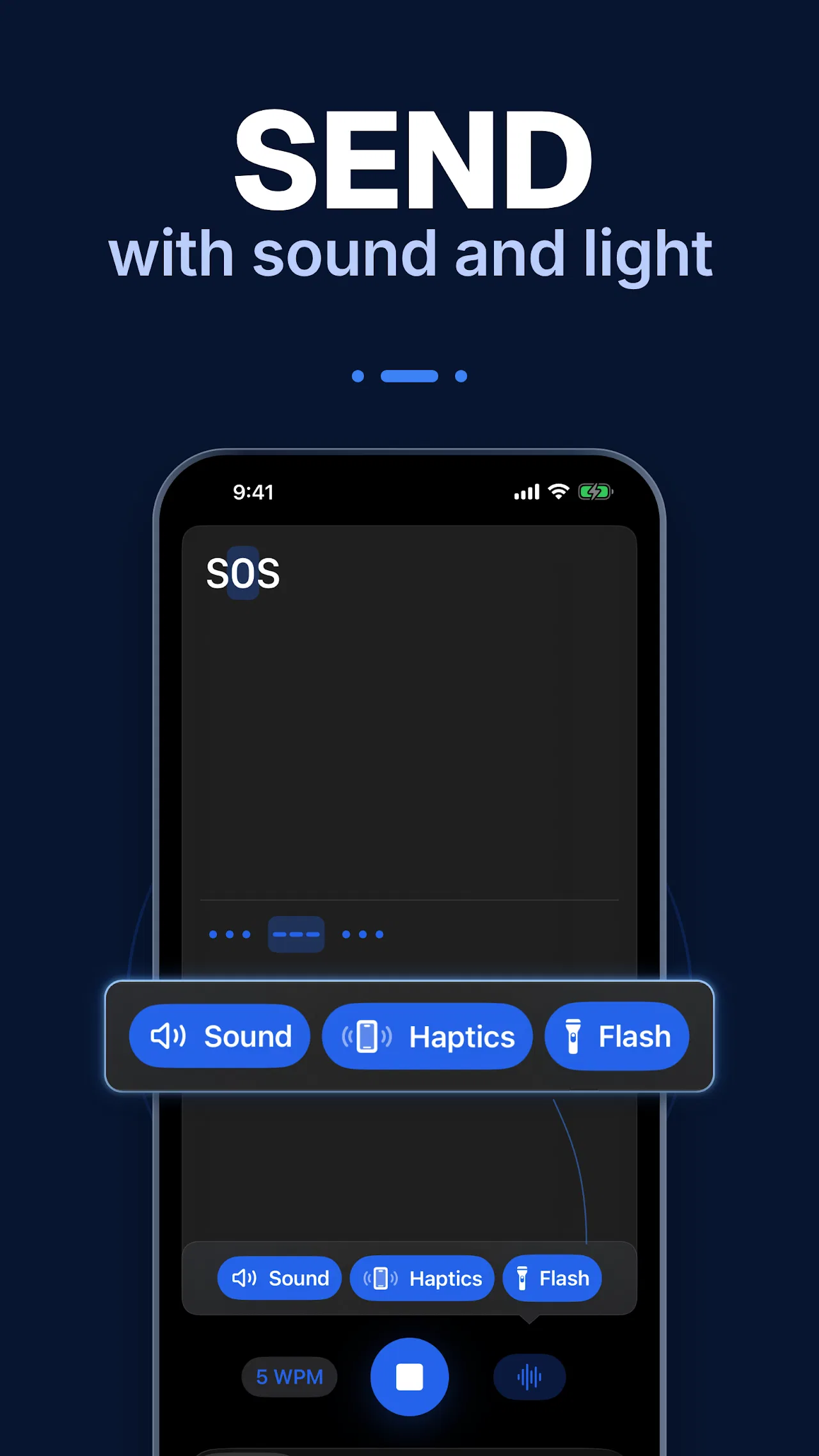
Your message can go out three ways: speaker tone with fresh tone controls, vibration pulses you can feel in a pocket, or the camera flashlight for across-the-room or across-the-campsite signaling. SOS loaded above with the three output buttons glowing is the classic demo, but any converted text plays the same way. Flashlight Morse is a genuine field skill: silent, long-range at night, and runnable on any phone.
Timing Basics the App Trains Into You
The rhythm drills teach the international standard without ever naming it. One dit is the base unit, and everything else is measured in dits:
| Element | Length | Example |
|---|---|---|
| Dit | 1 unit | The dot in E |
| Dah | 3 units | Three times a dit |
| Gap inside a letter | 1 unit | Between the dits of S |
| Gap between letters | 3 units | Between S and O |
| Gap between words | 7 units | Between words in a sentence |
| PARIS benchmark | 50 units | The word PARIS plus word gap defines WPM |
At 5 WPM a dit lasts 240 milliseconds, generous enough for a thumb. At 15 WPM it is 80 milliseconds, which is why the app’s speed guidance matters: start slow, let the gaps shrink naturally, and resist the urge to count. Farnsworth-style spacing (fast marks, wide gaps) is the proven path from 5 to 15 WPM and beyond.
Practical Drills for Future Hams
- Your callsign first. Type it into the converter, listen at 5 WPM, then tap it from memory on the tree screen until the path feels automatic. Your callsign is the word you’ll send most in your life.
- The standard QSO skeleton. Practice CQ, RST, QTH, name, and rig as whole phrases in rhythm mode. Real QSOs reuse a tiny vocabulary, so drill the skeleton, not the dictionary.
- Prosigns that save lives. SOS, AR (end of message), KN (go ahead, you only), and SK (signing off) are worth tapping until they are reflex. The SOS demo in the send screen is day one material.
- Copy practice in reverse. Play converter output through sound with the screen covered, write down what you hear, then uncover to check. Receiving is half of CW and most apps skip it.
- Flashlight field night. After dark, send your callsign across the campsite with the flash on. It teaches clean gaps fast, because sloppy timing strobes visibly.
Privacy, Price, and Polish
The Play Store data safety section, filled in by the developer, states no data is shared with third parties and data is encrypted in transit, with location, financial info, and two other types possibly collected. The app carries in-app purchases (rated 3+), offers support at [email protected] plus a feedback page, and publishes its terms and privacy policy from the developer site. The 18 October 2026 update added tone controls and learning speed guidance, a sign of active maintenance. Download from Google Play by searching Morse Code Tap and Translate by Ray.Lee, package com.raysuhyunlee.morsetranslator.
Morse Trainers Compared
| Trainer | Guided rhythm drills | Visual Morse tree | Sound, haptics and flash output | Text converter | Works fully offline | Price model |
|---|---|---|---|---|---|---|
| Morse Code: Tap and Translate | Yes, with dit dah rest timeline | Yes, live tap tracing | Yes, all three | Yes, with playback speed | Yes | Free with in-app purchases |
| LCWO web trainer (Koch method) | Yes, Koch lessons | No | Sound only | No | No, needs browser | Free |
| Typical flashcard Morse apps | Rarely | Sometimes static | Sound only | Sometimes | Varies | Ads or paid |
| Classroom and club Elmering | Yes, with a live fist to copy | Whiteboard only | Straight key and oscillator | No | Yes | Free, schedule-bound |
Tap and Translate wins for beginners who learn by doing: the tree makes the code spatial, the rhythm timeline makes timing visible, and the three output modes turn the phone into a signaling instrument rather than a quiz card.
Frequently Asked Questions
What is Morse Code Tap and Translate?
It’s a free Android app by Ray.Lee that teaches Morse by tapping: a live Morse tree decodes your taps, rhythm drills train timing, and a converter plays text via sound, vibration, or flashlight.
Is it good for complete beginners?
Yes. Drills start at 5 WPM with listen-then-tap guidance, the tree shows where every tap goes, and progression runs from letters to phrases and conversations.
Can it send real Morse with light and vibration?
Yes. Any message plays through the speaker with tone controls, haptic pulses, or the camera flash, which works for silent or night signaling practice.
Does it replace a real CW key and Elmer?
No, it prepares you for them. Arrive at your first straight key or paddle with rhythm and your callsign already in your fingers, then let an Elmer fix your fist.
Is my data shared or the app expensive?
The developer declares no third-party data sharing with encryption in transit. The app is free with in-app purchases and rated 3+.
Sources and Further Reading
- Morse Code: Tap and Translate on Google Play: https://play.google.com/store/apps/details?id=com.raysuhyunlee.morsetranslator
- Developer feedback page: https://www.raysuhyunlee.com/apps/morse-translator/feedback
- Terms of use: https://www.raysuhyunlee.com/apps/morse-translator/tos/en
- Privacy policy: https://www.raysuhyunlee.com/apps/morse-translator/privacy/en
73 de 9M2PJU






Post Comment