amateur radio
android
open source
Technology
Android TAK client, ATAK, Bluetooth companion radio, channel contacts, Colorado Mesh, CoT, Cursor on Target, delivery receipts, direct messages, EmComm, GeoChat, GPL-3.0, LoRa mesh network, Meshcore, MeshCore TAK Bridge, off-grid communications, open source, search and rescue, tactical mapping, TAK server
9M2PJU
0 Comments
MeshCore TAK Bridge: Put Your Off-Grid LoRa Mesh on the ATAK Map
MeshCore TAK Bridge: Put Your Off-Grid LoRa Mesh on the ATAK Map
TL;DR: MeshCore TAK Bridge is a free open source Android app by Colorado Mesh that connects a phone to a MeshCore LoRa companion radio over Bluetooth and presents the whole mesh to ATAK as a local TAK server on 127.0.0.1:8087. Mesh nodes become map markers, every mesh channel becomes an ATAK chat contact, and direct messages work both ways with delivery receipts. Version 0.1.1 is out now, GPL-3.0 licensed, tested on a Pixel 9 Pro and a Galaxy Tab Active 3.
What Is MeshCore TAK Bridge
MeshCore TAK Bridge is an Android app that connects a phone to a MeshCore companion radio over Bluetooth and presents the mesh to ATAK as a local TAK server. ATAK connects to it exactly like any other TAK server, mesh nodes with positions appear as map markers styled by node type, and every mesh channel appears as an ATAK contact you can chat with in both directions.
It is a Colorado Mesh project and the phone-side counterpart to the TAK server in the Colorado Mesh desktop client. The design history lives in docs/DESIGN.md, the done and next lists in docs/STATUS.md, and version 0.1.1 was released 17 October 2026. It is written from scratch in Kotlin with no code taken from TAK-MESHCORE, and it never writes to the radio’s settings, channels, contacts, or clock.
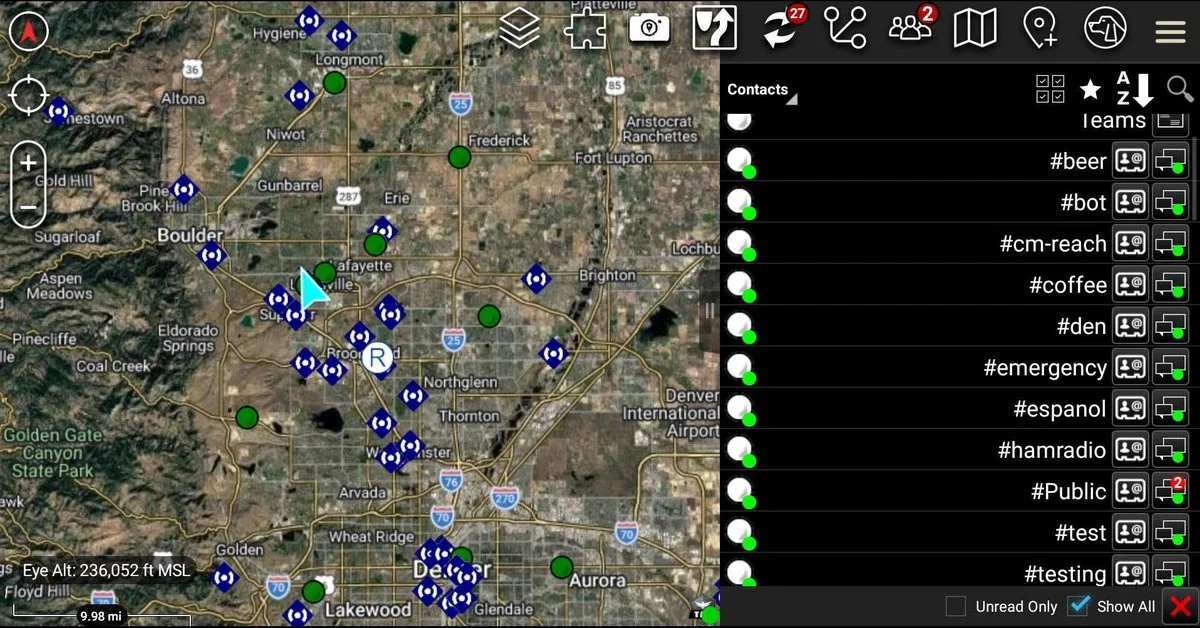
The screenshot above is the money shot from the project README: ATAK on a Galaxy Tab Active 3 with the bridge running. Mesh nodes sit along Colorado’s Front Range, repeaters show as blue installation symbols, companion radios as green team members, and every channel on the radio (#beer, #bot, #cm-reach, #coffee, #den, #emergency, #espanol, #hamradio, #Public, #test, #testing) appears as a contact grouped at the top of the list.
Why Radio Amateurs and EmComm Teams Should Care
Tactical mapping over off-grid mesh is one of the most requested EmComm capabilities, and this app nails the phone-only case:
- No infrastructure at all. Phone plus a MeshCore LoRa companion radio is the whole station. No computer, no shared network, no internet, no repeater hardware to deploy.
- Real team tracking. Companion nodes with positions show as ATAK team members in a team colour you choose, so a search team or SOTA group sees each other live.
- Channels stay usable. Every mesh channel becomes an ATAK chat contact, so net control can work
#emergencytraffic from the same screen as the map. - Direct messages with receipts. Person-to-person messages carry acknowledgements, and ATAK marks them delivered, which matters when you must confirm an order was received.
- TAK ecosystem compatibility. Because the bridge speaks the standard TAK server protocol, it interoperates with the world described in the OpenTAKServer Docker guide: the same ATAK client, the same CoT events, the same mapping conventions.
- Field proven. The Tab Active 3 held the radio link overnight with no power-saving kills, and the whole stack (plus ADS-B, packet, and mapping tools) fits the turnkey approach of EmComm Tools OS.
Background: Two Older Options and Their Gaps
The DESIGN.md file is unusually honest about why this app exists. There were two ways to get MeshCore into ATAK before, and each left a gap:
| Option | What it does well | Where it falls short |
|---|---|---|
| Colorado Mesh desktop client TAK server | One radio serves every ATAK device on the network; channels become chat; nodes become markers | Needs a computer running the client plus a shared network, useless for a lone phone in the field |
| TAK-MESHCORE plugin | Phone connects straight to its own radio, no server | Buggy connects, reads only 8 channel slots, writes an ATAK_DATA channel into the radio, cramped in-plugin chat panel, tied to one ATAK version, no tests in 36,000 lines |
Problems found in TAK-MESHCORE v1.5.14 by use and source reading: it hangs on “Connecting” forever on a Galaxy Tab Active 3 (two Bluetooth operations at once, no timeouts), it reads only channel slots 0 to 7 even when the radio reports more, it writes its own channel into radio slot 7 on every connect and leaves it there, chat lives in a cramped plugin panel instead of ATAK chat, it builds for ATAK 5.6.0 only, and it has no automated tests. The bridge answers each point: standard TAK protocol instead of a plugin (no rebuild per ATAK version), one Bluetooth operation at a time with time limits, every channel the radio reports, plain channel text readable by any MeshCore app, and chat in ATAK’s own chat screen.
How It Works: The App Between Radio and ATAK
The app sits between the radio and ATAK on the same phone, and each part has one job. Radio frames arrive over Bluetooth LE, get decoded, and update the bridge’s picture of nodes and channels. That picture becomes Cursor on Target (CoT) events for ATAK. A message typed in ATAK travels the reverse path and leaves the radio as a channel message. BridgeService, a foreground service, owns everything and holds the only state.
| Module | Contents | Needs Android |
|---|---|---|
protocol |
MeshCore companion frames plus the queued command client | No, plain Kotlin with JUnit tests |
cot |
CoT events (markers, contacts, GeoChat, deletes, ping/pong) and stream framing | No, tested |
takserver |
Loopback TCP server, inbound chat, rate limit, minimal web API on port 8080 | No, tested |
app |
Bluetooth link and scanner, mesh-to-ATAK mapping, foreground service, settings screen | Yes |
Bluetooth rules learned the hard way
The GattLink layer is hand-written against Android’s API (no library), because the failures are about ordering and time limits. Every step runs one at a time with a cap: connect 12 s per try, discovery 15 s, notifications 10 s, each write 5 s, pairing 60 s. Connecting tries up to 3 times since Android, Samsung especially, often fails the first attempt with status 133. The packet-size request may go unanswered, and after 4 s the link carries on at default size instead of stalling where tablets were seen to stall. The chosen radio is remembered by address and retried after 3, 5, 10, 20, 30, then every 60 s, while the last known mesh picture is kept so ATAK’s view survives short gaps. A scan runs 12 s, lists already-paired radios first, counts its own starts (Android silently ignores apps starting more than five scans in 30 s), and each radio keeps one button for the whole scan so redraws stop eating taps.
The local TAK server and its quirks
The server listens only on 127.0.0.1:8087, plain TCP, one client, no certificates, since the connection never leaves the phone. Several behaviours were found necessary by testing against real ATAK builds: bind 127.0.0.1 explicitly (Android’s loopback constant is ::1, which ATAK refused), send bare <event> elements with no XML declaration (ATAK parsed the first event then dropped the rest), answer ATAK’s t-x-c-t keepalive pings with pongs, re-send every marker every 5 minutes (ATAK stales them after 10), delete filtered-out nodes at once, and learn the ATAK user’s callsign and uid from its first position report for chat addressing.
ATAK also polls a TAK server web API on port 8080 at connect, so the bridge runs a minimal responder there answering contacts, groups, missions, invitations, and profiles with empty-but-parseable replies. Only the two version requests stay unanswered, by design, since ATAK merely logs those.
Chat: Channels as Contacts, Direct Messages, Replies
The key design finding: ATAK only sends chat to a reachable contact (endpoint *:-1:stcp) and addresses replies to that contact, not to the room a message was read in. So every channel is a contact (MESHCORE-CH-<slot>), parked at 0, 0. Callsigns start with #, which sorts channels together at the top of ATAK’s contact list: #Public, #name for hashtag channels, #lock name for private channels. Channel text arrives as messages from that contact with the sender’s name kept in MeshCore’s Name: text form, and anything sent to the contact goes out on that channel under the radio’s name. Messages heard before ATAK connects are held (up to 50). Over-length messages (about 133 bytes on a channel after the radio name) are refused with a note in the chat rather than chopped.
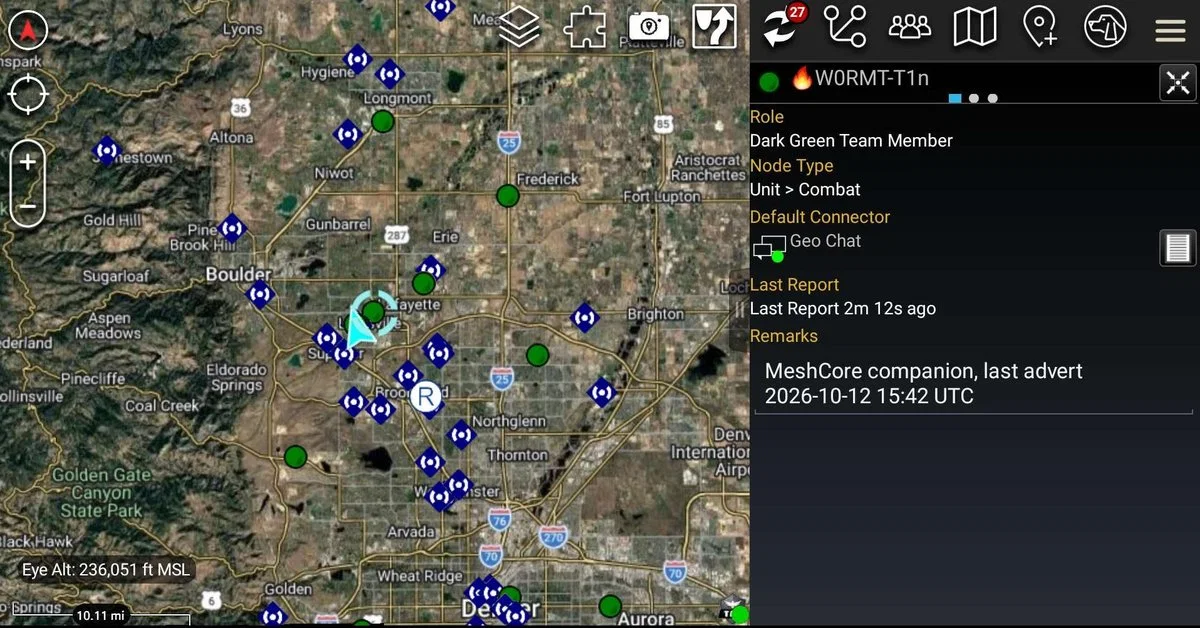
Selecting a companion node shows its details, including when it last sent an advert. The panel above reads a Dark Green team member on the Geo Chat connector with the remark MeshCore companion, last advert 2026-10-12 15:42 UTC. Chat with it straight from its contact entry.
Direct messages use the same contact pattern for companion nodes only. Repeaters and room servers get no endpoint because they read admin plain text as commands, so chat to one is never sent. Sending uses the companion protocol addressed by 6-byte key prefix, up to 160 bytes, retried up to 3 times on the recipient’s acknowledgement schedule (2 to 60 s estimates plus 2 s), and an acknowledgement produces a b-t-f-d delivery receipt so ATAK marks the message delivered. A stale contact on either radio breaks direct messages silently both ways while channels keep working; the fix is a flood advert from each radio so they re-learn keys.
Replies ride on MeshCore’s @[Name] convention, typed with @ plus a name start or @@ for whoever spoke last:
| Typed in ATAK | Sent on the channel |
|---|---|
@silver are you on? |
@[Silver Eagle] are you on? (one recent sender matches) |
@"Silver Eagle" ok |
@[Silver Eagle] ok (whole name, spaces included) |
@@ thanks |
@[Last speaker] thanks |
@home in 10 (nobody called Home) |
@home in 10, unchanged |
Several names match, or @@ on a quiet channel |
Nothing sent, chat lists up to 5 matches |
Matching ignores case, spaces, emoji, and punctuation, exact matches win, and the last-24-hours sender list (up to 50 per channel) never includes the radio’s own name.
The Bridge App Screen
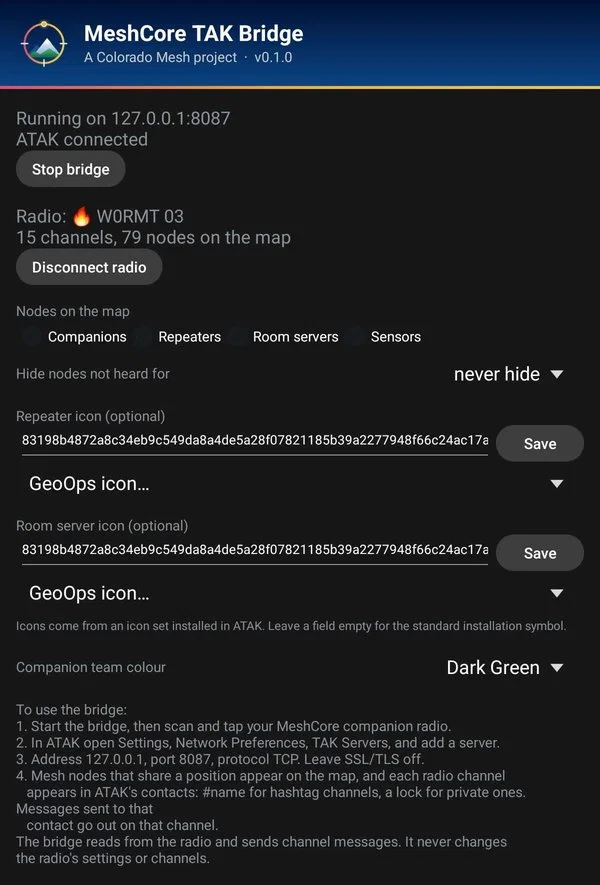
The app screen above shows everything at a glance: navy Colorado Mesh header with version, Running on 127.0.0.1:8087, ATAK connected, the radio with 15 channels and 79 nodes on the map, node-type filters, repeater and room-server icon settings, and the companion team colour picker. The UI is built in code with no layout resources; icons are generated from a script and use no ATAK artwork.
Setup Walkthrough
- Download
meshcore-tak-bridge-<version>.apkfrom the GitHub Releases page. Later releases install over it and keep settings. Uninstall any CI debug build first (different signing key). - Install on a phone with ATAK, open the app, tap Start bridge, and allow Bluetooth and notification permissions.
- Tap Scan for radios, tap your radio, enter its PIN if asked. The app remembers it and reconnects on its own.
- In ATAK add a TAK server: address
127.0.0.1, port8087, TCP, no SSL/TLS. - Nodes with positions appear as markers; each channel appears as a contact. Chat, reply with
@or@@, and message companions directly from their contacts.
With no radio connected the bridge serves three demo markers in central Denver plus an echo contact, handy for checking the ATAK side alone. If direct messages fail both ways while channels work, send a flood advert from each radio to fix stale contacts.
Checking a download
Every release shares one Colorado Mesh signing key. Verify with the Android SDK build tools and compare fingerprints:
apksigner verify --print-certs meshcore-tak-bridge-0.1.1.apk
The certificate SHA-256 is f59a5a05f3924b8e0dd2cc24aeb4f11405875d966d68bc25c2bbae9d38a7e554, and each release page also lists the APK’s own SHA-256. Debug builds from CI use throwaway keys, so uninstall before switching between debug and release.
Security and Privacy Notes
Exposure is small because nothing leaves the phone except what the radio transmits: loopback-only server and API responder, single client, chat never sent to repeaters or room servers, no configuration writes of any kind, defensive parsing with length limits and XML escaping, at most 10 chat messages a minute accepted from ATAK with 5 queued, minimal permissions (Bluetooth, notifications, foreground service. Location only on Android 11 and older where scanning needs it), and zero telemetry.
MeshCore TAK Bridge vs Alternatives
| Tool | Phone only | Radio writes | ATAK version lock | Tests | Chat home |
|---|---|---|---|---|---|
| MeshCore TAK Bridge 0.1.1 | Yes, Bluetooth to own radio | Never | None (standard TAK protocol) | JUnit on plain modules | ATAK chat screen |
| TAK-MESHCORE plugin v1.5.14 | Yes | Writes ATAK_DATA channel into slot 7 |
Built for ATAK 5.6.0 only | None in 36k lines | Cramped plugin panel |
| Colorado Mesh desktop client | No, needs computer plus network | Never | None | Yes | ATAK chat screen |
Limitations and What Is Next
Version 0.1.1 doesn’t yet show the radio’s battery in ATAK, skips signed room-server posts, never splits over-length messages, and can’t share the phone’s own position to the mesh (that would mean writing the radio’s advertised location, against the never-write rule). Open questions include whether ATAK visibly honours the b-t-f-d delivery receipts on device and which undocumented companion-protocol details stay stable across firmware versions. IPhone users are out of luck by architecture: iTAK can’t be served this way from an Android app.
Frequently Asked Questions
What does MeshCore TAK Bridge do?
It links an Android phone to a MeshCore LoRa radio over Bluetooth and serves the mesh to ATAK as a local TAK server, with nodes as markers and channels as chat contacts.
Do I need internet, a computer, or a TAK server?
No. The phone, the app, a MeshCore companion radio, and ATAK are the whole system. Everything runs on loopback with no certificates.
How do I connect ATAK to the bridge?
Add a TAK server in ATAK with address 127.0.0.1, port 8087, protocol TCP, and SSL off. Then start the bridge and scan for the radio.
Can it damage my radio’s configuration?
No. The app only reads the radio and sends user chat. Channels, contacts, keys, paths, settings, and the clock are never written.
How do channel replies work without a reply button?
Type @ plus a name start, or @@ for the last speaker, in the channel’s ATAK chat. The bridge converts it to MeshCore @[Name] form or explains ambiguous matches.
Sources and Further Reading
- MeshCore TAK Bridge repository: https://github.com/Colorado-Mesh/meshcore-tak-bridge
- Design document: https://github.com/Colorado-Mesh/meshcore-tak-bridge/blob/main/docs/DESIGN.md
- Project status: https://github.com/Colorado-Mesh/meshcore-tak-bridge/blob/main/docs/STATUS.md
- Colorado Mesh: https://coloradomesh.org/
- Colorado Mesh desktop client: https://github.com/Colorado-Mesh/mesh-client
- MeshCore documentation and companion protocol: https://docs.meshcore.io/
- ATAK (TAK Product Center): https://tak.gov/
- MeshCore TAK Bridge releases: https://github.com/Colorado-Mesh/meshcore-tak-bridge/releases
73 de 9M2PJU







Post Comment