FieldMesh: The Outdoor-Ready MeshCore Firmware with GPS Tracking, Off-Grid Mode and SOS
There is a particular kind of radio trip every outdoor group knows. The hike spreads out along the trail, the festival camp splits across three stages, the 4×4 convoy stretches around two bends, and the phone network that was supposed to hold everyone together quietly dies. One bar, no bar, then that familiar ritual of holding the phone to the sky. Mesh radio was supposed to fix exactly this, and for the most part it does, but stock firmware still assumes a phone in every hand, a repeater on every hill, and an operator willing to babysit settings instead of walking.
FieldMesh is a firmware fork that starts from that field reality instead. Built on top of MeshCore by the fieldmesh-radio project, it turns four inexpensive LoRa boards into backpack nodes you can switch on and forget: position beacons that send themselves when you move, a one-press Off-Grid frequency where every node relays for the group, SOS alerts with a buzzer that works even when the phone is in a dry bag, messages you can read on the device screen, and a Station G2 box that becomes the camp base station with a message board, weather answers, and a WiFi dashboard for everyone’s phones. It is free, MIT licensed, and version 2.1.0 is a live, tested release based on MeshCore v1.18.0.
Last updated: November 2026. Current release v2.1.0, published 27 October 2026.
TL;DR: FieldMesh is a free MIT licensed MeshCore firmware fork for outdoor use, maintained by the fieldmesh-radio project and based on MeshCore v1.18.0. It adds battery-friendly GPS tracking with movement triggered adverts, a one-press Off-Grid mode on a separate regional frequency with Client Repeat so every node relays, two-step SOS alerts with a buzzer alarm that fires without a connected phone, on-device message reading plus message writing on the Wio Tracker L1, automatic identity backup, and a FieldMesh Repeater image that turns a Station G2 into a camp base station with a room server board, WiFi dashboard, and Open-Meteo weather answers. Four devices carry prebuilt firmware: the Elecrow ThinkNode M1, the Seeed Wio Tracker L1, the card sized T1000-E, and the Station G2. Install from the browser based FieldMesh Web Flasher in Chrome or Edge, back up your private key first if you come from a stock repeater or FieldMesh 1.x, and check local band rules before using Off-Grid outside the EU, UK, US, or Australia.
What FieldMesh Is
FieldMesh is a free, open source MeshCore firmware fork that adapts inexpensive LoRa tracker boards and the Station G2 for outdoor group use, adding battery-friendly GPS tracking, a one-press Off-Grid relay mode, SOS alerts, standalone on-device messaging, and a camp base station repeater image.
Unpack that sentence and the whole project comes into focus. The base layer is MeshCore, the LoRa mesh platform whose architecture splits the job two ways: a small companion radio speaks the mesh protocol over the air, and a phone app provides the keyboard, the map, and the contacts. Repeaters extend range, and room servers act as bulletin boards. FieldMesh keeps all of that compatibility and changes what the firmware does when the phone is away, the infrastructure is absent, or someone is in trouble. Your node sends its position when it matters instead of on a timer, your whole group can jump to a private frequency with one press where every radio relays for the others, an SOS goes out with your coordinates and battery level and wakes every receiver with a siren, and the camp box keeps the message board, the SOS list, and the weather forecast available to any phone on its WiFi, with or without internet in the field.
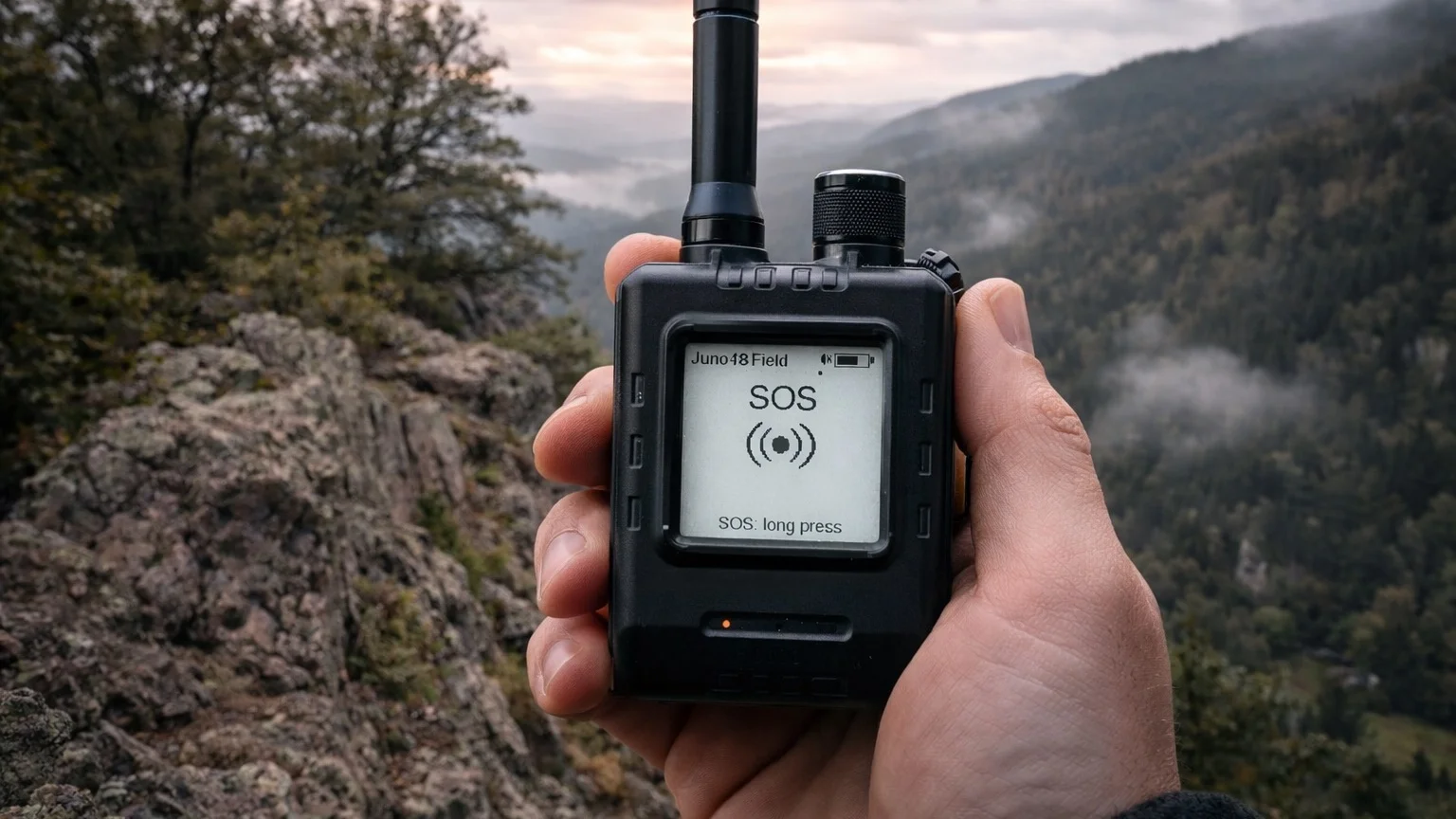
Three facts define the project. First, it is outdoor first in a literal sense: the feature list reads like a packing list for festivals, hiking groups, off-grid events, and tours, and the hero image on the repository is a hand holding a tracker showing an SOS screen above a mountain valley. Second, it is honest about scope: four tested devices get prebuilt firmware, everything else builds from source untested, Off-Grid knows EU, UK, US, and Australian frequencies only, and the README lists every limitation plainly. Third, it’s a healthy one maintainer project with open development: created in March 2026, moderately starred at 39 stars with 3 forks at the time of writing, MIT licensed, developed with Claude as a coding assistant with the collaboration visible in the commit history, planned from written specs, unit tested, CI built for all devices, and documented on a level most firmware twice its age never reaches.
Why a MeshCore Fork Exists
To understand why FieldMesh exists, start with what MeshCore already does well. MeshCore is an open LoRa mesh messaging system: small battery powered radios exchange short text messages across kilometres without any carrier network, using LoRa chirp spread spectrum in licence-exempt ISM bands. The design separates the radio from the interface. The companion radio handles the mesh protocol, flooding, contacts, and adverts, while the phone app handles typing, maps, and rooms. Fixed repeaters with better antennas and permanent power relay traffic across valleys and towns, and room servers give groups a shared channel with history. For neighbourhood meshes and always-on infrastructure, it’s an elegant split.
The field exposes the gaps in that split, and the FieldMesh author wrote them down as a feature list. A tracker that reports position on a fixed timer wastes battery and litters the mesh with packets nobody needed. A group that hikes out of repeater range has no one-press way to form its own relaying party net. An emergency alert that depends on a connected phone is no emergency alert at all. A node whose screen can’t show an incoming message is a beeper, not a communicator. And a base camp with a repeater still needs somewhere for the plan of the day, the weather, and the SOS list to live where every phone can see them. FieldMesh answers each of those with one focused mechanism: movement triggered GPS adverts, Off-Grid mode with Client Repeat, standalone SOS with a buzzer, on-device message history, and the FieldMesh Repeater.
The wider context matters too. The better known Meshtastic project covers similar ground with its own protocol, managed flood routing, MQTT uplinks, telemetry modules, and a large multi-vendor hardware ecosystem. MeshCore chose a different shape: chat first, with contacts, rooms, and repeaters as first class citizens and a phone app as the primary interface. FieldMesh doesn’t relitigate that choice. It takes the MeshCore shape as given and tunes it for the backpack, the festival wristband lane, and the convoy, where the phone may be off, the infrastructure may not exist, and the group still needs to find each other and call for help.
Supported Devices and Release Files
FieldMesh ships prebuilt firmware for four tested boards. The trackers pair with the standard MeshCore app exactly like stock companions, and every FieldMesh feature also works with no phone attached.
| Device | What it is | Release file |
|---|---|---|
| Elecrow ThinkNode M1 | Tracker with E-Ink display, GPS switch, one button, buzzer | ThinkNode_M1_companion_radio_ble_FieldMesh...zip |
| Seeed Wio Tracker L1 | Tracker with OLED display and joystick, can write messages on-device | WioTrackerL1_companion_radio_ble_FieldMesh...zip |
| Seeed T1000-E | Card sized tracker with no display, one button, buzzer | t1000e_companion_radio_ble_FieldMesh...zip |
| Station G2 | FieldMesh Repeater, the base station for a camp or tour | Station_G2_fieldmesh_repeater_FieldMesh..._full.bin |
The Elecrow ThinkNode M1 is the most communicative of the three trackers thanks to its E-Ink screen, which stays readable in sunlight and sips power. The Wio Tracker L1 trades that for an OLED plus joystick, and the joystick is what makes on-device message writing possible. The T1000-E is the minimalist: no screen at all, card sized, one button, and a buzzer, built for a pocket or a bag strap where it just needs to beacon, listen for SOS, and beep when spoken to. The Station G2 is a different animal entirely, a mains or power station fed box that becomes the camp repeater, message board, SOS display, weather oracle, and WiFi dashboard host.
Other boards build from source but ship no prebuilt images and carry no hardware tested promise. The documented candidates are the Heltec Mesh Node T1, the SenseCAP MeshTracker X1, the Wio Tracker L1 E-Ink variant, and the Wio Tracker L1 1W, and single-button screenless devices in the spirit of the RAK WisMesh Tag could plausibly work like the T1000-E. If you prove one out, the project explicitly asks to hear about it in the Discussions hardware category.
Install and Update Without Losing Your Identity
Installation is deliberately boring, which is exactly what you want the night before a trip. The recommended path is the FieldMesh Web Flasher, a browser page that flashes the current release over USB. Open it in Chrome or Edge on a Windows, macOS, or Linux computer, because flashing needs WebUSB and Web Serial support that phones and Safari don’t provide. Connect the board with a real USB data cable, not a charge-only lead, and follow the two or three steps on screen. ThinkNode M1, Wio Tracker L1, and T1000-E take a Start update mode step followed by Flash, picking the port again since its name can change between steps. The Station G2 takes a straight Flash, and if the G2 isn’t found you hold its download button, tap reset briefly, release, and click Flash again. The flasher installs the current release for first installs and updates alike, and it never erases the device.
One warning deserves its own paragraph because it bites exactly the people with the most to lose. Back up your private key before a first install if you come from a stock MeshCore repeater on the Station G2 or from FieldMesh 1.x on a tracker. The FieldMesh Repeater uses a larger app partition, so moving from a stock repeater can lose the identity and settings; run get prv.key on the USB serial console and keep the output, then restore with set prv.key. Trackers arriving from FieldMesh 1.x, formerly numbered V5.x, should export the private key in the MeshCore app first. Updates inside the FieldMesh 2.x line keep settings, contacts, and identity, and exporting the key in the app before any first install is simply good habit regardless.
The manual path exists for operators who prefer it. Grab the file for your board from the latest release, flash tracker .zip files with the MeshCore Flasher as custom firmware, and write the Station G2 ..._full.bin at address 0x0 with esptool-js, never with erase. Repeater updates after that get easier: once the box runs, open the dashboard, go to Setup, log in, and upload the ..._update.bin under firmware update, with settings, room, team, and identity preserved and an automatic restart. USB reflashing with the full image always works as the fallback, which is why the repeater keeps both paths.
Since version 2.1 the trackers also carry their own safety net. FieldMesh keeps a copy of the node identity (/_main.id) and settings (/prefs.json) in a second filesystem, external QSPI flash on the ThinkNode M1 and Wio Tracker L1 and a separate area of internal flash on the T1000-E, restoring it automatically at the next boot if the main copy is lost. A factory reset from the app or CLI clears the backup too, which is how you genuinely start over. BLE pairings aren’t part of the backup, so expect to re-pair the phone.
Using Your Tracker in the Field
The on-device interface is the heart of the standalone promise, and it differs by hardware because the hardware differs. ThinkNode M1 and Wio Tracker L1 carry displays with the same page order, left to right: Messages, Recent, Tracking, Radio, GPS, Sensors where available, Repeater discovery, and SOS. The controls map to what each board physically has.
| Control | ThinkNode M1, one button | Wio Tracker L1, joystick |
|---|---|---|
| Next / previous page | Short press / double press | Joystick right / left |
| Page action | Long press | Long joystick press, short press on Messages, GPS, and Repeater discovery |
| Buzzer on / off | Triple press | Triple press on the back button |
| Back | None | Back button |
Each page action does something useful rather than decorative. Messages opens the message menu with all messages, favourites only, and Send Message on the L1. Recent sends an advert immediately. Tracking opens Outdoor Settings with GPS-Share and Off-Grid toggles. GPS toggles the receiver. Repeater discovery scans for repeaters in direct range. SOS opens the two-step send screen. In the message history a short press steps to the next message and a long press clears all; on an SOS alarm a long press acknowledges it; and a long press within the first 8 seconds after power-on enters CLI rescue mode inherited from upstream.
The ThinkNode M1 adds one hardware wrinkle worth memorising: its GPS runs only when the physical GPS switch and the GPS setting agree, and flipping the switch on also flips the setting on. That two-gate design is what makes multi-day battery life achievable, because the receiver is truly off rather than merely quiet.
The displayless T1000-E compresses everything into button press counts, and the manual is worth rehearsing before you need it for real.
| Button | Action |
|---|---|
| 1 press | Acknowledge an SOS alarm |
| 2 presses | Send an advert now |
| 3 presses | Buzzer on / off |
| 4 presses | GPS on / off, saved across restart |
| 5 presses | Off-Grid on / off, saved across restart |
| Long press | Power off, or CLI rescue mode within 8 s of power-on |
GPS-Share tracking on the T1000-E is toggled from the MeshCore app advert settings, and note the asymmetry: the T1000-E receives SOS alarms but can’t send one, because sending needs the display’s two-step confirmation. Every action answers with a tone even when the buzzer is muted: ascending for on, descending for off, double beep for advert sent, and a continuous siren for an incoming SOS that you silence with one press. The Off-Grid state check is charmingly analogue: press five times and listen, ascending means it was off and is now on, descending means the reverse, then press five times again to return to where you started.
Battery-Friendly GPS Tracking
FieldMesh separates two things that stock MeshCore conflates: when you last heard from a node versus when that node last had a GPS fix. The RECENT page shows every recently heard node. The TRACKING page shows only nodes that actually sent a position, with the distance to you, green for fresh under five minutes and yellow for older. Only contacts starred as favourites in the MeshCore app appear there, capped at three, which keeps the page readable on a tiny screen and keeps the mesh quiet, since every tracked position costs airtime.
The GPS duty cycle borrows the approach Meshtastic users will recognise: while GPS is on, the receiver takes a fix every two minutes and sleeps between fixes, with search time adapting to visible sky and every constellation the chip supports in play across GPS, GLONASS, Galileo, and BeiDou. On the T1000-E that delivered about two to two and a half days with GPS on in the author’s tests, honestly flagged as having no exact current measurement. Boards whose GPS can’t be switched off simply keep it running.
Tracking itself, the GPS-Share switch, sends position only when it matters instead of on a fixed timer.
| Situation | What is sent |
|---|---|
| First fix after GPS-Share or GPS switched on | Advert with position |
| Moved at least 100 m since last sent position | Advert with position, at most every 2 min |
| Moving fast, at least 30 km/h by car or bike | Fix every 60 s, adverts at most every 60 s |
| Nothing changed for 10 min | Heartbeat advert, with position only if the last fix is at most 2 min old |
Two design choices keep the wider mesh healthy. In normal mode these adverts go out zero-hop, reaching only nodes in direct range and adding zero load to the wider network, while in Off-Grid mode they flood so the whole group sees them. And a position is only ever included when the fix is at most two minutes old, so the map never shows stale or cached coordinates as if they were live.
Off-Grid Mode: Your Group’s Private Frequency
Off-Grid mode is the headline feature and the one most worth understanding precisely. One press moves your node to a separate Off-Grid frequency and switches on Client Repeat, so every FieldMesh node in your group relays for the others. In the mountains, at a festival, or anywhere without mesh infrastructure, the group becomes its own infrastructure. Normal radio settings are saved and restored on the way back, and switching sends an advert immediately so nearby nodes know you moved.
The region is picked automatically from your normal frequency, which is why one firmware serves all regions.
| Your normal frequency | Off-Grid uses |
|---|---|
| Below 900 MHz, EU and UK | 869.4625 MHz, BW125, SF11, CR5, EU sub-band g3 at 500 mW ERP with 10 percent duty cycle |
| 900 MHz and above, US and Australia | 916.4625 MHz, BW125, SF11, CR5 |
Off-Grid deliberately avoids your normal MeshCore network: the EU and UK Narrow preset sits on 869.618 MHz at BW62.5, leaving roughly a 62 kHz gap. In Off-Grid you see only nodes that are also in Off-Grid, which is the point. FieldMesh also corrects upstream MeshCore Client Repeat frequency ranges to legal values: 433.050 to 434.790 MHz for EU 433, 869.400 to 869.650 MHz sub-band g3 for EU 869, and 915.000 to 928.000 MHz for US and Australia.
The warning is explicit and worth repeating verbatim in spirit: Off-Grid knows no frequency for other regions such as India, Japan, or Korea, so don’t use it there. Operators in those regions still get every other FieldMesh feature, and adapting the Off-Grid defaults for another region is listed as a welcome contribution.
SOS Alerts That Work Without a Phone
The SOS flow is designed around two facts: accidental triggers must be near impossible, and a real trigger must work when the phone is off, wet, or lost. On the SOS page, a long press opens a two-step confirmation screen, and only completing both steps sends. FieldMesh transmits to the channel whose name contains “sos”, case insensitive, so set one up in the MeshCore app first, something like #sos. The message carries position and battery in a compact fixed format.
!SOS 48.7636,9.1621 bat78%
!SOS no GPS bat78%
Position rides along only if the last fix is at most two minutes old. After sending, the GPS stays on for ten minutes, and if the first SOS went out without a position it is sent once more as soon as a fix arrives. A GPS you deliberately switched off isn’t switched on for an SOS, a restraint that respects the operator’s explicit choice about the receiver.
Receiving is where the buzzer earns its place. An !SOS message arriving in an SOS channel triggers a buzzer alarm that overrides quiet mode and loops until acknowledged, with the sender’s name on the alert screen while normal messages wait politely aside. An !SOS in any other channel, Public included, renders as a normal message with no alarm, which keeps the siren meaningful. The T1000-E acknowledges with one press and M1 and L1 with a long press, and every display owner should rehearse that gesture the way they rehearse a fire drill.
Messages Without a Phone
Standalone messaging covers both directions within the limits of tiny hardware. Received messages are kept in RAM, up to 32, readable on any display equipped device. The home screen shows an unread counter plus the latest message from a favourite, the message menu filters all messages or favourites only, and history reads newest first with sender, channel or direct message tag, time, and text. Stepping through all unread messages returns you to the home screen. Nothing you read or clear on the device touches the MeshCore app, which still receives everything, so the phone and the node never fight over state.
Writing stays exclusive to the Wio Tracker L1, the only supported board with a joystick suitable for text entry. From the message menu, Send Message offers a channel choice, then character by character selection with left and right and short press to confirm, and a long press sends. Messages run to 20 characters on channels only, no direct messages. Twenty characters sounds cramped until you try it: “AT CAMPSITE ETA 10MIN” fits, “NEED HELP RIDGE PATH” fits, and that is exactly the vocabulary the feature targets.
FieldMesh Repeater: the Station G2 Camp Base Station
The FieldMesh Repeater turns a Station G2 into the box that anchors a camp, a festival crew, or a multi-day tour, ideally packed with a power station and parked where its antenna sees the whole site. It remains a normal MeshCore repeater underneath, every repeater setting and CLI command works as usual, and FieldMesh layers camp infrastructure on top: Off-Grid switching for the whole repeater from the menu, CLI, or dashboard, a message board running as a room server under a second identity with its own name and key, in-chat room commands, SOS mirroring onto the board, a WiFi dashboard for phones, and weather answers built from forecasts the phones ferry in.
Getting started follows five steps. Install the repeater image with the key backup noted earlier. Set the box up as usual with name, admin password, radio preset, and location via the MeshCore app or CLI, including latitude and longitude since distances, radar, and weather all need them. Switch the board on with set roomserver BaseCamp or the G2 menu Room entry, adding set room.pass if the board should be private. Switch the dashboard WiFi on with set wifi on or the G2 menu, where the network is named after the room, or after the repeater while the room is off. Stick a QR code on the box pointing at http://192.168.4.1 so phones joining the WiFi land on the dashboard, moving on to http://<room name>.local where the phone supports it. FieldMesh never touches transmit power, so keep the manufacturer’s recommended Station G2 setting.
The G2 front panel menu stays simple: short press steps pages, long press acts, and the display always wakes on status. Status shows mode, frequency, spreading factor, bandwidth, and coding rate. Off-Grid toggles the repeater’s Off-Grid state with automatic EU or US selection. Room toggles the board with client and post counts. Room reset wipes posts, users, and password while keeping the name, armed by two long presses within five seconds. WiFi toggles the dashboard network and shows its name, address, and connected phone count. Power turns the box off.
The board itself behaves like a normal room server to every app, with its own key and name alongside the repeater. Open or password protected, name preserved across password changes that log everyone out, last 32 posts kept across restarts, automatic “Box started” notes, every heard SOS reposted, and dashboard posts signed “Name (WiFi)”. Its command set splits cleanly between everyone and the repeater admin, where admin means logged in to the repeater itself, since the room has no admin login and commands never post to the board.
| Command | Who | Answer |
|---|---|---|
!help |
Everyone | The user commands, reply only to you |
!weather / !wetter |
Everyone | Box location weather to everyone on the board, English or German |
!ping |
Everyone | Signal check with SNR, RSSI, and hops, reply only to you |
!status |
Everyone | Uptime, mode, frequency, users, posts, box temperature, reply only to you |
!commands [topic] |
Repeater admin | CLI commands by topic: room, radio, wifi, sos, team, weather |
/<CLI command> |
Repeater admin | Runs any repeater CLI command remotely, for example /get radio or /set offgrid on |
The WiFi dashboard is the part the whole camp touches. It’s an open WiFi serving up to ten phones with a live web page that needs no internet and updates without reloads, preserving open rows, zoom levels, and half-typed text, with light, dark, or automatic theme per phone.
| Tab | What you see |
|---|---|
| Board | Posts with timestamps, write to the board from the phone, SOS banner |
| SOS | Heard SOS messages with position, distance and bearing from the box, battery, and open-in-map-app links |
| Mesh, Nodes | Team first with Show all for everyone, sorted by last heard or distance, list or radar from 250 m to 10 km, teammates silent for 30 min dimmed |
| Mesh, Network | Box status, last hour activity, airtime, packet types, neighbour repeaters, hash collisions, live packets |
| Setup | Theme, plus after admin login: Off-Grid, room controls, SOS channels, box position, weather, firmware update, WiFi off |
Two details show real field experience. There is deliberately no captive portal: the WiFi announces itself as internet-free like a printer, so phones keep using mobile data for everything else and passersby aren’t funnelled to the dashboard. And phones that open the page set the box clock, which matters because the G2 carries no battery backed clock and its time only ever moves forward. Last heard accounting is generous, counting adverts alongside room and repeater logins, posts, and keep-alives. Team membership comes from admin starred favourites, and team members with last known data survive restarts while the general heard list lives in RAM.
Weather deserves its own explanation because the mechanism is clever. The box has no internet, so every phone with mobile data that opens the dashboard quietly fetches the forecast for the box location from Open-Meteo in the background once the box data is older than three hours, or on demand via Load now in Setup. The box stores the next 48 hours and composes answers at ask time, so one download covers about two days. !weather answers in English with Celsius and km/h, or Fahrenheit and mph for US users via Setup or set weather.units imperial, while !wetter answers in German.
Weather: 16°C, mostly sunny. Rain from 17:00 (80 %). Night 8°C, tomorrow 8-16°C.
Weather: 12°C, rain. Dry from about 19:00. Gusts up to 55 km/h from 15:00. Night 7°C, tomorrow 7-12°C.
Wetter: 16°, meist sonnig. Regen ab 17 Uhr (80 %). Nacht 8°, morgen 8-16°.
Each answer covers now, the most important event of the next twelve hours across thunderstorm, rain, or snow from a 30 percent threshold, otherwise how long it stays dry, gusts above 50 km/h, the night low, tomorrow’s range, and the data age once older than six hours. Position for the forecast defaults to the box and overrides via set weather.loc, accepting decimal degrees with points or commas, degrees minutes seconds, N/S/E/W and German O for east, and coordinates or map links pasted from Apple or Google Maps, though short links aren’t understood.
Restart behaviour is documented in a tidy split. Kept: repeater settings, Off-Grid state, room with name, password, posts, and users, WiFi state, SOS channels, team with last known data, weather forecast, and the clock as a high-water mark saved every five minutes. Lost: other heard nodes, the dashboard SOS list while the board SOS posts persist, and statistics. That table alone tells you the design intent: the camp’s social state survives, the radio ether starts fresh.
Building from Source
FieldMesh builds exactly like MeshCore with PlatformIO and needs nothing beyond MeshCore’s own dependencies. Pick the environment matching your board, with USB variants connecting to the app over USB instead of BLE.
| Device | Environment |
|---|---|
| ThinkNode M1 | ThinkNode_M1_companion_radio_ble |
| Wio Tracker L1 | WioTrackerL1_companion_radio_ble |
| T1000-E | t1000e_companion_radio_ble |
| Station G2 repeater | Station_G2_fieldmesh_repeater |
pio run -e ThinkNode_M1_companion_radio_ble
pio run -e Station_G2_fieldmesh_repeater                 # firmware.bin = update file
pio run -e Station_G2_fieldmesh_repeater -t mergebin     # firmware-merged.bin = full image (0x0)
Portability is a stated design goal rather than an accident. Hardware specifics live in variant.h, layouts use runtime display size checks, and joystick behaviour hides behind UI_HAS_JOYSTICK guards, which is why plausible ports are a matter of testing rather than rewriting. The project invites exactly that testing, and its honesty about process is refreshing: FieldMesh is one person’s project with written plans per version, unit-tested FieldMesh logic, CI across all devices, prebuilt firmware only for hardware it has actually run on, and Claude credited as coding assistant straight in the commit history.
FieldMesh vs Stock MeshCore vs Meshtastic
| Capability | Stock MeshCore | FieldMesh 2.1.0 | Meshtastic |
|---|---|---|---|
| Licence and base | Open firmware plus app ecosystem | MIT fork of MeshCore v1.18.0 | Open source LoRa mesh, own protocol |
| Position sharing | Manual or app driven adverts | Movement triggered, heartbeat, zero-hop or flooded | Smart position broadcast with configurable intervals |
| Group off-grid relay | Manual frequency moves, no group mode | One-press Off-Grid frequency plus Client Repeat | Custom channels and presets, no equivalent one-press party net |
| Emergency alerting | Plain channel messages | Two-step SOS with position, battery, buzzer siren, board mirroring | Emergency broadcast flag plus bell character alert |
| Phoneless operation | Companion needs the app | Read on screen, write on L1 joystick, SOS and adverts standalone | Small screens show messages on many nodes, canned messages |
| Camp base station | Repeater plus separate room setup | Single G2 image: repeater, board, WiFi dashboard, weather, SOS display | Router plus MQTT and plugins, no integrated camp dashboard |
| Tracking display | App map | On-device Tracking page for 3 favourite contacts with distances | On-device node lists on many screens |
| Identity safety | App export | App export plus automatic on-device backup since 2.1 | App export |
| Hardware scope | Broad official support | 4 tested boards, more buildable untested | Very broad multi-vendor ecosystem |
The table flatters nobody unfairly. Meshtastic keeps the broadest hardware church and the deepest telemetry bench. Stock MeshCore keeps the widest official device support inside its own ecosystem. FieldMesh wins the narrow contest it entered: the group that leaves coverage together and wants one button, one frequency, one siren, and one camp box.
Three Field Workflows That Show the Design
Picture the festival crew first. The Station G2 rides in a crate with a power station at the crew tent, board named BaseCamp, WiFi QR taped to the lid. Runners carry T1000-E cards in pockets, team leads carry M1s with E-Ink showing the message history. The plan of the day sits on the board, shift swaps post from phones on the WiFi, and when the headliner overruns, one message reaches every runner whether or not their phone has signal. A twisted ankle at the far stage becomes an SOS with coordinates and battery, the siren cuts through the show noise, and the dashboard SOS tab gives the medic a bearing, a distance, and a map link.
Picture the hiking group second. Six walkers, mixed boards, no repeaters on the ridge. At the trailhead everyone toggles Off-Grid once, five presses and a tone on the T1000-E, one menu dive on the M1, and the group becomes its own relay mesh with flooded movement adverts. The sweep walker falls behind around a spur; the lead’s Tracking page keeps a live distance in green, then yellow, no guessing, no radio check every ten minutes burning airtime. Phones stay in dry bags all day because the screens on the M1 and L1 carry the conversation in twenty-character bursts.
Picture the EmComm volunteer third, with the honest caveat that this rides on licence-exempt ISM bands rather than amateur spectrum and complements rather than replaces amateur systems. A community flood watch needs a parallel text net when the cellular network congests: a G2 on a hill as the repeater and board, fixed M1s in shopfronts as unbeatable message displays, T1000-E cards with wardens. Weather questions get answered from cached Open-Meteo data over the mesh while the town’s data connections still gasp. Nothing here replaces a proper amateur EmComm plan, but as a zero-licence-barrier neighbourhood layer under it, the shape is compelling.
Honest Limits Before You Flash
FieldMesh documents its boundaries unusually well, so treat this section as the short version of its Limitations page. Only four boards are hardware tested, and anything else is build at your own risk. Off-Grid is EU, UK, US, and Australia only, never India, Japan, or Korea. SOS needs a channel with “sos” in the name on both ends, and the T1000-E can only receive. Tracking shows at most three favourite contacts. Message history is RAM only by design, gone after reboot. On-device writing is L1 only, channels only. Repeater migration from stock MeshCore changes the partition table, back up the key. The dashboard WiFi is open by design, so anyone in range reads the board and sees node positions while setup stays behind the admin password. Weather arrives only when a data-connected phone opens the dashboard, and some Android phones pin all traffic to the box WiFi and can’t fetch it. None of these are hidden gotchas; they are the documented edges of a young firmware, and the project lists adapting Off-Grid for new regions and testing new hardware as its open invitations.
Why This Matters for Ham Radio
Strictly speaking FieldMesh isn’t amateur radio at all. It lives on licence-exempt ISM spectrum, needs no callsign, and asks no exam. That is precisely why it belongs on a ham radio site. Every club has prospective members standing on the wrong side of the licence barrier, every EmComm group has a neighbourhood that needs a parallel net the public can legally use, and every SOTA or POTA activator has a hiking party that needs tracking without burning the operator’s voice frequency for position reports. A ten dollar class of pocketable LoRa nodes running an honest outdoor firmware turns “bring a radio” from a licensing conversation into a packing decision, and the ones who catch the bug graduate to callsigns, to APRS, to MeshCore repeaters on amateur-adjacent hilltops, and to the deeper end of this hobby. FieldMesh at v2.1.0 is the most field thought-through MeshCore flavour this author has seen: movement aware, siren loud, camp friendly, and documented like it expects to be trusted.
Sources and Further Reading
- FieldMesh repository, README, releases, and docs: https://github.com/fieldmesh-radio/FieldMesh
- FieldMesh Web Flasher, install and update in the browser: https://fieldmesh-radio.github.io/FieldMesh/
- FieldMesh latest release v2.1.0: https://github.com/fieldmesh-radio/FieldMesh/releases/latest
- FieldMesh Discussions, including hardware reports: https://github.com/fieldmesh-radio/FieldMesh/discussions
- Upstream MeshCore firmware source: https://github.com/meshcore-dev/MeshCore
- Upstream MeshCore project and organisation: https://github.com/meshcore-dev
- MeshCore official site, platform overview: https://meshcore.co.uk
- MeshCore Flasher, for manual tracker installs: https://flasher.meshcore.io
- esptool-js, for manual Station G2 flashing: https://espressif.github.io/esptool-js/
- Open-Meteo weather API, the repeater forecast source: https://open-meteo.com
- PlatformIO, the build system for source builds: https://platformio.org
- Meshtastic, the neighbouring open LoRa mesh ecosystem: https://meshtastic.org
- Semtech LoRa, the chirp spread spectrum underneath: https://www.semtech.com/lora
- Elecrow ThinkNode M1 product page: https://www.elecrow.com/thinknode-m1-lora-mesh-networking-development-kit.html
73 de 9M2PJU.




Post Comment