DroidStar VU3LVO for iOS: The iPhone Digital Voice Client for DMR, M17, YSF, P25 and NXDN
There is a particular frustration every digital voice operator knows. The talkgroup is alive, the net is starting in five minutes, and the only computer in your pocket is an iPhone. Your DMR handheld is on the charger at home, the hotspot is in a drawer, and the App Store has never had a serious native client for BrandMeister. For years, iPhone owners watched Android users work the world on DroidStar while they stayed on the sidelines.
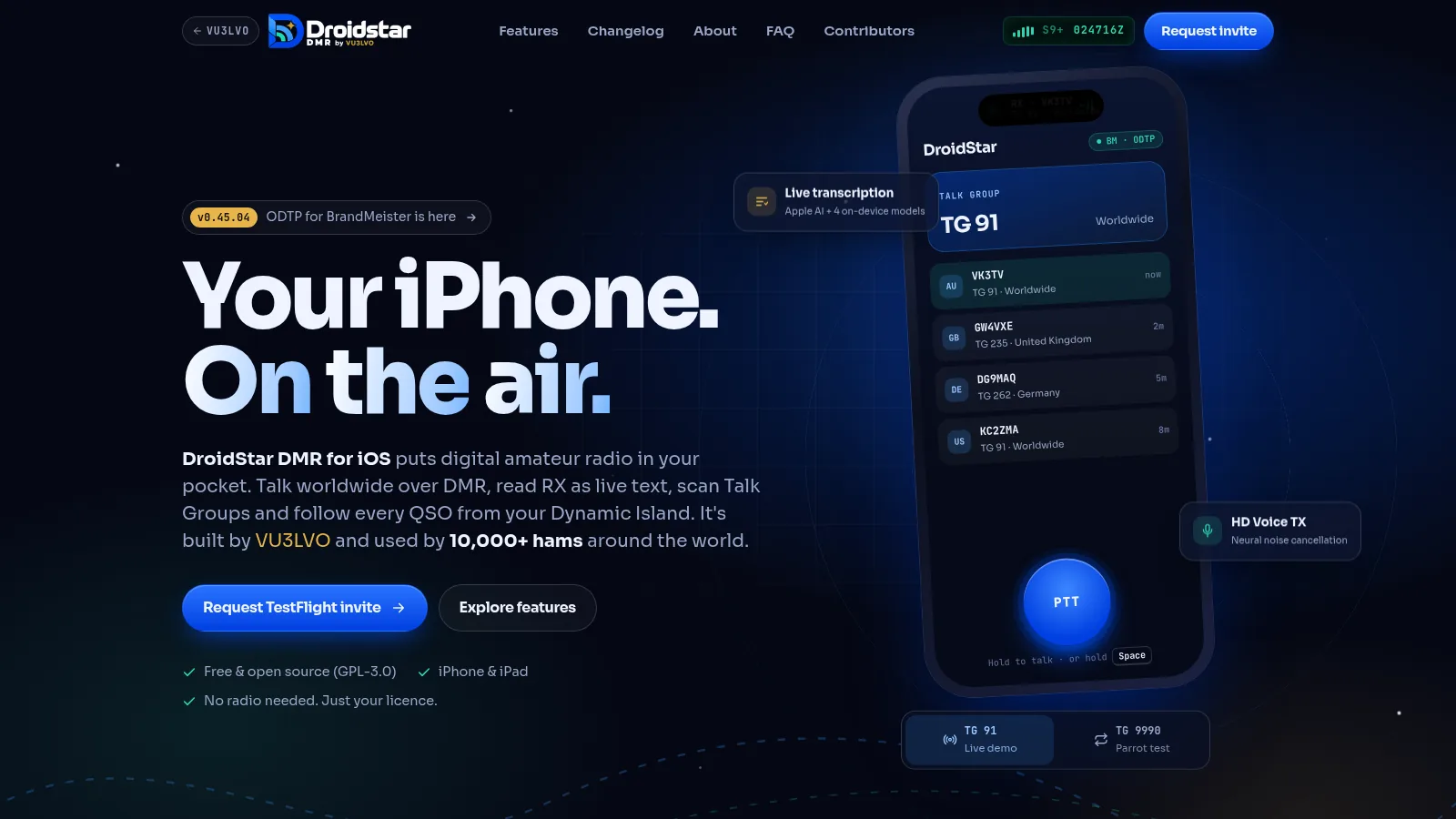
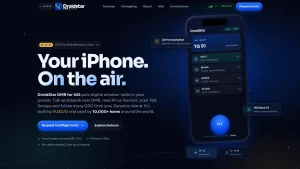
DroidStar VU3LVO iOS ends that wait. It’s a free, open source digital voice client for iPhone and iPad, built by Rohith Namboothiri VU3LVO of Bengaluru, India, that puts DMR on BrandMeister with the modern ODTP protocol, plus YSF, M17, P25, NXDN, D-STAR and AllStar, all in a native-feeling iOS app with live transcription, a Talk Group scanner, a persistent QSO log, and Dynamic Island status. It is used by more than 10,000 hams worldwide, it costs nothing, and it needs no radio and no hotspot, just a licence, a DMR ID, and an internet connection.
Last updated: November 2026. Current release v0.45.04 with v0.45.05 TX audio pass rolling out via TestFlight.
TL;DR: DroidStar VU3LVO iOS is a free GPL-3.0 iPhone and iPad digital voice client for licensed hams, forked from Doug McLain AD8DP DroidStar and rebuilt for iOS by Rohith VU3LVO. It works DMR over BrandMeister using ODTP with automatic fallback, plus YSF, M17, P25, NXDN, D-STAR and AllStar over the internet with no radio or hotspot. Headline features are on-device live transcription, Dynamic Island and Lock Screen status, an HD Voice TX suite with up to 24 dB pre-amp boost, a Talk Group scanner with favourites, net reminders, and a persistent ADIF and CSV QSO log. Distribution is Apple TestFlight invite only because of the 10,000 tester cap. Setup takes a callsign, a free RadioID DMR ID, and a BrandMeister SelfCare password.
What DroidStar VU3LVO for iOS Is
DroidStar VU3LVO iOS is a free, open source digital amateur radio client for iPhone and iPad that connects a licensed operator directly to DMR, YSF, M17, P25, NXDN, D-STAR and AllStar networks over the internet, with no radio, no hotspot, and no external vocoder hardware.
Unpack that sentence and the whole project comes into focus. The app is a modified fork of the original DroidStar by Doug McLain AD8DP, rebuilt by VU3LVO as a full iOS experience on top of the same proven Qt and C++ digital voice core. The phone behaves like a hotspot and a transceiver at once. Your voice is captured on the iPhone microphone, cleaned up with noise cancellation and levelling, encoded on-device into the compact digital stream each mode expects, and sent over Wi-Fi or cellular to a BrandMeister server, a YSF reflector, an M17 reflector, or an AllStar node. Replies come back the same way and play through the speaker, headphones, or a Bluetooth headset. The RF path is replaced by the internet path, and everything else, talkgroups, reflectors, callsign routing, QSO logging, works the way radio operators already understand.
Three facts define the project. First, it is iPhone first. Android development is paused while every hour goes into the iPhone and iPad app, with a rebuilt Android app and a browser based DroidStar for Web on the public roadmap. Second, it is genuinely open source under GPL-3.0, with the full source at github.com/rohithzmoi/Droidstar-DMR, currently around 77 stars and 20 forks. Third, it is free in both senses. No ads, no subscriptions, no premium tier. Community donations through Buy Me a Coffee and PayPal pay the Apple developer fees and test hardware, and all 157 contributors are thanked by name on the project contributors wall.
Where It Came From: From dstar-monitor to a 10,000 Ham iPhone App
To understand why this fork exists, rewind to the beginning of the DroidStar story. Doug McLain AD8DP started with dstar-monitor, a receive only D-STAR listener that decoded traffic over the network using the MBElib library. When transmit support and software vocoding arrived, it became a true two way client, renamed from DudeStar to DroidStar, and shipped on Android through the Google Play Store plus Linux, Windows, macOS, and iOS builds from one Qt codebase. It spoke M17 as early as October 2020, one of the first clients to do so, and it grew into the most versatile digital voice app in the hobby: DMR, M17, YSF and FCS in DN and VW modes, P25 Phase 1, NXDN, D-STAR on REF, XRF and DCS reflectors, and AllStarLink as an IAX2 client, all over UDP, with support for USB AMBE vocoders such as ThumbDV and DVstick and for MMDVM modems in hotspot or direct mode.
Stock DroidStar, for all its power, always felt like a developer tool that happened to run on a phone. Configuration meant hunting for a vocoder plugin URL and pasting it into Settings, hoping the host was still online. The interface was a flat stack of Qt dropdowns. On iOS it existed but never felt at home.
Rohith VU3LVO forked the project in August 2024 to fix exactly that. The first public builds landed on Android and iOS together, and the theme was immediate: operator name and country looked up automatically from the DMR ID and shown under every callsign, a QSO tab logging the most recent 250 contacts with callsign, DMR ID, talkgroup, handle, country, and local time, persistent logs that survived restarts, ADIF and CSV export with per-entry selection and share sheets, one tap links from any log row to the station QRZ, BrandMeister, and APRS pages, a recent talkgroup dropdown so nobody had to memorise numbers, Last Heard on the home page, and background receive so looking up a station on QRZ didn’t kill the audio. September 2024 added shareable log files, a Chinese build translated by BD4VHI, full iOS 18 support, and external earphone buttons as PTT on Android. Then came the hard call documented in the repository announcement: maintaining both platforms at solo-developer quality wasn’t sustainable, so Android was frozen and every hour moved to the iPhone and iPad app.
January 2026 brought the big redesign: a completely new interface with Dynamic Island, Lock Screen live activities, Notification Center status, and control over whether your own transmissions are logged. October 2026 delivered the AI wave across four rapid releases, v0.45.01 with beta live transcription and net reminders, v0.45.02 with the HD Voice suite, favourite talkgroups, and the TG scanner, v0.45.03 with the pre-amp volume boost up to plus 24 dB, and v0.45.04 with ODTP for BrandMeister, IAX WT, AllStar passwords, and a rebuilt TX audio pipeline. Version 0.45.05 followed as a focused audio pass that lifts the muffled close-talk quality out of transmit audio before encoding. Each step was shaped by tester feedback, including ODTP itself, which was built because a tester asked for it and explained why.
Today the numbers tell the story: more than 10,000 licensed hams on the air, callsigns from 18 countries on the contributors wall, 183 community contributions, and active discussion on Reddit communities, a WhatsApp channel for polls and sneak peeks, and GitHub issues.
How It Works: Your iPhone Becomes the Radio
The signal path has four stages, and the project page explains them in plain language worth repeating here.
First, you press PTT. DroidStar records through the iPhone or headset microphone and cleans the audio with noise cancellation, the HD Voice enhancer, and the mic leveller before anything is encoded. Hold the on-screen PTT or hold Space on a connected keyboard.
Second, the audio is encoded on-device. The built-in vocoder turns your voice into the same compact digital stream a hardware radio would produce for the selected mode. No external dongle, no plugin download, no AMBE USB stick required.
Third, the stream goes out over the internet. Over Wi-Fi or cellular, the app talks to a BrandMeister server using ODTP, or to a YSF, M17, D-STAR, or AllStar reflector using that network native protocol.
Fourth, the network carries you worldwide. Your transmission goes out to linked repeaters, hotspots, and apps on the selected talkgroup, and replies return the same way in under a second.
What you need on your side is small: a valid amateur licence and callsign, a free numeric DMR ID from RadioID.net, and for BrandMeister DMR, a SelfCare password from the BrandMeister portal. No licence means no invite, the TestFlight form requires you to confirm you hold one, and the app is explicitly beta software for licensed hams only.
ODTP for BrandMeister: The Headline Protocol Upgrade
The single most technical change in v0.45.04 is Open DMR Terminal Protocol, or ODTP, support for BrandMeister hosts, and it deserves a section of its own because it changes daily operating habits.
ODTP is a modern protocol for connecting DMR terminals and apps to BrandMeister, carried over UDP port 54006. In the older HomeBrew based workflow, changing talkgroups involved a key-up dance of connect, kerchunk, and confirm steps that every hotspot user knows. With ODTP, talkgroup changes happen cleanly without that ritual. The app prefers ODTP whenever the selected BrandMeister host offers it and falls back automatically to the standard protocol when it doesn’t, so a link never dies just because a server lags behind. A toggle in Settings turns ODTP off entirely for operators who want the legacy behaviour.
Practically, this means faster, more reliable BrandMeister sessions from a phone on hotel Wi-Fi or a moving train. The fallback design is the right call for a mobile app, because phone networks drop, change address, and roam between cells, and the last thing a portable operator needs is a protocol that punishes that. The project credits a tester suggestion for the feature, which fits the pattern of this fork: the most useful networking change in a year started as a user request.
Every Feature That Matters on the Air
Most of these features were requested by the people who use the app, and the project page makes them interactive so visitors can try the audio tools in the browser. Here is what each one does in practice.
Multilingual Live Transcription in Beta
Read incoming transmissions as text while they are still happening. Two engine choices cover two situations. Apple built-in speech recognition costs nothing extra and works well in quiet conditions. Four downloadable models run entirely on the phone for noisy bands or places where a speaker isn’t an option, such as a meeting room or a night train. Transcripts can sit alongside the QSO log. It’s still marked beta, and the developer is honest that a noisy marginal signal will still fool it. For net control, for operators with hearing loss, and for anyone monitoring a talkgroup with the volume down, this is the most accessibility positive feature any DroidStar variant has shipped.
Dynamic Island, Lock Screen, and Notification Center
TX and RX state, the active callsign, and the talkgroup stay visible without opening the app. When the phone lies face down on the bench and a callsign comes up, one glance answers the only question that matters. This was among the most requested features in the project history, and it’s easy to see why. A radio has a display you can read across the room. A phone app that hides everything behind a lock screen isn’t a radio replacement. This closes that gap.
HD Voice Audio Suite and 24 dB Pre-Amp
Three TX enhancements switch independently from the home page: hardware plus neural noise cancellation with a gate, a wideband presence and clarity enhancer for your own voice, and an automatic mic volume leveller. Above them sits a pre-amp volume boost adjustable up to plus 24 dB for situations where the phone microphone is simply too far away, such as a dashboard mount or a speakerphone style shack setup. The project page includes a noisy sample clip and a record-your-own-voice demo so you can flip each switch and hear the difference through headphones. Version 0.45.05 extended this work with a dedicated pass against muffled close-talk transmit audio. The fair way to judge any of it’s the Parrot test on talkgroup 9990, which plays your own transmission back exactly as the network heard it.
Talk Group Scanner and Favourites
Star the talkgroups you actually use, scan those plus currently busy global BrandMeister talkgroups, and tap once to tune in when a conversation you want catches your ear. This replaces the old workflow of typing numbers from memory or keeping a notes file of favourites. For travellers, it’s the fastest way to find activity on an unfamiliar repeater network.
Net Reminders
Save the schedules of your regular nets and get a push notification at check-in time. Anyone who has ever sworn they would remember the Tuesday net and then remembered on Wednesday understands why this exists.
Bluetooth, Wired Headsets, and Background Receive
Transmit can use a Bluetooth or wired headset microphone. Receive keeps playing when you leave the app and when the iPhone silent switch is engaged. The developer notes he uses this constantly, typically while looking up the station just heard on QRZ, and that is exactly the workflow it enables: monitor in the background, research in the foreground, tap back to answer.
Many Modes, One App
DMR on BrandMeister with ODTP, YSF rooms, M17 reflectors, P25, NXDN, D-STAR reflectors across REF, XRF, and DCS systems, and AllStar over IAX including IAX WT and password protected nodes. The full inherited DroidStar mode set is present. So one app covers the weekly DMR net, the YSF room your club uses, and the AllStar node that links your local repeater.
Recent Talk Groups and Last Heard
The TG field remembers what you have dialled, so 91, 3100, 235, and your local group behave like speed dial instead of phone numbers you are afraid of forgetting. Last Heard shows the two most recent stations on the home page, with the AMBE status notice moved to Settings where it belongs.
A QSO Log That Exports Anywhere
Logging is where the VU3LVO fork first distinguished itself, and it remains the best reason to try it beyond the iOS polish. Every station heard is logged automatically with callsign, DMR ID, talkgroup, operator handle, name, country, and local time. The log persists across restarts. You control how long it is allowed to grow and whether your own transmissions are logged at all.
Export covers the formats loggers actually accept. Select entries and export as ADIF for direct import into general loggers or as CSV for spreadsheets and analysis, then share by AirDrop, email, or WhatsApp. An illustrative sample from the project page shows the shape:
| Call | DMR ID | TG | Name | Country | Local |
|---|---|---|---|---|---|
| VK3TV | 5053241 | 91 | Mal | AU | 21:42 |
| GW4VXE | 2350912 | 235 | Tim | GB | 21:35 |
| K7RAN | 3153310 | 3100 | – | US | 21:28 |
| DG9MAQ | 2624456 | 262 | – | DE | 21:21 |
| ZL2BEZ | 5302019 | 91 | – | NZ | 21:14 |
One tap on any entry opens that operator QRZ, BrandMeister, or APRS page. The name and country under every callsign come from the DMR ID lookup, so the log reads like a well kept station diary instead of a bare number list.
Getting on the Air: From TestFlight Invite to First QSO
Distribution is the one part that surprises newcomers. There’s no App Store listing. Apple TestFlight caps each app at 10,000 testers, so invites go out one by one instead of through a public link.
Start at vu3lvo.com/droidstar/testflight and fill in the form with your full name, callsign, the email address tied to your Apple ID, your optional DMR ID, your country, your device type, and how you heard about the app. Confirm you hold a valid amateur licence. Install Apple free TestFlight app from the App Store on your iPhone or iPad. When the invite email arrives, open it, tap Start Testing, and install DroidStar. If anything about the invite looks wrong, write to [email protected].
Before you transmit, secure the two credentials every digital voice app needs. Register your callsign at RadioID.net for a free numeric DMR ID, typically seven digits, and allow a day or two for new IDs to propagate across networks. For BrandMeister DMR, create an account on the BrandMeister SelfCare portal with your callsign and DMR ID and set a SelfCare password, which is what the app sends to authenticate, stored in the BM Pass field.
Then configure the app. Open Settings and enter your callsign, DMR ID, and BM Pass, plus your latitude, longitude, location text, and description if you want to appear on network live maps. On the main screen, select DMR mode, slot S2, colour code 1, a BrandMeister host near you such as BM_404 for India, BM_235 for the United Kingdom, or BM_3102 for the western United States, and a talkgroup such as 91 for Worldwide, 93 for North America, 235 for the UK, or 404 for India. Tap Connect, wait for the confirmation in the log, hold PTT to talk, and release to listen.
Make your very first transmission a Parrot test. Connect DMR talkgroup 9990, key up, speak for ten seconds, and unkey. The network plays your audio back exactly as decoded, which is the fastest way to hear your HD Voice settings, mic gain, and pre-amp level the way everyone else hears them. Adjust, repeat once, then join a live talkgroup.
The other modes follow the same pattern with their own hosts. Pick YSF mode and a reflector such as YSF00001 for worldwide, DG-ID 99 for open access. Pick M17 and a reflector such as M17-USA or M17-EU with a module letter. Pick P25 or NXDN with the matching reflector and talkgroup, using your DMR ID as the source ID. Pick D-STAR with a REF, XRF, or DCS reflector. Pick AllStar, enter the node number plus the node password if it requires one, and use IAX WT where supported.
DroidStar Flavours Compared: VU3LVO, 9M2PJU, and Stock
Readers of this site already know the 9M2PJU Android mod covered previously on hamradio.my, so the honest question is which DroidStar belongs on which device. The table below compares the three builds that matter.
| Item | VU3LVO DroidStar for iOS | 9M2PJU Mod for Android | Stock DroidStar by AD8DP |
|---|---|---|---|
| Primary platform | iPhone and iPad, iOS and iPadOS | Android 12 and newer, arm64 | Android, Linux, Windows, macOS, iOS |
| Distribution | Apple TestFlight, invite only, 10,000 cap | Sideload APK from droidstar.hamradio.my | Google Play Store plus source builds |
| Licence and source | GPL-3.0, github.com/rohithzmoi/Droidstar-DMR | GPL-3.0, 9M2PJU GitHub | Open source, github.com/nostar/DroidStar |
| Price | Free, no ads, donations only | Free, no ads | Free |
| BrandMeister protocol | ODTP with automatic legacy fallback | Standard HomeBrew protocol | Standard HomeBrew protocol |
| Live transcription | Yes, Apple AI plus 4 on-device models, beta | No | No |
| Dynamic Island and Lock Screen | Yes, TX and RX with callsign and TG | No, Android status only | No |
| HD Voice TX suite and 24 dB pre-amp | Yes, per-switch controls on home page | No, standard mic gain only | No, standard mic gain only |
| TG scanner and favourites | Yes, scan plus star and tap to join | No, recent TG dropdown only | No |
| Net reminders | Yes, push notification at net time | No | No |
| QSO log with ADIF and CSV export | Yes, persistent, selectable, share sheet | Basic log plus operator lookup | Basic host log |
| Operator handle and country lookup | Yes, under every callsign | Yes, via RadioID API | Manual |
| Bluetooth and background RX | Yes, headset TX, background and silent RX | Yes, USB vocoder plus MMDVM modes | Yes, including USB and MMDVM direct |
| USB vocoder and MMDVM hotspot use | Phone only, no USB or hotspot role | Yes, ThumbDV and MMDVM hotspot or repeater | Yes, full USB and MMDVM support |
| Theme | Modern dark iOS redesign | Ham Radio Navy with teal accent | Stock Qt widgets |
| Best for | iPhone owners who want DMR in a pocket | Android owners and hotspot builders | Desktop users and tinkerers |
The takeaway is simple. Carry an iPhone and want the most polished phone experience with transcription, scanner, and island status, request the VU3LVO invite. Carry an Android phone, want built-in vocoders with zero plugin hunting, or want to drive an MMDVM hotspot from the phone, install the 9M2PJU mod. Run a Linux shack computer or build from source, start from stock upstream. The protocol cores stay compatible, so a VU3LVO station and a 9M2PJU station meet on the same talkgroups with no translation needed.
Privacy by Design: What Stays on the Phone
The privacy story is short and verifiable, which is exactly how it should be. There are no DroidStar servers and no cloud. Logs, settings, favourite talkgroups, net reminders, and transcripts stay on the phone. The app ships with no accounts and no analytics or tracking, and the website carries no cookies and no tracking either. The full statement lives at vu3lvo.com/droidstar/privacy.
Two honest caveats apply, and the project states the first itself. The networks you connect to still see your callsign and DMR ID, exactly as they would from any radio, because that’s how DMR routing works. Second, Apple TestFlight itself is an Apple service, so Apple sees that you installed a beta app, which is outside the developer control. Neither caveat is a reason to avoid the app, but both belong in any privacy section that wants to be trusted.
Who It Is For, and the Honest Limits
The ideal user is easy to picture. A newly licensed operator waiting on a first radio who wants to hear what DMR actually sounds like tonight. A flat dweller with no antenna permission who still wants the worldwide net. A traveller with only a phone and hotel Wi-Fi. A net control operator who wants transcription running alongside the audio. An EmComm volunteer who needs one more backup digital voice path that fits in a go bag with zero extra weight. A club Elmer demonstrating five digital modes on one screen without carrying five handhelds.
The limits are equally clear and mostly disclosed by the developer. TestFlight admission is manual and capped, so expect to wait for an invite rather than installing instantly. Android builds from 2024 are frozen and unmaintained, with a rebuilt Android app promised but not dated, so Android users should use the 9M2PJU mod today rather than waiting. Transcription is beta and noisy marginal signals will still produce confident sounding nonsense, so never log a callsign from a transcript without confirming it by ear. Transmit audio tuning is ongoing, with v0.45.05 specifically addressing muffled close-talk quality, so run the Parrot test after every update. The roadmap, Web client, iPhone Action button as PTT, live translation, DMR SMS messaging, plus surprises, is public but undated, so treat it as direction rather than promise. None of these are disqualifying. Together they describe a healthy beta: fast shipping, honest notes, and a developer who asks to hear how the new build sounds on your radio, your hotspot, and your headset, because those three never quite agree.
Why This Matters for Ham Radio
Step back and the significance is larger than one app. Every digital voice mode in the hobby began as hardware locked to a single vendor chip: AMBE in DMR, YSF, D-STAR, P25, and NXDN boxes, IMBE in public safety gear, with only M17 and its Codec 2 breaking the pattern as fully open. Software clients like DroidStar moved the vocoder from silicon to software and the RF path from antenna to internet, and in doing so they cut the price of trying digital voice from hundreds of dollars to zero. What the VU3LVO fork adds is the step that actually grows the hobby: making that zero cost entry feel like a first class iPhone app instead of a port, with transcription for accessibility, island status for real world monitoring, a scanner for discovery, reminders for participation, and a log that respects the contact enough to export it properly.
For the Malaysian and wider Asian audience of this site, the practical angle is direct. BrandMeister talkgroup 404 serves India next door, 505 covers Australia, 510 covers Indonesia, and worldwide 91 never sleeps, all reachable from a phone on a 4G connection with no antenna farm and no cross border equipment shipping. A student in a hostel, a young operator in an apartment, or a field volunteer with only a power bank can check into a net tonight. That’s how the hobby gains its next decade of operators.
Support keeps it that way. Apple developer fees, test devices, and late nights are paid by hams through Buy Me a Coffee and PayPal, with every supporter named on the contributors wall alongside day one voices like GW4VXE, KC2ZMA, DG9MAQ, and ZL2BEZ. If the app earns a place on your home screen, that’s where a coffee goes.
Sources and Further Reading
- DroidStar DMR for iOS by VU3LVO, project home: https://www.vu3lvo.com/droidstar
- TestFlight invite request form: https://www.vu3lvo.com/droidstar/testflight
- Release notes and changelog: https://www.vu3lvo.com/droidstar/changelog
- About Rohith VU3LVO: https://www.vu3lvo.com/droidstar/about
- Source code, GPL-3.0, rohithzmoi/Droidstar-DMR: https://github.com/rohithzmoi/Droidstar-DMR
- Contributors wall, 157 hams: https://www.vu3lvo.com/droidstar/contributors
- Privacy policy: https://www.vu3lvo.com/droidstar/privacy
- Original DroidStar by Doug McLain AD8DP: https://github.com/nostar/DroidStar
- DroidStar on Google Play: https://play.google.com/store/apps/details?id=org.dudetronics.droidstar
- RadioID.net, register a free DMR ID: https://www.radioid.net/
- BrandMeister network and SelfCare: https://brandmeister.network/
- M17 Project, open digital voice standard: https://m17project.org/
- DroidStar 9M2PJU Mod for Android on hamradio.my: https://hamradio.my/droidstar-9m2pju-mod-android-digital-voice-client/
- DroidStar 9M2PJU Mod project page and APK: https://droidstar.hamradio.my/
- Kapihan Network DroidStar setup walkthroughs: https://www.kapihan.net/connect/droidstar/
73 de 9M2PJU.

Post Comment