amateur radio
Technology
9M2PJU, Alex Harvey, amateur radio, APRS, AT32F403A, BK4829, Bluetooth KISS, crossband repeater, Embassy, embedded Rust, Ferrite Console, Ferrite Firmware, FX.25, ham radio, handheld transceiver, HT firmware, KISS TNC, PolyForm Noncommercial, Radtel RT-950 Pro, Rust firmware, shortwave, Si4732, VA7IF
9M2PJU
0 Comments
Ferrite Firmware for the Radtel RT-950 Pro: Rust-Built Amateur Radio Firmware with 107-Hour Idle Battery Life
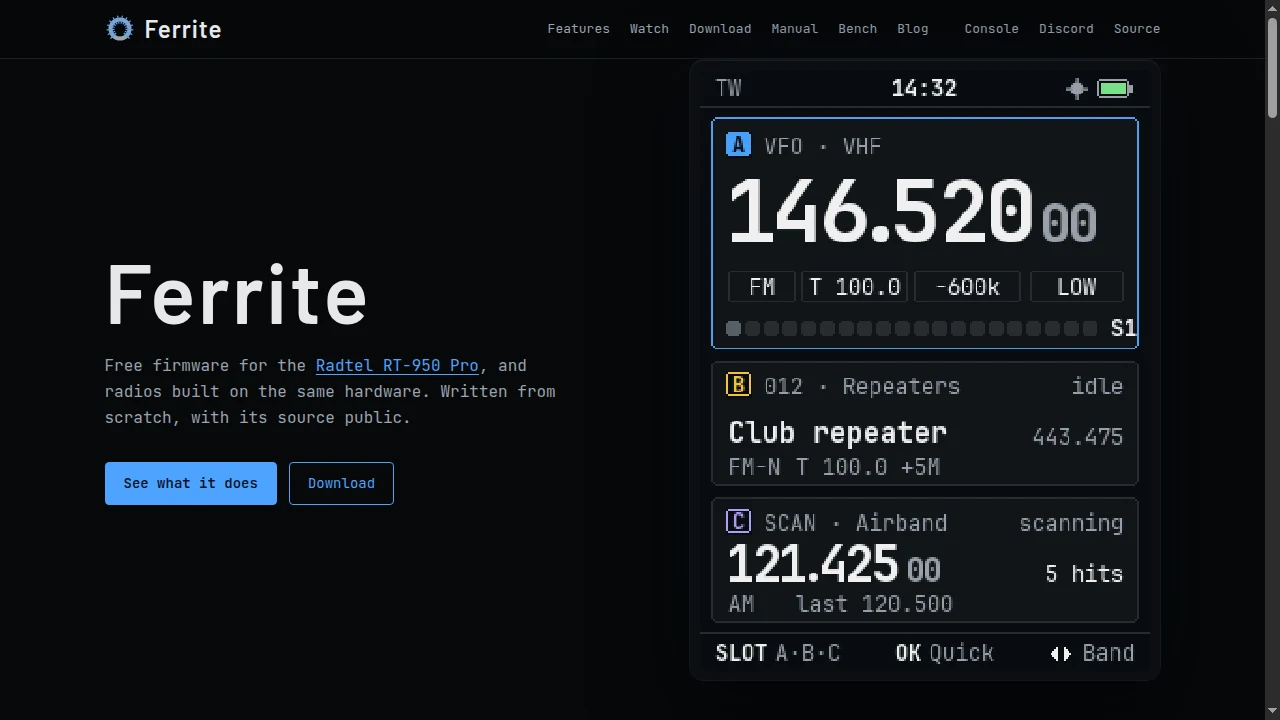
TL;DR: Ferrite Firmware (ferritefw.dev), written from scratch in Rust by Alex Harvey (VA7IF), is a free, source-public replacement firmware for the Radtel RT-950 Pro handheld transceiver. It turns the dual-BK4829, SI4732, and AT32F403A radio into a triple-slot VHF/UHF/HF receiver with background on-radio APRS, FX.25, Bluetooth KISS TNC, crossband repeating, and dynamic 24 MHz CPU scaling that drops idle battery draw from 130 mA down to 18.6 mA (roughly 107 hours on a 2000 mAh pack).
Budget Chinese handheld transceivers have a familiar pattern: manufacturers pack surprisingly capable silicon into a sub-$120 chassis, then ship it with clunky, power-hungry stock firmware full of inconsistent menus, half-finished APRS implementations, and sluggish interfaces. For the past few years, the amateur radio community watched custom firmware transform the cheap Quansheng UV-K5 into a cult favourite. Now, a much more ambitious hardware platform is getting the same treatment from the ground up.
Canadian amateur radio operator Alex Harvey (VA7IF) has released Ferrite Firmware, an independent, from-scratch firmware written in embedded Rust for the Radtel RT-950 Pro and compatible radios built on the same hardware. Rather than patching a disassembled binary or recycling decades-old C boilerplate, Ferrite rethinks how a modern multi-band handheld should behave in the field: one consistent key layout across every screen, three active monitoring slots, real on-radio APRS with FX.25 error correction, and aggressive hardware power management that multiplies standby runtime by seven.
This guide breaks down what Ferrite Firmware brings to the Radtel RT-950 Pro, examines the AT32F403A and multi-chip RF architecture under the hood, details the bench-tested 18.6 mA power reduction, compares Ferrite against stock firmware and UV-K5 community builds, walks through safe installation via Ferrite Console, and looks honestly at its current v0.9.4 limitations and noncommercial licence.
Last updated: November 2026.
What Is Ferrite Firmware?
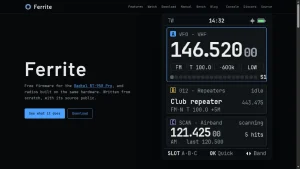
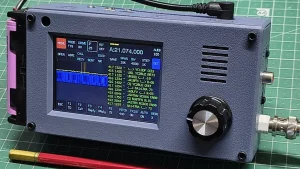
Ferrite Firmware is a free, source-public replacement firmware written from scratch in embedded Rust by Alex Harvey (VA7IF) for the Radtel RT-950 Pro handheld transceiver and hardware-identical variants. Distributed as cryptographically signed .ffw images and managed through the companion Ferrite Console desktop and web application, it replaces the factory operating system while leaving factory RF calibration data and the stock bootloader completely untouched.
Unlike single-purpose mods that bolt a spectrum analyser onto a stock binary, Ferrite is a complete clean-slate operating system built on the Embassy async Rust framework. As of v0.9.4 (released November 2026), it runs as a daily driver on real radios with full transmit support, background APRS decoding, crossband repeating, shortwave reception, and one-click rollback to stock firmware.
Core design principles behind Ferrite include:
- One fixed key layout learned once: Every screen uses the same navigation grammar, and a persistent soft-key bar along the bottom always tells you what each button will do next.
- Safety enforced by the compiler and firmware: At power-on, the transmitter is held off before any task starts. Band limits, power levels, timeouts, and battery thresholds are verified inside the firmware itself, and any fault drops the radio back to a safe receive state.
- Zero-risk experimentation: Ferrite never erases factory calibration tables and never flashes over the stock bootloader. Ferrite Console refuses to install until a full radio backup is saved to disk.
- Same code on radio and desktop: Everything above the hardware register layer compiles natively for PCs and WebAssembly, allowing thousands of automated tests to run before flashing and powering live screen mirroring inside Ferrite Console.
Inside the Hardware: Why the Radtel RT-950 Pro Is Worth Rewriting
To understand why Ferrite can do things impossible on a single-chip handheld like the Quansheng UV-K5, you have to open the back of the Radtel RT-950 Pro. Underneath the keypad sits a genuinely impressive multi-chip RF architecture:
| Hardware Component | Silicon / Specification | Role Under Ferrite Firmware |
|---|---|---|
| Main Microcontroller | Artery AT32F403A (ARM Cortex-M4, up to 240 MHz) | Runs Ferrite at 24 MHz at rest and dynamically scales to 120 MHz under load |
| Memory | 96 KB SRAM + 4 MB external SPI flash | Holds Embassy async tasks, UI buffers, channel zones, waypoints, and APRS logs |
| VHF / UHF Transceivers | Dual Beken BK4829 chips | Enables true multi-slot watch (Slots A, B, C), background APRS on Slot C, and VHF/UHF crossband repeating |
| Broadcast / HF Receiver | Silicon Labs SI4732 DSP chip | Dedicated AM, FM stereo (with RDS), shortwave, and HF amateur band receive (SSB/CW with optional stock .BTF patch) |
| Positioning & Comms | Built-in GPS + Bluetooth | Grid square, altitude, sky plot, GPS clock sync, SmartBeaconing, and wireless KISS TNC / Ferrite Console link |
+-------------------------------------------------------------------+
|                   RADTEL RT-950 PRO HARDWARE                      |
|                                                                   |
|   +-----------------------------------------------------------+   |
|   |         Artery AT32F403A (ARM Cortex-M4, 96 KB RAM)       |   |
|   |     Ferrite Firmware (Embedded Rust + Embassy Async)      |   |
|   |     Dynamic Clock: 24 MHz (Idle) <---> 120 MHz (Active)   |   |
|   +----+------------------+------------------+----------------+   |
|        |                  |                  |                    |
|        v                  v                  v                    |
|  +-----------+      +-----------+      +------------+             |
|  | BK4829 #1 |      | BK4829 #2 |      |   SI4732   |             |
|  | Slot A/B  |      | Slot B/C  |      | Broadcast  |             |
|  | Voice/TX  |      | APRS/XBand|      | FM/AM/SW/HF|             |
|  +-----------+      +-----------+      +------------+             |
|        |                  |                  |                    |
|   +----+------------------+------------------+----------------+   |
|   |  GPS Module (Auto Power)   |   Bluetooth (Console / KISS) |   |
|   +----------------------------+------------------------------+   |
+-------------------------------------------------------------------+
Because the RT-950 Pro contains two Beken BK4829 transceivers plus a third dedicated SI4732 receiver, the hardware is physically capable of simultaneous multi-band monitoring, full-duplex crossband repeating, and background packet decoding without dropping your main voice channel. Stock firmware barely scratches the surface of what those three RF chips can do together. Ferrite wires all of them into a single coordinated architecture.
Written in Rust on Embassy: Why Not C?
Almost every amateur radio firmware ever written is in C. Vendor SDKs are in C, register headers are in C, and embedded forum wisdom from the last twenty years assumes C. In his engineering post “Why Ferrite is Rust(ing)”, VA7IF explains why he chose Rust before a single line ran on hardware, and the reasoning is refreshingly pragmatic rather than ideological.
1. A Radio Is a Computer with a Transmitter
A bug in a desktop app gives you a crash dialog. A bug in handheld transceiver firmware can key a 10-watt carrier out of band, lock PTT open until the final amplifier cooks, or corrupt calibration values. With 96 KB of RAM and no operating system, Rust’s borrow checker and exhaustive match statements eliminate entire classes of classic firmware bugs at compile time: use-after-free, buffer overflows, concurrent tasks clobbering shared state, and unhandled enum states.
2. The 85-Second Flash Cycle Tax
Flashing firmware onto the RT-950 Pro through the stock bootloader over a serial programming cable takes roughly 85 seconds per build. Every bug caught on the bench costs minutes of staring at a progress bar and re-setting test equipment. A strict compiler catches errors in seconds before the binary ever touches the cable.
3. Host-Side Simulation and Automated Testing
Because Ferrite isolates hardware registers behind clean traits, everything above the driver layer compiles for x86/ARM desktops and WebAssembly as well as the AT32F403A. That yields three major payoffs:
- Thousands of automated tests run on a PC before any release is cut.
- Pixel-accurate UI rendering: Every screen recording on
ferritefw.devis generated directly by the firmware’s own drawing code. - Browser-native tooling: Ferrite Console runs the radio’s actual logic in Chrome, Edge, or its standalone desktop app.
4. The Flash Size Tradeoff
VA7IF is candid about the cost: porting his initial C prototype to Rust feature-for-feature produced a binary roughly one-third larger. On the RT-950 Pro’s flash budget, that tradeoff is worth making for memory safety, though flash discipline still matters. In one real-world example, removing a single redundant branch inside a generic drawing routine reclaimed 19,312 bytes across every screen in the firmware.
The 18.6 mA Breakthrough: Cutting Idle Current by 85%
For field operators, SOTA activators, and EmComm volunteers, battery life is where Ferrite truly separates itself from every stock Chinese handheld firmware. A handheld spends 95% of its day sitting idle with squelch closed, waiting for a call.
Stock firmware sets the AT32F403A Cortex-M4 to 120 MHz at boot and leaves it pegged at full speed forever, whether it is decoding an APRS burst or sitting silently on a dead repeater at 3 a.m.
Ferrite runs on the Embassy async runtime, where the radio, display, keypad, APRS modem, and GPS each run as independent tasks that sleep until work arrives. On top of that, Ferrite implements dynamic CPU frequency scaling:
- 24 MHz at rest: When the radio is simply monitoring squelch, the processor drops to 24 MHz.
- Instant 120 MHz boost: Any keypress, rotary encoder movement, scan, band scope sweep, transmit event, incoming decoder signal, audio playback, or active Ferrite Console link raises the clock to 120 MHz immediately. One second after the last request clears, it scales back down.
- Clock-aware drivers: Because UART baud rates, GPS serial links, backlight timers, and the system tick all divide down from the core clock, every driver queries the active clock speed and compensates across transitions so timing never drifts.
Dynamic clocking alone slashed resting current from 64.7 mA down to 18.6 mA (a 71% drop). The first 65 mA of savings came from methodical board-level power hygiene:
- 25 kHz PWM keypad dimming: Stock firmware runs the keypad LEDs either 100% on or off. Ferrite dims them smoothly at 25 kHz (flicker-free) at half display brightness and shuts them off with the screen.
- Display controller sleep: Putting the LCD controller itself to sleep when the backlight turns off saves roughly 7 mA alone.
- Stopping parasitic GPS back-feeding: Cutting power to the GPS module wasn’t enough on stock; a high processor GPIO pin was still back-feeding current into the GPS receive line. Ferrite parks that pin low when GPS is off.
- Clock-gating unused peripherals: Idle UARTs, audio timers, the SI4732 broadcast chip (held in reset when unused), and the internal MCU temperature sensor (powered only for a brief reading every 10 seconds) are all shut down.
- No floating GPIO pins: Every unused input pin is pulled or parked to eliminate stray leakage current.
Bench Power Measurements (FNIRSI DPS-150P at 7.6 V)
Measured by VA7IF over 15-minute charge-integrated runs on a quiet channel with squelch closed, screen dark, and GPS/Bluetooth disabled:
| Firmware Configuration | Resting Current Draw | Estimated Standby (2000 mAh Pack) | Gain vs Stock |
|---|---|---|---|
| Radtel Stock Firmware | ~130 mA | ~15 hours | Baseline |
| Ferrite (Fixed 120 MHz Clock) | 64.7 mA | ~31 hours | 2.0x |
| Ferrite (Dynamic 24 / 120 MHz) | 18.6 mA | ~107 hours | 7.0x |
Even acknowledging that real-world operating (lit screens, scanning, GPS fixes, and transmitting) sits above the resting best case, dropping baseline standby draw from 130 mA to 18.6 mA transforms a one-day radio into a multi-day field pack HT. For emergencies, Low Power Mode strips the radio down to single-frequency voice operation (engaging automatically below 20% battery if set to Auto, and exited anytime by holding SIDE1 + SIDE2). If you ever want full clock speed locked on, MENU 0 9 9 4 overrides dynamic scaling.
Three-Slot Operating, Consistent Keys, and Crossband Repeating
Instead of the cramped dual-VFO A/B layout found on most handhelds, Ferrite organises the screen around three independent slots: A, B, and C.
- Active slot plus two live cards: Whichever slot you select occupies the main display area while the other two sit as compact status cards underneath. Watch mode monitors two or three slots simultaneously, giving priority to the active slot without hijacking your selection mid-QSO.
- Dedicated dual-PTT behaviour:
PTT Aalways transmits on your currently active slot, whilePTT Bis pinned directly to Slot B for instant secondary-channel response. - Quick mute and background scan: Press
*to mute or silence a chatty slot without losing its frequency. You can scan a channel zone or frequency band on one slot while continuing to listen on another. - Zones and GPS Nearby list: Channels group cleanly into folder-like zones (“Repeaters”, “Air”, “Weather”, “CB”). With a GPS fix, holding
V/Mopens a Nearby list sorted by distance (computing the 32 closest repeater/channel entries with coordinates).
Predictable Key Layout and Menu Paths
Anyone who has fought a typical budget HT menu knows the pain of memorising arbitrary menu numbers that change between firmware revisions. Ferrite enforces a uniform interface:
- Quick settings: Press
MENUfollowed by a single digit for squelch, power, mode, tones, offset, step, watch, save, or Battery Save. - Long-press shortcuts: Hold a number key for instant access to the band scope, TX power, tone picker, or repeater shift.
- In-place slot editor: Hold
SLOTto view and edit every parameter for the active slot on one consolidated screen. - Fixed numeric menu paths: Nine logical groups keep paths permanent across updates (for example,
MENU 0 5 2always opens APRS messages, andMENU 0 9 9 2opens calibration diagnostics).
Transmit, Repeaters, and Crossband Operation
Ferrite supports FM voice across your selected regional amateur allocations (2 m, 70 cm, 6 m, 1.25 m where permitted, and 17 m to 10 m, configured via MENU 0 9 4). During transmit, the screen displays frequency, TX power, live microphone audio level, and remaining TOT countdown. Better yet, if transmit is blocked, Ferrite tells you exactly why and names the specific setting or calibration check responsible.
Repeater setup pulls default offsets automatically from your region’s band plan, paired with CTCSS/DCS, unknown tone search, and 1750 Hz tone burst. Because the RT-950 Pro houses two BK4829 chips, Ferrite also implements a true VHF/UHF crossband repeater with a live status screen showing who is passing through, timeout status, and the last 30 minutes of activity.
On-Radio APRS, FX.25, and Bluetooth KISS TNC
For EmComm and portable VHF packet operators, Ferrite’s APRS implementation is a standout feature. When APRS mode is enabled, Slot C is dedicated to background APRS decoding while Slots A and B stay completely free for voice traffic. You no longer have to sacrifice your voice channel just to track beacons.
Capabilities built directly into the firmware include:
- Two-way APRS messaging: Compose messages on the keypad with predictive text and quick replies, with automatic retries (up to 5 attempts) until an acknowledgement arrives.
- Stations Heard and Waypoints: View decoded stations with bearing, distance, and digipeater path. Any heard station can be saved directly as a GPS waypoint with a live compass dial and arrival alarm.
- Flexible Beaconing: Transmit manual, timed, or speed-adaptive SmartBeaconing packets, and inspect a live list of which local digipeaters repeated your frames.
- FX.25 Forward Error Correction: Alongside standard Bell 202 AFSK AX.25, Ferrite supports FX.25 FEC framing for cleaner copy over noisy simplex paths, plus Mic-E, telemetry, and standalone digipeating.
- KISS TNC over Cable or Bluetooth: Connect your phone (running APRSdroid or an iOS/Android APRS client) or laptop over Bluetooth or the USB programming cable to use the RT-950 Pro as a clean wireless KISS TNC without external cables or Mobilinkd dongles.
Shortwave, Broadcast FM, Band Scope, and NOAA Weather
The dedicated SI4732 receiver chip unlocks receiving features that rarely work smoothly on stock firmware:
- Stereo FM Broadcast with RDS: Tune commercial FM on any slot with stereo output and RDS station text. Your VHF/UHF slots keep watching in the background, automatically ducking the music whenever amateur traffic breaks squelch.
- HF and Shortwave Receive: Dedicated HF mode tunes shortwave broadcast and amateur HF bands in AM everywhere, FM from 18 MHz upward, and SSB/CW when you supply the optional SSB patch from your stock
.BTFfile during installation. - Band Scope: Visualise nearby RF activity around your tuned frequency at a glance.
- Weather Alerts and DTMF: Built-in US and Canadian NOAA Weather Radio reception with SAME area alerts, plus live DTMF decoding displayed right on the slot card.
- Field-ready themes: Switch to a Night Red colour palette in two keypresses to preserve night vision, or flip to a high-contrast daylight theme for bright outdoor operating.
Ferrite Console, Mandatory Backups, and Cryptographic Verification
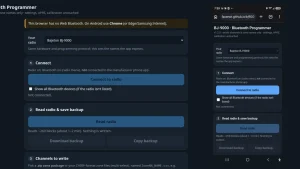
Ferrite ships with its own companion tool, Ferrite Console, available both as a web app (in Chrome or Edge via Web Serial and Web Bluetooth) and as standalone builds for macOS (.dmg for Apple Silicon and Intel), Linux (.AppImage), and Windows (portable .exe).
Key Console features include:
- Mandatory full-radio backup: Console won’t flash Ferrite until you have read and saved a complete backup of your radio’s current state.
- One-click Back to Stock: Restores your saved backup and original stock
.BTFfirmware in one workflow if you ever decide to revert. - CHIRP CSV channel import: Bring existing repeater lists and memory banks straight into Ferrite’s zone-based codeplug format (
.ferrite). - Live screen mirror, APRS map, and PC audio: View the radio’s screen live on your computer, send APRS messages from a full keyboard, plot heard stations on a map, and listen to radio audio through your PC.
- Minisign cryptographic verification: Every
.ffwfirmware package is signed with minisign (Public Key ID5B2C47F45817851B), and Console verifies the signature before writing a single byte. You can also verify releaseSHA256SUMSmanually:
minisign -Vm SHA256SUMS -P RWQbhRdY9EcsW+Has6GdiIJMPCVPZltho1Lv4lkOpBYls0fxgxZ6Tvai
Comparison: Ferrite vs Stock Firmware vs UV-K5 Community Firmware
How does Ferrite on the Radtel RT-950 Pro stack up against the factory Radtel firmware and the popular Quansheng UV-K5 custom firmware ecosystem (such as Egzumer or F4HWN)?
| Feature / Aspect | Ferrite Firmware (v0.9.4) | Radtel RT-950 Pro Stock | Quansheng UV-K5 Custom (Egzumer / F4HWN) |
|---|---|---|---|
| Target Hardware | Radtel RT-950 Pro (AT32F403A + 2x BK4829 + SI4732) | Radtel RT-950 Pro | Quansheng UV-K5 / K6 (DP32G030 + 1x BK4819) |
| Language & Runtime | Embedded Rust (Embassy async) | Proprietary C | C (bare metal) |
| Idle Current Draw | 18.6 mA (~107 h on 2000 mAh) | ~130 mA (~15 h on 2000 mAh) | ~15-35 mA (varies by Battery Save) |
| Simultaneous Watch | 3 slots (A, B, C) via dual BK4829 | Dual watch | Single receiver (time-sliced dual watch) |
| Crossband Repeater | Built-in with live monitor | Basic / limited | Not possible (single RF chip) |
| On-Radio APRS | Full TX/RX, messaging, FX.25, SmartBeaconing, BT KISS | Basic / limited | RX/TX mods exist (tight flash/RAM) |
| HF / Shortwave RX | Dedicated SI4732 (AM, SSB/CW w/ patch, RDS FM) | SI4732 (clunky UI) | BK4819 wide-RX hack (poor HF sensitivity) |
| GPS & Bluetooth | Built-in GPS + BLE Console & KISS TNC | Built-in GPS + BT app | No GPS or Bluetooth hardware |
| Backup & Rollback | Mandatory backup + one-click stock restore | Vendor updater only | Manual calibration/EEPROM backup |
| Licence | PolyForm Noncommercial 1.0.0 (source-public) | Closed source | Apache 2.0 / GPL (OSI open source) |
Step-by-Step Installation and Rolling Back to Stock
Installing Ferrite is intentionally designed to be difficult to mess up:
- Gather your files: Make sure you have a Radtel RT-950 Pro (or hardware-identical variant), its USB programming cable, and a copy of the stock firmware
.BTFfile (needed both for rolling back later and optionally for extracting the SI4732 SSB receive patch). - Download Ferrite Console: Grab the latest release (macOS
.dmg, Linux.AppImage, or Windows portable.exe) from the Ferrite Console GitHub Releases, or open console.ferritefw.dev in Chrome or Edge. - Connect and back up: Plug in the programming cable, turn the radio on, and open the Install tab in Ferrite Console. Run the full-radio backup and store the resulting file safely. Console won’t unlock the install step until the backup is saved.
- Install Ferrite: Click Install (and optionally drop in your stock
.BTFfile if you want HF SSB receive enabled). The stock bootloader flashes the signed.ffwimage without touching factory calibration. - Run first-time setup: Select your operating region (
MENU 0 9 4if you need to change it later so default calling frequencies match your regional band plan, such as 145.500 / 433.500 MHz for IARU Region 1/3), set your callsign for APRS, and import your channels from CHIRP CSV via Console. - Going back to stock anytime: Open Console’s Back to stock page, point it at your saved backup and original
.BTFfile, and it writes your old channels, settings, and factory firmware straight back onto the radio.
Honest Caveats, Limitations, and the PolyForm Noncommercial Licence
In the spirit of honest technical reporting, there are four important things to know before flashing your daily radio:
- v0.9.4 is the first public release series: VA7IF explicitly notes that while Ferrite runs daily on team radios with transmit enabled, early adopters should still expect occasional rough edges. That said, bug turnaround is fast:
v0.9.4already resolved per-band HF calibration lockouts, non-US regional default frequencies, CB zone navigation (18-64 MHz), and Battery Save audio clicking on broadcast FM. - 18.6 mA is the resting best case: The 107-hour figure assumes a dark screen, closed squelch, and GPS/Bluetooth turned off. Active scanning, APRS beaconing, Bluetooth KISS sessions, and bright screen usage will pull more current, though still far less than stock.
- SSB receive requires your own stock
.BTFfile: Because the SI4732 SSB patch is proprietary silicon vendor code, Ferrite doesn’t redistribute it. You drop your own stock.BTFfile into Ferrite Console during install if you want HF SSB reception. - Not OSI “open source”: Ferrite is released under the PolyForm Noncommercial License 1.0.0. That means the source code is public, inspectable, and completely free for personal, amateur radio, and noncommercial use. Selling Ferrite, pre-flashing it onto commercial radios for sale, or bundling it into a paid service requires a commercial licence from Alex Harvey. To protect the community long-term, the project includes a fallback clause allowing Ferrite to transition to the MIT licence if it is ever archived or goes seven years without a release.
Why It Matters
For years, amateur radio operators accepted a quiet compromise: buy an affordable multi-band handheld and tolerate terrible firmware, or spend five times as much on a big-three Japanese HT to get clean ergonomics and dependable APRS. Ferrite Firmware proves that clean software engineering can completely transform mid-range hardware.
Writing a full multi-chip transceiver operating system in embedded Rust, cutting resting power draw by 85% through dynamic 24/120 MHz clocking, and shipping a companion console with cryptographic verification and mandatory backups sets a genuinely new bar for community radio firmware. Even if you don’t own a Radtel RT-950 Pro yet, Ferrite is a project worth watching closely, especially with hints on the project’s bench wishlist pointing toward iPad Console support and Ferrite Pocket on Android.
Explore the features and documentation at ferritefw.dev, read VA7IF’s deep-dive engineering notes on the Ferrite Blog, and if you run Ferrite on your RT-950 Pro, share your real-world battery numbers and bug reports on the Ferrite Discord or GitHub issue tracker.
73 de 9M2PJU.
Sources and Further Reading
- Ferrite Firmware Official Website (ferritefw.dev)
- Ferrite Features Overview
- Ferrite Download & Installation Guide
- Ferrite Developer Documentation (Link Protocol, SPI Flash Map, Building)
- Ferrite Engineering Blog: “Because mAh count” (18.6 mA Idle Power Breakdown)
- Ferrite Engineering Blog: “Why Ferrite is Rust(ing)”
- Ferrite Firmware Source Repository (GitHub – FerriteFW/ferrite)
- Ferrite Console Companion App Releases (GitHub – FerriteFW/console)
- Ferrite Licence Summary (PolyForm Noncommercial 1.0.0)
- Ferrite Bench & Hardware Support Page
- APRSdroid 9M2PJU Mod on hamradio.my

Post Comment