HamGeek Raspberry X1: $79 Full-Mode HF SDR Phased Receiver with Built-in CW and Offline FT8
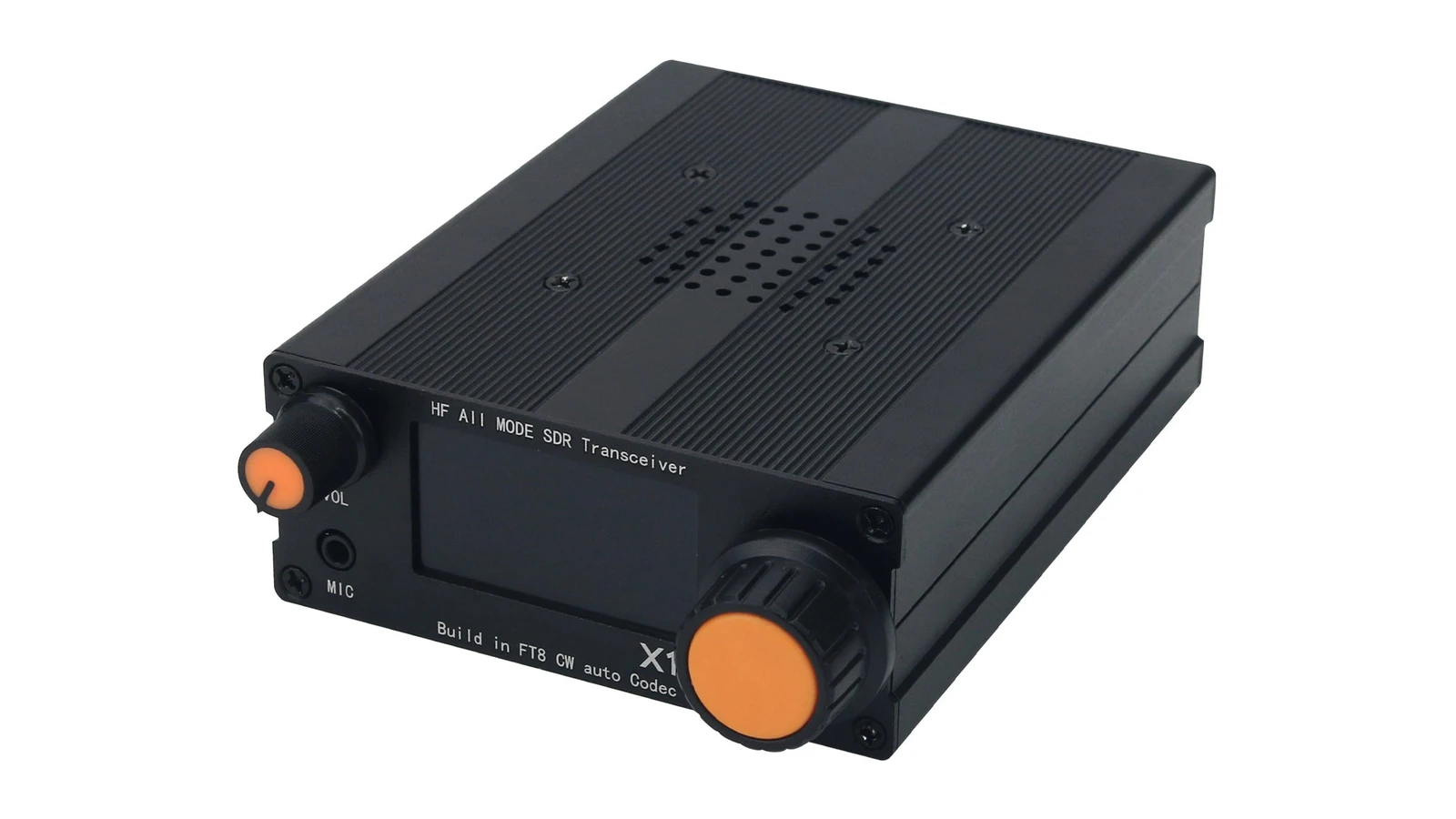
TL;DR: The HamGeek Raspberry X1 is a $79 compact 80 m to 10 m full-mode HF SDR phased receiver in a black aluminium enclosure with a 30 kHz spectrum and waterfall display, DSP noise reduction, a built-in CW codec, and offline FT8 transceiving capability. It ships out of the box as a receive-only SDR, with a documented DIY modification path that unlocks up to 5 W QRP transmission for licensed amateur radio experimenters.
Getting onto the HF bands with digital modes or Morse code used to require a small desk full of kit: a transceiver, an external audio interface, a CAT control cable, a laptop or tablet, a time-sync utility, and enough battery capacity to keep all of it alive in the field. For SOTA activators, POTA operators, shortwave listeners, and newly licensed hams on a tight budget, that pile of cables and software is often the single biggest barrier between thinking about HF and actually getting on the air.
That is why the HamGeek Raspberry X1 has started turning heads across amateur radio forums, YouTube teardown channels, and QRP groups. Priced at around $79 USD direct from the HamGeek Official Store, this pocket-sized HF software-defined radio packs full-mode reception from 80 metres to 10 metres, a real-time 30 kHz spectrum and waterfall plot, digital noise reduction, an onboard CW encoder/decoder, and standalone offline FT8 support into a single black extruded aluminium box.
There is an important twist, though, and it is printed right on the product page in red text: out of the box, the Raspberry X1 is sold as a receive-only multi-band phased SDR, while its hardware and silkscreen hint at a 5-watt QRP transceiver that requires DIY work to unlock. This article breaks down what the HamGeek Raspberry X1 is, how its phased SDR architecture works, what connectors and controls sit on the chassis, why standalone CW and FT8 matter for amateur radio, how it compares against other budget HF rigs, and what you should know before ordering one for your shack or field kit.
Last updated: November 2026.
What Is the HamGeek Raspberry X1?
The HamGeek Raspberry X1 is a compact, budget-friendly multi-band HF software-defined phased receiver covering the 80-metre to 10-metre amateur bands, featuring a 30 kHz spectrum waterfall display, built-in CW codec, and offline FT8 functionality. Designed for portable listening, weak-signal experimentation, and homebrew tinkering, it operates as a standalone unit without needing a tethered computer or smartphone for demodulation, Morse decoding, or FT8 decoding.
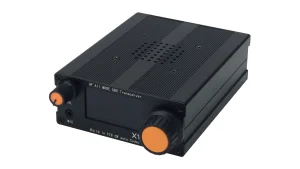
A quick look at the enclosure reveals the split personality that makes this radio so talked about in ham circles. The front panel silkscreen reads “HF All MODE SDR Transceiver” across the top and “Build in FT8 CW auto Codec” along the bottom, while the rear panel is labelled “HF QRP 5W SDR Transceiver”. On the retail listing. HamGeek states clearly that the X1 is delivered as a multi-band phased receiver and that the transmission function must be enabled through DIY work by the user, up to a maximum output power of 5 watts.
That makes the Raspberry X1 appealing on two different levels for amateur radio operators:
- As a standalone $79 HF SDR receiver: You get a self-contained shortwave and amateur-band monitor with a waterfall display, DSP filtering, and built-in CW and FT8 decoding at a fraction of the price of most standalone SDR receivers.
- As a homebrew and QRP experimentation platform: Licensed hams who enjoy opening enclosures, tracing PCBs, verifying low-pass filters, and tinkering with QRP hardware get a compact chassis already populated with mic, CW key, and
PTT OUTports.
Phased SDR Architecture: How It Works Under the Hood
Unlike a classic superheterodyne receiver that relies on bulky crystal roofing filters and multiple intermediate frequency (IF) stages, a phased SDR receiver (also called a direct-conversion quadrature SDR) mixes incoming HF signals straight down to baseband in two channels separated by 90 degrees of phase: In-phase (I) and Quadrature (Q).
In amateur radio, this quadrature phasing approach is the backbone of modern compact SDR designs. By sampling the I and Q baseband signals with an analogue-to-digital converter and handing them to a digital signal processor (DSP) or microcontroller, the radio can cancel the unwanted opposite sideband mathematically, draw a live spectrum and waterfall display, and apply steep digital bandpass, noise reduction, and notch filters in software.
  BNC Antenna (80 m - 10 m)
        |
        v
  [ RF Front-End / Band Filtering ]
        |
        v
  [ Quadrature Mixer (0 deg / 90 deg LO) ]
       / \
    I /   \ Q   (Baseband Quadrature Signals)
     v     v
  [ Dual ADC / Audio Codec ]
        |
        v
  [ Digital Signal Processing (DSP) ]
   |-- 30 kHz FFT Spectrum & Waterfall
   |-- LSB / USB / CW-L / CW-U / AM / FM Demodulation
   |-- Noise Reduction (NR), Noise Eliminator & Notch Filter
   |-- Built-in CW Codec (Decode + Short-Text Encode)
   +-- Offline FT8 Decode & Send Engine
        |
        v
  [ Internal Top-Firing Speaker / Display UI ]
Key DSP Features Included
Even at the $79 price point, the Raspberry X1 includes the core digital receive tools that make HF listening far more comfortable in noisy urban environments:
- 30 kHz real-time spectrum and waterfall display: Wide enough to watch an entire CW sub-band or the busy FT8 watering hole on 40 m or 20 m at a glance, spotting signals visually before you even tune onto them.
- Digital noise reduction (NR): Helps pull weak SSB voices and QRP CW signals out of urban hash and high local noise floors.
- Noise eliminator: Targets impulsive interference such as switching power supplies, ignition noise, or electric fences.
- Notch filter: Cuts out persistent heterodynes, carriers, and tune-up tones sitting inside your passband.
Despite the “Raspberry” name used in the product title, community teardowns note that the unit is a purpose-built compact SDR board rather than a full-sized Raspberry Pi single-board computer stuffed inside a case. Treat “Raspberry X1” as the model name rather than a promise of a Linux desktop running inside the chassis.
Hardware Layout, Controls, and Specifications
The HamGeek Raspberry X1 is housed in a rugged black extruded aluminium case with cooling ribs milled along the top and bottom faces. A perforated circular speaker grille sits in the centre of the top panel, secured by four recessed screws, keeping the audio firing upward on a desk or picnic table.
Front Panel
- VOL rotary knob (top left): Orange-capped volume control for quick one-finger adjustment.
- MIC 3.5 mm jack (bottom left): Ready for an electret hand microphone or headset when used in voice / VOX modes after TX enablement.
- Central rectangular screen: Displays frequency readout, active mode, S-meter, menu settings, CW/FT8 text, and the 30 kHz spectrum and waterfall plot.
- Main VFO tuning encoder (right): Large, knurled orange-capped rotary knob that gives the little box a proper radio feel rather than fiddly pushbuttons.
Rear Panel
- DC 13.8V power jack: Standard 5.5 x 2.1 mm barrel connector suited to a 12 V / 13.8 V bench supply or a 3S/4S LiFePO4 field battery pack.
- USB Type-C port: Modern USB-C connection for firmware updates, serial/data interfacing, or bench tinkering.
- CW KEY 3.5 mm jack: Dedicated port for connecting a straight key or paddle.
- PTT OUT 3.5 mm jack: External push-to-talk keying output, useful for sequencing an external QRP linear amplifier or T/R accessory if you build out the transmit side.
- ANT connector: Recessed BNC female socket, the universal favourite among portable HF and SOTA/POTA operators for quick field antenna swaps.
Specifications Summary
| Specification | HamGeek Raspberry X1 Details |
|---|---|
| Product Type | Full-mode HF SDR multi-band phased receiver (DIY TX capable) |
| Frequency Coverage | 80 m to 10 m amateur HF bands |
| Supported Modes | LSB, USB, CW-L, CW-U, FT8, AM, FM, Voice (VOX) |
| Built-in Digital Modes | CW decoding, CW short-text encoding, offline FT8 decoding and sending |
| Spectrum Display | Real-time 30 kHz spectrum and waterfall plot |
| Receive DSP Tools | Noise reduction, noise eliminator, notch filter |
| TX Output Power | Receive-only out of the box; up to 5 W QRP via user DIY modification |
| Antenna Interface | BNC female |
| Power Interface | 5.5 x 2.1 mm DC barrel jack (labelled DC 13.8V) |
| Other Interfaces | USB-C, 3.5 mm MIC, 3.5 mm CW KEY, 3.5 mm PTT OUT |
| Enclosure | Black extruded aluminium with top-firing internal speaker |
| Package Included | 1 x SDR Receiver unit |
| Typical Retail Price | ~$79 USD (HamGeek Official Store) |
Full-Mode Coverage, Built-in CW Codec, and Offline FT8
The headline feature that sets the Raspberry X1 apart from ordinary sub-$100 shortwave receivers is standalone digital mode processing.
Built-in CW Decoder and Short-Text Encoder
For many newcomers to amateur radio, Morse code (CW) is fascinating to listen to on 40 metres and 20 metres, yet intimidating at full on-air speeds. Having a built-in CW codec right on the screen turns the Raspberry X1 into an immediate learning and monitoring companion. You can tune across the CW portion of any HF band from 80 m to 10 m, watch the waterfall for narrow vertical traces, centre the signal, and read decoded characters without wiring up a PC sound card or running FLDIGI. When paired with short-text encoding on a TX-enabled build, it also supports basic keyboard-free or canned CW text sending.
Offline FT8 Without a Laptop
FT8 has become the dominant weak-signal HF mode for good reason: it pulls contacts out of signals well below the audible noise floor using 15-second synchronised time slots (see our deeper dive in FT8: The Little Digital Mode). Normally, working or even monitoring FT8 requires WSJT-X on a laptop or an Android phone app linked through audio cables.
Integrating offline FT8 decoding and sending directly inside a $79 radio changes the portability equation. Even if you only ever use the Raspberry X1 as a receiver, you can clip a simple random-wire or telescopic whip onto the BNC port during a lunch break or campout, tune to 14.074 MHz or 7.074 MHz, and immediately check real-time HF propagation by watching which grid squares and DX prefixes decode on the screen. No laptop, no USB hubs, no ground-loop hum.
The Receiver vs. 5W QRP Transceiver Catch
Let’s be completely upfront about the biggest talking point surrounding the HamGeek Raspberry X1.
On the official product listing, HamGeek places a red notice at the very top: the X1 is sold as a software-defined multi-band phased receiver, and the transmission function must be completed or unlocked by DIY. Early community teardowns, including coverage by M0FXB HamTech on YouTube, have highlighted why this happens across budget Chinese SDR gear: shipping a unit as a receive-only device avoids costly multi-region transmitter type-approval hurdles while leaving the PCB footprints, physical connectors (MIC, CW KEY, PTT OUT), and 5 W QRP architecture ready for experimenters.
If you are a licensed amateur radio operator who plans to explore the DIY 5 W QRP transmit path, keep three engineering rules front and centre:
- Verify harmonic suppression and low-pass filtering. Never put a DIY or modified QRP transmitter straight onto an antenna without checking its spectral purity on a spectrum analyser or TinySA. Every HF band requires proper low-pass filtering (LPF) to keep second and third harmonics well below regulatory limits.
- Watch the duty cycle on FT8. FT8 transmits for roughly 12.6 seconds out of every 15-second cycle at 100% carrier power. On compact 5 W QRP stages without large heatsinks, continuous FT8 runs warm up final transistors quickly (we covered this in detail in FT8 and CW Duty Cycle Impact on Transceivers).
- Operate strictly within your licence class. In Malaysia (MCMC) and most IARU Region 3 administrations, HF transmitting requires the appropriate amateur licence class and strict adherence to band plans. Receive-only monitoring. Is open to everyone, making the stock X1 a great gateway into HF for students and future hams.
Comparison: HamGeek Raspberry X1 vs. Other Budget HF SDRs and QRP Rigs
Where does a $79 full-mode phased SDR with built-in CW and FT8 sit in the current amateur radio landscape? The table below compares it against five popular alternatives across price, standalone capability, and transmit support.
| Feature | HamGeek Raspberry X1 | RTL-SDR Blog V4 (+ PC/Phone) | Malahit / Malachite DSP2 | (tr)uSDX 5-Band QRP | zBitx v2 HF SDR | Xiegu G90 |
|---|---|---|---|---|---|---|
| Approx. Price (USD) | ~$79 | ~$35 (+ host device) | ~$300 – $380 | ~$120 – $150 | ~$150 – $200 | ~$420 – $460 |
| HF Coverage | 80 m – 10 m | 500 kHz – 1.7 GHz (direct) | 10 kHz – 2 GHz | 5 HF bands (80/60/40/30/20 m) | 80 m – 10 m | 160 m – 10 m |
| Standalone (No PC Needed) | Yes | No | Yes | Yes | Yes | Yes |
| Built-in Spectrum / Waterfall | Yes (30 kHz) | Via PC/phone software | Yes (up to 160 kHz) | No (2-line OLED) | Yes (touchscreen) | Yes (48 kHz) |
| Built-in CW / FT8 Codec | Yes (CW + offline FT8) | Via PC/phone software | CW decode only (no FT8) | CW decode (no FT8) | Yes (full WSJT-X / FT8) | No (external interface) |
| TX Capability | RX out of box; 5 W DIY | RX only | RX only | 5 W QRP TX ready | 5 W QRP TX ready | 20 W TX + built-in ATU |
| Best For | Ultra-budget standalone HF SDR, SWL, DIY QRP tinkering | Wideband shack monitoring with a computer | Premium portable wideband listening | Ultra-lightweight SOTA/POTA CW & SSB | Turnkey portable touchscreen FT8/CW/SSB | Primary budget HF station with internal ATU |
The comparison makes the Raspberry X1’s niche obvious. You can’t touch a Malahit DSP2, zBitx v2 (read our zBitx v2 HF SDR Transceiver overview), or Xiegu G90 anywhere near $79. An RTL-SDR V4 is cheaper, but it is useless without a laptop or phone attached. The Raspberry X1 occupies a sweet spot for hams who want a self-contained, battery-powered HF waterfall and digital decoder box that costs less than a decent coax cable assembly.
Five Practical Ways to Use the Raspberry X1 in Amateur Radio
Whether you keep it strictly receive-only or take it onto the workbench as a DIY project, there are plenty of practical roles for a $79 HF phased SDR:
- Portable HF propagation scout: Toss it in a backpack with a lightweight wire antenna and a 12 V battery pack. Tune the FT8 and CW beacons across 40 m, 20 m, 15 m, and 10 m to check real band openings before hauling out a heavier transceiver and mast.
- On-the-go CW practice companion: Listening to live on-air Morse code is the fastest way to build head-copy skills. Having a live CW decoder on screen lets you check your copy against real QSOs without firing up a computer.
- Affordable entry point for radio clubs and youth outreach: Clubs running licensing classes or STEM workshops can put a real waterfall HF SDR in front of newcomers for $79, letting students see and hear SSB, CW, AM, and FT8 signals live on the bands.
- Go-bag backup shortwave receiver: In an EmComm or power-outage scenario, a low-power 12 V HF receiver that covers 80 m through 10 m gives you access to regional HF nets, maritime weather, and international shortwave broadcasts with minimal battery draw.
- Homebrew SDR and QRP workbench project: For operators who enjoy circuit tracing, testing filter boards, measuring phase balance, and experimenting with 5 W QRP stages, the X1 gives you a finished aluminium enclosure, display, encoders, and I/O ports as a head start.
Honest Limitations to Keep in Mind
No $79 HF SDR is going to replace a $1,000 desktop transceiver, and it is important to go in with realistic expectations:
- Budget component tolerances: Early teardowns confirm the X1 is built to a strict price target. Expect basic front-end selectivity compared with high-end desktop SDRs; strong nearby broadcast stations on 40 m or 80 m may require a simple external band-pass filter or shorter portable antenna to avoid overload.
- Receive-only out of the box: If you want a ready-to-transmit HF transceiver with zero soldering or configuration, look at a turnkey rig like the Xiegu G90, (tr)uSDX, or zBitx v2 instead.
- No internal antenna tuner (ATU): Like most ultra-compact QRP/SDR boxes, you’ll want a resonant antenna (such as a linked dipole or EFHW) or a small manual QRP tuner for optimal reception and any DIY transmit experiments.
- 30 kHz waterfall span: Thirty kilohertz is plenty for CW and FT8 sub-bands, though SSB ragchewers used to 100 kHz+ panadapters will be turning the big orange VFO knob a little more often.
- Minimal box contents: The retail package includes the SDR receiver unit itself. Plan to supply your own 13.8 V DC power lead (5.5 x 2.1 mm), BNC antenna or adapter, and any key/mic accessories.
Why It Matters for Amateur Radio
Amateur radio stays alive when experimentation remains affordable. Not everyone can drop a thousand dollars on a modern waterfall HF rig just to find out whether they enjoy hunting DX on 20 metres, copying CW on 40 metres, or decoding FT8 signals from the other side of the planet.
The HamGeek Raspberry X1 lowers that entry barrier dramatically. For $79 USD, you get a self-contained aluminium-cased HF phased SDR covering 80 m to 10 m with a live 30 kHz waterfall, DSP noise reduction, a built-in CW codec, offline FT8 capability, and a hardware path for licensed hams who want to get their hands dirty with a 5 W QRP DIY build.
If you are looking for an affordable portable HF receiver, a CW/FT8 learning tool, or your next weekend homebrew bench project, check out the full listing and current availability directly on the HamGeek Raspberry X1 product page. Share it with your local radio club, test it on a wire antenna in the park, and keep the spirit of amateur radio experimentation going.
73 de 9M2PJU.
Sources and Further Reading
- HamGeek Raspberry X1 Full-Mode SDR Multi-band Phased Receiver (Official Product Page)
- HamTech – M0FXB YouTube Channel (Raspberry X1 Reviews and Teardown)
- FT8: The Little Digital Mode (hamradio.my)
- FT8 and CW Duty Cycle Impact on Transceivers (hamradio.my)
- zBitx v2 HF SDR Transceiver (hamradio.my)
- Pebble HF Ultra-Affordable 20m QRP Transceiver Kit (hamradio.my)
- HamGeek E310 AD9361 Zynq SDR, OpenWiFi and DragonOS (hamradio.my)



Post Comment