CANExplorer: Free MIT Open Source CAN, CAN FD and LIN Bus Analyser With Reverse Engineering and MCP
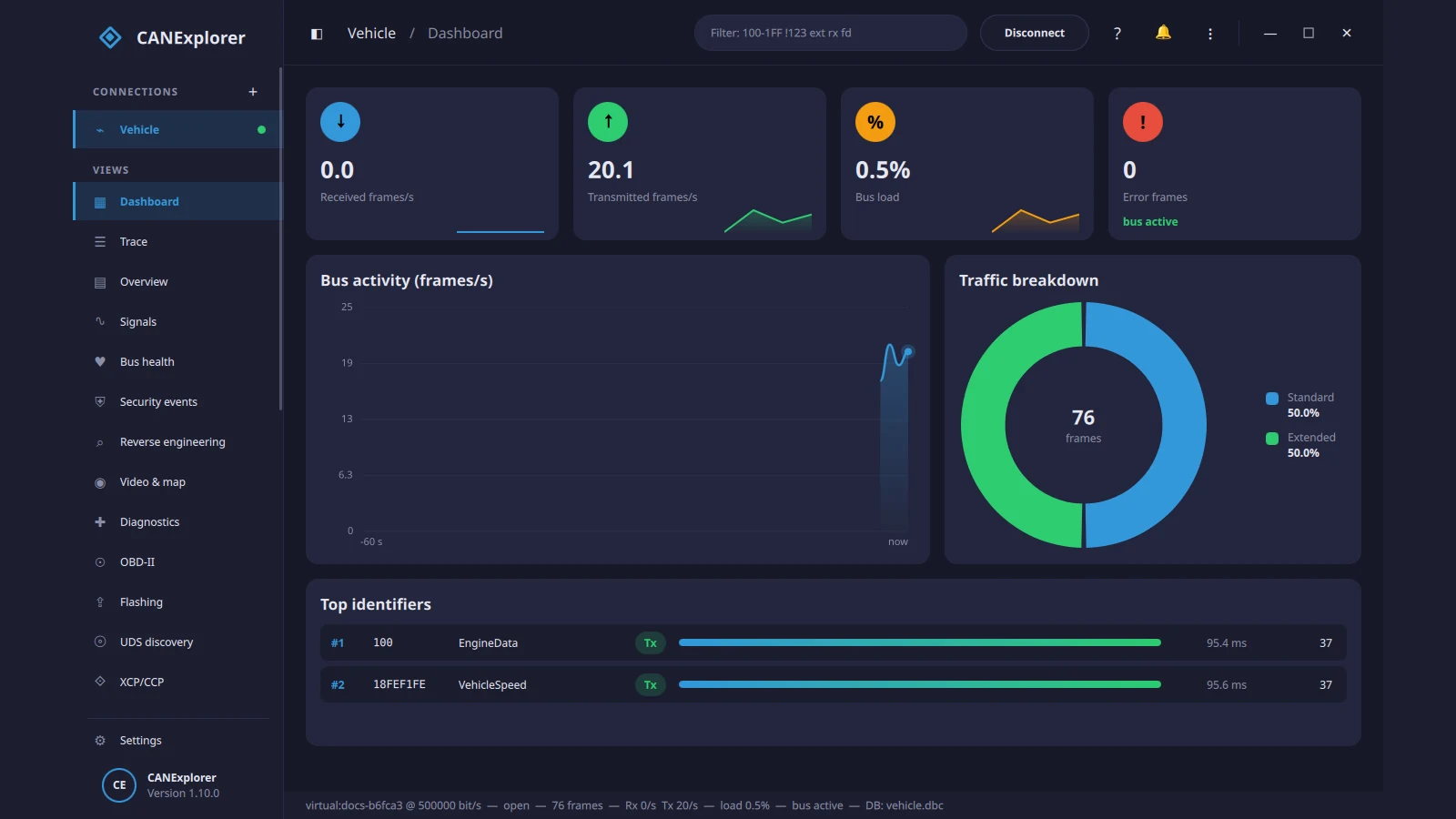
Modern vehicles, solar battery packs, marine electronics, and industrial controllers all speak CAN bus, yet the software needed to inspect those frames has long been split into two extremes. On one side sit commercial suites like Vector CANoe and CANalyzer, priced for OEM engineering departments and locked to Windows. On the other sit bare command-line utilities like candump and small single-purpose sniffers that leave you juggling three tools just to decode a DBC file, plot a signal, and poll an OBD-II trouble code. CANExplorer closes that gap with a single free, MIT-licensed desktop application that runs natively on Linux, Windows, and macOS.
Built around Python and Qt/QML on top of python-can, CANExplorer covers live CAN, CAN FD, and LIN monitoring, automatic reverse engineering of unknown frames, full automotive diagnostic stacks (UDS, OBD-II, DoIP, J1939, CANopen, XCP/CCP, FlexRay, and Automotive Ethernet), restbus simulation, headless CI test automation, remote Raspberry Pi bus forwarding, MQTT telemetry, and even a built-in Model Context Protocol (MCP) server for AI-assisted bus analysis. This guide walks through what CANExplorer does, how its architecture fits together, what hardware it works with, how it compares with SavvyCAN and Vector tools, and how to try it today even without a CAN adapter on your desk.
TL;DR: CANExplorer is a free, MIT-licensed open source GUI and toolkit for monitoring, analysing, diagnosing, reverse-engineering, and simulating CAN, CAN FD, LIN, and automotive Ethernet buses on Linux, Windows, and macOS. It supports any python-can adapter plus virtual buses with no hardware required, loads DBC/ARXML/KCD/SYM/LDF databases, automates checksum and counter discovery, exports MQTT telemetry, and exposes live or recorded buses to AI agents over MCP.
What CANExplorer Is
CANExplorer is a free, MIT-licensed cross-platform desktop application and command-line toolkit for monitoring, decoding, reverse-engineering, diagnosing, and simulating CAN, CAN FD, LIN, and automotive Ethernet networks on Linux, Windows, and macOS. Maintained in the AKJ7/CANExplorer GitHub repository with prebuilt installers for all three desktop operating systems, it wraps python-can hardware support inside a modern dashboard-style Qt/QML interface that handles millions of frames per session by paging older traffic to disk.
Unlike many hobbyist CAN viewers that stop at raw hex dumps, CANExplorer is designed as a complete workbench. A single workspace file saves your bus connections, signal databases, display filters, signal plots, and test scripts together so you can hand a bench setup to a colleague or reopen a vehicle investigation weeks later in one click.
Why CANExplorer Matters for Makers, Hams, and Vehicle Engineers
Anyone who works on modern field gear eventually runs into a CAN bus. Mobile radio installations tap vehicle CAN buses for ignition sense, speed pulses, and steering-wheel controls. Off-grid shack power banks and LiFePO4 battery management systems (BMS) report cell voltages, state of charge, and inverter limits over CAN or J1939. Boats run NMEA 2000 (which is CAN with Fast Packet framing). Amateur robotics, EV conversions, and tractor telemetry all rely on the same twisted pair.
Historically, getting visibility into those buses meant choosing between three awkward compromises:
- Command-line tools (
can-utils): Fast and rock-solid on Linux SocketCAN, but hopeless when you need live signal plots, DBC bit-layout editing, or synchronized video and GPS playback. - Older community GUIs: Useful for basic sniffing and DBC decoding, yet often missing modern stacks like CAN FD, DoIP, SOME/IP, AUTOSAR ARXML, or headless test runners.
- Proprietary commercial tools: Feature-complete, but costing thousands of dollars per seat and tethered to proprietary USB dongles and Windows-only installers.
CANExplorer ships under the permissive MIT licence with standalone installers (.deb, AppImage, Snap, Windows setup.exe, macOS Apple Silicon .dmg, and portable zips) that bundle Python internally. So you can drop it onto a field laptop with zero environment setup.
Live Monitoring, Trace Filtering, and Signal Databases
CANExplorer connects to any interface supported by python-can: Linux SocketCAN, PEAK PCAN, Vector, Kvaser, gs_usb (such as CANable, CandleLight, and budget STM32 adapters), slcan serial adapters, and virtual buses for hardware-free testing. CAN FD is supported with independent arbitration and data bitrates, alongside automatic channel detection.
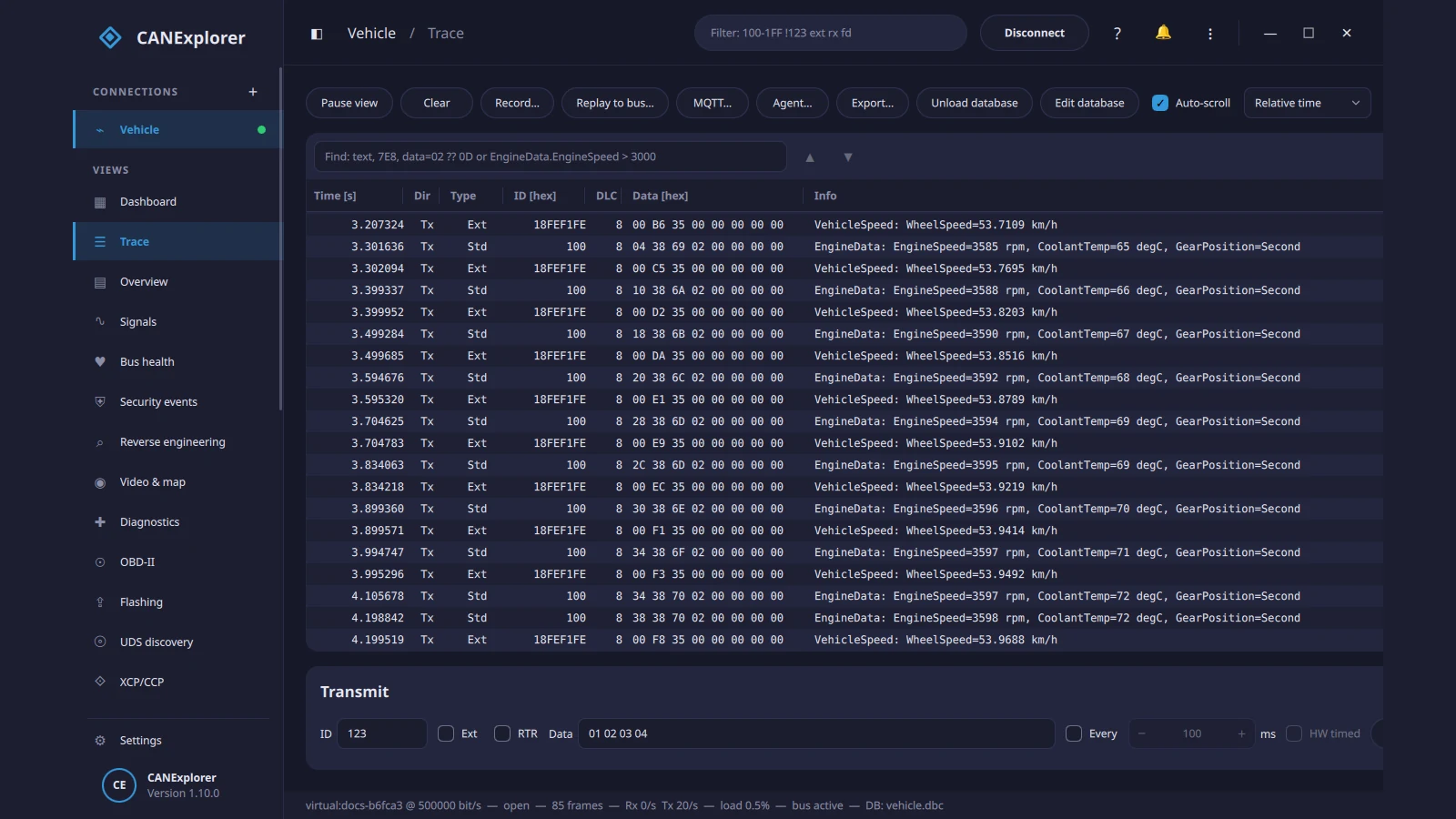
Key monitoring and database capabilities include:
- Expressive Trace Filtering and Search: Filter live or recorded traces with compact expressions like
100-1FF !123 ext rx fd, search by text, hex data patterns (data=02 ?? 0D), or decoded signal conditions (EngineData.EngineSpeed > 3000), and drop bookmarks on interesting events. - Per-Identifier Overview and Bus Health: Watch cycle times and highlighted changed bytes per ID, plus a dedicated Bus Health view tracking error frames, TX/RX error counters (TEC/REC), error state timelines, and bus load over up to an hour.
- Multi-Format Signal Databases: Load and convert Vector DBC, BUSMASTER DBF, AUTOSAR ARXML (including container PDUs), Kayak KCD, PCAN SYM, and LIN LDF files. A built-in database editor lets you edit frames, signals, nodes, encodings, and LIN schedule tables with a live bit-layout view and consistency checks.
- Live E2E and SecOC Verification: When working with AUTOSAR ARXML files, CANExplorer checks AUTOSAR End-to-End (E2E profiles 2, 5, 22) and Secure Onboard Communication (SecOC) protection directly in the live trace.
- Synchronized Recording, Replay, Video, and GPS: Record in ASC, BLF, CSV,
candumpLOG, PEAK TRC, SQLite, ASAM MF4, or gzipped text formats. Triggered recording captures pre- and post-trigger windows around signal thresholds (for exampleEngineData.EngineSpeed > 6000). You can even record a camera feed and attach a GPX or NMEA track to replay bus frames, video, and map position in lockstep, or step through replays with frame and signal breakpoints.
Built-In Reverse Engineering and Authorised Security Analysis
One of CANExplorer’s strongest modules is its reverse-engineering suite. Most vehicle and BMS CAN buses ship without a public DBC file, leaving you staring at 8-byte hex payloads changing every 10 milliseconds. Instead of guessing bit positions in a spreadsheet, CANExplorer automates the heavy lifting.
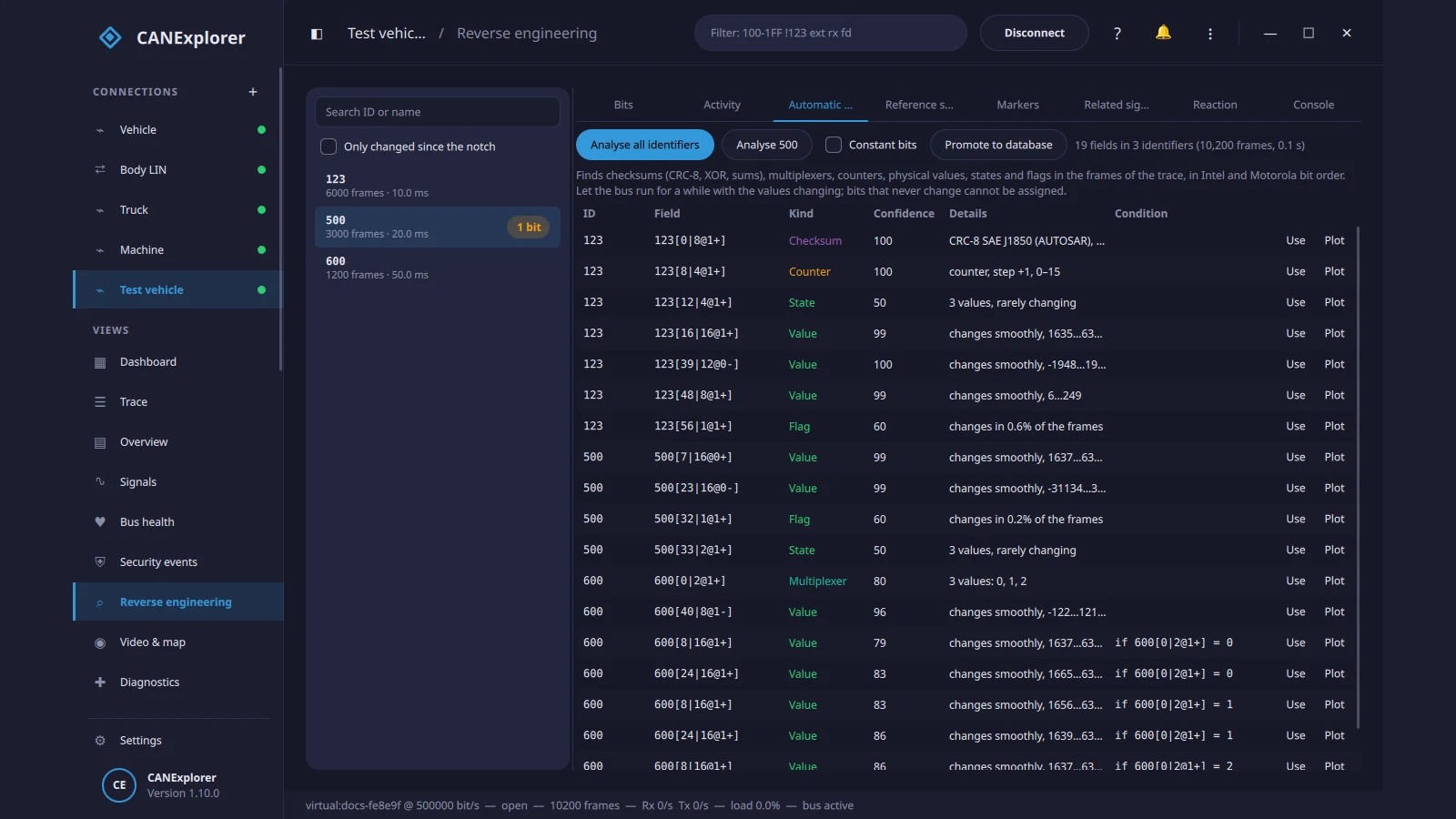
Inside the Reverse Engineering view you can:
- Run Automatic Field Detection: Scan captured frames across both Intel (little-endian) and Motorola (big-endian) bit orders to automatically spot CRC-8/XOR/sum checksums, rolling counters, multiplexers, state enums, flags, and smoothly varying physical values with confidence scores.
- Notch and Diff Live Changes: Set a “notch” baseline, press a physical switch or move a throttle, and filter to only the IDs and bits that changed since the notch.
- Correlate Against External Data: Match unknown bit fields against polled OBD-II PIDs, CSV/GPS logs, or existing database signals, group related signals across messages, plot raw bit fields without a DBC, and promote confirmed discoveries straight into your signal database.
- Authorised Security Testing: For legitimate vehicle security research and bench validation, CANExplorer includes passive payload cryptanalysis (randomness tests, MAC and keystream-reuse checks), SecOC/E2E layout recovery, UDS SecurityAccess seed/key analysis, gateway topology and filtering audits, and active bench tests with safety rails.
Diagnostics, Legacy Buses, and Automotive Ethernet
Where many tools stop at Classic CAN, CANExplorer packs an unusually broad set of diagnostic and bus protocol decoders into one interface:
- OBD-II (SAE J1979) and UDS (ISO 14229): Dedicated OBD-II view to scan supported PIDs, watch live values, read/clear DTCs, and pull the VIN. Full UDS client over ISO-TP and LIN with CANdelaStudio CDD and ASAM ODX/PDX support, custom seed/key plugins, and ECU flashing (
RequestDownload/TransferData) from Intel HEX, S-record, or raw binaries. - Heavy-Duty, Industrial, and Marine: SAE J1939 (including J1939-22 on CAN FD, address claims, DM1/DM2 codes, BAM/RTS-CTS), NMEA 2000 (with Fast Packet decoding), CANopen master (NMT, SDO, PDO, EDS/DCF, plus CANopen over EtherCAT via the
ethercatextra), and legacy J1708/J1587 over USB RS-485. - Legacy OEM Protocols: GMLAN (GMW3110 including single-wire 33.3 kbit/s SWCAN), GM Class 2 (SAE J1850 VPW for 1996-2007 GM PCMs via ELM327/OBDLink), K-Line (ISO 9141-2 / ISO 14230 KWP2000), and VW TP 2.0 / KWP2000 for 2000-2011 VAG modules.
- Next-Gen Automotive Ethernet and FlexRay: DoIP (ISO 13400-2, including TLS), SOME/IP and SOME/IP-SD with FIBEX/ARXML deserialization, live or pcap/pcapng Automotive Ethernet dissection (VLAN, 802.1CB, gPTP, MACsec, IPsec, TLS with key log, AVTP IEEE 1722 with CAN/LIN/FlexRay ACF tunnelling), and FlexRay cluster decoding with schedule verification.
Remote Buses, MQTT Telemetry, and AI Agent Control (MCP)
CANExplorer also embraces modern distributed and automated workflows through three companion tools bundled with the project:
  [ Vehicle / Field BMS / Bench ECU ]
                 |
      SocketCAN / USB-CAN / ELM327
                 |
        +--------+--------+
        |   can-server    |  (e.g., Raspberry Pi in vehicle or shack)
        +--------+--------+
                 |  TCP / Network
                 v
  +--------------+---------------+
  |         CANExplorer          |  (Desktop GUI: Trace, Plots, DBC, UDS)
  +------+---------------+-------+
         |               |
   MQTT Broker      can-mcp (localhost MCP server + Bearer token)
         |               |
         v               v
  [ Home Assistant /  [ AI Agent: inspect IDs, decode,
    Grafana Dash ]      reverse-engineer, promote to DBC ]
- Remote Bus Sharing (
can-server): Runcan-serveron a Raspberry Pi tucked inside a vehicle or battery cabinet to stream SocketCAN interfaces over Wi-Fi or Ethernet to CANExplorer on your workbench. - MQTT Bridge: Publish decoded signals or raw frames from either the desktop GUI or
can-serverdirectly to an MQTT broker for Grafana dashboards or Home Assistant automation (and optionally accept transmit requests over MQTT). - Model Context Protocol (
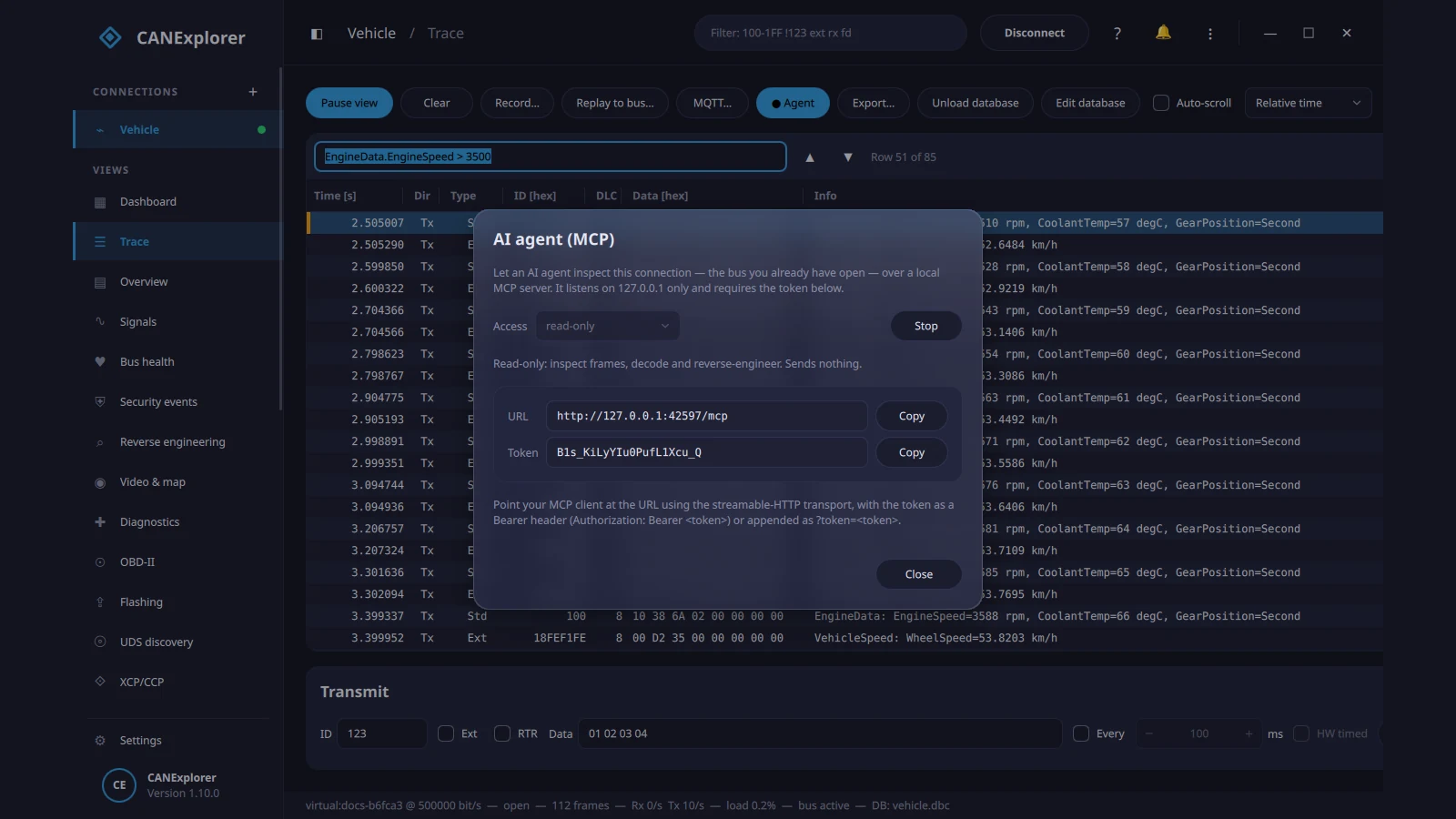
can-mcp): Expose a live or recorded bus to an AI coding or analysis agent over a local streamable-HTTP MCP endpoint on127.0.0.1protected by a bearer token and strict permission tiers (defaulting toread-onlyso nothing can transmit on the bus unless you explicitly permit it). The agent can inspect identifiers, run reverse-engineering statistics, correlate fields, read OBD-II/UDS codes, and promote confirmed signals into a DBC file.
Simulation, Restbus, and Headless CI Testing
For bench work and firmware development, CANExplorer removes the need to keep an entire vehicle wired up:
- Restbus Simulation: Periodically transmit all messages from a loaded database at their defined cycle times while excluding the ECU under test, keeping the bench module happy and out of limp mode.
- Python Simulated ECUs and QML Panels: Script custom simulated ECUs in Python and drive them from interactive QML control panels.
- Headless Test Runner (
can-test): Write automated ECU test scripts with timing checks and UDS assertions, then execute them interactively in the GUI or headlessly in CI pipelines viacan-test, outputting HTML, JUnit, and Markdown pass/fail reports with requirement traceability.
CANExplorer Versus the Alternatives
| Area | CANExplorer | SavvyCAN | Vector CANoe / CANalyzer | SocketCAN can-utils |
|---|---|---|---|---|
| Licence and Cost | Free, MIT open source | Free, MIT open source | Commercial, expensive per seat | Free, GPL/BSD open source |
| Platforms | Linux, Windows, macOS | Linux, Windows, macOS | Windows only | Linux only |
| Hardware Support | Any python-can adapter, ELM327, virtual bus |
GVRET/M2, SocketCAN, Lawicel, PCAN, Kvaser | Vector hardware interfaces | Linux SocketCAN interfaces |
| Database Formats | DBC, ARXML, DBF, KCD, SYM, LDF + editor | DBC, KCD, SYM | DBC, ARXML, FIBEX, LDF, ODX | None built-in (external scripts) |
| Reverse Engineering | Automated checksum/counter/mux finder + notch + OBD correlation | Fuzzing, range/flow views, Sniffer | Manual / CAPL scripting | Manual CLI filtering |
| Protocols | CAN/FD, LIN, UDS, OBD-II, DoIP, SOME/IP, FlexRay, J1939, CANopen, NMEA 2000, Ethernet | Classic CAN, basic UDS/ISO-TP | Full industry OEM stack | Raw CAN / CAN FD / ISO-TP |
| Automation and IoT | can-test CI runner, can-server, MQTT, can-mcp AI server |
JavaScript scripting | CAPL, vTESTstudio | Shell scripts and Python |
| Best For | All-in-one modern bench, vehicle, BMS, and reverse-engineering work | Quick ESP32/GVRET sniffing and lightweight reverse engineering | OEM production validation and corporate labs | Ultra-lightweight headless Linux logging |
Honest Limits and Practical Advice
No single tool is magic, and a few practical boundaries are worth keeping in mind before you plug into a live vehicle:
- Python and Qt Overhead on Extreme Loads: Paging old frames to disk allows multi-million-frame sessions, which is impressive, but on heavily saturated multi-channel CAN FD or gigabit Automotive Ethernet captures, a C/C++ native capture engine or dedicated hardware logger still has lower CPU overhead. For raw high-rate capture on a low-power SBC, capture with
candumportcpdumpand open the log in CANExplorer afterwards. - Bus Safety Comes First: Reading a CAN bus in listen-only mode is safe; transmitting arbitrary frames, running UDS routines, or flashing an ECU on a live vehicle can trigger fault codes, disable safety systems, or brick a module. Always test on a bench ECU or virtual bus first, keep MCP in
read-onlymode on live vehicles, and verify bitrate and termination (120 ohms at both ends of the bus) before going active. - Optional Extras When Running From Source: Features like MQTT (
mqtt), EtherCAT (ethercat), and USB physical I/O (io) require their optional extras if you install from source rather than using the prebuilt installers.
Getting Started in Five Minutes (With or Without Hardware)
You don’t need a USB-to-CAN dongle to explore the interface. Every diagnostic view (UDS, OBD-II, DoIP, XCP/CCP, GMLAN, GM Class 2, and EtherCAT) includes built-in simulated ECUs or virtual buses.
- Install CANExplorer: Grab the latest release installer (
v1.11.0as of November 2026) from the GitHub Releases page for Windows (setup.exe), Linux (AppImage,.deb, orsudo snap install canexplorer), or macOS Apple Silicon (.dmg). - Start on a Virtual Bus: Follow the Quick Start guide to create a virtual connection, load a sample DBC file, and watch the Dashboard, Trace, and Signal Plots come alive with zero hardware attached.
- Connect Real Hardware: On Linux, bring up a SocketCAN adapter (such as a budget
gs_usbCANable or a Raspberry Pi MCP2515 HAT) withsudo ip link set can0 up type can bitrate 500000, then selectsocketcanandcan0in CANExplorer’s New Connection dialog. - Try Automatic Reverse Engineering: Record 10 to 30 seconds of traffic from an undocumented device (like a solar BMS or vehicle interior bus), open the Reverse engineering tab, click Analyse all identifiers, and inspect the detected counters, checksums, and physical values before promoting them to a fresh DBC file.
- Explore Remote and AI Workflows: If your bus lives in a garage or vehicle, deploy
can-serveron a Raspberry Pi, or enable the local read-only MCP endpoint from the Trace toolbar to let an AI assistant help correlate unknown frames.
Sources and Further Reading
- CANExplorer official documentation
- CANExplorer Quick Start guide
- CANExplorer source code on GitHub (AKJ7/CANExplorer)
- CANExplorer prebuilt releases (Linux, Windows, macOS)
- python-can hardware interface documentation
- SocketCAN Linux kernel documentation
- SavvyCAN open source CAN reverse-engineering tool
- Linux can-utils command-line toolkit
73 de 9M2PJU.

Post Comment