amateur radio
Technology
9M2PJU, ADIF, amateur radio, amateur radio logging, band conditions, BigCTY, Fieldbook, fieldbook.cc, ham radio, ham radio logbook, Jack Coble, M7UJC, Maidenhead locator, offline logger, Parks on the Air, portable operating, POTA, Progressive Web App, PWA, QRZ Logbook Sync, QRZ lookup
9M2PJU
0 Comments
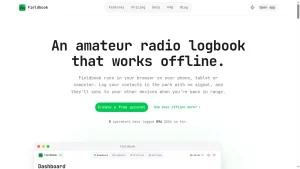
Fieldbook: Offline-First Browser Amateur Radio Logger for POTA and Portable Operating
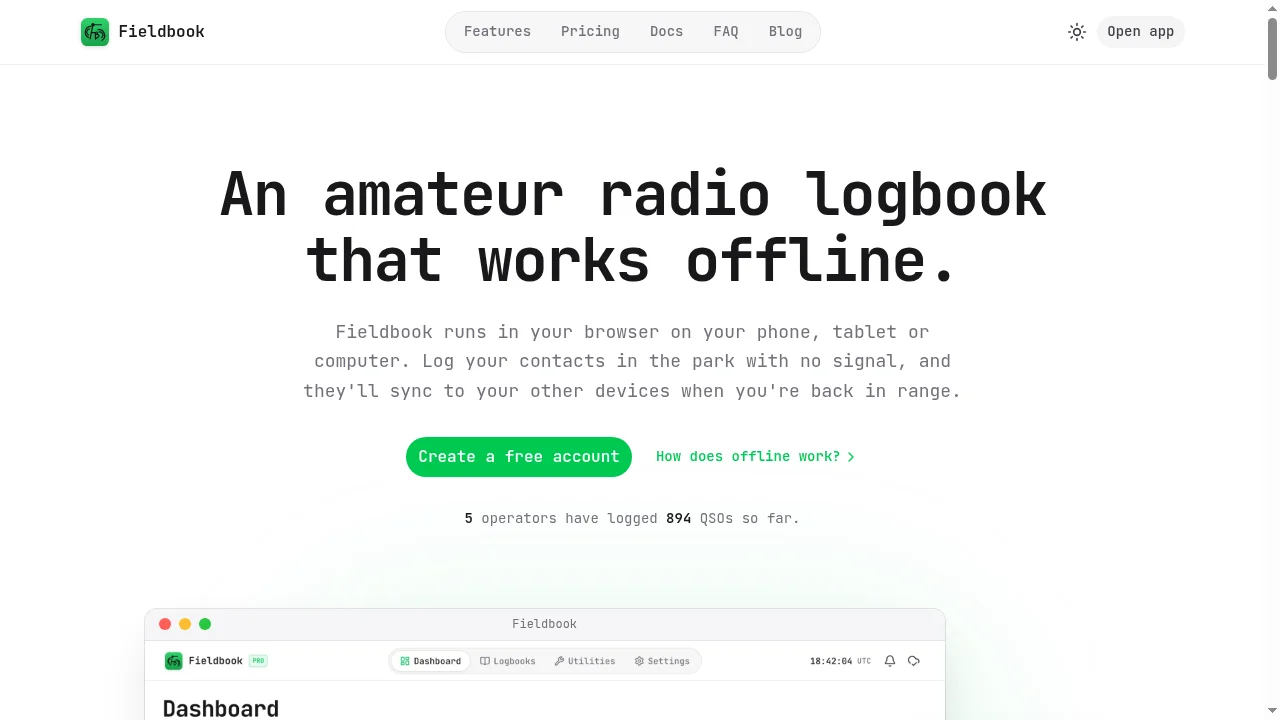
TL;DR: Fieldbook (fieldbook.cc), built by UK amateur radio operator and software developer Jack Coble (M7UJC), is an offline-first Progressive Web App (PWA) for amateur radio logging that runs in any mobile, tablet, or desktop browser. It offers free cloud sync, up to 10,000 QSOs, built-in Parks on the Air (POTA) activation and hunting tools, offline BigCTY and park reference databases, free QRZ callsign lookups, and full ADIF import and export, with an optional Pro tier for unlimited QSOs, QRZ Logbook Sync, version history, and embeddable widgets.
Portable amateur radio logging has a familiar friction point. You hike into a forest reserve or set up an end-fed half-wave wire in a coastal park with zero mobile signal, pull out your phone or tablet, and discover that half the “modern” logging apps either refuse to load without a data connection or lock basic multi-device cloud syncing behind a monthly paywall. On the other hand, if you log purely into a local file on your phone, a dropped handset in the mud or a failed storage partition can wipe out an entire weekend of activations before you ever get back to the shack.
UK software developer and amateur radio operator Jack Coble (M7UJC) ran straight into that gap shortly after earning his Foundation licence. Rather than settling for clunky legacy interfaces or paying extra just to keep his phone and desktop in sync, he built Fieldbook – a clean, browser-based Progressive Web App designed from day one around offline-first field logging and free automatic cloud synchronisation.
This guide examines how Fieldbook works under the hood, breaks down its offline synchronisation model and Parks on the Air (POTA) toolkit, walks through its logging workflow, QRZ integration, and built-in radio utilities, compares it directly against Ham2K PoLo, HAMRS, Wavelog, and LLog, and lays out the honest tradeoffs to consider before taking it into the field.
Last updated: November 2026.
What Is Fieldbook?
Fieldbook is an offline-first, browser-based amateur radio logging application (Progressive Web App) created by Jack Coble (M7UJC) that saves QSOs locally on phones, tablets, and desktops without mobile signal and automatically syncs them to the cloud when connectivity returns. Because it is delivered through standard web technologies rather than the Apple App Store or Google Play Store, it runs on iOS, Android, Windows, macOS, and Linux from a single codebase and can be pinned to a home screen for a full-screen, native-style experience.
Launched publicly in August 2026 and expanded substantially in its November 2026 update, Fieldbook targets casual shack operators and portable activators – especially Parks on the Air (POTA) participants – who want fast callsign entry without wrestling with desktop-era menus.
Its core design philosophy rests on three practical decisions:
- Offline-first local storage: Every logbook creation, QSO entry, edit, search, and duplicate check writes directly to a local database on your device first. Network availability is treated as optional during operation.
- Free cloud sync and QRZ lookups: Unlike several competing loggers that gate cloud synchronisation behind paid subscriptions, Fieldbook includes multi-device sync, ADIF backup, and live QRZ callsign lookups on its free tier (supporting up to 10,000 QSOs across unlimited logbooks).
- Zero lock-in data portability: Every plan supports full ADIF export per logbook as well as full-account ZIP backups containing one ADIF file per logbook, ensuring your contacts remain yours regardless of whether you stay on the platform.
Offline-First Architecture and How Sync Works
Most web apps break the moment your phone drops from 4G to “No Service” at a trailhead. Fieldbook avoids that trap by combining a Progressive Web App service worker with an on-device local sync database and bundled offline reference tables.
+---------------------------------------------------------------+
|  Field Device (Phone / Tablet / Laptop - No Cellular Signal)  |
|                                                               |
|  [Fieldbook PWA UI] ---> [Local Sync Database (IndexedDB)]    |
|         |                        ^                            |
|         v                        |                            |
|  [Offline Reference Data]        | (Queued Local Changes)     |
|   - BigCTY Country/DXCC          |                            |
|   - POTA Park Directory          |                            |
+----------------------------------|----------------------------+
                                   |
                   (Signal Restored / Back at Shack)
                                   |
                                   v
                   +-------------------------------+
                   |    Fieldbook Cloud Sync       |
                   +---------------+---------------+
                                   |
            +----------------------+----------------------+
            v                                             v
+-----------------------+                     +-----------------------+
|  Shack Desktop Browser|                     | QRZ.com Logbook API   |
|  (Auto-Synced Logbook)|                     | (Optional - Pro Tier) |
+-----------------------+                     +-----------------------+
When you log a contact in the field, Fieldbook writes the record immediately to your device’s local sync store. A cloud status icon in the top bar tracks the exact state of your queue at all times:
- Everything’s synced: All local records match the cloud store.
- Syncing: Fieldbook is pushing local edits and pulling changes made on other devices.
- You’re offline: Changes are safely queued on-device and will upload automatically once a data connection returns.
- Sync paused / Couldn’t sync: Operators can manually pause sync (for instance, on metered roaming connections), resume later, or trigger Force sync under Settings > Sync.
Offline Reference Data
During your first sign-in, Fieldbook automatically downloads two critical reference datasets directly to your device:
- BigCTY country data: Resolves callsign prefixes to DXCC entities and country flags instantly without an internet query.
- POTA park directory: Allows you to search parks by name, reference code, or nearby GPS coordinates even when completely off-grid.
Both datasets can be refreshed on demand before a trip via Settings > Offline Data.
What Works Offline vs What Needs Signal
Being realistic about what a browser app can and can’t do without a network link saves frustration at the summit or park bench:
| Capability | Works Offline? | Notes |
|---|---|---|
| Creating logbooks and logging QSOs | Yes | Saved immediately to local device storage |
| Editing, searching, and bulk-editing QSOs | Yes | Synced automatically when back in range |
| Worked-before / duplicate detection | Yes | Checks across every logbook stored on your device |
| BigCTY DXCC entity and flag lookup | Yes | Uses locally cached BigCTY dataset |
| POTA park search and nearby park lookup | Yes | Uses locally cached POTA park list + device GPS |
| POTA activation counter and ADIF export | Yes | Generates POTA-formatted ADIF files locally |
| Dashboard totals and statistics | Yes | Computed from local log data |
| Live QRZ callsign lookup (name/QTH) | No | Requires signal; missing details can be backfilled later |
| Live POTA spots and self-spotting | No | Requires active internet connection to POTA API |
| HAMQSL band conditions and map tiles | No | Requires network fetch for live solar data and tiles |
Critical Field Safety Rule: Do Not Log Out Offline
There is one strict operational rule documented by the developer that every portable operator must remember: never log out of Fieldbook on a device that holds unsynced QSOs. Logging out intentionally purges the local sync database on that device for privacy, which will permanently discard any un-uploaded contacts. Always confirm the cloud icon reads “Everything’s synced” before signing out or clearing browser site data.
Built for Parks on the Air (POTA): Activating and Hunting
Fieldbook’s strongest real-world focus is Parks on the Air (POTA). Instead of forcing activators to juggle a separate spotting web page, a park-finder map, and a generic contest logger, Fieldbook folds both activating and hunting into a single interface.
Activating a Park
When you create a new logbook, you can select the dedicated POTA template. From there, the workflow stays tight and distraction-free:
- Offline park discovery: Search by park reference (such as
MY-0001orGB-0001), park name, or let Fieldbook locate the nearest parks to your current GPS position without cellular coverage. - Live activation progress: As you log QSOs, Fieldbook tracks your contact count and clearly indicates when you have crossed the 10-QSO threshold for a valid POTA activation.
- Built-in self-spotting: When you do have a bar of signal, you can spot yourself directly from inside the logbook without switching tabs – your park reference, frequency, and mode are pre-filled automatically.
- Park-to-Park (P2P) assistance: Active park-to-park contacts can be pulled straight from the live spots feed to cut down typing errors in the field.
- POTA-compliant ADIF export: When you pack up your antenna, Fieldbook exports individual ADIF files per activation using the exact naming convention POTA’s upload portal expects.
- Activation history (Pro): Pro subscribers get a consolidated overview of every park activated, which activations reached 10 QSOs, and one-click ADIF downloads for any past outing.
Hunting Parks from the Shack
For chasers working from home or mobile, Fieldbook’s POTA Spots utility refreshes live spots every minute. You can sort by the latest spots or by nearest activators first – useful for working regional NVIS or 2-metre FM park activations. Tapping any spot displays the park details, Maidenhead grid square, activator comments, and park location on a map. On the Pro tier, Fieldbook also flags new parks you have never worked before and shows how many times (and when) you previously logged a park.
Logging Workflow, QRZ Integration, and Logbook Management
Speed matters when a pileup builds on 20 metres or when rain starts threatening your portable desk. Fieldbook keeps the entry form minimal: set your station parameters – band, frequency, mode, and transmit power – once, and Fieldbook retains them across subsequent contacts. For each QSO, you type the callsign, confirm the signal reports, and hit log.
Free QRZ Lookups and Offline Worked-Before Alerts
Two quality-of-life features immediately stand out during everyday operating:
- Free QRZ lookups without a QRZ.com login: When online, typing a callsign automatically populates the operator’s name and location from QRZ without requiring you to sign into or pay for a QRZ XML account. If you prefer to use your own QRZ credentials, you can connect them in settings. Contacts logged offline without QRZ data can be enriched later via the logbook menu.
- Offline Worked-Before and duplicate warning: As you type a callsign, Fieldbook checks every logbook stored on your device and displays a worked-before counter right inside the callsign field. Tapping the badge reveals prior dates, bands, and modes, flagging whether the contact is a new band or mode slot. If you have already logged that station today on the same band and mode, the indicator turns amber to prevent accidental duplicates.
Logbook Organisation, ADIF Import, and Backups
For operators who maintain separate logs for home HF, POTA outings, club callsigns, or VHF simplex, Fieldbook supports unlimited logbooks on all plans and lets you assign custom colours and over 60 offline-capable icons to distinguish them at a glance.
When migrating from another logger, the ADIF import flow includes a dedicated pre-import review screen. Before modifying your logbook, Fieldbook reports exactly how many records are new, how many are duplicates already in your log, and whether any malformed lines couldn’t be parsed. It also archives the original imported ADIF file alongside the logbook so you can re-download or inspect it later.
Additional log management tools include:
- Bulk editing and logbook merging: Fix an incorrect power level, mode, or park reference across dozens of contacts in one pass, or merge separate portable logbooks into a master log.
- QRZ Logbook Sync (Pro): Automatically pushes new contacts and edits directly to your QRZ.com logbook (including historical QSOs), with per-logbook toggles so practice or test logs stay local. Private notes never leave Fieldbook. Note that QRZ itself requires an active QRZ subscription with Logbook API access to accept automated uploads.
- Edit history and Trash (Pro): Every edit to a QSO is versioned, allowing you to roll back accidental overwrites or restore deleted contacts from the Trash.
- Scheduled backup reminders: Under Settings > Backup, you can download a complete ZIP archive (one ADIF file per logbook) on demand and enable recurring backup reminders every 1, 3, 7, 14, or 30 days.
Built-In Field Utilities, Dashboard, and Embeddable Widgets
Fieldbook bundles several everyday radio utilities directly inside the navigation bar so you don’t need four separate browser tabs open while setting up a portable station:
- Band conditions: Live HF propagation summary (day and night band ratings) sourced from HAMQSL.com.
- Maidenhead locator calculator: Converts latitude/longitude coordinates into Maidenhead grid squares and vice versa.
- Antenna length calculator: Computes wire lengths in both metres and feet for five common field and home antennas:
- Half-wave dipole (including individual leg lengths)
- End-fed half-wave (EFHW) (including recommended counterpoise length for 49:1 unun builds)
- Quarter-wave vertical
- 5/8-wave vertical
- Full-wave loop (delta or quad loops)
- Dashboard and QSO Map: Visualises total contacts, DXCC entities worked, operating streaks, 12-month activity trends, and plots every logged QSO on a world map. Pro unlocks deeper breakdowns by band, mode, and country.
- Dark Mode: Built-in low-glare dark interface for twilight and overnight activations where a bright white screen ruins night vision and draws insects to your operating table.
- Embeddable Widgets (Pro): Generates live HTML embed snippets for your QRZ.com biography page or personal amateur radio website, covering Recent QSOs, Monthly Activity bar charts, QSO Map, and Countries Worked with flags.
Free vs Pro Pricing Breakdown
Fieldbook follows a transparent freemium model designed so casual and portable operators never hit a paywall for core logging, offline operation, or cloud sync. Payments are processed via Paddle, Pro can be tested with a 14-day free trial (no payment card required), and paid upgrades carry a 30-day no-questions-asked refund policy.
| Feature | Free Plan (£0) | Pro Plan (Monthly / Yearly) |
|---|---|---|
| Logbooks | Unlimited | Unlimited |
| QSO Storage Limit | Up to 10,000 QSOs | Unlimited QSOs |
| Offline Logging & Cloud Sync | Included | Included |
| ADIF Import, Export & ZIP Backup | Included | Included |
| Free QRZ Callsign Lookups | Included (no QRZ account needed) | Included |
| POTA Spots, Self-Spotting & Utilities | Included | Included |
| POTA Activation Counter & Today’s Export | Included | Included |
| POTA Activation History & New Park Badges | Not included | Included |
| Dashboard & QSO Map | Totals and map | Full band/mode/country breakdowns |
| QRZ Logbook Auto-Sync | Not included | Included (requires QRZ API plan) |
| QSO Edit History & Restore Deleted Trash | Not included | Included |
| Embeddable QRZ / Website Widgets | Not included | Included |
| Support | Standard | Priority support |
For the vast majority of portable operators, 10,000 QSOs on the free tier covers years of weekend activations before an upgrade is ever needed. When a free account does reach 10,000 contacts, cloud sync pauses cleanly and notifies you rather than silently dropping records.
How Fieldbook Compares to Other Portable Loggers
Fieldbook enters a competitive space alongside several well-loved portable and web loggers that we have also covered on hamradio.my. Here is how it stacks up in practical day-to-day use:
| Feature / Aspect | Fieldbook | Ham2K PoLo | HAMRS | Wavelog / Cloudlog | LLog |
|---|---|---|---|---|---|
| Platform | Browser PWA (iOS, Android, Desktop) | Native iOS & Android app | Native Mobile & Desktop | Self-hosted Web App (PHP/MySQL) | Native Linux Desktop |
| Offline Field Logging | Full offline PWA + local DB | Full native offline | Full native offline | Requires local server or mobile bridge | Full native offline |
| Cloud Sync | Free built-in multi-device sync | Free via Ham2K Sync (beta/cloud) | Paid (HAMRS Pro subscription) | Self-hosted central database | Manual file / Git sync |
| POTA Support | Native template, offline parks, spots, self-spot, ADIF export | Best-in-class POTA, SOTA, WWFF, IOTA, multi-activity | Strong POTA/SOTA/Field Day templates | Good POTA fields + external integrations | Minimalist SOTA/POTA logging |
| Free QRZ Lookups | Included (no QRZ account needed) | Uses your own QRZ/HamQTH creds | Uses your own QRZ XML account | Uses your own QRZ/HamQTH creds | Manual / external |
| CAT / Rig Control & WSJT-X | Not built-in (browser logger) | Limited / experimental | No | Yes (via Flrig/Hamlib/CloudlogCAT/WSJT-X) | Yes / lightweight shack use |
| Open Source? | No (closed-source indie SaaS) | Yes (MIT open source) | No (proprietary) | Yes (MIT open source) | Yes (open source) |
| Best Fit | Operators wanting zero-install cross-device offline POTA & casual logging | Heavy multi-award activators (POTA + SOTA + WWFF) on phones/tablets | Simple cross-platform native portable logging | Shack owners wanting full self-hosted control & rig integration | Minimalist Linux field operators |
If you already rely on Ham2K PoLo for combined SOTA/POTA/WWFF multi-activity chasing, PoLo remains deeper for multi-scheme award tracking. If you run Linux on a rugged field laptop and want zero cloud dependencies, LLog or QRZero fit that niche well. Fieldbook carves out a very clean middle ground: zero app-store friction, instant desktop-and-phone parity, offline POTA park lookup, and free cloud sync out of the box.
Getting Started and Installing Fieldbook as a PWA
Because Fieldbook runs in the browser, getting set up takes less than two minutes, but preparing it properly for offline field use requires one quick pre-trip check.
1. Create Your Account and Station Setup
- Visit fieldbook.cc and click Create a free account (opens
app.fieldbook.cc). - Sign up with your email address and add your amateur radio callsign in your profile settings.
- Create your first logbook – choose either the Generic template for everyday shack operating or the Parks on the Air template for activations – and configure your default band, mode, and power.
2. Install Fieldbook to Your Home Screen
Installing Fieldbook as a Progressive Web App removes browser address bars and lets it run in its own dedicated window:
- iPhone and iPad (Safari): Open
app.fieldbook.cc, tap the Share button, and select Add to Home Screen. - Android (Chrome): Open
app.fieldbook.cc, tap the browser menu (three dots), and select Install app or Add to Home screen. - Desktop (Chrome or Edge): Click the Install icon on the right side of the address bar.
3. Pre-Trip Offline Field Checklist
Before leaving home or losing mobile coverage on the drive to a park:
- Open Fieldbook on every device you plan to log from.
- Wait until the cloud icon at the top confirms Everything’s synced.
- Open Settings > Offline Data and verify your BigCTY country data and POTA park data are downloaded and up to date.
- Open the specific logbook you intend to use so its assets are warm in local storage.
- Don’t log out while in the field.
Honest Limitations and Tradeoffs
Every piece of amateur radio software involves engineering tradeoffs. Before making Fieldbook your primary logger, keep these real-world constraints in mind:
- No CAT rig control or WSJT-X UDP integration: As a browser-based manual logger, Fieldbook doesn’t talk to your transceiver over serial/USB CAT or ingest live UDP QSOs from WSJT-X/JTDX. It is built for voice (SSB/FM), CW, and portable manual entry rather than automated digital-mode shack logging (though you can always import WSJT-X ADIF files cleanly).
- Focused on POTA rather than every portable scheme: POTA support is first-class, but dedicated SOTA, WWFF, IOTA, or BOTA templates and summit/flora-fauna reference databases aren’t yet built to the same depth as POTA.
- No direct LoTW or eQSL upload yet: Automated external sync currently targets QRZ Logbook (Pro tier). Operators using Logbook of the World (LoTW) or Club Log will need to export an ADIF file and upload it manually via TQSL or the respective web portal.
- Closed-source solo-developer SaaS: Fieldbook is built and maintained by a single developer (Jack Coble, M7UJC). Direct access to the author and a public voting roadmap (
app.fieldbook.cc/roadmap) are huge positives for rapid bug fixes, but it isn’t self-hostable open-source software like Wavelog. Using Fieldbook’s built-in scheduled ADIF ZIP backups is still good practice for long-term log stewardship. - Browser storage caveats on iOS: Safari on iOS can occasionally evict cached web storage if a PWA sits unused for long stretches. Opening Fieldbook briefly while online before heading out for an activation avoids any cold-cache surprises.
Why Fieldbook Matters for Portable Operators
Too much amateur radio software still looks and behaves like a Windows 98 utility, or forces portable operators to pick between offline reliability and multi-device cloud backup. Fieldbook proves that a modern Progressive Web App can deliver snappy, zero-signal field logging, offline park and DXCC lookups, duplicate warnings, and automatic cloud sync without charging a subscription just to keep your phone and desktop aligned.
Whether you are a newly licensed operator looking for a clean first logbook or a regular POTA activator tired of copying ADIF files over USB cables after every weekend outing, Fieldbook is well worth a test run on your next portable activation.
73 from 9M2PJU.
Sources and Further Reading
- Fieldbook Official Website
- Fieldbook Web Application
- Fieldbook Documentation
- Fieldbook Sync and Offline Guide
- Fieldbook Parks on the Air (POTA) Guide
- Fieldbook Pricing and Plan Comparison
- Fieldbook Blog – Welcome to Fieldbook (August 2026)
- Fieldbook Blog – November 2026 Update
- Fieldbook Public Roadmap
- Ham2K PoLo Portable Logger on hamradio.my
- LLog Minimalist SOTA/POTA Logger on hamradio.my

Post Comment