APRS
APRS igate
automatic packet reporting system
digipeater
graywolf
hamradio
open source
radio amatur
`graywolf aprs, afsk demodulator, amateur radio software, aprs beacon, aprs digipeater, aprs igate, aprs messaging`, aprs modem, aprs software, aprs station, aprs web ui, aprs-is, AX25, direwolf alternative, hamlib, KISS TNC, packet radio, Raspberry Pi APRS, software tnc, wb2osz
9M2PJU
0 Comments
Graywolf: A Modern APRS Station That Actually Keeps Up With the Hardware It Runs On

If you’ve spent any time in the amateur radio packet world, you know the landscape. Most of the software was written in the early 2000s, configured via INI files, and runs best when you squint at it the right way. Direwolf came along and meaningfully improved the software TNC situation. But the broader stack (decoding, digipeating, iGating, monitoring) still required cobbling together multiple tools, and none of them came with anything resembling a modern user interface.
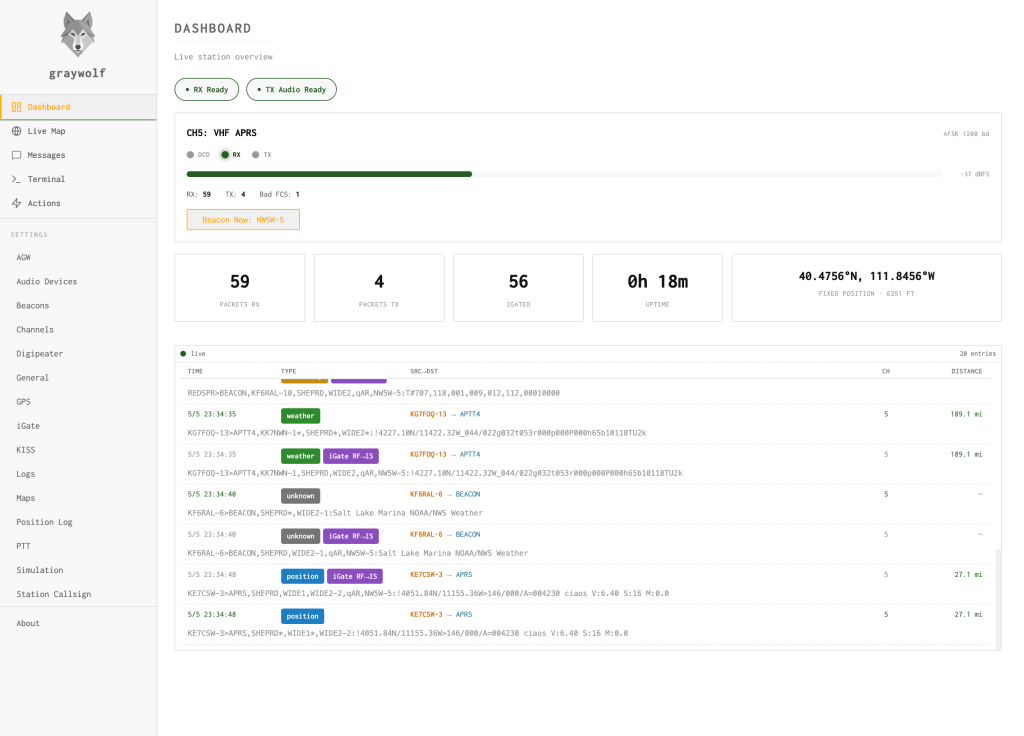
Graywolf changes that. It’s a complete APRS station in a single binary: software modem, digipeater, iGate, and a browser-based web UI, all bundled and working together out of the box. It’s written by Chris Snell, NW5W, and it’s open source under GPL-2.0. As of June 2026, it’s at version 0.13.15 with 100 releases published and an active development pace.
What It Actually Is
Graywolf isn’t a front-end wrapper around Direwolf. It has its own modem, written from scratch in Rust. The AX.25 decoding, APRS operations (beacons, digipeating, iGating), and the REST web API are handled by a service written in Go. The web frontend is built in Svelte.
The Rust modem is a port of the AFSK demodulator from Direwolf, originally written by WB2OSZ. It incorporates decision-feedback AGC and hard-limiter correlator techniques credited to Ion Todirel (W7ION) from his libmodem project. These aren’t just software engineering choices. They’re the reason the modem performs the way it does, and they represent real signal processing expertise applied to a practical problem.
The Benchmark Numbers
This is where Graywolf makes its case plainly. The WA8LMF TNC test CD is the standard benchmark for software TNCs. Here’s how Graywolf compares to Direwolf running in its best mode, which is -P AD+:
| WA8LMF Track | Direwolf | Graywolf |
|---|---|---|
| Track 01 – 40-min traffic mix | 1020 | 1026 |
| Track 02 – DE-emphasized Mic-E | 1000 | 1000 |
| Track 03 – flat Mic-E (100 reps) | 100 | 100 |
| Track 04 – drive test | 107 | 108 |
Graywolf beats or matches Direwolf on every single track. Not by massive margins, but those aren’t the point. It achieves this performance at roughly 5% of a Raspberry Pi 5’s CPU, while Direwolf in its most effective mode is considerably heavier. On an actual Raspberry Pi 5, Graywolf’s modem runs at about 19% of a single CPU core. For a station that’s meant to run 24/7 on low-power hardware, that’s a meaningful difference.
The benchmarks are reproducible. The repo includes a bench.sh script so you can verify this yourself.
Installation
Graywolf ships as a single binary. There are no external dependencies to manage, no daemon prerequisites, and no separate modem process to configure.
Packages are available for:
- Debian/Ubuntu via APT
- Fedora/RHEL via RPM
- Arch Linux via AUR
- Windows with an installer
- macOS as binaries
Architecture support includes x86-64 and ARM, including Raspberry Pi. As of version 0.13.15, the build process also restores support for armv6 and 32-bit Pi targets, which had been broken. The SQLite database stores all configuration, so there’s no flat config file to maintain. Setup is handled entirely through the web UI.
The Web Interface
Graywolf is managed through a browser. The interface is responsive and works on both desktop and smartphones, which matters when you’re managing a station remotely from a phone.
The interface includes a live packet stream, a full map view, and a messaging interface. Configuration of all station parameters (modem settings, PTT method, beacon intervals, digipeater paths, iGate filters, and more) is done through the browser, not a text editor.
The Live Map
The map deserves its own mention because it’s not just a stripped-down APRS viewer. Graywolf describes it as “a private aprs.fi for your station,” and that’s accurate in scope. It supports:
- Real-time packet display with station trails
- Digipeater path visualization
- Weather overlays
- A private vector basemap
- Offline map downloads by state, province, or country
The offline map capability is practically useful. If you’re operating at a remote site, during an emergency activation, or in an area with unreliable internet, being able to pre-download map tiles for your region means the map still works.
Messaging
APRS messaging in Graywolf works as an SMS-style interface with delivery status and unread badges. Under the hood it supports:
- Auto-ACK and retry on direct messages
- Tactical callsigns: you can message groups using callsigns like
GRAYWOLForAMIGOSfor net operations - RF-first delivery with APRS-IS fallback: it tries the radio path first and falls back to internet gating if the RF path fails
- Long messages up to 200 characters: the standard APRS message limit is 67 characters, so this is a significant extension for stations that support it
PTT Methods
One of the more practical aspects of Graywolf is how many PTT methods it supports out of the box, covering virtually every common way to key up a radio from a computer:
- Serial RTS/DTR: works with Digirig and standard USB-serial adapters
- CM108 USB HID GPIO: works with AIOC and homebrew sound card adapters
- Linux GPIO: direct GPIO control on Raspberry Pi, BeagleBone, and similar boards
- Hamlib rigctld: CAT control for radios that support it
Most APRS software supports one or two of these. Supporting all four in the same package means Graywolf works with the hardware you already have.
Digipeater
The digipeater implementation is full-featured:
- WIDEn-N path handling: the standard APRS digipeating path format
- Preset-driven configuration: presets for common roles like fill-in digi or wide-area digi
- Duplicate suppression: prevents re-transmitting packets already heard from other digipeaters
- Per-path filtering: control which packets get digipeated based on path
This is the kind of configuration that matters for anyone setting up a serious digipeater node rather than just a home station.
iGate
The iGate handles both directions:
- RF to APRS-IS: packets heard on RF are uploaded to the APRS-IS network
- APRS-IS to RF: packets from the internet are gated down to RF for local delivery
Configurable filters let you control what gets gated in each direction. The logs include packet origin tracking so you can see where each packet came from and whether it was gated. As of v0.13.15 (PR #202), the iGate exposes RF-to-IS gate reasons for KISS client TX, meaning you can see exactly why a packet was or wasn’t gated.
TNC Interfaces
Graywolf speaks the protocols that other packet software expects:
- KISS TNC: TCP built in, serial via tnc-server
- AGWPE TCP: the Packet Engine interface used by Winlink, UI-View, and many others
This means you can use Graywolf as the TNC back-end for other software while still using Graywolf’s own interface for monitoring and configuration.
Actions
Actions are a less-common feature that’s worth understanding. They let you trigger scripts or webhooks remotely by sending specially-crafted APRS messages to your station. Supported trigger types include:
- Shell scripts
- PowerShell scripts
- Webhooks
Actions can be secured with one-time passwords using the same TOTP standard as Google Authenticator and 1Password. A recent commit adds a TOTP verifier with a replay ring, meaning the same OTP can’t be reused, which closes a basic replay attack vector.
The practical uses here are real. Triggering a generator start, alerting monitoring systems, or running a check-in script via an APRS message from a mobile radio is the kind of capability that makes sense in emergency communications contexts.
Observability
For a station that runs unattended, knowing what it’s doing matters:
- Prometheus metrics: scrape Graywolf’s metrics into whatever monitoring stack you’re using
- SQLite packet logging with search: all heard packets are logged and searchable
- Live packet stream in the web UI: real-time view of everything the station is hearing
The Prometheus integration is unusual for amateur radio software. It means Graywolf fits into professional monitoring setups (Grafana dashboards, alerting rules, the whole ecosystem) without any custom work.
Android
There’s an Android application in active development. Recent commits show USB KISS TNC support added, a watchParentDeath mechanism to properly cancel the app context when the parent process exits, and a CI pipeline using Fastlane for track promotion and Play Store listing uploads. This is real software engineering work, not a proof-of-concept port.
The Project in Context
Graywolf sits at version 0.13.x with 100 public releases and four contributors. It has 123 stars and 11 forks on GitHub. The commit history shows consistent, regular work across multiple releases per month, and the changelog reflects real user-reported issues being fixed. The armv6 build regression, for example, was reported as issue #199 and fixed in five days.
The project has a Discord community, a published handbook, a Known-Working Configurations list with community-submitted hardware setups, and a public map of currently active stations.
This is software built to be used, not just released.
Who It’s For
Graywolf makes sense for:
- Home stations that want a complete APRS setup without managing multiple tools
- Digipeater and iGate operators who want modern configuration and monitoring
- Emergency communications groups that need reliable, maintainable software on Raspberry Pi hardware
- Experimenters who want to run their own private APRS network with a real-time map
If you’re currently running Direwolf with a collection of scripts, config files, and manual log inspection, Graywolf is a direct upgrade. The modem performance is better, the CPU footprint is lower, and everything is accessible through a browser instead of a terminal.
The latest release is available at the Graywolf GitHub repository. The handbook covers installation, configuration, and the REST API reference in full.







Post Comment