9M2PJU
amateur radio
android
open source
9M2PJU, AllStarLink, amateur radio Android, AMBE vocoder, Android app, APK, BrandMeister, C4FM, Codec 2, D-STAR, digital voice, DMR, DMR ID, DroidStar, DVstick, FreeDMR, GPL, hamradio.my, HBLink, hotspot, IMBE, M17, Malaysian amateur radio, MMDVM, NEXEDGE, NXDN, open source, P25, PTT, push to talk, Qt, Radioid, reflectors, talkgroup, TGIF, ThumbDV, Wires-X, Yaesu System Fusion, YSF
9M2PJU
1 Comments
DroidStar 9M2PJU Mod: The All-in-One Android Digital Voice Client for DMR, M17, YSF, P25 and NXDN
There is a moment every digital voice operator knows. You are standing in a car park, or sitting on a hilltop during a SOTA activation, and someone on the other side of the world keys up on a talkgroup you have been monitoring for weeks. The catch? You left the hotspot at home, the handheld is charged but on the wrong band, and the only radio you actually have in your pocket is your phone.
That used to be the end of the contact. With DroidStar 9M2PJU Mod, it is the beginning of one.
DroidStar 9M2PJU Mod is a free, open source Android digital voice client that connects your phone directly to DMR, M17, Yaesu System Fusion (YSF), P25, NXDN, D-STAR and AllStarLink reflectors over the internet, no hotspot, no handheld, no external vocoder dongle required. The AMBE, Codec 2 and IMBE vocoders are compiled straight into the APK, so the moment you install it you can talk on five different digital voice modes from a single app.
This is the 9M2PJU customised build of Doug McLain AD8DP’s DroidStar, with a dedicated Ham Radio Navy theme, 9M2PJU branding, built-in vocoders, an Android 15 edge-to-edge fix, and a reworked push-to-talk button. The core engine and every protocol stay in sync with upstream, so you get the latest digital voice features with a cleaner, more usable Android experience.
Last updated: July 2026.
What Is DroidStar?
DroidStar is the brainchild of Doug McLain, AD8DP, and it is arguably the most versatile amateur radio digital voice application ever written. It is a cross-platform C++ application built on the Qt toolkit that runs on Linux, Windows, macOS, Android and iOS, and it speaks essentially every digital voice mode in the hobby:
- DMR (Digital Mobile Radio), BrandMeister, FreeDMR, HBLink, TGIF networks
- M17, the open source, patent-free digital voice standard
- Yaesu System Fusion (YSF/FCS), both DN and VW modes
- P25 (Project 25), Phase 1
- NXDN (Next Generation Digital Narrowband), NEXEDGE
- D-STAR, REF, XRF and DCS reflectors
- AllStarLink, as an IAX2 client or via Web Transceiver mode
It connects to all of these over UDP, directly to the reflectors and servers that already exist on the internet. You do not need a hotspot between your phone and the network, the phone is the radio. If you do have an AMBE USB vocoder (ThumbDV, DVstick 30, DVSI) or an MMDVM modem, DroidStar can drive those too, acting either as a hotspot/repeater or as a stand-alone transceiver in MMDVM Direct mode.
The project started life as dstar-monitor, a receive-only D-STAR listener that used the MBElib library to decode traffic over the network. When transmit support and software vocoding were added, it became a true two-way client. The name evolved from DudeStar to DroidStar, and the Android build has been on the Google Play Store for years. What makes it controversial in some circles, and indispensable in others, is that it lets a licensed operator with nothing but a phone and an internet connection get on digital voice, without buying a radio with an AMBE chip first.
The 9M2PJU Mod: What Is Different
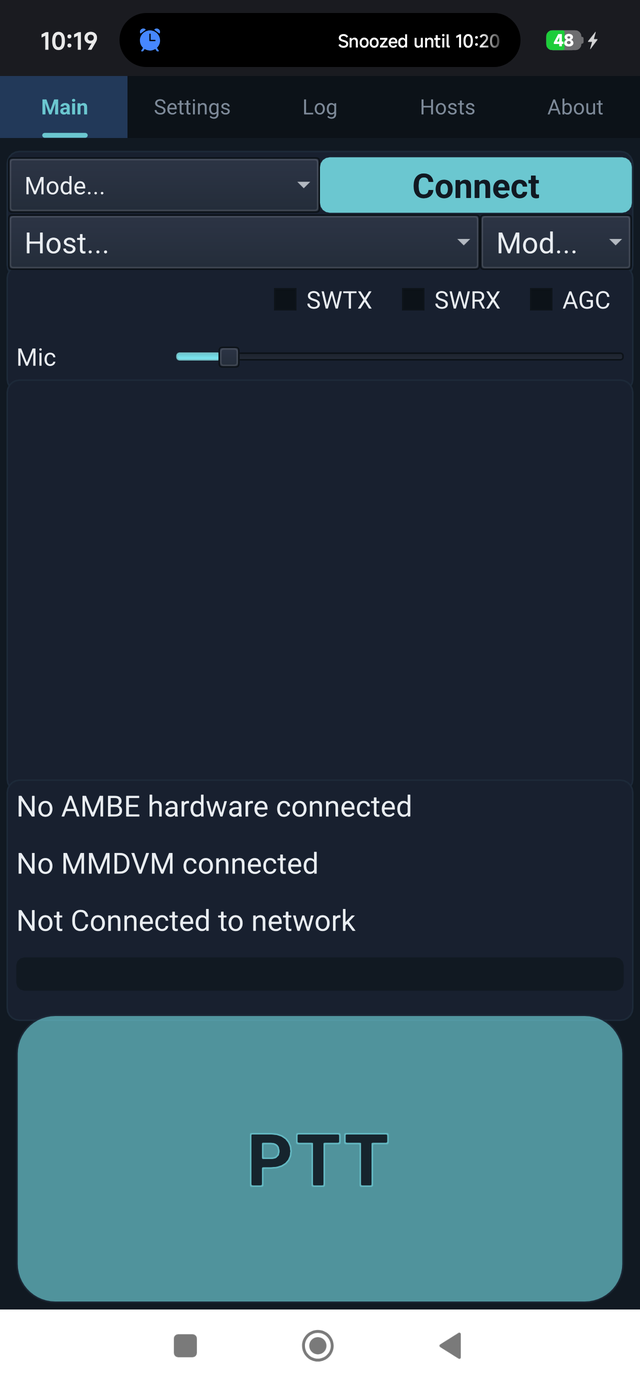
The 9M2PJU Mod is a customised build of DroidStar for Android. It does not fork the protocol stack or the vocoder engine, those stay identical to upstream so every reflector, talkgroup and repeater behaves exactly the same. The modifications are purely about the Android experience: branding, visual polish, and a handful of fixes that make the app nicer to actually use on a modern phone.
Ham Radio Navy Theme
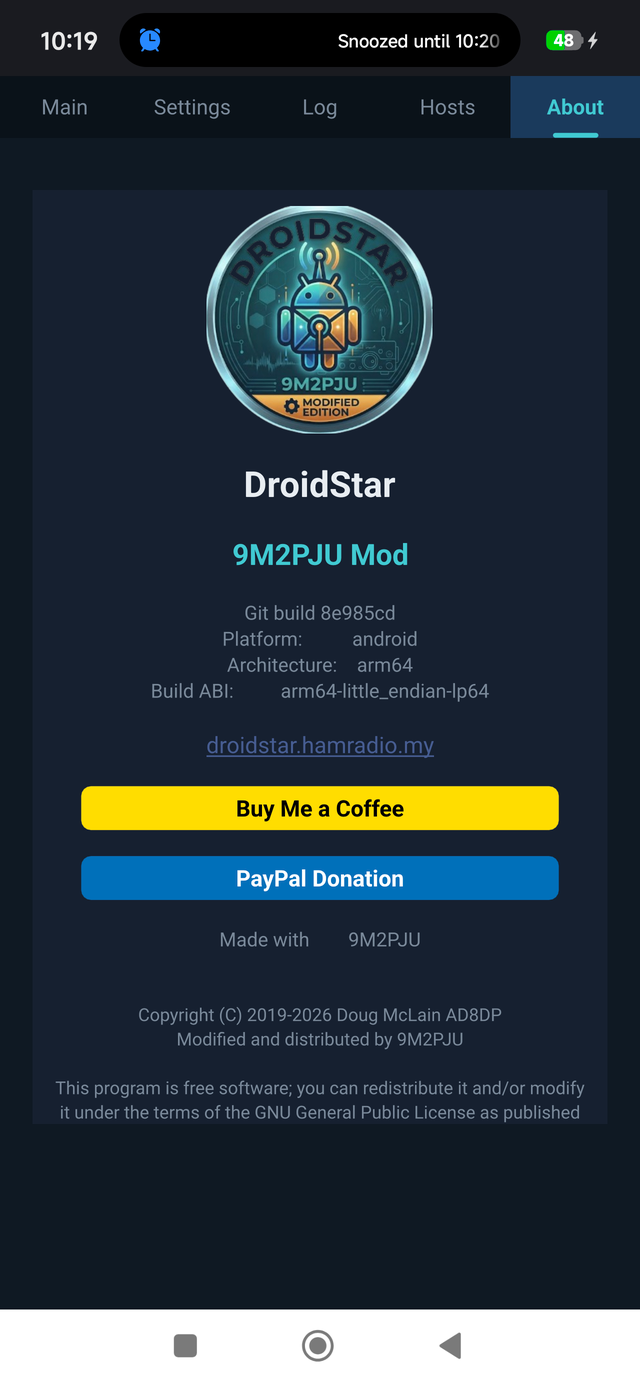
The default DroidStar interface is functional but visually plain. The 9M2PJU Mod ships a custom Ham Radio Navy theme: a deep navy (#0f1923) background with a teal (#41cad2) accent that matches the 9M2PJU logo. The tab bar gets an active indicator, and the Main tab is reorganised into a card-based layout that groups the connection controls, mode selectors and the PTT button into clear visual sections. It reads like a piece of radio gear, not a developer debug tool.
9M2PJU Branding
The app name, launcher icon, splash screen and About page are all customised with the 9M2PJU identity and a link back to hamradio.my. The icon uses the 9M2PJU logo on a navy background, so it sits cleanly on a home screen next to your other ham radio apps.
Built-in Vocoders, No Plugin Download
This is the biggest practical difference for a new user. Stock DroidStar requires you to download a vocoder plugin from a URL before you can transmit on AMBE-based modes (DMR, YSF, P25, NXDN, D-STAR). On Android that means hunting for the right vocoder_plug.android.arm64 file, pasting a URL into a settings field, and hoping the host is still online.
The 9M2PJU Mod compiles the AMBE, Codec 2 and IMBE vocoders directly into the APK. You install the app, you configure your callsign, and you talk. No vocoder URL, no plugin download, no extra step. For an operator setting up their first digital voice client in a car park, this is the difference between a working QSO and giving up.
Android 15 Edge-to-Edge Fix
Android 15 enforces edge-to-edge display by default, which on the stock build could hide the PTT button and the bottom navigation behind the system navigation bar. The 9M2PJU Mod adds proper safe-area handling so the PTT button and tab bar are always fully visible and tappable, regardless of gesture mode or system bar size.
Reworked PTT Button
The push-to-talk button is the single most-used control in any digital voice app. The 9M2PJU Mod replaces it with a large, cyan, rounded button that fills the available space, scales its text to the button dimensions, and turns dark red while you are transmitting. You always know, at a glance, whether you are keyed up.
Automated CI Builds
Every release tag triggers an automated build pipeline that produces a fresh, signed APK. You always download a current build straight from the project page, no stale APKs, no manual compilation.
The Five Digital Voice Modes, Explained
If you are new to digital voice, the alphabet soup of modes can be intimidating. Here is what each one is and why you might use it.
DMR (Digital Mobile Radio)
DMR is the most popular digital voice mode in amateur radio worldwide. It is an open ETSI standard originally designed for commercial land-mobile radio, adopted by hams because the radios are cheap and the network is huge. DMR uses two-slot TDMA on a 12.5 kHz channel, giving you two independent talk paths per frequency. The global network is split into BrandMeister, FreeDMR, HBLink and TGIF, each hosting thousands of talkgroups organised by region, language and interest (World Wide 91, Europe 2350, Malaysia 2352, and so on). DMR requires a DMR ID from Radioid.net and, for BrandMeister, a SelfCare password.
M17
M17 is the open source, patent-free digital voice standard built by the amateur radio community. It uses the Codec 2 vocoder (no AMBE chip, no patent licensing) and is fully open from the protocol down to the codec. M17 reflectors (M17-USA, M17-KPH, M17-EU, etc.) work just like DMR talkgroups. If you care about open standards and want a mode you can implement from scratch without paying anyone, M17 is it. DroidStar was one of the first clients to add M17 support, back in October 2020.
Yaesu System Fusion (YSF / FCS)
Yaesu’s C4FM-based digital voice system, marketed as “System Fusion”. It supports both DN (digital narrow, with a low-rate data sub-channel) and VW (voice wide, full-rate voice) modes. YSF rooms and FCS reflectors are organised by region and topic. Wires-X gateways bridge local Yaesu repeaters to the worldwide network.
P25 (Project 25)
P25 is the public-safety-grade digital voice standard used by police, fire, EMS and military worldwide. The amateur radio P25 network (DMR-P25, the P25NX network) is smaller than DMR but has a dedicated following, particularly in North America. P25 uses the IMBE vocoder. DroidStar supports P25 Phase 1.
NXDN (NEXEDGE)
NXDN is Icom and Kenwood’s narrowband digital voice standard (6.25 kHz). The amateur NXDN network is small but active. You need an NXDN ID in addition to your DMR ID for some networks.
D-STAR and AllStarLink
DroidStar also connects to D-STAR reflectors (REF, XRF, DCS) and to AllStarLink nodes as an IAX2 client or via Web Transceiver mode. D-STAR is Icom’s older digital voice standard; AllStarLink is the Asterisk-based analogue linking network that ties repeaters together over the internet. Having all of these in one app is what makes DroidStar unique.
Why Built-in Vocoders Matter
Digital voice modes need a vocoder, the algorithm that compresses your voice into the low bitrate the protocol can carry. AMBE (used by DMR, YSF, P25, NXDN, D-STAR) is patented and licensed by DVSI. Codec 2 (used by M17) is open source. IMBE (used by P25 Phase 1) is another DVSI codec.
In stock DroidStar, the vocoder is a separate plugin you have to download, for legal reasons, the app ships without patented codecs and you supply your own. In practice this is a friction point: the plugin URL changes, the host goes down, new users get stuck before they ever make a contact.
The 9M2PJU Mod bundles all three vocoders into the APK so installation is a single step. You are responsible for ensuring you are properly licensed to use any patented vocoder, as with any digital voice software, but the mechanical friction of finding and loading the plugin is gone.
Key Features at a Glance
- Five digital voice modes in one app, DMR, M17, YSF, P25 and NXDN, plus D-STAR (REF/XRF/DCS) and AllStarLink (IAX2) reflectors.
- Built-in vocoders, AMBE, Codec 2 and IMBE compiled into the APK. No external plugin download required.
- USB vocoder support, connect an external AMBE vocoder (ThumbDV, DVstick 30, DVSI) or an MMDVM modem over USB serial.
- MMDVM hotspot and direct mode, use DroidStar as a hotspot/repeater with an MMDVM modem, or as a stand-alone transceiver in MMDVM Direct mode (M17).
- Operator info auto-fetch, your handle and country are pulled automatically from your DMR ID via the Radioid API.
- M17 SMS and IAX DTMF, send SMS messages on M17 and DTMF tones over IAX, built in.
- Ham Radio Navy theme, deep navy and teal, card-based layout, active tab indicator.
- Android 15 safe-area fix, PTT and navigation never hidden behind the system bar.
- Large cyan PTT button, turns dark red while transmitting, scales to screen size.
- Custom 9M2PJU icon and splash, navy background, matches the 9M2PJU logo.
- No root required, runs on any modern Android phone.
System Requirements
| Requirement | Detail |
|---|---|
| Operating system | Android 12+ (API level 31) |
| Architecture | arm64-v8a (64-bit ARM) |
| APK size | ~48 MB |
| Root access | Not required |
| Internet | Wi-Fi or mobile data (UDP to reflectors) |
| Optional hardware | USB AMBE vocoder or MMDVM modem (USB OTG) |
How to Install DroidStar 9M2PJU Mod
Because the app is distributed as an APK rather than through an app store, Android will warn that it is from an unknown source. This is expected for a debug-signed build.
- Download the APK from the DroidStar 9M2PJU project page.
- On your Android phone, open Settings → Apps → Special access → Install unknown apps (the exact path varies by manufacturer; on some it is under “Install unknown apps” for your browser or file manager) and grant permission to the app you will use to open the APK.
- Tap the downloaded .apk file in your Files app or in the download notification.
- Follow the prompts to Install. Android will warn the app is from an unknown source, this is normal for a sideloaded APK. Accept and install.
- Open DroidStar 9M2PJU from your app drawer. The vocoders are already built in, so there is no separate vocoder download step.
First-Time Configuration
Before you can transmit, you need three things: a valid amateur radio licence and callsign, a DMR ID (free, from Radioid.net), and, for BrandMeister, a SelfCare password.
Step 1: Get a DMR ID
Go to Radioid.net and register your callsign. You will be assigned a numeric DMR ID (typically 7 digits). This single ID works across DMR, and on many networks it is also used for P25 and NXDN. It can take a day or two for a new ID to propagate to the networks, so register it before you plan to use the app.
Step 2: Set Up BrandMeister (for DMR)
If you want to use DMR on the BrandMeister network, create an account at the BrandMeister SelfCare portal using your callsign and DMR ID, and set a SelfCare password. This password is what DroidStar sends to authenticate your hotspot or client. Use the same password in the app’s BM Pass field.
Step 3: Configure the App
Open DroidStar 9M2PJU and tap the Settings tab. Fill in:
- Callsign, your amateur callsign (e.g.
9M2PJU) - DMRID, your numeric DMR ID from Radioid
- BM Pass, your BrandMeister SelfCare password (DMR only)
That is the minimum. You can also set your latitude, longitude, location text and description, which appear on the network’s live map.
Connecting to Each Mode
Once Settings are filled in, go to the Main tab. The top row of dropdowns selects the mode and its parameters; the big cyan button is PTT.
DMR (BrandMeister)
- Mode: DMR
- Slot: S2 (Time Slot 2 is the conventional slot for talkgroups)
- Color Code: CC1
- Host: pick a BrandMeister server near you (e.g.
BM_2352_Malaysia,BM_2350_Europe,BM_3102_USA_West) - TGID: enter a talkgroup (e.g.
91for World Wide,2352for Malaysia,2350for Europe) - Tap Connect. After a few seconds you should see the connection confirm in the log.
- Hold the PTT button to transmit. Release to listen.
M17
- Mode: M17
- Host: pick an M17 reflector (e.g.
M17-USA,M17-KPH,M17-EU) - Module: pick a module letter (e.g.
Y) - Lower the Mic gain slider by about 20-35% to avoid overdriving, M17 is sensitive to hot audio.
- Tap Connect, then PTT to talk.
Yaesu System Fusion (YSF)
- Mode: YSF
- Host: pick a YSF reflector (e.g.
YSF00001World Wide, or a regional room) - DG-ID: usually
99(open) - Connect and PTT.
P25
- Mode: P25
- Host: pick a P25 reflector (e.g.
P25-2020,P25-3020) - TGID: enter the talkgroup for the reflector
- Connect and PTT. P25 uses your DMR ID as the source ID.
NXDN
- Mode: NXDN
- Host: pick an NXDN reflector (e.g.
NXDN-204Europe,NXDN-310North America) - You may need an NXDN number in addition to your DMR ID, depending on the network.
- Connect and PTT.
USB Vocoder and MMDVM Hotspot Mode
If you have a USB AMBE vocoder (ThumbDV, DVstick 30, DVSI) or an MMDVM modem (MMDVM_HS hotspot stick, LoneStar, ZumSpot), DroidStar 9M2PJU can drive it over USB OTG. This is useful in two ways:
- As a vocoder source, some operators prefer a hardware AMBE chip for transmit quality, or to keep the phone’s CPU free.
- As a hotspot/repeater, connect an MMDVM modem, select it under Modems, and DroidStar becomes a personal hotspot that bridges your local RF to the internet reflector. Your handheld DMR/YSF/M17 radio then talks through the phone’s internet connection.
- As a stand-alone transceiver, in MMDVM Direct mode (currently M17), DroidStar plus an MMDVM modem becomes a self-contained transceiver with no reflector in the middle.
For USB to work you will need a USB OTG adapter and, on most phones, to grant the app USB permission when prompted.
The Ham Radio Navy Theme in Detail
A lot of amateur radio software looks like it was designed by an engineer in 2003, because it was. The 9M2PJU Mod takes a different approach. The Ham Radio Navy theme uses:
- Deep navy
#0f1923as the base background, easy on the eyes in a dark shack or at night, and it does not blow out your night vision on a SOTA summit. - Teal
#41cad2as the accent colour, pulled from the 9M2PJU logo, used for the active tab indicator, the PTT button, and highlights. - Card-based layout on the Main tab, connection controls, mode selectors and the PTT button are grouped into visually distinct cards rather than a flat list of dropdowns.
- Active tab indicator, a teal underline on the current tab, so you always know which screen you are on.
It is a small thing, but when you use an app every day, the difference between a thoughtfully themed interface and a default Qt widget stack is the difference between reaching for the app and reaching for something else.
Why This Matters
Digital voice is the part of amateur radio that most benefits from the internet, and the part that is most often locked behind hardware. To get on DMR conventionally you need a DMR radio (with an AMBE chip), a hotspot or repeater, and a DMR ID. To get on YSF you need a Yaesu radio. P25, NXDN, M17, each historically meant another radio, another antenna, another learning curve.
DroidStar collapses all of that into a single Android app. One install, one callsign, one DMR ID, and you are on five digital voice networks from your phone. The 9M2PJU Mod makes that install painless by bundling the vocoders, fixing the Android 15 layout bugs, and giving the whole thing a theme that looks like it belongs in a ham shack.
For a Malaysian operator on a budget, for a DXpedition team that wants a backup digital voice path, for a new licensee who wants to hear what DMR actually sounds like before buying a radio, or for an experienced ham who just wants one app instead of five, DroidStar 9M2PJU Mod is the simplest way onto digital voice there is.
It is free, it is open source (GPL v3.0), and it is built and maintained by 9M2PJU for the hobby. If it is useful to you, consider buying a coffee to keep the builds coming.
73, and may your talkgroups be active.
Sources and Further Reading
- DroidStar 9M2PJU Mod, download and project page: https://droidstar.hamradio.my/
- Original DroidStar by Doug McLain AD8DP: Google Play Store
- Radioid.net, register your DMR ID: https://radioid.net/
- BrandMeister SelfCare portal: https://brandmeister.network/
- M17 Project, the open source digital voice standard: https://m17project.org/
- Kapihan Network, DroidStar Mobile setup walkthroughs (DMR, M17, YSF, P25, NXDN): https://kapihan.net/connect/droidstar/
- G8SIB, DroidStar DMR on Android and Windows guide: https://g8sib.radio/droidstar
- HamRadio.my, Amateur Radio Resources, Tools and Reviews: https://hamradio.my/
- About 9M2PJU, Malaysian Amateur Radio Operator: https://hamradio.my/about/

1 comment