Meet the 9M2PJU HF Prediction Tool: A Free, Relaxing Way to Read the Bands
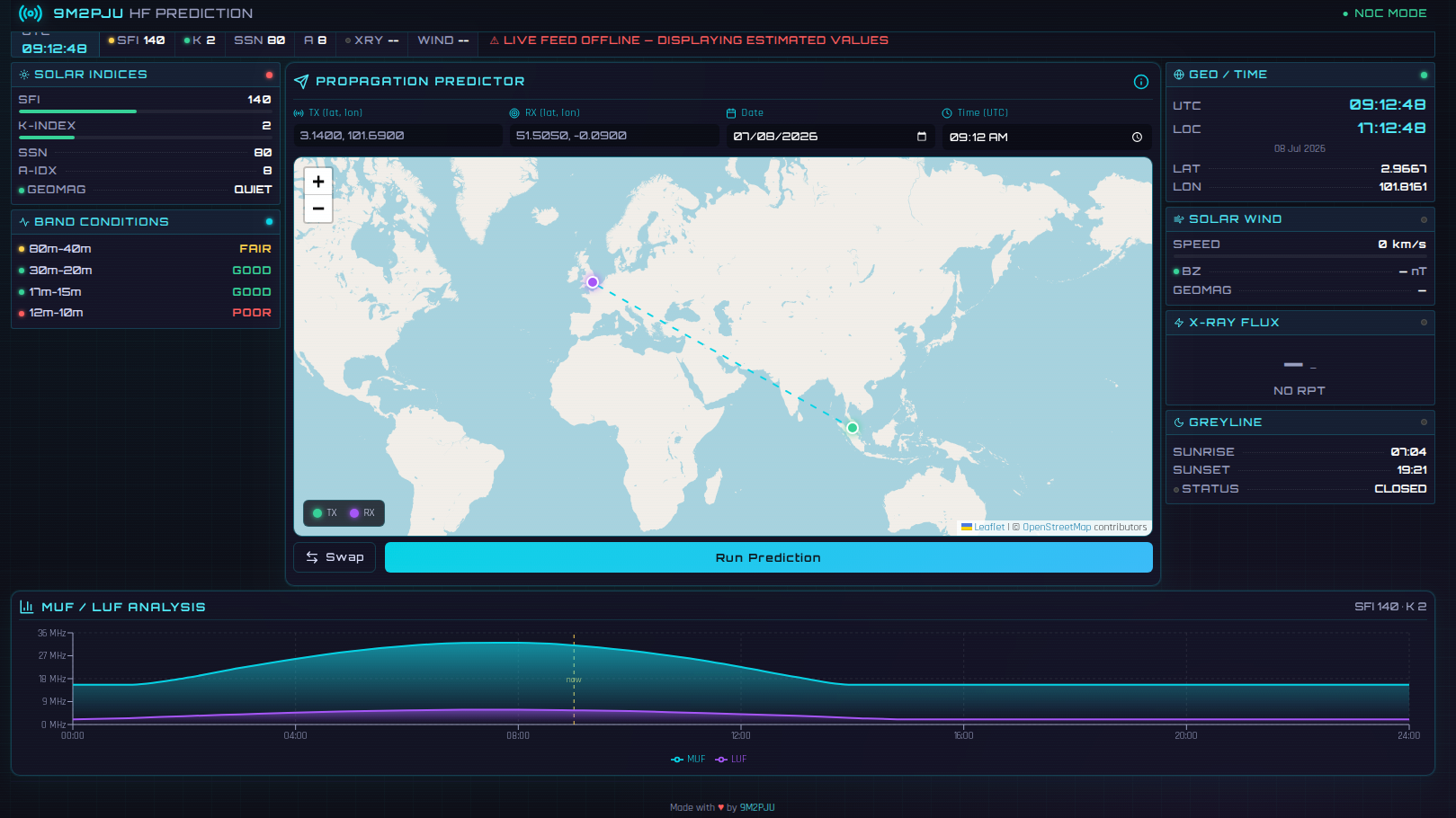
There is a particular kind of calm that comes with sitting down at the radio before the rest of the house is awake. The coffee is still hot, the shack is quiet, and the only question on your mind is a simple one: are the bands open today?
For years, answering that question meant juggling half a dozen browser tabs, a solar flux page here, a K-index graph there, a greyline map somewhere else, and a calculator you mostly trusted by feel. It worked, but it was not exactly relaxing.
That is why I built 9M2PJU HF Prediction, a free, browser-based HF propagation dashboard that puts the whole picture on one screen. No logins, no paywalls, no apps to install. You open the page, and the bands tell you their story.
Last updated: July 2026.
What It Is, in One Breath
9M2PJU HF Prediction is a lightweight web tool that shows you live solar conditions, current HF band status, and a point-to-point propagation calculator, all in a single, calm, cyberpunk-flavoured dashboard. It runs in any modern browser, works on your phone, and can be installed as a Progressive Web App to your home screen if you want it to feel like a native app.
It is built and maintained by 9M2PJU, the same Malaysian amateur behind hamradio.my, and it is offered free for the hobby.
A Gentle Tour of the Dashboard
The page is split into two comfortable sections: STATUS and PREDICT. You can think of them as “what is happening right now” and “what is likely to happen between two points.”
STATUS: The Sky Right Now
This is the part you glance at with your morning coffee.
Temporal / Spatial Data. A clean digital clock shows UTC and your local time side by side, and if you allow location access, it quietly notes your latitude and longitude. It is the kind of widget that saves you from doing the UTC math in your head at 3 a.m.
Solar Indices. The tool pulls live data from HamQSL.com, which in turn draws from NOAA space weather sources. You get four numbers that every HF operator learns to love:
- SFI, Solar Flux Index, the classic measure of how much ionising energy the Sun is throwing at our ionosphere.
- SSN, Sunspot Number, the old reliable indicator of cycle activity.
- A-Index, the daily geomagnetic summary, a broad sense of how unsettled the Earth’s magnetic field has been.
- K-Index, the three-hour snapshot that tells you whether a storm is brewing right now.
HF Propagation. Below the indices, the bands are laid out in plain language: 80m-40m, 30m-20m, 17m-15m, and 12m-10m, each tagged GOOD, FAIR, or POOR with a coloured bar. No interpretation required. If the bar is green, go put your signal on the air.
Solar Wind and X-Ray Flux. For those who like to read the sky a little deeper, there is a solar wind panel (speed in km/s and density in p/cm³) and an X-ray flux readout showing the current flare class. A quiet Class B means a calm Sun; a climbing Class M is your hint to watch the higher bands.
Greyline Alert. This is my favourite little luxury. The dashboard shows your local sunrise and sunset and flags whether the greyline window, that magic half-light when low-band DX comes alive, is open or closed. When the window is open, you stop reading and start calling.
PREDICT: Point-to-Point Propagation
This is where the tool earns its keep for serious DX planning.
The Propagation Calculator lets you enter two locations by latitude and longitude, and it works out the great-circle path between them. Using the current solar flux, the time of day, and the Sun’s declination, it estimates:
- Distance between the two stations, in kilometres.
- MUF, the Maximum Usable Frequency for that path right now.
- Best frequency, the highest band at or below the MUF that is likely to support the link.
- Reliability, a rough confidence score for the path.
- Path midpoint, the latitude and longitude where your signal is bouncing, useful for thinking about where the ionosphere is actually doing the work.
A companion Frequency Chart visualises how the usable bands shift across the path, so you can see at a glance whether 20 metres is your friend tonight or whether you should be looking lower.
It is not a substitute for a full ionospheric model, and it does not pretend to be. It is a quick, honest first read, the kind of thing you check before you decide whether to fire up the amplifier.
Why a Tool Like This Matters
Propagation is not magic, but it can feel that way when you are starting out. The Sun does what it wants, the ionosphere bends and folds, and a band that was wide open at noon can be a dead wire by sunset.
A good propagation tool does not promise certainty. It gives you a fighting chance to be in the right place at the right time. It turns guesswork into a reasonable plan, and it does so without making you learn space physics before your first QSO.
That is the spirit behind 9M2PJU HF Prediction. It is a quiet helper, not a lecture.
How to Use It
- Open hf.hamradio.my in any modern browser, on desktop or mobile.
- Allow location access if you want the clock and greyline widget to use your position. If you decline, the tool still works; you just enter coordinates manually in the calculator.
- Glance at the STATUS section for a quick read of the bands.
- Scroll to PREDICT when you are planning a specific contact. Enter your coordinates and the target station’s coordinates, and let the calculator do the maths.
- If you want it to feel like an app, install it as a PWA from your browser menu. It will open full-screen and update its solar data every five minutes on its own.
That is the whole workflow. No account, no settings menu to get lost in, no premium tier hiding the good numbers.
A Few Honest Notes
The solar data comes from HamQSL.com, which aggregates NOAA space weather feeds. Like any live data source, it can occasionally lag or fall back to an estimate when the upstream feed is slow, the dashboard will tell you when it is showing an offline estimate rather than a live reading.
The MUF and reliability figures are calculated with a simplified model. They are excellent for a quick go or no-go decision and for teaching newcomers how propagation thinks. For contest-grade planning or scientific work, pair the tool with a dedicated ray-tracing engine.
In other words: trust it for the morning coffee check, and cross-reference it for the serious stuff. That is how it is meant to be used.
Try It With Your Next QSO
The next time you are wondering whether to bother turning on the radio, do what I do. Open hf.hamradio.my, let the solar indices load, and let the bands tell you whether tonight is a night for DX or a night for a good book.
Either way, you will know before you key the mic. And that, in a hobby built on listening first, is exactly the point.
73, and may your noise floor stay low.











Post Comment