CYD Ham Dashboard: Turn a $10 ESP32 Cheap Yellow Display into a Touchscreen Ham Radio Shack Monitor
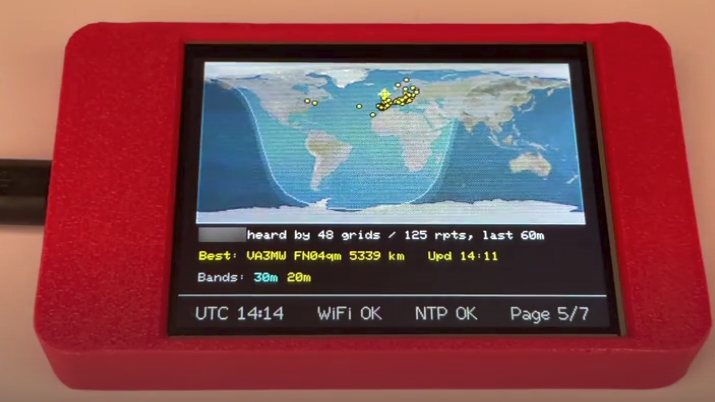
TL;DR: The CYD Ham Dashboard by HenrysCat is an open-source firmware that transforms the popular $10 ESP32-2432S028R “Cheap Yellow Display” (CYD) into a standalone, touch-controlled amateur radio desktop monitor. Inspired by HamClock, it delivers seven dedicated screens featuring UTC/local clocks, HamQSL HF/VHF solar propagation, live greyline terminator mapping, PSKReporter reception reports, Telnet DX cluster spots, and real-time POTA activator feeds without requiring a Raspberry Pi or SD card.
Every ham radio operator benefits from having real-time operating conditions visible at a glance in the shack. Knowing the current solar flux index (SFI), geomagnetic K-index, active DX cluster spots, Parks on the Air (POTA) activations, and the exact position of the greyline terminator helps you catch fleeting HF band openings and optimize operating schedules.
Traditionally, operators dedicated an auxiliary computer monitor or deployed a Raspberry Pi running Elwood Downey WB0OEW’s popular HamClock software. While powerful, dedicated single-board computers consume 5 to 15 watts, generate heat, and require micro-SD cards prone to filesystem corruption during unexpected power outages.
The CYD Ham Dashboard (developed by HenrysCat and available on GitHub) solves this problem elegantly. By targeting the ultra-cheap, readily available ESP32-2432S028R development board (commonly known as the Cheap Yellow Display or CYD), this open-source project creates a completely self-contained, low-power desktop appliance for around $10 to $15. It boots instantly, draws less than 1 watt, requires no operating system maintenance, and can be flashed directly from a web browser via Web Serial.
Last updated: August 2026.
What is the CYD Ham Dashboard?
The CYD Ham Dashboard is an open-source embedded firmware written in C++ for the ESP32-2432S028R Cheap Yellow Display that provides a touch-operated, multi-page visual telemetry terminal for amateur radio operators.
+-------------------------------------------------------------------------+
|                    External Data Sources over Wi-Fi                     |
|  [NTP Pool]  [HamQSL Solar/VHF]  [DX Cluster Telnet]  [PSKReporter]  [POTA] |
+------------------------------------+------------------------------------+
                                     | (Wi-Fi 802.11 b/g/n / HTTP / Telnet)
+------------------------------------v------------------------------------+
|               ESP32-WROOM-32 Dual-Core Microcontroller                  |
|  - Core 0: Background Network Tasks (NTP Sync, Telnet TCP, HTTP Fetch)  |
|  - Core 1: Display Rendering Engine (TFT_eSPI) & Touch Input (XPT2046) |
|  - Non-Volatile Memory (NVS Preferences): Callsign, Locator, Wi-Fi      |
+------------------------------------+------------------------------------+
                                     | (SPI Bus @ 40MHz / Touch @ 2.5MHz)
+------------------------------------v------------------------------------+
|               ESP32-2432S028R Hardware (Cheap Yellow Display)           |
|  - 2.8-inch 320x240 ILI9341 Color TFT LCD Panel                        |
|  - XPT2046 Resistive Touch Controller (Left/Right Page Navigation)      |
|  - Web Settings Console (http://cyd-ham.local) & SoftAP Captive Portal  |
+-------------------------------------------------------------------------+
Unlike heavier graphical projects that rely on complex windowing libraries like LVGL, the CYD Ham Dashboard is built directly on top of the high-performance TFT_eSPI rendering library. This lightweight design allows the firmware to run entirely within the internal RAM of standard ESP32-WROOM modules without requiring external PSRAM or SD cards.
The dashboard provides seven distinct, touch-navigable pages:
- Clock: High-visibility UTC and local time, date, NTP synchronisation status, Wi-Fi signal strength (RSSI), and IP address.
- HF Propagation: Real-time solar-terrestrial telemetry from HamQSL, including Solar Flux Index (SFI), Sunspot Number (SN), A-Index, K-Index, X-Ray flux, Solar Wind speed, and day/night band condition ratings for 80m through 10m.
- VHF Conditions: Aurora activity, 2m/4m/6m Sporadic-E status, and solar flare event indicators.
- Greyline Map: A 320×240 world map rendering the day/night solar terminator, real-time solar sub-point, sunrise/sunset times, and your station QTH marker calculated from your Maidenhead grid locator.
- PSKReporter Map: Plots live digital mode reception reports (FT8, JS8, CW, etc.) for your specific callsign directly onto the world map, showing where your signal is being heard globally.
- DX Cluster Spots: Live DX spots fetched via a direct, persistent Telnet socket to any DXCluster server (port 7300) or via JSON feeds, displaying spotted callsigns, frequencies, DXCC entities, and spotter remarks.
- POTA Activator Spots: Live Parks on the Air spots with an optional proximity filter (e.g., within 500 km or worldwide) based on your station coordinates.
Hardware Overview: The Cheap Yellow Display (CYD)
The ESP32-2432S028R module has become a staple of the maker and amateur radio community due to its integrated design and low cost. You can purchase the hardware directly as a pre-assembled ESP32 Bruce CYD 2.8″ GPS NFC Wi-Fi Bluetooth Board on AliExpress.
+-------------------------------------------------------------------------+
|                  ESP32-2432S028R (CYD) Board Layout                     |
+-------------------------------------------------------------------------+
|  +-------------------------------------------------------------------+  |
|  |                                                                   |  |
|  |                 2.8" 320x240 Color TFT LCD Screen                 |  |
|  |                 (ILI9341 Display / XPT2046 Touch)                 |  |
|  |                                                                   |  |
|  +-------------------------------------------------------------------+  |
|                                                                         |
|  [Micro-USB/Type-C]  [RGB LED]  [LDR Sensor]  [TF Card Slot]  [BOOT/RST]|
+-------------------------------------------------------------------------+
Technical Specifications
- Processor: Espressif ESP32-D0WDQ6 (dual-core Xtensa LX6, 240 MHz).
- Wireless: 2.4 GHz Wi-Fi (802.11 b/g/n) and Bluetooth v4.2 BR/EDR/BLE.
- Display: 2.8-inch TFT LCD, 320×240 resolution, 65K RGB colours, ILI9341 SPI controller.
- Touch Screen: 4-wire resistive touch panel driven by an XPT2046 SPI controller.
- Onboard Peripherals: Micro-USB / USB-C programming port, RGB indicator LED, light-dependent resistor (LDR) for ambient light sensing, micro-SD slot, and 3-pin expansion headers.
- Power Consumption: Approximately 120 mA to 180 mA at 5V DC (0.6W to 0.9W), easily powered from any shack USB hub, power bank, or 12V-to-5V step-down buck converter.
Hardware Pinout Matrix
The CYD shares SPI data lines between the display, touch controller, and SD card. The firmware is pre-configured with the standard CYD pin mapping:
| Function | Signal Name | ESP32 GPIO Pin | Description |
|---|---|---|---|
| TFT Display | TFT_MOSI | GPIO 13 |
SPI Master Out Slave In |
| TFT_MISO | GPIO 12 |
SPI Master In Slave Out | |
| TFT_SCLK | GPIO 14 |
SPI Serial Clock | |
| TFT_CS | GPIO 15 |
Display Chip Select (Active Low) | |
| TFT_DC | GPIO 2 |
Display Data/Command Control | |
| TFT_BL | GPIO 21 |
Backlight PWM Brightness Control | |
| Touch Screen | TOUCH_MOSI | GPIO 32 |
Touch SPI MOSI |
| TOUCH_MISO | GPIO 39 |
Touch SPI MISO | |
| TOUCH_SCLK | GPIO 25 |
Touch SPI Clock | |
| TOUCH_CS | GPIO 33 |
Touch Chip Select | |
| TOUCH_IRQ | GPIO 36 |
Touch Pen Interrupt Input | |
| Controls | BOOT Button | GPIO 0 |
Factory Reset Trigger (Hold 5s) |
Hardware Note: Some clone boards on AliExpress swap red/blue colour channels or invert touch coordinates. The CYD Ham Dashboard firmware includes built-in settings in the web console to invert colours, rotate 90/180 degrees, or flip touch axes without recompiling code.
3D-Printable Enclosures and Shack Desk Stands
Operating a bare development board on a busy operating desk risks accidental shorts from loose coaxial patch cables, antenna switches, or metal tools. Fortunately, the maker community has produced high-quality 3D-printable enclosures tailored specifically for the CYD:
- Desktop Enclosure with Pen Holder and Stand: aamott’s ESP32 CYD Enclosure on Printables features an angled desktop stand that props the screen at an optimal viewing angle next to your transceiver, provides rear cable strain relief for USB-C/Micro-USB power, and includes an integrated stylus holder for the resistive touch pen.
- Rugged Field Case for Portable Operations: The ESP32 CYD Case on Printables provides a compact, snap-fit handheld shell that encases the display while preserving direct access to the side buttons, USB ports, and SD card slot for portable field monitoring or EmComm deployments.
Key Features and Operational Walkthrough
+-------------------------------------------------------------------------+
|                     Touch Navigation & Screen Layout                    |
+-------------------+--------------------+--------------------------------+
| Tap Left Third    | Tap Centre Area    | Tap Right Third                |
| -> Previous Page  | -> Manual Refresh  | -> Next Page                   |
| (Page 7 -> 1)     | (Trigger Data Pull)| (Page 1 -> 7)                  |
+-------------------+--------------------+--------------------------------+
1. Dual-Mode DX Cluster Engine
Many embedded DX cluster displays only parse static web JSON APIs, which can lag by several minutes. The CYD Ham Dashboard supports two distinct DX sourcing modes:
- Persistent Telnet DX Cluster: Establishes a direct, continuous TCP connection to reverse beacon nodes or cluster servers (such as DXSpider, CC Cluster, or AR-Cluster on port 7300). Spots appear on screen within seconds of being announced.
- HTTP JSON Endpoint: Pulls formatted spots from web aggregators for networks that restrict outbound telnet ports.
2. Live PSKReporter Reception Mapping
By configuring your amateur radio callsign in settings, the dashboard queries the PSKReporter API every five minutes. Reception reports from monitoring stations around the globe are plotted directly onto the 320×240 world map, giving you a real-time visual representation of your transmitter’s actual propagation footprint.
3. Real-Time Solar and VHF Propagation
The firmware parses N0NBH’s HamQSL XML/JSON feed to present solar metrics cleanly on the 2.8-inch screen:
- SFI (Solar Flux Index), Sunspot Number (SN), A-Index, and planetary K-Index.
- Colour-coded band condition indicators (Poor, Fair, Good) split by 80m-40m, 30m-20m, and 17m-10m across day and night paths.
- VHF propagation status, including Aurora activity, 6m/4m/2m Sporadic-E, and geomagnetic storm alerts.
4. Smart Wi-Fi Captive Portal and Zero-RF Standby
On initial power-up (or if the shack Wi-Fi network is unavailable), the device broadcasts a temporary setup network named CYD-HamClock-Setup (password hamclock). Connecting with a smartphone automatically opens the captive portal at http://192.168.4.1 to configure your SSID, password, callsign, grid square, and timezone.
Crucially for amateur radio operators sensitive to local RF noise, the captive portal softAP automatically shuts off a few seconds after the ESP32 successfully links to your Wi-Fi network, eliminating unnecessary 2.4 GHz beacon emissions in the shack.
5. Local Web Settings and mDNS
Once connected to the local network, the full configuration dashboard is accessible from any web browser on your LAN:
http://cyd-ham.local/or via the device’s IP address displayed on the clock screen. The web interface allows operators to adjust backlight brightness, customize Telnet cluster credentials, configure POTA distance filters, and restart the unit.
Comparison: CYD Ham Dashboard vs Other Solutions
| Feature | CYD Ham Dashboard | HamClock (WB0OEW) | 9M2PJU DX Cluster Client | Commercial Shack Clock |
|---|---|---|---|---|
| Hardware Platform | ESP32-2432S028R (CYD) | Raspberry Pi / Inovato Quadra | 22+ ESP32 Screen Boards | Proprietary MCU |
| Typical Hardware Cost | $10 – $15 | $50 – $100+ | $15 – $35 | $100 – $300+ |
| Power Consumption | < 1.0 Watt | 5.0 – 15.0 Watts | < 1.2 Watts | 2.0 – 5.0 Watts |
| Display Size | 2.8″ (320×240) | 7″ to 24″+ HDMI | 1.9″ to 3.5″ TFT/OLED | Fixed Segment / LCD |
| Touch Controls | Yes (XPT2046) | Yes (Touch/Mouse) | Physical Buttons / Touch | Physical Buttons |
| Storage Medium | Internal Flash (NVS) | Micro-SD Card / eMMC | Internal Flash (NVS) | Internal EEPROM |
| Solar / HF Propagation | Yes (HamQSL) | Yes (NOAA / SDO) | No (Cluster Only) | Optional |
| PSKReporter Map | Yes (Live Callsign) | No (VOACAP/De-Dx) | No | No |
| DX Cluster Engine | Telnet & JSON | Telnet Cluster | Direct Telnet (Port 7300) | No |
| POTA Spotting | Yes (Distance Filter) | POTA / SOTA | No | No |
| Browser Web Flasher | Yes (Web Serial) | Image Burner / Script | Yes (ESP Web Tools) | Proprietary / JTAG |
Flashing and Installation Guide
You can install the CYD Ham Dashboard using either a direct in-browser web flasher or by compiling the source code using PlatformIO.
+-------------------------------------------------------------------------+
|                       Two Easy Installation Paths                       |
+------------------------------------+------------------------------------+
|   Method A: Web Browser Flasher    |   Method B: PlatformIO Source      |
|   (No Software Install Required)   |   (Full Code Customization)        |
+------------------------------------+------------------------------------+
| 1. Open https://henryscat.github.io| 1. Clone GitHub repository         |
| 2. Connect CYD via USB cable       | 2. Open in VS Code + PlatformIO    |
| 3. Click "Install" & pick COM port | 3. Run: pio run -t upload          |
| 4. Flash completes in 60 seconds   | 4. Monitor serial at 115200 baud   |
+------------------------------------+------------------------------------+
Method 1: Web Flashing via Browser (Recommended)
- Open a Chromium-based browser (Google Chrome, Microsoft Edge, or Brave).
- Navigate to the official web installer: https://henryscat.github.io/.
- Connect your ESP32 CYD board to your computer using a high-quality USB data cable.
- Click Install CYD Ham Dashboard, select your board’s USB serial port (e.g.,
CP2102orCH340), and confirm. - Once flashing completes, the device reboots into setup mode.
Method 2: Building from Source with PlatformIO
If you wish to modify screen layouts, add custom data endpoints, or tweak driver timings:
- Install VS Code and the PlatformIO IDE extension.
- Clone the repository:
git clone https://github.com/HenrysCat/esp32-cyd-ham-dashboard.git cd esp32-cyd-ham-dashboard - Copy the configuration template:
cp include/app_config.example.h include/app_config.h - Build and upload to your connected board:
pio run -t upload - Open the serial console to verify boot output:
pio device monitor
Initial Setup Procedure
- Power on the CYD. Connect your phone or laptop to the
CYD-HamClock-SetupWi-Fi hotspot (Password:hamclock). - Open your browser and navigate to
http://192.168.4.1. - Enter your home Wi-Fi SSID, password, callsign, and 6-character Maidenhead locator (e.g.,
OJ03vf). - Select your preferred timezone rule and save.
- The device will restart, join your home network, fetch NTP time, and begin populating all seven dashboard screens.
Frequently Asked Questions (FAQ)
What is the ESP32 Cheap Yellow Display (CYD)?
The Cheap Yellow Display (ESP32-2432S028R) is an affordable $10-$15 development board integrating an ESP32 microcontroller, a 2.8-inch 320×240 colour LCD, and a resistive touchscreen on a single yellow PCB.
Does the CYD Ham Dashboard require an SD card or Raspberry Pi?
No. The firmware runs entirely inside the ESP32 microcontroller’s internal memory. It does not require a Raspberry Pi, external SD card, or secondary computer to operate.
How do I factory reset the device?
Hold down the physical BOOT button (GPIO0 on the back of the board) for 5 seconds while the dashboard is running. A countdown will appear on the screen before wiping saved preferences.
What should I do if the screen colours are inverted or touch is mirrored?
Different CYD hardware revisions use varying display panels. Open the local web settings page (http://cyd-ham.local/) to toggle colour inversion, 90/180-degree rotation, or touch axis swapping without recompiling.
Can the dashboard connect to private Telnet DX clusters?
Yes. In the web configuration interface, select Telnet mode and specify your preferred DXCluster hostname (such as dxc.nc7j.com or your own local DXSpider node) and port number (default 7300).
Summary: Why the CYD Ham Dashboard Belongs in Your Shack
The CYD Ham Dashboard proves that effective amateur radio telemetry does not require expensive hardware or energy-intensive computers. For the price of a couple of PL-259 connectors, HenrysCat has delivered an open-source, touch-enabled appliance that keeps crucial HF propagation, greyline paths, DX cluster spots, and PSKReporter telemetry right in front of your operating position. It is an ideal weekend project that adds immediate utility to any ham shack.
73 from 9M2PJU.
Sources and Further Reading
- HenrysCat CYD Ham Dashboard GitHub Repository – Full source code, documentation, and issue tracker.
- CYD Ham Dashboard Browser Web Flasher – Install firmware directly from your browser via Web Serial.
- ESP32 Bruce CYD 2.8″ GPS NFC Board on AliExpress – Hardware development board for CYD Ham Dashboard and multi-tool firmware.
- ESP32 CYD Enclosure with Pen Holder (Printables Model 769863) – 3D printable desktop stand and enclosure with stylus holder by aamott.
- ESP32 CYD Case for Bruce & Marauder (Printables Model 1285303) – 3D printable portable protective case.
- HamQSL Solar-Terrestrial Data Service – Live solar flux and geomagnetic indices by N0NBH.
- PSKReporter Digital Reception Monitor – Real-time global digital mode signal mapping.
- Parks on the Air (POTA) Official Portal – Worldwide park activation spotting and logging.
- 9M2PJU ESP32 DX Cluster Client – Multi-board standalone telnet DX spot monitor firmware.











2 comments