GOGUFW Messenger: Turn a $25 Quansheng UV-K1 Into a Radio-to-Radio Text Messenger
TL;DR: GOGUFW 2.3.0 is a free custom firmware for the Quansheng UV-K1 and UV-K5 V3 that adds direct radio-to-radio FSK text messaging, a HEARD packet log, multi-radio Range Check with RSSI and battery voltage, CALLTX melodies, RF Log Lite, named FM memories, per-channel scrambling, and multiboot, all on top of the F4HWN 6.0.0 feature set.
What Is GOGUFW Messenger?
GOGUFW Messenger is a free custom firmware for the Quansheng UV-K1 and UV-K5 V3 handheld transceivers that adds direct radio-to-radio short text messaging over FSK alongside full analog voice operation.
The project lives at Gogu-Qs/GOGUFW-UV-K1-Messenger on GitHub. Current stable is GOGUFW 2.3.0, released 25 September 2026, built on the F4HWN 6.0.0 Fusion base with multiboot support. At the time of writing the repository holds around 42 stars, 5 forks, and close to 1,938 commits inherited through its fork history from the wider Quansheng custom firmware family.
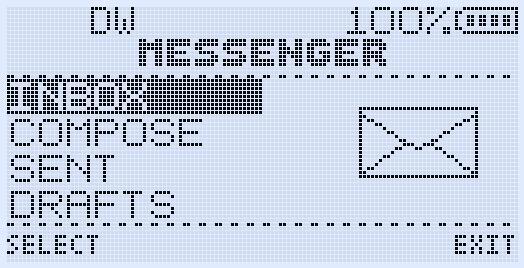
What makes it different from every other Quansheng mod is the sidecar Messenger. Two compatible handhelds can exchange 36-character text messages directly over RF with delivery acknowledgements, retries, reply and resend controls, duplicate protection, and callsign addressing. No phone, no Bluetooth, no digipeater, no internet, and no infrastructure of any kind is required. Normal analog FM voice keeps working in parallel. So the radio remains a usable handheld first and a text terminal second.
+--------------------------------------------------------------+
|                    GOGUFW 2.3.0 on UV-K1 / UV-K5 V3          |
|              F4HWN 6.0.0 Fusion base + GOGUFW tools          |
+---------------------------+----------------------------------+
                            |
        Analog FM voice     |     FSK sidecar data
        (always live)       |     (Messenger / PING / PONG / ACK)
                            |
+---------------------------v----------------------------------+
|  Messenger · HEARD · Range Check · CALLTX · RF Log Lite     |
|  Action Picker · FM names · Scrambler · Spectrum · Multiboot |
+--------------------------------------------------------------+
The $25 Radio That Started It All: Quansheng Background
To understand why GOGUFW matters, it helps to recall how strange the Quansheng story is.
From obscure budget handheld to open firmware legend
The Quansheng UV-K5 launched around 2023 as just another low cost Chinese dual band handheld, typically selling for $20 to $30. It covered VHF and UHF with a color-adjacent monochrome LCD, a backlight, an FM broadcast receiver, and unremarkable stock firmware.
Then hobbyists discovered three things:
- The radio used a documented Beken BK4819 transceiver chip (later BK4829 on revised boards) with FSK modem, DTMF, CTCSS/DCS, spectrum sweep, and configurable filters all controllable in software.
- The main MCU was flashable over a cheap USB programming cable with no locked bootloader on early hardware.
- The RF front end was far wider than advertised, with receive experiments stretching from HF images up through 1.3 GHz on some builds.
The result was an explosion. Independent developers including Egzumer, IJV, F4HWN (Armelle F4HWN), UVMOD, and many others released competing firmware with spectrum analyzers, frequency scanners, signal meters, SSB reception, AM airband improvements, and desktop-style configuration menus. Few consumer radios in history have received this much aftermarket software attention. The closest parallels are the Linksys WRT54G router with DD-WRT and OpenWrt, and the Canon PowerShot cameras with CHDK.
UV-K1, UV-K5 V1/V2, and UV-K5 V3: the compatibility trap
This is the section that saves radios from being bricked, so read it carefully.
- UV-K5 V1/V2: Early boards built around the BK4819 RF chip. These run the classic Egzumer, IJV, and early F4HWN builds.
- UV-K1 and UV-K5 V3: Revised hardware built around the PY32F071 MCU and BK4829 RF IC. These need firmware compiled specifically for the new chip pair.
- GOGUFW 2.3.0 supports UV-K1 and UV-K5 V3 only. Don’t flash it onto a V1/V2 radio or any other BK4819-based handheld.
If you are unsure which board you own, check the seller listing, the battery compartment sticker, or the stock firmware version screen before flashing. When in doubt, back up the factory image with CHIRP first and keep a known good DFU recovery image on hand, exactly as the GOGUFW README advises.
Where GOGUFW fits in the family tree
GOGUFW declares its lineage openly. It is forked from armel/uv-k1-k5v3-firmware-custom, which is the F4HWN codebase for the new BK4829 hardware, and it tracks the F4HWN 6.0.0 Fusion feature set. Gogu-Qs then layers the Messenger system, HEARD log, multi-radio Range Check, CALLTX melodies, RF Log Lite, named FM memories, Action Picker, per-channel scrambling, and channel policy flags on top.
Build numbers tell the resource story. The multiboot image is 119,648 of 120,832 bytes, or 99.02 percent full, with only 1,184 bytes free. RAM sits at 13,520 of 16,384 bytes, or 82.52 percent used. This is firmware packed to the roof of the chip. Every new feature had to earn its bytes.
Supported Hardware and Downloads
- Supported: Quansheng UV-K1, Quansheng UV-K5 V3 (PY32F071 + BK4829).
- Not supported: UV-K5 V1/V2, UV-K6, and any other BK4819 radio.
- Current release: GOGUFW 2.3.0 (
f4hwn.gogufw.v2.3.0.bin, multiboot compatible). - CHIRP module:
Gogufw_2.3.0_chirp_module.py, matched to the 2.3.0 memory layout with 1024 channels, Messenger settings, FM names, channel policies, and scrambler fields. - Download page: GOGUFW 2.3.0 release
Use the firmware and CHIRP module as a matched pair. An older module may not understand newer side key actions or channel fields and can silently overwrite them during upload.
Messenger Deep Dive: Text Messages Without Infrastructure
Messenger is the headline feature and the reason the repository has Messenger in its name.
How it works on the air
Messenger sends short text bursts using the BK4829 FSK modem as a sidecar to normal analog FM. You stay on your voice channel. When a message arrives, the radio alerts you with a configurable beep and LED pattern. You don’t need to sit on a dedicated Messenger screen for reception to work.
Key limits and behaviors, taken from real radio behavior documented in the README:
- 36 characters per message, entered with old school T9-style multi-tap on the numeric keypad. Hold a number key for the digit itself. STAR cycles case and digit variants.
- 16-message Inbox, 8-message Sent list, 8 editable quick-message Drafts for canned traffic like “ARRIVED CAMP”, “QSY 146.520”, or “NEED RIDE HOME”.
- Delivery acknowledgements and retry status, with up to three responding callsigns tracked.
- Reply, Resend, and Delete controls on read messages.
- Duplicate message protection so a retried burst doesn’t appear twice.
- Wake frame transmitted before the first normal attempt to improve reception when the destination radio is idle.
- Randomized ACK and PONG timing so several radios answering at once are less likely to collide.
Safety interlocks before every transmission
One of the more thoughtful engineering details is how paranoid Messenger is before keying up data. Every message, retry, ACK, PING, or PONG passes TX-frequency, frequency-lock, modulation, and channel-policy checks first. If anything blocks transmission, the radio shows a clear popup naming the cause: No FSK TX policy, frequency restriction, modulation mismatch, configuration problem, or low battery.
The per-channel No FSK TX flag deserves special attention. You can mark specific memory channels as voice only. Messenger data will refuse to transmit there while voice and FSK reception still work. This is useful for repeaters, shared simplex calling channels, or any frequency where unattended data bursts would be unwelcome.
Callsign, alerts, and preferences
Messenger settings include your callsign tag, receive behavior, ACK handling, alert beep style, and LED indication. Set a short recognizable callsign string so other stations know who a burst came from, especially during group Range Check sessions where several radios answer together.
Messenger controls cheat sheet
| Screen | Controls |
|---|---|
| Home (F + MENU or MESSENGER side key) | UP/DOWN selects Inbox, Compose, Sent, or Drafts. MENU opens. EXIT returns to radio. Side key acts as toggle. |
| Inbox / Sent | Four visible rows. UP/DOWN selects. MENU reads. F deletes. EXIT returns. Inbox rows show unread state, sender, preview, and age. Sent rows show delivery state, preview, and age. |
| Read | UP/DOWN changes message. MENU replies or resends. F deletes. EXIT returns. |
| Compose / Draft edit | Number keys enter text. Hold for digit. STAR cycles character case. F deletes. MENU sends. EXIT returns without sending. |
Practical tip for newcomers: pre-fill the 8 Draft slots with your most common traffic before heading out. T9 entry on a 16-key pad is fine for short replies but slow for composing a fresh 36-character message in the rain.
HEARD List and Multi-Radio Range Check
If Messenger is the mail system, HEARD and Range Check are the radar.
HEARD: who has been transmitting data near you
HEARD records recently received Messenger packets with callsign, RSSI signal strength, packet type, and age. Open it with F + 7 or an assigned HEARD side key.
Use it the way packet operators use a heard list on APRS or a DX cluster spot list:
- Arrive at a campsite and check who else in the group already has RF coverage.
- During a foxhunt or hike, confirm which stations your radio actually decoded, not just who you think should be in range.
- Spot a new callsign appearing with strong RSSI and know someone just came over the ridge.
Range Check: active PING with PONG replies from every GOGUFW in earshot
Press MENU inside HEARD to start a 12-second Range Check. Your radio sends a PING. Every compatible GOGUFW radio in range that has RngRsp enabled answers with a PONG containing its callsign, RSSI, and battery voltage.
The result screen shows one entry per responding radio. Scroll with UP/DOWN one entry at a time. The first EXIT press returns to HEARD, the next returns to normal radio operation.
Why battery voltage in a range test is clever: during event support or search exercises, net control learns not only who is reachable but whose handheld is about to die. That single field turns a propagation test into a logistics tool.
Randomized reply timing keeps the PONG burst from turning into a pileup when five or ten radios answer the same PING.
Action Picker: Stop Reprogramming Your Side Keys
Quansheng handhelds have two programmable side keys, SIDE1 and SIDE2, and every firmware immediately runs out of buttons. The GOGUFW Action Picker solves this with temporary access to the full action list.
How to use it:
- Briefly press F.
- Hold SIDE1 or SIDE2 to open that key picker.
- Scroll with UP/DOWN.
- Press MENU to run the action once, or EXIT/F to cancel.
Each side key remembers its last picker choice. The picker works on the main radio screen, Messenger Home, idle HEARD, and the normal FM broadcast screen. It deliberately stays out of message editors, active Range Check collection, and FM edit dialogs so existing keys keep their editing functions. Pressing PTT closes the picker and transmits normally.
A safety detail: some actions are unsafe while the FM broadcast receiver is active. Picking one of those actions inside FM mode gives a double warning beep instead of changing radio state.
Assign Messenger, HEARD, RF LOG, and CALLTX to long-press slots you can reach by feel, then use the picker for everything else.
RF Log Lite: A 20-Event Flight Recorder in RAM
RF Log Lite keeps the latest 20 completed analog RX and TX events with channel name or VFO frequency, direction, duration in MM:SS, and age. Storage is RAM only, so the log clears on reboot and never wears the external flash chip.
Open it from the Action Picker or assign RF LOG directly to a side key. Scroll with UP/DOWN, press MENU to load the selected memory or frequency into the active VFO, or EXIT to leave without changing anything.
Field uses add up fast:
- Reconstruct what happened during a busy net after the fact.
- Jump back to an interesting frequency you heard five minutes ago without remembering the digits.
- Check how long you actually transmitted during an activation for battery planning.
CALLTX: Five Selectable Alert Melodies Over RF
CALLTX transmits one of five selectable alert melodies through the normal TX audio path. Trigger it with F + 9 or a dedicated side key.
Settings include CllTon for melody selection with audible preview and CllVol for low or high tone generator level. The melody plays its current phrase to completion without clipping the final note, and CALLTX skips the normal Roger beep or MDC tail so the melody arrives clean.
Use cases include camp call-up tones, team recall signals during exercises, and attention getters before a voice announcement on simplex. Keep melodies short and use them sparingly on shared frequencies, following the same courtesy you would extend to any selective calling system.
FM Broadcast Radio With Names and Live RSSI
The FM broadcast receiver (88 to 108 MHz region plus extended coverage depending on band plan) gets real usability upgrades:
- Named station memories with rename and delete controls. Occupied save slots show channel number and station name before you confirm an overwrite.
- LIVE RSSI mode as the first menu item in both VFO and memory modes. ON updates the signal meter continuously with a LIVE tag. OFF samples once after tuning and freezes the meter to avoid periodic clicking on quiet broadcasts.
- Action Picker support from the normal FM screen, disabled only inside frequency entry, name editing, save/delete, and auto-scan confirmation dialogs.
For travelers, preload local broadcast stations by city as named memories before a trip. For EmComm monitoring, store NOAA weather radio or local broadcast news outlets alongside amateur channels for situational awareness when data networks fail.
Search Frequency and Search Tone
Open Search Frequency with F + 4 and Search Tone with F + STAR. Both share the same header, status, frequency/tone rows, and footer control pattern as other GOGUFW tools.
After a hit, press MENU/SAVE, pick a destination memory with UP/DOWN or direct number entry, press MENU, and confirm SAVE. Empty slots show as CH-xxxx. Occupied slots show channel number and name, shortened with trailing dots when long. A saved result opens directly in memory mode without also dumping you into the main menu.
Scanner-created memories preserve the power level active before the search, default to NARROW bandwidth, and store airband hits as AM rather than FM. These small defaults save a surprising amount of manual cleanup after a scanning session.
Scrambler, Channel Policies, and On-Screen Icons
Per-channel voice inversion scrambler
The Scramb channel menu selects OFF or an inversion frequency from 2600 Hz to 3500 Hz, stored independently per memory channel and editable in the matched CHIRP module.
Two honest caveats come straight from the project docs and bear repeating:
- Analog voice inversion is not encryption. Anyone with a matching descrambler or an SDR can recover the audio.
- Scrambling may be restricted by local regulations, including a flat prohibition on obscuring the meaning of amateur transmissions in many jurisdictions. Use it only where permitted, such as licensed commercial or public safety-adjacent use outside the ham bands where rules allow.
No FSK TX and No Roger policies
- No FSK TX blocks Messenger and Range Check data on one memory channel while leaving voice TX and FSK reception intact.
- No Roger suppresses the Roger beep or MDC tail on one memory channel.
Main screen icons at a glance
- Radio wave icon: FSK data TX is permitted on this memory channel.
- Musical note icon: the global Roger or MDC tail is active and permitted on this memory channel.
These flags appear as normal memory list columns and under Properties then Extra in the custom CHIRP module, which makes auditing a 1024-channel image far easier on a computer screen than on the radio.
Spectrum, Multiboot, and Survival Mode
Spectrum analyzer
Open Spectrum with F + 5. From memory mode it sweeps stored memories and shows channel name plus frequency. From VFO mode it sweeps a continuous range. Press PTT on a peak to stop and listen, MENU while listening for LNA and PGA gain controls, PTT again to adopt the peak into the active VFO or stored channel without transmitting, UP/DOWN to resume sweeping, EXIT to leave, and SIDE1 to temporarily exclude the current peak.
Multiboot firmware slots
Hold MENU while powering on to open the firmware slot selector. On first use GOGUFW makes a one-time backup of the Main firmware into slot 0. Don’t interrupt the Init Main step. Slot images are fully CRC checked before internal flash is erased. Each slot keeps a private settings bank by default, including Messenger drafts and FM names, while calibration and the boot logo stay shared. SetCfg can deliberately pair a slot with a compatible settings bank. GOGUFW can run as Main or from a slot using the official F4HWN multiboot image format.
Multiboot is how cautious operators test nightly builds without risking their working event radio. Keep a proven release in one slot and experiment in another.
Survival Mode: a stripped voice-only session
Hold PTT plus SetKey while powering on (default SetKey is MENU, so default is PTT + MENU + Power) to enter Survival Mode. Messenger, FSK, HEARD, Range Check, scanning, FM radio, Spectrum, Dual Watch, cross band, and VOX are disabled for that session. Power cycle normally to return to full operation. Saved settings aren’t overwritten.
Think of it as a clean minimal configuration for maximum battery life and minimum surprises: voice only, no background features, ideal for cold weather, low battery, or handing the radio to a less experienced operator during an event.
Quick Shortcuts Table
| Function | Shortcut |
|---|---|
| Messenger | F + MENU, or MESSENGER side key (toggle) |
| HEARD / Range Check | F + 7, or HEARD side key (toggle), then MENU for 12-second check |
| CALLTX melody | F + 9, or CALLTX side key |
| Spectrum | F + 5 |
| Backlight override | F + 8 cycles always on, always off, saved strategy |
| Keypad lock | Hold F |
| Action Picker | Press F, then hold SIDE1 or SIDE2 |
| RF Log Lite | RF LOG in Action Picker, or dedicated side key |
| Multiboot slots | Hold MENU while powering on |
| Survival Mode | Hold PTT + SetKey while powering on (default PTT + MENU + Power) |
Installation Guide: From Stock to Messenger in 30 Minutes
What you need
- A Quansheng UV-K1 or UV-K5 V3 handheld with a charged battery.
- A Kenwood-style K1 USB programming cable (the same cable used for CHIRP).
- A Windows, Linux, or macOS computer with CHIRP installed.
- The matched pair:
f4hwn.gogufw.v2.3.0.binandGogufw_2.3.0_chirp_module.pyfrom the release page. - A flasher that supports the new PY32F071 boards. Check the release notes and the F4HWN flashing guides linked from the repository for the current recommended web flasher or desktop tool.
Step by step
- Back up the stock radio. Start CHIRP with the factory module, download the full image, and save it somewhere safe. Export a CSV copy of your channels too.
- Keep a recovery image available. Store a known good DFU recovery image on your computer before writing anything.
- Flash GOGUFW 2.3.0. Write
f4hwn.gogufw.v2.3.0.binusing the recommended flasher for K1/V3 hardware. Don’t interrupt power or the USB connection. - First boot and multiboot init. If prompted for Init Main, let it finish completely. This creates the slot 0 backup of Main firmware.
- Load the matched CHIRP module. In CHIRP choose File then Load Module, select
Gogufw_2.3.0_chirp_module.py, then download from the radio using the Quansheng UV-K1 / UV-K5 V3 GOGUFW Messenger driver. - Program channels and policies. Build your 1024-channel image, set No FSK TX on repeaters and calling channels where data is unwelcome, set No Roger where needed, fill scrambler fields only where legal, and name FM broadcast stations.
- Configure Messenger identity. Set your callsign tag, ACK behavior, alert beep, and LED preference. Pre-fill the 8 Draft quick messages.
- Assign side keys. Put MESSENGER and HEARD on long presses you can find by feel. Leave RF LOG and CALLTX in the Action Picker until muscle memory forms.
- Test with two radios. Send a short message, confirm the ACK, run a 12-second Range Check, and check RSSI plus battery voltage on the reply screen.
If a flash fails halfway, don’t panic. Close the flasher, check the cable seating and battery charge, restart the radio in programming or DFU mode per the guide, and rewrite the known good image.
Practical Use Cases for Hams and Field Teams
- Camp and convoy comms: exchange frequencies, arrival times, and supply requests as silent text instead of tying up the voice channel.
- Event support: Range Check at net start shows who is reachable and whose battery needs attention before the event begins.
- Summits and parks: spot a weak voice contact, then confirm details by text when audio is marginal but FSK still decodes.
- Night operations: LED plus short beep alerts beat a loud voice call when quiet matters.
- Training: HEARD logs give instructors objective proof of who transmitted data and how strong they arrived.
- Off-grid resilience: with no cellular coverage, two $25 handhelds still pass short coordination messages across a valley.
Remember licensing basics. Use frequencies you’re authorized for, identify per your licence conditions, keep data bursts off repeater inputs and calling channels unless the repeater owner explicitly permits it, and never use the scrambler to obscure amateur communications where rules forbid it.
Tool Comparison Matrix
| Capability | GOGUFW 2.3.0 | F4HWN 6.0.0 stock | Egzumer / IJV classics (V1/V2) | Stock Quansheng firmware |
|---|---|---|---|---|
| Target hardware | UV-K1 / UV-K5 V3 (BK4829) | UV-K1 / UV-K5 V3 (BK4829) | UV-K5 V1/V2 (BK4819) | Model specific, no cross flash |
| Radio-to-radio text | Yes, FSK Messenger with ACK and retries | No native Messenger | No native Messenger | No |
| HEARD log + Range Check | Yes, multi-radio PING/PONG with RSSI and voltage | No | Partial spectrum and scanner hits only | No |
| CALLTX melodies | Yes, 5 melodies with volume select | Depends on build options | Varies by fork | Simple call tones only |
| RF activity log | Yes, 20-event RAM log with VFO recall | No dedicated RF Log Lite | No | No |
| Named FM memories + Live RSSI | Yes | Partial FM features | Basic FM presets | Basic presets |
| Per-channel scrambler + policies | Yes, inversion plus No FSK TX and No Roger | Partial channel options | Varies by fork | No |
| Spectrum + search tools | Yes, MR/VFO spectrum plus frequency and tone search | Yes, strong scanner heritage | Yes, pioneered on this platform | Simple scan only |
| Multiboot + Survival Mode | Yes, slots with CRC checks plus voice-only session | Yes, multiboot heritage | Limited or none | No |
| CHIRP support | Yes, matched 2.3.0 module with 1024 channels | Yes, F4HWN module | Yes, mature modules | Generic UV-K5 driver |
| Flash footprint | 99.02 percent full, highly optimized | Roomier, fewer GOGUFW tools | Varies by fork | Factory image |
| License and cost | Open source, free | Open source, free | Open source, free | Proprietary, included |
Frequently Asked Questions
Which radios can run GOGUFW Messenger?
Only the Quansheng UV-K1 and UV-K5 V3 with the PY32F071 MCU and BK4829 RF chip. It won’t work on UV-K5 V1/V2 or other BK4819 models.
Does Messenger need internet, a repeater, or a phone?
No. Messages travel directly radio to radio over FSK on the tuned frequency. No cellular network, repeater, digipeater, or companion app is required.
How long can a Messenger text be?
Each message holds up to 36 characters with T9-style entry. The radio stores 16 inbox, 8 sent, and 8 editable draft quick messages.
Is the voice scrambler the same as encryption?
No. It uses simple analog voice inversion from 2600 to 3500 Hz. It is easily reversible and may be restricted under amateur rules. Use only where permitted.
What should I back up before flashing?
Save a full CHIRP image plus a CSV channel export, and keep a known good DFU recovery image. Use the matched 2.3.0 CHIRP module for programming.
Sources and Further Reading
- GOGUFW-UV-K1-Messenger GitHub Repository
- GOGUFW 2.3.0 Release and Downloads
- F4HWN UV-K1/K5V3 Custom Firmware Base
- Quansheng UV-K5 Mods and Community Wiki
- IJV Quansheng UV-K5 Firmware Mod
- CHIRP Radio Programming Software
- Beken BK4829 Transceiver Product Page
- Reddit Quansheng Messenger Menu Screenshot
73 and enjoy turning a budget handheld into a pocket text terminal.



Post Comment