Waveshare PocketTerm35: Handheld Raspberry Pi Linux Terminal for Amateur Radio Field Operations
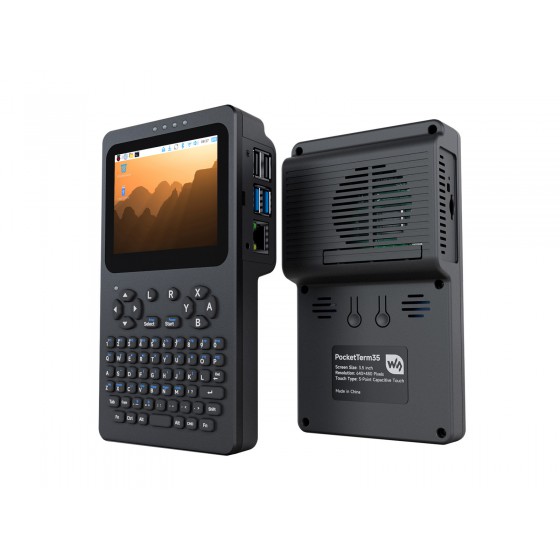
Waveshare PocketTerm35: Handheld Raspberry Pi Linux Terminal for Amateur Radio Field Operations
TL;DR: The Waveshare PocketTerm35 is a handheld Linux terminal built around the Raspberry Pi 4B or Pi 5, with a 3.5inch 640×480 optical-bonded capacitive touchscreen, a 67-key QWERTY silicone keyboard, an RP2040 keyboard and power controller, a built-in UPS with 5000mAh lithium battery, speaker and 3.5mm audio, all in a 93.5 x 168.5 x 37 mm CNC aluminum and plastic case. For amateur radio operators, it is a pocketable field computer that runs Dire Wolf, WSJT-X, JS8Call, Pat Winlink, GPredict, SDR tools, Meshtastic CLI, and rig control software anywhere a laptop is too bulky.
Field radio work has a computer problem. A modern laptop runs every digital mode, logger, and satellite tracker an operator could want, but it is bulky on a summit, fragile in rain, hungry for battery, and awkward on a small camp table next to a QRP rig. A phone is portable but locked down, with no real USB serial flexibility and no native Linux ham software. For decades, operators have dreamed of something in between: a truly pocketable terminal with a real keyboard, a daylight-usable screen, honest Linux, and enough ports to talk to a radio.
The Waveshare PocketTerm35 (official product page, official wiki) is one of the most practical attempts at that middle ground. In this guide we examine the hardware in detail, walk through the kit options and setup, and then focus on what matters to hams: ten concrete amateur radio field uses, from APRS and FT8 to satellite tracking, SDR, Winlink, and mesh networking, with real software names and practical commands.
What Is the Waveshare PocketTerm35?
The Waveshare PocketTerm35 is a handheld Linux terminal computer that houses a Raspberry Pi 4B or Raspberry Pi 5 behind a 3.5inch 640×480 IPS capacitive touchscreen and a 67-key silicone QWERTY keyboard, with RP2040-based keyboard and power management, UPS battery backup, speaker and audio output, in a pocketable CNC aluminum case.
+-----------------------------------------------------------------------------------+
|                          POCKETTERM35 SYSTEM ARCHITECTURE                         |
+-----------------------------------------------------------------------------------+
|                                                                                   |
|   +---------------------------+       +---------------------------------------+   |
|   |   67-KEY SILICONE QWERTY  |       |   3.5IN 640x480 IPS TOUCH DISPLAY     |   |
|   |   RP2040 MCU controller   | <---> |   Optical bonding, G+G glass, 6H      |   |
|   |   Brightness/volume keys  |       |   HDMI input, I2C touch, 5-point      |   |
|   +---------------------------+       +---------------------------------------+   |
|               |                                       |                         |
|   +---------------------------------------------------------------------------------+ |
|   |                        RASPBERRY PI 4B / 5 (COMPUTE CORE)                       | |
|   |   Pi 4B-2GB or Pi 5-1GB • 64GB TF card • heatsink / active cooler • USB-C     | |
|   +---------------------------------------------------------------------------------+ |
|               |                                       |                         |
|   +---------------------------+       +---------------------------------------+   |
|   |   UPS POWER MANAGER       |       |   AUDIO + I/O                         |   |
|   |   USB-C charge + run      |       |   8 ohm 2W speaker, 3.5mm jack        |   |
|   |   5000mAh LiPo (PH2.0)    |       |   USB, micro HDMI, GPIO access        |   |
|   +---------------------------+       +---------------------------------------+   |
|                                                                                   |
+-----------------------------------------------------------------------------------+
Unlike a phone or tablet, every layer is open. The Pi runs standard Raspberry Pi OS (Debian-based Linux), so the full amateur radio Linux software catalog installs with apt: Dire Wolf, Xastir, WSJT-X, JS8Call, FLdigi, GPredict, GQRX, SDR++, dump1090, CQRlog, Pat, and Hamlib. Unlike a bare Pi with a loose display, everything is integrated into one handheld unit with keyboard, display, audio, battery backup, and case.
A Short History of Pocket Terminals for Radio Operators
The PocketTerm35 didn’t appear from nowhere. It sits at the end of a 40-year line of portable terminals that radio amateurs have always loved.
- 1983: TRS-80 Model 100. The original field terminal. Full-travel keyboard, 40×8 LCD, RS-232 port, 20-hour battery life. Hams used it for packet radio and RTTY with a TNC. The Model 100 proved that a small keyboard plus serial port beats a big computer in the field.
- 1990s: HP 200LX palmtop. DOS in a pocket. Ran early packet and logging software. Hams carried it to summits with an HT and a Baycom modem.
- 2000s: Palm and Pocket PC. APRS clients like PalmAPRS appeared. Small but locked to proprietary OS builds.
- 2005: Nokia 770 / N800 / N900. Real Linux (Maemo) in a handheld with keyboard. The N900 became a cult APRS and DX cluster terminal. Hams still mourn it.
- 2010s: Raspberry Pi era. Operators strapped a Pi, a small TFT, a Bluetooth keyboard, and a power bank together with rubber bands. It worked but was fragile and ugly. Purpose-built kits like the Pi-Top and Lapdock improved things but stayed desk-bound.
- 2020s: Cyberdeck movement. Makers built custom portable Pi terminals with mechanical keyboards and IPS panels. ClockworkPi uConsole, DevTerm, and similar devices proved there is real demand for keyboard-plus-screen Linux handhelds.
- 2024-2026: Waveshare PocketTerm35. A factory-built, affordable ($87.99 to $181.99) take on the same idea: standard Pi 4B/5 inside, integrated 3.5inch touch display, silicone keyboard, UPS battery, aluminum front cover. No custom SoC, no locked bootloader, just a Pi you already know how to image and repair.
For amateur radio, this lineage matters because the use case never changed: type commands, watch decodes scroll, log contacts, control a rig, all with one hand holding the radio and the other holding the terminal.
Hardware Deep Dive
Display: 3.5inch 640×480 IPS with Optical Bonding
The display is the heart of the device:
- Size and resolution: 3.5inch diagonal, 640×480 (VGA 4:3). At this size that is roughly 229 PPI, sharp enough for terminal text at 8-10pt and readable for waterfall displays.
- Panel type: IPS, so viewing angles are wide. Important when the unit sits on a rock next to a rig and you read it from above.
- Optical bonding: The touch glass is bonded directly to the LCD with no air gap. This cuts internal reflections, improves sunlight readability, and prevents condensation between layers during cold SOTA activations.
- Touch: 5-point capacitive touch over I2C, with G+G (glass plus glass) toughened panel rated 6H hardness. Works with light gloves off, but like all capacitive screens it needs bare fingers or a capacitive stylus.
- Interface: HDMI for video plus I2C for touch. The Pi sees it as a standard 640×480 HDMI monitor, so no exotic drivers are needed.
640×480 is small by desktop standards but generous for terminal work. An 80×24 terminal fits comfortably. WSJT-X, JS8Call, and Pat all run in windows that fit, though you’ll tile rather than multitask side by side.
Keyboard: 67-Key Silicone QWERTY with RP2040 Controller
- Layout: 67 keys in standard QWERTY arrangement, silicone membrane. Includes function row behavior, arrows, and modifier keys for Ctrl combinations (Ctrl+C, Ctrl+D in terminal work).
- Feel: Silicone chiclet, similar to a rugged remote control. Not a mechanical keyboard, but positive enough for typing callsigns, grid squares, and short CQ macros with thumbs or index fingers. Touch typists will be slower than on a laptop, but far faster than on a phone touchscreen.
- Controller: A built-in RP2040 microcontroller handles key scanning, screen brightness, and volume. This offloads input from the Pi and keeps keys responsive even when the Pi CPU is busy decoding.
- Backlight: Check the wiki for the specific accessory revision, but brightness control keys are handled by the RP2040 layer.
Compute Core: Real Raspberry Pi 4B or Pi 5
This is the key advantage over closed handhelds. You get a standard Pi:
- PocketTerm35-Pi4: Built-in Pi 4B with 2GB RAM.
- PocketTerm35-Pi5: Built-in Pi 5 with 1GB RAM.
- Accessory kits: Bring your own Pi 4B or Pi 5 (brackets for both included).
Because it’s a genuine Pi, everything you know transfers directly: Raspberry Pi Imager, standard 64-bit Raspberry Pi OS images, EEPROM updates, GPIO pinout, USB boot, and the entire Pi HAT ecosystem (within height limits, see below).
Practical note for hams: the Pi 4B 2GB is the sweet spot for most field digital modes (Dire Wolf plus one decoder uses well under 1GB). The Pi 5 1GB is faster per core and has PCIe for NVMe expansion, but draws more peak current and runs hotter. For battery-powered summit use, the Pi 4B kit often lasts longer per charge.
Power: UPS with Simultaneous Charge and Run
Field power is where many Pi handhelds fail. The PocketTerm35 includes a proper UPS manager:
- External input: USB-C charging port. Works with standard 5V USB-C supplies and power banks. The Pi 5 variant benefits from a 27W PD supply (included in full kits).
- Battery: 2-pin PH2.0 lithium header, 3.7V nominal. Full kits ship with a 5000mAh polymer LiPo (roughly 18.5 Wh).
- UPS behavior: Supports charging and running at the same time with smooth switchover between external power and battery. If camp power drops, the Pi keeps running instead of corrupting the SD card. This alone makes it worth considering for EmComm go-kits.
- Power control: Short press turns power on, double click turns power off. Simple enough to operate with gloves.
- Runtime estimate: A Pi 4B idling with display on draws roughly 4 to 7W depending on CPU load and screen brightness. A 5000mAh (18.5 Wh) pack yields roughly 2.5 to 4 hours of active terminal use. Add an RTL-SDR dongle (0.5 to 1W) or heavy FT8 decoding and expect closer to 2 hours. Carry a 20,000mAh USB-C power bank for a full day on summit or in the field.
Battery safety matters. The wiki specifies a 3.7V polymer pack around 67 x 55 x 12 mm with built-in protection circuit, maximum discharge at least 3A, and protection trip at 5A or higher. If you source your own cell, verify the PH2.0 polarity (red positive, black negative on the factory pack) because some third-party PH2.0 leads reverse the order and reversed polarity can destroy the board.
Audio: Speaker and 3.5mm Output
- Built-in 8 ohm 2W speaker on a 4-pin PH1.25 header.
- 3.5mm audio output jack for headphones or interface to a radio.
- For digital modes you’ll normally use a USB soundcard interface (DigiRig, SignaLink, or a cheap CM108 dongle) rather than the onboard audio, because isolation and PTT control matter. The onboard speaker is still useful for monitoring CW sidetone, JS8Call alerts, and satellite pass audio cues.
Case and Dimensions
- Size: 93.5 x 168.5 x 37 mm. Roughly the footprint of a large smartphone but much thicker. Fits a jacket pocket or a small radio go-bag pouch.
- Materials: CNC-machined aluminum front cover (rigid, good heat spreading, some RF shielding) plus PC and ABS plastic back cover (radio transparent, so internal Bluetooth and Wi-Fi still work).
- Mounting: Kits include Pi 4 and Pi 5 mounting plates, micro HDMI adapter, short HDMI cable, Type-C adapter cable, screws, and screwdriver.
Full Specification Table
| Subsystem | Specification |
|---|---|
| Compatible boards | Raspberry Pi 4B / Raspberry Pi 5 (brackets for both included) |
| MCU | RP2040 for keyboard scan, brightness, volume |
| Display | 3.5inch IPS, 640×480, HDMI input |
| Touch | 5-point capacitive, I2C, optical bonding, G+G glass, 6H hardness |
| Keyboard | 67-key QWERTY silicone membrane |
| Audio | 8 ohm 2W speaker (PH1.25 4-pin), 3.5mm audio output jack |
| Power input | USB-C external, supports charge and run simultaneously |
| Battery | 2-pin PH2.0 header, 3.7V LiPo, 5000mAh supplied in full kits |
| Power control | Short press on, double click off |
| Case | CNC aluminum front, PC plus ABS back |
| Dimensions | 93.5 x 168.5 x 37 mm |
| Internal HAT clearance | Max 2.5 mm above tallest Pi component |
| Storage expansion | M.2 via PCIe TO M.2 Board (E) on Pi 5 only, fan clearance limited |
| Gaming | RetroPie compatible |
| Documentation | Wiki at docs.waveshare.com/PocketTerm35 |
Kit Selection Guide
| Kit | What is in the box | Best for |
|---|---|---|
| PocketTerm35-Pi4 | Pi 4B 2GB built in, 64GB system TF card pre-installed, Pi 4 heatsink set, 5000mAh battery, 27W supply option, screwdriver, case | Field radio use on battery. Lower peak power draw, cooler, longest runtime. Recommended for most hams. |
| PocketTerm35-Pi5 | Pi 5 1GB built in, 64GB system TF card pre-installed, Pi 5 Active Cooler B, 5000mAh battery, 27W supply option, screwdriver, case | Maximum CPU for SDR and heavy decoding, plus PCIe NVMe path. Shorter battery life, more heat. Choose if you run SDR++ plus Dire Wolf plus browser simultaneously. |
| PocketTerm35-RPI-ACCE (Accessory Kit B) | Host unit, Pi 4 and Pi 5 brackets, micro HDMI adapter, HDMI cable, adapter cables, screws, silicone keycap, 5000mAh battery. No Pi, no TF card, no heatsink. | Operators who already own a Pi 4B or Pi 5 and want to reuse it. |
| PocketTerm35-RPI-ACCE-EN (Accessory Kit A) | Same as above but without the lithium battery. | Operators who already own both a Pi and a suitable 3.7V protected LiPo, or who will always run from external USB-C power. |
Pricing at launch spans roughly $87.99 for the bare accessory kit to $181.99 for the full Pi 5 kit, before power plug options (EU, UK, US, or none). That positions it well below a rugged field laptop and roughly in line with a good Bluetooth keyboard plus small monitor plus power bank combo, except everything is integrated.
Assembly and First Boot
Assembly is straightforward and well documented in the official wiki assembly guide:
- Fit the Pi to the correct bracket. Pi 4 and Pi 5 brackets differ. Use the matching plate so the ports matches the case cutouts.
- Connect the short HDMI cable and touch cable. The display takes HDMI video from the Pi micro HDMI port through the supplied adapter and short cable. Touch runs over a separate small cable to the Pi I2C header path handled inside the case.
- Connect the RP2040 keyboard link. The 1.27 mm 4-pin cable carries keyboard data. Seat it firmly, the silicone keyboard does nothing until this link is connected.
- Fit the heatsink or active cooler. Don’t skip this. A Pi 4B or Pi 5 in a closed handheld case will throttle quickly under FT8 or SDR load without cooling.
- Connect the battery (observe polarity). Red positive, black negative. If you supply your own cell, confirm with a multimeter before plugging in.
- Insert the TF card and power on with a short press. Full kits ship with a pre-installed 64GB card so the first boot lands on a working Raspberry Pi OS desktop.
Software configuration (rotation, touch calibration, keyboard map, audio routing) is covered in the software guide. Budget 30 minutes to set display scaling for 640×480, enlarge terminal fonts, and test the keyboard layout before taking it to the field.
Amateur Radio Use Cases: Ten Field-Tested Roles
This is where the PocketTerm35 earns its place in a go-bag. Each role below runs today on standard Raspberry Pi OS with free software.
1. Portable APRS Tracker, iGate Controller, and Packet Terminal
APRS is the most natural fit. The PocketTerm35 plus an HT or mobile rig covers the full APRS stack:
- Dire Wolf software TNC: Installs with
sudo apt install direwolf, runs comfortably on either Pi variant. Connects to a radio via DigiRig or SignaLink USB audio plus PTT, or to a KISS Bluetooth TNC. - Clients: YAAC (Java, excellent maps), Xastir (lightweight, perfect for 640×480), or APRS-IS-only tools for receive and messaging.
- LoRa APRS: The CA2RXU LoRa APRS iGate and tracker ecosystem is configured and flashed from a browser or PlatformIO. The PocketTerm35 runs Chromium plus PlatformIO CLI, so you can reflash a LilyGO T-Beam or Heltec tracker at the trailhead without a laptop.
- Why handheld wins: On a SOTA summit you can watch raw packets scroll in a terminal while your HT transmits beacons. Position reports, weather frames, and messages all fit on the small screen because APRS text is terse by design.
Typical field chain: HT plus DigiRig to PocketTerm35 USB port, Dire Wolf decoding at 1200 baud, Xastir showing local stations on offline OSM tiles, uplink via RF path WIDE1-1,WIDE2-1.
2. FT8, FT4, JS8Call, and VarAC Digital Modes Station
A full HF digital station fits in a jacket plus a QRP rig:
- WSJT-X / JTDX: Native ARM64 builds run on Pi OS. FT8 and FT4 decode fine on a Pi 4B. The 640×480 screen shows the waterfall plus a scrolling decode pane if you close side panels.
- JS8Call: Ideal for the small screen because the interface is chat-like. Keyboard entry of directed messages feels natural on the silicone QWERTY.
- FLdigi and NBEMS suite: Olivia, Contestia, MT63, and the ICS-213 message forms used in EmComm nets. FLdigi audio levels are easy to set with the onboard volume keys plus
alsamixer. - VarAC: Runs under Wine or Box86 paths on the Pi, or natively via the growing Linux builds. The PocketTerm35 handles the chat-style QSO flow well.
- CAT control: Hamlib
rigctldplusflrigtalk to the rig over USB serial while the modem uses a separate USB audio device. Two USB ports plus a small hub cover rig, audio interface, and GPS simultaneously.
Practical tip: pre-build your WSJT-X frequency list, macros, and log directory at home. In the field you want to double-click one desktop icon and be on the air in under a minute.
3. Winlink Email and EmComm Go-Kit Terminal
For emergency communications teams, the PocketTerm35 is a credible Winlink terminal:
- Pat Winlink client: Native Linux binary, tiny footprint, works over packet, PACTOR, ARDOP, and VARA (with Wine helper). The offline mailbox and message composer fit the small screen perfectly.
- ARDOP and packet:
ardopcplus Dire Wolf gives HF and VHF Winlink paths from one box. - Forms: ICS-213 and other EmComm templates render in the Pat web GUI served to localhost, so any browser on the device opens them.
- UPS advantage: The smooth battery switchover means a generator hiccup or a yanked power cable doesn’t kill a half-sent message or corrupt the Pat mailbox. For EmComm, that reliability is worth more than raw CPU speed.
Pair with a printed frequency and gateway list, a pre-tested DigiRig cable for your deployment rig, and a USB GPS puck for position stamping.
4. Satellite Tracker and Rotator Controller
Passes are short and laptops are clumsy on a hilltop. A handheld tracker works better:
- GPredict: Predicts ISS, FM sats, and linear birds, shows footprint and countdown, and drives Hamlib
rotctldfor automatic antenna tracking. - Hamlib rig control:
rigctldhandles Doppler tuning on FT-817/818, IC-705, or similar portable satellite rigs over USB CAT. - APRS on ISS: Combine roles 1 and 4. Track the pass in GPredict, work the digipeater in Dire Wolf plus Xastir, log in real time.
- Why the small screen helps: GPredict single-satellite view plus a countdown timer is readable at arm’s length in sunlight better than a crowded laptop desktop.
Add a handheld Arrow-style Yagi, a phone compass for azimuth, and pre-downloaded TLE files so you aren’t dependent on summit cellular coverage.
5. Portable SDR Receiver and Spectrum Scope
A Pi 4B or Pi 5 plus an RTL-SDR Blog V4 dongle turns the PocketTerm35 into a pocket spectrum analyzer:
- GQRX / SDR++: Both run on Pi ARM64. SDR++ is lighter and better suited to 640×480. Tune broadcast, airband, 2m, and 70cm, record baseband for later analysis.
- dump1090 ADS-B: Feeds a local map for field airspace awareness during public service events. The map fits the small display if you zoom to the local area.
- Satellite weather: RTL-SDR plus
satdumpdecodes NOAA APT and Meteor M2 LRPT passes to images stored on the TF card or NVMe. - RF discipline: Keep the SDR dongle on a short USB extension away from the case. The Pi itself is noisy (HDMI and switching regulators radiate), so snap-on ferrites on the USB and HDMI flyleads plus distance between the spectrum antenna and the terminal noticeably lower the noise floor.
6. Rig Control, Logging, and DX Cluster Console
For HF field operations (POTA, SOTA, lighthouse activations):
- CQRlog / Cloudlog / TLF: Full loggers run locally. TLF in a terminal is perfect for the 640×480 screen and the physical keyboard during contest-style pileups.
- DX cluster: Plain
telnetto a cluster node, or a Python cluster client, scrolling spots in a terminal pane while you tune. - HamClock: The 9M2PJU HamClock installer and similar dashboards run in Chromium kiosk mode, giving propagation, greyline, and solar indices on the handheld.
- CW support: USB Winkeyer or a simple serial keying interface plus CQRlog keying works from the Pi GPIO or USB serial.
Operators who hate balancing a laptop on their knees while working a pileup will appreciate typing callsigns on a thumb keyboard with the log three feet from the rig.
7. Meshtastic, Reticulum, and Off-Grid Mesh Console
Mesh networking is increasingly an amateur-adjacent field skill:
- Meshtastic CLI and web client: Manage nodes, flash firmware, set channels and keys, and exchange messages from the terminal without depending on a phone app.
- Reticulum and RNode: Configure RNode LoRa interfaces, run
rnstatus,rnsd, and mesh chat clients directly on the Pi. - AREDN and dzieje admin: Use Chromium to administer AREDN mesh nodes, OpenWRT routers, and IP cameras over the field LAN.
- Offline maps: Pre-cache map tiles and carry MBTiles for the operating area so mesh plots work with zero internet.
The PocketTerm35 is the right shape for this: a terminal-first device for terminal-first networks.
8. MMDVM Hotspot Dashboard and AllStar / Echolink Admin
- Pi-Star / WPSD dashboards: Administer a hotspot from the handheld browser over the field LAN. Change talkgroups, watch live logs, and reboot a hung hotspot without pulling out a laptop.
- AllStarLink: SSH into nodes, run
asterisk -rvv, check Supermon in Chromium. - ATAK / TAK tooling: The OpenTAKServer Docker stack and WebTAK clients are administered from the same handheld during exercises.
9. Antenna Analyzer Companion and Bench Terminal
- NanoVNA Saver: Runs on Pi OS and plots SWR sweeps from a NanoVNA over USB. The 640×480 screen is small for Smith charts but fine for SWR sweeps and return loss checks on a mast.
- Serial console: USB-to-serial adapters give console access to routers, switches, tuners, and homebrew controllers.
minicom,screen, andpicocomare all oneapt installaway. - GPIO and HAT work: Within the 2.5 mm height limit, low-profile HATs (RTC, small I/O, SWR bridge controllers) still fit. Taller boards must be used externally via ribbon cable.
10. CW Practice, SSTV, and Training Station
- CW decoders and trainers: Morse training apps plus on-device sidetone through the speaker make the PocketTerm35 a code practice oscillator with a screen.
- SSTV: QSSTV decodes Robot36 and Martin modes from a handheld or base audio feed. The small screen shows the image forming line by line, which is half the fun.
- Classroom use: For club training nights, one PocketTerm35 per table running FLdigi or JS8Call is cheaper and more portable than issuing laptops, and students learn real Linux radio software.
Recommended Software Stack
| Role | Software | Install path |
|---|---|---|
| APRS TNC | Dire Wolf 1.7+ | sudo apt install direwolf |
| APRS maps | Xastir, YAAC | apt install xastir, YAAC jar from source |
| FT8/FT4 | WSJT-X, JTDX | ARM64 deb from official sites |
| Keyboard chat modes | JS8Call, FLdigi | ARM64 builds, apt install fldigi |
| Winlink | Pat, ardopc | Go binary plus ALSA config |
| Satellite | GPredict, Hamlib | apt install gpredict hamlib-utils |
| SDR receive | SDR++, GQRX, satdump, dump1090 | apt plus AppImage builds |
| Logging | CQRlog, TLF, Cloudlog | apt install cqrlog tlf |
| Mesh | Meshtastic CLI, Reticulum | pip install meshtastic, apt install reticulum |
| Cluster | telnet, PyCluster | Built in plus Python |
| Analyzer | NanoVNA Saver | pip install NanoVNASaver |
| Dashboards | Chromium kiosk, HamClock | Pre-installed browser |
Pre-install and pre-configure everything at home with the exact callsign, grids, rig CAT rates, and audio card names you will use in the field. Screenshot each working audio level screen so you can restore settings from memory on a summit.
Power, RFI, and Field Practicalities
Three practical topics decide whether a Pi handheld is a joy or a headache on the air.
Power budgeting. Measure your real draw with a USB-C power meter before deploying. A typical field load (Pi 4B, display at medium brightness, Dire Wolf decoding, one USB audio interface) sits around 5 to 8W. Size battery banks for double your expected operating time, and carry the radio battery separately. Never power a 50W mobile rig from the same pack feeding the terminal unless the pack and wiring are rated for it.
RFI management. Raspberry Pis are noisy neighbors. HDMI clocks, USB 3.0, and switching regulators spray harmonics across HF and VHF. Mitigations that work: clip ferrites on every cable entering the case, run the terminal at least 1 to 2 meters from HF wire antennas where possible, use shielded USB cables for audio interfaces, drop display brightness one notch (reduces backlight switching noise), and prefer wired audio interfaces over Bluetooth in weak-signal work. Test the full station at home on a quiet band before trusting it on an activation.
Ergonomics and weather. The 640×480 touch targets are small. Enlarge system fonts, use a capacitive stylus with a tether, and map your most-used apps to desktop icons or keyboard shortcuts. The case isn’t waterproof, so pack a zip-lock bag or a small dry pouch. In rain, operate the keyboard through the bag. Capacitive touch will misbehave when wet, but the physical keys keep working.
How It Compares to Alternatives
| Option | Strengths | Weaknesses | Best when |
|---|---|---|---|
| Waveshare PocketTerm35 | Integrated Pi, keyboard, touch, UPS battery, open Linux, $88 to $182 | 640×480 small for multitasking, no built-in radio/GPS/LoRa, Pi heat in closed case | You want one pocketable Linux box for APRS, digital modes, sats, and SDR |
| Phone plus Termux | Always in pocket, great screen, cellular built in | No native ham GUI apps, fragile USB serial, typing pain | Casual cluster checks and logging only |
| Laptop | Full power, big screen, easy multitasking | Heavy, power hungry, awkward on summits | Base camp, contest, or multi-decoder sessions |
| ClockworkPi uConsole | Better keyboard, modular, community cool | Higher price, availability swings, custom parts | You value keyboard feel over Pi parts commonality |
| Pi plus Lapdock | Big screen, real keyboard feel | Two pieces, cables, no battery backup | Portable but not pocketable operating |
| Tablet plus Bluetooth keyboard | Good screen, light | Locked OS, poor serial and audio interface support | Content consumption with light logging |
The PocketTerm35 wins on integration per dollar. Nothing else puts a real Pi, a bonded touch display, a keyboard, a speaker, and a UPS battery in one handheld case at this price with standard Pi OS images.
Honest Limitations
No review is useful without the downsides:
- Small screen multitasking is cramped. One app at a time works well. WSJT-X plus browser plus logger side by side doesn’t. Plan a single-task workflow.
- No built-in GPS, LoRa, or radio. Every RF path needs an external dongle or rig. Budget USB ports and a small hub.
- Pi 5 heat in a closed case. The Active Cooler B is mandatory, not optional, and sustained SDR plus decode loads will still throttle on hot days. The Pi 4B kit runs cooler.
- 1GB RAM on the Pi 5 kit is tight. Chromium with several tabs plus SDR++ plus Dire Wolf can exhaust 1GB. The Pi 4B 2GB kit actually multitasks better despite the older SoC. Close tabs aggressively.
- Silicone keyboard isn’t for long prose. Fine for callsigns, macros, and short messages. Writing a full EmComm situation report is slower than on a laptop.
- NVMe expansion is Pi 5 only and blocks the fan. The PCIe TO M.2 Board (E) path exists but thermal headroom shrinks. For most hams a large endurance microSD plus USB stick is simpler.
None of these are fatal. They just define the envelope: short, bursty, terminal-first field tasks rather than all-day desktop replacement.
Getting Started Checklist for Hams
- Choose the Pi 4B kit for battery life or the Pi 5 kit for SDR headroom.
- Image or verify the supplied 64GB card, then run full updates and set hostname, callsign, and grid in one pass.
- Install the radio stack:
direwolf xastir fldigi gpredict hamlib-utils wsjtx js8call pat. - Configure one audio interface (DigiRig recommended) and label its ALSA card name. Save
alsamixerlevels. - Set up Hamlib rig profiles for each portable rig you own, test CAT at home.
- Pre-download offline maps, TLE files, and gateway lists for your operating area.
- Do a full driveway test: battery only, antenna in the yard, one complete QSO or packet exchange per mode.
- Pack ferrites, USB hub, stylus, power bank, and a dry bag with the terminal.
Frequently Asked Questions
What exactly is the Waveshare PocketTerm35?
It’s a handheld Linux terminal that encloses a Raspberry Pi 4B or Pi 5 with a 3.5inch touch display, 67-key keyboard, UPS battery system, and speaker in one pocketable case.
Which kit should a ham radio operator buy?
Most operators should choose the Pi 4B kit for longer battery life and cooler running. Choose Pi 5 only for heavy SDR use.
Can it run FT8, APRS, and Winlink in the field?
Yes. It runs Dire Wolf, WSJT-X, JS8Call, FLdigi, Pat Winlink, and GPredict on standard Raspberry Pi OS with USB audio and CAT interfaces.
How long does the battery last portable?
Expect 2 to 4 hours on the internal 5000mAh cell depending on load. Carry a 20,000mAh USB-C bank for full-day activations.
Does it include a radio, GPS, or LoRa board?
No. All RF needs external hardware such as an HT, QRP rig, RTL-SDR dongle, GPS puck, or LoRa tracker connected over USB or Bluetooth.
Conclusion
The Waveshare PocketTerm35 doesn’t try to replace a shack computer. It replaces the tangle of Pi, display, keyboard, speaker, battery, and cables that field operators currently rubber-band together, with one honest handheld that runs the same Linux ham software you already trust. For APRS on a summit, FT8 from a park bench, Winlink in a go-kit, satellite passes on a hilltop, or SDR spectrum checks at a public service event, it puts a keyboard and a terminal where they belong: in your hand, next to the radio.
If your operating style is terminal-first, battery-conscious, and portable by choice, this is one of the most fun and practical Pi accessories in recent years. Image the card, pack the ferrites, and take the shack outside.
73, and see you from the next summit.
Sources and Further Reading
- Waveshare PocketTerm35 Product Page: https://www.waveshare.com/pocketterm35.htm?&aff_id=119210
- Waveshare PocketTerm35 Wiki and Documentation: https://docs.waveshare.com/PocketTerm35
- Waveshare PocketTerm35 Assembly Guide: https://docs.waveshare.com/PocketTerm35/Assembly-Guide
- Waveshare PocketTerm35 Software Guide: https://docs.waveshare.com/PocketTerm35/Software-Guide
- Waveshare PCIe TO M.2 Board (E) for Pi 5 NVMe Expansion: https://www.waveshare.com/pcie-to-m.2-board-e.htm
- Dire Wolf Software TNC by WB2OSZ: https://github.com/wb2osz/direwolf
- Xastir APRS Client: https://xastir.org/
- WSJT-X Weak Signal Modes by K1JT: https://wsjtx.net/
- JS8Call Keyboard-to-Keyboard Mode: http://js8call.com/
- Pat Winlink Client: https://getpat.io/
- GPredict Satellite Tracker: https://oz9aec.dk/software/gpredict
- Hamlib Rig Control Library: https://hamlib.github.io/
- SDR++ Software Defined Radio Receiver: https://www.sdrpp.org/
- Meshtastic Off-Grid Mesh: https://meshtastic.org/
- Reticulum Mesh Networking: https://reticulum.network/
- HamRadio.my Open Source Tools and Tech Guides: https://hamradio.my/
- About 9M2PJU Station Profile and Software Projects: https://hamradio.my/about/




Post Comment