Bearpaw: Modern Open Source Desktop Control and Activity Logging for Uniden Scanners
Bearpaw: Modern Open Source Desktop Control and Activity Logging for Uniden Scanners
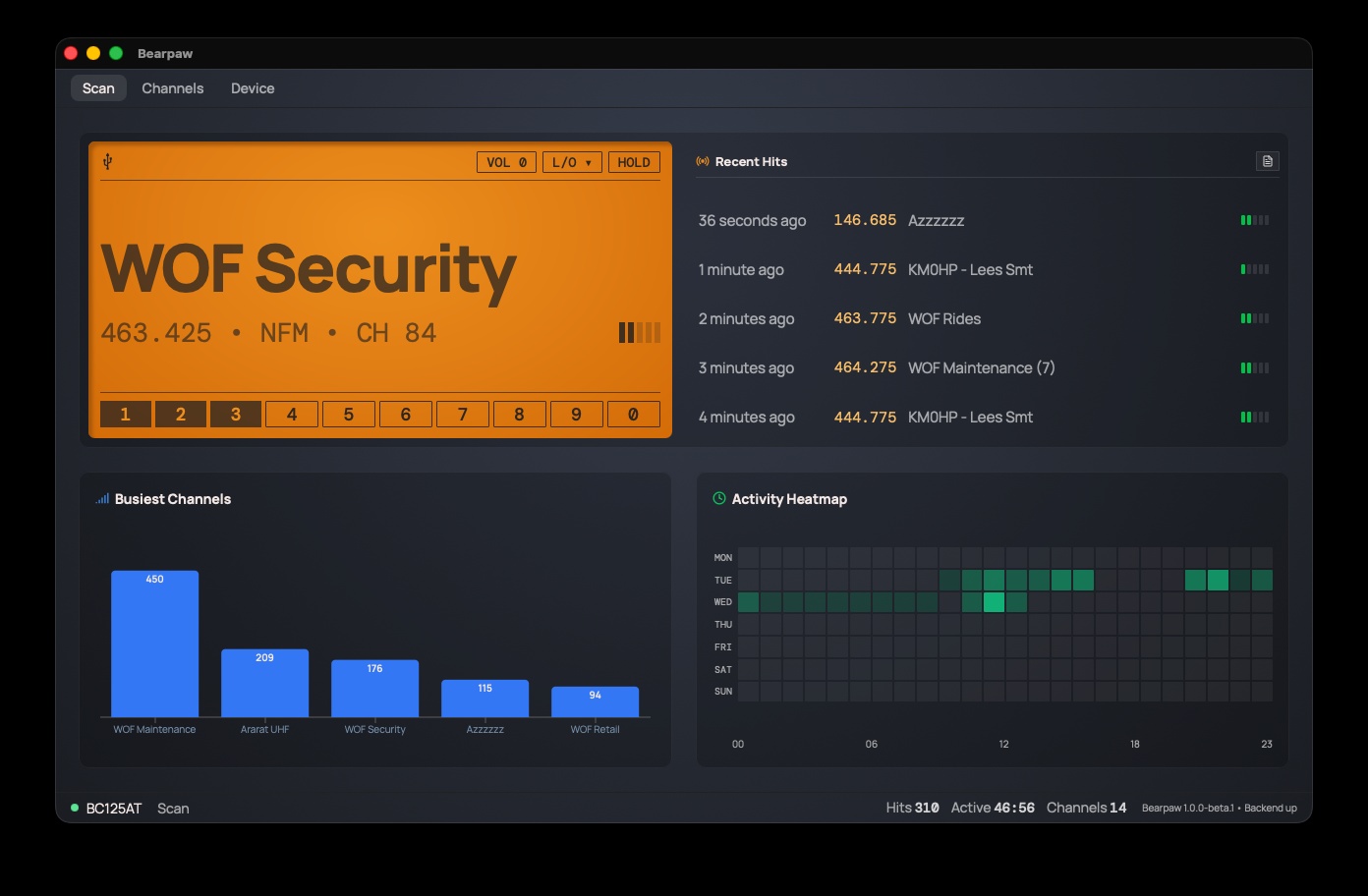
TL;DR: Bearpaw (bearpaw.app, GitHub) is a free, open source desktop application created by Jeremy Fuksa (KF0NUI) that brings modern scanner control, 500-channel memory management, and live RF activity visualization to popular Uniden analog handhelds (including the BC125AT, BC75XLT, and UBC125XLT). Built with Tauri 2 and Rust, Bearpaw runs natively on macOS, Windows, and Linux, finally breaking free from outdated, Windows-only legacy software. It features a scalable amber virtual display readable across the shack, a 7×24 activity heatmap, busiest-channel bar charts, CSV activity logging, and safe draft-based channel programming with CTCSS/DCS tone configuration.
For over a decade, the Uniden BC125AT and its sibling scanners have served as the gold standard for analog VHF/UHF monitoring, civilian and military airband listening, railroad tracking, and local public safety monitoring. Despite the radio’s enduring popularity, the official software experience remained trapped in the past. Uniden’s factory BC125AT SS utility is strictly Windows-only, clunky to navigate, and incapable of showing live activity while scanning. Non-Windows operators were forced to maintain virtual machines or dedicated PCs simply to edit memory channels.
Amateur radio operator and software designer Jeremy Fuksa (KF0NUI) solved this long-standing frustration with Bearpaw. By wrapping Uniden’s serial command protocol in a high-performance Tauri 2 and Rust architecture, Bearpaw delivers a cross-platform desktop console that pairs broad 500-channel memory editing with real-time spectrum activity telemetry and shack-friendly visual design.
What Is Bearpaw?
Bearpaw is a cross-platform, open source desktop control and channel-programming application built with Tauri and Rust that communicates with Uniden analog handheld scanners over USB serial to provide real-time display mirroring, memory management, and radio activity telemetry.
+-----------------------------------------------------------------------------------+
|                           BEARPAW ARCHITECTURAL OVERVIEW                          |
+-----------------------------------------------------------------------------------+
|                                                                                   |
|   +-----------------------------------------------------------------------------+ |
|   |                       UNIDEN ANALOG HANDHELD SCANNER                        | |
|   |   • BC125AT (US 500ch) • UBC125XLT (EU 500ch) • BC75XLT (US 300ch)          | |
|   |   • Uniden ASCII Serial Protocol (PRG, EPG, CIN, VOL, SQG, GLG commands)    | |
|   +-----------------------------------------------------------------------------+ |
|                                          |                                        |
|                               USB Serial (57600 / 19200 baud)                     |
|                                          v                                        |
|   +-----------------------------------------------------------------------------+ |
|   |                       BEARPAW RUST BACKEND (TAURI 2)                        | |
|   |   • Auto-probe model discovery and serial connection manager                | |
|   |   • Hardware profile adaptation (500ch vs 300ch, alpha tag visibility)      | |
|   |   • Batch memory synchronization and draft change buffer                    | |
|   |   • Real-time hit detection, duration tracking, and CSV logger              | |
|   +-----------------------------------------------------------------------------+ |
|                                          |                                        |
|                               IPC Bridge / Webview                                |
|                                          v                                        |
|   +-----------------------------------------------------------------------------+ |
|   |                   CROSS-PLATFORM FRONTEND (Mac / Win / Linux)                | |
|   |                                                                             | |
|   |   +---------------------------+       +---------------------------------+   | |
|   |   |   SCAN TAB (TELEMETRY)    |       |   CHANNELS TAB (MEMORY EDITOR)  |   | |
|   |   |   • Scalable amber LCD    |       |   • 10 Bank split view          |   | |
|   |   |   • Live CTCSS/DCS decode |       |   • Alpha tags, CTCSS, Delays   |   | |
|   |   |   • Busiest-channel chart |       |   • Staged draft uploads        |   | |
|   |   |   • 7x24 Activity heatmap |       |   • CSV & .bc125at import/export|   | |
|   |   +---------------------------+       +---------------------------------+   | |
|   |                 |                                     |                     | |
|   |                 +------------------+------------------+                     | |
|   |                                    v                                        | |
|   |                      +---------------------------+                          | |
|   |                      |   DEVICE TAB (HARDWARE)   |                          | |
|   |                      |   • Audio & backlight cfg |                          | |
|   |                      |   • Close Call RF capture |                          | |
|   |                      |   • Service/Custom search |                          | |
|   |                      |   • Locked-out skip list  |                          | |
|   |                      +---------------------------+                          | |
|   |                                                                             | |
|   +-----------------------------------------------------------------------------+ |
|                                                                                   |
+-----------------------------------------------------------------------------------+
The application functions both as an offline memory programmer and as a live desktop dashboard, turning an ordinary handheld scanner into a permanent base station monitoring console.
Part 1: Hardware Support and Dynamic Adaptation
Bearpaw communicates with conventional analog Uniden scanners using a flat memory layout. When you plug in your radio, Bearpaw probes the serial interface, identifies the model, and automatically adapts its user interface to match the radio’s physical capabilities.
Supported Scanner Matrix
| Scanner Model | Regional Market | Channel Capacity | Verification Status | Functional Adaptation |
|---|---|---|---|---|
| Uniden BC125AT | North America | 500 Channels (10×50) | Verified (Primary Testbed) | Full alpha tags, CTCSS/DCS, modulation, Close Call, search banks |
| Uniden BC75XLT | North America | 300 Channels (10×30) | Verified (Hardware Tested) | 300ch layout; cleanly hides tags, tones, and unsupported settings |
| Uniden UBC125XLT | Europe / UK | 500 Channels (10×50) | Verified (Community Tested) | Full 500-channel European frequency steps and band plans |
| Uniden BCT125AT | North America | 500 Channels (10×50) | Expected | Same USB ID and ASCII command set as BC125AT |
| Uniden UBC126AT | Australia / NZ | 500 Channels (10×50) | Expected | Accepted by model probe; shares command framework |
| Albrecht AE125H | Europe (Albrecht) | 500 Channels (10×50) | Expected | Accepted by model probe; rebadged European variant |
Why Trunking Scanners Are Not Supported
Bearpaw focuses exclusively on conventional analog scanners. Trunking scanners (such as the BCD396XT, BCD996XT, BC346XT, and the SDS/HomePatrol series) organize memory dynamically into hierarchical systems, sites, and talkgroups rather than flat numeric channels. Supporting trunked architectures requires a fundamentally different control protocol. When an unsupported trunking scanner is connected, Bearpaw identifies it by name and gracefully alerts the operator.
Part 2: The Scan Tab: Live Shack Telemetry and Visualization
The centerpiece of Bearpaw is the Scan Tab, which mirrors the scanner’s physical display while calculating real-time activity metrics.
+-----------------------------------------------------------------------------------+
|                           THE SCAN TAB INTERFACE LAYOUT                           |
+-----------------------------------------------------------------------------------+
|                                                                                   |
|  +---------------------------------------------------+  +----------------------+  |
|  | SCALABLE AMBER VIRTUAL DISPLAY                    |  | RECENT HITS STREAM   |  |
|  | [USB]                       VOL: 10  L/O ▼  HOLD  |  | • 36s ago: 146.685  |  |
|  |                                                   |  | • 1m ago:  444.775  |  |
|  |  WOF Security                                     |  | • 2m ago:  463.775  |  |
|  |  463.425 • NFM • CH 84 • CTCSS 123.0  [IIIII]     |  | • 3m ago:  WOF Maint|  |
|  |                                                   |  |   (7 grouped hits)   |  |
|  |  [ 1 ][ 2 ][ 3 ][ 4 ][ 5 ][ 6 ][ 7 ][ 8 ][ 9 ][ 0 ]|  | • CSV Export Icon    |  |
|  +---------------------------------------------------+  +----------------------+  |
|                                                                                   |
|  +-------------------------------------+  +------------------------------------+  |
|  | BUSIEST CHANNELS (ALL-TIME)         |  | ACTIVITY HEATMAP (ROLLING 7 DAYS)  |  |
|  | [===== 450 =====] WOF Maintenance   |  | MON [][][][][][][][][][][][][][][] |  |
|  | [=== 209 ===]     Ararat UHF        |  | TUE [][][][][==][====][==][][][][] |  |
|  | [== 176 ==]       WOF Security      |  | WED [==][==][====][======][==][][] |  |
|  | [= 115 =]         Local Repeaters   |  | (24 Columns: 00h to 23h UTC/Local) |  |
|  +-------------------------------------+  +------------------------------------+  |
|                                                                                   |
|  STATUS BAR: ● BC125AT Scan | Hits: 310 | Active Airtime: 46:56 | Channels: 14    |
+-----------------------------------------------------------------------------------+
Core Telemetry Features
- Readable Across the Shack: The amber virtual screen resizes dynamically with your window. Placed on a secondary monitor across the room, you can monitor alpha tags, frequencies, and signal levels from your workbench without squinting at the radio’s built-in LCD.
- Instant On-Screen Controls: Click VOL to adjust speaker volume from 0 to 15, toggle HOLD to park on a frequency, configure temporary or permanent channel L/O (lockouts), and toggle banks 1 through 10 with a single mouse click.
- Intelligent Recent Hits Grouping: The right-hand panel streams incoming hits with relative timestamps (“just now”, “2 minutes ago”). Repeated transmissions on the same channel collapse into grouped rows with hit counters (such as
WOF Maintenance (7)), preventing rapid transmissions from pushing other channels off the screen. - Squelch Tail Filtering: Users can configure a minimum duration threshold (default: 2 seconds) in Preferences. Brief noise spikes, key clicks, and squelch crashes are filtered out, ensuring logs reflect legitimate voice transmissions.
- Busiest Channels Bar Chart: Automatically tallies all-time transmissions per channel, highlighting which repeaters or dispatch frequencies dominate local airwaves.
- 7×24 Activity Heatmap: Displays a rolling 7-day matrix broken down into 24 one-hour columns. Brighter cells pinpoint high-traffic operational windows throughout the week.
- CSV Activity Export: Export full session logs to CSV (timestamp, frequency, channel number, alpha tag, and signal duration) for analysis in spreadsheets or external databases.
Part 3: The Channels Tab: Comprehensive Memory Management
Programming 500 channels through a scanner keypad is tedious and error-prone. Bearpaw’s Channels Tab offers a full-featured spreadsheet interface organized into the radio’s ten memory banks.
Channel Parameter Management
- Bank Navigation: smoothly switch between the 10 memory banks (50 channels per bank on BC125AT; 30 channels on BC75XLT) using the clean left-hand sidebar.
- Frequency Validation: Supports the radio’s four VHF/UHF tuning ranges (25-54 MHz, 108-174 MHz, 225-380 MHz, and 400-512 MHz). Out-of-band entries are caught immediately by the validation engine.
- 16-Character Alpha Tags: Assign clear, readable names to every channel.
- Modulation Selection: Set modulation per channel to AUTO, FM, AM, or NFM (Narrowband FM).
- CTCSS / DCS Tone Squelch: Restrict reception to transmissions carrying specific CTCSS sub-audible tones (67.0 to 254.1 Hz) or DCS digital squelch codes.
- Configurable Delays: Set channel scan delay intervals from -10s to +5s, allowing you to hear replies before the radio resumes cycling.
- Priority Channel Management: Assign one priority channel per bank with instant radio synchronization.
Safe Draft Workflow
To protect against accidental overwrites, Bearpaw uses a staged draft editing model:
- Stage Edits Locally: Make changes to frequencies, tags, or tones. Modified rows display a colored pending bar on their left margin.
- Review Changes: Inspect your pending changes without interrupting the radio’s current scanning operation.
- Upload Changes: Press Upload Changes to batch-write your updates to the scanner’s internal EEPROM, followed by an automated verification readback. Pressing Discard Changes instantly rolls back all pending drafts.
Part 4: The Device Tab: Hardware Configuration and Search Control
The Device Tab provides direct software control over hardware parameters that previously required complex multi-button keypad combinations.
+-----------------------------------------------------------------------------------+
|                        DEVICE TAB HARDWARE CONTROL SECTIONS                       |
+-----------------------------------------------------------------------------------+
|                                                                                   |
|  [1. Device Config]   ===> Audio volume, backlight timeout, battery save, beeps   |
|  [2. Close Call]      ===> Set Close Call modes (Off, Priority, DND), band limits |
|  [3. Service Search]  ===> Trigger sweeps across Marine, Air, Police, Railroad    |
|  [4. Custom Search]   ===> Define custom frequency search windows (Lower / Upper) |
|  [5. Locked Channels] ====> Review, audit, and clear temporary & permanent skips  |
|  [6. Preferences]     ====> Configure app-side minimum hit duration & log paths   |
|                                                                                   |
+-----------------------------------------------------------------------------------+
Key Hardware Control Pages
- Close Call RF Capture: Configure Uniden’s nearfield signal capture engine. Select between Close Call Priority, Close Call DND (Do Not Disturb while actively receiving a channel), and specific search band limits.
- Service and Custom Search: Direct the scanner to sweep predefined public safety, airband, or marine bands, or define custom search boundaries with user-defined step sizes.
- Locked Channels Manager: Audit all frequencies currently locked out of search and scan banks. Clear individual avoid entries or unblock entire lists with one click.
Part 5: Bearpaw vs. Alternative Scanner Software
| Feature / Metric | Bearpaw | Uniden BC125AT SS | Butel ARC125 | Scan125 |
|---|---|---|---|---|
| License & Cost | Free & Open Source (MIT) | Free (Proprietary) | Paid Commercial ($29.95) | Free / Donationware |
| Operating Systems | macOS, Windows, Linux | Windows Only | Windows Only | Windows Only |
| Underlying Tech | Tauri 2 + Rust + Webview | Legacy Visual Basic/C++ | Legacy Windows Win32 | Visual Basic .NET |
| Live Display Mirroring | Yes (Scalable High-Res LCD) | No (Offline Only) | Yes (Fixed Size) | Yes |
| Activity Heatmap & Charts | Yes (7×24 Matrix + Bar Charts) | No | No | Basic Logging |
| Real-Time CSV Hit Logging | Yes (With Duration Filter) | No | Limited | Yes |
| Draft-Based Memory Safety | Yes (Batch Upload/Discard) | Full Overwrite | Full Overwrite | Direct Write |
| File Compatibility | CSV & Native .bc125at | Proprietary .bc125at | Proprietary .125 | CSV / Custom |
Part 6: Installation and Getting Started
Bearpaw is distributed as pre-compiled native binaries for all major desktop platforms.
1. Download and Platform Installation
Download the latest installer or package from the Bearpaw Releases page:
- macOS (Apple Silicon M1-M4 & Intel): Download the
.dmgpackage and drag Bearpaw into your/Applicationsfolder. On first launch, right-click the application and select Open. If macOS Gatekeeper prevents execution, clear the quarantine attribute in Terminal with:xattr -cr /Applications/Bearpaw.app - Windows (64-Bit): Download the
.exeinstaller. If Windows SmartScreen displays a blue prompt, click More info followed by Run anyway. - Linux (Ubuntu, Debian, Mint, Fedora): Download the standalone
.AppImage(make executable withchmod +xand run) or install the native.debpackage viasudo dpkg -i bearpaw_*_amd64.deb.
2. Connecting the Scanner
- Connect your scanner to your computer using a standard USB mini-B data cable (ensure the cable supports data, not charging only).
- Power on the radio.
- Launch Bearpaw. The app auto-probes your serial ports, connects at the appropriate baud rate (57600 baud for BC125AT), and completes an initial memory sync in 30 to 45 seconds.
Frequently Asked Questions
Which Uniden scanner models work with Bearpaw?
Bearpaw is verified on the Uniden BC125AT (US), BC75XLT (US), and UBC125XLT (EU). It also supports the BCT125AT, UBC126AT, and Albrecht AE125H. It doesn’t support trunking scanners such as the BCD396XT or SDS100.
Does Bearpaw work on macOS without a virtual machine?
Yes. Bearpaw is built with Tauri 2 and runs natively on macOS (Apple Silicon and Intel), Windows 10/11, and Linux, eliminating the need for Wine, Parallels, or virtual machines.
What is the difference between temporary and permanent lockout in Bearpaw?
Temporary lockout skips the selected frequency only until the scanner is power-cycled. Permanent lockout writes the skip flag directly to the scanner’s internal channel EEPROM so it remains locked out across power cycles.
How does Bearpaw filter out static bursts from activity logs?
In Preferences, Bearpaw provides a Hit Minimum Duration setting (default: 2 seconds). Signals shorter than this threshold (such as squelch crashes or brief key clicks) are excluded from logs, heatmaps, and charts.
Can I import my existing Uniden programming files into Bearpaw?
Yes. Bearpaw can import and export both standard CSV spreadsheets and native Uniden .bc125at legacy configuration backup files, ensuring full data portability.
Conclusion
Bearpaw is one of the most polished open source amateur radio and scanner software releases in recent years. By combining modern desktop framework engineering with deep respect for radio ergonomics, Jeremy Fuksa (KF0NUI) has breathed new life into the Uniden BC125AT family.
Whether you need a rock-solid Mac or Linux channel editor, a large-format shack display for your workbench, or automated RF activity heatmaps to track local public safety and airband channels, Bearpaw delivers an exceptional experience.
73, and happy monitoring.
Sources and Further Reading
- Bearpaw Official Website: bearpaw.app
- Bearpaw GitHub Repository: jeremyfuksa/bearpaw on GitHub
- Bearpaw Complete User Documentation: Bearpaw Docs
- Jeremy Fuksa (KF0NUI) Portfolio: jeremyfuksa.com
- Uniden BC125AT Official Product Specifications: Uniden America
- RadioReference BC125AT Resource Page: RadioReference Wiki
- HamRadio.my Open Source Amateur Radio Guides: HamRadio.my
- About 9M2PJU Station Profile and Software Tools: 9M2PJU Profile


Post Comment