Web JJY: Sync Radio-Controlled Clocks in Your Browser Using Audio Harmonics
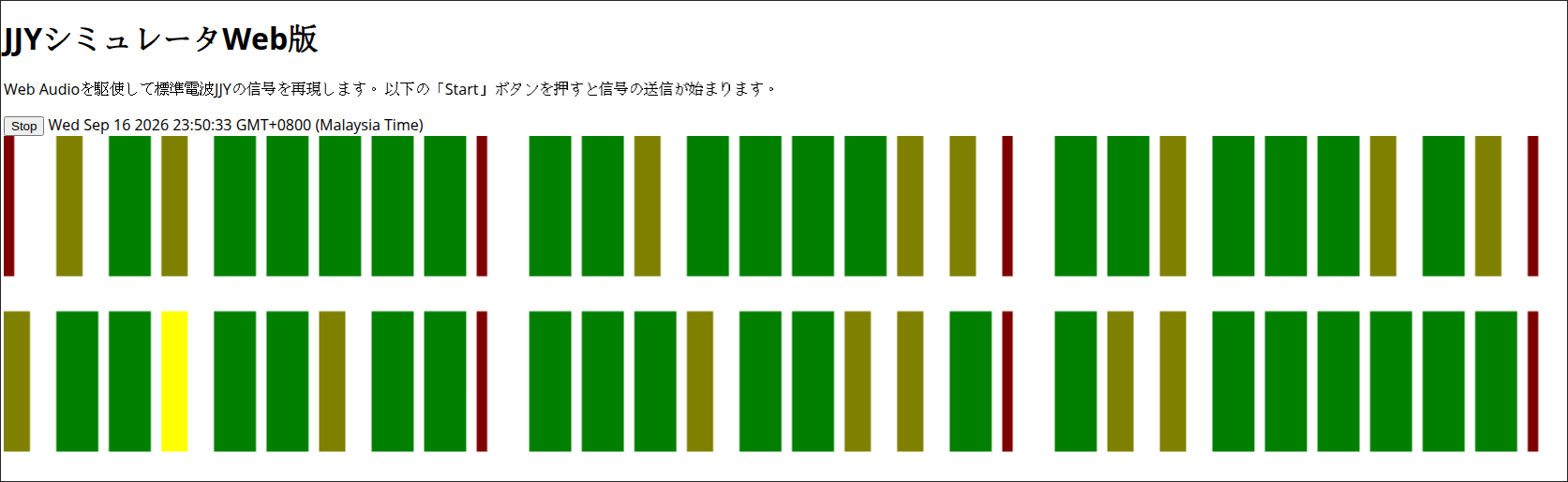
TL;DR: Web JJY is a free, open-source web application that generates Japan’s 40 kHz JJY low-frequency time calibration signals directly inside any modern web browser. By synthesizing a 13.333 kHz square wave through the HTML5 Web Audio API, standard headphone coils radiate the 40 kHz third harmonic electromagnetically, allowing you to synchronize Casio Wave Ceptor, G-Shock Multi-Band 6, Citizen, and Seiko radio-controlled watches without physical radio towers or extra hardware.
What Is JJY and Why Do Radio Clocks Fail Indoors?
JJY is the Japanese national standard time and frequency radio broadcast operated by the National Institute of Information and Communications Technology (NICT), transmitting precise atomic time codes on 40 kHz and 60 kHz longwave frequencies.
+-------------------------------------------------------------------------+
|                       HOW WEB JJY BRIDGES THE GAP                       |
|                                                                         |
|  [ NTP Server ]                                                         |
|         │ (Accurate System Clock via Internet)                          |
|         ▼                                                               |
|  [ Modern Web Browser ] ───► [ Web Audio API Engine ]                   |
|                                     │                                   |
|                                     │ 13.333 kHz Square Wave            |
|                                     ▼                                   |
|                          [ 3.5mm Headphone Jack ]                       |
|                                     │                                   |
|                                     ▼                                   |
|                           [ Earphone Voice Coil ]                       |
|                                     │                                   |
|                                     │ 3rd Harmonic (39.999 kHz)         |
|                                     │ Electromagnetic Near-Field Flux   |
|                                     ▼                                   |
|                        [ Watch Ferrite Bar Antenna ]                    |
|                                     │                                   |
|                                     ▼                                   |
|                     [ Casio / Citizen / Seiko Watch ]                   |
|                           (Locked & Synchronized)                       |
+-------------------------------------------------------------------------+
Millions of consumer timepieces worldwide rely on low-frequency (LF) time signals. Watches from Casio, Citizen, and Seiko contain internal ferrite bar antennas tuned to regional LF stations:
- JJY (Japan): 40 kHz (Mount Otakadoya) and 60 kHz (Mount Hagane)
- WWVB (United States): 60 kHz (Fort Collins, Colorado)
- DCF77 (Germany): 77.5 kHz (Mainflingen)
- MSF (United Kingdom): 60 kHz (Anthorn)
- BPC (China): 68.5 kHz (Shangqiu)
While longwave signals propagate over long distances at night through ionospheric groundwave and skywave reflection, real-world reception often degrades in urban environments. Modern buildings constructed with reinforced concrete and metal foil insulation create Faraday-cage attenuation. Consumer electronics, power adapters, LED drivers, and computer monitors also generate severe electromagnetic interference (EMI) across the LF spectrum below 100 kHz.
Horology enthusiasts outside Japan who collect Japan Domestic Market (JDM) radio-controlled watches can’t receive the native 40 kHz or 60 kHz signal due to geographic distance. When a radio-controlled watch fails to sync over several consecutive nights, it defaults to standard quartz timekeeping with standard monthly drift.
Web JJY, developed by Japanese engineer Shogo Ichinose (@shogo82148), solves this problem entirely in software. It provides an immediate, zero-install method to calibrate any 40 kHz JJY-compatible radio watch directly from a web browser.
How Web JJY Works: The 13.333 kHz Harmonic Trick
Standard personal computer sound cards, mobile phone audio DACs, and web browsers operate with audio sampling rates capped at 44.1 kHz or 48 kHz. According to the Nyquist-Shannon sampling theorem, a 44.1 kHz audio system can’t produce an analog output frequency higher than 22.05 kHz. Outputting a pure 40.0 kHz fundamental sine wave directly through consumer audio hardware is physically impossible.
Web JJY bypasses hardware audio limits through Fourier analysis of non-sinusoidal waveforms.
The Physics of Square Wave Harmonics
A pure mathematical square wave with frequency f0 consists of an infinite summation of odd integer harmonics:
xsquare(t) = (4 / π) × ∑k=1,3,5,… (1/k) × sin(2πkf0t)
When evaluated at individual harmonic frequencies:
- Fundamental (1f0): 13,333.3 Hz at relative amplitude 1.000 (audible high-frequency tone)
- Third Harmonic (3f0): 3 × 13,333.33 Hz = 39,999.99 Hz ≈ 40.0 kHz at relative amplitude 0.333
- Fifth Harmonic (5f0): 5 × 13,333.33 Hz = 66,666.65 Hz ≈ 66.7 kHz at relative amplitude 0.200
Relative
Amplitude
  1.0 |      █ (13.333 kHz Fundamental - Audible Acoustic Tone)
      |      █
  0.5 |      █
      |      █               █ (39.999 kHz - 3rd Harmonic = 40 kHz JJY Carrier)
  0.3 |      █               █
      |      █               █                               █ (66.666 kHz - 5th)
  0.0 +------+---------------+-------------------------------+------------------>
           13.333 kHz     39.999 kHz (JJY)                66.666 kHz       Frequency
By generating a sharp square wave at 13.333 kHz, the browser DAC produces strong electromagnetic energy at 40.0 kHz as its third harmonic.
Audio Voice Coils as Magnetic Loop Antennas
When the 13.333 kHz electrical signal travels through the copper voice coil of a standard wired earphone or headphone driver, Ampere’s Law dictates that the alternating current induces an oscillating magnetic field.
The physical wire loops in the earphone transducer act as a low-power magnetic dipole near-field antenna. The internal ferrite core antenna of a radio-controlled watch is sensitive to this exact magnetic field component. When placed within 1 to 5 centimeters of the earphone driver, the watch’s front-end receiver locks onto the 40 kHz third harmonic as if it were receiving an over-the-air radio transmission from Mount Otakadoya.
Inside the Code: JJY Protocol and Web Audio Scheduling
The JJY time code protocol broadcasts one structured frame every 60 seconds at a rate of 1 pulse per second (1 baud). Web JJY implements the full Japanese LF transmission specification in pure JavaScript within jjy.js.
Pulse-Width Modulation (PWM) Encoding
Each one-second timeslot represents one bit or framing marker defined by the duration of carrier wave transmission:
- Marker (M, P0, P1, P2, P3, P4, P5): 200 ms carrier burst (0.2s ON, 0.8s OFF)
- Binary 1: 500 ms carrier burst (0.5s ON, 0.5s OFF)
- Binary 0: 800 ms carrier burst (0.8s ON, 0.2s OFF)
0.0s        0.2s        0.5s        0.8s        1.0s
  +-----------+
  |  CARRIER  |               OFF                 |  MARKER (M, P0-P5): 200ms ON / 800ms OFF
  +-----------+-----------------------------------+
  +-----------------------+
  |        CARRIER        |          OFF          |  BINARY 1:          500ms ON / 500ms OFF
  +-----------------------+-----------------------+
  +-----------------------------------+
  |              CARRIER              |    OFF    |  BINARY 0:          800ms ON / 200ms OFF
  +-----------------------------------+-----------+
Frame Data Structure
A complete 60-second JJY frame organizes temporal information into Binary Coded Decimal (BCD) fields:
| Second (Slot) | Field Function | Bit Weighting / Encoding |
|---|---|---|
| 00 | Frame Marker (M) | 200 ms pulse |
| 01 – 08 | Current Minute | BCD weights: 40, 20, 10, 8, 4, 2, 1 |
| 09 | Position Marker 1 (P1) | 200 ms pulse |
| 10 – 18 | Current Hour | BCD weights: 80, 40, 20, 10, 8, 4, 2, 1 |
| 19 | Position Marker 2 (P2) | 200 ms pulse |
| 20 – 28 | Day of Year (Part 1) | BCD weights: 800, 400, 200, 100, 80, 40, 20, 10 |
| 29 | Position Marker 3 (P3) | 200 ms pulse |
| 30 – 33 | Day of Year (Part 2) | BCD weights: 8, 4, 2, 1 |
| 34 – 35 | Reserved / Zero Bits | Fixed to 0 |
| 36 – 37 | Parity Bits (PA1, PA2) | Hour parity (PA1) and Minute parity (PA2) |
| 38 | Summer Time / DST Flag 1 | Summer time active flag |
| 39 | Position Marker 4 (P4) | 200 ms pulse |
| 40 | Summer Time / DST Flag 2 | Advance notice flag (6-day warning) |
| 41 – 48 | Year (Last 2 Digits) | BCD weights: 80, 40, 20, 10, 8, 4, 2, 1 |
| 49 | Position Marker 5 (P5) | 200 ms pulse |
| 50 – 52 | Day of Week | BCD weights: 4, 2, 1 (0 = Sunday, 6 = Saturday) |
| 53 – 54 | Leap Second Notice | Positive/negative leap second indicator |
| 55 – 58 | Reserved / Padding | Fixed to 0 |
| 59 | Position Marker 0 (P0) | 200 ms pulse |
Precision Web Audio Scheduling
JavaScript standard setInterval and setTimeout timers suffer from millisecond-level execution jitter caused by browser event loop delays. To maintain microsecond-level clock accuracy, Web JJY schedules audio pulses directly into the browser audio hardware queue using AudioContext.currentTime:
function marker(s) {
    array.push(0.2);
    var t = s + offset;
    if (t < 0) return;
    var osc = ctx.createOscillator();
    osc.type = "square";
    osc.frequency.value = freq; // 13333 Hz
    osc.start(t);
    osc.stop(t + 0.2);
    osc.connect(ctx.destination);
}
The graphical <canvas> interface renders a real-time progress bar of the 60-second transmission frame, displaying active bits in color-coded blocks: red for markers, yellow for binary ones, and green for binary zeros.
Step-by-Step Setup Guide: Synchronizing Your Watch
Calibrating a radio-controlled watch with Web JJY takes less than five minutes. Follow these practical steps:
1. Verify Host Computer Time (NTP Sync)
Web JJY derives its timecode from the host operating system clock. Ensure your computer or smartphone is synchronized with an active Network Time Protocol (NTP) server. Check that your system clock error is below 0.1 seconds using standard time synchronization utilities or time services.
2. Configure Your Watch Home City
Radio-controlled watches only activate their JJY 40 kHz receiver if configured to a compatible time zone.
- On Casio G-Shock Multi-Band 6 or Wave Ceptor modules, set the Home City to TYO (Tokyo, UTC+9), SEL (Seoul), or another East Asian regional setting.
- You can change the time zone back to your local city once synchronization completes.
3. Connect Wired Earphones
Plug standard 3.5mm wired earphones or over-ear headphones into your computer or phone headphone jack.
Tip: Over-ear headphones with 40mm or 50mm dynamic drivers contain larger copper coils than small in-ear monitors. They produce stronger electromagnetic flux, resulting in faster signal locks on stubborn watches.
4. Physical Positioning
Place the watch directly against the earphone speaker housing:
- Most Casio watches place the internal ferrite bar antenna horizontally along the 12 o’clock or 9 o’clock position of the case.
- Wrap the earphone cord twice around the watch bezel, or rest the top edge of the watch directly over the earphone speaker grille.
       +-------------------------------+
       |       [ COMPUTER / PHONE ]    |
       |    Volume set to 100% (Max)   |
       +---------------+---------------+
                       │ 3.5mm Headphone Jack
                       ▼
       ~~~~~~~~~~~~~~~~~~~~~~~~~~~~~~~~~  Earphone Cable
                       │                  (Acts as antenna feed)
               +-------┴-------+
               |  ( O ) ( O )  |  Headphone / Earphone Drivers
               +-------┬-------+
                       │ Direct Contact
                       ▼
         +---------------------------+
         |     [ 12 o'clock ]        |
         |  +---------------------+  |
         |  |   FERRITE ANTENNA   |  | ◄── Maximum magnetic coupling here
         |  +---------------------+  |
         |                           |
         |    [ CASIO G-SHOCK ]      |
         |      Display: RC L3       |
         |                           |
         |     [ 6 o'clock ]         |
         +---------------------------+
5. Set Audio Volume to Maximum
Increase your computer master volume and browser tab volume to 100%. The electromagnetic emission strength is directly proportional to the output current passing through the coil.
Warning: Do not wear the earphones in your ears while running Web JJY. The 13.333 kHz square wave produces an intense, piercing acoustic tone at maximum volume.
6. Launch Web JJY and Trigger Watch Reception
- Open https://shogo82148.github.io/web-jjy/ in your web browser.
- Click Start. The visualizer will begin tracking seconds.
- Initiate manual time reception on your watch (for Casio watches, hold down the bottom-right
RECEIVEbutton for 2 to 3 seconds until the display beeps and flashesRCorRCVD). - Watch signal strength indicators:
- L1 (Weak): Adjust earphone angle slightly.
- L2 (Medium): Signal detected, frame synchronization starting.
- L3 (Strong): Optimal alignment, decoding active frame.
- Keep the setup still for 2 to 4 minutes. Radio-controlled movements require two consecutive error-free 60-second frames to verify parity before advancing the hands or digital display.
Comparison: Time Signal Emulation Methods
Multiple approaches exist for calibrating radio-controlled clocks outside broadcast reception zones. Here is how Web JJY compares to hardware and software alternatives:
| Feature / Method | Web JJY (Browser Web Audio) | Mobile Apps (Clock Wave / JJY Emulator) | ESP32 / Arduino DDS Synthesizer | SDR Transmitter (HackRF / LimeSDR) | Direct Over-The-Air (NICT JJY / WWVB) |
|---|---|---|---|---|---|
| Primary Platform | Any Web Browser (Chrome, Firefox, Safari) | iOS / Android Native Apps | ESP32 / ATmega328P + Wire Coil | Linux / Windows PC + SDR Board | Commercial LF Broadcast Towers |
| Carrier Generation | 13.333 kHz 3rd Harmonic (39.999 kHz) | 13.333 kHz 3rd Harmonic or DAC | Hardware PWM / Si5351 Clock Generator | Direct RF synthesis at 40.0 / 60.0 kHz | High-power 50 kW LF transmitter |
| Additional Hardware | None (Standard Earphones) | None (Phone Speaker / Earphones) | Custom Microcontroller + Ferrite Core | SDR Transceiver ($150 – $350) | Outdoor Longwave Antenna |
| Software Installation | Zero (Instant Web App) | App Store / APK install | Arduino IDE / PlatformIO flashing | GNU Radio / Python SDR stack | None |
| Effective Range | 1 – 5 cm (Near-field coupling) | 1 – 10 cm | 10 – 50 cm | 1 – 10 meters (Requires RF license) | Hundreds to thousands of kilometers |
| Supported Protocols | JJY (40 kHz Japan) | JJY / WWVB / DCF77 / BPC | JJY / WWVB / MSF / DCF77 | All LF protocols | Regional broadcast only |
| Open Source | Yes (GitHub: shogo82148) | Mixed (Mostly closed-source) | Yes (Various community projects) | Yes | Government utility |
Best Practices and Troubleshooting
- Signal Stalls at L1 / ERR: If your watch stays on
L1and eventually reportsERR, the received signal to noise ratio is too low. Rotate the watch 90 degrees relative to the headphone driver to align the internal ferrite coil axis with the magnetic flux lines. - Sound Card High-Pass Filters: Some external USB audio interfaces, sound cards, or laptops incorporate aggressive hardware high-pass filters or voice-enhancement software that attenuates tones above 10 kHz. If signal strength is insufficient, disable audio enhancement filters (such as Dolby Audio, Waves MaxxAudio, or Realtek spatial processing) in your sound settings.
- Smartphone Speakers vs Headphones: While smartphone internal speakers can radiate sufficient acoustic harmonics, standard wired earphones plugged into a 3.5mm jack or USB-C DAC dongle deliver cleaner magnetic coupling due to their unshielded driver coils.
- DST / Summer Time Setting: Standard Japanese JJY doesn’t implement Daylight Saving Time. Keep the
夏時間を有効にする(Enable Summer Time) checkbox unchecked unless testing overseas DST shifts.
Frequently Asked Questions
Will playing Web JJY through room speakers sync my watch across the room?
No. Audio speakers produce acoustic sound pressure, whereas the watch requires an electromagnetic field. Because magnetic near-field strength drops off by the inverse cube law (1/r3), the watch must sit within a few centimeters of the speaker coil.
Does my watch need to be set to Tokyo time to sync with Web JJY?
Yes. Most multi-band watches disable their JJY 40 kHz receiver if set to Western cities. Select Tokyo (TYO) or an East Asian time zone before syncing, then switch back to your home city afterward.
Can running Web JJY damage my computer sound card or earphones?
No. Web JJY generates standard audio signals within normal voltage limits. Run the volume at 100% only during the 3-minute sync process to avoid unnecessary continuous heating of tiny earbud voice coils.
Why does Web JJY use 13.333 kHz instead of generating 40 kHz directly?
Standard consumer audio hardware operates at 44.1 kHz or 48 kHz sampling rates, making direct 40 kHz generation impossible. Web JJY uses the 3rd odd harmonic of a 13.333 kHz square wave (3 × 13.333 kHz = 40.0 kHz).
How long does the synchronization process take?
Synchronization typically takes between 2 and 4 minutes. The watch must decode at least two complete, consecutive 60-second time frames without bit errors to verify parity checks before adjusting the hands or display.
Sources and Further Reading
- Web JJY Application: https://shogo82148.github.io/web-jjy/
- Web JJY GitHub Repository: https://github.com/shogo82148/web-jjy (Developer: Shogo Ichinose / @shogo82148)
- NICT Japan Official JJY Specification: http://jjy.nict.go.jp/jjy/ – National Institute of Information and Communications Technology
- W3C Web Audio API Specification: https://www.w3.org/TR/webaudio/ – W3C Audio Working Group
- Casio Official Support: Casio Radio-Controlled Watch Reception Guide – Multi-Band 6 and Wave Ceptor operation manuals
73 de 9M2PJU


Post Comment