FlightScnr Pi: Build a Round Radar Flight and Marine Tracker on Raspberry Pi
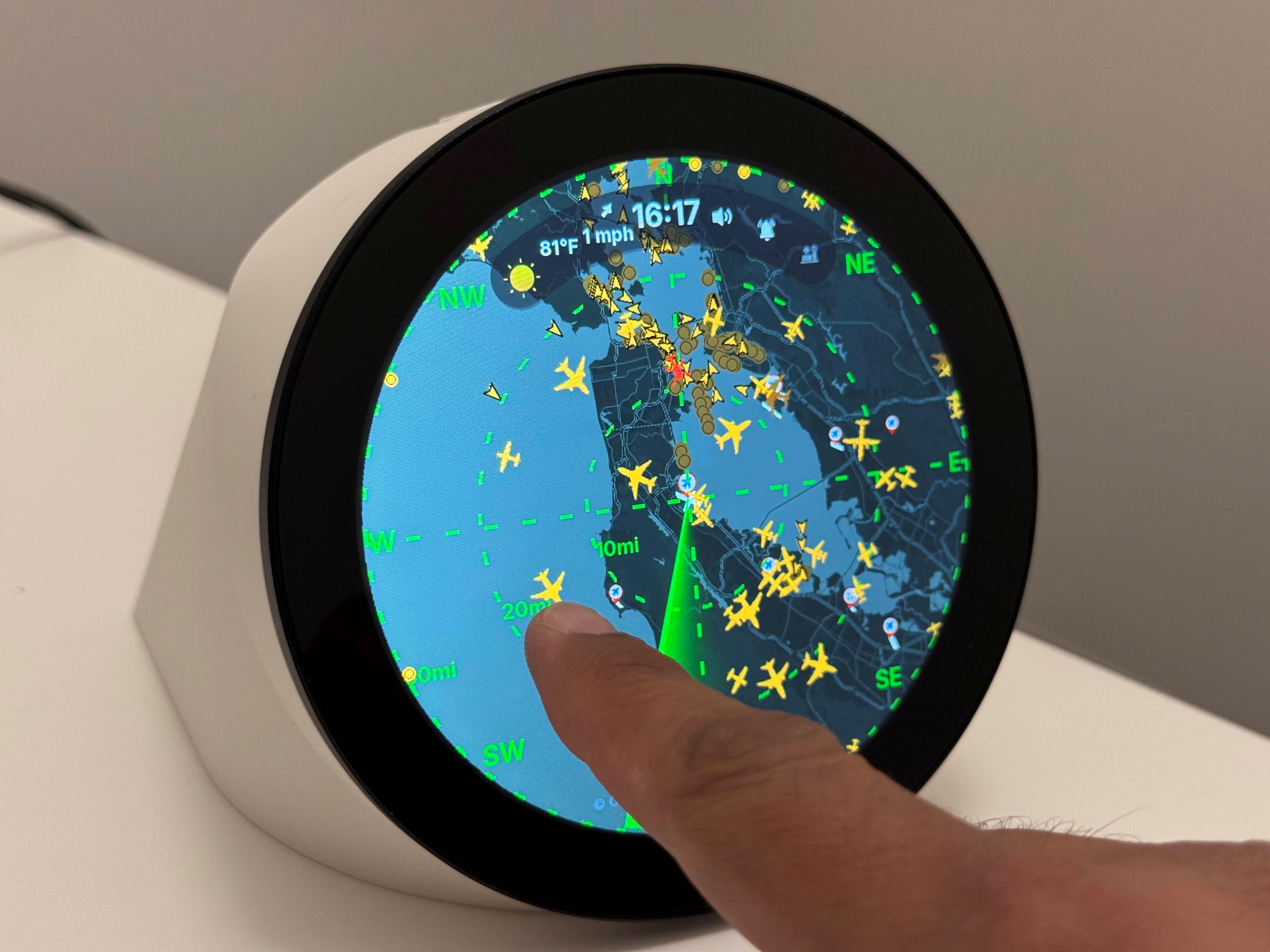
FlightScnr Pi: Build a Round Radar Flight and Marine Tracker on Raspberry Pi
TL;DR: FlightScnr Pi by Yash Mulgaonkar (GitHub, 601 stars, 44 forks) turns a Raspberry Pi and a round 4inch 720×720 Waveshare touch display into a dark radar-style flight and marine tracker with animated sweep, gesture navigation, tap-to-detail screens, LiveATC audio, eleven map styles, weather, wildfire and earthquake layers, and a local web portal for setup with no SSH needed. For radio amateurs it is the perfect shack display for a 1090 MHz ADS-B station: feed it from FR24, adsb.fi, or your own local dump1090/readsb RTL-SDR receiver, add AIS marine traffic, and put live RF-derived tracks on the wall.
Every shack has a screen that guests stare at. For some it’s a waterfall, for others a greyline map. A live radar scope showing real aircraft your own antenna just heard has a special pull: those plots exist because radio waves hit your coax. The FlightScnr Pi project packages that magic into a purpose-built round display appliance that looks like avionics, runs 24/7 on a Pi, and configures from a browser.
In this guide we tour the project in depth, walk through hardware and install, show how to connect your own RTL-SDR ADS-B receiver for fully local plots, and explain why this build deserves a place next to the rig.
What Is FlightScnr Pi?
FlightScnr Pi is a Raspberry Pi appliance that displays live aircraft and marine vessel traffic as an animated circular radar on a round 4inch 720×720 touch display, with tap-through detail screens, map layers, weather and hazard overlays, LiveATC audio, and browser-based configuration.
+-----------------------------------------------------------------------------------+
|                          FLIGHTSCNR PI SYSTEM ARCHITECTURE                        |
+-----------------------------------------------------------------------------------+
|                                                                                   |
|   +---------------------------+       +---------------------------------------+   |
|   |   ROUND 4IN 720x720 TOUCH |       |   RADAR UI (PYTHON + PYGAME)          |   |
|   |   Waveshare DSI LCD (C)   | <---> |   Sweep, tags, gestures, detail cards |   |
|   |   or 4-DSI-TOUCH-C panel  |       |   HUD clock, weather, AQI, alerts     |   |
|   +---------------------------+       +---------------------------------------+   |
|               |                                       |                         |
|   +---------------------------------------------------------------------------------+ |
|   |                          RASPBERRY PI 4 (PI OS 64-BIT)                          | |
|   |   Data aggregator • tile cache • local web portal • OTA updater • gpio-fan     | |
|   +---------------------------------------------------------------------------------+ |
|         |                        |                         |                      |
|   +-------------+       +----------------+       +----------------+    +---------------+
|   | FR24 +      |       | LOCAL dump1090 |       | WEATHER +      |    | LiveATC AUDIO |
|   | adsb.fi     |       | / readsb +     |       | HAZARDS APIs   |    | USB/BT speaker|
|   | AIS streams |       | RTL-SDR 1090   |       | Tomorrow.io... |    | Chimes, ATC   |
|   +-------------+       +----------------+       +----------------+    +---------------+
|                                                                                   |
+-----------------------------------------------------------------------------------+
The project is modeled after the original FlightScnr and carries release 2026.8.21.2 on main at the time of writing. Full guides live in the project wiki, and day-to-day help happens on the FlightScnrPi Discord.
Why Radio Amateurs Should Care
ADS-B at 1090 MHz sits squarely in amateur-adjacent radio territory. The modulation (1090ES Mode S extended squitter), the receiver chain (LNA, filter, SDR dongle, decoder), the antennas (collinears, cantennas, coax collinear builds), and the feeder culture (sharing data with aggregators) all mirror ham practice. A large share of ADS-B feeder operators already hold callsigns.
FlightScnr Pi matters to hams for six concrete reasons:
- It visualizes your own RF. Point it at local dump1090/readsb and every plot on the round scope is a packet your antenna decoded. That closes the loop between receiver building and results.
- It rewards antenna work. Raise the collinear, add a 1090 MHz filter and LNA, and the radar fills up. Few shack displays make antenna improvements this instantly visible.
- It teaches SDR and decoding. RTL-SDR plus readsb is one of the cheapest complete receive chains in radio. Clubs use it to teach gain, PPM correction, multipath, and range plotting.
- It adds EmComm awareness. Wildfire layers (CAL FIRE, NIFC, NASA FIRMS), USGS earthquakes, weather and precipitation overlays, and marine AIS give a net-control desk ambient situational awareness during exercises and events.
- It’s a stunning shack centerpiece. The round radar with sweep reads as avionics from across the room and starts conversations with visitors, exactly what a club open day needs.
- It respects the feeder ethos. It consumes FR24 and adsb.fi data while supporting local decoders, so feeding the community and displaying the community reinforce each other.
If you already run HamClock, a DX cluster board, or an APRS map on the wall, the FlightScnr Pi is their natural sibling: the air picture next to the ionosphere picture.
Feature Tour
Radar Home Screen
The heart of the device is a dark circular radar with an animated rotating sweep. Contacts appear as tagged plots with leader lines, optionally colored by altitude, on top of your chosen basemap clipped to the round display. An optional frosted HUD pill shows time, weather, wind, and US AQI with adjustable opacity and light or dark styling. Per-channel audio controls cover chimes, tracked-flight alerts, military alerts, earthquake voice alerts, and ATC levels.
Tap-Through Detail Screens
Tapping a contact opens a flight detail card with identity, position, altitude, speed, heading, squawk, and an aircraft photo (planespotters.net and Wikimedia sources). A tracked-flight view adds a route map. A Follow/Live map mode keeps the selected target centered. A clock and weather screen rounds out the rotation.
Gesture Navigation
Navigation is swipe-driven on the 720×720 capacitive touch panel (10-point touch on the original panel):
- Swipe right on radar opens the Tracked view when a track is active, then again for Follow/Live.
- Swipe left cycles Home and saved favorite locations.
- Pinch-to-zoom works under X11 (the installer forces the desktop to X11 for this reason).
Eleven Basemap Styles
| Style family | Options | Notes |
|---|---|---|
| CARTO | Dark, Light, Voyager | Free CARTO_BASEMAPS_API_KEY |
| OpenStreetMap | OSM Dark | Community tiles |
| Stadia | Dark plus Toner | Free STADIA_MAPS_API_KEY |
| Esri | Streets, Satellite | Good rural detail |
| FAA | VFR sectionals (US) | Sectional chart look for aviation fans |
| Nautical | Open Waters Seamap | Depths and seamarks, not for navigation |
| Minimal | Dark Flat | Solid black for maximum contrast at night |
Optional overlays include tag leaders, color-by-altitude, precipitation radar, airport markers, wildfire perimeters, and earthquake markers.
Screens Gallery
The project documents each screen with photos: radar home, flight detail, tracked flight with route map, clock and weather, CARTO dark and Voyager maps, FAA VFR sectional view, HUD in light and dark modes, ATC menus, and marine traffic with vessel detail cards. Browse them in the repo under docs/images/features/ before building to pick your preferred look.
LiveATC Audio
Optional LiveATC streams route to a USB or Bluetooth speaker. Airport and channel are selectable on-device or in the portal. Pair this with the speaker enclosure profile and the unit becomes a self-contained airband monitor: radar on screen, tower audio in the room, hourly chime on the hour.
Five Languages
Clock, date, forecast, weather descriptions, portal overview, and controls render in English, Dutch, German, French, or Spanish, selectable per device under Settings then Display or in the portal. The translation catalogs are dependency-free validated JSON shared by the Python display and the browser portal, and adding a language needs no code changes: copy the en folder under flightscnr/i18n/locales/, translate messages.json values while leaving keys and {placeholders} intact, and the loader picks it up automatically with English fallback for missing keys.
Data Sources
| Source | What it provides | Key needed |
|---|---|---|
| FR24 | Live aircraft positions and details | Yes, user key via portal |
| adsb.fi | Community ADS-B positions | Per portal config |
| Local dump1090 / readsb | Your own RTL-SDR 1090 MHz decodes | No, runs on your LAN |
| Tomorrow.io | Weather and forecast text | Yes, free tier works |
| LibreWXR (RainViewer fallback) | Precipitation radar tiles | Per portal config |
| Route enrichment | Flight route data | Optional |
| USGS | Earthquake markers plus voice alerts | No |
| CAL FIRE / NIFC / NASA FIRMS | Wildfire layers | No |
| aisstream.io (Open Waters AIS fallback) | Marine vessel positions | Optional key, fallback needs none |
| planespotters.net / Wikimedia | Aircraft and ship photos | No |
| LiveATC | Airport audio streams | No |
The hybrid model is the smart part. Internet aggregators give global coverage, your local decoder gives zero-latency nearby plots with no internet dependency, and hazard layers arrive free. Note the honest caveat from the README: aisstream.io is known to be unreliable, and the built-in Open Waters AIS fallback covers outages.
Hardware: Bill of Materials
The hardware wiki lists a short, affordable BOM:
| Qty | Item | Notes |
|---|---|---|
| 1 | Raspberry Pi 4 Model B (2GB or 4GB) | Tested target. Pi 3B+ and Pi 5 also work with the Waveshare panel. Needs desktop OS for pygame/X11. |
| 1 | Waveshare 4inch DSI LCD (C), 720×720 | Round IPS, 10-point capacitive touch, DSI plus I2C. Not the 480×800 or HDMI round variants. |
| 1 | microSD card 32GB or larger, A2 rated | Flash Raspberry Pi OS 64-bit with desktop. |
| 1 | USB-C supply 5V 3A minimum | Powers the whole device through the display USB-C pigtail. Official Pi 4 PSU or equivalent. |
| 1 | 3D-printed enclosure or stand | Two MakerWorld profiles: without speaker bay, or with USB speaker bay. |
| 4 | M4x8mm button head screws | Screen to enclosure. |
| 2 | M2.5x10mm button head screws | Fan heatsink to Pi. |
| 0-1 | Heatsink plus fan | Recommended for 24/7 duty. The installer enables gpio-fan on GPIO 14, on at 60C. |
| 1 | 90-degree USB-C adapter | Onto the display backpanel PCBA power port for neat cable routing. |
| 0-1 | USB mini speaker | Tested model: HONKYOB USB mini speaker. Needed for the speaker enclosure profile. |
| 0-1 | 180-degree USB-A adapter | Speaker-profile only, connects the USB speaker upward into a Pi USB-A port. |
Two build paths exist: without USB speaker (simpler, Bluetooth audio later if wanted) or with USB speaker (print the speaker enclosure, install the speaker before closing the case). The assembly wiki covers both with photos.
Display Panel Note
Two panel revisions share the housing: the original 4inch DSI LCD (C) and the newer 4-DSI-TOUCH-C (same 720×720 resolution, different bezel). Each needs its own firmware overlay in /boot/firmware/config.txt, or the screen stays black:
- Original:
dtoverlay=vc4-kms-dsi-waveshare-panel,4_0_inchC - Newer:
dtoverlay=vc4-kms-dsi-waveshare-panel-v2,4_0_inch_c
On the newer panel the display power cable is mandatory; DSI ribbon power alone won’t run it. On Pi 5 or CM boards with a blank screen, try the DSI0 form of the same overlay per the software setup wiki. Credit to @Matzebhv for the newer-panel overlay via issue #207.
Software Setup
The software setup wiki gives the full path. In short:
- Assemble hardware per the assembly guide.
- Flash Raspberry Pi OS 64-bit with desktop.
- Add the common overlay line plus your panel-specific overlay to
/boot/firmware/config.txt:
dtoverlay=vc4-kms-v3dplus one panel overlay row. - Clone and install:
git clone https://github.com/yashmulgaonkar/FlightScnr_Pi.git ~/FlightScnr_Pi
cd ~/FlightScnr_Pi
sudo bash install-pi.sh - Open the web portal at
http://<hostname>.localand add API keys.
The installer handles the fiddly parts: it forces the desktop to X11 (pinch-zoom needs it, with an automatic reboot), enables the enclosure fan via the kernel gpio-fan overlay on GPIO 14 at 60C, disables Wi-Fi power save for kiosk reliability, and enables Bluetooth for speaker pairing.
The Web Portal: No SSH Required
Day-to-day configuration happens in a local web portal, not over SSH. Data source keys, route and position sources, alert modes, orientation, favorite locations, audio channels, language and region, display settings, and OTA updates all live there. For hams who deploy remote displays (clubhouse wall, repeater site monitor), browser-based admin plus portal OTA (Update Now, Later tonight, off-hours auto-install, Finish install, Repair and Update) is the difference between a display that stays current and one that rots on an old release.
If an old build gets stuck (notably the 2026.8.5.x permission issue on scripts/release.sh), one more Update Now usually clears it, with a documented repair-ota.sh curl fallback in the README for stubborn cases.
Connecting Your Own ADS-B Receiver
This is the section that makes the project a radio project rather than a dashboard project.
The Local Feed Chain
1090 MHz antenna --> filter + LNA --> RTL-SDR dongle --> dump1090/readsb --> FlightScnr Pi
Run dump1090-fa or readsb on the same Pi or a second Pi on your LAN (a Pi Zero 2 W or Pi 3B+ is plenty for decoding), then point FlightScnr Pi at the local feed in the portal position sources. Nearby aircraft then plot from your own decodes with millisecond freshness, even if your internet drops.
Antenna and RF Front End Tips
- Antenna: A 1090 MHz collinear (coax-collinear homebrew or commercial) as high and clear as you can manage dominates range results. Even a simple quarter-wave ground plane above roofline beats an indoor whip.
- Filter: A 1090 MHz SAW or cavity filter ahead of the dongle kills cellular overload, the most common urban range killer.
- LNA: A filtered LNA at the antenna (bias-T powered) typically doubles message rate on weak fringe plots.
- Dongle: RTL-SDR Blog V3/V4 with bias-T, or an Airspy for dense RF environments. Set gain by experiment; maximum gain is rarely optimal.
- Feedline: Short, low-loss coax at 1090 MHz matters more than at HF. Keep the run short or move the dongle to the antenna and backhaul data over Wi-Fi.
Join the Feeder Community
While FlightScnr Pi displays data, consider also feeding it. The same local decoder can share to adsb.fi, ADS-B Exchange style communities, and FR24 simultaneously. Feeding is the ADS-B equivalent of running an APRS iGate: you contribute RF-derived data that others display. If your club builds a FlightScnr Pi, pair the unveiling with a feeder signup night and an antenna build session.
Marine AIS Bonus
Coastal stations can mirror the ADS-B fun on VHF: an AIS receiver (162 MHz) plus the AIS stream input puts vessels on the same round radar with ship photos. Inland operators still get ships via the internet fallback. But decoding your own AIS from a rooftop discone is the real radio achievement.
Shack Integration Ideas
- The air picture wall: Mount the round display beside HamClock or a DX cluster screen. Ionosphere, air traffic, and contacts in one glance.
- Net control desk: Wildfire plus earthquake plus weather overlays during public service events and EmComm exercises.
- Clubhouse build night: One experienced member pre-tests the image, then the group assembles displays, prints enclosures, and configures portals together.
- Youth and STEM: Aircraft kids can see from the window appearing on a radar they built demystifies radio in one evening.
- Repeater site monitor: Portal OTA plus no-SSH admin makes a wall display at a shared site maintainable by the whole committee.
- Field portable: A Pi plus display plus battery bank plus mag-mount collinear turns any hilltop into a temporary ADS-B survey station for antenna comparisons.
How It Compares
| Solution | Display | Data | Setup effort | Best for |
|---|---|---|---|---|
| FlightScnr Pi | Round 720×720 touch radar appliance with sweep, gestures, ATC audio | FR24, adsb.fi, local dump1090/readsb, AIS, weather, fires, quakes | Medium: print, assemble, flash, portal config | Shack centerpiece and dedicated 24/7 scope |
| FlightAware PiAware + SkyAware | Browser map on your own hardware | Local decoder plus FlightAware network | Medium: decoder plus feeder config | Feeding FlightAware with local map |
| tar1090 / readsb web map | Browser map, any screen | Local decoder only | Low to medium | Pure local RF visualization |
| adsb.fi web interface | Browser, any device | Community network | None: just browse | Quick look without hardware |
| FR24 receiver + app | Phone or PC app | FR24 network plus own receiver | Low: receiver kit | Tracking flights in the FR24 ecosystem |
| Generic HDMI status board | Rectangular monitor, DIY layout | Whatever you script | High: you build everything | Operators who want full custom dashboards |
FlightScnr Pi wins where dedicated hardware, round avionics aesthetics, touch gestures, offline portal admin, and combined air plus marine plus hazard layers matter. It loses where you need a big rectangular map with dozens of columns: that remains a browser job.
Honest Notes Before You Build
A good promotion includes the fine print:
- Firmware license is CC BY-NC-SA 4.0, not OSI open source. Personal, club, and educational non-commercial use is the intended zone, with attribution and share-alike on adaptations. Commercial use needs separate permission. Read
LICENSEandNOTICEin the repo. - The enclosure is separately licensed. The 3D files and prints follow the MakerWorld Standard Digital File License on the model page, which restricts sharing, remixing, and paid use. Check the model page terms before printing for others.
- API keys are required for full function. FR24, weather, and some basemaps need free keys you register yourself. Budget an evening for signup and portal entry.
- 24/7 duty needs cooling. Fit the fan heatsink and let the installer manage it at 60C. A closed printed case with a busy Pi 4 and no airflow will throttle.
- Round means cropped corners. Rectangular maps and long text get clipped by design. The UI is built for it, but dense data tables belong on a second screen.
- Newer panel needs its own overlay and power cable. Wrong overlay equals black screen. Follow the panel table exactly.
None of these block the project. They set expectations so the build night ends with working radars.
Getting Started Checklist
- Read the Features wiki and browse
docs/images/features/to pick your look. - Order the Pi, Waveshare round panel revision of choice, 32GB A2 card, 5V 3A supply, and fasteners.
- Print the enclosure profile that matches your audio plan (speaker bay or not).
- Flash Pi OS desktop 64-bit, set the correct panel overlay, first-boot on a normal monitor to confirm display.
- Clone the repo, run
install-pi.sh, let the X11 reboot complete. - Open the portal, add FR24, weather, and basemap keys, set location and favorites.
- Add a local dump1090/readsb feed from your RTL-SDR for live local plots.
- Mount it where visitors see it, then tell the club.
Frequently Asked Questions
What hardware does FlightScnr Pi need?
A Raspberry Pi 4 (2GB or 4GB), Waveshare 4inch 720×720 round DSI touch panel, 32GB microSD, 5V 3A supply, printed enclosure, screws, and an optional fan and USB speaker.
Can it use my own ADS-B receiver instead of the internet?
Yes. Point it at local dump1090 or readsb from your RTL-SDR 1090 MHz station for zero-latency local plots, with internet aggregators as backup.
Do I need SSH to configure it?
No. Day-to-day setup, keys, audio, language, and OTA updates all happen in the local web portal at http://<hostname>.local.
Is the software free for club and personal use?
Yes for non-commercial use. Firmware is CC BY-NC-SA 4.0 with attribution and share-alike. Check the enclosure MakerWorld license separately before printing.
Where do I get help if the screen stays black?
Check the panel overlay table first: original and newer panels need different overlays, and the newer panel needs its power cable. Then see the Troubleshooting wiki and Discord.
Conclusion
FlightScnr Pi captures something rare: it is genuinely useful, genuinely educational for radio minds, and genuinely beautiful on the shack wall. It turns anonymous internet flight data plus your own 1090 MHz decodes into a living radar that rewards better antennas, teaches SDR decoding, feeds community networks, and watches over your local sky during events. The build is a weekend, the parts are modest, and the result draws every visitor in the room.
Star the repo, join the Discord, print the enclosure, hoist the collinear, and put your own RF on the scope. Then send the author a coffee: 601 stars of avionics glow don’t maintain themselves.
73, and see you on the scope.
Sources and Further Reading
- FlightScnr Pi GitHub Repository: https://github.com/yashmulgaonkar/FlightScnr_Pi
- FlightScnr Pi Features Wiki: https://github.com/yashmulgaonkar/FlightScnr_Pi/wiki/Features
- FlightScnr Pi Hardware BOM Wiki: https://github.com/yashmulgaonkar/FlightScnr_Pi/wiki/Hardware
- FlightScnr Pi Hardware Assembly Wiki: https://github.com/yashmulgaonkar/FlightScnr_Pi/wiki/Hardware-Assembly
- FlightScnr Pi Software Setup Wiki: https://github.com/yashmulgaonkar/FlightScnr_Pi/wiki/Software-Setup
- FlightScnr Pi Web Portal Wiki: https://github.com/yashmulgaonkar/FlightScnr_Pi/wiki/Web-Portal
- FlightScnr Pi Data Sources Wiki: https://github.com/yashmulgaonkar/FlightScnr_Pi/wiki/Data-Sources
- FlightScnr Pi Troubleshooting Wiki: https://github.com/yashmulgaonkar/FlightScnr_Pi/wiki/Troubleshooting
- FlightScnr Pi Updates Wiki: https://github.com/yashmulgaonkar/FlightScnr_Pi/wiki/Updates
- FlightScnrPi Discord Community: https://discord.gg/wjqgUjv8Re
- Waveshare 4inch DSI LCD (C) Product Page: https://www.waveshare.com/4inch-dsi-lcd-c.htm
- Waveshare 4-DSI-TOUCH-C Product Page: https://www.waveshare.com/4-dsi-touch-c.htm
- 3D Enclosure on MakerWorld: https://makerworld.com/en/models/3024952-flightscnrpi-large-ads-b-traffic-sweeping-radar
- adsb.fi Community ADS-B Network: https://adsb.fi
- readsb ADS-B Decoder: https://github.com/wiedehopf/readsb
- dump1090 ADS-B Decoder: https://github.com/flightaware/dump1090
- HamRadio.my Open Source Tools and Tech Guides: https://hamradio.my/
- About 9M2PJU Station Profile and Software Projects: https://hamradio.my/about/

Post Comment