APRSPH Messenger: Modern Web-Based APRS Chat with Multi-SSID Routing and RF Ingress Badges

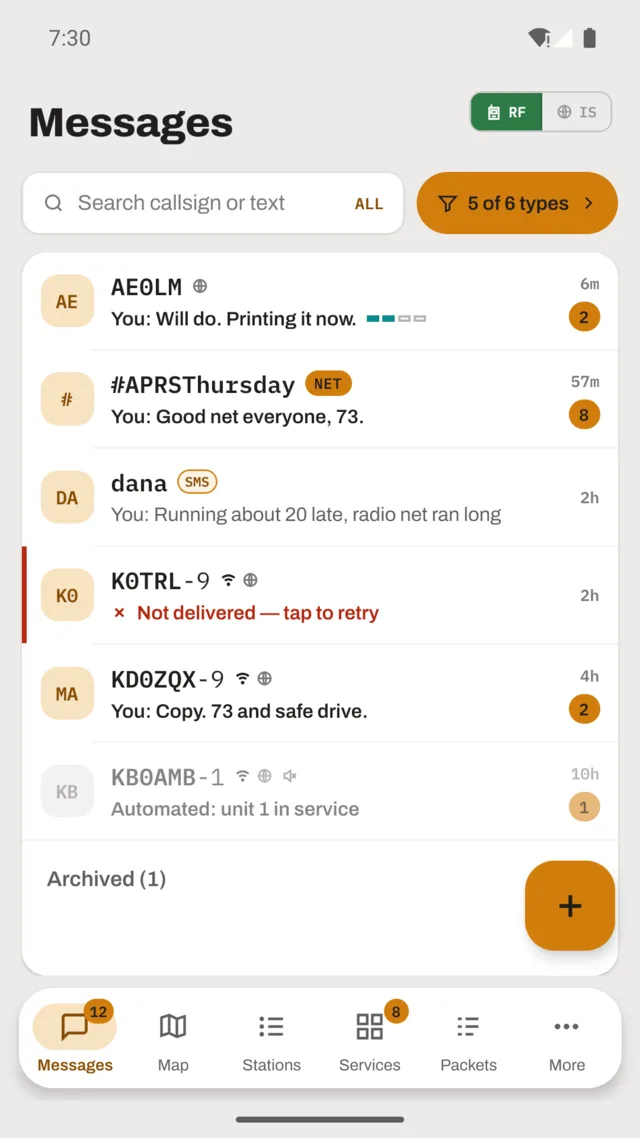
TL;DR: APRSPH Messenger (developed by N2RAC and hosted by Steve N2RWE) is a modern, installable Progressive Web Application (PWA) that transforms Automatic Packet Reporting System (APRS) text messaging into an intuitive, mobile-friendly chat experience. Bridging browser sessions directly to the global APRS-IS network and terrestrial RF gateways, it provides passwordless email authentication, multi-SSID station management, delivery acknowledgments, built-in check-in workflows for the daily APRSPH Net and weekly #APRSThursday, and a newly introduced RF ingress badge (
RF · via IGATE) in v0.9.7 that verifies when incoming packets crossed real amateur radio frequencies.
What Is APRSPH Messenger?
APRSPH Messenger is an open-access, browser-based Progressive Web Application that provides licensed amateur radio operators with a modern, two-way text chat interface connected directly to the global APRS Internet System (APRS-IS) and terrestrial radio gateways.
+-----------------------------------------------------------------------------------------+
|                               APRSPH MESSENGER TOPOLOGY                                 |
+-----------------------------------------------------------------------------------------+

  [ User Client Layer ]                [ APRSPH Core Platform ]            [ Global Amateur Radio ]
  ┌─────────────────────────┐          ┌───────────────────────┐          ┌───────────────────────┐
  │ Browser / Installed PWA │          │ APRSPH Web Engine:    │          │ Global APRS-IS Tier 2 │
  │ (iOS, Android, Desktop) │ ──HTTPS─►│ - Magic Link Auth     │ ──TCP──► │ Core Servers          │
  └─────────────────────────┘          │ - Multi-SSID Routing  │          │ (APRSPH-11 Backbone)  │
  ┌─────────────────────────┐          │ - PWA Shell & Service │          └───────────┬───────────┘
  │ Web-Only Chatboard      │          │   Workers             │                      │
  │ (Community discussions) │          ├───────────────────────┤                      ▼
  └─────────────────────────┘          │ Packet Parser Engine: │          ┌───────────────────────┐
                                       │ - RF Path Diagnostics │ ◄──AX.25─│ Terrestrial iGates &  │
                                       │ - Delivery ACK Engine │          │ VHF Digipeaters       │
                                       │ - Net Check-In Parser │          │ (144.390 MHz / LoRa)  │
                                       └───────────────────────┘          └───────────┬───────────┘
                                                                                      │
                                                                                      ▼
                                                                          ┌───────────────────────┐
                                                                          │ Mobile Radios & HTs   │
                                                                          │ (Kenwood, Anytone, TNC│
                                                                          └───────────────────────┘
When Bob Bruninga (WB4APR) introduced the Automatic Packet Reporting System in the early 1990s, tactical real-time two-way text messaging was a core pillar of the design. Long before smartphones and commercial cellular networks, hams exchanged position packets, weather bulletins, and tactical short messages over AX.25 packet radio at 1200 baud on VHF.
Operating APRS messaging on modern devices has often felt disjointed:
– Transceiver front panels force users into cumbersome multi-tap keypad entry on tiny monochrome screens.
– Desktop packet client programs frequently rely on complex TNC terminal commands or legacy software designs from thirty years ago.
– Traditional web portals like aprs.fi emphasize geographic maps, treating messaging as a secondary utility without conversational threading.
APRSPH Messenger solves this disconnect. Built from the ground up as a modern Progressive Web App, it wraps the global APRS-IS infrastructure in a clean conversation interface familiar to anyone who uses modern messaging apps, while remaining strictly compliant with amateur radio protocols and AX.25 packet constraints.
APRSPH Messenger vs Traditional APRS Messaging Tools
To see how APRSPH Messenger changes tactical digital communication, let us examine how it compares with existing APRS operating methods:
┌───────────────────────────────────────────────────────────────────────────────────────────────────────────┐
│                                   APRS MESSAGING PLATFORM COMPARISON                                      │
├──────────────────────┬────────────────┬────────────────┬────────────────┬────────────────┬────────────────┤
│ Feature              │ APRSPH         │ aprs.fi        │ APRSdroid      │ Direwolf /     │ Hardware HT    │
│                      │ Messenger      │ Web Messaging  │ Android Client │ AX.25 TNC      │ (D74 / AT-878) │
├──────────────────────┼────────────────┼────────────────┼────────────────┼────────────────┼────────────────┤
│ Primary Interface    │ Modern PWA     │ Map-centric    │ Native Android │ Terminal CLI   │ Radio screen & │
│                      │ Chat Threads   │ web console    │ mobile app     │ or raw text    │ keypad         │
├──────────────────────┼────────────────┼────────────────┼────────────────┼────────────────┼────────────────┤
│ Installation Method  │ Browser / PWA  │ Web browser    │ Google Play /  │ Linux package  │ Physical radio │
│                      │ (No App Store) │ only           │ Sideload APK   │ compile        │ hardware       │
├──────────────────────┼────────────────┼────────────────┼────────────────┼────────────────┼────────────────┤
│ Authentication       │ Passwordless   │ APRS-IS        │ APRS-IS        │ APRS-IS        │ Callsign in    │
│                      │ Email Link     │ Passcode       │ Passcode       │ Passcode       │ radio codeplug │
├──────────────────────┼────────────────┼────────────────┼────────────────┼────────────────┼────────────────┤
│ Multi-SSID Switcher  │ Yes (Instant   │ Manual call    │ Requires new   │ Config file    │ Radio memory   │
│                      │ dropdown menu) │ re-entry       │ profile setup  │ edit           │ channel change │
├──────────────────────┼────────────────┼────────────────┼────────────────┼────────────────┼────────────────┤
│ RF Ingress Badging   │ Yes (v0.9.7    │ Raw path text  │ Raw path text  │ Raw packet     │ Visual RF      │
│                      │ RF via iGate)  │ only           │ only           │ monitor        │ signal bar     │
├──────────────────────┼────────────────┼────────────────┼────────────────┼────────────────┼────────────────┤
│ Built-in Net Tools   │ APRSPH Net &   │ None           │ None           │ None           │ None           │
│                      │ #APRSThursday  │                │                │                │                │
├──────────────────────┼────────────────┼────────────────┼────────────────┼────────────────┼────────────────┤
│ Off-RF Chatboard     │ Yes (Web-only  │ None           │ None           │ None           │ None           │
│                      │ community chat)│                │                │                │                │
├──────────────────────┼────────────────┼────────────────┼────────────────┼────────────────┼────────────────┤
│ Hardware Required    │ None           │ None           │ Optional audio │ TNC or sound   │ Dedicated VHF  │
│                      │ (Internet)     │ (Internet)     │ cable / radio  │ card modem     │ digital radio  │
└──────────────────────┴────────────────┴────────────────┴────────────────┴────────────────┴────────────────┘
While dedicated radio hardware and software modems like Direwolf remain vital for field operations without internet access, APRSPH Messenger serves as the most accessible bridge for operators monitoring their home station, participating in digital nets, or checking in while away from the radio desk.
Key Architecture & Features of APRSPH Messenger v0.9.7
APRSPH Messenger brings several unique design choices that cater directly to amateur radio workflows:
+─────────────────────────────────────────────────────────────────────────────────────────+
|                           APRSPH MESSENGER CORE CAPABILITIES                            |
+─────────────────────────────────────────────────────────────────────────────────────────+

  1. Progressive Web App (PWA) Architecture
     - Installable on iOS, Android, macOS, Windows, and Linux.
     - Fast local caching, standalone window frame, and zero app store dependency.

  2. Passwordless Magic Link Authentication
     - Single email verification grants persistent access to verified callsigns.
     - Rate-limiting protection and email request cooldown timers prevent abuse.

  3. Dynamic Multi-SSID Station Identity
     - Switch directly between -0 (Base), -7 (Handheld), -9 (Mobile), and -10 (iGate).
     - Maintains distinct conversation threads and inboxes for each active SSID.

  4. Reliable APRS-IS Packet Delivery Engine
     - Automated delivery acknowledgments (ack1, ack2) and retry sequences.
     - Strict 67-character message limits preventing AX.25 truncation over RF.

  5. RF Ingress Diagnostics (New in v0.9.7)
     - Analyzes packet paths to display distinct "RF · via IGATE" badges.
     - Differentiates true terrestrial RF transmissions from web-only APRS-IS packets.

  6. Integrated Net Operating Workflows
     - Native commands for the daily APRSPH Net (NET, CQ, LIST).
     - Built-in guidance and group subscription tools for #APRSThursday (ANSRVR).

  7. Six Comprehensive Visual Themes
     - Light, Dark, High Contrast, High Visibility (bold icons), Sepia, and Auto.
1. Progressive Web App (PWA) Foundation
APRSPH Messenger is built as a standards-compliant Progressive Web Application. When you visit https://aprsph.net/messenger/, you can tap Add to Home Screen on your smartphone or click the install icon in your desktop browser. It launches in its own dedicated window without browser URL bars, caches static assets locally, and behaves like a native application on Android, iOS, Windows, macOS, and Linux.
2. Passwordless Magic Link Authentication
Rather than requiring users to remember yet another password or navigate obscure APRS-IS passcode generators during initial signup, APRSPH Messenger uses a passwordless magic link system:
– Enter your registered amateur radio callsign and email address.
– Click Email me a login link.
– The server sends a single-use verification link to your inbox.
– Clicking the link verifies your callsign and securely authenticates your browser session.
– Release v0.9.7 includes a visual cooldown countdown timer, preventing users from accidentally clicking multiple times and triggering rate limits.
3. Multi-SSID Station Management
In amateur radio APRS, Secondary Station Identifiers (SSIDs) represent distinct physical assets:
– 9M2PJU or 9M2PJU-0: Fixed primary base station or shack computer.
– 9M2PJU-7: Handheld transceiver (walkie-talkie).
– 9M2PJU-9: Mobile vehicle installation.
– 9M2PJU-10: APRS-IS gateway or weather station.
Traditional web messengers force you to log out and log in again to monitor different SSIDs. APRSPH Messenger includes an instant dropdown selector at the top of the interface. When you switch from SSID 0 to SSID 7, the active conversation pane updates immediately, preserving separate message histories and routing outgoing packets under the correct identity.
4. RF Ingress Badging (RF · via IGATE)
One of the most praised additions in v0.9.7 is the automatic packet path analyzer.
In APRS, a message can travel exclusively over the internet via APRS-IS, or it can be broadcast over the radio frequency spectrum (such as 144.390 MHz VHF or 433 MHz LoRa) and picked up by an internet gateway (iGate).
APRSPH Messenger evaluates the raw AX.25 packet headers. When it detects an RF gating path (such as WIDE1-1,qAR,CALL-10), it attaches an RF · via IGATE badge with a custom radio tower icon next to the message status. This allows operators to immediately confirm that their correspondent was transmitting from a real radio in the field rather than a web browser.
5. Automated Net Operating Support
The application includes purpose-built tools for regular amateur radio nets:
– APRSPH Net: Runs daily with check-in resets at 00:00 UTC. Sending NET Hello to station APRSPH quietly checks your station in. Sending CQ Hello checks you in and broadcasts your greeting to all checked-in operators. Sending LIST requests the current roster of active stations.
– #APRSThursday: An international weekly net operating every Thursday (00:00 to 23:59 UTC). The messenger provides direct instructions for subscribing to the HOTG group via ANSRVR (CQ HOTG Hello) and cleanly unsubscribing (U HOTG) to reduce spectrum congestion.
6. The Community Chatboard
To prevent casual chatter from polluting local RF packet frequencies, APRSPH Messenger includes an integrated APRSPH Chatboard (# APRSPH Chatboard). This functions as an off-air community lounge where web operators can discuss propagation, equipment builds, and net schedules without sending packets to APRS-IS or triggering VHF repeaters.
Step-by-Step Guide: Getting Started with APRSPH Messenger
Setting up APRSPH Messenger takes less than two minutes:
+─────────────────────────────────────────────────────────────────────────────────────────+
|                            GETTING STARTED WITH APRSPH                                  |
+─────────────────────────────────────────────────────────────────────────────────────────+

  Step 1: Open the Application
  ────────────────────────────
  Navigate to https://aprsph.net/messenger/ in any modern browser.

  Step 2: Sign In or Register
  ───────────────────────────
  1. Enter your official Amateur Radio Callsign (without an SSID, e.g. 9M2PJU).
  2. Enter your valid email address.
  3. Click "Email me a login link".
  4. Open your email inbox and click the activation link.

  Step 3: Select Your Station SSID
  ────────────────────────────────
  1. Look at the top right header bar.
  2. Select your base callsign and choose your preferred station SSID (0-15).
  3. Verify the status indicator turns green: "Connected (APRSPH-11)".

  Step 4: Send an APRS Message
  ────────────────────────────
  1. Click the compose icon (pencil/edit symbol) in the Conversations pane.
  2. Enter the target callsign with SSID (e.g. APRSPH, ANSRVR, or a friend's call).
  3. Type your short message (up to 67 characters).
  4. Click Send or press Enter. Watch for the incoming delivery acknowledgment (ack).
APRS Messaging Best Practices & Operating Ethics
Because APRS-IS links directly to physical amateur radio frequencies, operators must observe fundamental operating standards:
1. The 67-Character Limit: APRS message payloads are constrained by AX.25 packet specifications. APRSPH Messenger enforces a 67-character limit to ensure messages fit within a single packet frame without risking truncation over RF.
2. APRS Packets Are Public: Never send sensitive personal details, passwords, or private financial data over APRS. All packets are public broadcasts logged permanently on servers worldwide.
3. Unsubscribe from Groups Promptly: When taking part in nets via ANSRVR (such as #APRSThursday), remember to send U HOTG to ANSRVR when your session ends. Lingering subscriptions cause iGates to repeat group messages to your local RF channel, generating unnecessary channel load.
4. Valid Amateur Radio Callsign Required: Using APRS-IS to originate traffic requires a valid amateur radio operator license issued by your national telecommunications authority (such as MCMC in Malaysia, NTC in the Philippines, or FCC in the United States).
Frequently Asked Questions (FAQ)
What is APRSPH Messenger?
APRSPH Messenger is a web-based Progressive Web Application developed by N2RAC that provides a chat interface for sending and receiving APRS-IS text messages across global amateur radio networks.
Do I need a physical radio to use APRSPH Messenger?
No. APRSPH Messenger connects directly to APRS-IS servers over the internet, allowing licensed amateur radio operators to communicate with RF stations and internet gateways without radio hardware.
What does the “RF via IGATE” badge indicate?
Introduced in v0.9.7, the badge confirms that the received packet originated over the air on radio frequencies (VHF or LoRa) before being forwarded to APRS-IS by a physical internet gateway.
How do I check in to the APRSPH Net?
Select your callsign and SSID, compose a message to station APRSPH, and send NET Hello for a silent check-in or CQ Hello to greet the day’s checked-in operators.
Can APRSPH Messenger be installed on my phone?
Yes. As a Progressive Web Application, you can open the site in Safari or Chrome, tap “Add to Home Screen”, and use it as a standalone app without visiting an app store.
Sources and Further Reading
- APRSPH Messenger Web Portal: aprsph.net/messenger
- APRSPH Amateur Radio Infrastructure: aprsph.net
- N2RAC Amateur Radio Projects: n2rac.com
- Bob Bruninga WB4APR Official APRS Specification: aprs.org
- ANSRVR APRS Group Messaging Server: aprs-is.net/ansrvr
- #APRSThursday Worldwide Net Guide: aprsph.net/messenger/#help
73 de 9M2PJU




Post Comment