llog: The Minimalist SOTA, POTA, and Outdoor Ham Radio Logger for Linux
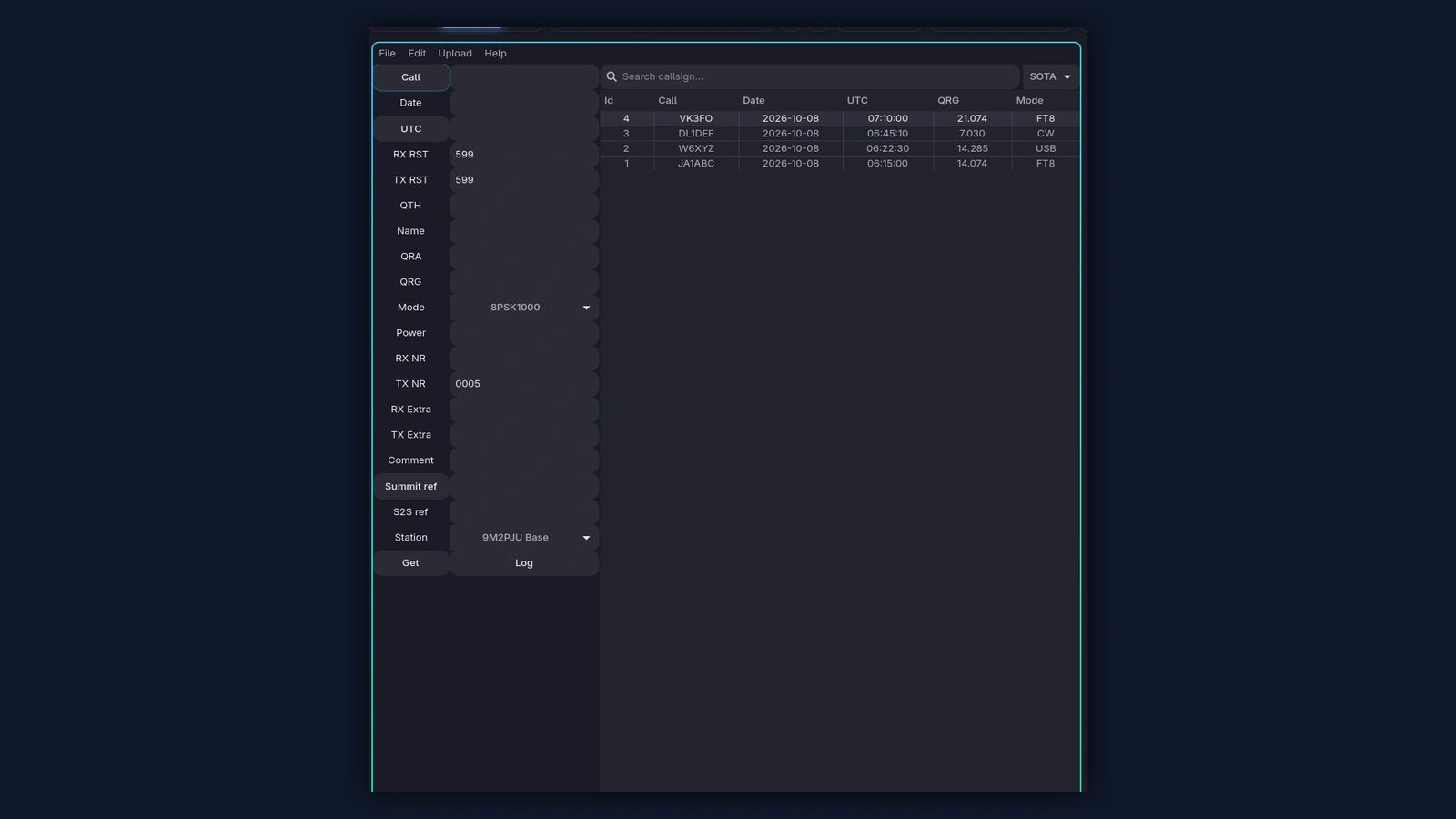
TL;DR: llog by Hungarian radio amateur Levente Kovacs (HA5OGL) is an open source, ultra-lightweight logging application for Linux built with native C and GTK4. Designed specifically for outdoor operators who carry a laptop into the field for Summits on the Air (SOTA), Parks on the Air (POTA), and World Wide Flora and Fauna (WWFF), llog bypasses the resource bloat of traditional shack loggers. It connects directly to GPSd to track station coordinates, queries an offline auxiliary SQLite database to calculate the nearest summit or park via the Spherical Law of Cosines, and features one-click reference insertion. With version 2.6.0, llog adds native WSJT-X UDP datagram parsing alongside FLDIGI XML-RPC control, automated duplicate QSO detection, secure credential storage through the FreeDesktop Secret Service API, and direct cloud syncing to LoTW (via TQSL), eQSL.cc, and the World Radio League (WRL) API.
What Is llog?
llog is an open source, minimalist amateur radio logging application for Linux built in C and GTK4, designed specifically for outdoor portable operations such as SOTA, POTA, and WWFF with automated GPSd location tracking, SQLite storage, and direct WSJT-X and cloud logbook integration.
+-----------------------------------------------------------------------------------------+
|                                  LLOG SYSTEM ARCHITECTURE                               |
+-----------------------------------------------------------------------------------------+

  [ External Hardware & Sensors ]                  [ Core Application Engine (Native C) ]
  ┌─────────────────────────────┐                  ┌────────────────────────────────────┐
  │ USB / Bluetooth GPS Puck    │──NMEA Streams───►│ GPSd Location Client (position.c)  │
  │ GPSd Daemon (port 2947)     │                  │ - Lat, Lon, Altitude MSL, Speed    │
  └─────────────────────────────┘                  └──────────────────┬─────────────────┘
                                                                      │ Coordinates
  [ Digital Radio Suites ]                                            ▼
  ┌─────────────────────────────┐                  ┌────────────────────────────────────┐
  │ WSJT-X / JTDX (UDP 2237)    │──Qt QDataStream─►│ Digital Integration Subsystems     │
  │ - Live status & auto-log    │                  │ - wsjtx_client.c (Binary parser)   │
  ├─────────────────────────────┤                  │ - xml_client.c (FLDIGI XML-RPC)    │
  │ FLDIGI (XML-RPC 7362)       │──XML-RPC POST───►│ - Instant frequency & report sync  │
  └─────────────────────────────┘                  └──────────────────┬─────────────────┘
                                                                      │ Logged Contacts
  [ Local Relational Storage ]                                        ▼
  ┌─────────────────────────────┐                  ┌────────────────────────────────────┐
  │ Auxiliary Geodesic DB       │◄──Spherical Law──│ GTK4 User Interface & Engine       │
  │ - SOTA, POTA, WWFF tables   │    of Cosines    │ - Resizable QSO columnar tree      │
  ├─────────────────────────────┤                  │ - Sticky operating parameters      │
  │ Station SQLite Logbook      │◄──Atomic SQL─────│ - Real-time duplicate QSO warning  │
  │ - log, station, upload tbls │   Transactions   │ - QRZ browser lookup integration   │
  └─────────────────────────────┘                  └──────────────────┬─────────────────┘
                                                                      │ Outbound Records
  [ Cloud QSL & Secret Storage ]                                      ▼
  ┌─────────────────────────────┐                  ┌────────────────────────────────────┐
  │ FreeDesktop Secret Service  │◄──D-Bus Secrets──│ Sync & Export Modules              │
  │ - GNOME Keyring / KWallet   │                  │ - lotw_window.c (ARRL TQSL bridge) │
  ├─────────────────────────────┤                  │ - eqsl_client.c (Direct HTTP POST) │
  │ Cloud Logbook Endpoints     │◄──HTTPS REST/API─│ - wrl_client.c (WRL REST API)      │
  │ - LoTW, eQSL.cc, WRL API    │                  │ - exporter_writer.c (ADIF/ADX/CSV) │
  └─────────────────────────────┘                  └────────────────────────────────────┘
Logging contacts from a remote summit, wind-swept ridge, or provincial nature park requires a tool built for field realities. For more than a decade, Levente Kovacs (HA5OGL) developed and refined llog as a personal, no-nonsense utility for portable operating and fixed shack work. Released under the GNU General Public License v3 (GPL-3.0), llog represents an intentional departure from cumbersome multi-window logging software. It delivers instant keyboard response, rock-solid stability on modest hardware, and zero dependence on cloud servers while out in the wilderness.
The Outdoor Operator’s Dilemma: Why Bloated Loggers Struggle in the Field
Operating portable amateur radio-especially under demanding award schemes like Summits on the Air (SOTA) or Parks on the Air (POTA)-imposes constraints that traditional shack software simply ignores:
- Battery Life and Compute Overhead: Heavy desktop suites like Cqrlog or Log4OM frequently rely on background relational database services such as MySQL or MariaDB, runtime interpreters, or heavy GUI runtimes. On an ultrabook running on battery at 2,000 meters elevation, unnecessary background cycles drain precious watt-hours that belong to your transceiver.
- The Fragility of Touchscreen Interfaces: While mobile logging apps like Ham2K Polo or HAMRS work well on tablets, operating a capacitive touchscreen with cold fingers, under direct midday sunlight, or in misty mountain drizzle is frustrating. Trying to tap tiny on-screen buttons while copying high-speed CW or handling an intense pileup costs time and leads to logging errors.
- The Multi-Window Clutter Trap: Traditional shack loggers scatter solar indices, greyline maps, cluster telnet streams, and band maps across multiple floating windows. On a compact 11-inch to 13-inch laptop screen, window management turns into an annoying obstacle.
- Offline Isolation: When activating remote peaks or backcountry parks, cellular connectivity is often non-existent. A logger that relies on live web queries to confirm a summit reference, compute a Maidenhead grid locator, or look up park identifiers becomes unusable.
HA5OGL designed llog specifically to eliminate these bottlenecks. Written in pure C using the modern GTK4 toolkit, the entire compiled binary is barely a few megabytes. It opens instantaneously, holds all operating controls in a unified, distraction-free window, and treats a laptop keyboard and local hardware sensors as first-class citizens.
Native C and GTK4: Lightweight Foundations
Unlike modern desktop applications built on Electron or multi-layered interpreted stacks, llog relies on lean, time-tested UNIX design principles:
- Native C Implementation: The entire codebase is implemented in C99/C11. Memory management is direct, CPU utilization remains close to zero when idling, and execution latency is virtually unmeasurable.
- GTK4 Desktop Toolkit: By using GTK4,
llogbenefits from hardware-accelerated rendering, crisp high-DPI font scaling, smooth keyboard navigation, and native system dark-theme integration. - Minimal External Dependencies: The application links against standard system libraries:
libsqlite3,libgtk-4,libgps,libhamlib,libxml2,libxmlrpc-core-c3,libcurl,libjson-c, and optionallibsecret-1.
This compact foundation means llog compiles in seconds and runs effortlessly on everything from a high-end Arch Linux workstation to a lightweight Debian netbook or a field-deployed Raspberry Pi 4/5.
Real-Time Location and Geodesic Intelligence via GPSd
One of the standout features of llog is its automated physical location awareness. Instead of forcing you to look up your coordinates, estimate your Maidenhead locator, or verify park boundaries manually before keying the microphone, llog integrates directly with the GPSd service daemon.
+-----------------------------------------------------------------------------------------+
|                          GPSD & GEODESIC REFERENCE RESOLUTION                           |
+-----------------------------------------------------------------------------------------+

  [ GPS Satellite Constellation ]
                 │
                 ▼
  [ USB / Bluetooth GPS Receiver ]
                 │
                 ▼ (NMEA sentences: $GPGGA, $GPRMC)
  [ gpsd Daemon on Host (port 2947) ]
                 │
                 ▼ (JSON stream: WATCH_ENABLE | WATCH_JSON)
  [ llog position.c Subsystem ]
  - Extracts Latitude, Longitude, Altitude MSL, Speed, 3D Fix Mode
                 │
                 ▼
  [ SQLite Geodesic Query on aux_db.sqlite ]
  - Evaluates Spherical Law of Cosines distance across summit_data & pota_park_data
                 │
                 ▼
  [ One-Click Reference Insertion ]
  - Operator clicks "Summit ref" button
  - Closest summit code (e.g., 9M/WP-001) and park ID instantly populate the QSO record
How the GPS Client Works
When llog launches, its background position thread (src/position.c) connects to the local GPS daemon via gps_open() and activates JSON telemetry streaming:
/* src/position.c: GPS stream initialization */
gps_stream(&gpsdata, WATCH_ENABLE | WATCH_JSON, NULL);
As the GPS hardware tracks satellites, position_step() ingests raw fixes. Whenever latitude, longitude, and Mean Sea Level (MSL) altitude data arrive, llog updates its internal position structure thread-safely:
if (gpsdata.set & LATLON_SET) {
    new_pos.lat = gpsdata.fix.latitude;
    new_pos.lon = gpsdata.fix.longitude;
    progress = true;
}
if (gpsdata.set & ALTITUDE_SET) {
    new_pos.alt = gpsdata.fix.altMSL;
    progress = true;
}
The live elevation, ground speed, distance, and heading are continuously available on the application status bar at the bottom of the interface.
The Auxiliary Geodesic Database
To make this coordinate data practically useful in the field without internet access, llog uses an offline auxiliary SQLite database (aux_db.sqlite). This database is built before heading out using the bundled utility script create_aux_db.py, which pulls international directory datasets directly from authoritative sources:
- SOTA Summits: Sourced directly from
sotadata.org.uk/summitslist.csv. - POTA Parks: Sourced directly from
pota.app/all_parks_ext.csv. - WWFF Reserves: Sourced directly from
wwff.co/wwff-data/wwff_directory.csv.
Instant Nearest Summit and Park Lookup
When you arrive at an operating site and click the Summit ref button, llog doesn’t search a flat list or rely on imprecise grid squares. Instead, db_sqlite.c executes a high-speed trigonometric search using the Spherical Law of Cosines directly inside the SQLite engine:
SELECT
    rowid, summit_code, summit_name, points, bonus_points,
    valid_from, valid_to, latitude, longitude, alt_m,
    (
        6371 * acos(
            cos(radians(:lat)) * cos(radians(latitude)) *
            cos(radians(longitude) - radians(:lon)) +
            sin(radians(:lat)) * sin(radians(latitude))
        )
    ) AS distance
FROM summit_data
ORDER BY distance ASC
LIMIT 1;
Within a few milliseconds, the database engine computes the exact great-circle distance between your GPS puck and every summit on earth, locates the single closest summit, and populates the reference field in your active QSO entry. A matching routine handles Parks on the Air via pota_park_data. If you operate portable across multiple summits or move between park boundaries during a road activation, your logging reference updates with zero manual typing.
User Interface Tour: Built for Rapid Contact Entry
The user interface of llog is intentionally compact, organized around a two-column desktop layout that keeps data entry fast and visual verification effortless.
The Left-Hand QSO Entry Panel
The left pane contains every parameter required for a complete contact exchange:
- Callsign & QRZ Integration: Enter the remote station callsign. Clicking the Call button immediately opens the station’s QRZ.com profile in your system web browser.
- Date & UTC Buttons: Click the UTC button to stamp the current time instantly, or let automated digital integrations manage timestamps.
- Signal Reports (RX / TX RST): Dedicated fields with intelligent defaults (such as
599for CW and digital modes, or59for phone). - QTH, Name, and QRA: Location name, operator handle, and 4-digit or 6-digit Maidenhead grid locator.
- QRG & Mode Selection: Frequency in MHz and an extensive dropdown covering standard and specialized modes (CW, SSB, AM, FM, FT8, FT4, PSK31, RTTY, and experimental modes like 8PSK1000).
- Contest & Activation Exchanges: Fields for power output, sent and received serial numbers (
TX NR,RX NR), and custom exchange extra tags. - SOTA, POTA, and WWFF References: Dedicated entry boxes for activator and chaser references (
Summit ref,S2S ref,POTA ref,P2P ref). - Station Selector: A dropdown linked to your station configuration profile (for example,
9M2PJU Baseor a dedicated portable profile). - Action Buttons (
Get&Log):Getretrieves live frequency and contact metadata from external digital software;Logcommits the QSO into the local database.
Sticky Fields: Eliminating Repetitive Keystrokes
When working a high-speed pileup from a summit, having a logging program wipe every field after each contact is counterproductive. Your operating frequency, mode, power output, summit reference, and station profile don’t change between QSOs.
In llog, these operating fields are deliberately sticky. When you click Log (or press Enter), llog writes the QSO to SQLite and clears the transient fields-callsign, signal reports, serial numbers, and comments-while keeping your operating frequency, mode, power, and summit reference intact. You can work fifty chasers in a row without touching your frequency or summit settings again.
Real-Time Duplicate QSO Detection
Accidentally logging duplicate contacts on the same band and mode can compromise contest scores and activation logs. llog integrates real-time duplicate checking via db_check_dup_qso().
As soon as you enter a callsign, llog queries the local SQLite database:
SELECT date, UTC FROM log WHERE call = :call COLLATE NOCASE;
If a prior contact matches, llog displays a clear visual warning in the terminal and user interface, indicating the exact date and UTC time the station was previously worked.
Rig Control and Digital Modes: WSJT-X and FLDIGI Integration
While llog was conceived as a minimalist logger for CW and SSB portable stations, the newly released v2.6.0 introduces first-class support for modern digital workflows.
+-----------------------------------------------------------------------------------------+
|                           DIGITAL SUITE INTEROPERABILITY                                |
+-----------------------------------------------------------------------------------------+

  [ WSJT-X / JTDX Transceiver Engine ]
                 │
                 ▼ (Qt QDataStream over UDP port 2237)
  [ llog wsjtx_client.c Native Binary Parser ]
  - Decodes Magic Header: 0xadbccbda
  - Parses WSJTX_MSG_STATUS (Type 1): Band, Mode, DX Grid, Sent RST
  - Parses WSJTX_MSG_QSO_LOGGED (Type 5): Start/End UTC, Received RST, Exchange
                 │
                 ▼
  [ Optional Auto-Log Pipeline ]
  - Updates llog GUI fields in real-time as you exchange frames
  - Commits to SQLite automatically upon QSO completion in WSJT-X
Native WSJT-X UDP Parser (v2.6.0)
Rather than running a heavyweight background scripting helper, llog implements a native binary decoder in src/wsjtx_client.c. It listens directly on standard UDP port 2237 for datagrams generated by WSJT-X and compatible derivatives like JTDX.
WSJT-X serializes network packets using Qt’s binary QDataStream format (big-endian). llog inspects the stream header, validates the magic signature (0xadbccbda), and handles two core message types:
WSJTX_MSG_STATUS(Type 1): As you tune the band or click callsigns on the waterfall, WSJT-X broadcasts status updates.llogextracts the operating frequency, mode, DX callsign, grid square, and report in real time, keeping the logging window synchronized with your radio.WSJTX_MSG_QSO_LOGGED(Type 5): When a contact concludes and you confirm the QSO in WSJT-X, a logged packet is broadcast.llogingests the final start time, end time, both signal reports, and operator comments.
Under Edit -> Preferences, operators can enable WSJT-X auto log. With this setting active, every contact completed in WSJT-X is immediately written to your llog SQLite database without requiring a single click.
+-----------------------------------------------------------------------------------------+
| TIP: MULTICAST WSJT-X SHARING                                                           |
| Standard unicast UDP (127.0.0.1:2237) can only be bound by one listening program at     |
| a time. If you run llog alongside GridTracker or JTAlert, set the UDP Server address to |
| a multicast address (such as 239.255.0.1) in WSJT-X and all listening applications.    |
+-----------------------------------------------------------------------------------------+
FLDIGI Integration via XML-RPC
For operators working soundcard digital modes such as PSK31, RTTY, Contestia, or Olivia, llog includes a built-in XML-RPC client (src/xml_client.c).
When FLDIGI is running, clicking the Get button in llog triggers a sequence of XML-RPC queries to http://localhost:7362/:
log.get_calllog.get_frequencylog.get_bandlog.get_rst_in&log.get_rst_outlog.get_locatorlog.get_name&log.get_qth
The extracted values populate the llog entry form instantly, bridging soundcard digital decoding with portable log archiving.
Relational SQLite Storage and the Git-Friendly Workflow
Traditional amateur radio loggers frequently store contacts in opaque proprietary binary databases or require full-blown SQL database servers running in the background. In contrast, llog stores every piece of station data in a single, standard SQLite3 database file.
Relational Schema Design
The llog schema (db/llog.sql) is structured into three clean relational tables:
BEGIN TRANSACTION;

CREATE TABLE IF NOT EXISTS station (
    name TEXT,
    CALL TEXT,
    OPERATOR_CALL TEXT,
    OPERATOR_NAME TEXT,
    QTH TEXT,
    QRA TEXT,
    ASL TEXT,
    rig TEXT,
    ant TEXT,
    comment TEXT
);

CREATE TABLE IF NOT EXISTS log (
    date TEXT,
    UTC TEXT,
    call TEXT,
    rxrst TEXT,
    txrst TEXT,
    rxnr INTEGER,
    txnr INTEGER,
    rxextra TEXT,
    txextra TEXT,
    QTH TEXT,
    name TEXT,
    QRA TEXT,
    QRG float,
    mode TEXT,
    pwr TEXT,
    rxQSL INTEGER,
    txQSL INTEGER,
    SOTA_REF TEXT,
    S2S_REF TEXT,
    POTA_REF TEXT,
    P2P_REF TEXT,
    WWFF_REF TEXT,
    W2W_REF TEXT,
    comment TEXT,
    station INTEGER default 1
);

CREATE TABLE IF NOT EXISTS upload (
    log_id INTEGER NOT NULL,
    service TEXT NOT NULL,
    remote_id TEXT,
    uploaded_at TEXT DEFAULT CURRENT_TIMESTAMP,
    UNIQUE(log_id, service)
);

COMMIT;
Why SQLite Fits Portable Operations
- Zero Administration: No daemons to start, no user permissions to configure, and zero background CPU usage when the logger is idle.
- Write-Ahead Logging (WAL) Durability:
llogmanages its SQLite connection using Write-Ahead Logging. Calls todb_merge_wal_file()execute full database checkpoints (PRAGMA wal_checkpoint(FULL);), ensuring that even if your laptop abruptly powers off on a mountaintop, uncommitted journal transactions are safeguarded against corruption. - Direct Querying and Visual Editing: Under Edit -> Log database,
lloglaunchessqlitebrowser. You can inspect raw tables, run ad-hoc SQL queries, adjust station metadata, or bulk-edit records with standard SQL tools. - Version Control via Git: Because the entire log lives in a single local file (such as
~/.local/share/llog/my_station.sqlite), managing your logbook with Git is straightforward. You can commit your log on your field laptop after an activation, push it to a private Git repository, and pull it to your shack desktop without managing complex database export/import routines.
Cloud Sync and Credential Security
Once your portable operation is complete and you return to home broadband or a mobile hotspot, llog provides integrated modules to synchronize your QSOs with major online logging platforms.
+-----------------------------------------------------------------------------------------+
|                             CLOUD QSL UPLOAD ARCHITECTURE                               |
+-----------------------------------------------------------------------------------------+

                                 ┌─────────────────────────┐
                                 │   llog Upload Manager   │
                                 └────────────┬────────────┘
                                              │
         ┌────────────────────────────────────┼────────────────────────────────────┐
         │                                    │                                    │
         ▼                                    ▼                                    ▼
  [ ARRL LoTW ]                       [ eQSL.cc ]                         [ World Radio League ]
  - Formats temporary ADIF            - Direct HTTP POST                  - Modern REST API
  - Calls tqsl with station cert      - Uploads mode, band, RST           - Respects 60 req/min limit
  - Cryptographically signs log       - Records per-QSO response          - Syncs logbook UUID
         │                                    │                                    │
         └────────────────────────────────────┼────────────────────────────────────┘
                                              │
                                              ▼
                                 ┌─────────────────────────┐
                                 │    SQLite upload Table  │
                                 │ - log_id, service, date │
                                 │ - UNIQUE(log_id, svc)   │
                                 │ - Prevents duplicate TX │
                                 └─────────────────────────┘
1. ARRL Logbook of the World (LoTW) via TQSL
LoTW requires every uploaded ADIF file to be cryptographically signed using a private callsign certificate issued by the ARRL. Rather than attempting a fragile re-implementation of the signature logic, llog interfaces directly with ARRL’s official TrustedQSL (TQSL) utility (src/lotw_window.c):
tqsl -x -d -u -a compliant -l <station_location> <temp_adif_file>
The output from TQSL is piped directly into the llog status window. Once TQSL confirms successful submission, llog records each QSO in the upload table so the same contacts are never re-transmitted.
2. eQSL.cc Direct Sync
The eQSL module (src/eqsl_client.c) uploads contacts directly over HTTP. Each contact is submitted with its frequency, ADIF mode/submode, sent report, and power. As eQSL accepts each record or identifies it as an existing duplicate, llog flags the entry as uploaded.
3. World Radio League (WRL) API
The newest cloud addition is direct integration with the World Radio League platform (src/wrl_client.c). Using your WRL developer API key, llog connects to the WRL REST API, retrieves your default logbook identifier, and uploads pending QSOs. The client enforces WRL’s 60-request-per-minute rate limit, ensuring large activation uploads proceed cleanly without triggering HTTP 429 throttling errors.
Secure Credential Storage via FreeDesktop Secret Service
Many amateur radio tools store user passwords and cloud API keys in plaintext inside unencrypted configuration files. llog takes a more secure approach through libsecret (src/secret_store.c):
- Encrypted Desktop Keyring: Your eQSL password and WRL API key are stored directly in your system’s desktop keyring (such as GNOME Keyring or KWallet) using the schema
eu.logonex.llog.Secret. - System Login Integration: The credentials unlock automatically when you log into your desktop session and remain encrypted on disk.
- Headless Fallback: If
llogis run on a minimal window manager without an active Secret Service daemon, it stores credentials in~/.config/llog/llog.cfand automatically restricts file permissions to owner-only read/write (0600).
Comparison: llog vs Other Linux Amateur Radio Loggers
To understand where llog fits into the amateur radio software ecosystem, consider how it compares with other common logging applications:
| Feature / Metric | llog (v2.6.0) | Cqrlog | KLog | Ham2K Polo | PyQSO |
|---|---|---|---|---|---|
| Primary Focus | Outdoor Portable (SOTA / POTA) | Full Shack Workstation | General Shack & Contesting | Mobile / Smartphone SOTA | Lightweight Desktop Logging |
| Language & Toolkit | Native C / GTK4 | Free Pascal / Lazarus | C++ / Qt5 & Qt6 | Flutter / Dart | Python 3 / GTK3 |
| Database Engine | SQLite3 (Single File) | MySQL / MariaDB Server | SQLite3 | Local Storage | SQLite3 |
| GPSd Hardware Integration | Built-in (Automatic) | No (Manual coords) | No | Phone GPS | No |
| Offline SOTA/POTA Lookup | Built-in (Trigonometric SQL) | No | External Web Query | Built-in | No |
| Sticky Activation Fields | Yes (Optimized for pileups) | Partial | No | Yes | No |
| WSJT-X UDP Integration | Built-in (Binary parser) | UDP / TCP Bridging | UDP Broadcast | No | No |
| FLDIGI Integration | Built-in (XML-RPC) | TCP Socket | Limited | No | XML-RPC |
| LoTW Upload Method | Native TQSL bridge | TQSL script | TQSL bridge | Manual ADIF | Manual ADIF |
| Credential Security | FreeDesktop Secret Service | Plaintext config | Plaintext config | Android Keystore | Plaintext |
| Binary / Package Footprint | Extremely Light (~3 MB) | Heavy (~80 MB + MySQL) | Medium (~35 MB) | Mobile APK | Light (~15 MB) |
Installation and Field Deployment Guide
Setting up llog on a modern Linux distribution is straightforward. Below are step-by-step instructions for compiling from source and preparing your auxiliary database.
1. Install Build Dependencies
On Debian, Ubuntu, Linux Mint, and Raspberry Pi OS:
sudo apt update
sudo apt install -y \
    build-essential cmake git \
    libsqlite3-dev libgtk-4-dev libgps-dev \
    libhamlib-dev libxml2-dev libxmlrpc-core-c3-dev \
    libcurl4-openssl-dev libjson-c-dev libsecret-1-dev \
    gpsd gpsd-tools sqlitebrowser trustedqsl python3-requests
On Arch Linux, CachyOS, and Manjaro:
sudo pacman -S --needed \
    base-devel cmake git \
    sqlite gtk4 gpsd \
    hamlib libxml2 curl json-c libsecret \
    sqlitebrowser trustedqsl python-requests
(Note: If compiling against FLDIGI XML-RPC on Arch, ensure xmlrpc-c is installed from the official repositories or AUR).
2. Clone the Repository and Compile
git clone https://github.com/leventelist/llog.git
cd llog
mkdir build && cd build
cmake ..
make -j$(nproc)
sudo make install
The build produces a single optimized binary installed to /usr/local/bin/llog along with desktop menu icons and database definitions.
3. Generate the Offline Auxiliary Database (Crucial First Step)
Before taking your laptop to a remote summit or park, you must initialize the auxiliary database while connected to the internet. If you skip this step, your operating mode dropdown will be empty, and summit lookups will fail:
cd ~/llog/aux_db
python3 create_aux_db.py
This script downloads the latest worldwide summits, POTA park boundaries, and WWFF reserves, building aux_db.sqlite inside your configuration path. You can also trigger an auxiliary rebuild directly from the running GUI via Edit -> Rebuild aux database.
4. Configure GPSd for Your USB Receiver
If you use a standard USB GPS puck (such as a u-blox 7 or 8 dongle):
# Check device enumeration
ls -l /dev/ttyACM0 /dev/ttyUSB0

# Start or restart gpsd pointing to your receiver
sudo gpsd /dev/ttyACM0 -F /var/run/gpsd.sock

# Verify live satellite reception
cgps -s
Launch llog using:
llog
The status bar at the bottom will display your latitude, longitude, and elevation as soon as the receiver acquires a 3D satellite fix.
Summary and Practical Verdict
For portable operators, simplicity in software is a virtue. When sitting on an exposed mountain summit or setting up a wire antenna in a provincial park, you want tools that do their job reliably without getting in your way.
llog delivers on that promise. By pairing a native C and GTK4 codebase with local SQLite storage, automated GPS tracking, and practical digital mode integrations, Levente Kovacs (HA5OGL) has built a fast, focused logging tool for Linux-based field operators. Whether you’re running CW pileups during a SOTA activation, hunting parks for POTA, or chasing weak-signal FT8 contacts with WSJT-X, llog deserves a permanent place on your portable shack laptop.
73 de 9M2PJU
Frequently Asked Questions (FAQ)
What is llog in amateur radio?
llog is an open source, minimalist ham radio logger for Linux created by HA5OGL. Built with native C and GTK4, it is designed for outdoor operations like SOTA, POTA, and WWFF with automated GPSd tracking, SQLite storage, and direct WSJT-X and cloud logbook sync.
How does llog find the nearest SOTA or POTA reference?
llog connects to GPSd to obtain real-time coordinates, then queries an offline auxiliary SQLite database. Using the Spherical Law of Cosines, it calculates great-circle distances to all worldwide summits and parks, letting operators insert the closest reference with one click.
Does llog support WSJT-X and digital modes?
Yes. Starting in version 2.6.0, llog includes a native binary UDP listener that parses WSJT-X datagrams in real time for live tracking and automatic logging. It also features an XML-RPC client for one-click contact imports from FLDIGI.
How are passwords and API keys stored in llog?
llog stores eQSL passwords and World Radio League API keys securely in your encrypted desktop keyring using the FreeDesktop Secret Service API (libsecret). On headless systems without a keyring, secrets fall back to an owner-only configuration file with strict 0600 permissions.
Which cloud logbooks can llog upload contacts to?
llog uploads directly to ARRL Logbook of the World (LoTW) using ARRL’s official TQSL utility, to eQSL.cc via HTTP POST, and to World Radio League via its REST API. It tracks submissions in an SQLite upload table to prevent duplicate transmissions.
Sources and Further Reading
- llog GitHub Repository by Levente Kovacs (HA5OGL)
- Summits on the Air (SOTA) Official Programme
- Parks on the Air (POTA) Documentation
- World Wide Flora and Fauna (WWFF) Directory
- GPSd – A GPS Service Daemon
- WSJT-X FT8/FT4 Protocol and Software
- ARRL Logbook of the World & TrustedQSL
- FreeDesktop Secret Service API Specification






Post Comment