APRSBox: Build the Ultimate APRS Console and Digipeater Daemon on Raspberry Pi
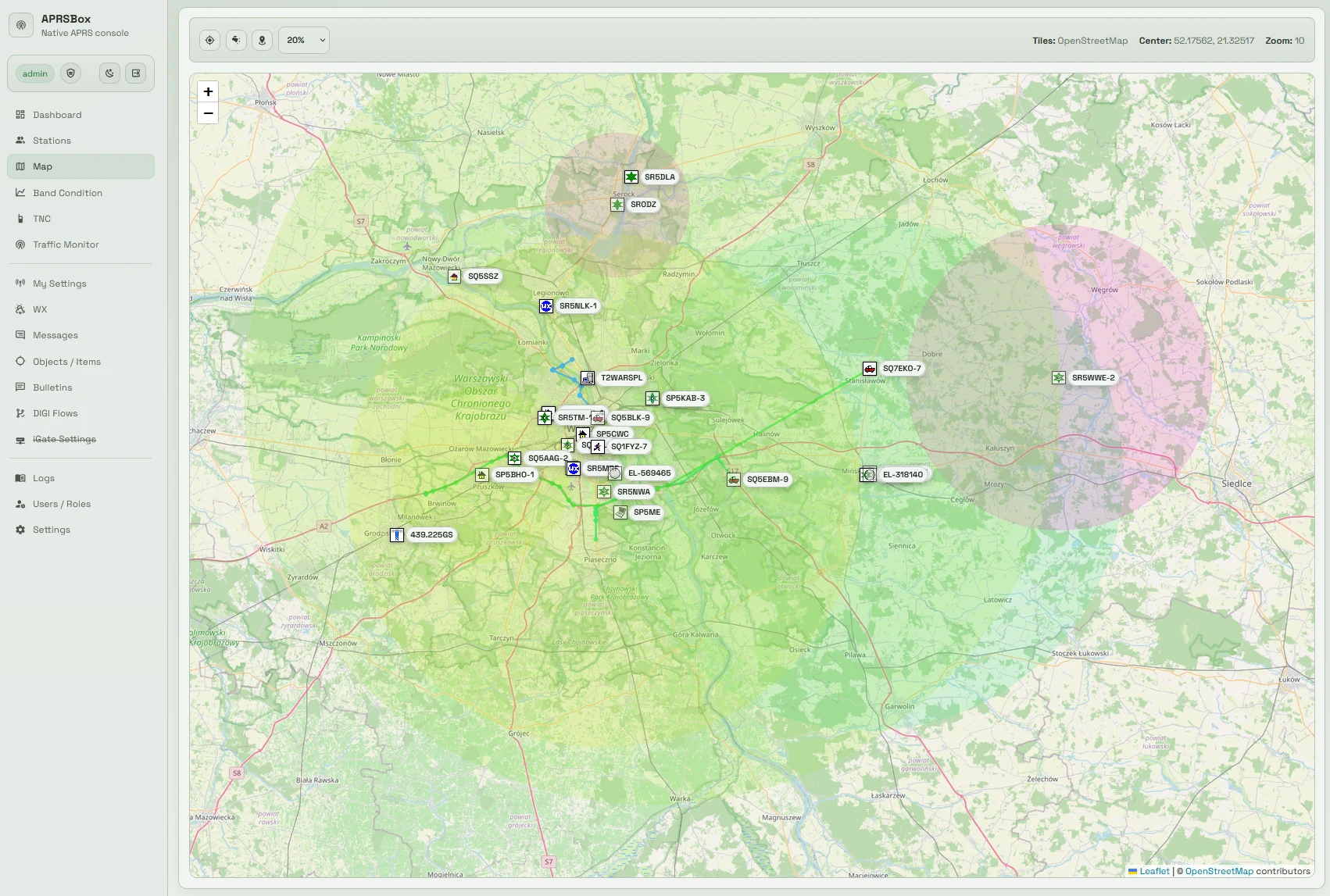
TL;DR: APRSBox by Polish amateur radio operator Radosław (Radek) SQ9MDD is an open source, all-in-one APRS operations platform, digipeater, and background daemon designed for Raspberry Pi and Linux hosts (Debian, Ubuntu, and Alpine Linux). Moving beyond basic web scrapers and static terminal utilities, APRSBox pairs a modern FastAPI web interface with an independent core runtime daemon. The system ingests packet traffic from TCP KISS (such as Direwolf), hardware serial TNCs, and OpenWebRX MQTT streams, passing frames through a visual, block-based Packet Routing (DIGI Flows) engine equipped with strict RF-safety filters. Beyond standard iGate and digipeater roles, APRSBox integrates directly with Home Assistant and Domoticz to broadcast local weather telemetry, calculates real-time VHF tropospheric band conditions (W0 to W5) from received RF baselines, and parses civil emergency weather alerts (CAWF and NWS-WARN). With automated single-command installers and turnkey Docker containers, APRSBox is one of the most capable shack automation platforms available.
What Is APRSBox?
APRSBox is an open source, all-in-one APRS console and background daemon for Linux and Raspberry Pi that combines dual-process FastAPI architecture, visual node-based packet routing, multi-interface KISS and MQTT reception, smart home weather station broadcasting, and automated VHF propagation monitoring into an authenticated web interface.
+-----------------------------------------------------------------------------------------+
|                                APRSBOX SYSTEM ARCHITECTURE                              |
+-----------------------------------------------------------------------------------------+

  [ Radio Transceivers & RF Feeds ]                 [ Linux Host (Raspberry Pi / Alpine) ]
  ┌───────────────────────────────┐                 ┌─────────────────────────────────────┐
  │ Direwolf Soundmodem / TNC-Pi  │──KISS over TCP─►│ Interface Broker Subsystem          │
  │ Hardware TNC (/dev/ttyUSB0)   │──Serial KISS───►│ - TCP KISS Client (Direwolf:8001)   │
  │ OpenWebRX SDR Receiver Feed   │──MQTT Stream───►│ - Serial KISS Engine with Watchdogs │
  └───────────────────────────────┘                 │ - OpenWebRX MQTT Topic Subscriber   │
                                                    │ - Shared LAN KISS Proxy (Expose Port│
  [ APRS-IS Internet Backbone ]                     └──────────────────┬──────────────────┘
  ┌───────────────────────────────┐                                    │
  │ APRS-IS Tier-2 Server Cluster │◄──TCP:14580 (qAO / qAR)────────────┤
  │ Derived Passcode Autologin    │                                    │
  └───────────────────────────────┘                                    ▼
                                                    ┌─────────────────────────────────────┐
  [ Smart Home & Weather Sensors ]                  │ app.core_main (Core Runtime Daemon) │
  ┌───────────────────────────────┐                 │ - AX.25 UI Frame Decoder            │
  │ Home Assistant (REST API)     │──Bearer Token──►│ - SQLite WAL Outbound Job Queue     │
  │ Domoticz (REST API)           │──Basic Auth────►│ - Visual Packet Routing Engine      │
  └───────────────────────────────┘                 │ - WX Scheduler & Unit Normalizer    │
                                                    │ - W0-W5 Tropospheric Ducting Model  │
  [ Web & Management Clients ]                      │ - CAWF / NWS-WARN Alert Processor   │
  ┌───────────────────────────────┐                 └──────────────────┬──────────────────┘
  │ Web Browser (Desktop / Mobile)│                                    │
  │ HTTPS Port 443 / HTTP 8000    │◄──FastAPI / REST / WebSockets──────┤
  │ Authenticated Admin Session   │                                    ▼
  └───────────────────────────────┘                 ┌─────────────────────────────────────┐
                                                    │ app.main (Web GUI & Management)     │
                                                    │ - Leaflet Map & Spiderfier Markers  │
                                                    │ - Station Readiness Checklist       │
                                                    │ - Visual DIGI Flow Builder          │
                                                    │ - Interactive Message Console       │
                                                    └─────────────────────────────────────┘
For decades, running an amateur radio packet station or APRS iGate on Linux has been an exercise in stitching together disconnected command-line tools. An operator typically configured direwolf for audio demodulation, chained it to aprx or javAPRS for digipeating, scripted cron jobs to parse weather station logs, and left headless daemons running without real-time visibility or interactive control. Troubleshooting dropped packets or routing loops required parsing sprawling text logs with grep.
SQ9MDD created APRSBox to solve this operational fragmentation. By applying modern software engineering patterns-splitting responsibilities between a resilient background daemon and a reactive web application-APRSBox provides amateur radio operators with an enterprise-grade control room for packet operations.
Core Architecture: The Dual-Process FastAPI Model
A decoupled dual-application architecture written in Python and built on the FastAPI framework:
app.core_main(The APRS Core Runtime Daemon): Runs as an independent system service (aprsbox-core). It maintains persistent connections to physical TNCs, listens for OpenWebRX MQTT broadcasts, connects to APRS-IS, decodes incoming AX.25 UI frames into TNC2 structures, queues outbound transmissions in an SQLite database, and executes background schedulers.app.main(The Web GUI Application): Runs as a separate web service (aprsbox-web) under Uvicorn. It provides an authenticated dashboard, interactive Leaflet mapping, station configuration forms, and real-time packet monitors without blocking the RF packet processing loop.
+-----------------------------------------------------------------------------------------+
|                        DUAL-PROCESS INTER-SERVICE WORKFLOW                              |
+-----------------------------------------------------------------------------------------+

   [ app.core_main Daemon ]                              [ app.main Web Console ]
   ┌────────────────────────────────┐                    ┌────────────────────────────────┐
   │ - Background Packet Processor  │                    │ - Authenticated User Session   │
   │ - Persistent TNC Links         │                    │ - Interactive Flow Builder     │
   │ - Outbound Job Execution       │                    │ - Leaflet Map Visualizer       │
   │ - Schedulers (WX, Beacons)     │                    │ - System Diagnostics & Logs    │
   └───────────────┬────────────────┘                    └────────────────┬───────────────┘
                   │                                                      │
                   ▼                                                      ▼
   ┌──────────────────────────────────────────────────────────────────────────────────────┐
   │                        Shared SQLite Database (/opt/aprsbox/data)                    │
   │ - Thread-safe Write-Ahead Logging (WAL mode)                                         │
   │ - Ingested Frames, Heard Stations, Outbound Queues, Alarms, and Routing Rules        │
   └──────────────────────────────────────────────────────────────────────────────────────┘
Why Decoupling Matters
In single-threaded or monolithic APRS applications, rendering a heavy geographic map or executing a slow REST query to an external weather station can freeze the serial buffer. In APRSBox, even if an operator reboots the web interface or runs a complex database query, app.core_main continues listening to the radio, acknowledging packets, and executing digipeater flows without dropping a single byte of RF data.
Enterprise Process and Security Management
- Native Service Daemons: APRSBox includes native service definitions for both systemd (Debian, Raspberry Pi OS, Ubuntu) and OpenRC (Alpine Linux).
- Built-in HTTPS & Automated Redirection: APRSBox features an integrated TLS certificate manager. In HTTP mode, it listens on port 8000. When HTTPS is toggled on, the application switches Uvicorn to port 443 with native SSL certificate verification (
aprsbox.crtandaprsbox.key) and starts an automated redirect service on port 80 that routes incoming requests to HTTPS via HTTP 308.
Visual Packet Routing: Building Digipeater and iGate Flows
The crown jewel of APRSBox is its Packet Routing (DIGI Flows) engine. Rather than editing cryptic, error-prone configuration files, operators configure traffic logic using a visual, top-to-bottom pipeline.
+-----------------------------------------------------------------------------------------+
|                            DIGI FLOW PACKET PIPELINE LOGIC                              |
+-----------------------------------------------------------------------------------------+

  [ SOURCE BLOCKS ]
  ┌─────────────────────────────────────────────────────────────────────────────────────┐
  │ Receiver RF (Physical TNC)  │  Local TX (Internally Generated)  │  APRS-IS Network  │
  └──────────────────────────────────────────┬──────────────────────────────────────────┘
                                             │ Incoming Packet
                                             ▼
  [ MODULAR FILTER & SAFETY BLOCKS ] (Processed Top-to-Bottom)
  ┌─────────────────────────────────────────────────────────────────────────────────────┐
  │ 1. RF Duplicate Delay Filter        - Drops identical frames heard within N seconds │
  │ 2. Direct RF Reception Filter       - Accepts only packets heard direct (0 digis)   │
  │ 3. Source Callsign Filter           - Whitelist / blacklist by exact call or mask   │
  │ 4. Distance / Zone Filter           - Drops stations outside a geographic radius    │
  │ 5. APRS Packet Type Filter          - Selects messages, beacons, WX, or telemetry   │
  │ 6. APRS Symbol Filter               - Filters by table / and overlay icon codes     │
  │ 7. Transmission Rate Filter         - Leaky-bucket limiter protecting airtime       │
  │ 8. RF Digipeating Path Rule         - Manages WIDE1-1 / WIDE2-2 path modification   │
  │ 9. APRS-IS Uplink Safety Rule       - Strips TCPIP, NOGATE, and malformed frames    │
  └──────────────────────────────────────────┬──────────────────────────────────────────┘
                                             │ Passed Packet
                                             ▼
  [ TARGET BLOCKS ]
  ┌─────────────────────────────────────────────────────────────────────────────────────┐
  │ TX RF (Transmitter)         │  TX APRS-IS (Global Backbone)     │  Black Hole (Drop)│
  └─────────────────────────────────────────────────────────────────────────────────────┘
Standard Flow Implementations:
- Classic RF to APRS-IS iGate (
Receiver RF -> TX APRS-IS):
Locally received RF frames pass through the mandatory APRS-IS Uplink Safety Rule. Frames containingTCPIP,TCPXX,NOGATE, orRFONLYare discarded, ensuring local RF noise or loopback packets never pollute the global server cluster. - Standard VHF Digipeater (
Receiver RF -> TX RF):
Incoming frames are checked against the RF Duplicate Delay Filter and the RF Digipeating Path Rule. The engine decrements hop counts (such asWIDE1-1toWIDE1*), appends your station callsign, and queues the packet for transmission. - Internal Telemetry and Beacons (
Local TX -> TX APRS-IS):
Locally generated station beacons, weather reports, and status announcements are injected directly into the APRS-IS backbone with theTCPIP*designator. - Diagnostic Sink (
Receiver RF -> Black Hole):
Allows operators to test new filter combinations or observe raw receiver performance without transmitting frames over the air or the internet.
Strict Fail-Closed APRS-IS Safety Contract
Internet-to-RF routing in amateur radio requires extreme caution to avoid congesting local frequencies with global internet traffic. APRSBox enforces strict fail-closed safety guards:
– No Stale Replays: APRS-IS transmission operates under an explicit best-effort contract. Any packet delayed more than 5 seconds between arrival and physical transmission is dropped.
– Connection Guard: If an internet connection hiccups, APRSBox drops unwritten frames immediately rather than buffering them in memory to flood the channel upon reconnection.
– Heard-Station Gating: Traffic from APRS-IS is only gated to RF if the destination station has been actively heard over local RF, protecting the local VHF channel.
Multi-Interface Connectivity: KISS, Serial, and OpenWebRX MQTT
APRSBox supports simultaneous, multi-port station configurations across physical transceivers and software-defined radios:
+-----------------------------------------------------------------------------------------+
|                               INTERFACE BROKER WORKFLOW                                 |
+-----------------------------------------------------------------------------------------+

  ┌──────────────────────────────────────┐          ┌───────────────────────────────────┐
  │ TCP KISS Interface                   │          │ Serial KISS Interface (SERIALL)   │
  │ Host: 127.0.0.1  Port: 8001          │          │ Port: /dev/ttyUSB0  Baud: 9600    │
  │ - Direwolf software soundcard        │          │ - TNC-X, TNC-Pi, Mobilinkd TNC4   │
  │ - Dedicated TX Min Gap pacing        │          │ - Hardware RX Silence Watchdog    │
  └──────────────────┬───────────────────┘          └─────────────────┬─────────────────┘
                     │                                                │
                     └───────────────────────┬────────────────────────┘
                                             ▼
  ┌─────────────────────────────────────────────────────────────────────────────────────┐
  │ Shared Interface Core Engine                                                        │
  │ - OpenWebRX MQTT Subscriber: Receives remote SDR AX.25 decodes over LAN             │
  │ - APRS-IS Shared Connection: Bi-directional stream with server filter (e.g. m/50)   │
  │ - LAN KISS Proxy (Expose Port): Multiplexes physical TNC to up to 3 remote PCs      │
  └─────────────────────────────────────────────────────────────────────────────────────┘
- TCP KISS: Directly links to local or remote Direwolf instances, micro-controllers, or network TNCs running on port 8001.
- Serial KISS (SERIALL): Native Linux serial communication (
/dev/ttyUSB0,/dev/ttyACM0) supporting configurable baud rates (1200, 9600, 19200, 38400, 57600, 115200). It features an integrated RX Silence Watchdog that monitors physical byte reception and resets stale serial handles if the channel drops. - OpenWebRX MQTT Ingestion: For stations monitoring multiple receiver sites, APRSBox can subscribe directly to an OpenWebRX MQTT broker (
mqtt://ormqtts://). Decoded packets from remote web receivers flow into APRSBox as an RX-only interface, expanding station reception beyond the immediate shack antenna. - Shared LAN KISS Proxy (“Expose Port”): APRSBox can act as a TNC server for the rest of your local network. By enabling the LAN proxy, other shack computers running applications like YAAC, PinPoint APRS, or Winlink can share the primary physical TNC through APRSBox, complete with an IP CIDR whitelist.
Smart Home Weather Integration: Home Assistant and Domoticz
Broadcasting local weather telemetry on APRS provides critical ground-truth data for the National Weather Service (NWS), Citizens Weather Observer Program (CWOP), and neighboring hams. Interfacing personal weather stations (Davis Instruments, Ecowitt, Ambient Weather) with packet radio usually requires specialized hardware decoders.
APRSBox bypasses this complexity by fetching telemetry directly from your existing smart home controllers:
+-----------------------------------------------------------------------------------------+
|                             WEATHER TELEMETRY FLOW PIPELINE                             |
+-----------------------------------------------------------------------------------------+

  [ Smart Home Controller ]                         [ APRSBox WX Normalizer ]
  ┌─────────────────────────┐                       ┌─────────────────────────────────────┐
  │ Home Assistant /        │──HTTP REST Poller────►│ Sensor Unit Normalization:          │
  │ Domoticz API            │  (Bearer Token / Auth)│ - Wind Speed (mph) & Direction (deg)│
  │ - Davis, Ecowitt, WX-Net│                       │ - Ambient Temperature (Fahrenheit)  │
  └─────────────────────────┘                       │ - Rain: 1h, 24h, midnight (c-in)    │
                                                    │ - Humidity (%), Barometer (0.1 hPa) │
                                                    │ - Luminosity, Radiation, Battery    │
                                                    └──────────────────┬──────────────────┘
                                                                       │
                                                                       ▼
                                                    ┌─────────────────────────────────────┐
                                                    │ Outbound WX Frame Generator         │
                                                    │ Callsign: SQ9XYZ-13 (Dedicated SSID)│
                                                    │ Format: Complete APRS WX Payload    │
                                                    │ Schedule: Configurable Timer Jitter │
                                                    └──────────────────┬──────────────────┘
                                                                       │
                                             ┌─────────────────────────┴───────────────┐
                                             ▼                                         ▼
                                ┌────────────────────────┐                ┌────────────────────────┐
                                │ Radio Interface (RF)   │                │ APRS-IS Uplink (TCP)   │
                                └────────────────────────┘                └────────────────────────┘
- Direct API Integration: Connects to Home Assistant via long-lived Bearer tokens or Domoticz via Basic Authentication. An integrated discovery tool scans your home automation setup, allowing you to select weather entities from a dropdown menu.
- Complete WX Normalization: Raw sensor readings are converted automatically into standard APRS weather telemetry units:
- Wind direction (000-360 degrees) and sustained speed (mph)
- Temperature (Fahrenheit)
- Rainfall in the last hour, last 24 hours, and since midnight (hundredths of an inch)
- Relative humidity (percentage) and barometric pressure (tenths of hPa)
- Solar luminosity, ionizing radiation, and station battery voltage
- Dedicated Weather Identity: To comply with APRS operating standards, weather telemetry is broadcast under a dedicated secondary SSID (such as
9M2PJU-13), keeping your personal station beacon separate from automated environmental observations.
Empirical VHF Tropospheric Propagation Assessment (W0-W5)
One of the most remarkable technical innovations in APRSBox is its automated Tropospheric Band Condition Assessment Model.
VHF signals on 144 MHz normally travel line-of-sight plus a small radio horizon factor. Atmospheric temperature inversions create tropospheric ducting, allowing 2-meter signals to travel hundreds or thousands of kilometers.
+-----------------------------------------------------------------------------------------+
|                       TROPOSPHERIC BAND ASSESSMENT (W0-W5) PIPELINE                     |
+-----------------------------------------------------------------------------------------+

  [ Incoming RF Traffic ]
  ┌─────────────────────────────────┐
  │ Received 2m & 70cm Packets      │ ──► Ignore third-party encapsulated frames
  └────────────────┬────────────────┘
                   │
                   ▼
  [ 28-Day Running Baseline Model ]
  ┌─────────────────────────────────────────────────────────────────────────────────────┐
  │ - Calculates median reception distance per unique fixed station                     │
  │ - Filters outliers using Median Absolute Deviation (MAD Scale = 1.4826)             │
  │ - Establishes Far (MAD-Z = 3.5) and Very-Far (MAD-Z = 5.0) distance thresholds      │
  └────────────────┬────────────────────────────────────────────────────────────────────┘
                   │
                   ▼
  [ Real-Time Opening Classifier ]
  ┌───────────────┬─────────────────────────────────────────────────────────────────────┐
  │ Level W0 / W1 │ Normal / Degraded Conditions: Baseline reception distance           │
  │ Level W2      │ Slight Enhancement: Scattered distant receptions above average      │
  │ Level W3      │ Moderate Opening: 35%+ station increase; verified distant stations  │
  │ Level W4      │ Strong Opening: Multiple verified very-far stations across segments │
  │ Level W5      │ Extreme Tropospheric Ducting: Significant reach expansion into new  │
  │               │ 0.5-degree geographic grid squares                                  │
  └───────────────┴─────────────────────────────────────────────────────────────────────┘
Rather than relying on static online propagation models, APRSBox monitors incoming 2-meter and 70-centimeter packets in real time:
– Baseline Learning: Over a 28-day window, APRSBox builds a statistical baseline of normal reception distances for every fixed station heard.
– Robust Statistical Filtering: To prevent mobile vehicles or random bursts from skewing the model, APRSBox uses Median Absolute Deviation (MAD) outlier filtering. Third-party packets are strictly ignored.
– Verification Across Time Segments: To trigger an elevated opening level, a distant station must be heard across at least three distinct time segments, eliminating single-packet meteor scatter or aircraft scatter flukes.
– W0 to W5 Scale: Operators can glance at their APRSBox dashboard and instantly see local VHF propagation conditions, alerting them to grab the microphone and hunt DX on 2 meters.
Emergency Warnings and Weather Alarms (CAWF and NWS-WARN)
APRS was designed from day one to deliver emergency bulletins. APRSBox includes a dedicated alert processing engine that ingests emergency group bulletins:
- CAWF (Common Alerting Protocol Warning Format): Decodes international warning messages (such as
PL-WARN) into structured alerts, categorizing them into weather, flood, heat, and severe storm events. - NWS-WARN: In the United States, APRSBox monitors National Weather Service county alerts, parsing UGC county codes and matching them against local geometry tables.
- Interactive Map Polygons & Popups: When a severe weather alert is received, APRSBox draws the affected county polygon directly onto the Leaflet basemap and triggers an emergency modal banner on the operator’s console.
APRSBox vs Traditional APRS Infrastructure Software
To see how APRSBox compares with other Linux and desktop APRS solutions, examine the following comparison:
| Feature / Metric | APRSBox (SQ9MDD) | aprx (C Daemon) | Direwolf (Standalone) | YAAC (Java Desktop) | Polaric Server |
|---|---|---|---|---|---|
| Primary Role | Unified Web Console & Daemon | Headless Digipeater / iGate | Software DSP Modem / Digi | Desktop Station Client | Tracking & Dispatch Server |
| User Interface | Modern Responsive Web (FastAPI) | None (Config file only) | Terminal CLI Only | Desktop Swing GUI | Heavy Web GIS Interface |
| Packet Routing | Visual Node-Based DIGI Flows | Text Rule Blocks | Digipeater Subroutines | Filter Dialog Menus | Fixed Relay Logic |
| Smart Home WX | Native Home Assistant / Domoticz | External Script Pipes | External Serial / Weatherflow | Weather Underground / Serial | External Python Scripts |
| Tropospheric DX | Automated W0-W5 Model (MAD) | None | None | None | None |
| Emergency Alerts | Native CAWF & NWS-WARN Polygons | Raw Bulletins Only | Raw Bulletins Only | Basic Bulletin Alerts | Custom Alert Plugins |
| OpenWebRX Link | Native MQTT Topic Subscriber | No | No | No | No |
| KISS LAN Proxy | Built-in Multi-Client Server | Native KISS Server | Native KISS Port 8001 | No | No |
| Native HTTPS | Integrated PKI & Port Redirect | N/A | N/A | N/A | Reverse Proxy Required |
| OS Footprint | Raspberry Pi OS, Alpine, Docker | Lightweight C Daemon | C Audio Subsystem | Heavy JVM Runtime | Heavy Perl / Java Stack |
Step-by-Step Installation Guide
Setting up APRSBox on a Raspberry Pi or Linux server can be completed in minutes using the automated installation scripts or Docker.
Method 1: Single-Command Native Installer
The native installer automatically configures system dependencies, creates an isolated Python virtual environment, initializes the SQLite database in /opt/aprsbox/data, creates the admin user, and starts the system services.
On Raspberry Pi OS / Debian / Ubuntu:
curl -fsSL https://raw.githubusercontent.com/SQ9MDD/APRSBox/main/scripts/install.sh | \
  sudo env APRSBOX_GIT_URL=https://github.com/SQ9MDD/APRSBox.git APRSBOX_GIT_BRANCH=main sh
On Alpine Linux (Run as root):
curl -fsSL https://raw.githubusercontent.com/SQ9MDD/APRSBox/main/scripts/install.sh | \
  env APRSBOX_GIT_URL=https://github.com/SQ9MDD/APRSBox.git APRSBOX_GIT_BRANCH=main sh
Note: The Alpine installer uses BusyBox user tools and Alpine’s native doas, eliminating dependencies on sudo or shadow packages.
Method 2: Turnkey Docker Deployment
If you prefer containerized workloads, APRSBox provides a pre-built Docker image:
docker run -d \
  --name aprsbox \
  --restart unless-stopped \
  -p 8000:8000 \
  -v aprsbox_data:/opt/aprsbox/data \
  -v aprsbox_logs:/opt/aprsbox/logs \
  sq9mddpl/aprsbox:1.8.25.dev
Initial Configuration Walkthrough
- Access the Console: Open your web browser and navigate to
http://<your-pi-ip>:8000/login. - Default Username:
admin - Default Password:
aprs
(Immediately update your password under Settings!) - Configure Station Identity: Open My Station, enter your callsign, select an SSID (e.g.,
9M2PJU-1for a digi or9M2PJU-10for an iGate), select your APRS icon, and set your geographic coordinates. - Add Interfaces: Open Interfaces and add your TNC:
- For Direwolf: Add a
TCPinterface with address127.0.0.1:8001. - For a hardware TNC: Add a
SERIALLinterface with device path/dev/ttyUSB0and baud rate9600. - For APRS-IS: Enable the built-in
APRS-IS (RX/TX)interface. - Build Your Packet Routing Flows: Open Packet Routing and add your core flows:
Local TX -> TX APRS-IS(for station beacons and weather)Receiver RF -> TX APRS-IS(for iGate uplink)Receiver RF -> TX RF(for digipeater repeating, if authorized)- Verify Station Readiness: Return to the Dashboard and check the Station Readiness checklist card. Ensure all configured paths display a crisp green status indicator.
Frequently Asked Questions (FAQ)
What is APRSBox and what hardware does it run on?
APRSBox is an open source APRS console and background daemon created by SQ9MDD. It runs natively on Raspberry Pi (all models), Debian, Ubuntu, and Alpine Linux, as well as inside Docker containers.
How does APRSBox route packets between RF and APRS-IS?
APRSBox uses a visual, block-based Packet Routing engine. Operators define source-to-destination pipelines with modular filters that suppress duplicates, enforce digipeat paths, and strictly prevent internet packets from flooding local RF frequencies.
Can APRSBox broadcast weather data from Home Assistant?
Yes. APRSBox connects directly to Home Assistant or Domoticz via REST APIs. It normalizes temperature, wind, rain, and humidity into standard APRS format and broadcasts telemetry over RF or APRS-IS on a dedicated SSID.
How does the W0-W5 band condition monitor work?
APRSBox establishes a 28-day statistical baseline of received RF packet distances on 2m and 70cm. Using Median Absolute Deviation (MAD), it detects tropospheric ducting openings from Level W0 (degraded) to W5 (extreme opening).
Can APRSBox operate in a Docker container?
Yes. APRSBox distributes an official Docker image (sq9mddpl/aprsbox). When run in a container, persistent configuration and logs are mapped to host volumes, and the web interface is exposed on port 8000.
Sources and Further Reading
- APRSBox Official GitHub Repository: https://github.com/SQ9MDD/APRSBox
- APRSBox English Documentation & Guides: https://github.com/SQ9MDD/APRSBox/tree/main/help
- APRS Protocol Specification (Bob Bruninga, WB4APR): http://www.aprs.org/doc/APRS101.PDF
- Direwolf Software TNC Repository (WB2OSZ): https://github.com/wb2osz/direwolf
- OpenWebRX SDR Platform: https://www.openwebrx.de/
- Common Alerting Protocol (CAP / CAWF): https://docs.oasis-open.org/emergency/cap/
- FastAPI Modern Web Framework: https://fastapi.tiangolo.com/
73 de 9M2PJU




Post Comment