amateur radio
linux
open source
Technology
ADS-B, Braille terminal graphics, curses terminal graphics, day night terminator, greyline, HF propagation, homebrew, live aircraft tracking, Natural Earth, offline maps, Open-Meteo, OpenSky Network, PyPI, Python terminal apps, RainViewer radar, Raspberry Pi ham radio, shack computer, terminal world map, Terrascope, USGS earthquakes
9M2PJU
0 Comments
Terrascope: Live Aircraft, Greyline, Weather and Radar on an Interactive Terminal World Map
Terrascope: Live Aircraft, Greyline, Weather and Radar on an Interactive Terminal World Map
TL;DR: Terrascope is a free open source Python program that renders a live world map inside your terminal: country outlines, city labels, real-time aircraft from the OpenSky Network, city weather and radar, USGS earthquakes, and day/night greyline bands. It installs with one command (pipx install terrascope), works on macOS and Linux, runs fine over SSH on a Raspberry Pi, and keeps working offline from cache. This guide tours every tab with screenshots, explains the data sources, and shows four practical ham radio uses.
What Is Terrascope
Terrascope is an interactive world map for the terminal. Built with Python curses, Unicode Braille cells, and terminal colors, it draws countries, place names, live aircraft, city weather, a radar overlay, earthquakes, and day/night bands in plain text mode, with no desktop environment or web browser required.
The project by developer a-shygun is early-stage software under the MIT license. The core map, tabbed interface, keyboard and mouse navigation, live data layers, and cache handling all work today, while APIs and visual details may still change. Installation is intentionally lightweight: large map data downloads into a user cache on first run instead of shipping inside the package, and country names plus airport locations come bundled from Natural Earth so the base map works with no network at all.
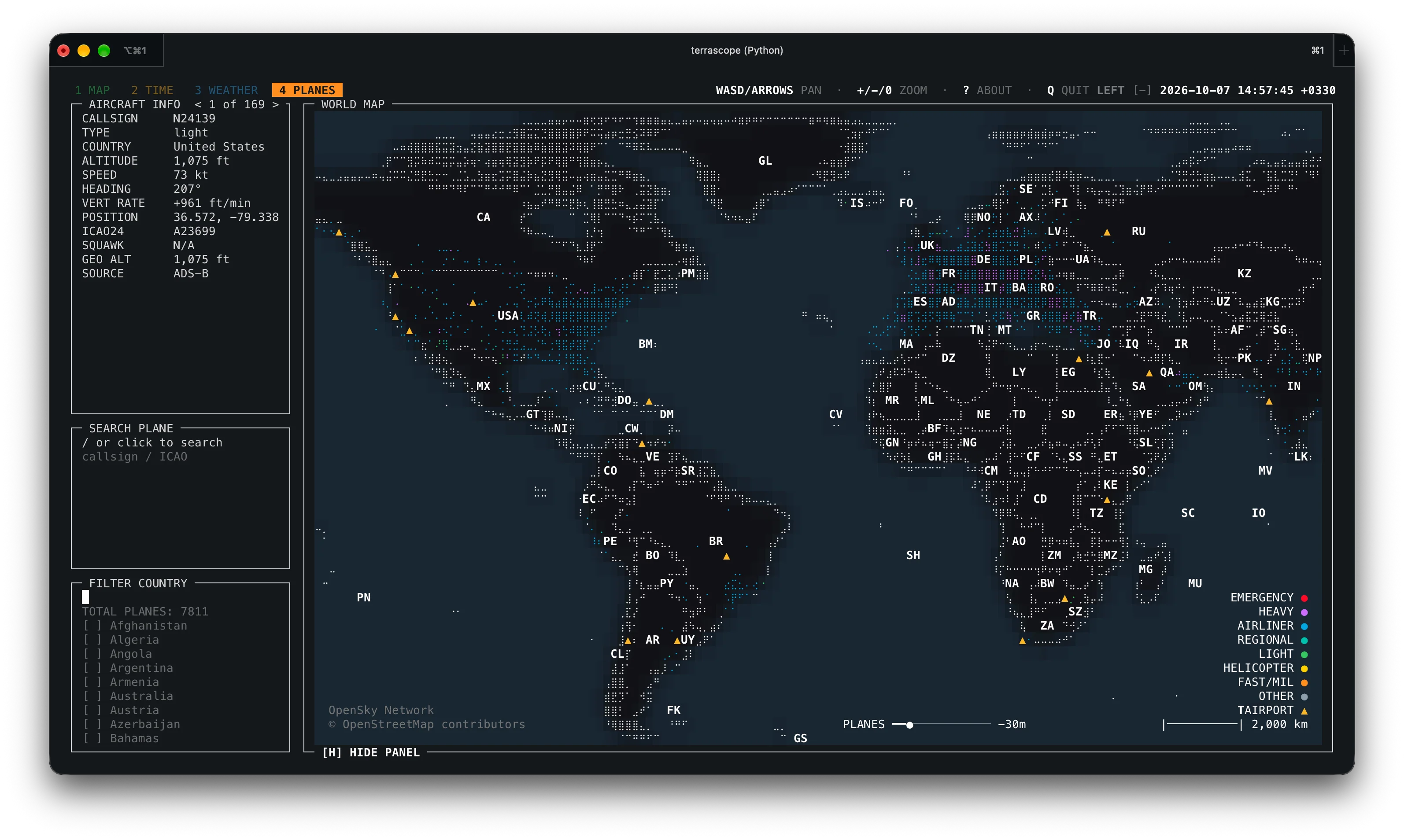
The screenshot above shows the PLANES tab in its global view. Every aircraft marker is a real position report pulled live from the OpenSky Network, plotted over Natural Earth country outlines, all inside an ordinary terminal window. If you have ever wanted a HamClock-style glanceable display but live entirely in SSH, this is it.
Why Radio Amateurs Should Care
Terrascope isn’t written for hams, yet four of its layers map directly onto things radio amateurs check every day:
- Greyline and day/night bands for HF. The TIME tab draws the day/night terminator across the globe. Greyline propagation, when the terminator passes over both ends of a path, produces some of the best low-band DX of the day. A terminal greyline you can open in two seconds complements the 9M2PJU HamClock Installer dashboard on the shack wall.
- Live aircraft from OpenSky. The PLANES tab plots ADS-B-style position reports with trails, categories, and airport markers. Anyone running a 1090 MHz receiver (for example the dump1090 setup described in the EmComm Tools OS guide) already speaks this language.
- Weather and radar for portable work. The WEATHER tab combines Open-Meteo city forecasts with a RainViewer radar overlay. Checking rain over a summit before a SOTA activation takes one command.
- Earthquakes for EmComm awareness. The WEATHER tab also plots USGS earthquake feeds, useful context for emergency communication groups monitoring regional events.
- Timezone picker for skeds. The TIME tab includes a searchable timezone selector, handy when arranging contest or net schedules across continents.
- Runs anywhere a terminal runs. No GPU, no browser, no desktop. It works over SSH on a headless Raspberry Pi, in tmux on a field laptop, or in Termux-adjacent workflows, and
--offlinemode keeps the cached map usable with zero connectivity.
How a World Map Fits Inside a Terminal
A terminal has no pixels, only a grid of character cells. Terrascope squeezes graphics out of that grid with three classic techniques:
- Unicode Braille cells. Each Braille character holds a 2 by 4 dot matrix, so one text cell carries 8 sub-pixels. This is the same trick behind many ASCII-art map renderers, and it gives surprisingly smooth coastlines.
cursesfull-screen drawing. Thecurseslibrary repaints only changed cells, so panning and zooming stay fluid instead of flickering.- 256-color and true-color terminals. Coastlines, terminator shading, radar intensity, and aircraft categories are all color-coded. A UTF-8 terminal with true-color support gives the best result; 256 colors still work.
The honest trade-off is resolution: a maximized terminal gives roughly a 300 by 100 Braille-dot canvas, far below a PNG map. Terrascope compensates with zoom (up to 128x via map.zoom.max), labels that appear as you zoom in, and a side panel carrying the exact numbers the dots can’t show.
The Four Tabs
Press 1 through 4 to switch tabs. Each tab below is shown with the project’s own screenshots and notes on what to look at.
MAP Tab: Countries, Provinces and Cities
The MAP tab is the base layer: country outlines, province and state boundaries, and city labels that fade in as you zoom. Zoom from the whole planet down to a single region with + and -, pan with WASD, arrows, or the mouse.
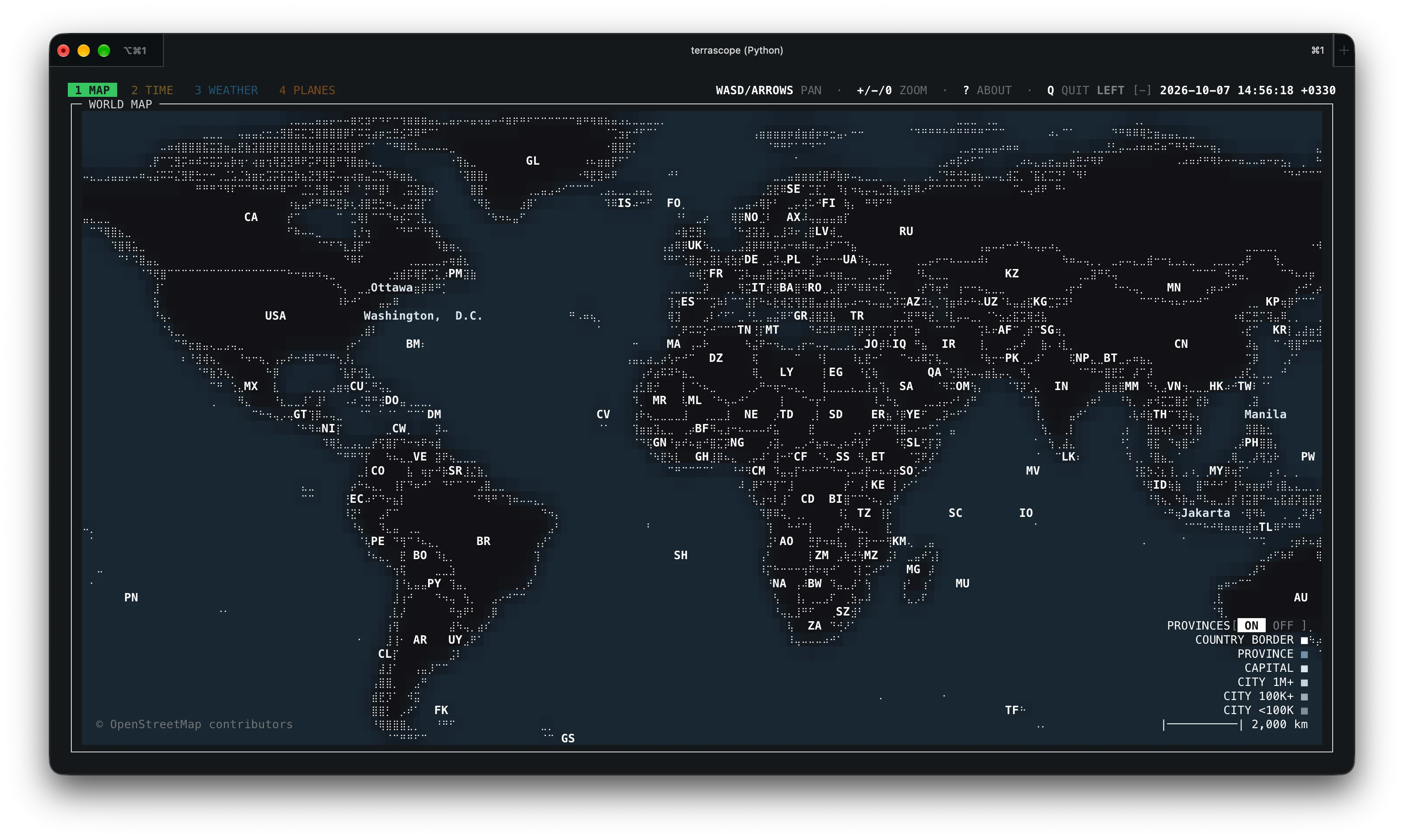
The global view above shows every continent rendered in Braille dots with country shapes clearly readable. Note the dense city-label cluster over Europe and eastern North America, where populated-place data is thickest.
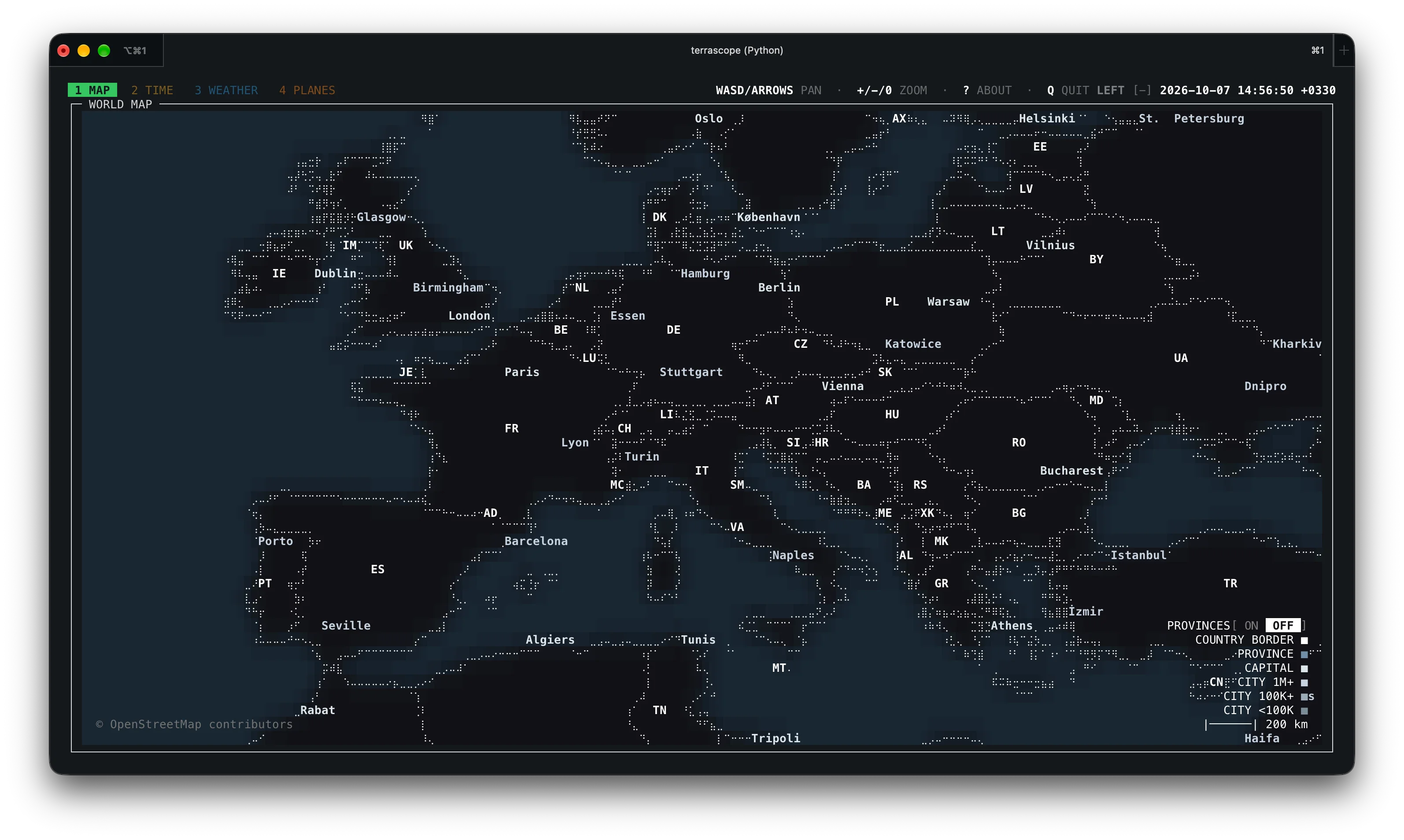
Zoomed into Europe with provinces off, borders stay clean and readable. This is the fastest rendering mode and a good default on slow links.
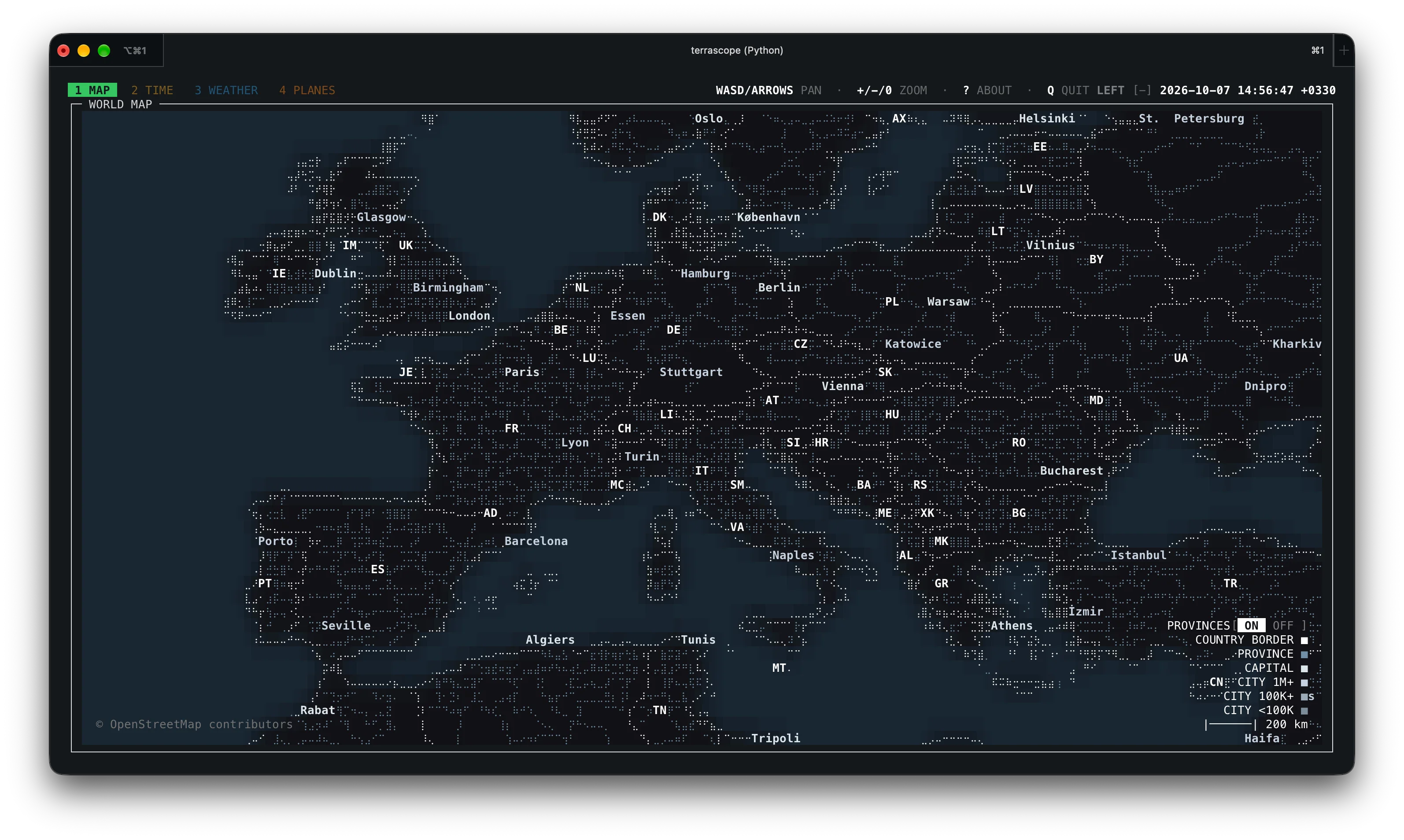
The same view with provinces on adds first-level administrative boundaries, useful when a contact gives a state or province rather than a country. Both boundary datasets ship from Natural Earth 50m Cultural Vectors, which are public domain.
TIME Tab: Greyline, Sun, Moon and Timezones
The TIME tab is the one HF operators will open most. It shades the night side of the planet, reports sun and moon information, and offers a searchable timezone picker (press Z, type a name, navigate with arrows, confirm with Enter).
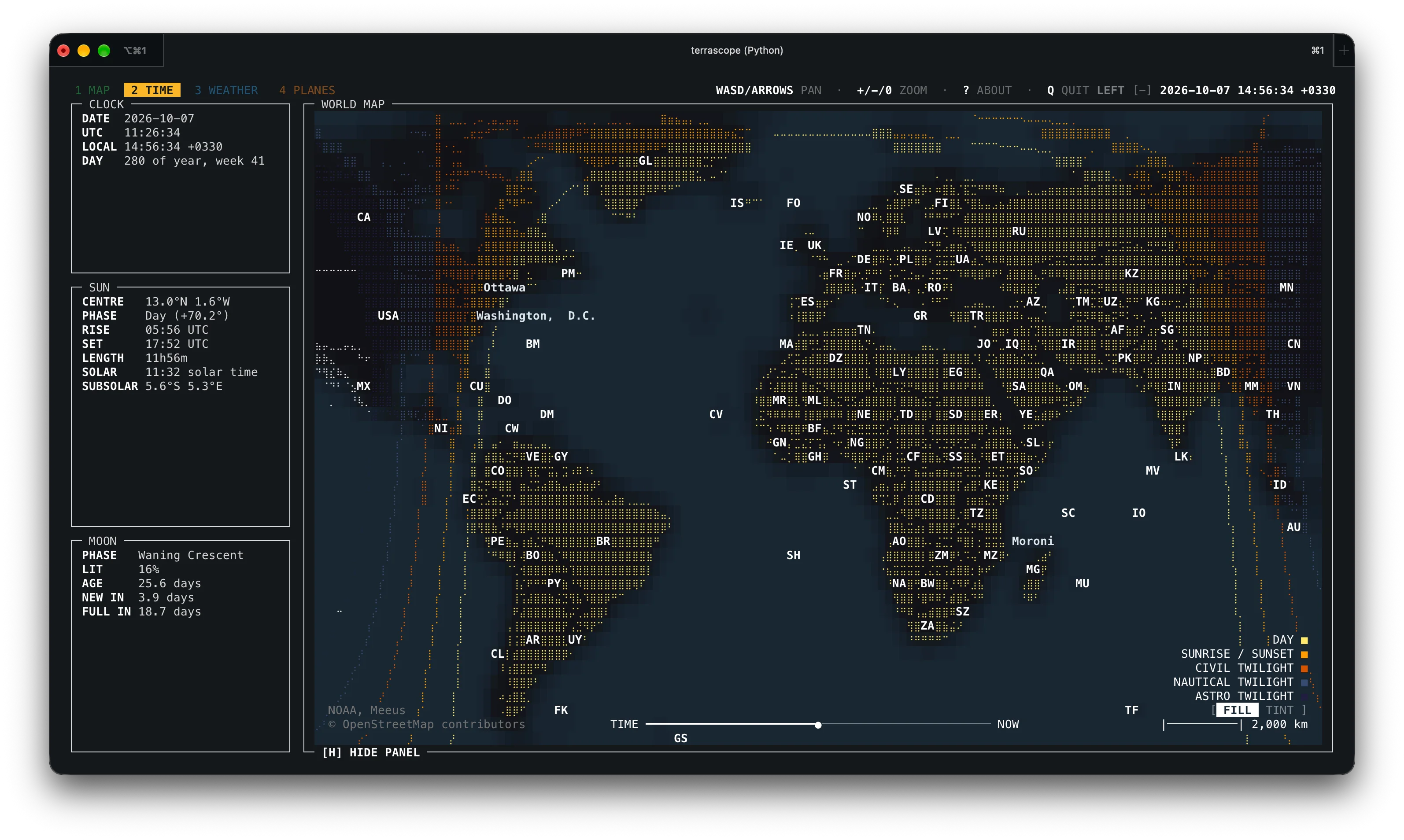
Fill mode paints the night hemisphere solid so the terminator line stands out at a glance. When the grey band crosses your QTH and your target region at the same time, low bands are worth a try.
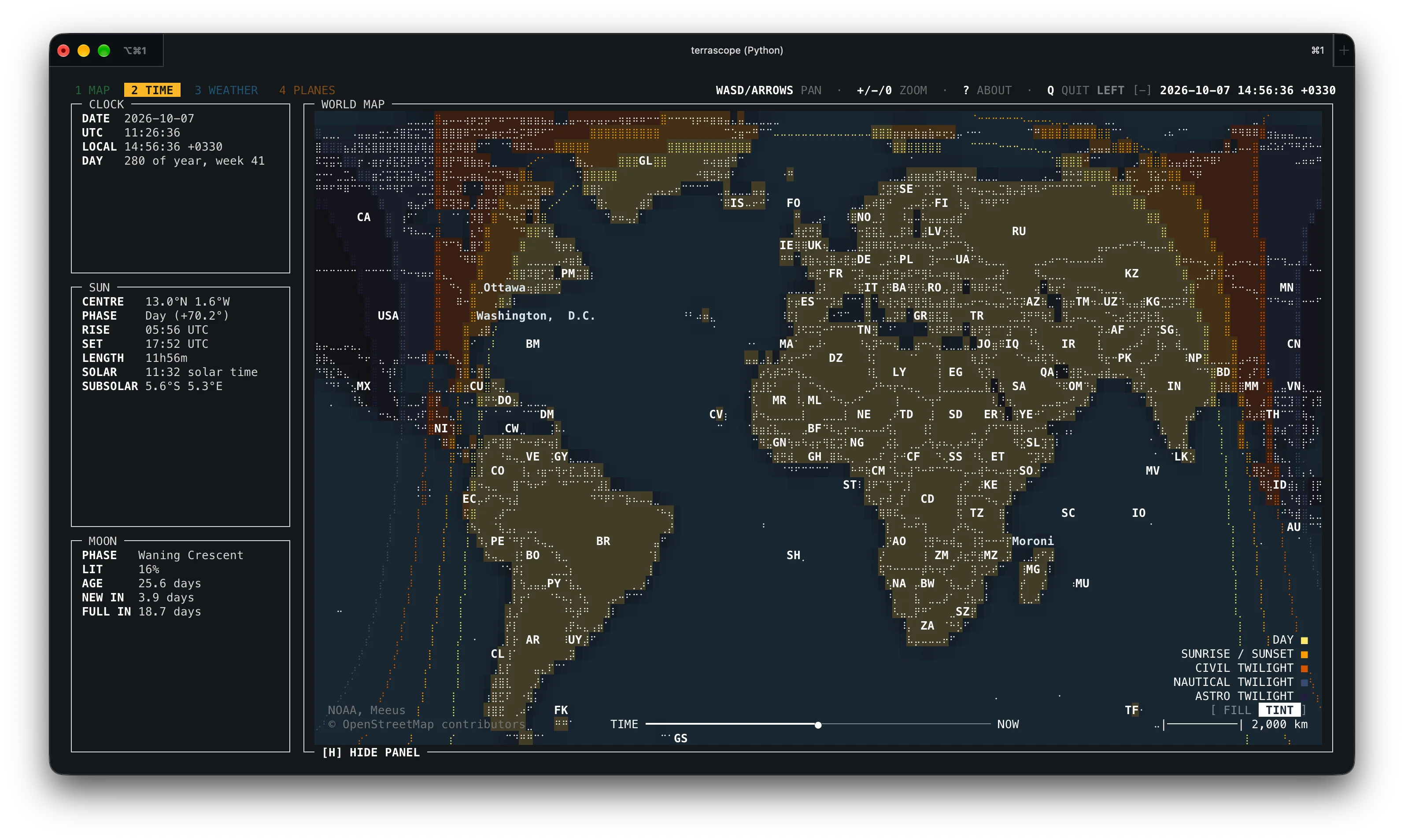
Tint mode keeps the map visible under a translucent night shade. Prefer this when you still want to read labels and markers on the dark side of the planet. Toggle between fill and tint with L.
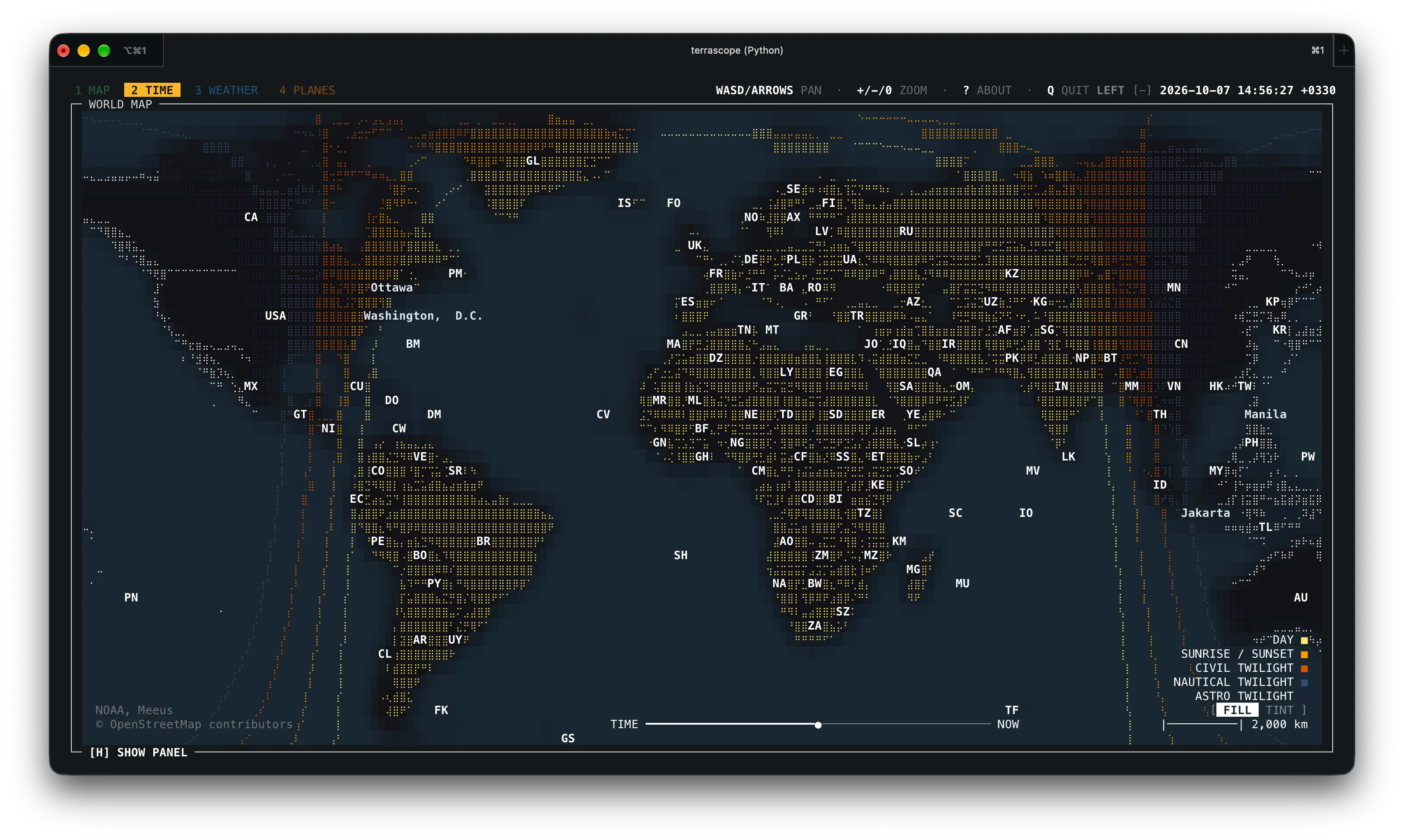
Pressing H hides the panel for a full-screen map. On a small field laptop display this is the most readable layout for a quick greyline check.
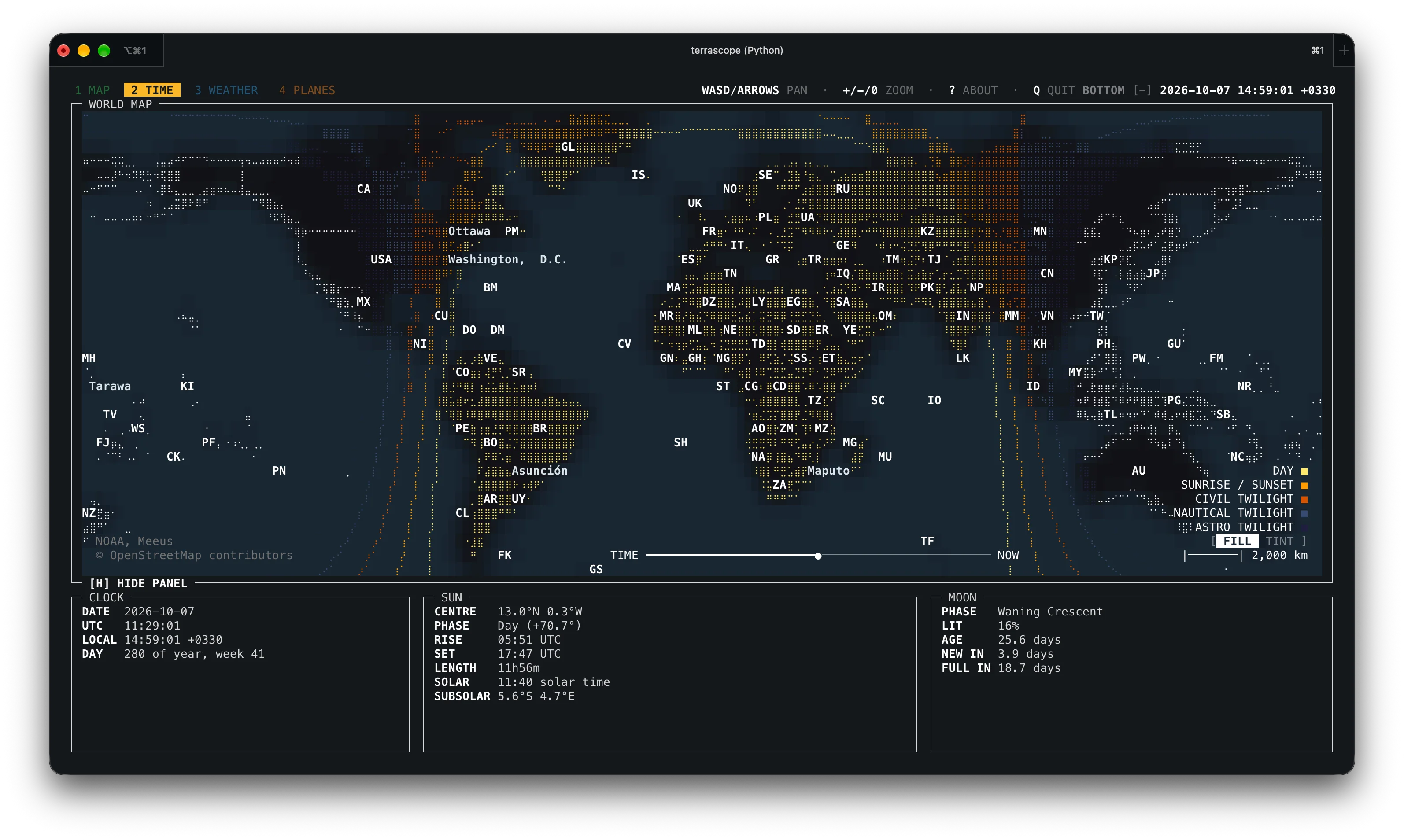
The panel can dock at the bottom instead of the side. Click [+] beside the clock to expand the top controls, then click the placement label to flip between BOTTOM and LEFT. Flags --panel-orientation vertical and --panel-orientation horizontal set the starting layout per run.
WEATHER Tab: Cities, Radar and Earthquakes
The WEATHER tab layers Open-Meteo city weather and forecasts, a RainViewer radar overlay, and USGS earthquake markers over the base map. City labels can be toggled with C, earthquakes with E.
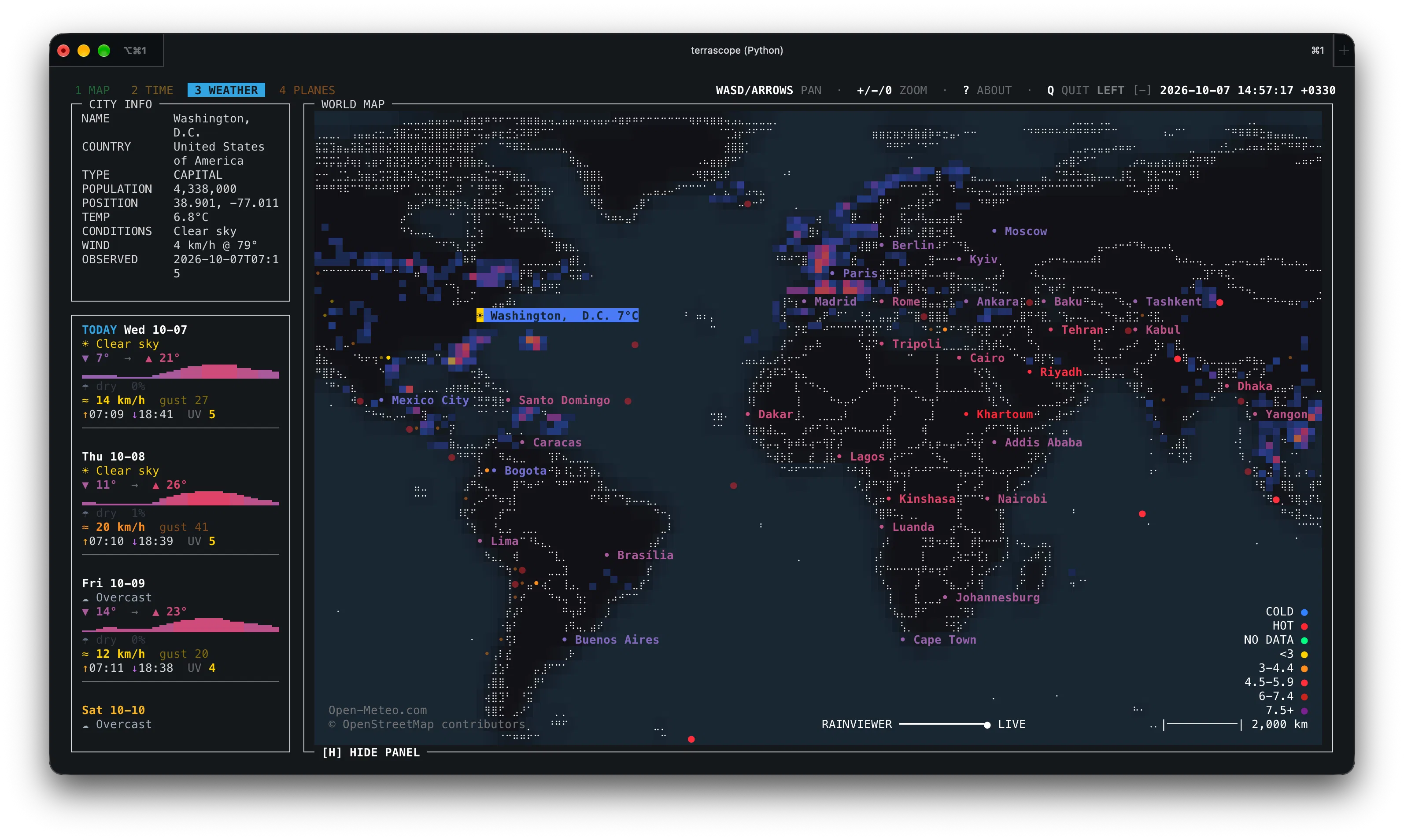
The default vertical sidebar shows the multi-day forecast for the selected city, including the temperature graph, conditions, precipitation, wind, and sunrise and sunset times. Scroll over the forecast to step through each day in full detail.
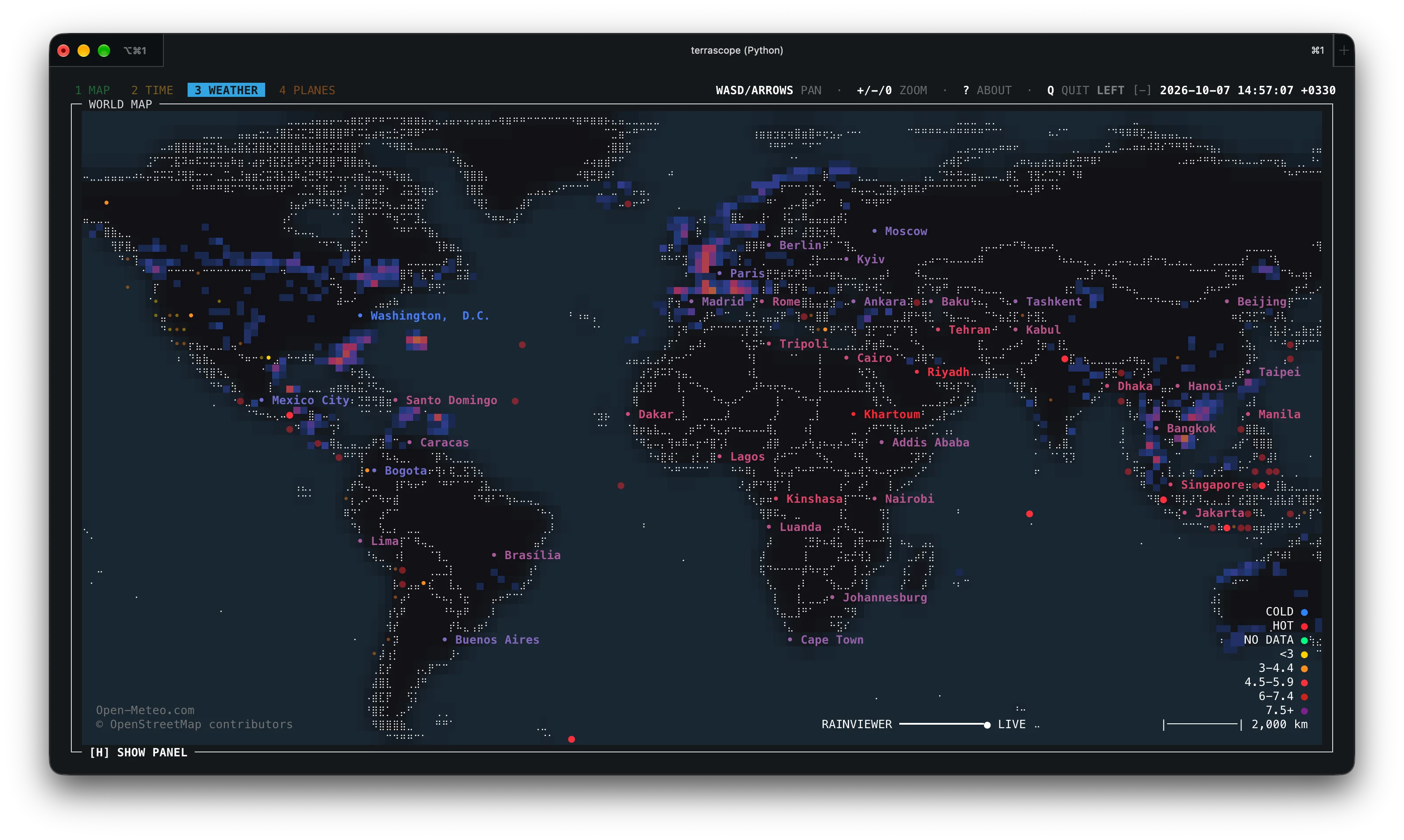
With the panel hidden, city weather glyphs and quake markers stand alone on the map. This is the best view for scanning a whole region before a portable outing.
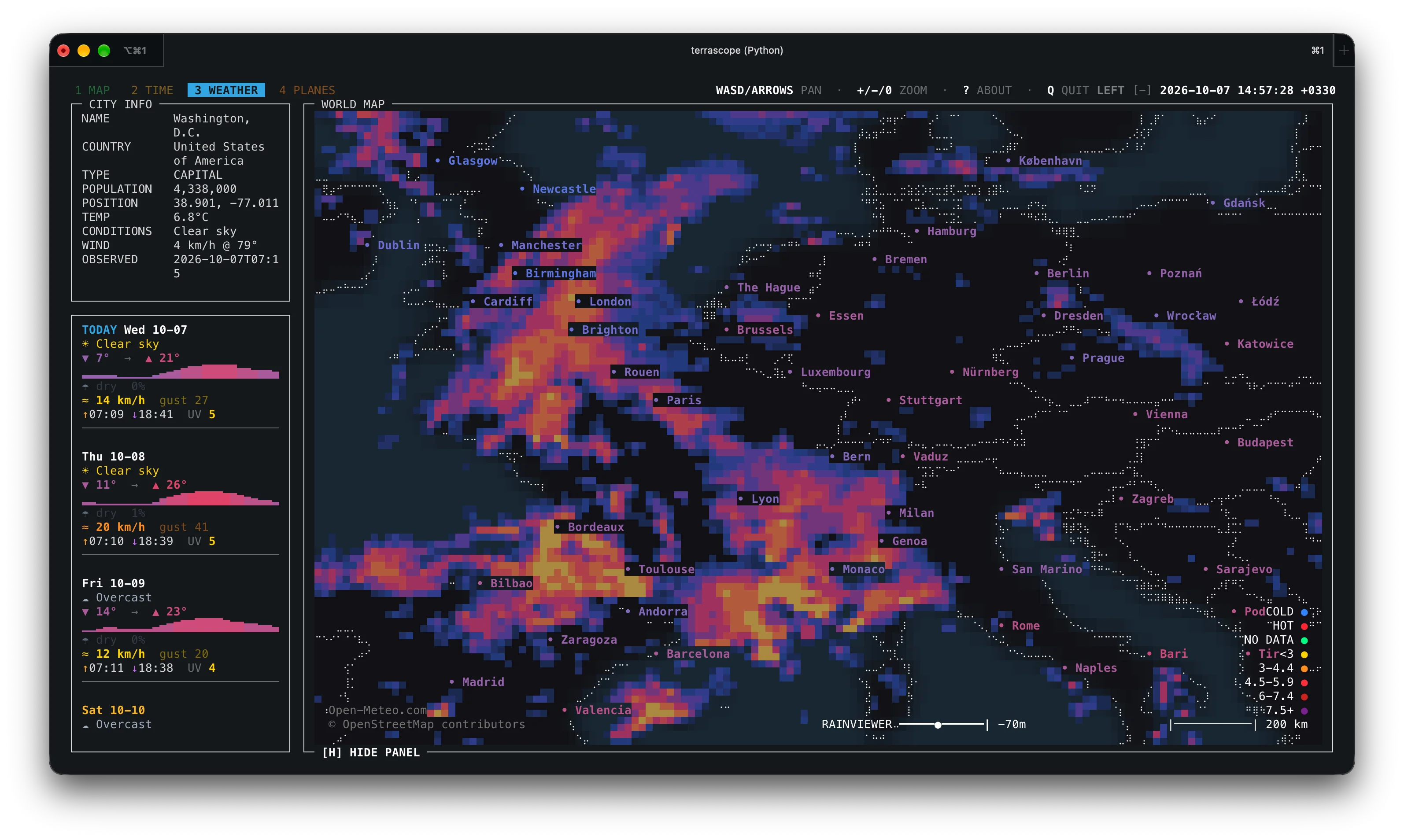
Zoomed into Europe, the RainViewer past-radar tiles show precipitation cells over the continent. RainViewer data is supplied for personal and educational use with attribution required. So check its terms before any club or commercial reuse.
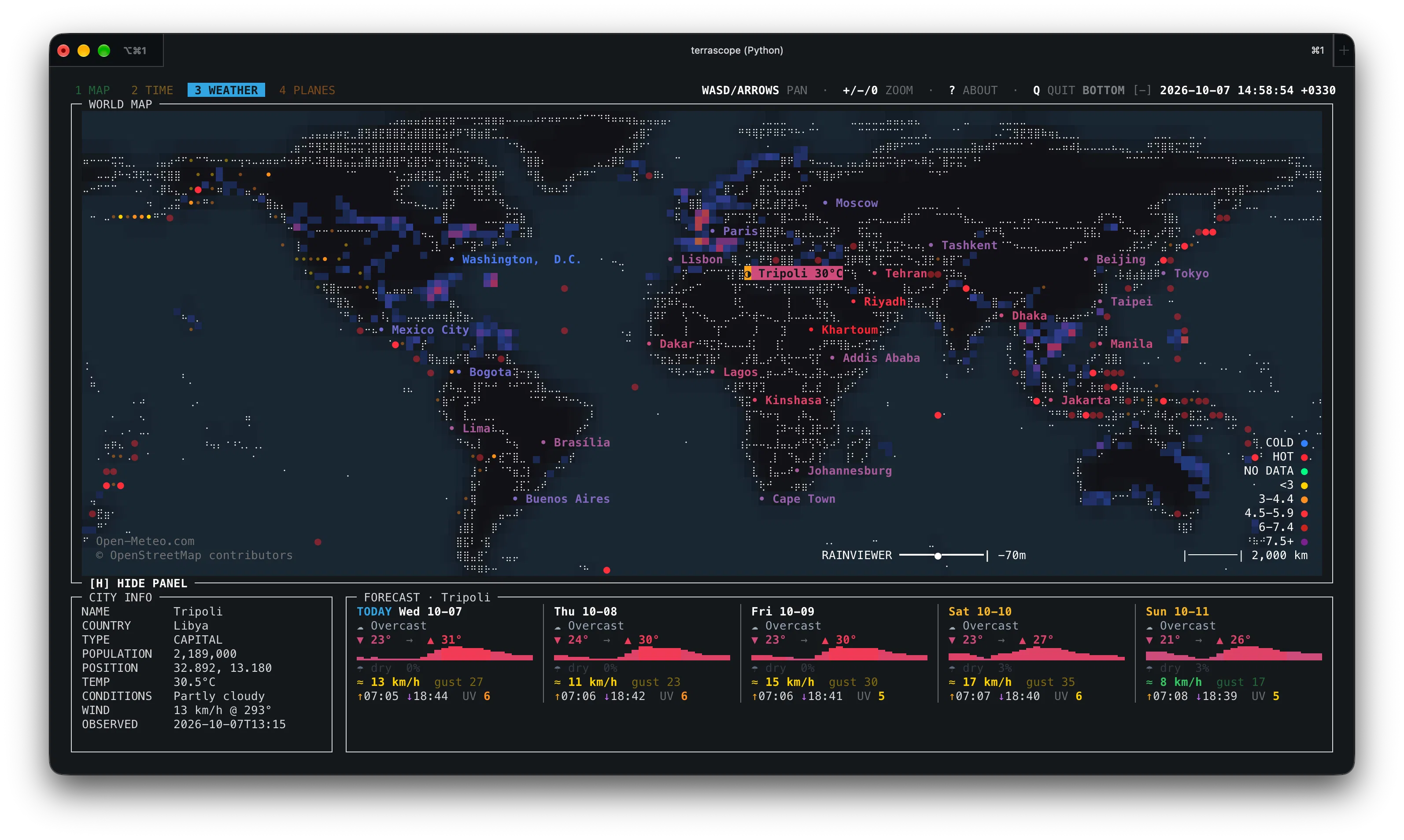
The horizontal layout puts the forecast strip along the bottom, leaving maximum vertical room for the map. Pick whichever orientation fits your terminal shape.
PLANES Tab: Live Aircraft and Airports
The PLANES tab plots OpenSky Network aircraft positions with trails and categories, plus Natural Earth airport markers (toggle airports with K, flights with P, and click markers for detail).
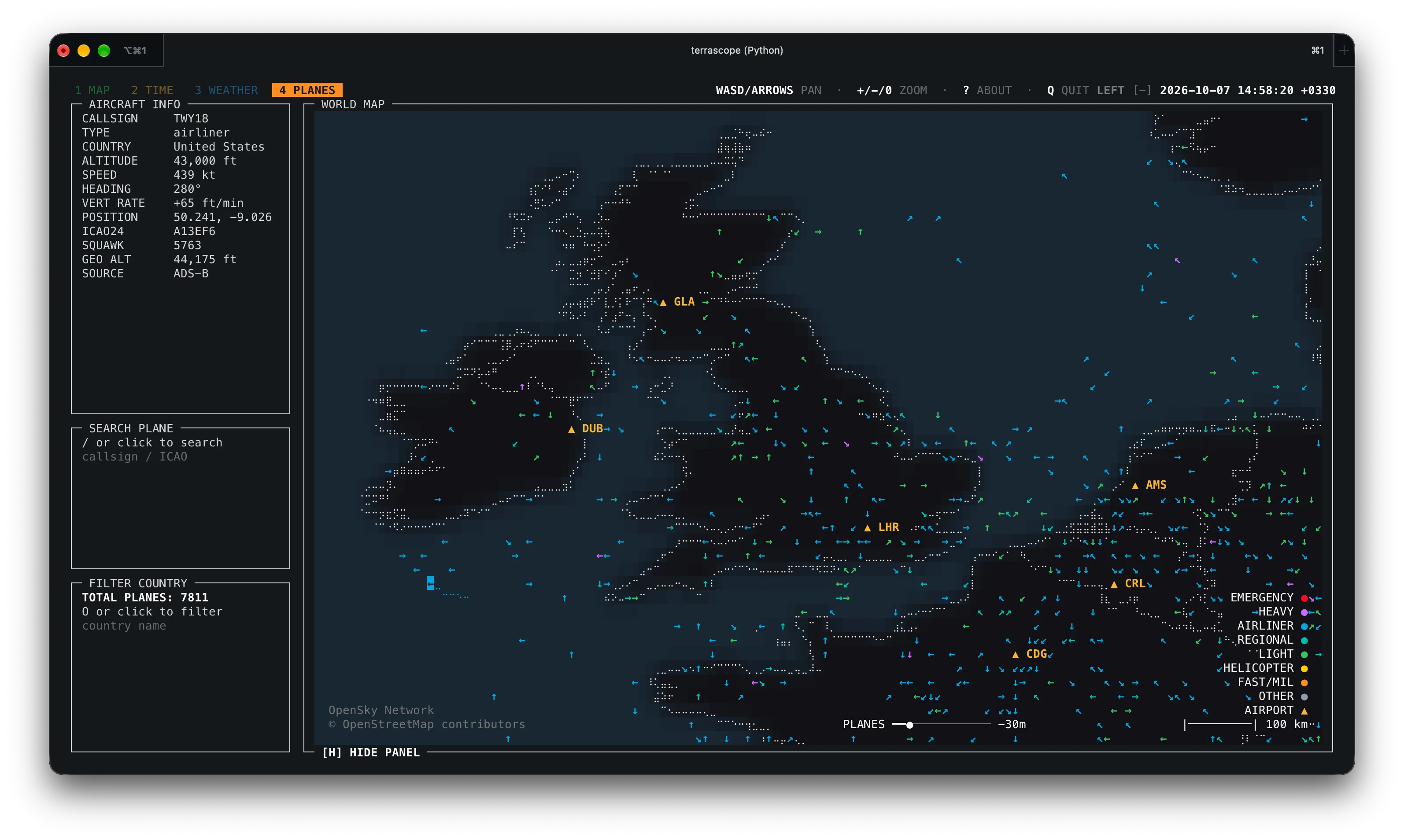
The close-up over the United Kingdom shows how dense real traffic gets: individual aircraft with trails over the south-east, airport markers anchoring the airfields, and labels resolving as you zoom. For ADS-B hobbyists this is a text-mode cousin of web trackers like tar1090, and it pairs naturally with a home 1090 MHz receiver for comparing what you hear locally against the network picture.
Data Sources at a Glance
Every live layer names its provider, and Terrascope ships no telemetry or analytics of its own. When live layers are on, requests go only to the configured providers (weather requests include displayed-city coordinates, and providers see your IP and the Terrascope User-Agent as with any client).
| Layer | Provider | Notes |
|---|---|---|
| Countries, provinces, cities, airports | Natural Earth 50m Cultural Vectors | Public domain, bundled, works offline |
| Live aircraft positions | OpenSky Network | Free community API, rate limits apply |
| City weather and forecasts | Open-Meteo | Free for non-commercial use |
| Radar overlay | RainViewer Weather Maps API | Past tiles, personal and educational use, attribution required |
| Earthquakes | USGS GeoJSON feeds | Public domain US government data |
| Day/night, sun, moon | Computed in code (NOAA and Meeus-style math) | No network needed |
Installation
Requirements are Python 3.10 or newer on macOS or Linux, a UTF-8 terminal, preferably with 256-color or true-color support. Network is needed only for first-run downloads and live layers.
| Method | Command | Tracks |
|---|---|---|
| pipx (recommended) | pipx install terrascope then terrascope |
Tagged PyPI release |
| Homebrew release | brew tap a-shygun/terrascope <repo> then brew install a-shygun/terrascope/terrascope |
Tagged release |
| Homebrew latest | brew install --HEAD a-shygun/terrascope/terrascope |
main branch |
| pipx latest | pipx install --force "git+https://github.com/a-shygun/Terrascope.git@main" |
main branch |
| Nix | nix run ./packaging/nix from a checkout |
That checkout |
| From source | git clone, venv, pip install -e . |
That checkout |
Python dependencies are small and declared in pyproject.toml: numpy, Pillow, PyYAML, and pyshp. An Arch VCS recipe exists but remains a draft and hasn’t been submitted to the AUR.
First Run, Cache and Offline Mode
On first launch Terrascope downloads Natural Earth GeoJSON into $XDG_CACHE_HOME/terrascope (default ~/.cache/terrascope) and the UI shows a loading message until the map appears. Bundled country and airport reference data means the base map never waits on the network.
Handy cache commands:
terrascope --show-paths    # cache, config and log locations
terrascope --clear-cache   # wipe cached downloads and API data
terrascope --offline       # run from cache only, no live requests
A first-run pattern for field use: launch once on home Wi-Fi to warm the cache, then run terrascope --offline or set terrascope_OFFLINE=1 at the site. Errors and background warnings go to the log file shown by --show-paths so stray output never corrupts the curses screen.
Controls
| Input | Action |
|---|---|
1–9 |
Switch tabs |
WASD or arrows |
Pan |
+ / - |
Zoom in and out |
0 |
Reset view |
| Mouse drag / wheel / click | Pan, zoom, select marker or label |
< / > |
Step through overlapping selections |
/ |
Search |
O |
Open filter prompt |
H |
Show or hide the panel |
? |
Welcome and help modal |
Esc |
Close prompts, clear selection and filters |
Q |
Quit |
P / K |
Flights layer / airports on PLANES tab |
C / E |
City weather labels / earthquakes |
N / L |
Day/night layer / tint and fill mode |
[ / ] |
Time slider where available |
Z |
Timezone selector on TIME tab |
Run terrascope --list-keys at any time for the effective list, since keys can be rebound in configuration.
Configuration
Defaults are copied on first launch to ~/.config/terrascope/default.yaml (or $XDG_CONFIG_HOME/terrascope/default.yaml), and your copy survives upgrades. Layer on extra files with --config ~/terrascope.yaml, override one value per run with --set 'map.zoom.max=128', and inspect the merged result with --dump-config. Flags beat config files, and --set beats flags.
Useful environment variables:
| Variable | Meaning |
|---|---|
terrascope_OFFLINE=1 |
Disable live network requests |
terrascope_CONFIG=/path/file.yaml |
Load a config file before CLI flags |
terrascope_RAINVIEWER_URL=https://... |
Override the RainViewer catalog API |
XDG_CACHE_HOME=/path |
Change the default cache root |
Terrascope vs Alternatives
| Tool | Interface | Live aircraft | Greyline | Weather and radar | Offline mode | Best for |
|---|---|---|---|---|---|---|
| Terrascope | Terminal (curses) |
Yes (OpenSky) | Yes | Yes | Yes (cache) | SSH, Pi, field laptops, terminal lovers |
| HamClock | Web or fullscreen GUI | No | Yes, plus propagation | Space weather focus | Partial | Shack wall display, VOACAP maps |
| tar1090 / dump1090 web | Browser | Yes (own receiver) | No | No | Yes (local RF) | Seeing your own antenna’s actual range |
| KiwiSDR / WebSDR maps | Browser | No | Sometimes | No | No | Receiver hunting, not general maps |
| Google Earth / web maps | Browser or app | Via plugins | Via plugins | Via layers | Mostly no | Heavyweight visual analysis |
Terrascope wins when the computer is small, the link is remote, or the operator never leaves the keyboard. It loses on raw resolution and on transmitter-specific data such as VOACAP propagation predictions, where HamClock remains the shack standard.
Four Practical Shack Scenarios
- Greyline check before calling CQ. Open the TIME tab in fill mode, find the terminator, and see whether it touches both your region and the target. If yes, try 40m or 80m first.
- Summit weather before a SOTA trip. Warm the cache at home, then run
terrascope --tab weather --offlineat the trailhead to re-check forecast, radar trend, and sunrise time without mobile data. - EmComm earthquake watch. Leave the WEATHER tab running with
Eenabled during net nights. New USGS markers give immediate regional context for welfare-traffic decisions. - Contest timezone math. Use
Zon the TIME tab to confirm a DX station’s local sunrise and sunset before planning gray-line or long-path attempts in the last hours of a contest.
Limitations to Know
- Early-stage software: APIs and visuals may change between releases.
- Linux and macOS only; no native Windows build (WSL is the unofficial route).
- Live layers inherit provider rate limits and outages; OpenSky in particular throttles anonymous traffic.
- Terminal resolution caps map detail; it complements but doesn’t replace photographic maps.
- Radar use is personal and educational with attribution; check RainViewer terms for club use.
Frequently Asked Questions
What is Terrascope in one sentence?
Terrascope is a free open source Python program that draws a live world map with aircraft, weather, radar, earthquakes, and greyline bands inside a terminal window.
Does Terrascope need internet to run?
Only for first-run map downloads and live layers. Warm the cache once, then terrascope --offline runs the map with no network at all.
Where does the live aircraft data come from?
The OpenSky Network community API supplies aircraft positions, shown with trails and categories plus Natural Earth airport markers on the PLANES tab.
Which terminal works best with Terrascope?
Any UTF-8 terminal, ideally with true-color support. It also runs fine over SSH, in tmux, and on low-power boards like the Raspberry Pi.
Is Terrascope useful for ham radio if it has no propagation maps?
Yes, as a complement. Use it for greyline timing, summit weather, earthquake awareness, and timezone math, and keep HamClock for VOACAP predictions.
Sources and Further Reading
- Terrascope repository by a-shygun: https://github.com/a-shygun/Terrascope
- Terrascope animated UI demo: https://github.com/a-shygun/Terrascope/blob/main/docs/images/terrascope-ui-promo.gif
- OpenSky Network: https://opensky-network.org/
- Open-Meteo: https://open-meteo.com/
- RainViewer Weather Maps API: https://www.rainviewer.com/api.html
- USGS Earthquake Hazards Program feeds: https://earthquake.usgs.gov/earthquakes/feed/
- Natural Earth 50m Cultural Vectors (public domain): https://www.naturalearthdata.com/downloads/50m-cultural-vectors/
- PyPI Terrascope package: https://pypi.org/project/Terrascope/
73 de 9M2PJU






Post Comment