amateur radio
linux
open source
Survival
Technology
9M2PJU, amateur radio, cyberdeck, Dire Wolf, EmComm Tools, emergency communications, ETC OS, fldigi, Gaston Gonzalez, GPS Stratum-1, ham radio, js8call, LinBPQ, mbtileserver, offline maps, open source, Panasonic Toughbook, Pat, The Tech Prepper, VOACAP, winlink
9M2PJU
0 Comments
EmComm Tools OS Community Edition: The Ultimate Turnkey Linux Distribution for Off-Grid Ham Radio and Tactical Cyberdecks
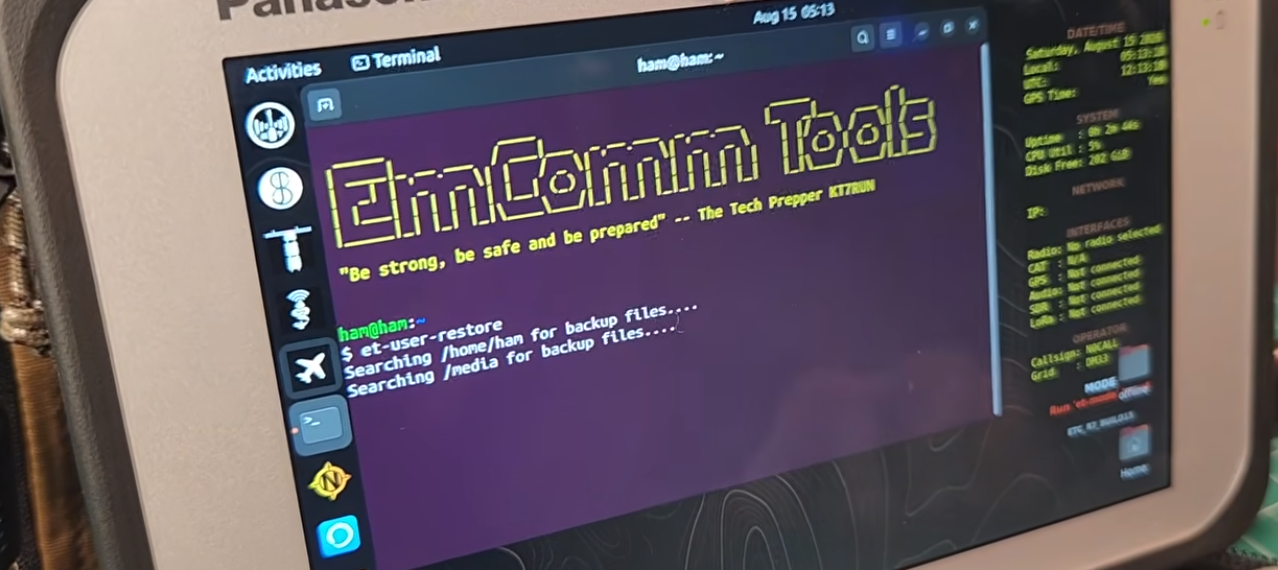
TL;DR: EmComm Tools Community (ETC) OS by Gaston Gonzalez (The Tech Prepper) is an open-source, zero-configuration Debian/Ubuntu-based operating system designed for field emergency communications, rugged laptops, and tactical cyberdecks. It delivers plug-and-play Tier 1 and Tier 2 transceiver CAT and audio integration, automated GPS Stratum-1 time synchronisation, offline GIS mapping (OpenStreetMap via mbtileserver), offline VOACAP/SPLAT! propagation prediction, integrated LinBPQ packet BBS and Winlink P2P messaging, JS8Call with automatic grid/station configuration, and offline knowledge archives (Kiwix and FCC databases) without requiring internet connectivity.
When a severe weather event, flood, or grid failure strikes, communication infrastructure collapses rapidly. Amateur radio operators and emergency response teams are frequently called upon to deploy auxiliary digital messaging networks. However, setting up a standard Linux distribution in the field for digital modes is notoriously frustrating: missing audio loopbacks, ALSA permissions errors, ALSA volume clipping, unconfigured Hamlib CAT baud rates, manual TNC configurations, and time-drift errors that completely break synchronous modes like JS8Call and FT8.
In high-stress field conditions, an emergency communications operator should never waste thirty minutes configuring udev rules, serial permissions, or GPS daemons. The operating system must function as a true tactical communications appliance: boot the machine, plug in the USB or DigiRig cable to the transceiver, connect a USB GPS puck, and immediately start exchanging emergency traffic, tactical forms, Winlink emails, and packet messages.
Created by Gaston Gonzalez (The Tech Prepper) and supported by a dedicated community of field operators, EmComm Tools Community (ETC) OS solves this challenge. It packages decades of amateur radio, packet networking, SIGINT, GIS mapping, and digital communication tools into an automated, plug-and-play Debian/Ubuntu environment tailored for Panasonic Toughbooks, Dell Rugged tablets, ThinkPads, and custom field cyberdecks.
Last updated: August 2026.
What Is EmComm Tools Community (ETC) OS?
EmComm Tools Community (ETC) OS is an open-source, turnkey Linux operating system engineered specifically for off-grid amateur radio emergency communications, tactical cyberdecks, and disaster response field operations.
+-------------------------------------------------------------------------+
|                  EMCOMM TOOLS COMMUNITY (ETC) ARCHITECTURE              |
+-------------------------------------------------------------------------+
|                                                                         |
|  [ CORE RUNTIME CONTROLLERS ]                                           |
|  - et-user        : Global operator profile (Callsign, Grid, Timezone)  |
|  - et-radio       : Hardware profile & PnP transceiver selector         |
|  - et-mode        : Communications mode & stack switcher                |
|  - et-api (Java)  : Offline geocoding, FCC lookups, and telemetry bus   |
|                                                                         |
+--------------------+---------------------+------------------------------+
| DIGITAL HF MODES   | PACKET & WINLINK    | OFFLINE GIS & RF TOOLS       |
+--------------------+---------------------+------------------------------+
| - JS8Call (@TTPNET)| - Dire Wolf 1.7 TNC | - mbtileserver (OSM offline) |
| - Fldigi Suite     | - LinBPQ BBS Server | - Navit vector navigation    |
| - Flmsg / Flamp    | - Pat (Winlink P2P) | - et-predict-app 1.5.2       |
| - AmRRON ICS Forms | - ARDOP HF Modem    | - VOACAP & SPLAT! RF engine  |
| - WSJT-X (FT8/FT4) | - QtTermTCP Terminal| - dump1090 & et-aircraft-app |
| - VARA HF/FM (WINE)| - Chattervox P2P    | - SDR++ & RTL-SDR toolchain  |
+--------------------+---------------------+------------------------------+
| HARDWARE PnP LAYER | TIME & POSITION     | OFFLINE KNOWLEDGE BASE       |
+--------------------+---------------------+------------------------------+
| - Tier 1 & 2 Radios| - GPSD & Chrony     | - Kiwix (Offline Wikipedia)  |
| - DigiRig / CAT    | - Stratum-1 Sync    | - Offline FCC/Canada DB      |
| - Bluetooth TNCs   | - Automatic Maiden- | - Artemis Signal Database    |
| - Panasonic Fixes  |   head Grid Updates | - GPA (GPG) & PFTE Crypto    |
|                                                                         |
+-------------------------------------------------------------------------+
Originally derived from Gaston’s commercial EmComm deployment builds, the Community Edition provides a fully reproducible, script-driven ecosystem that installs on clean x86_64 Debian/Ubuntu installations. Rather than presenting a disjointed collection of standalone radio applications, ETC unifies every component under a central configuration layer (et-user, et-radio, et-mode, and et-api), ensuring that callsign updates, GPS grid positions, audio levels, and serial ports propagate instantly across every installed application without manual intervention.
The Zero-Configuration Philosophy: How the ETC Control Plane Works
The defining strength of ETC OS is its unified control plane. In standard Linux distributions, changing your operating callsign or moving to a new Maidenhead grid square requires manually updating configuration files across JS8Call, Fldigi, Dire Wolf, Pat Winlink, YAAC, and LinBPQ.
ETC abstracts these disparate subsystems into cohesive command-line utilities and background daemons:
+-------------------------------------------------------------------------+
|                       ETC UNIFIED CONTROL PLANE                         |
+-------------------------------------------------------------------------+
|                                                                         |
|                          [ Operator Inputs ]                            |
|                       'et-user' or GPS Telemetry                        |
|                                    |                                    |
|                                    v                                    |
|                   +---------------------------------+                   |
|                   |   /etc/emcomm-tools/config.env  |                   |
|                   |   - CALLSIGN: 9M2PJU            |                   |
|                   |   - GRID    : OJ03vb            |                   |
|                   |   - RADIO   : ic-705            |                   |
|                   +---------------------------------+                   |
|                                    |                                    |
|          +-------------------------+-------------------------+          |
|          |                         |                         |          |
|          v                         v                         v          |
|  [ JS8Call.ini ]            [ fldigi_def.xml ]        [ config.json ]   |
|  - Sets myCall              - Sets Operator Callsign  - Pat Winlink     |
|  - Sets Maidenhead Grid     - Injects AmRRON Macros   - Sets P2P Call   |
|  - Assigns ALSA card        - Binds RigCAT / Flrig    - Maps Secure RMS |
|                                                                         |
+-------------------------------------------------------------------------+
1. et-user: The Master Operator Profile
Running et-user configures the primary operator credentials (callsign, tactical ID, default Maidenhead grid square, and region). When executed, the utility updates the underlying configuration store and writes these variables directly into the dotfiles and initialization files for every installed digital communications application.
2. et-radio: Plug-and-Play Transceiver Switching
Selecting an active radio is as simple as executing et-radio <model>. ETC configures the serial CAT baud rate, flow control flags, ALSA soundcard bindings, and PTT GPIO/RTS lines across Hamlib, Flrig, and Dire Wolf simultaneously.
3. et-mode: One-Touch Tactical Stacks
Switching between operating modes on an emergency net usually requires stopping one daemon, releasing the soundcard, and launching another stack. The et-mode switcher handles this automatically:
et-mode winlink-packet: Launches Dire Wolf on 1200-baud AX.25, binds the AX.25 network interface, and starts Pat Winlink in listening mode.et-mode winlink-ardop: Initialises the ARDOP soundcard modem, configures the HF transceiver via CAT, and connects Pat to ARDOP.et-mode aprs-client: Spawns Dire Wolf as an AX.25 KISS TNC and launches YAAC with offline OpenStreetMap layers.et-mode bbs-server: Spins up LinBPQ to act as a local tactical store-and-forward packet bulletin board station.
Tiered Transceiver Plug-and-Play (PnP) Architecture
Hardware interfacing is the single most common failure point during field operations. ETC categorises transceiver support into distinct tiers, ensuring reliable operation across major portable and base-station radios:
+-------------------------------------------------------------------------+
|                  TRANSCEIVER PLUG-AND-PLAY (PnP) TIERS                  |
+------------------------------------+------------------------------------+
| TIER 1: FULL NATIVE PnP            | TIER 2: SOUNDCARD / PARTIAL PnP    |
| (CAT Control + USB Audio + Levels) | (DigiRig / Audio / Manual CAT)     |
+------------------------------------+------------------------------------+
| - Icom IC-705 (Single USB Cable)   | - Xiegu X6200                      |
| - Icom IC-7100                     | - Xiegu G90 (via DigiRig Mobile)   |
| - Icom IC-7200 (Auto ALSA Levels)  | - QRPLabs QMX                      |
| - Icom IC-7300 (Auto ALSA Levels)  | - Yaesu FT-891 (DigiRig DR-891)    |
| - Yaesu FT-991A                    | - Elecraft KX2 (via DigiRig)       |
| - Yaesu FT-818ND / FT-857D / 897D  | - Yaesu FTX-1 Field (CAT Only)     |
|   (via DigiRig Mobile)             | - DigiRig Lite / Generic Soundcard |
| - Lab599 TX-500MP (via DigiRig)    |                                    |
| - FX-4CR                           |                                    |
+------------------------------------+------------------------------------+
Automatic ALSA Level Control
A notable feature added in Release 6.0.0 is automatic ALSA soundcard calibration for radios with internal USB audio codecs (such as the Icom IC-7200 and IC-7300). When connected, udev triggers custom level-setting scripts that configure the capture and playback mixer levels to mathematically prevent audio distortion, over-deviation, and ALSA buffer clipping on digital modes.
Bluetooth TNC Integration
For VHF/UHF tactical handhelds with integrated Bluetooth KISS TNCs, ETC provides dedicated pairing scripts:
et-uv-pro: Automated RFCOMM binding for BTECH UV-Pro handhelds.et-vr-n76: Bluetooth TNC management for Vero VGC VR-N76 radios.et-th-d74: Native Bluetooth TNC attachment for Kenwood TH-D74.
Once bound via /dev/rfcomm0, these wireless connections drop cleanly into axcall, QtTermTCP, Pat Winlink, and YAAC.
GPS Stratum-1 Time Synchronization & Offline Navigation
Synchronous digital modes (JS8Call and FT8) rely on precise time synchronization. In FT8, a clock drift greater than 1.0 second degrades decodes significantly; a drift beyond 1.5 seconds completely breaks communications. In disaster zones where internet NTP servers and cellular networks are unavailable, GPS is the only viable reference.
+---------------------+
| USB GPS Puck /      |
| IC-705 Internal GPS |
+---------------------+
           | NMEA Sentences (GPGGA, GPRMC) @ 9600 / 4800 baud
           v
+---------------------+
| gpsd Daemon         | <--- Serial auto-discovery (VK-162 / VK-172 / UG-353)
+---------------------+
           | Shared Memory / Socket (SHM 0)
           v
+---------------------+
| Chrony NTP Daemon   | <--- Stratum-1 Local Reference Clock
+---------------------+
           | Sub-millisecond Local Time Disciplining
           v
+-------------------------------------------------------------------------+
| System Clock Disciplined -> JS8Call / WSJT-X Flawless Synchronisation  |
+-------------------------------------------------------------------------+
1. Automated Chrony & GPSD Pipeline
ETC configures gpsd and chrony out of the box to monitor connected USB GPS receivers (such as the VK-162, VK-172, VFAN UG-353, and internal GPS from the Icom IC-705 or Dell Rugged 7220). chrony uses the GPS NMEA stream via shared memory (SHM 0) to discipline the Linux kernel clock within sub-millisecond precision, displaying real-time time-lock telemetry on the desktop Conky heads-up display.
2. Navit Offline Navigation
For tactical movement and vehicular deployment, ETC preconfigures Navit, an open-source vector navigation engine. Paired with offline OpenStreetMap datasets, Navit provides turn-by-turn routing on rugged laptops without touching cellular data networks. The distribution includes customised high-contrast dark and sunlight-readable XML map layouts.
The Digital HF & Soundcard Communications Suite
ETC OS integrates the complete spectrum of amateur radio digital voice and data protocols:
+-------------------------------------------------------------------------+
|                     ETC DIGITAL HF COMMUNICATIONS                       |
+-------------------------------------------------------------------------+
|                                                                         |
|  [ JS8Call Tactical Suite ]                                             |
|  - Auto-joins @TTPNET & @AMRRON emergency groups                        |
|  - Dynamic Maidenhead grid updates via GPS telemetry                    |
|  - Station info tagged with ETC build version                           |
|  - Clean waterfall layout prioritising active emergency traffic         |
|                                                                         |
|  [ Fldigi / Flmsg / Flamp NBEMS Stack ]                                 |
|  - Preloaded ICS forms (ICS-205, ICS-213, ICS-214)                     |
|  - Preloaded AmRRON AIB (Amateur Radio Resource Network) templates      |
|  - Flamp multi-packet broadcast protocol for error-free file transfer   |
|                                                                         |
|  [ WSJT-X (FT8 / FT4 / WSPR) ]                                          |
|  - Plug-and-play soundcard and CAT integration for weak-signal paths    |
|                                                                         |
|  [ VARA HF & VARA FM via WINE ]                                         |
|  - Pre-tuned WINE environment with automated registry settings         |
|  - One-click installer scripts for VARA modems                          |
|                                                                         |
+-------------------------------------------------------------------------+
1. Customised JS8Call Experience
JS8Call is one of the most vital HF keyboard-to-keyboard and store-and-forward protocols for weak-signal emergency communications. ETC launches JS8Call through a zero-config wrapper that:
- Reads the operator’s current GPS position and updates the 6-character Maidenhead grid square in
JS8Call.inion every startup. - Configures default call groups including
@TTPNETand@ALLCALL. - Formats the call activity window to highlight newly heard emergency stations while expiring inactive callsigns after 30 minutes.
2. Narrow Band Emergency Messaging System (NBEMS)
The complete Fldigi suite (fldigi, flmsg, and flamp) comes configured with standardized emergency messaging forms:
- ICS Forms: Standard Incident Command System templates (ICS-205 Incident Radio Communications Plan, ICS-213 General Message, ICS-214 Activity Log).
- AmRRON Custom Forms: Specialized emergency coordination templates used across tactical radio networks.
- Flamp File Broadcasts: Multicast ARQ file distribution enabling an operator to transmit manuals, casualty lists, and map files across entire geographical nets simultaneously.
Packet Radio, LinBPQ BBS, Chattervox & Winlink P2P
Beyond real-time keyboard chat, resilient emergency networks require asynchronous store-and-forward messaging. ETC delivers a complete packet radio ecosystem:
+-------------------------------------------------------------------------+
|                      PACKET RADIO & MESSAGING FLOW                      |
+-------------------------------------------------------------------------+
|                                                                         |
|  [ Tactical Radios ] (VHF/UHF Packet or HF ARDOP/VARA)                  |
|          |                                                              |
|          v                                                              |
|  +-------------------------------------------------------------------+  |
|  | Dire Wolf 1.7 Software TNC / Soundcard Modem                      |  |
|  | (300 baud HF / 1200 baud VHF / 9600 baud High-Speed)              |  |
|  +-------------------------------------------------------------------+  |
|          |                                                              |
|          +----------------------+----------------------+                |
|          |                      |                      |                |
|          v                      v                      v                |
|  [ LinBPQ BBS Server ]  [ Pat Winlink Client ]  [ Chattervox / Paracon] |
|  - Local Message Store  - Peer-to-Peer (P2P)   - Real-time packet chat  |
|  - Tactical Bulletins   - Offline RMS Locator  - AGW / KISS terminals   |
|  - Forwarding Nodes     - ARDOP / AX.25 / VARA - Multi-node monitoring  |
|                                                                         |
+-------------------------------------------------------------------------+
1. Built-in LinBPQ Packet BBS Node
In disaster scenarios where Winlink RMS gateways or internet connections are offline, an ETC machine can immediately function as a local packet bulletin board system (BBS). Running LinBPQ over Dire Wolf allows surrounding stations to connect via 1200-baud VHF simplex or repeaters, leave messages, post bulletins, and retrieve tactical logs.
2. Pat Winlink with Always-On P2P Listeners
Pat, the lightweight open-source Winlink client, is configured in ETC with background P2P listeners active across AX.25 packet and ARDOP. In Release 6.0.0, the et-winlink-find utility allows operators to query an offline worldwide RMS directory by geographic coordinates or Maidenhead grid square to identify the closest reachable HF gateways without an internet connection.
3. Chattervox & QtTermTCP
For real-time multi-operator packet communications, ETC provides Chattervox (a modern packet chat client) and QtTermTCP (a versatile terminal emulator supporting AX.25, AGW, and TCP connections).
Offline GIS, RF Propagation & ADS-B Aircraft Tracking
ETC OS functions as a comprehensive situational awareness terminal by bundling offline mapping, RF terrain modeling, and radio frequency signal intelligence:
+-------------------------------------------------------------------------+
|                   OFFLINE GIS & SITUATIONAL AWARENESS                   |
+-------------------------------------------------------------------------+
|                                                                         |
|  [ Offline Map Tile Engine ]                                            |
|  - mbtileserver running on localhost:8080                               |
|  - Pre-cached OpenStreetMap raster tiles (US 0-11, Canada 0-10, World)  |
|  - Provides offline slippy map tiles to browser, YAAC, and GIS apps     |
|                                                                         |
|  [ RF Path Analysis & Propagation Engine ]                              |
|  - VOACAP: Ionospheric HF propagation prediction                        |
|  - SPLAT!: VHF/UHF terrain obstruction and RF coverage modeling         |
|  - et-predict-app 1.5.2: GUI tool supporting VARA HF 500/2300/2750     |
|                                                                         |
|  [ SDR & Tactical Airspace Tracking ]                                   |
|  - dump1090 ADS-B decoder + et-aircraft-app 1.1.0 offline visual map    |
|  - SDR++ & RTL-SDR v2/v3/v4 plug-and-play support                       |
|                                                                         |
+-------------------------------------------------------------------------+
1. mbtileserver: Local Offline OpenStreetMap Server
Rather than relying on live map tile downloads from the internet, ETC hosts a local tile server using mbtileserver. The build scripts download bundled .mbtiles packages covering the continental United States, Canada, and global base layers, providing responsive offline mapping to web browsers, YAAC, and custom tactical dashboards.
2. et-predict-app 1.5.2 & VOACAP
Planning HF communications requires knowing which frequency bands will open to a target area at a given time of day. ETC incorporates VOACAP and SPLAT! paired with Gaston’s custom et-predict-app. Operators can select their transmitter power, antenna types, Maidenhead grid coordinates, and digital mode (including VARA HF 500, 2300, and 2750), generating 24-hour SNR heatmaps and point-to-point path reliability forecasts completely off-grid.
3. Tactical ADS-B Airspace Tracking
By connecting an RTL-SDR dongle tuned to 1090 MHz, ETC spins up dump1090 and et-aircraft-app. The software decodes Mode-S ADS-B transponder beacons from overhead aircraft, plotting their altitudes, flight numbers, and headings onto local offline maps to maintain airspace situational awareness during regional emergencies.
Tactical Cyberdeck Knowledge Base & Security Hardening
In prolonged disaster response scenarios, technical references and secure communication are as critical as voice transceivers. ETC integrates offline documentation libraries and cryptographic utilities:
+-------------------------------------------------------------------------+
|                    KNOWLEDGE BASE & SECURITY TOOLKIT                    |
+-------------------------------------------------------------------------+
|                                                                         |
|  [ Offline Reference Archives ]                                         |
|  - Kiwix & .zim reader (Full text offline Wikipedia & medical archives) |
|  - Offline FCC & Canadian Callsign Database (March 2026 update)         |
|  - Artemis Signal Identification Database (Offline audio/waterfall ref) |
|  - S2 Underground GhostNet & AmRRON AIB tactical documentation          |
|                                                                         |
|  [ Cryptography & Tactical Security ]                                   |
|  - GNU Privacy Agent (GPA / GPG) with preloaded public keys             |
|  - Paranoia File & Text Encryption (PFTE)                               |
|  - Ventoy USB multi-boot utility for emergency recovery                 |
|                                                                         |
|  [ Conky Tactical HUD Overlay ]                                         |
|  - Real-time UTC / Local clocks                                         |
|  - GPS fix status & satellite count                                     |
|  - Transceiver CAT, audio, and serial link indicators                   |
|  - Active operator callsign and current communications stack            |
|                                                                         |
+-------------------------------------------------------------------------+
1. Kiwix Offline Knowledge Archives
ETC includes Kiwix, allowing operators to store entire compressed .zim archives (including Wikipedia, WikiMed, survival compendiums, and technical documentation) on their hard drive or microSD cards for instant offline search.
2. Artemis Signal Database
When an unknown digital transmission appears on the waterfall, the included Artemis database provides an offline repository of audio recordings, spectral waterfall images, modulation schemes, and technical characteristics for hundreds of military, commercial, and amateur radio digital modes.
3. Desktop Conky Tactical HUD
The desktop features an optimized Conky overlay that monitors vital system and RF metrics:
- Local time and UTC time.
- GPS lock state, latitude/longitude, and current Maidenhead grid square.
- Connected transceiver CAT status and active ALSA audio interface.
- Operator callsign, active operating mode, CPU load, RAM usage, and battery telemetry.
Operating System Comparison Table
How does EmComm Tools Community (ETC) OS compare against other amateur radio distributions and do-it-yourself setups?
| Feature / Capability | Manual Linux Setup (Debian/Ubuntu) | 73Linux / KM4ACK (Raspberry Pi) | DragonOS (SDR-Centric) | EmComm Tools Community (ETC) OS |
|---|---|---|---|---|
| Target Hardware | Generic PC / Laptop | Raspberry Pi 4 / 5 | x86_64 Laptops / PCs | x86_64 Laptops / Toughbooks / Cyberdecks |
| PnP Transceiver Support | None (Manual config) | Partial (Build-time scripts) | Manual CAT setup | Comprehensive (Tier 1 & Tier 2 Automated) |
| ALSA Auto-Leveling | Manual (alsamixer) | None | None | Automated (IC-7200, IC-7300, etc.) |
| GPS Stratum-1 Sync | Complex manual setup | Semi-automated | Manual setup | Fully Automated (Chrony + GPSD + Conky HUD) |
| Unified Control Plane | None | Limited scripts | None | Yes (et-user, et-radio, et-mode, et-api) |
| Offline GIS Map Engine | Manual installation | Minimal | Minimal | Integrated (mbtileserver + OpenStreetMap) |
| Offline RF Prediction | Manual VOACAP build | None | None | Integrated (et-predict-app + VOACAP + SPLAT!) |
| LinBPQ Packet BBS | Difficult manual compile | Available | Not preconfigured | Zero-Config Built-in Packet BBS |
| AmRRON / ICS Forms | Manual XML import | Manual import | None | Preloaded into Fldigi / Flmsg / Flamp |
| Offline Knowledge Base | Manual | Optional | None | Integrated (Kiwix + FCC DB + Artemis) |
| Licence / Availability | Open Source | Open Source | Open Source | Open Source (MIT / Shell Scripts on GitHub) |
Step-by-Step Installation and Hardware Deployment Guide
To install EmComm Tools Community OS on a dedicated laptop or cyberdeck:
+-------------------------------------------------------------------------+
|                       ETC INSTALLATION WORKFLOW                         |
+-------------------------------------------------------------------------+
|                                                                         |
|  Step 1: Install Base OS (Ubuntu 22.04 LTS Desktop or Server)           |
|          Ensure user account is created with standard sudo privileges.  |
|                                                                         |
|  Step 2: Clone the ETC Repository                                       |
|          git clone https://github.com/thetechprepper/                   |
|                    emcomm-tools-os-community.git                        |
|                                                                         |
|  Step 3: Execute the Master Installation Pipeline                       |
|          cd emcomm-tools-os-community/scripts && sudo ./install.sh      |
|                                                                         |
|  Step 4: Run Initial Operator Setup                                     |
|          et-user (Enter Callsign, Grid, Tactical ID, Region)            |
|                                                                         |
|  Step 5: Connect Hardware & Select Active Radio                         |
|          et-radio ic-705 (or ft-891, g90, kx2, tx-500, etc.)            |
|                                                                         |
+-------------------------------------------------------------------------+
Step 1: Base Operating System Preparation
Start with a clean installation of Ubuntu 22.04 LTS (Jammy Jellyfish) 64-bit Desktop on your laptop or cyberdeck. Ensure your user account has administrative (sudo) privileges.
Step 2: Cloning the Build Repository
Open a terminal and clone the official community repository:
git clone https://github.com/thetechprepper/emcomm-tools-os-community.git
cd emcomm-tools-os-community/scripts
Step 3: Running the Installer
Execute the master installation script under root privileges:
sudo ./install.shThe installer executes an automated modular build sequence:
- Updates package repositories and installs foundational developer tools.
- Applies GNOME power management policies and installs Panasonic Toughbook screen brightness fixes.
- Compiles Hamlib, Dire Wolf 1.7, LinBPQ, Pat Winlink, YAAC, JS8Call, and Fldigi.
- Installs
mbtileserver, downloads OpenStreetMap raster tilesets, and compiles Navit. - Configures
gpsd,chrony, and sets up the desktop Conky HUD overlay. - Preloads offline FCC and Canadian callsign databases, Artemis signal identification files, and AmRRON/ICS emergency forms.
Step 4: Configuring Your Station
Once the installation script completes, reboot your computer. Open a terminal and run the configuration utility:
et-userEnter your callsign, default Maidenhead grid square, and operational parameters.
Step 5: Connecting Your Radio
Plug your transceiver into the USB port (or connect your DigiRig Mobile interface) and select your model:
et-radio ic-705Connect your USB GPS puck. Within seconds, the desktop Conky HUD will confirm GPS time lock, display your live coordinates, and configure all digital communication tools for immediate operation.
Frequently Asked Questions (FAQ)
What hardware does EmComm Tools Community OS run on?
ETC OS runs on standard 64-bit x86 laptops, ruggedised PCs (such as Panasonic Toughbooks and Dell Rugged tablets), and custom DIY tactical cyberdecks built on Ubuntu 22.04 LTS.
Can ETC OS operate completely without internet access?
Yes. ETC OS is specifically engineered for off-grid deployment, providing local OpenStreetMap tile servers, offline VOACAP propagation modeling, offline FCC callsign lookups, and Kiwix Wikipedia archives.
Does ETC OS support VARA HF and VARA FM?
Yes. ETC includes a pre-configured WINE environment and automated helper scripts to install and run VARA HF and VARA FM modems smoothly on Linux.
How does ETC handle time synchronization without the internet?
ETC uses gpsd and chrony to automatically synchronize the system clock to Stratum-1 precision using any standard USB GPS receiver, ensuring reliable JS8Call and FT8 operation.
How does ETC compare to Raspberry Pi-based images like 73Linux?
While 73Linux targets ARM-based Raspberry Pi single-board computers, ETC OS is optimized for high-performance x86_64 laptops, offering integrated offline map servers, LinBPQ packet BBS nodes, and automated transceiver PnP level calibration.
Why EmComm Tools Community OS Matters for Field Operators
EmComm Tools Community OS represents a landmark contribution to amateur radio emergency communications. By bridging the gap between sophisticated open-source software and the unforgiving reality of field operations, Gaston Gonzalez and the ETC community have eliminated the technical barriers that often hinder digital radio deployment during crises.
Whether you’re preparing a rugged Panasonic Toughbook for search and rescue operations, equipping an emergency operations centre (EOC), or building a solar-powered tactical cyberdeck for wilderness communications, ETC OS delivers an unmatched, turnkey operating environment that works the moment you turn on the power.
Explore the project documentation, clone the repository, and consider integrating ETC OS into your emergency communications go-box.
73 from 9M2PJU.
Sources and Further Reading
- EmComm Tools OS Community GitHub Repository – Official build scripts, release notes, and issue tracker by Gaston Gonzalez.
- EmComm Tools Community Documentation Portal – Broad online guides, hardware compatibility lists, and operational references.
- The Tech Prepper Official Website – Field communications engineering guides, cyberdeck builds, and tactical reviews.
- Dire Wolf Software TNC – Decoded packet radio modem and AX.25 TNC documentation.
- LinBPQ Packet BBS Platform – Multi-port packet radio switch and bulletin board system.
- JS8Call Open Source Project – Official home of the JS8 digital weak-signal messaging protocol.











Post Comment