amateur radio
linux
open source
Technology
3D space weather, ACARS, ADS-B, Airspy, AIS, APRS, aurora oval, CME alert, CW skimmer, Doppler correction, DX cluster, FreeDV RADE, FT4, ft8, GPU panadapter, hackrf, Hellschreiber, js8call, logbook, NAVTEX, POTA, propagation heat map, rotator control, rtl-sdr, Rust ham radio, RX-888, satellite tracking, SDR transceiver, SDRoxide, sota, sstv, WEFAX, Winlink radio email, WSPR
9M2PJU
0 Comments
SDRoxide: The Rust SDR Transceiver with GPU Panadapter, Neural Noise Reduction and 3D Space Weather Globe
SDRoxide: The Rust SDR Transceiver with GPU Panadapter, Neural Noise Reduction and 3D Space Weather Globe
TL;DR: SDRoxide is a free open source SDR transceiver client forged in Rust with a GPU panadapter, dual VFOs, neural noise reduction, built-in wideband skimmers, a full digital mode stack (FT8, JS8, FreeDV RADE, Hellschreiber, SSTV, WEFAX, NAVTEX, Winlink and more), hands-free satellite operation with Doppler and rotator control, and a live 3D space-weather globe. It drives 21 radio families natively, runs on Linux, macOS, Windows, and in any browser, and installs with one command.
What Is SDRoxide
SDRoxide is a software-defined radio transceiver client written in Rust that turns USB dongles, direct-sampling HF receivers, wideband IQ radios, network SDRs, and ordinary CAT-controlled rigs into one coherent station. A GPU waterfall with spectrum panadapter sits at the center, dual VFOs with split and sub-receiver flank it, neural noise reduction cleans the audio, built-in skimmers label callsigns straight onto the waterfall, and a 3D globe tracks the Sun, the aurora, coronal mass ejections, and every satellite you care about. It is free and open source software built for amateur radio, with the complete user manual shipped both on GitHub and inside the app under F1.
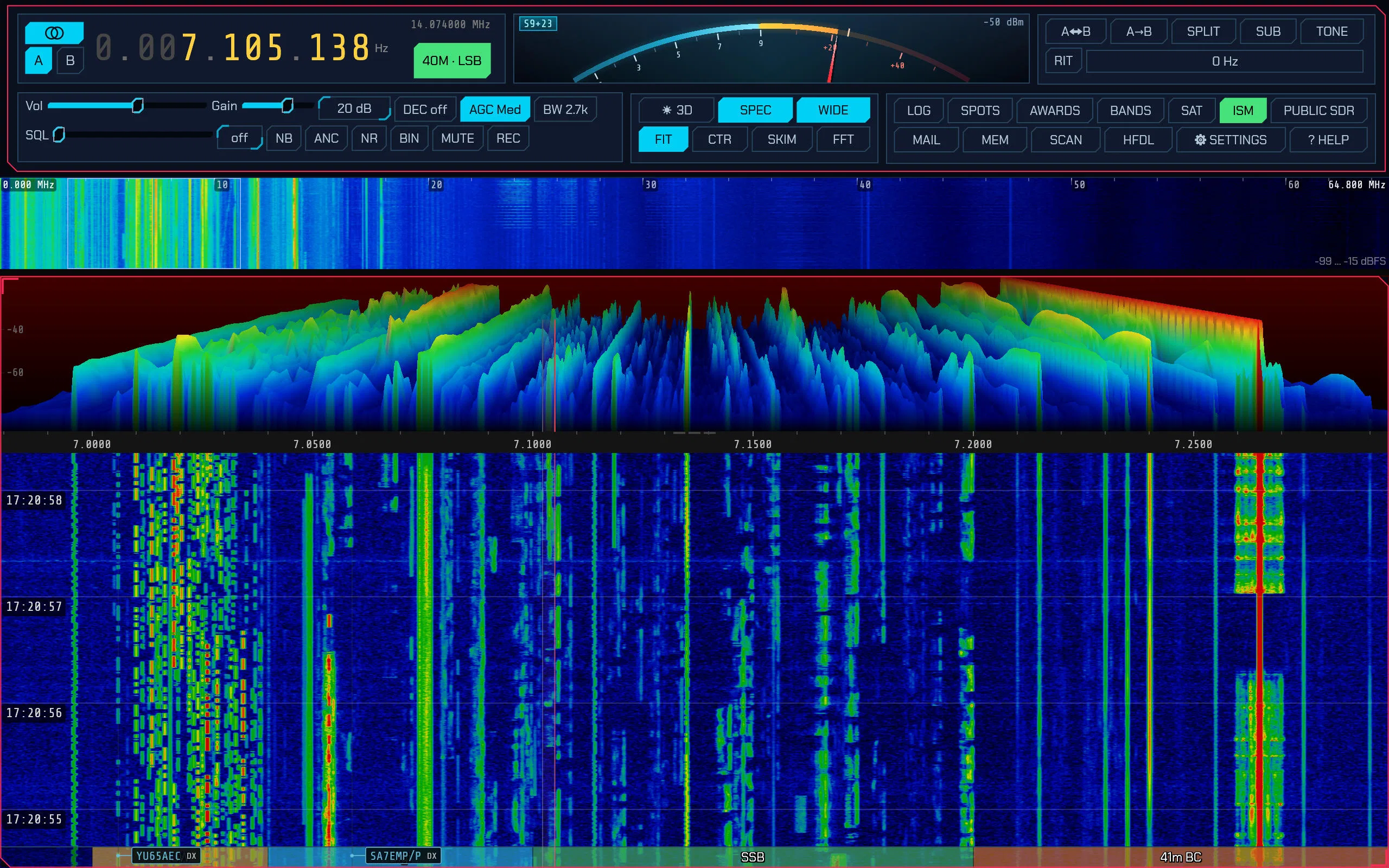
The main window above is the requested featured view: control bar on top, GPU spectrum panadapter with bright waterfall below, decoded spot callsigns overlaid, and the colour-coded bandplan strip along the bottom. Everything in this article’s screenshots comes from the project’s own site and docs.
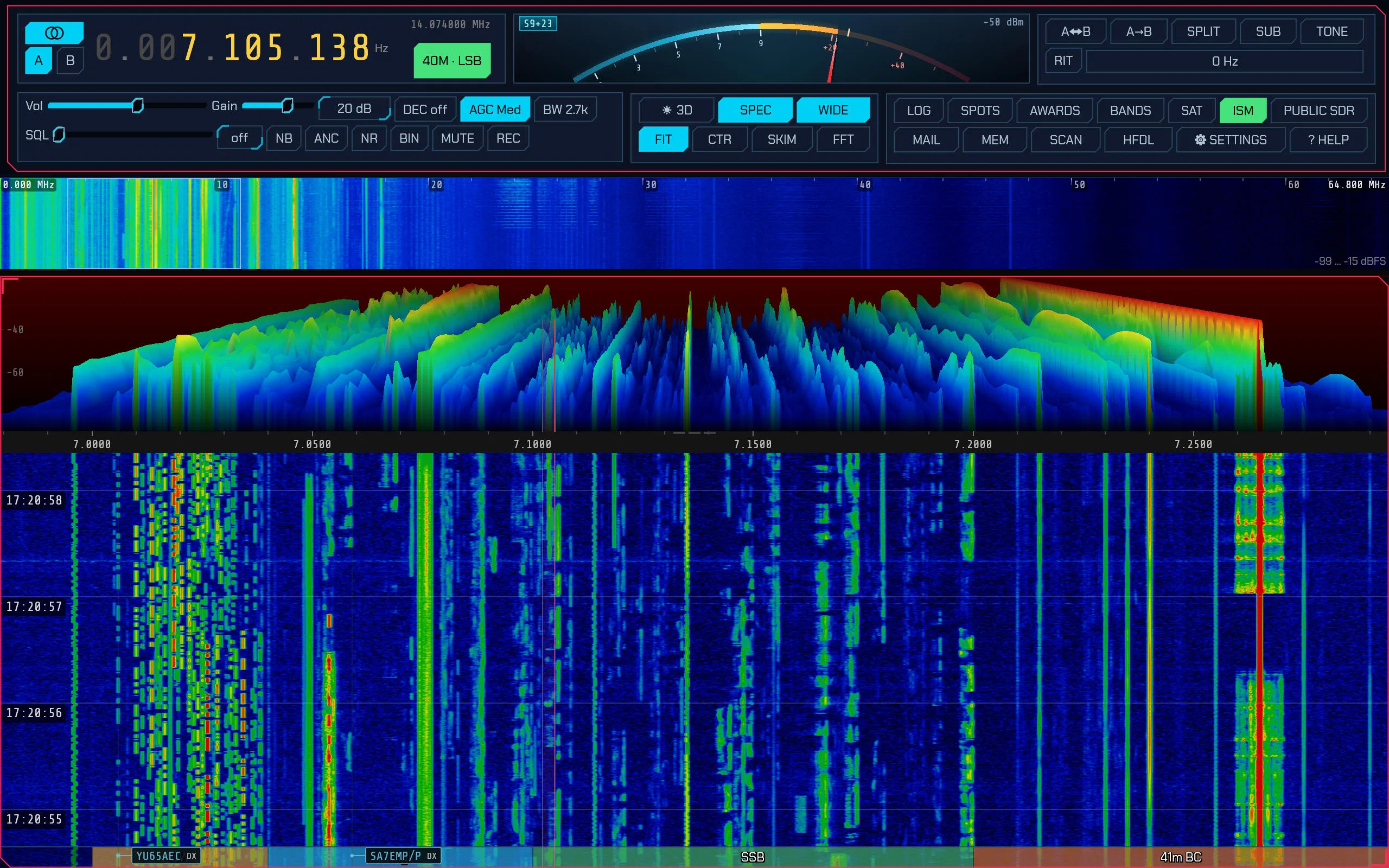
The README’s own capture above shows the same station from the operator’s chair: 7.105 MHz on 40 metres, the 0 to 64.8 MHz wideband scope on top, skimmer callsigns like YU65AEC and SA7EMP/P painted on the waterfall, and the module buttons (3D, SPEC, WIDE, LOG, SPOTS, AWARDS, SAT, ISM, MAIL, HFDL) one click away.
One Program, Twenty-One Radio Families
SDRoxide talks to hardware through pluggable backends, and the headline act is how many radios work with zero extra drivers. Native pure-Rust USB drivers cover RTL-SDR dongles, the RX-888 and Mk2, HackRF, Airspy HF+ and R2/Mini, HydraSDR RFOne, ELAD FDM series, RigExpert FobosSDR, and the receive side of many more, so the stock installers just work with no SoapySDR, libusb, or vendor packages. Where a vendor stack is unavoidable it is loaded at runtime (LimeSDR via LimeSuite, SDRplay via its API service, HD Radio via libnrsc5).
| Family | How it connects | Notes |
|---|---|---|
| RTL-SDR, RX-888/Mk2, HackRF, Airspy HF+/R2/Mini, HydraSDR RFOne, ELAD FDM, FobosSDR | Native Rust USB driver | No extra libraries, firmware auto-uploaded where needed |
| HermesLite2 and Apache Labs | OpenHPSDR Protocol 1 and 2 over Ethernet | High dynamic range, calibrated SWR on HL2 |
| LimeSDR plus LimeRFE, PlutoSDR, bladeRF via SoapySDR | Vendor or Soapy libraries at runtime | Full duplex where hardware allows, PureSignal linearisation on Lime |
| Icom IC-705/7300/7610/9700/905/R8600, FlexRadio, SunSDR | Icom LAN, SmartSDR DAX IQ, TCI WebSocket | No cables or licences beyond the network |
| KiwiSDR, SpyServer, rtl_tcp/rsp_tcp dongles | Network IQ or low-bandwidth VFO plus FFT | A Pi at the mast or hundreds of public receivers |
| Kenwood, Yaesu, Xiegu, Icom CI-V, (tr)uSDX | CAT plus sound card, or single-cable CAT audio | RIT, XIT, split, keyer control from the panel |
| Sound-card-only handhelds | RX audio in, TX audio out, radio’s own VOX | Dial acts as label, transmit lockout still enforced |
Three tricks stand out. Any CAT rig without wideband output can borrow a desk SDR as its panadapter receiver, gaining a real waterfall with click-to-tune while the rig keeps dial, mode, and keying. A remote SDRoxide server is just another radio tab beside local hardware. And multiple radios run side by side in tabs, even full duplex on capable hardware, with a station-wide transmit interlock so only one radio is ever on the air.
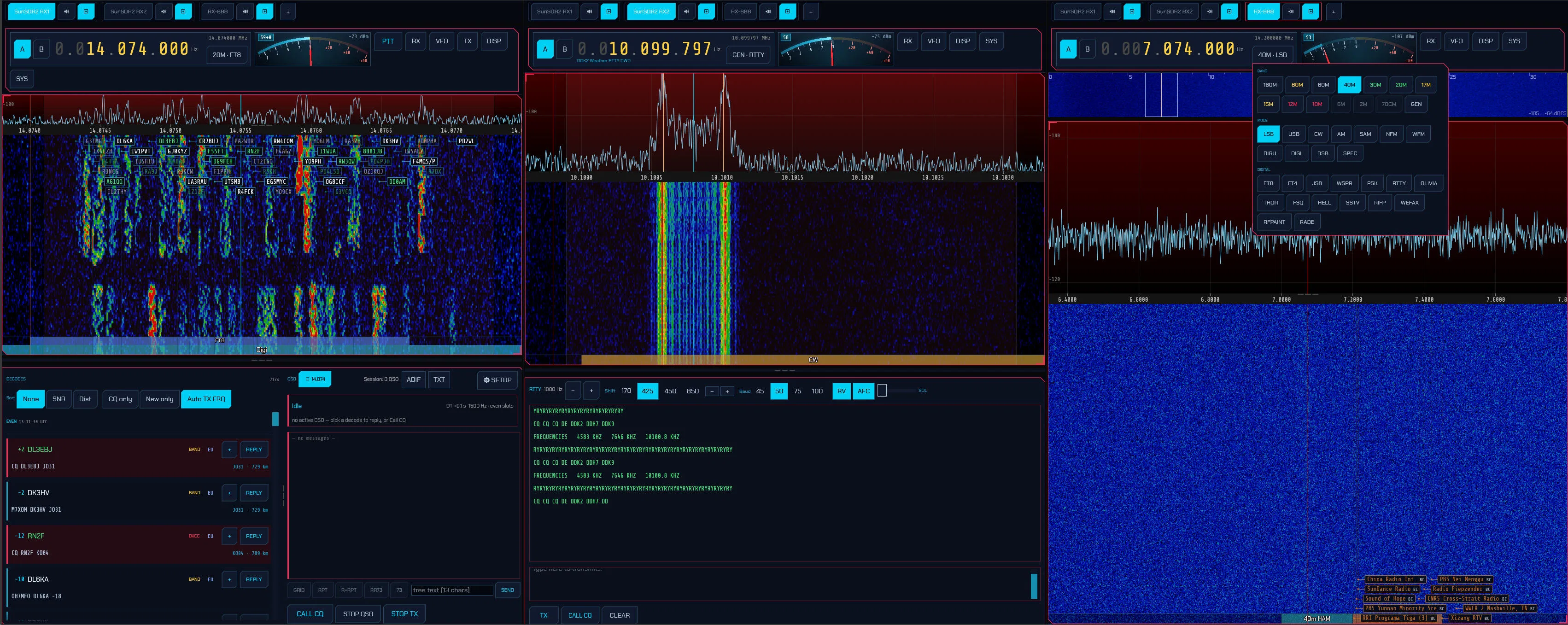
The multi-radio view above shows tabs and a side-by-side layout in action: satellite work in full duplex while other bands keep running. For contest or satellite stations this replaces a whole desk of programs.
The Mode Stack: Everything In-Process
Every mode runs inside the binary as a native Rust modem. No decoder programs alongside, no virtual audio cables, nothing to wire between programs:
- Voice and CW: LSB, USB, AM, SAM, DSB, NFM, WFM, plus a CW decoder that reads speed off the signal, type-ahead keyboard sending, and a space-bar straight key with local sidetone.
- FT8, FT4, FT2: auto-sequencing QSO engine, sortable decode list, dot-matrix world map, automatic logging. FT2 completes a contact in about six seconds. Decoded signals are subtracted and the slot re-searched so weak stations under strong neighbours still decode.
- JS8Call-compatible JS8: all four speeds, heard list, multi-frame free text, heartbeats, directed frames byte-identical to JS8Call.
- FreeDV RADE: neural digital voice readable well below the SSB threshold, inside a normal USB channel.
- WSPR and PI4: beaconing with band hopping and WSPRnet upload feeding the propagation map, plus Next Generation Beacon reception on 6 m and up.
- JT65, JT9, FST4, Q65: the classic and deep weak-signal modes for HF, 6 m, moonbounce, and LF/MF experiments.
- MSK144 and FSK441: meteor scatter on 6 m and 2 m, hunting pings across the period.
- PSK31, RTTY, Olivia, THOR, FSQ: the keyboard and weak-signal MFSK classics with FSQCALL directed layer.
- Hellschreiber: Feld Hell, Slow, X5, X9, FSK245, FSK105, and Hell80.
- SSTV and WEFAX: Scottie, Martin, Robot, Wraase, and the high-resolution PD family with auto mode detection, plus weather fax with station schedules, auto start/stop, phasing, and slant correction.
- NAVTEX: the maritime safety broadcast on 518, 490, and 4209.5 kHz, with repeats filling faded characters back in over hours.
- Packet and Winlink: AX.25 at 300 baud HF and 1200/9600 FM with frame monitor and KISS server, plus a native Winlink radio-email client with B2F forwarding and a real mailbox.
- Broadcast and utility: DRM shortwave, HD Radio FM and AM, RDS data, ACARS and HFDL airband datalinks, VDL Mode 2, ADS-B aircraft tracking, AIS ship tracking, APRS, and AtCHAT nets.
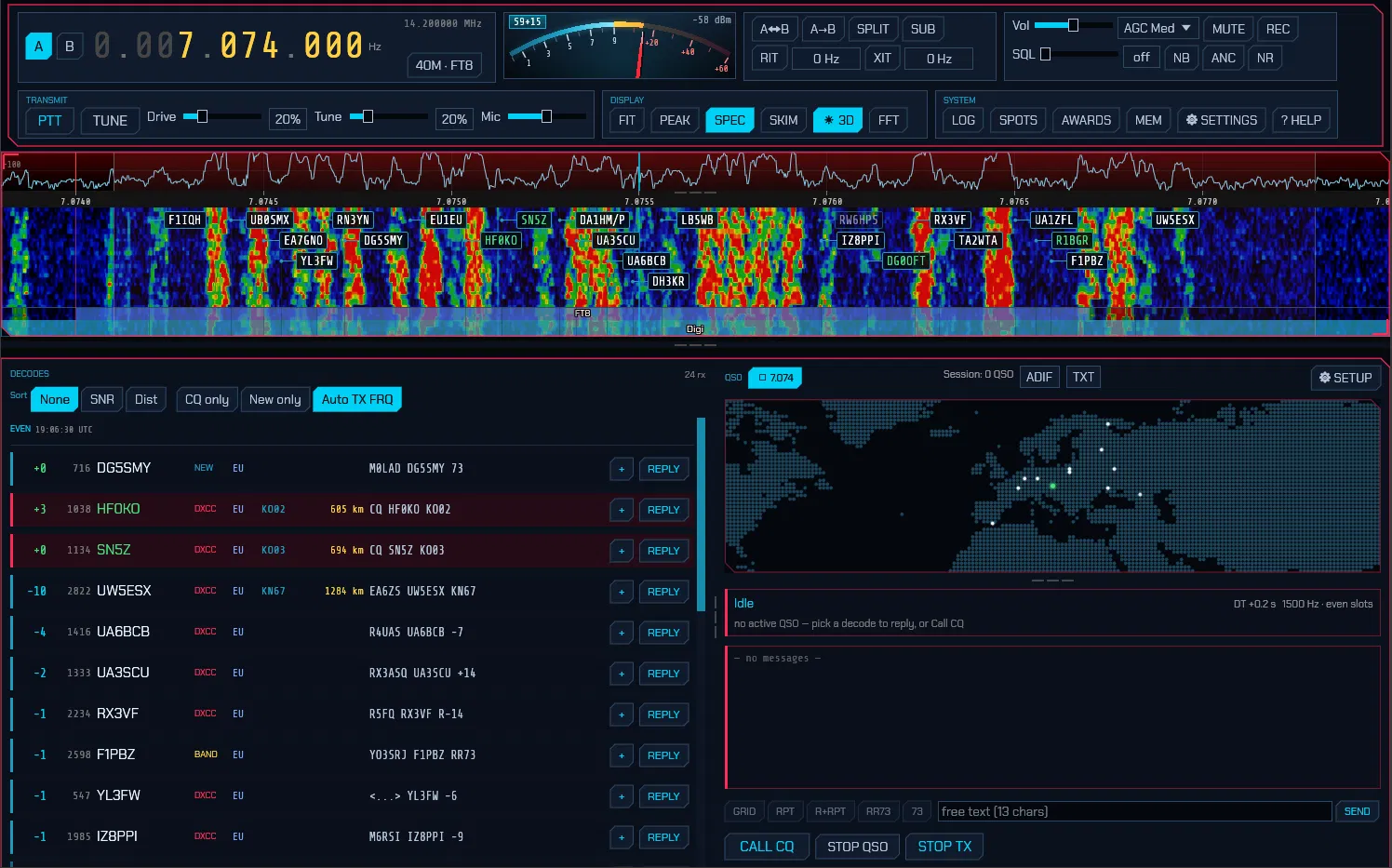
The FT8 panel above shows the workflow: sortable decodes on the left, a dot-matrix world map drawing the great-circle path to the worked station on the right, auto-sequencing engine driving the QSO, and one click pushing it into the logbook.
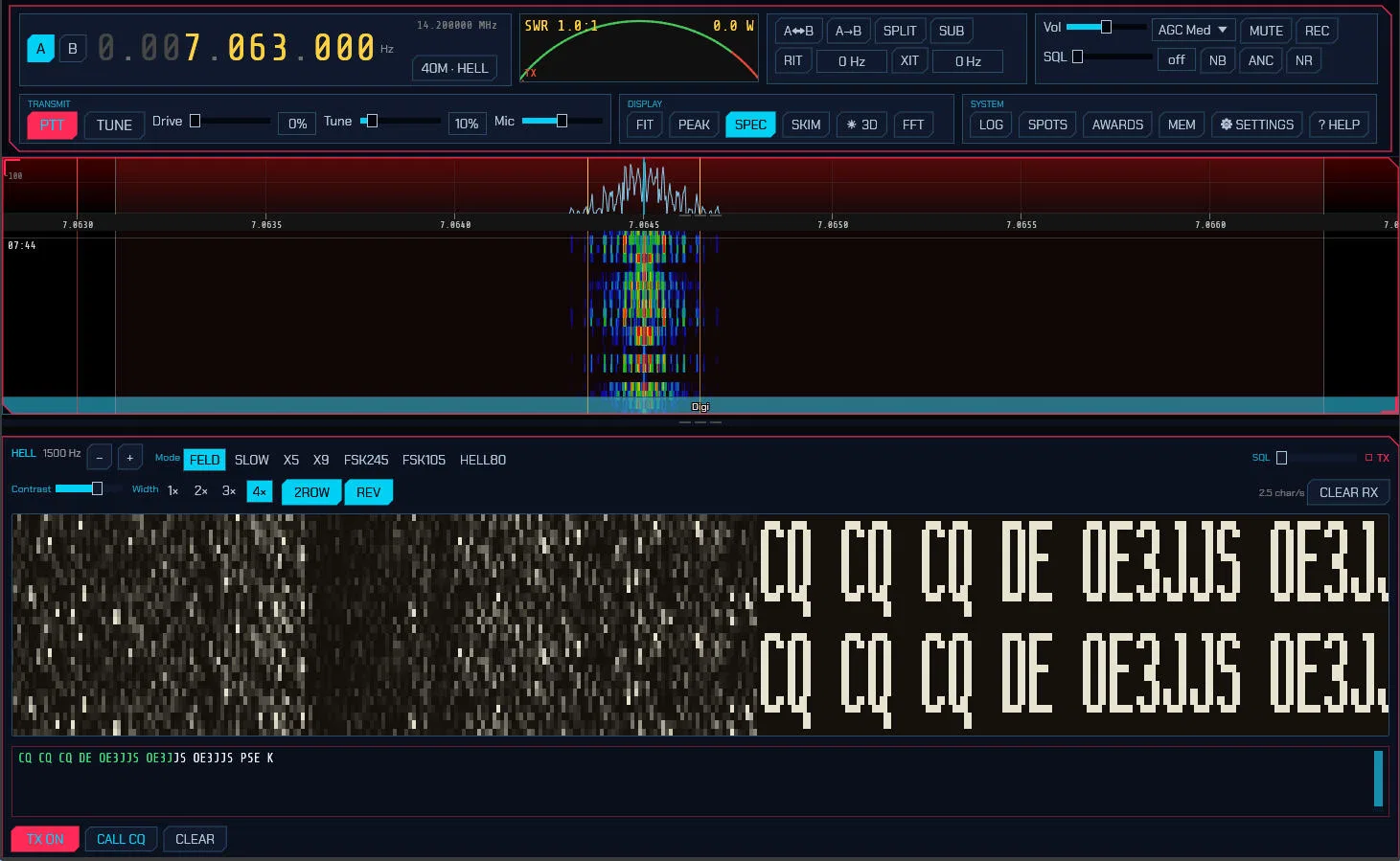
Feld Hell looks like nothing else on the bands, and the panel above captures it: the CQ call painted as dot-matrix letters scrolling across the doubled receive raster, with transmit box and variant buttons underneath. It’s the mode that turns a waterfall into typography.
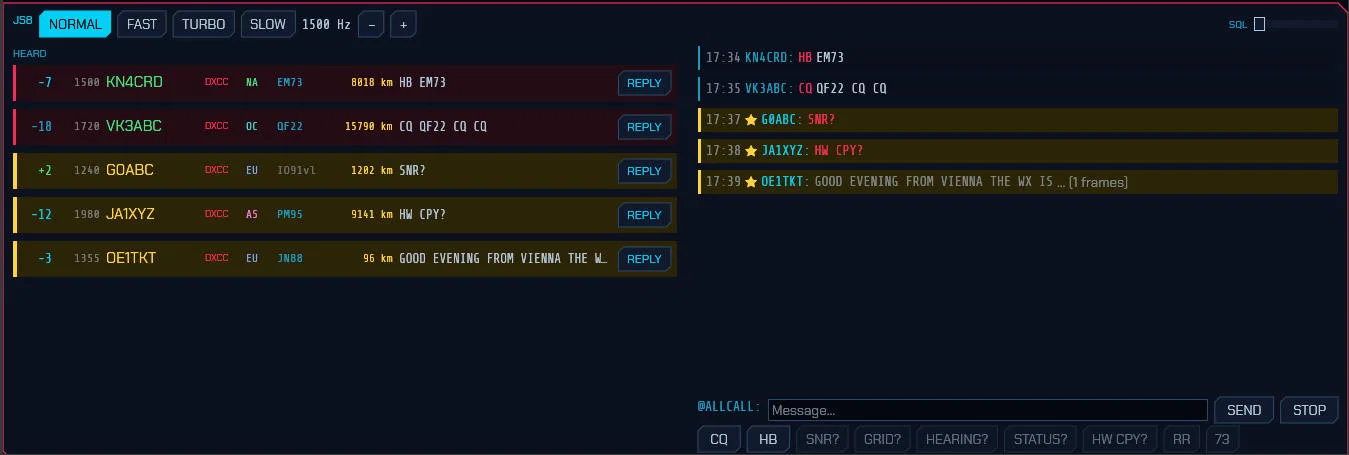
The JS8 panel keeps the keyboard conversation readable: heard stations with reports and last messages on the left, the conversation with starred addressed messages on the right, and query buttons under the composer for directed commands.
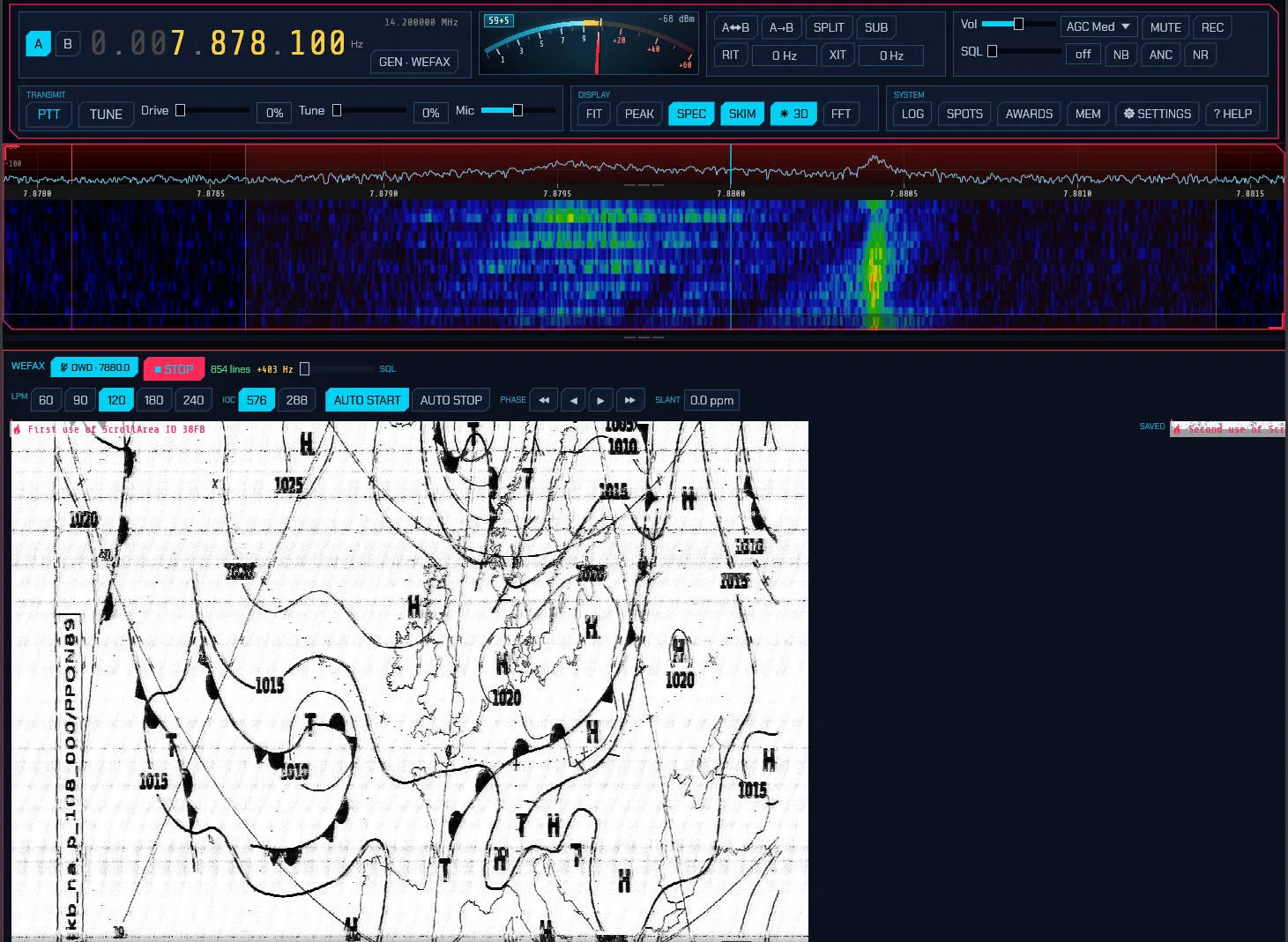
Weather fax remains a working utility mode, and the capture above shows a surface-analysis chart with isobars and fronts painting line by line next to the LPM, IOC, phasing, and slant controls.
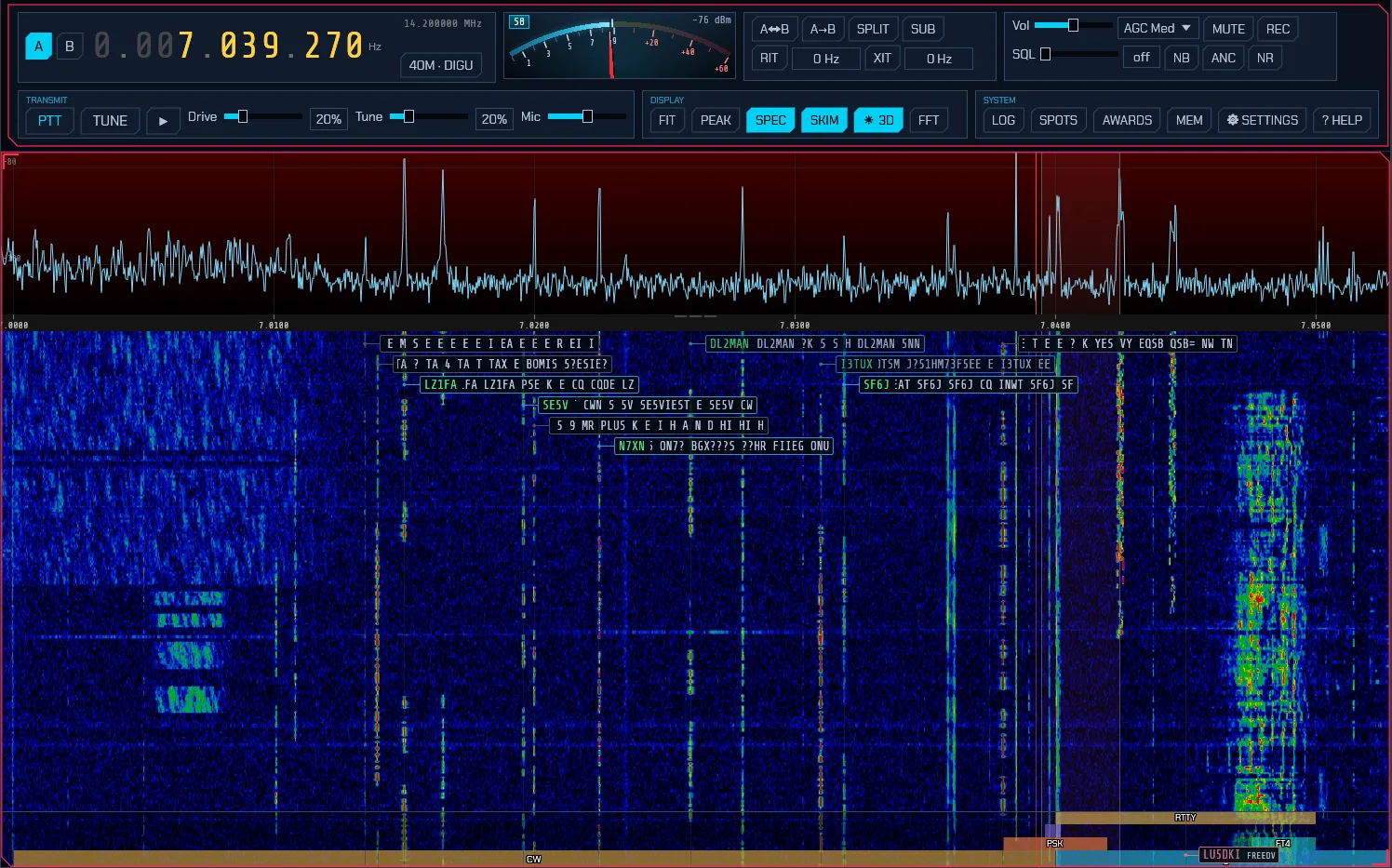
The wideband CW skimmer above labels decoded callsigns straight onto the waterfall across the passband, with PSK31 and RTTY skimmers doing the same for digital segments. Spotting while you tune, with no cluster needed.
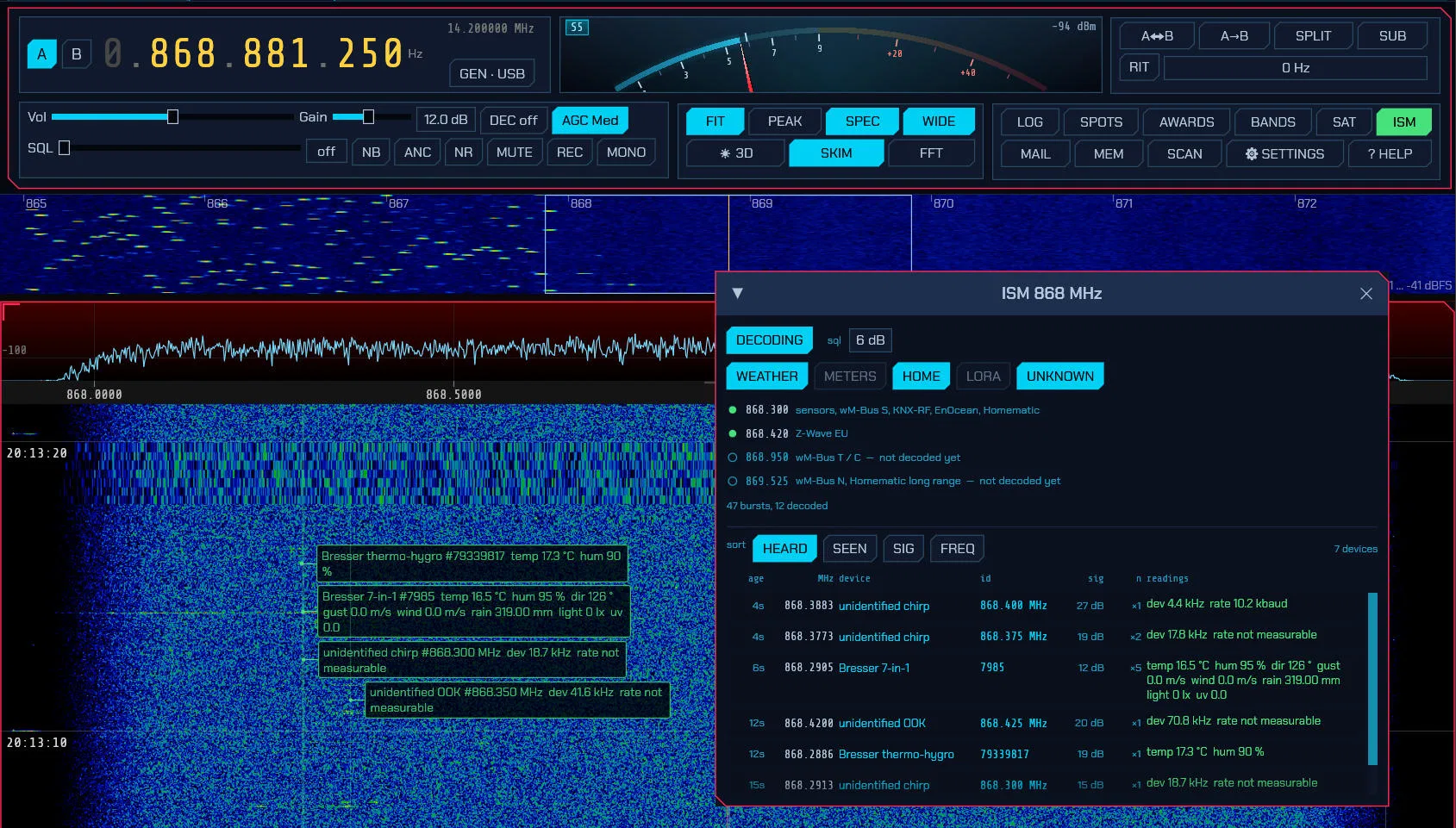
Beyond ham bands, the ISM decoder parks a receiver on each of the four 868 MHz channels and lists every sensor burst it hears with protocol, identity, signal strength, and readings in real units. Weather stations, soil probes, and lightning detectors around the QTH become waterfall labels you can click to tune.
Hands-Free Satellite Operation
Pick a satellite, press LOCK ON, and every voice and digital mode works through it. Receive Doppler is corrected in the DSP so the dial stays on the published frequency, transmit is pre-corrected and tracked through the over, and rotators steer themselves as a Hamlib rotctld client with minimum elevation, offsets, and park positions. TLEs refresh themselves in the background and suspend correction rather than freezing when stale.
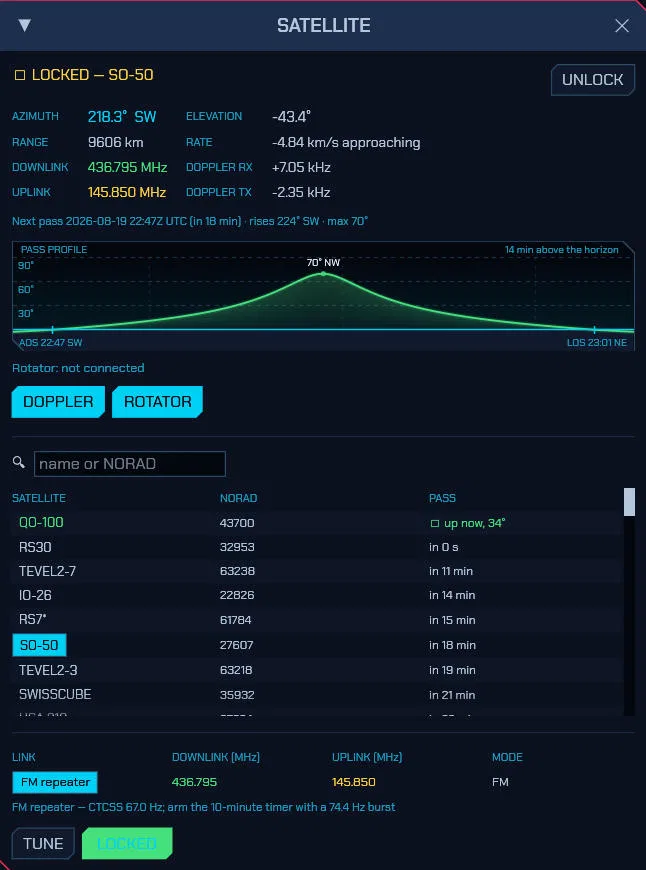
The satellite window above, locked onto QO-100, shows azimuth, elevation, range, live Doppler on both legs, the DOPPLER and ROTATOR controls, a searchable satellite list with pass predictions, and the transponder table with downlink, uplink, and mode per link.
The 3D Space-Weather Globe
A live three-dimensional view of the Sun, Earth, and everything headed here, built from NASA SDO, NOAA SWPC, DONKI, GIRO, and CelesTrak data plus what your own receiver hears, cached for offline use:
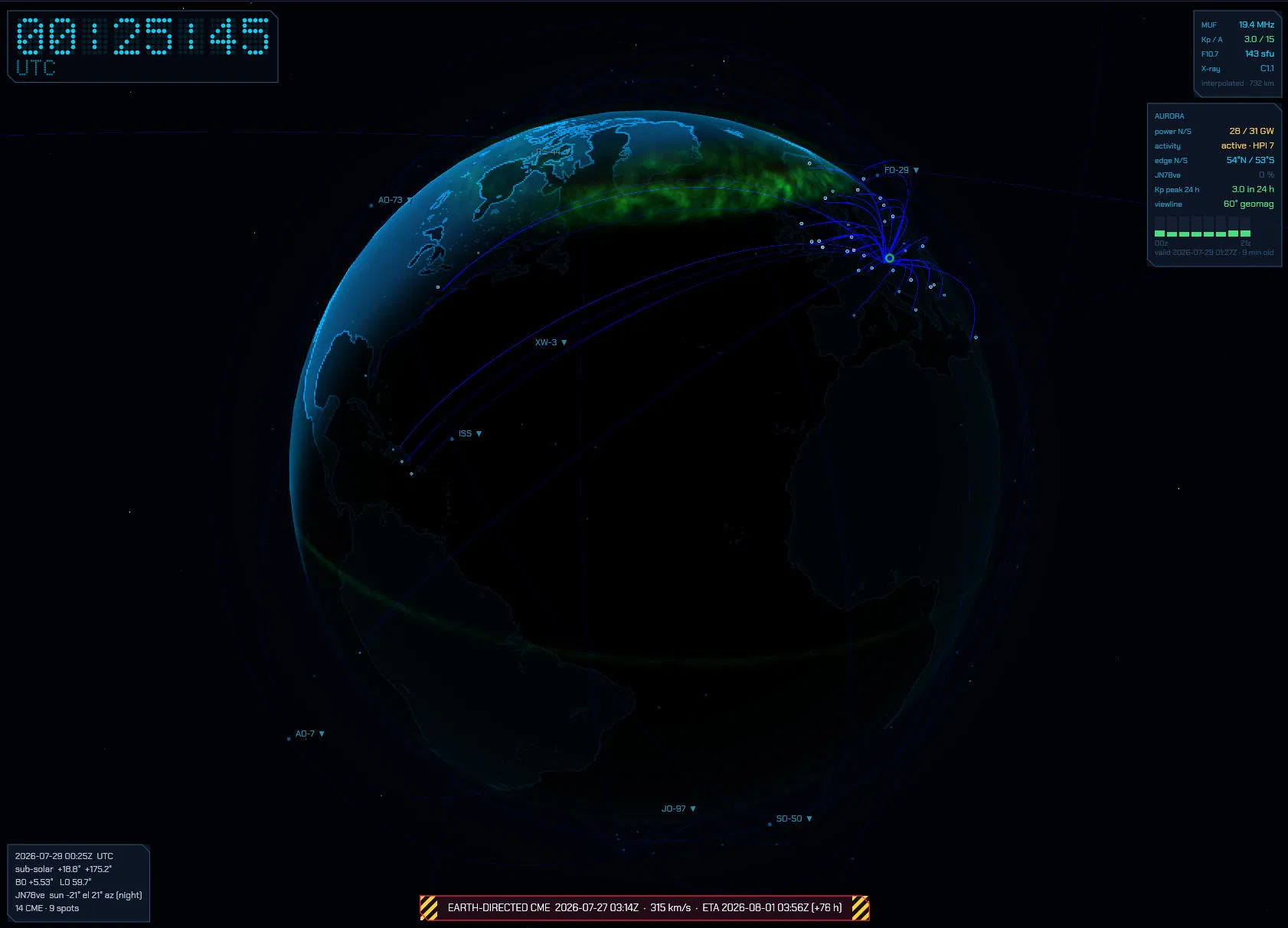
The README’s globe capture above packs a whole space-weather briefing into one frame: the auroral oval glowing over the pole, QSO arcs fanning out to FO-29 and other birds, MUF, Kp, F10.7 and X-ray panels, and a red Earth-directed CME banner with speed and estimated arrival along the bottom. Your traffic renders as fading dots with a pulse running along the worked path while you transmit.
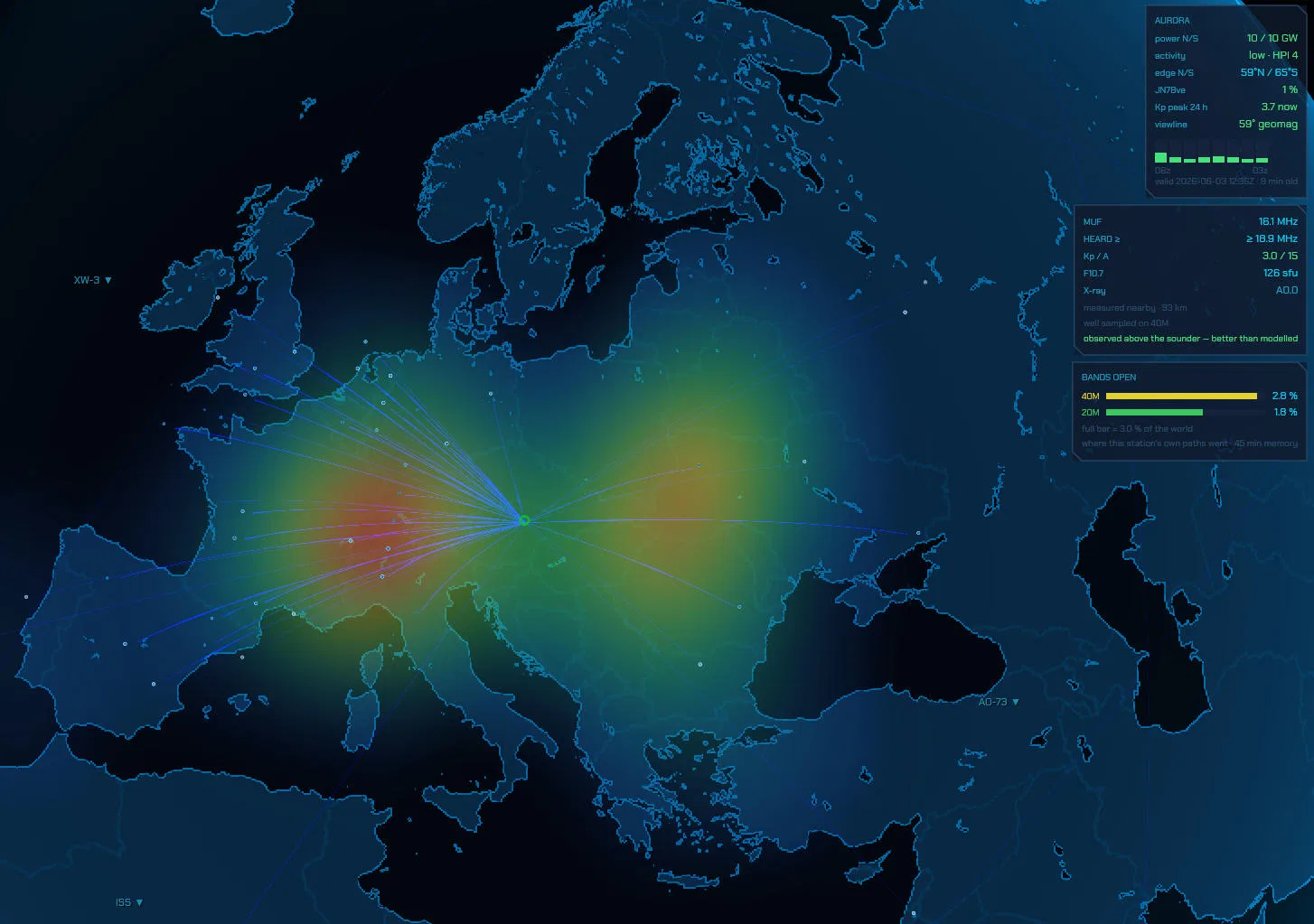
The propagation heat map above is the operator’s own evidence: WSPR, FT8, JS8, logged QSOs, and Reverse Beacon Network spots painted at their ionospheric midpoints in blended hues on a 45-minute half-life. Next to it sit the measured MUF against the nearest ionosonde, heard floor, Kp and A indices, F10.7 flux, GOES X-ray class, and NCDXF beacon readings. Scrub the whole scene plus or minus 24 hours, or let AUTO fly a two-minute camera tour.
Logbook, Spots, and Awards That Close the Loop
Contacts group into daily sessions with time span and QSO count, auto-logged from FT8 and FT4 or entered by hand, with contest fields, a worked-before badge per band, DXCC, CQ and ITU zones, IOTA, and POTA/SOTA references resolved per QSO. A DX cluster over telnet plus POTA, SOTA, PSK Reporter, and FreeDV Reporter feeds place clickable markers on the waterfall and world map: click a spot and the radio tunes, sets the mode, and pre-fills the entry.
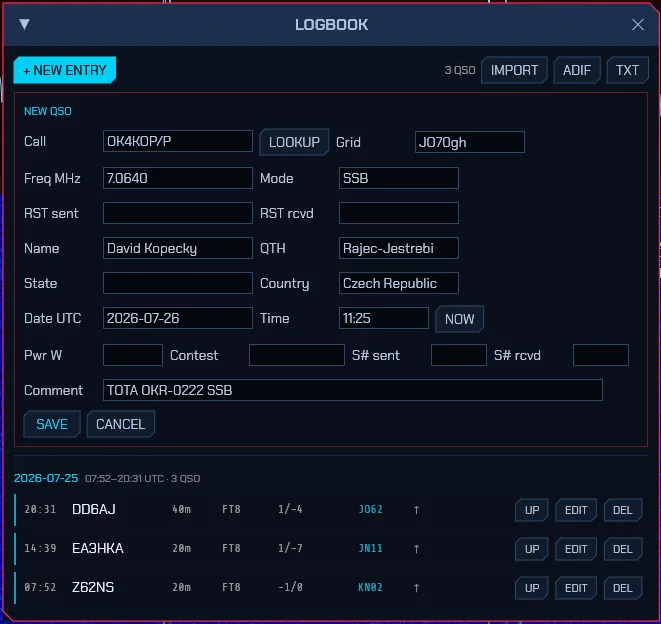
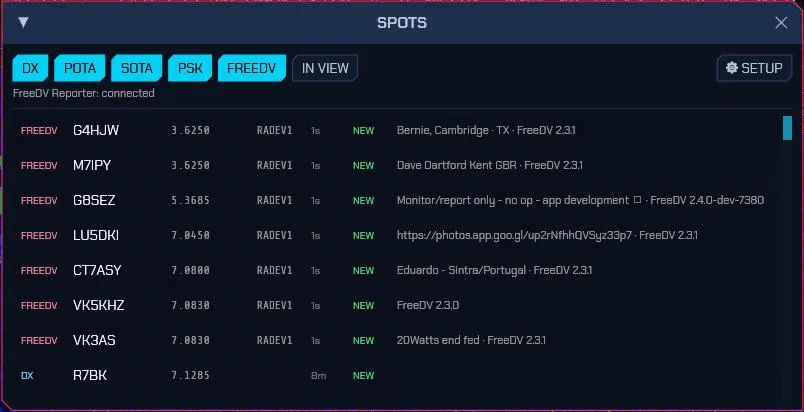
Awards track DXCC, WAS, WAZ, and grid squares worked against confirmed with a per-band filter, new entities flagged the moment a spot arrives, and audible alerts (spoken callsign included) on a dedicated sound device. QSOs upload to eQSL, QRZ Logbook, Club Log, and LoTW, and LoTW and eQSL confirmations download and match back.
Install It in Minutes
cargo install --git https://github.com/dividebysandwich/sdroxide builds from source, Arch users take paru -S sdroxide, and the GitHub releases page carries Linux packages (including a glibc 2.35 build for older distros and Raspberry Pi OS bookworm, plus an AppImage for x86-64 and ARM64), macOS, and Windows builds. DEFAULT builds need nothing else installed: native drivers, firmware uploads, and the Dream DRM receiver with built-in faad2 all ship inside. SoapySDR devices and HD Radio are the exceptions that need their libraries. No hardware at hand? --siggen gives a built-in signal generator and --file plays raw IQ captures.
Run it three ways: native desktop with sdroxide, full UI streamed to any browser with sdroxide --server (installable to a phone home screen), or native remote with sdroxide --connect host:4950. A --console ASCII waterfall exists for the truly minimal terminal.
Honest Caveats
The project warns plainly that it is young and under heavy development: expect bugs, and don’t rely on it for mission-critical operating yet. Several newer drivers and SmartSDR, PlutoSDR, and the AM side of HD Radio are marked not yet verified against real hardware on the site. GitHub issues are the feedback channel, and the manual ships in-app under F1 for everything else.
SDRoxide vs Alternatives
| Tool | Scope | Native drivers | Built-in skimmers | Satellite + Doppler | 3D space weather | Logbook and awards |
|---|---|---|---|---|---|---|
| SDRoxide | Transceiver client | 21 families, many native Rust | CW, PSK31, RTTY | Yes, with rotator | Yes, live globe | Yes, with uploads |
| SDR++ | Receiver client | Broad via modules | No | Basic tracking | No | No |
| SDRangel | Receiver plus tools | Broad | Some | Yes | No | No |
| OpenWebRX+ | Web receiver | Server-side | No | No | No | No |
| WSJT-X plus Fldigi plus logging | Mode programs | Via rig CAT | No | No (external trackers) | No | Yes, split across apps |
SDRoxide’s bet is the whole station in one binary: the receiver, the modems, the skimmers, the satellite tracker, the space-weather globe, and the logbook sharing one state instead of five programs sharing audio cables.
Frequently Asked Questions
What is SDRoxide in one sentence?
SDRoxide is a free open source Rust SDR transceiver client with a GPU panadapter, wideband skimmers, a full digital mode stack, satellite tracking, and a live 3D space-weather globe.
Which radios does SDRoxide support?
Twenty-one families, from RTL-SDR and HackRF dongles to HermesLite2, Icom network radios, FlexRadio, KiwiSDR and plain CAT rigs, many through native drivers with nothing extra to install.
Does SDRoxide run in a browser?
Yes. Start it with –server and the full interface streams to any browser, installable to a phone home screen, alongside native desktop, remote client, and console waterfall modes.
Can it work satellites hands-free?
Yes. Lock onto a bird and Doppler correction plus Hamlib rotator steering run automatically, with TLEs refreshing in the background and a LOCK ON button on every pass window.
Is SDRoxide finished software?
No, it is young and actively developed. Expect bugs on some paths and a few drivers still marked unverified against real hardware, with GitHub issues as the feedback channel.
Sources and Further Reading
- SDRoxide official site: https://sdroxide.com/
- SDRoxide source code: https://github.com/dividebysandwich/sdroxide
- SDRoxide user manual: https://github.com/dividebysandwich/sdroxide/blob/main/docs/USER_MANUAL.md
- SDRoxide releases: https://github.com/dividebysandwich/sdroxide/releases
- Reverse Beacon Network: https://www.reversebeacon.net/
- WSPRnet: https://wsprnet.org/
- CelesTrak: https://celestrak.org/
73 de 9M2PJU

Post Comment