Repeater Scores App: Find Likely Busy VHF and UHF Repeaters and Build ICOM and CHIRP CSV Files
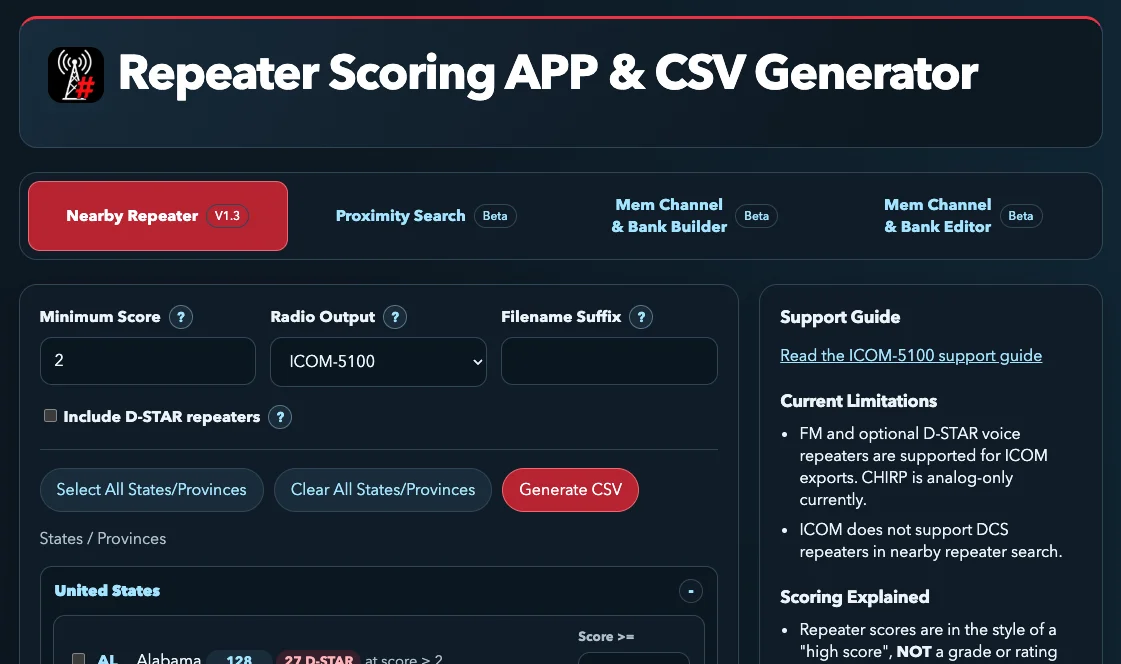
TL;DR: Repeater-Scores.app is a free web app with no ads and no signup that scores VHF and UHF repeaters in the USA and Canada by likely activity, using RepeaterBook data signals such as weekly nets, AllStar and EchoLink links, linked systems, coverage claims and ARES, RACES or SKYWARN affiliations. Set a minimum score, pick your states, choose ICOM-5100, ID-5200, ID-52 or CHIRP output, and the app builds a ready to import CSV that loads straight into your radio, with automatic cutoff adjustment when the file would overflow the radio’s memory.
Every travelling ham knows the frustration. You drive into a new city, run a repeater search, and your radio fills with dozens of listings. You kerchunk through them one by one and hear nothing but courtesy beeps and dead air, because half of them are low use backyard machines with a few watts into a loft antenna. The busy wide coverage repeaters with morning nets and linked systems are in there somewhere, but finding them takes an evening of trial and error you don’t have on a road trip.
The Repeater Scoring App attacks exactly that problem. Instead of dumping the whole directory into your radio, it ranks every repeater with a transparent activity heuristic, lets you cut off the quiet tail with one number, and hands you a clean CSV tuned to your exact radio model.
What Is the Repeater Scoring App?
The Repeater Scoring App is a free browser based tool that estimates how likely each USA or Canada VHF and UHF repeater is to be busy, then exports a filtered channel list as a CSV file your radio can import directly.
It was built specifically to improve the ICOM Near Repeater experience. ICOM mobiles and handhelds such as the ID-5100, ID-5200 and ID-52 can load a repeater list and show nearby machines sorted by distance from GPS. That feature is only as good as the list you feed it. Load all 2,354 California listings from the raw directory and the search drowns in quiet machines. Load a scored and filtered list and the first hits are the wide coverage workhorses you actually want while mobile.
Four points define the project:
- Free with no ads and no signup. The front page says it plainly: no ads, no signup, NADA.
- Score, not a grade. The number is an activity estimate, not a quality rating and not a competition. A low score usually means sparse listing data, not a bad repeater.
- RepeaterBook powered. All data derives from RepeaterBook, and every generated row links back to its source listing for verification.
- Radio aware exports. Output formats target the ICOM-5100, ID-5200 and ID-52 plus generic CHIRP import, with the app automatically tightening score cutoffs when the file would exceed the radio’s row or group limits.
Why Raw Repeater Lists Fail Travellers
A national repeater directory is a phone book, not a recommendation engine. RepeaterBook lists every reported machine: high profile wide area systems with dozens of weekly nets, and equally a 5 watt box in someone’s garage that hasn’t been keyed in months. Both look identical in a flat import.
Three failure modes follow:
- Result flooding. Radios like the ICOM-5100 cap nearby search lists. Fill the slots with low use machines and the strong distant repeater you could actually work disappears below the cutoff.
- Dead air roulette. Kerchunking unknown machines one by one wastes drive time and annoys repeater owners who monitor with tone squelch off.
- Stale confidence. A listing with no nets, no links and a thin description may be perfectly healthy but rarely updated, or it may be long gone. A flat list gives no hint which.
Scoring fixes the ordering problem. By stacking observable activity signals, the app pushes machines with nets, links, wide coverage and public service ties to the top, so the first channels you try are the ones most likely to answer.
How the Score Works
Scores follow a high score style: the more a repeater has going on, the higher the number climbs. There’s no maximum of 10 and no grading curve. The current highest scoring machine cited by the developer is a 15.5, KB3AWQ in Williamsport, Pennsylvania, which serves as the reference for what a fully loaded listing looks like.
Signals that raise a score
- Regular nets. Listed weekly nets are the strongest single indicator that humans actually use the machine. Two or more nets also lights the N badge flag.
- Linked services. AllStar, EchoLink or IRLP connectivity suggests an active owner and a wider audience.
- Linked repeater systems. Membership in a linked system implies coordination, shared traffic and maintained infrastructure.
- Stated coverage. Broad mobile or regional coverage claims add weight, and genuinely wide area machines earn the W flag.
- Public service affiliations. ARES, RACES or SKYWARN ties indicate emergency use and regular drills.
- Isolation bonus. A repeater standing alone in a sparse coverage area can earn bonus value, since it may be the only usable machine for miles.
Deliberate design limits
Coverage alone can’t dominate. A machine claiming huge coverage but showing no nets, no links and no affiliations lands mid pack by design, which stops one inflated coverage claim from swamping every other signal. Similarly, a single net or a one line description keeps a machine low even when it is perfectly usable on the air. The developer is open about the guesswork: the page notes the team is making a lot of assumptions, and urges users to submit updates on RepeaterBook when listings are thin, since better source data improves every score downstream.
Practical threshold guidance
- Score 2 or higher is the suggested starting filter for cutting backyard and low detail machines.
- Raise the threshold in dense regions to keep the list tight and high confidence.
- Lower the threshold when travelling through thin coverage areas where even a quiet machine beats silence.
- Per state overrides let dense states stay selective while sparse states stay inclusive. Leave a state blank to follow the base score.
- Score 0 includes everything, which is exactly what emergency communicators building a maximum information file want.
Reading the Score Badge Shorthand
ICOM-5100 and ID-5200 exports pack the score and its reasons into the Sub Name field as a compact badge in the form ST/SXCWN. Each slot is one character, and a dash means the flag is absent.
| Slot | Meaning | Values |
|---|---|---|
ST |
State or province abbreviation | OR for Oregon, WA for Washington, and so on |
S |
Score as a single digit, decimals floored, anything above 9 shown as 9 | 0 to 9 |
X |
Link status | S system linked, L other linked, - neither |
C |
IP connectivity | A AllStar, E EchoLink, B both, - neither |
W |
Wide area qualifier | W present, - absent |
N |
Nets | N means two or more listed nets, - otherwise |
Worked examples from the official docs:
OR/7SEWNis an Oregon repeater scoring 7, system linked, with EchoLink, wide area qualified, and at least two nets.OR/4-BW-is an Oregon repeater scoring 4 with both AllStar and EchoLink and wide area coverage, but not marked linked and short of the nets flag.WA/4L-W-is a Washington repeater scoring 4, linked and wide area, but with neither AllStar nor EchoLink and too few nets.WA/1----is a Washington repeater scoring 1 with none of the tracked flags.
Learn to read the badge at a glance and you can judge a channel before ever keying up: 7SEWN is a prime time machine, 1---- is a filler worth trying only when nothing else answers.
The Four Tools in the App
The header bar hosts four tabs. Nearby Repeater is the mature core at version 1.3, while the other three carry Beta labels and extend the workflow from repeater discovery into full memory management.
Nearby Repeater V1.3
The main CSV generator. Set a minimum score, pick a radio output, optionally append D-STAR voice channels, tick states and provinces, and hit Generate CSV. Live tallies show how many repeaters will export as you adjust scores and selections, so there’s no guess and regenerate loop. If the file would overflow the radio, the app automatically raises cutoffs until it fits and tells you it did so.
Proximity Search Beta
A location driven search for finding machines near a point rather than sweeping whole states. Ideal for trip planning: drop a route corridor and pull the high scoring machines along it instead of importing two entire states.
Mem Channel and Bank Builder Beta
Takes the scored repeater output and arranges it into radio memory channels and banks. So related machines group together the way you would lay them out by hand, without the spreadsheet grind.
Mem Channel and Bank Editor Beta
Edits existing memory layouts, for reworking a codeplug you already have rather than building from scratch.
Building Your First CSV in Five Minutes
You need nothing installed: a modern browser is enough. The workflow below mirrors the on screen layout.
Step 1: Set the minimum score
Leave the default of 2 for a first export. This single number does most of the filtering work, removing low use and thinly documented machines while keeping everything with real activity signals.
Step 2: Pick the radio output
Choose ICOM-5100, ICOM-5200, ICOM-ID52 or CHIRP from the Radio Output dropdown. The format, column layout and naming rules adapt automatically, including the score badge in Sub Name on the 5100 and 5200 and the equivalent indicators on the ID-52.
Step 3: Decide on D-STAR
Tick Include D-STAR repeaters to append all on air 2m and 70cm D-STAR voice channels for the selected states. They land after the score sorted FM channels in groups such as OR-Dstar. Note that D-STAR entries carry no scores or badges, a dual mode machine may appear twice (once FM, once DV), and a listing doesn’t guarantee a working internet gateway. Keep an eye on capacity: D-STAR channels hold their slots and only score cutoffs rise to compensate, and no export can exceed 50 repeater groups.
Step 4: Select states and watch the tallies
Tick the states or provinces you need, or Select All for a continental road trip file. Per state Score >= boxes override the base minimum wherever you set them. Counts update live and already account for automatic cutoff increases needed to fit the radio limit.
Step 5: Generate and load
Hit Generate CSV, optionally add a filename suffix for version control, then import the file per your radio’s procedure. The ICOM-5100 support guide linked in the sidebar walks through the 5100 side. Spot check a few rows against their linked RepeaterBook listings before a big trip, the links are in every row for exactly this purpose.
D-STAR Handling in Detail
D-STAR support is explicitly Beta, and its rules differ from FM in ways worth knowing before you tick the box:
- Appended after FM channels in state groups such as
OR-Dstar, unsorted by score since DV channels aren’t scored. - State counts preview eligible D-STAR records before you opt in. D-STAR unavailable means that state’s cache hasn’t been acquired yet, while zero means a valid cache with no eligible records.
- A dual mode repeater produces both an FM channel and a DV channel.
- Gateway presence isn’t verified. A listed D-STAR repeater may have no working internet link, so confirm reflectors before relying on one.
- Capacity pressure from D-STAR never deletes DV channels. The app raises FM score cutoffs instead, so in a full radio the FM tail shrinks first.
System Names in Channel Labels
Known linked systems get appended to channel names, for example Salem-PEAK, with the location portion shortened to keep the full suffix. Suffixes drop out when the channel name limit falls below 10 characters or the complete suffix can’t fit. ID-52 exports keep score and activity indicators ahead of the system suffix. So the badge stays readable even with the system tag attached.
Repeater Scores App vs Other Ways to Fill a Radio
| Method | Effort | Activity ranking | Radio ready file | Cost |
|---|---|---|---|---|
| Repeater Scores App | Minutes in a browser | Yes, transparent heuristic | Yes, ICOM and CHIRP CSV | Free, no signup |
| RepeaterBook manual search | High, repeater by repeater | No, flat listings | No, copy by hand | Free |
| Desktop CHIRP query | Medium, app plus drivers | No, imports everything matching | Yes, direct to radio | Free, install needed |
| RT Systems software | Low per radio | No, full directory | Yes, proprietary cable | Paid per model |
| ARRL Repeater Directory | Low, browse and copy | No, curated listings | No | App plus subscription for full data |
The scoring app doesn’t replace RepeaterBook, it sits on top of it as a prioritization and export layer. The developer states this directly in the FAQ: every row links back to its source listing so you can sanity check the score and make your own call.
For ARES, RACES and SKYWARN Operators
The FAQ answers the objection head on: emergency communicators should arguably import everything at score 0, because maximum information in the radio beats a curated shortlist when infrastructure fails and there is no time to look things up online. The scoring layer then becomes a triage aid rather than a filter. Program the full set, and let the badge flags tell you at 2 AM which machine likely has the widest ears: the W wide area flag and the N nets flag mark the machines most likely to raise a net control station.
Go further and build two files: a travel file at score 2 or higher for daily mobile use, and an EmComm file at score 0 with every machine in your section. Storage is cheap, and the app regenerates either in seconds when RepeaterBook data updates.
Honest Limitations
- USA and Canada only. The state and province picker covers all 50 US states plus DC and the Canadian provinces and territories. No other countries.
- FM plus D-STAR for ICOM outputs. CHIRP export is analog only at present.
- No DCS in ICOM nearby search. ICOM hardware doesn’t support DCS repeaters in this search mode, so they’re excluded from those exports.
- Data quality follows RepeaterBook. Sparse or stale listings score low regardless of real world activity. The fix is upstream: submit updates on RepeaterBook.
- Overflow auto trims the FM tail. In a full radio the app raises score cutoffs and says so, but check the message so a threshold change doesn’t surprise you later.
- Scores are estimates. One thin clue such as a single net keeps a score low even on a well used machine. Treat the number as a first try ordering, not a verdict.
Frequently Asked Questions
Does a low score mean the repeater is bad?
No. Low scores usually reflect sparse listing data, few listed nets, or infrequent updates. Many perfectly good machines score low for lack of detail, so verify on the air.
Why not just import every repeater at score 0?
You can, and EmComm operators should. For daily mobile use, full imports can flood ICOM nearby search and bury strong wide coverage machines under quiet ones.
What exactly does the score measure?
It’s a practical ranking heuristic combining listed nets, linked services, linked systems, coverage claims, public service ties and isolation, estimating which machines are worth trying first.
Why do some wide area machines still rank mid pack?
Coverage is only one input by design. Broad claims without nets, links or affiliations stay middling so one big claim can’t overwhelm all other signals.
Is this a replacement for RepeaterBook?
No, it is a prioritization and export layer on top. Every row links back to its RepeaterBook source listing for verification and final judgment.
Sources and Further Reading
- Repeater-Scores.app main tool
- Proximity Search Beta
- Mem Channel and Bank Builder Beta
- Mem Channel and Bank Editor Beta
- ICOM-5100 support guide
- RepeaterBook worldwide repeater directory
- KB3AWQ Williamsport PA reference listing
- Repeater-Scores.app update thread on r/amateurradio
- ICOM ID-5100 product page
- ICOM ID-52 product page
- CHIRP open source radio programming project
73 de 9M2PJU



Post Comment