KIISU V4BR: The Credit Card Size Flipper Zero Alternative for Sub-GHz, NFC, RFID and IR
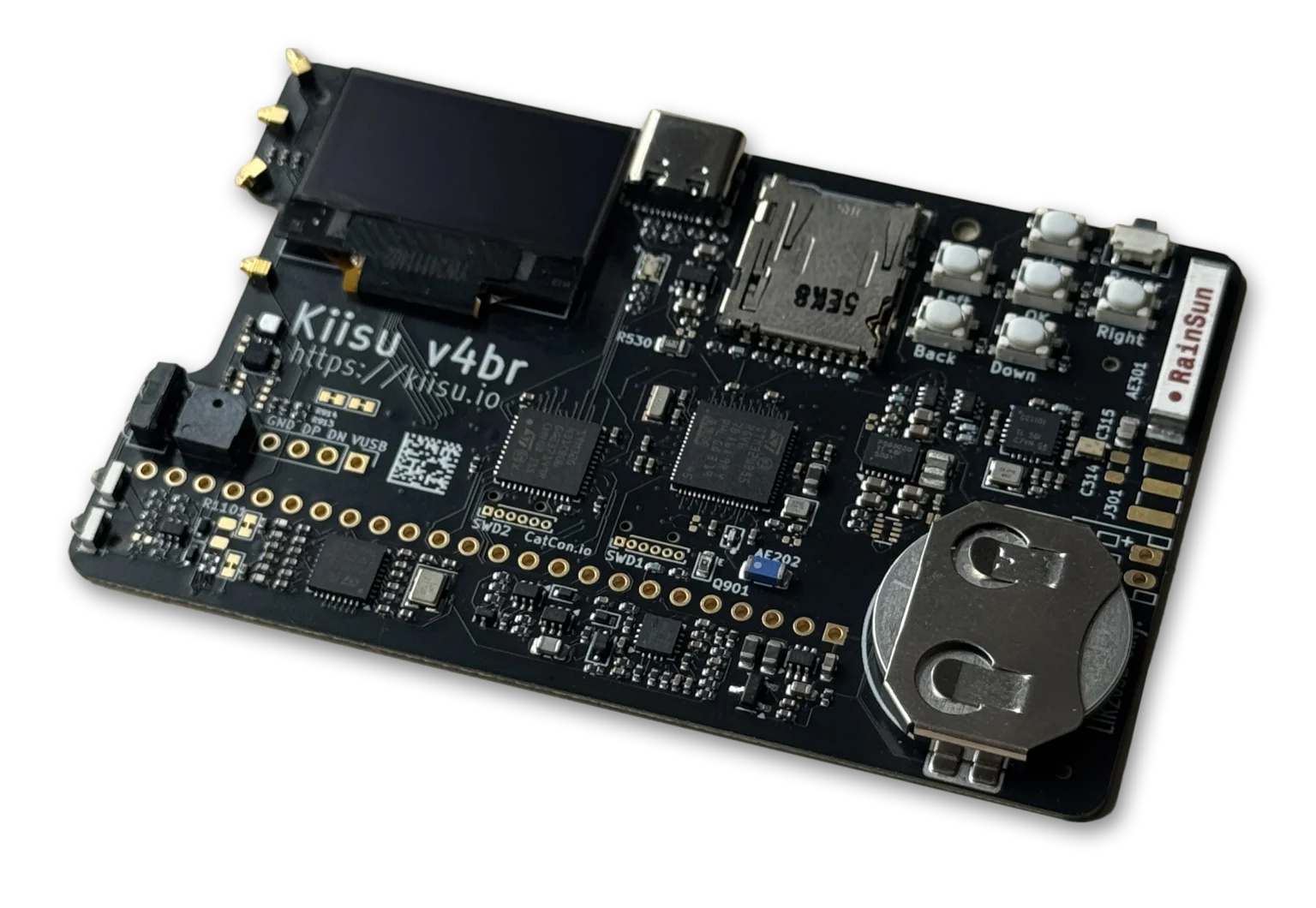
TL;DR: The KIISU V4BR is a credit card size (85 x 54 mm) multipurpose development board from RainWalker OU in Tallinn, Estonia that runs Flipper Zero compatible firmware. It packs a Sub-GHz CC1101 transceiver, ST25R3916 NFC reader and emulator, 125 kHz RFID reader and emulator, infrared receiver and transmitter, iButton contact, Flipper compatible GPIO, Bluetooth Low Energy, dual STM32 microcontrollers, onboard sensors, microSD storage and a 128×64 OLED into a wallet size PCB that sells for about USD 80 from the official store. If you want Flipper Zero workflows for signal analysis, access control testing and remote control work in a pocket friendly form factor you can afford to carry everywhere, the V4BR is the most practical option on the market right now.
If you follow handheld hacking tools, you already know the dilemma. The Flipper Zero is brilliant, open source, well documented and supported by a huge community. It’s also roughly USD 200, frequently out of stock, and bulky enough that you think twice before throwing it in a backpack for a SOTA activation or a club field day. The KIISU V4BR answers that dilemma directly: same firmware family, same core radios, half the price, and small enough to live in your wallet next to your QSL cards.
This guide covers what the V4BR is, the full technical specifications, how the firmware works, how to go from unboxing to first capture in about 10 minutes, where it fits in an amateur radio shack, how it compares honestly against the Flipper Zero, where to buy one, and which video reviews to watch before you spend money.
What Is the KIISU V4BR?
The KIISU V4BR is a credit card size open hardware development board that implements the Flipper Zero toolset on an 85 x 54 mm PCB with dual STM32 microcontrollers, Sub-GHz, NFC, RFID, infrared, iButton, GPIO and Bluetooth Low Energy.
It is built by RainWalker OU (registry 16704677, Tallinn, Estonia) under the KIISU Development Board project. The “V4” marks the fourth hardware generation, “B” is the board revision, and “R” denotes the current retail spin. Earlier spins include the V4A and V4B, and the manuals, schematics and 3D models for the whole family live in the public kiisu-io/kiisu4 repository under CERN-OHL-S-2.0 for hardware and CC-BY-SA-4.0 for docs.
Three facts define the product:
- It is card sized. 85 x 54 mm, the exact footprint of a credit card. It slips into a wallet, a badge holder, a shirt pocket or a go-kit pouch.
- It is firmware compatible with Flipper Zero. It runs the kiisu-firmware fork of Flipper Zero firmware plus a companion Aux MCU firmware, and it uses the same SD card asset layout and the same desktop tools such as qFlipper.
- It’s a development board, not a consumer toy. The official docs say this plainly: lab use, exposed pads, small parts, soldering may be required. That honesty is a strength. You get schematics, STEP and STL files, and direct community support instead of a sealed black box.
Why a Wallet Size Flipper Tool Matters
To understand why hams and makers care about the V4BR, it helps to recall how this category was born.
The Flipper Zero launched on Kickstarter in 2020, raised almost USD 5 million, and shipped from 2022 onward. It combined a CC1101 Sub-GHz chip, an NFC front end, a 125 kHz RFID stage, an infrared transceiver, GPIO and a friendly UI in one dolphin themed handheld. Open hardware plus open firmware plus an app store created an explosion of third party modules: external CC1101 boards, NRF24 radios, ESP32 WiFi dev boards, GPS modules and sensor hats, all talking over a documented GPIO header.
Demand outstripped supply for years. Scalpers, import bans in some countries, and a USD 169 to 199 street price kept it out of reach for students, club loaner fleets and field operators who didn’t want to risk a USD 200 tool on a rainy summit.
KIISU attacked exactly that gap. Instead of cloning the Flipper Zero plastic dolphin, the team shrank the core to a bare card: OLED, 5-way pad, OK, Back and Power buttons, USB-C, microSD and the radios, nothing else. No bulky case, no speaker assembly, no retail packaging overhead. The result sells for about USD 80 (RM358 MYR on the official store, around 429 PLN in Poland via Sapsan, around USD 145 to 155 shipped in the USA via Rabbit-Labs where tariffs inflate the landed price). At that price you can equip a club, keep one in the car, and still have budget left for a 3D printed case and a good SanDisk Ultra microSD card.
For amateur radio operators the relevance is practical, not theoretical. Modern shacks are full of Sub-GHz weather stations on 433 MHz, 315 MHz key fobs, infrared controlled rotators and air conditioners, NFC tagged equipment bins, iButton locked repeater sites and 125 kHz RFID club access cards. A card size tool that can read, emulate, log and replay those signals, with files you can inspect on a laptop, earns its place next to a NanoVNA and an RTL-SDR dongle.
One Card, Endless Possibilities: What the V4BR Can Do
The official V4BR page summarizes the board as “One Card. Endless Possibilities.” Here is what each interface actually does in plain language.
Sub-GHz with CC1101
- Reads and replays common ASK and FSK signals on 300 to 928 MHz depending on region profile, including 315 MHz and 433.92 MHz ISM devices.
- Built-in internal 433 MHz antenna for grab and go use, plus an SMA footprint on the PCB for an external antenna if you are comfortable with soldering.
- Practical ham uses: identify mystery 433 MHz weather station packets, test 433.92 MHz remote relay boards, verify low power beacon timing, capture your own key fob rolling code structure for study on hardware you own.
NFC with ST25R3916
- Reads, emulates and clones 13.56 MHz NFC tags, including ISO14443A/B, ISO15693 and FeliCa families, using the same ST25R3916 front end found in the Flipper Zero.
- Built-in PCB antenna, no external coil needed.
- Practical ham uses: inventory tagged coax reels and go-kit boxes, test club station NFC door tags you administer, study data structures on your own hotel key cards and transit test cards.
125 kHz RFID
- Reads and emulates low frequency EM4100 style and HID style proximity cards with the onboard 125 kHz coil.
- Practical ham uses: audit your own club room access tokens, migrate a repeater site from lost cards to known good spares, teach new members how LF RFID differs from HF NFC.
Infrared receiver and transmitter
- Captures and replays infrared remote codes for TVs, air conditioners, projectors and shack automation.
- Practical ham uses: replace the missing remote for the clubhouse air conditioner, automate projector power for training nights, trigger DSLR shutters adapted for IR.
iButton (1-Wire)
- Reads and emulates DS1990A style iButton fobs through the corner contact pad.
- Practical uses: back up your own site access fob, study 1-Wire timing with a logic analyzer alongside.
GPIO, pin compatible with Flipper Zero
- Same header pinout as the Flipper Zero, so existing modules and breadboard jumpers carry over.
- You need to solder the header connector yourself. Headers aren’t pre-installed on the card.
- Opens the door to the full Flipper module ecosystem: ESP32 WiFi marauder boards, NRF24 sniffers, CAN bus adapters, sensor hats and UART debug probes.
Bluetooth Low Energy
- Provided by the STM32WB55 radio SoC. Used for phone companion apps, file transfer workflows and BLE spam or detector demos where firmware supports them.
- Practical uses: link the board to a phone in the field without cables, run BLE scanner demos at club talks.
Under the Hood: Full Technical Specifications
The V4BR uses a dual MCU architecture. The Main MCU runs the user facing firmware. The Aux MCU handles power, charging, companion features and low level support so the main chip stays free for radio timing.
| Subsystem | KIISU V4BR specification |
|---|---|
| Form factor | 85 x 54 mm credit card PCB, 3D printable cases on Printables, MakerWorld and Cults3D |
| Display | 128×64 SPI OLED |
| Buttons | 5-way directional pad plus OK, Back and Power |
| Main MCU | STM32WB55RGV6, Arm Cortex-M4 plus Cortex-M0+ for BLE, up to 80 MHz |
| Aux MCU | STM32G431CBU6, Arm Cortex-M4F, up to 170 MHz |
| Sub-GHz | CC1101 transceiver, internal 433 MHz antenna, SMA footprint for external antenna |
| NFC | ST25R3916 reader and emulator, 13.56 MHz, built-in antenna |
| RFID | 125 kHz reader and emulator, built-in antenna |
| Infrared | IR receiver plus IR transmitter |
| Wired | USB Type-C with data, iButton pad, Flipper compatible GPIO (header soldering required) |
| Wireless | Bluetooth Low Energy via STM32WB55 |
| Storage | microSD push-push socket, 2 to 32 GB FAT32 recommended, SanDisk Ultra recommended, SPI mode |
| Sensors stock | LSM303AGR accelerometer and compass, GXHTC3C temperature and humidity, ambient light sensor |
| Sensor options | BME680 gas, pressure, humidity and temperature (user install), VL53xxx time of flight ranger (user install) |
| Power | LIR2032 rechargeable coin cell only, never CR2032 disposables, primary power via USB-C |
| Firmware | kiisu-firmware fork plus kiisu4-companion-fw for Aux MCU, qFlipper compatible |
| Docs and CAD | Schematics PDF, STEP, GLB and STL in kiisu-io/kiisu4 on GitHub |
| Maker | RainWalker OU, Parnu mnt. 30, Tallinn, Estonia |
A note on power that trips up first time owners: the holder looks like it takes a CR2032, but it doesn’t. Use only LIR2032 rechargeable cells (nominal 3.6 V). A disposable CR2032 (3.0 V, non rechargeable) will undervolt the board and can be damaged by the onboard charger. If you have no battery, the board runs fine on USB-C power alone.
A note on storage: the V4BR talks to the SD card over SPI. Many fake and oversized cards fail in SPI mode or crawl. Stay at or under 32 GB, format FAT32, and buy SanDisk Ultra from a reputable seller. Anything larger often causes slow loads or boot faults.
Firmware, Software and Open Source Repositories
KIISU is honest about standing on the shoulders of the Flipper Zero open source project, and the repo structure shows it:
- kiisu-firmware – Main MCU firmware fork. Download
kiisu.sdcard.zipfrom Releases, extract to a FAT32 microSD card, insert and power on. Updates use the same qFlipper desktop flow as a Flipper Zero. - kiisu4-companion-fw – Aux MCU firmware for power management and companion features.
- kiisu4 docs and hardware – Manual and quick start PDF, schematics PDF, STEP, GLB and STL 3D models, plus links to Discord, cases and third party apps. Licensed CERN-OHL-S-2.0 for hardware and CC-BY-SA-4.0 for documentation.
- Twoelw apps – Useful community apps and firmware builds highlighted in the official docs.
- KIISU SMOL – Sister project: a modular networking development board currently in crowdfunding, worth watching if you like the KIISU approach.
Because the SD card layout matches Flipper Zero conventions, most tutorials written for Flipper Sub-GHz, NFC, RFID and IR apply directly. Read the Flipper docs alongside the KIISU manual and you’ll rarely get stuck.
(The most watched KIISU review so far with over 250,000 views: a full card size vs Flipper Zero walkthrough on YouTube)
Getting Started in About 10 Minutes
The official Getting Started with V4B guide boils down to this field tested sequence. You need a USB-C data cable (charge only cables won’t work), a 2 to 32 GB microSD card, and a computer.
Step 1: Prepare the microSD card
- Format the card as FAT32 on your computer or phone.
- Download
kiisu.sdcard.zipfrom kiisu-firmware Releases. - Extract the archive contents to the root of the card.
- Slide the card into the V4BR push-push socket before powering on.
If you bought a prepared SD card with the board, skip the download and just insert it. If you prefer a blank card, insert it, let the board format it, then update firmware per the manual.
Step 2: Power the board
- If a battery shipped with the board, pull the isolation sticker.
- If not, insert a genuine LIR2032 rechargeable cell, or just run from USB-C.
- Flip the top power switch. The Flipper based demo firmware should boot to the OLED menu.
Step 3: Learn the controls
- The 5-way pad navigates, OK selects, Back goes up one level, Power handles on, off and lock.
- The Flipper docs explain each app: Sub-GHz, NFC, RFID, Infrared, iButton, GPIO and Settings.
- Remember the V4BR differences: header pins and SMA antenna need soldering, battery chemistry is LIR2032 only.
Step 4: Update firmware when ready
Updating is optional for first boot but recommended within the first week. Use qFlipper or the documented USB DFU and ST-Link recovery paths in the manual PDF. Flash Main MCU firmware first, then Aux companion firmware if the release notes call for it.
Step 5: Print a case
A bare card in a wallet will survive, but knocks and keys will scratch the OLED. Print the official cases from MakerWorld or Printables. Try a slim snap case for pocket carry and a rugged bumper for field days.
Step 6: Join the community
Stuck on a weird Sub-GHz capture or a DFU recovery? The fastest help is the official Discord, plus the r/KIISU_IO subreddit, Telegram channel and GitHub issues. Email support is [email protected].
(Nobul Tech walks through unboxing, firmware installation and live Sub-GHz demos on YouTube. Follow along for your first flash.)
Ham Radio and Maker Use Cases That Justify the Purchase
Generic hacking demos are fun on video, but hams buy tools that solve shack problems. Here is where the V4BR earns a permanent slot in a go-kit.
433 MHz ISM detective work. Many home weather stations, soil sensors, driveway alarms and cheap telemetry links sit on 433.92 MHz. Pair the V4BR with an RTL-SDR and Universal Radio Hacker on a laptop: capture on the card, replay on the card, analyze deeply on the laptop. You’ll identify unknown signals faster than with either tool alone.
Repeater site and clubhouse access. If you administer the locks, the V4BR consolidates test cards in one place: 125 kHz fobs, 13.56 MHz tags and iButtons. Audit what opens what, retire lost tokens, and document the system for the next committee. Only ever test systems you own or have written permission to test.
Field day and contest infrastructure. Label equipment bins with NFC tags that link to inventory sheets. Use IR to control projectors and cameras. Log ambient temperature and humidity with the onboard GXHTC3C during overnight portable ops and correlate with band conditions the next morning.
Antenna and rotator bench. Drive IR controlled accessories, probe GPIO projects, and use the LSM303AGR compass and accelerometer for quick mast orientation sanity checks before you trust an expensive magnetic sensor.
Training nights. A USD 80 card is a lot easier to hand to a curious teenager than a USD 200 flagship. Load known good captures of your own hardware, let students decode ASK on screen, then graduate them to GNU Radio. The CERN open hardware license means you can project the schematics on screen and teach from real design files.
Travel and SOTA weight budget. At a few tens of grams with battery, the V4BR disappears into a summit pack. It draws little power, runs from any USB-C power bank, and gives you a Sub-GHz and NFC lab on a summit without risking your main handheld.
KIISU V4BR vs Flipper Zero: Honest Comparison
No review is useful without trade-offs. The V4BR replicates Flipper Zero functionality, it isn’t an exact clone, and the gaps matter for some buyers.
| Category | KIISU V4BR | Flipper Zero |
|---|---|---|
| Size | 85 x 54 mm card, wallet friendly | Handheld with rubber case, pocket but not wallet size |
| Street price | About USD 80 official, RM358 MYR, tariffs raise USA price to about USD 145 to 155 | About USD 169 to 200 plus shipping and often import fees |
| Display and input | 128×64 OLED, 5-way pad plus OK, Back, Power | 128×64 orange backlight LCD, 5-way plus OK and Back, similar flow |
| Sub-GHz | CC1101, internal 433 MHz antenna, SMA footprint needs soldering | CC1101, built-in antenna plus external module path |
| NFC | ST25R3916, built-in antenna | ST25R3916 family front end, built-in antenna |
| RFID 125 kHz | Built-in coil | Built-in coil |
| Infrared | Receiver plus transmitter | Receiver plus transmitter |
| iButton | Corner pad | Dedicated iButton connector |
| GPIO | Flipper compatible pinout, header needs soldering | Pre-installed header, large module ecosystem plugs straight in |
| Bluetooth | BLE via STM32WB55 | BLE via STM32WB55 family |
| Sensors | Accelerometer, compass, temp, humidity, light stock, gas and ranger optional | Accelerometer only on stock board |
| Storage | microSD SPI, 2 to 32 GB FAT32 | microSD SPI, same guidance |
| Power | LIR2032 rechargeable only, USB-C primary | Built-in LiPo with USB-C charging |
| Firmware | kiisu-firmware fork plus Aux companion, qFlipper flow | Official Flipper firmware plus Momentum, Unleashed, RogueMaster forks |
| Hardware openness | Schematics, STEP, STL public under CERN-OHL-S-2.0 | Open hardware and firmware, larger accessory market |
| Best for | Budget carry everywhere tool, clubs, students, travel | Plug and play modules, no soldering, biggest app community |
The short version from independent reviewers is consistent: if you can live with soldering headers, a coin cell instead of a LiPo, and a smaller out of box accessory shelf, you get roughly Flipper class capability for roughly half the money. If you want zero soldering and maximum drop in modules on day one, the Flipper Zero still wins.
(sn0ren bought his board with his own money and tests it unsponsored, including the limitations, on YouTube. Watch this one for a balanced verdict.)
(Rabbit-Labs, the USA distributor, explains pricing, tariffs and real world stacking against the Flipper Zero on YouTube. Useful if you’re ordering from North America.)
Where to Buy, Pricing and Regional Stores
Buy from the channel closest to you to avoid customs surprises:
- Official RainWalker store – Ships worldwide except direct USA shipping is disabled due to tariffs. Listed at RM358 MYR for Malaysian buyers at time of writing, roughly USD 80 baseline.
- Rabbit-Labs USA – USA distributor. Expect about USD 145 to 155 shipped once tariffs and domestic handling are included.
- LAB401 EU – European stockist popular with security professionals.
- Sapsan Cybersec Poland – Polish and EU orders, listed around 429 PLN.
- Hacktronix India – Indian stockist.
What to add to the cart: a genuine LIR2032 cell if not bundled, a SanDisk Ultra 16 or 32 GB microSD card, a USB-C data cable, and either a printed case or the STL files plus header pins if you plan to use GPIO modules. Budget a soldering iron session for the GPIO header and optional SMA antenna socket.
Limitations, Legality and Responsible Use
A tool this capable demands a clear ethics section, and KIISU prints it on the docs page for good reason.
- Development board, not a certified end product. Exposed pads, small parts, soldering may be required. Handle it like lab gear, not a TV remote.
- Only test what you own or have permission to test. Reading your own hotel card to understand its structure is education. Cloning someone else’s access card, car fob or contactless payment token without consent is illegal in Malaysia and in most countries.
- Radio rules apply. Sub-GHz transmit permissions vary by country and band. In Malaysia, MCMC regulates short range devices on 433 MHz and nearby bands with power and duty cycle limits. Verify the plan for your region before transmitting, keep power low, use a dummy load or attenuator on the bench where possible, and never replay alarms, garage doors or vehicle systems you don’t own.
- Battery safety. LIR2032 only. Never insert a CR2032 and never charge a non rechargeable cell. If the cell puffs, leaks or reads below 3.5 V under load, recycle it and fit a fresh genuine cell.
- SD card hygiene. Keep firmware and card assets from official Releases. Random badge files from forums can carry malicious Flipper payloads like any executable content.
Used within those bounds, the V4BR is a superb teaching platform for modulation basics, access control literacy, and RF hygiene, exactly the skills amateur radio clubs should be teaching in 2026.
Why It Matters for Ham Radio
Amateur radio has always absorbed adjacent technology: packet radio borrowed from X.25, APRS borrowed from GPS, MMDVM borrowed from DSP. The Sub-GHz ISM world is next. Our repeaters share hills with LoRa gateways, our clubhouses use the same NFC cards as offices, and our field sensors speak the same 433 MHz chirps as weather stations.
A card size open tool that speaks all of those protocols, runs community firmware, publishes its schematics, and costs less than a tank of fuel lowers the barrier to learning RF beyond the HF and VHF bands most hams live on. It turns “I wonder what that signal is” into a 30 second capture instead of a weekend project. For students it turns a lecture about ASK versus FSK into something they can hold. For clubs it turns a drawer of mystery remotes and lost fobs into a documented system.
The Flipper Zero proved the category. The KIISU V4BR makes the category portable and affordable enough to become standard kit, like an RTL-SDR dongle did a decade ago. That’s why it deserves a slot in your go-kit and a demo slot at your next club night.
Frequently Asked Questions
Is the KIISU V4BR a Flipper Zero clone?
No. It’s a Flipper Zero compatible development board with its own PCB, dual STM32 design and sensors. It runs a firmware fork and shares the SD layout and tools.
Do I need to solder anything to start?
No for basic Sub-GHz, NFC, RFID, IR and iButton use. Yes for GPIO modules (header) and for an external Sub-GHz antenna (SMA footprint).
Which battery does the V4BR use?
Only LIR2032 rechargeable coin cells. Never use CR2032 disposables. The board also runs from USB-C power without any battery fitted.
Which SD card should I buy?
A genuine 2 to 32 GB card formatted FAT32, ideally SanDisk Ultra from a reputable seller. Larger or fake cards often fail in SPI mode or load very slowly.
Where is the safest place to get firmware and help?
Use kiisu-firmware Releases and kiisu4 docs plus the official Discord. Avoid random firmware bundles from forums.
Sources and Further Reading
- KIISU V4BR official product page
- Getting Started with V4B
- V4B manual and quick start PDF
- kiisu-io/kiisu4 docs, schematics and 3D models on GitHub
- kiisu-firmware Releases
- kiisu4-companion-fw Aux MCU firmware
- KIISU SMOL networking development board
- Official RainWalker store listing
- Rabbit-Labs USA listing
- LAB401 EU listing
- Sapsan Cybersec Poland listing
- Flipper Zero official docs
- Is This Card Better Than A Flipper Zero? video review
- Flipper Zero Clone? This is KIISU V4B by sn0ren
- KIISU V4B overview, firmware install and live demo by Nobul Tech
- KIISU V4B How Does It Stack Up? by Rabbit-Labs
- Official KIISU Discord community
- r/KIISU_IO subreddit
- Official cases on Printables
- Official cases on MakerWorld
73 de 9M2PJU

Post Comment