QRZero: A Fast Local First Amateur Radio Logger for Windows, macOS and Linux with DX Chasing Built In
TL;DR: QRZero by nreed97 is a free open source desktop amateur radio logger for Windows, macOS (Apple Silicon) and Linux that keeps your whole log in a single SQLite file, stays responsive past 200,000 QSOs, and integrates the full shack: WSJT-X, JTDX and N1MM over UDP, Hamlib and serial rig control, rotators, DX cluster with Needed now alerts, DXCC through CW club awards, LoTW, QRZ, Club Log and eQSL uploads, and paper QSL label printing. Built with DX chasing and CW in mind, local first with no cloud account, and honest about its demo screenshots using the placeholder call N0CALL.
Every ham eventually hits the same wall with logging software. The log grows past 50,000 QSOs and the grid starts stuttering. The DX cluster lives in one program, awards tracking in a spreadsheet, LoTW uploads in another window, and the CW club numbers in a paper notebook. Contest season means exporting and importing ADIF files and hoping no field gets mangled in transit.
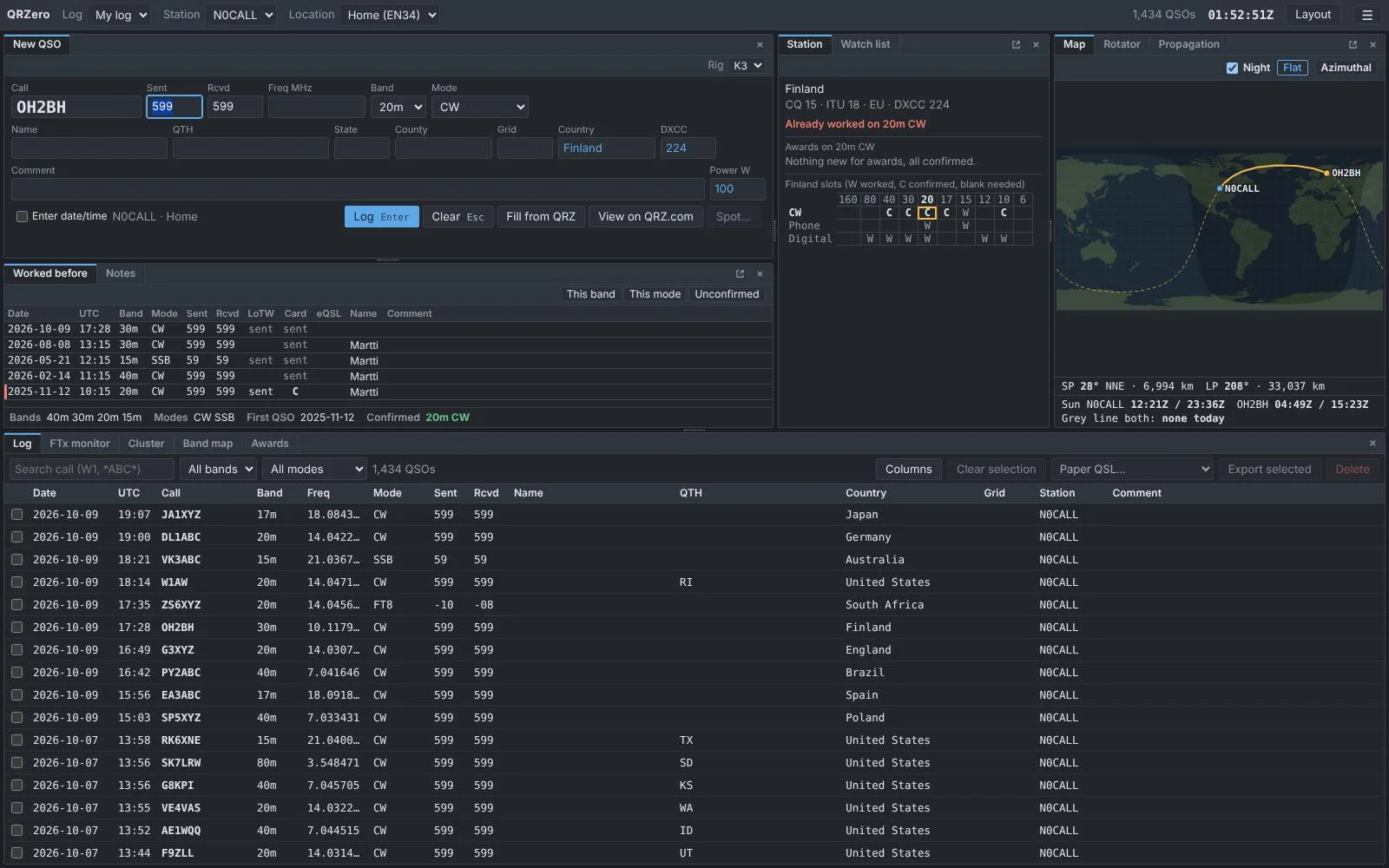
QRZero was built to collapse that whole pile into one window that never makes you wait mid QSO. The screenshot above shows it mid session: a New QSO entry for OH2BH on 20m CW, a Station pane that instantly says Finland is already worked on this band and mode with the full DXCC slot grid, a grey line map with beam headings, a Worked before history, and a log grid holding 1,434 contacts without breaking a sweat.
What Is QRZero?
QRZero is a fast local first amateur radio logging application for Windows, macOS and Linux that stores the log in one SQLite file and combines QSO entry, rig control, digital mode integration, DX cluster chasing, awards tracking and QSL management in a single desktop window.
The stack is modern: a Rust workspace for the log database, ADIF handling, rig control and cluster client, plus a React and TypeScript UI in a Tauri shell, with the same screens also servable to a web browser from a small local server. Passwords live in the OS credential store (Windows Credential Manager, macOS Keychain, Linux desktop keyring), never in the log file, and the app only touches the internet for services you explicitly switch on.
Four design goals define it:
- Speed. The grid renders only visible rows, searches are indexed, and the interactive queries are tested against a 200,000 QSO log. The stated goal is a logger that never makes you wait mid QSO.
- Every mode is equal. CW, phone and digital get identical treatment in entry defaults, awards, band map and spot colours. No second class modes.
- Nothing is lost. Every ADIF field of every QSO is stored, including proprietary APP fields other programs add, and a Full export returns them all. One file, with daily automatic backups.
- Local first. No account, no cloud, no wizard to fight. The classic dense desktop logger layout with dockable panes you can move, tab, resize and pop out to a second screen.
Logging QSOs the Fast Way
Type the call, press Tab or Space, and QRZero looks it up and fills name, QTH, state, county, grid, country and DXCC. Press Enter to log. Start time is captured when you begin typing, the form clears, and the cursor returns to the call box. Lookup filled boxes render in a different colour from typed text, and typed text always wins.
- Lookups use QRZ.com XML with a subscription (cached 30 days) and fall back to your own earlier QSOs and the country file, with Fill from QRZ and View on QRZ.com buttons beside Clear.
- Frequency, band and mode follow each other. Type a frequency and the band sets itself. FT4 stores the ADIF correct way (MFSK with FT4 submode) while displaying as FT4.
- Entry fields are fully yours. Pick a starting layout (general DX, CW, CW clubs, parks and summits, satellites, casual contesting), then add, remove, rename, resize or default any ADIF field, or invent your own. Tick keep to carry a value across QSOs. CW, Phone and Digital can each own a layout, so CW shows club number boxes while SSB shows something else.
- CW club numbers get a dedicated layout with SKCC, NAQCC, FISTS and CWops boxes that prefill from your last QSO with that call and feed the club awards engine.
- Split aware. With a split radio the form shows TX and RX boxes, both are logged, and spotting uses the frequency you listened on. Cluster comments like UP 5 or QSX 14.205 auto configure split when clicked.
- Rig, antenna and amplifier per location. Antennas carry their band coverage so the Ant box can auto select. Each QSO records MY_RIG, MY_ANTENNA and power.
- Spotting from the entry panel shows the exact cluster line before anything is sent, and only QSOs from the last 10 minutes qualify, so stale contacts never get spotted by accident.
The Worked before pane lists every earlier QSO with the station including portable variants, with duplicate markers and band, mode and unconfirmed filters. The Station pane shows what the contact is worth for every award plus a band by mode DXCC slot grid (W worked, C confirmed, blank needed). Station notes (“QSL via bureau only”, “sked on 40m”) follow the callsign and are searchable. The Map draws short and long paths with beam headings and distances, flat or azimuthal projections, live grey line shading with sunrise and sunset at both ends, and Turn SP and LP buttons when a rotator is connected.
Radios and Rotators
Each radio is equipment at a location with its own control method:
| Rig control | Covers |
|---|---|
| Hamlib rigctld | Almost any radio Hamlib supports |
| TCI | ExpertSDR, SunSDR, Thetis, Flex via bridge, every slice as its own radio |
| Kenwood, Elecraft, Flex CAT | Serial or SmartSDR CAT ports |
| Yaesu CAT | FT-991A, FTDX10, FTDX101, FT-710 and other recent Yaesu rigs |
| Icom CI-V | IC-7300, IC-7610, IC-705 and others over USB or CI-V interface |
Follow mode ties frequency, band and mode to your tuning both directions, and clicking decodes, spots or DXpedition rows tunes the radio. Multi radio operation covers SO2R and Flex slices with Alt+1 and Alt+2 switching and a red readout on transmit. Rotators connect over Hamlib rotctld, Yaesu GS-232 serial or TCP, or PstRotatorAz UDP, with N1MM bearings accepted as input. The Rotator pane is a clickable compass dial with presets, short and long path buttons for the entry callsign, and an optional azimuthal map backdrop.
WSJT-X, JTDX and N1MM Integration
QRZero listens to any number of WSJT-X and JTDX instances (separate ports or shared multicast) plus N1MM Logger+ over UDP. Contacts logged in those programs land in your log at the chosen location, with QRZ data backfilled and nothing they sent overwritten. A Pass on relay feeds GridTracker or JTAlert from the same stream.
The FTx monitor merges every running decoder into one list flagged against your log: New DXCC, New band, New mode, New grid (6m and up), New call, New on band, Worked, plus callers calling you and watch list hits. Click fills the QSO panel without retuning, double click triggers WSJT-X to call. Per instance control strips show TX state with Halt TX and Call CQ, a call boxes view mirrors the JTAlert style layout coloured by top alert, and filters hide worked stations or set signal floors. N1MM radio info can drive the QSO panel and N1MM can steer your rotator through QRZero.
Chasing DX: Cluster, Needed Now, Band Map and More
The DX cluster client connects through your node list with failover, flags spots against your log exactly like FTx decodes, colours by mode (blue CW, green digital, orange phone), replaces duplicates, and filters by band, mode group, age, Needed only and Hide worked, with origin filters for impossible paths. Clicking a spot fills the form and tunes the radio, and a console speaks raw node commands.
The Needed now pane is the DX chaser’s home screen: only spots that would be new for your log, ranked new entity first, then new band, then new mode, each group ordered by the entity’s rank on Club Log’s public Most Wanted list (fetched daily, no login). Sound alerts (double beep for new entity, single for band or mode) and corner popups that tune on click are independently switchable, with per call quiet periods and sensible scope settings.
Around it sit a full toolkit: a zoomable band map with cluster spots, FT8 decodes and band plan strips. A watch list for calls, prefixes or entities with top bar notices; an NG3K DXpedition calendar marking what is new for you with click to tune; a WA7BNM contest calendar with mode filters and rules links; and a propagation pane with flux, sunspots, A and K, solar wind and N0NBH band estimates plus a per call 160m to 10m 24 hour band forecast computed locally from solar data and path geometry.
Awards from DXCC to CW Clubs
The Awards pane tracks DXCC (with Challenge, 5BDXCC and optional LoTW verified credit), WAS, WAZ, WPX, WAC, ITU zones, VUCC grids on 6m and up, IOTA and US counties. Rows show Mixed, CW, Phone and Digital plus every band 160m to 70cm with green C confirmed and amber W worked cells, configurable confirmation sources, per callsign limits, and click through to the underlying QSOs. Unwanted awards switch off cleanly without touching the log.
CW operators get rare first class treatment: SKCC (Centurion, Tribune, Senator with dates and single band endorsements), CWops (ACA, ACMA, CMA, member DXCC and states, plus CWT medals with per hour breakdowns and manual points for other logs), NAQCC Friendship Club levels, and FISTS Century tiers through Diamond plus WAS, all counted from logged club numbers by member number. The honest caveat is stated in the docs: QRZero holds no member lists, so validate against club rules before applying.
QSL and Online Services in One Window
One QSL window covers the paper and digital worlds. The Queue tab handles cards: queue to send, mark received with reply queuing, contact info per station, Avery and Brother label layouts (including direct to printer Brother QL output and PNG saves), bureau grouped sorting, and sent via bureau or direct marking. Online services get one page each with its own credentials and auto upload timers: LoTW signs through your installed TQSL with background confirmation downloads that backfill states, zones, grids and counties; QRZ Logbook, Club Log and eQSL auto upload new and edited QSOs minutes after the last change with date range manual uploads and on demand confirmation downloads. A New toward your awards list after each download shows exactly what the fresh confirmations earned. Importing from another logger? Download confirmations first so nothing already confirmed gets re sent.
Your Data, Your Window, Your Machine
ADIF import keeps every field, links QSOs to a location, skips duplicates safely and absorbs unknown station callsigns. Export writes selected rows, the current grid view, or full filter matches in Standard (for other loggers and services) or Full (for backups and QRZero to QRZero moves) fidelity. Multi log and multi callsign support shares locations and equipment, archived callsigns retire gracefully while keeping history, and the Statistics window summarizes totals, yearly DXCC progress, per service confirmation rates and top entities in about half a second on 200,000 QSOs.
The window itself is fully yours: dockable tabbed pop out panes with Always on top and named layouts, light and dark themes, 11 to 18 px text, remappable keys with printable cheat sheets, and a search box over all settings. The same UI runs in a browser from a local server binary, UDP connections feed anything else in the shack with templated N1MM, ADIF, JSON and PstRotatorAz messages, and startup programs launch your helpers automatically. Daily backups keep ten copies with verified restores and a pre restore safety copy.
QRZero vs Other Logging Options
| Feature | QRZero | Cqrlog | KLog | N1MM+ | Cloudlog | HAMRS |
|---|---|---|---|---|---|---|
| Price and license | Free, open source | Free, open source | Free, open source | Free | Free, open source | Free tier plus paid |
| Platforms | Windows, macOS ARM, Linux | Linux mainly | Win, macOS, Linux | Windows only | Any browser, self hosted | Win, macOS, Linux, mobile |
| Log storage | Single local SQLite file | MySQL or MariaDB local | SQLite | Local files | MySQL, self hosted | Local plus cloud sync |
| 200k QSO performance | Tested design goal | Can slow without tuning | Good | Excellent | Depends on server | Good |
| Digital integration | WSJT-X, JTDX, N1MM UDP | WSJT-X via ADIF | WSJT-X direct | Native contest engine | WSJT-X API | Manual plus WSJT-X import |
| DX cluster plus alerts | Yes, Needed now with sound | Basic cluster | Basic cluster | Yes, contest focused | Via addons | No |
| Awards depth | DXCC to CW clubs with medals | DXCC basics | DXCC, WAS, WAZ | Contest scoring | DXCC via addons | POTA, SOTA focused |
| QSL services | LoTW, QRZ, Club Log, eQSL plus paper | LoTW, eQSL | LoTW, eQSL, Club Log | Limited | LoTW, eQSL via cron | Limited |
| Internet required | No, local first | No | No | No | Yes, server based | Partially |
QRZero’s niche is clear: the offline desktop DX chaser and CW operator who wants one fast program instead of a chain of tools, without surrendering data to a server.
Honest Limitations
- Windows is the main platform and gets the most testing. MacOS and Linux builds exist but trail it.
- macOS is Apple Silicon only and unsigned. No Intel build, and first launch needs Control click Open or an explicit Privacy and Security approval since there’s no Apple Developer signature.
- No club member lists. CW club awards count from your logged numbers, so confirm eligibility against club records before applying.
- Contest calendar only. The WA7BNM pane lists contests with rules links, but live contest logging stays in N1MM with QSOs flowing to QRZero over UDP.
- Browser server needs a source build. Release downloads carry the desktop app only. The local web server binary is built from source with Rust and Node 22.
- Forecast is a guide. The band forecast is computed locally from flux, K index, sun geometry and date. It knows nothing about sporadic E and replaces no prediction program.
Frequently Asked Questions
Which platforms does QRZero run on?
Windows with installer, MSI and portable builds, Apple Silicon macOS 11 and up via DMG, and Linux via deb, rpm or AppImage. Windows receives the most testing.
Can it handle a large existing log?
Yes. Import ADIF with duplicate skipping, every field preserved, and a grid and queries tested against 200,000 QSOs with daily automatic backups keeping ten copies.
Does it work with WSJT-X and my radio?
Yes. WSJT-X, JTDX and N1MM connect over UDP with an FTx monitor flagging decodes against your log, and rigs connect via Hamlib, TCI, serial CAT or CI-V with SO2R and rotator support.
Which awards and QSL services are covered?
DXCC with Challenge, 5BDXCC and verified credit, WAS, WAZ, WPX, WAC, VUCC, IOTA, US counties and SKCC, CWops, NAQCC and FISTS awards, plus LoTW, QRZ, Club Log, eQSL and paper card label printing.
Is my log data safe and private?
Your log is one local SQLite file, passwords stay in the OS keyring, networking only runs for services you enable, and the daily GitHub update check downloads nothing and can be disabled.
Sources and Further Reading
- QRZero GitHub repository
- QRZero releases page
- QRZero user guide
- ADIF amateur data interchange specification
- ARRL Logbook of the World
- QRZ Logbook
- Club Log
- eQSL.cc
- WSJT-X weak signal software
- N1MM Logger+
- Hamlib rig control
- NG3K DXpedition calendar
- WA7BNM contest calendar
- SKCC Straight Key Century Club
- CWops
73 de 9M2PJU

Post Comment