amateur radio
open source
Technology
9M2PJU, church emergency, Dioxus, Ecowitt, EmComm, firmware, lora, MapLibre, mesh networking, Meshcore, MeshCore companion, MetisMesh-HQ, MQTT, off-grid communications, Open-Meteo, Repeater, Room Server, Rust, volunteer communications, Web Serial
9M2PJU
0 Comments
MetisMesh-HQ: The Local Emergency Headquarters for MeshCore Communities
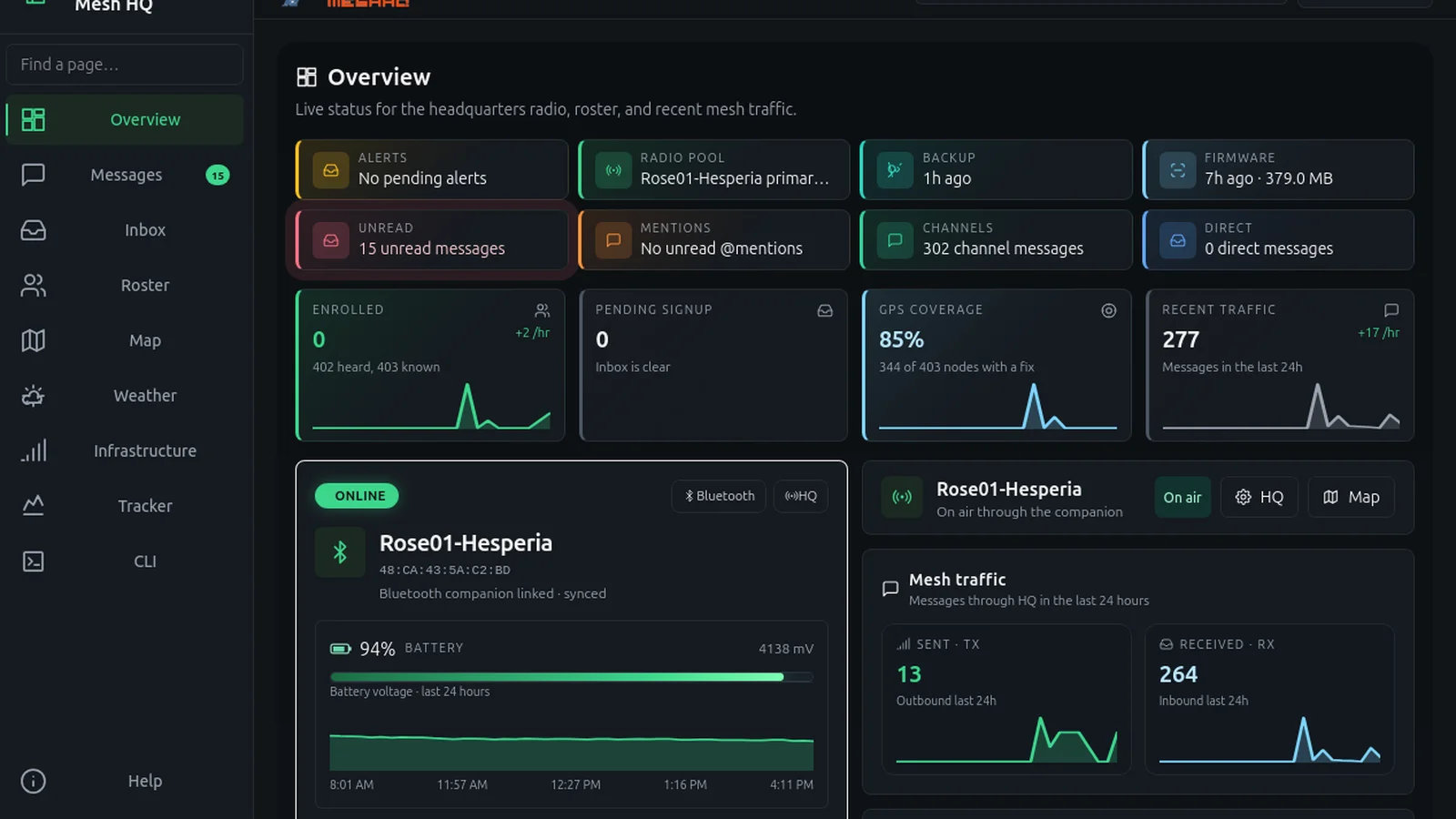
MetisMesh-HQ turns an ordinary Windows or Linux computer sitting next to a MeshCore companion radio into a local emergency headquarters that keeps working when the internet drops.
TL;DR: MetisMesh-HQ by DigitalExpl0it is a free MIT licensed Rust desktop app that pairs with MeshCore companion radios over Bluetooth, USB serial, or TCP to run enrollment, private channels, a METIS-INFO bot, live MapLibre tracking, repeater management, and an offline firmware locker from one local computer with no cloud account.

What Is MetisMesh-HQ
MetisMesh-HQ is a free, open source, local-first desktop headquarters for MeshCore off-grid LoRa mesh networks. It is built for churches, neighborhoods, volunteer groups, and emergency teams that want one trusted computer to manage their local mesh: approving members, handing out private channel keys, answering bot queries, watching the map, maintaining repeaters, and flashing firmware, all without depending on the internet or any vendor cloud.
The project lives at https://github.com/digitalexpl0it/MetisMesh-HQ under the MIT license, written in Rust with the Dioxus desktop framework. The current release line is 0.1.14 (November 2026), shipped as a Windows zip, an Ubuntu 26.04 deb, a Linux tarball, and a portable Linux AppImage. MacOS builds were dropped so the maintainer can focus on Windows and Linux where field laptops actually live.
The core idea is simple and well suited to amateur radio thinking. Your MeshCore companion radio handles the RF. The HQ computer next to it handles people, channels, maps, logs, and firmware. When the WAN fails, the pair keeps running because everything important is stored in a local SQLite database under your own user profile.
Why a Headquarters Computer Makes Sense on a Mesh
MeshCore is already decentralized at the RF layer. Any two nodes with a path can exchange messages through flood or room based routing. What breaks down in real deployments isn’t the RF, it’s the human layer: who is allowed into the private channel, where is everybody right now, which repeater battery is dying, which firmware build is trusted, and what happens when the one person who knows all the CLI commands is asleep.
A headquarters model answers those questions with one always on desk machine:
- One system of record for roster, channels, map tracks, and audit logs instead of five phones with five different views.
- One enrollment desk so private channel secrets are handed out deliberately, not pasted into a public channel by accident.
- One bot operator (METIS-INFO) that answers
#weather,#quake,#amber, and related queries with the same data for everyone. - One firmware locker that mirrors trusted builds while online and flashes over USB when offline.
- One map with live pins, tracked movers, and path traces that a net control operator can actually read during an event.
That is the gap MetisMesh-HQ fills. It doesn’t replace your handheld companion or your phone app. It sits beside the radio the way a club station logbook sits beside the rig.
Radio Pool: Bluetooth, USB Serial, and TCP Companions
The radio pool is the foundation. HQ connects to one or more MeshCore companion radios and designates one as primary for bot traffic and enrollment transmissions.
| Connection | Typical hardware | Notes |
|---|---|---|
| Bluetooth LE | ESP32 or nRF52 based companions | One GATT client at a time, disconnect the phone app first, Windows pairs with PIN bond |
| USB serial | Same boards over USB CDC | Sticky identity by VID, PID, and serial so COM port renumbering does not create a new radio entry |
| TCP | WiFi or Ethernet companion firmware | Default port 5000, no companion PIN, good for a fixed mast mounted node wired to the LAN |
Multi-radio support matters in practice. A church EOC might run a USB radio on the desk plus a TCP linked rooftop node. Contacts heard are tagged per radio, while roster and map stay unified at one row per public key. The primary radio owns bot replies and enrollment traffic so responses never come from two mouths at once.
Windows Bluetooth pairing deserves a callout because it was a long standing pain point fixed in the 0.1.9 cycle. MeshCore firmware ignores frames until the link is encrypted with a PIN bond, and earlier builds never paired on Windows, which produced the classic “never answered APPSTART” timeout. HQ now performs WinRT custom pairing with the operator PIN, removes stale bonds without PIN protection, and reports clear errors for wrong PIN, radio held by a phone, or timeout.
Enrollment, Messages, and the Inbox Workflow
Enrollment is where community meshes succeed or leak. MetisMesh-HQ treats it as an operator workflow, not a button.
Pending join requests land in the Inbox alongside held community alerts (weather, Amber, civil) waiting for operator confirm or auto-relay. The operator approves or denies each signup, and only enrolled nodes receive bot replies or private channel secrets. Heard but not enrolled nodes stay in the database so you can see strangers without trusting them.
The Messages view splits into Channels, DMs, and Contacts rails with practical details that show real operating experience:
- Public and private channels with session speakers listed under each channel.
- Direct threads only open when a real public key is known from a contact card or companion contact. A bare channel display name never opens a DM, which matches MeshCore mobile behavior and stops impersonation.
- Unread and @mention tracking, new message dividers, and per-channel look settings.
- Blocking by sender, including block by channel display name when no roster key exists yet.
- Share chips using
meshcore://contact/addandmeshcore://channel/addlinks with Add, Join, and Copy actions. - Held alerts stay quarantined until the operator releases them, which is exactly what you want before rebroadcasting a civil alert to a whole neighborhood.
Mesh text is capped at 160 bytes and treated as plain text, never shell or HTML. That constraint shapes everything about message design and keeps the RF side honest.
METIS-INFO Bot, Weather, and Community Alerts
Out of the box HQ runs a local bot on METIS-INFO with commands such as #weather, #quake, #amber, and related queries. Only enrolled nodes get answers, which prevents drive by strangers from draining the primary radio.
Weather is more than a web API call here. HQ combines Open-Meteo forecasts with local station input over MQTT or Ecowitt ingest, including gateway pull modes for popular Ecowitt gateways. A bare #weather prefers a fresh local Mosquitto reading when one exists, falling back to scheduled Open-Meteo data otherwise. There is also a dedicated operator Weather page in the app plus the mesh bot replies, so the desk and the field see the same numbers.
For earthquake and civil alerts, the Inbox holding pattern is the key safety feature. Alerts wait for operator confirmation or a configured auto-relay rule instead of spraying the mesh unverified. The project docs are explicit that this is a community tool and not FEMA, NWS, or law enforcement, which is the right framing for volunteer nets.
Map: Live Pins, Sonar, Traces, and Offline Basemaps
The Map page uses MapLibre with a locally bundled style and optional PMTiles offline packs, so basemaps keep working with no internet once you have downloaded a pack. That offline first choice is what separates an EmComm tool from a demo.
Day to day the map shows:
- Live node pins with type, hop count, last heard, and RF telemetry where available.
- Message sonar and warp in presence so new activity is visible at a glance.
- Tracked movers with trails and stale styling for nodes that stop reporting.
- Operator Trace paths for tracked or claimed pins, plus passive Traffic edges derived from overheard message paths.
- Favorites and camera position that persist between sessions.
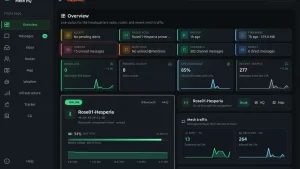
GPS from a node is self reported, and HQ keeps that honest by treating an enrolled site pin as separate from whatever coordinates a stranger advertises. The Overview page complements the map with companion status, activity graphs, and a Repeaters tab that appears once infrastructure is claimed, with fleet tiles, 15 minute to 7 day detail windows, and Battery and Queue charts with gauge and numeric modes.
Infrastructure, Tracker, and CLI for Repeater Keepers
The Infrastructure page is where repeater keepers will spend their time. HQ supports claiming repeaters, rooms, and sensors with admin verification over login plus ACL proof, and passwords are never stored. From there the operator can run status probes and remote CLI through the primary companion, capture replies into status metrics, and watch battery, noise, RSSI, SNR, and queue depth on the Overview fleet dashboard.
The Tracker page holds a whitelist of devices expected to share GPS, with trails and stale styling on the map. Combined with the CLI page, which gives a companion and remote device console without racing the subscribe path, a single operator can verify a hilltop repeater, check its queue, and confirm its advert path without leaving the desk.
A 0.1.4 era addition worth knowing is the opt-in Local API plus Home Assistant MQTT discovery. The read only JSON API on port 8787 exposes health, status, nodes, infra, channels, and stats behind a bearer token with per-IP rate limits, and never exposes secrets or message bodies. The MQTT discovery publishes companion state, enrolled counts, and first repeater telemetry for dashboards. Both are off by default and documented in the in-app Help.
Firmware Locker and LAN Flash Locker: Ready for Outage
The firmware locker is one of the strongest reasons to run HQ. While online, HQ mirrors community firmware builds with SHA-256 verification against release digests, re-downloads corrupt files, and reports a Ready for outage banner once the selected boards and roles are synced. When the internet is gone, flashing happens over USB from the HQ machine cache, with integrity checks that block bad files.
Version 0.1.14 added the opt-in LAN flash locker under Settings then Flasher. It serves an HTTPS page with a room PIN so other laptops on the same LAN can download synced builds and flash over Web Serial (ESP SLIP and nRF DFU zip flows), grab OTAFIX UF2 bootloader and erase images by drag and drop, enter DFU mode on nRF roles, flash a custom local file, or run a guided Repeater and Room Server setup CLI after flashing. Export and import pack support means you can carry a MetisMeshHQ-firmware-*.zip on a USB stick to a site with no internet at all.
Practical rules from the offline runbook: sync while online, check integrity, export a pack to USB, disable OS sleep while HQ is on duty, and flash only indexed verified builds from the HQ machine.
Backup, Storage, and Privacy Model
Everything lives local first. The live store is SQLite in WAL mode under the per-user data folder (~/.MetisMeshHQ on Linux, %APPDATA%\MetisMeshHQ on Windows, overridable with METIS_DATA_DIR), with channel secrets in the OS keyring where available or a locked down file otherwise. Backups are passphrase encrypted archives of the database plus channel secrets, with restore requiring confirmation.
There is no cloud account and the app doesn’t call home. Communities stay separate until both headquarters agree to link, a bridge the data model leaves room for but which isn’t in this MVP. Contact QR codes for meshcore://contact/add are rendered by a background worker into the data folder so the map never encodes on refresh.
Install in Minutes: Windows and Linux Paths
Supported install targets are Windows x86_64 and Linux x86_64. Each GitHub Release and main branch CI run produces a Windows zip, an Ubuntu 26.04 deb, a Linux tarball, and a portable Linux AppImage for Fedora, Arch, Debian, and older Ubuntu systems.
| Artifact | Best for | Command |
|---|---|---|
Windows .zip |
Windows 10 and 11 | Unpack and run the exe |
Ubuntu .deb |
Ubuntu 26.04 and newer | sudo apt install ./metis-mesh-hq_*_amd64.deb |
Linux .tar.gz |
Thin installs with system WebKit and GTK | Unpack, keep assets/ beside the binary, run ./metis-mesh-hq |
Linux .AppImage |
Fedora, Arch, Debian, older Ubuntu | chmod +x *.AppImage then run |
First launch opens a setup wizard that checks Bluetooth and USB serial access, can install missing pieces (may prompt for admin), and optionally connects a companion over BLE, USB, or TCP. On Linux you want BlueZ running plus membership in dialout for USB serial. On Windows you want the Edge WebView2 runtime, which HQ can fetch with the Evergreen bootstrapper if missing. Optional flash tools such as esptool and adafruit-nrfutil install the same guided way.
Building from source needs Rust 1.88 or newer plus the Dioxus CLI, with WebKitGTK 4.1, GTK 3, D-Bus, and libudev headers on Linux. Day to day development is dx serve --platform desktop, and releases are cut only from version tags.
MetisMesh-HQ vs Alternatives: When to Pick What
| Tool | What it is | Pick it when |
|---|---|---|
| MetisMesh-HQ | Local desktop HQ for a whole MeshCore community | You run the desk: enrollment, bot, map, repeaters, firmware locker, offline first |
| MeshCore phone app | Single user mobile client | You are a field node with one companion radio over BLE |
| Meshtastic clients | parallel LoRa mesh ecosystem | Your group standardized on Meshtastic instead of MeshCore |
| reticulum mesh tools | General purpose mesh stack | You need custom services beyond chat and position |
| Paper log plus handheld | Manual net control | Under five nodes and no repeater to maintain |
HQ doesn’t compete with the phone app. The phone is the field endpoint. HQ is the desk that keeps the community coherent, keeps the map readable, keeps the repeaters healthy, and keeps trusted firmware ready for outage day.
Field Workflows: Church, Neighborhood, and Event Use
Three patterns cover most real deployments:
- Weekly net night. One laptop plus one USB companion at the net control desk. Open Messages, post check-in on the community channel, watch session speakers fill in, approve any new enrollment requests in the Inbox, and glance at the map for late check-ins with stale GPS.
- Storm or outage weekend. Pre-sync the firmware locker and export a USB pack while online. Move HQ to UPS power with sleep disabled. Monitor METIS-INFO queries, hold and verify weather and civil alerts before relaying, and watch repeater battery and queue tiles on the Overview page.
- Build and flash day. Enable the LAN flash locker, hand out the room PIN, and let each laptop flash its own boards over Web Serial from synced builds. Run the Repeater and Room Server setup wizard after each flash so names, passwords, advert intervals, and coordinates are consistent before nodes leave the room.
In all three, the offline runbook in Help is the canonical one page guide: power, open HQ, confirm companion link, check map, post check-in, approve only trusted enrollments, and flash only from cache.
Honest Limits and What Is Still Ahead
No tool review is complete without limits. Mac users are out of luck for now because release builds ship Windows and Linux only. The HQ to HQ community bridge is modeled in the data layer but not implemented, so two towns still coordinate by hand. GPS remains self reported by design. The mesh text cap of 160 bytes keeps messages short whether you like it or not. And channel secrets demand operator discipline: HQ won’t paste them safely for you if you screenshot them into a public channel.
Still, for version 0.1.x this is a remarkably complete desk. Radio pool with primary ownership, enrollment with held alerts, bot with local weather preference, offline maps with traces, claimed infrastructure with probes, tracker whitelists, encrypted backups, local API and Home Assistant hooks, and a firmware locker with LAN flashing and OTAFIX coverage add up to a coherent EmComm story rather than a feature list.
If you run any MeshCore community bigger than a few friends, put one laptop on the desk, pair one companion, sync the locker, and print the offline runbook. That’s the whole pitch: a local headquarters that is boring in the best way when the internet stops working.
Sources and Further Reading
- MetisMesh-HQ GitHub repository
- MetisMesh-HQ releases
- MetisMesh-HQ changelog
- MetisMesh-HQ offline runbook
- MeshCore official site
- Dioxus desktop framework
- MapLibre open source maps
- Open-Meteo weather API
- FieldMesh outdoor MeshCore firmware guide
73 de 9M2PJU


Post Comment