Vessel: The Native macOS App That Tracks, Hears and Works Satellites
A satellite pass lasts about ten minutes and rewards preparation. You need to know when the bird rises, where to point, which of its several downlinks is actually active, what modulation it is sending, and how far to nudge the dial as it races across the sky. Most stations answer those questions with three separate programs: a tracker to plot the pass, an SDR receiver to hear it, and a decoder to turn the signal into a picture or telemetry. Copying frequencies between the three by hand, and chasing Doppler while you do it, is where beginners lose the pass.
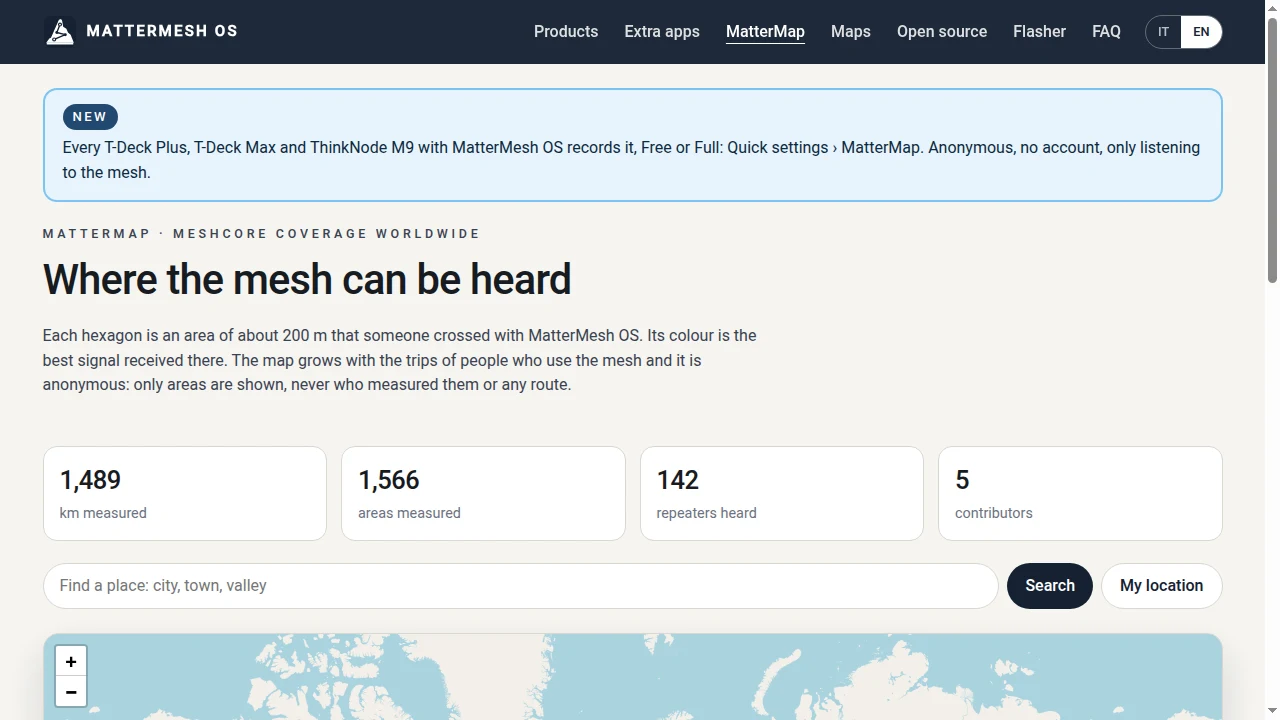
Vessel, a new open source satellite app for macOS by Ryvan Prabhu, collapses that stack into one window. Pick a satellite on a 3D globe, and the app works out the pass for your address, tunes the radio, follows the Doppler shift, chooses a decoder and starts listening when the satellite comes over the horizon. It also transmits, but only through published amateur uplinks, and only with a set of interlocks that are stricter than most commercial software.
What follows covers the three programs it learned from, the globe and radar, the receiver across eight SDR families, the embedded SatDump engine, deep space tracking, the transmit interlocks, installation, and where version 1.0.0 is still rough.
TL;DR: Vessel is a free GPL-3.0 macOS app from Ryvan Prabhu that combines a satellite tracker, an SDR receiver and a decoder in one window. It plots more than 17,000 satellites on a Metal-rendered globe, works out 48 hours of passes, tunes RTL-SDR, Airspy, HackRF, SDRplay, LimeSDR, bladeRF, USRP, PlutoSDR and RFNM hardware or a public SpyServer, follows Doppler automatically, and decodes with an embedded SatDump engine. Transmit is limited to published amateur uplinks with hold-to-talk, callsign checks and a crash guard.
What Vessel is
Vessel is a native macOS application that tracks satellites, controls a software-defined radio and decodes satellite signals in a single window, so a pass can be planned, tuned and recorded without moving between three programs. It is written in Swift with SwiftUI for the interface and a Metal renderer for the globe, released under the GNU GPL version 3.0 with a commercial licence option, and published by Ryvan Prabhu as the afterplanet/Vessel repository on GitHub. The first release, version 1.0.0, appeared on 12 November 2026.
The codebase is readable: 86 Swift files and roughly 27,500 lines of Swift, plus five C and C++ targets for the orbit propagator, the FT8 library, the SSDV picture format, the Codec 2 speech codec and Google’s Draco mesh decoder. The receiving and decoding engine isn’t Vessel’s own code. SatDump, the open source ground station suite, is compiled from source into the app bundle and runs as a background program, which is why there’s nothing else to install and no second app to open.
The README labels the release version 1 and asks for bug reports. It also warns that transmit hasn’t been tried on real hardware yet.
Three programs, one window
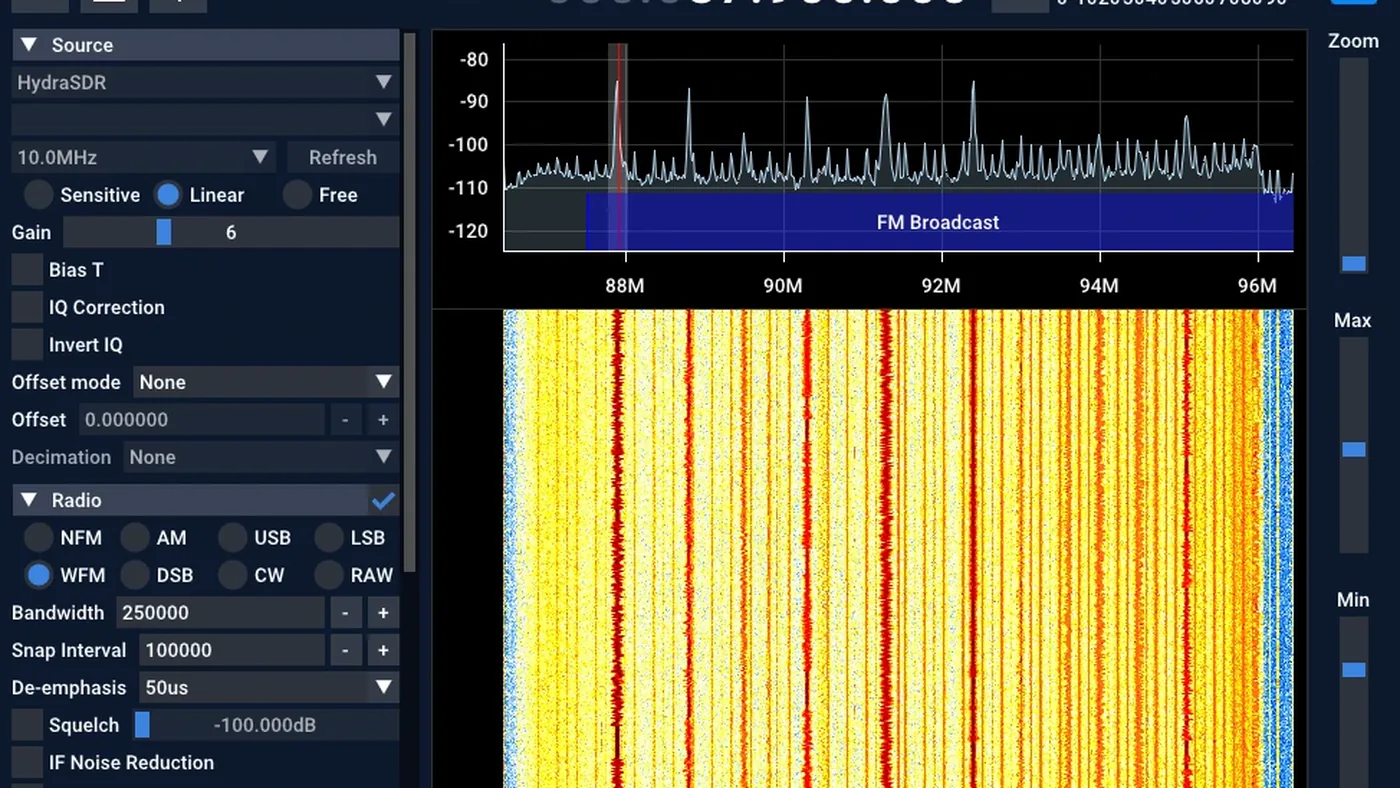
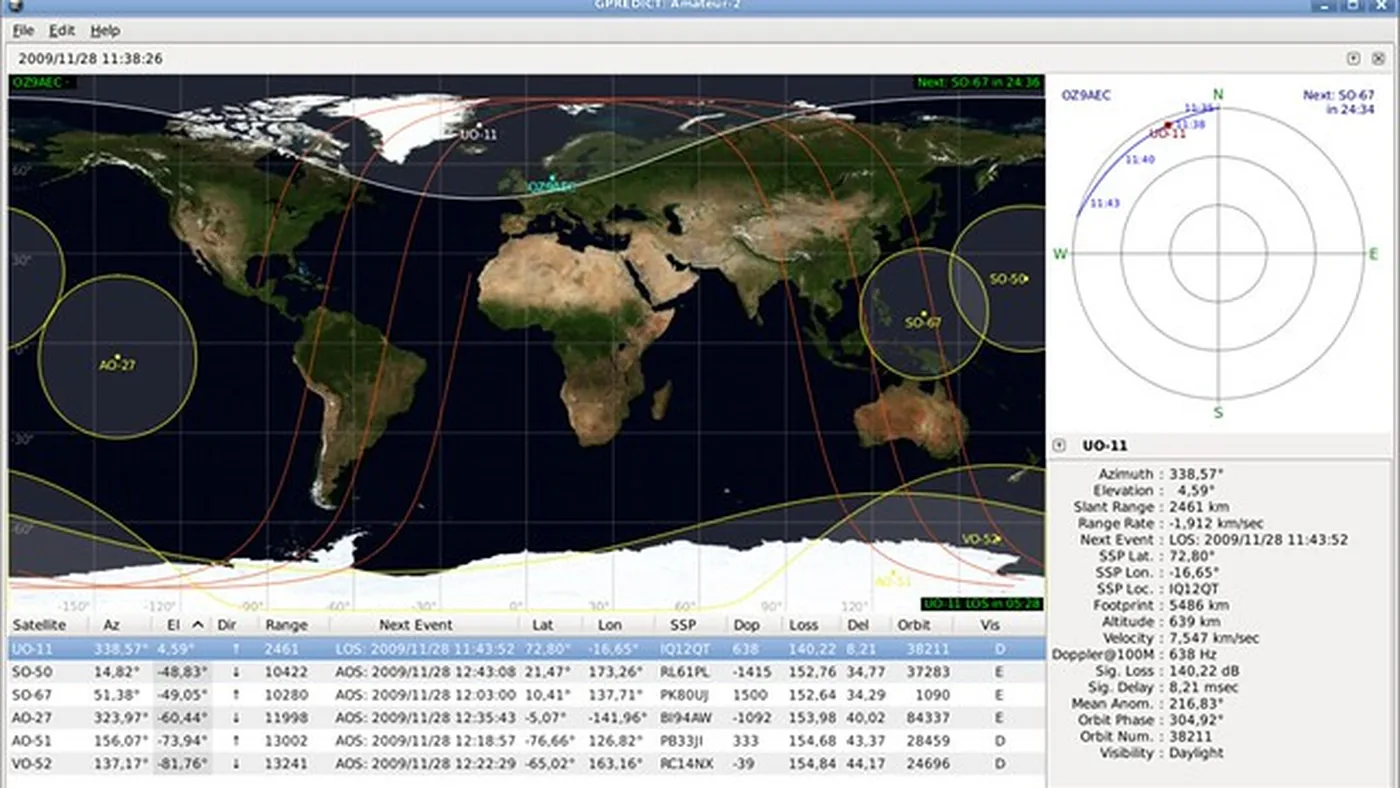
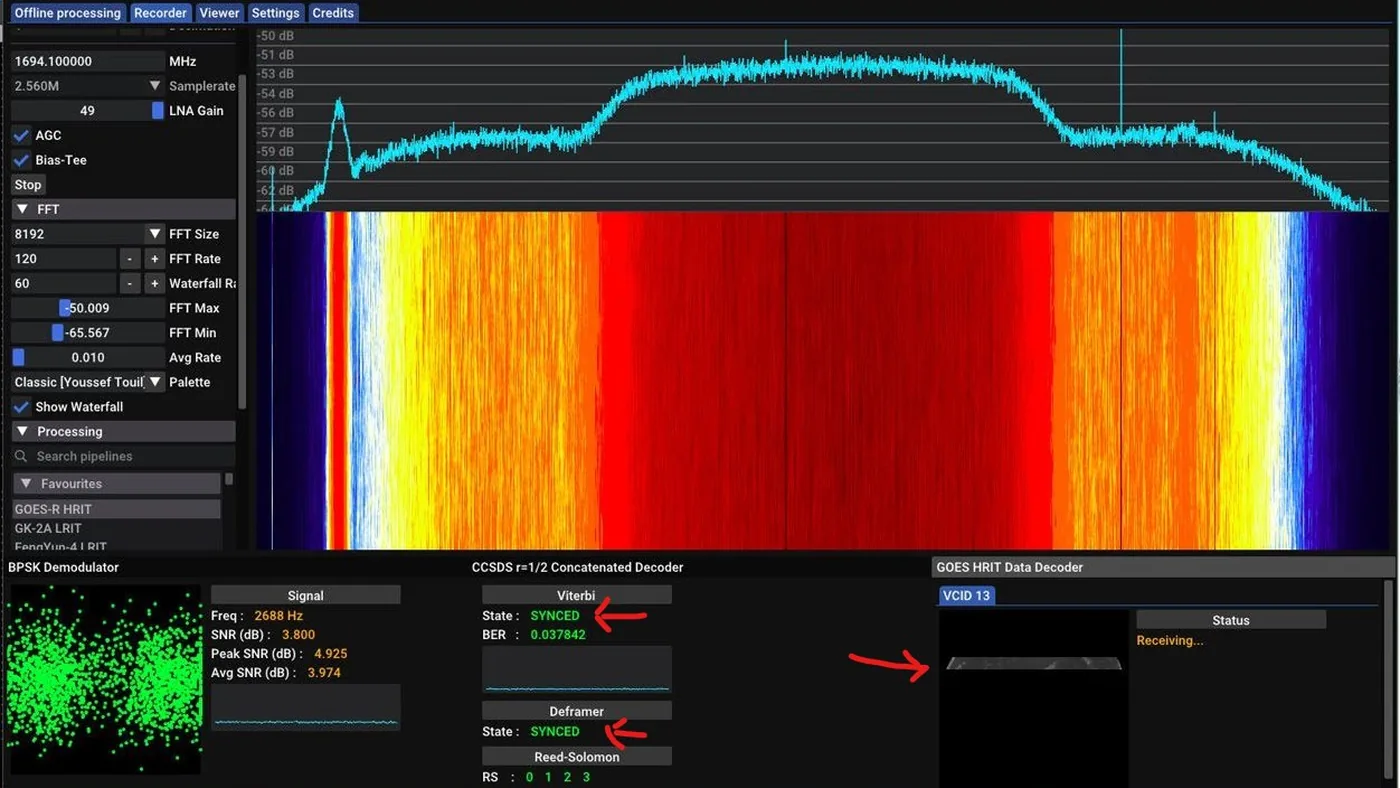
Satellite work has an established toolchain, and Vessel is explicit about where its ideas came from. SDR++ by Alexandre Rouma is the receiver people reach for: choose hardware, set gain and sample rate, watch the spectrum and waterfall, demodulate FM, AM and SSB. Gpredict by Alexandru Csete OZ9AEC is the tracker: a map of everything in orbit, a sky plot of the next pass, and AOS, LOS, azimuth and elevation for your location. SatDump is the decoder: demodulators, error correction and pipelines that turn a raw signal into weather images, telemetry and data products.
Vessel takes the receiver and tracker jobs into its own code, with no SDR++ or Gpredict code inside, and embeds SatDump as the engine. The README is explicit about the distinction. The app is GPL-3.0, and the SatDump engine ships under its own GPL-3.0 terms, with the exact source version recorded in Contents/Resources/Engine inside the bundle.
| Task | Separate programs | Vessel |
|---|---|---|
| Find a satellite | Look it up in the tracker | Click it on the 3D globe, or search by name or NORAD number |
| Know when it passes | Read AOS and LOS in the tracker | Radar, pass list and countdown, worked out for your address |
| Tune the radio | Copy the frequency into the receiver by hand | Tuned automatically from the satellite’s published downlinks |
| Correct for Doppler | Link the tracker to the receiver yourself | Followed for you through the pass |
| Decode | Choose a pipeline in the decoder | Chosen for you, per satellite |
| Transmit | A separate radio-control program | Public amateur uplinks only, with safety checks |
Inside the globe
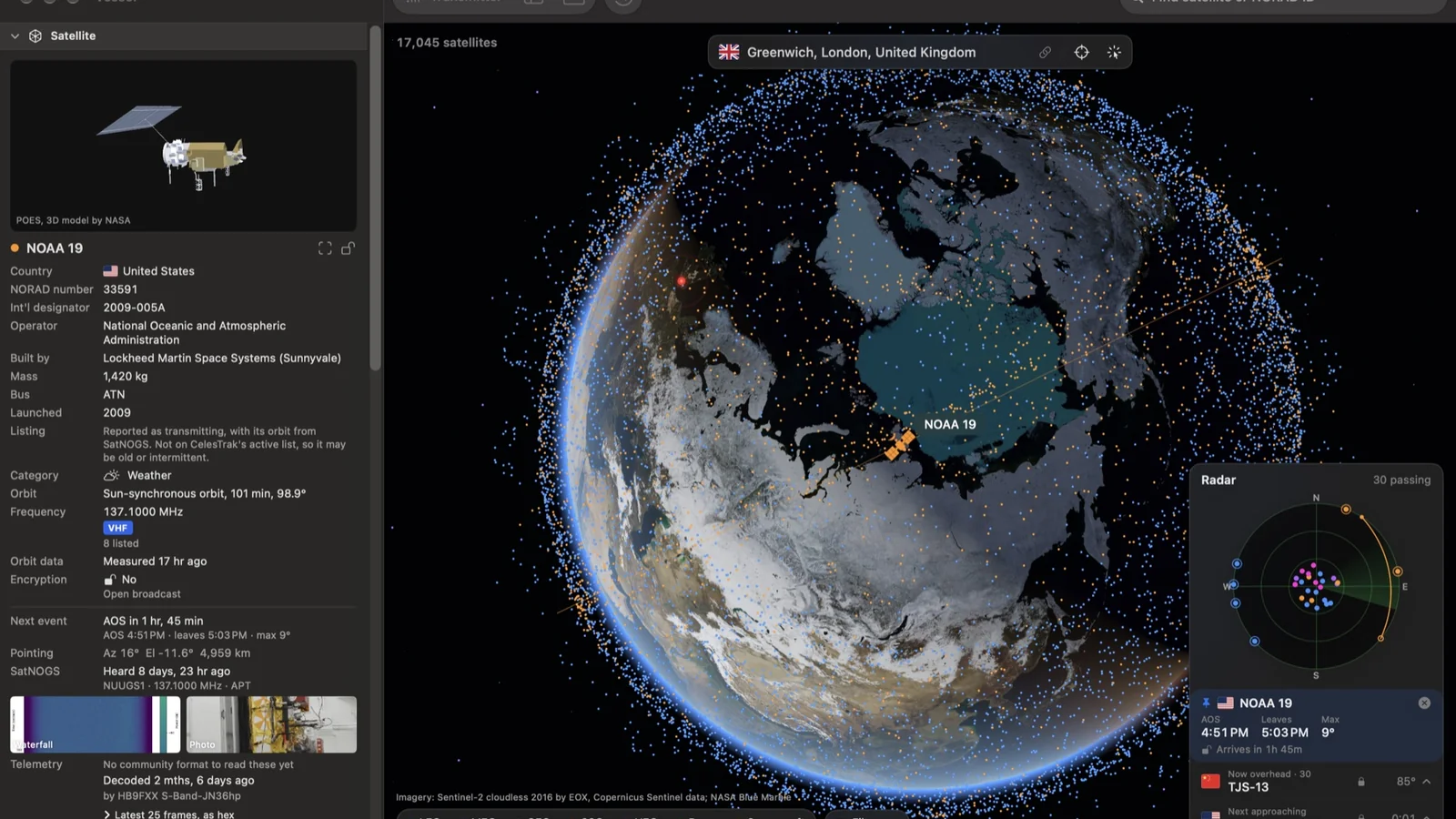
The globe carries the whole catalogue. Vessel renders more than 17,000 satellites as particles in a Metal pipeline, each one a 40-byte vertex, coloured by orbit class and tagged with a category, a country and a set of frequencies. Dragging rotates, scrolling or pinching zooms, and double-clicking pushes in. Earth imagery comes from Sentinel-2 cloudless tiles served by EOX, streamed as you zoom down to roughly 10 km and cached in ~/Library/Caches/Vessel/tiles, with Natural Earth borders, GeoNames place names, NASA Blue Marble land and night lights underneath.
Orbit classification is rule based, first match winning:
| Type | Colour | Rule (first match wins) |
|---|---|---|
| Deep | Green | Period over 1500 min |
| HEO | Magenta | Eccentricity 0.25 or more |
| GEO | White | Period 1380 to 1500 min |
| MEO | Purple | Period 130 to 1380 min |
| SSO | Orange | Inclination 95.5 to 104 degrees, eccentricity under 0.1 |
| LEO | Blue | Everything else |
Filters work by orbit type, category, country, frequency band, signal type and encryption, and groups keep the satellites you follow together. When a filter narrows the sky, the particles grow on a logarithmic curve toward the size of the icon a locked satellite wears, so a single remaining candidate is unmissable instead of a dot you hunt for.
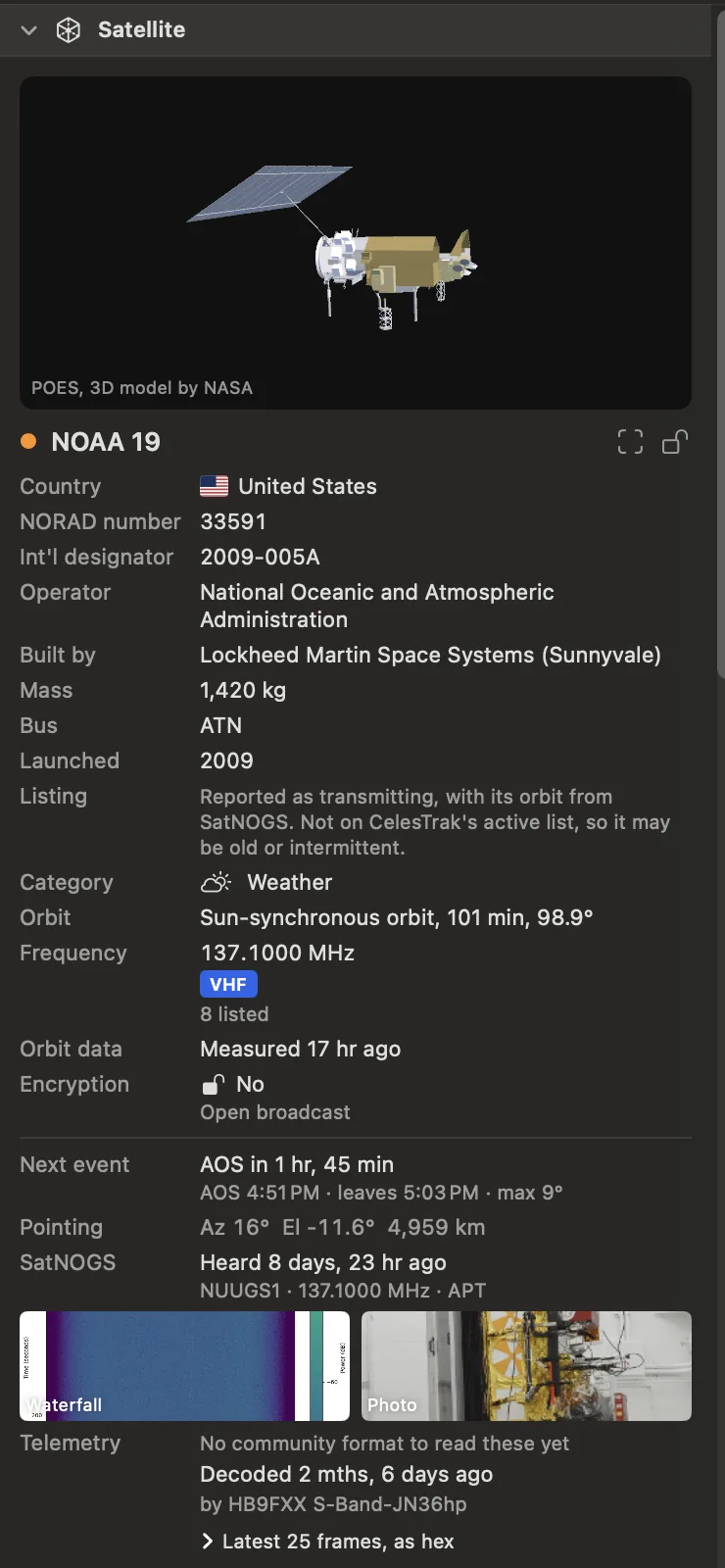
Locking a satellite opens the details panel: a rotating 3D model, owner country, launch year, category, frequencies with colour-coded band and mode labels, encryption state, recent SatNOGS receptions and decoded telemetry. Models come from NASA’s 3D Resources and community contributors, compressed with Draco and labelled by how close they are: NASA’s model of that exact spacecraft, a model of the same design family, or a stand-in of similar type. A GPS satellite gets a labelled stand-in rather than a fictional shape.
The radar, the pass list and the planner
The radar panel draws the sky above your station, straight up at the centre and north at the top. It plots the highest 24 satellites above the horizon that your filters allow, plus the newest arrivals once they rise, ringed so they stand out. A locked satellite always appears, with its current or next pass drawn across the sky in its orbit type’s colour and faded where it has already been. The countdown switches from “Arrives in” to “Leaves in” the moment the satellite rises, then moves to the next pass once it sets.
Prediction depth adapts to the orbit: fast movers are projected 15 minutes ahead, slower orbits 3 hours. Now overhead opens the full list in view, and Next approaching lists the next ten to rise, timed to the second. Geostationary and deep space objects hang still, so they only appear when their type is selected.
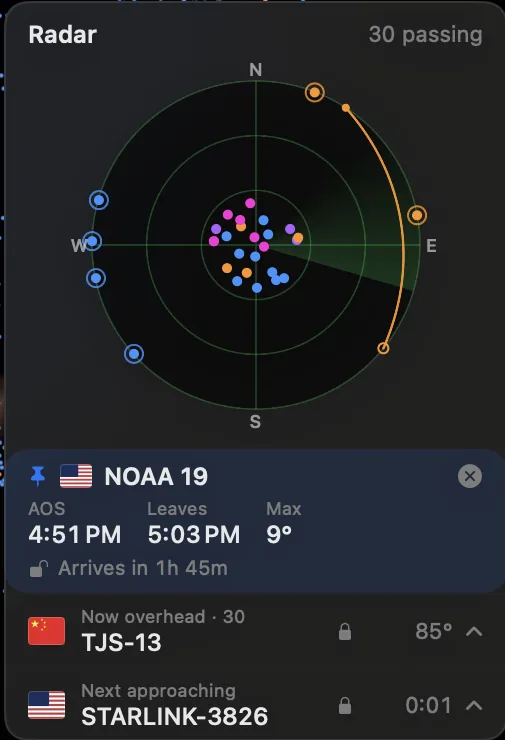
Beyond the radar sits planning. Vessel computes passes for the next 48 hours, offers spoken alerts, includes a contact planner that finds when two stations can see the same satellite at once, and keeps a schedule that follows a watch list of satellites pass after pass, locking each as it rises so automatic listening catches it. The schedule starts switched off by design, with a minimum elevation you set, because an unattended station that starts on its own is a surprise nobody wants.
The receiver
Vessel detects what is plugged in over USB by enumerating IOKit against a table of known vendor and product IDs, then lists only that hardware, with the device type handed to the SatDump engine.
| Recognised hardware | Status |
|---|---|
| RTL-SDR (RTL2832U with R820T, R828D or RTL-SDR Blog V4 tuner) | Detected, tested on hardware |
| Airspy Mini and R2 | Detected, tested on hardware |
| Airspy HF+ | Detected, configured, untested |
| HydraSDR RFOne | Detected, configured, untested |
| HackRF One and Jawbreaker | Detected, configured, untested |
| SDRplay RSP family | Detected by Mirics vendor ID, untested |
| LimeSDR USB and Mini | Detected, configured, untested |
| bladeRF and bladeRF 2.0 | Detected, configured, untested |
| USRP and NI USRP | Detected, configured, untested |
| PlutoSDR | Detected, configured, untested |
| Fobos SDR | Detected, configured, untested |
| RFNM | Detected, configured, untested |
RTL-SDR dongles all look identical on USB, so Vessel reads the tuner chip and offers only the frequencies yours can tune: 24 to 1766 MHz for R820T and R828D parts, 0.5 to 1766 MHz for a Blog V4, and the narrower ranges of the E4000, FC0012, FC0013 and FC2580 variants. That stops the classic confusion of a receiver that appears to tune a band it can’t hear.
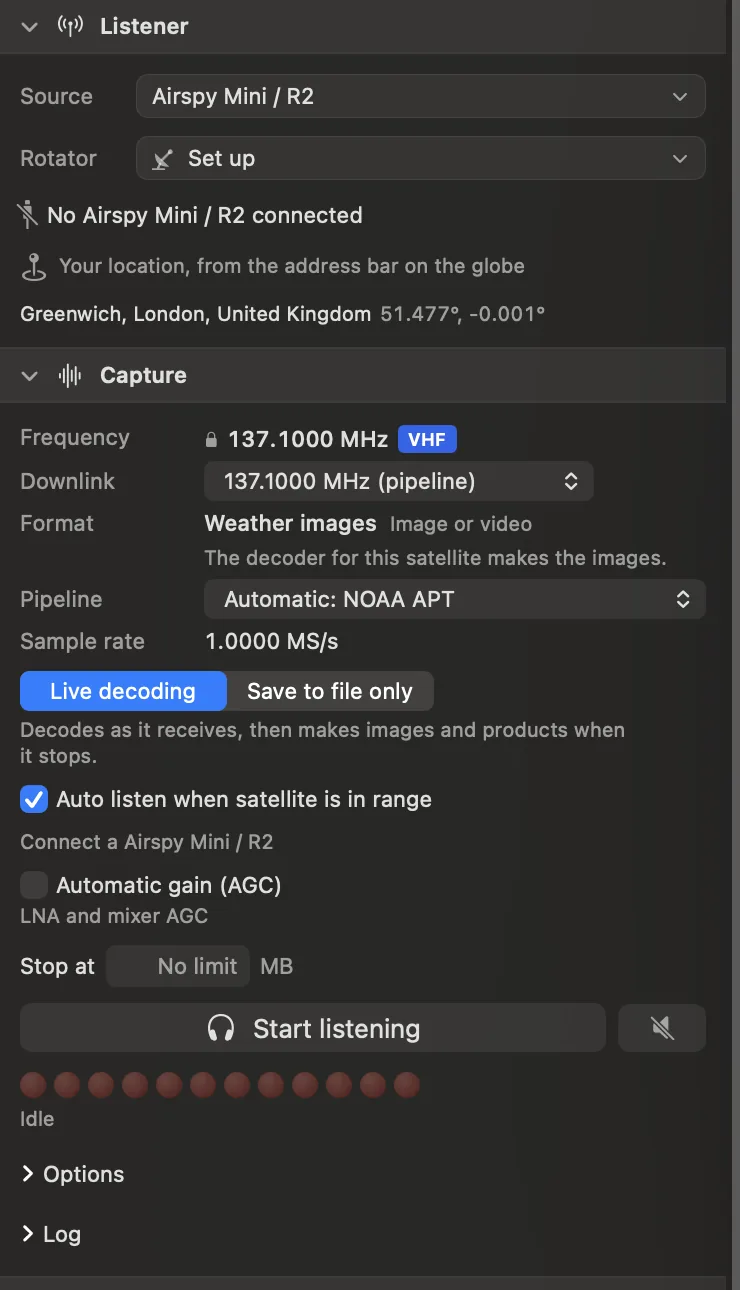
Frequency, downlink, decoder and sample rate are chosen per satellite and can be overridden by hand. Gain is adjustable, with automatic gain offered only where the source genuinely has it, greyed out with a reason where it doesn’t, and remembered per source. The spectrum and waterfall label the signals they expect to see, and a signal meter reports level, using the demodulator’s SNR where one is available and an estimate from peak over noise floor where it isn’t.
Borrowing someone else’s antenna
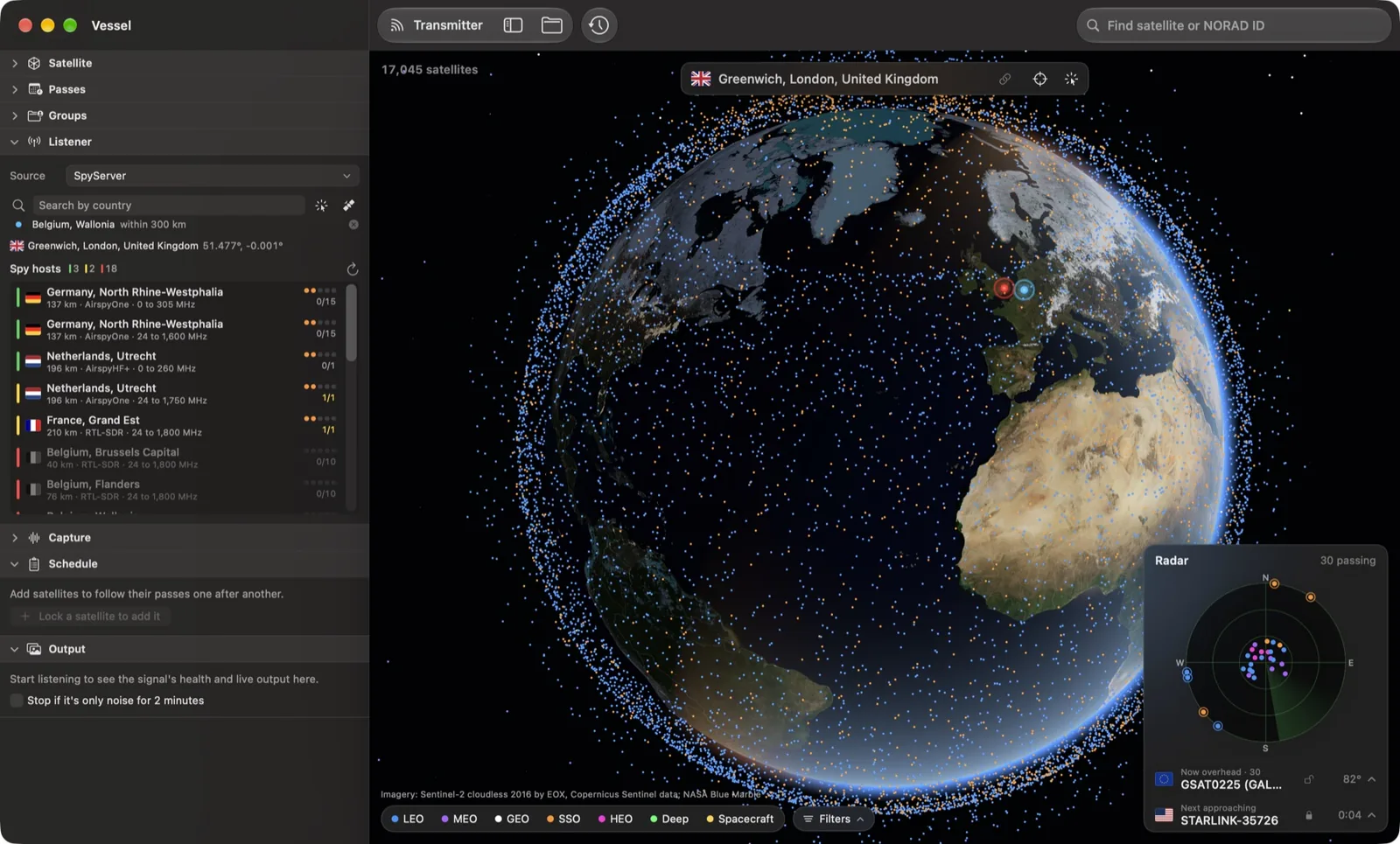
You don’t need hardware to try Vessel. The app loads the full Airspy SpyServer directory live, one-minute refresh, and lists each public station with its location, frequency range, antenna, maximum sample rate and how many people are using it. Search by country, or click a region on the globe to list the stations there.
Stations can also be filtered by satellite, leaving only those that can hear the locked one, with the time of its next pass over each. Each host is checked as you browse and marked available, busy, offline, or too slow for the signal. Connection strength comes from round-trip time and lost attempts rather than spare bandwidth, which is what matters before pulling a 2 MS/s stream across the internet. WebSDR stations open in your browser instead.
Decoding the pass
Vessel doesn’t ask you to pick a pipeline for most satellites. A decoder is chosen in a fixed order: a manual choice saved for that satellite in pipeline_choices.json, then the rules in pipeline_rules.json where the first match wins and the first live-capable decoder in its preference list is used, then a decoder named exactly after the satellite, then the analog demodulator for voice and tone downlinks, and finally no decoder, in which case the raw signal can still be saved.
The decoder definitions come from SatDump. At every start the app compares its copy with the latest upstream definitions, downloads what changed, tests each file against the engine, and drops any that would stop a decoder loading before accepting the rest into engine-run/pipelines.json. For a fast-moving project like SatDump, that’s a pragmatic compromise: you get new missions without reinstalling, and a broken definition can’t take the engine down.
| Signal | What you get |
|---|---|
| NOAA APT and Meteor LRPT | Weather images, decoded live or at the end of a recording |
| SSTV downlinks | Pictures, including PD, Robot, Martin and Scottie formats with VIS headers |
| AX.25 packet | Callsigns, paths and message text, with binary payloads shown as hex for FoxTelem-style tools |
| Telemetry formats | Decoded through Kaitai definitions published by the satnogs-decoders project |
| HADES-SA | Power, temperature, status, payload, antenna, ephemeris, mailbox frames, plus SSDV pictures and Codec 2 voice |
| Analog voice and tone downlinks | Demodulated directly, without a digital pipeline |
| FT8 and FT4 | Decoded on receive, and generated for transmit |
HADES-SA is a satellite that is on the air now. AMSAT-EA’s SpinnyONE satellite transmits from NORAD 68446 at 436.875 MHz, 800 baud, with a 0xBF35 sync word and sixteen frame types, pictures sent as SSDV and voice sent as Codec 2. Vessel implements the frame format from AMSAT-EA’s own decoder, checked against their sample frames, with CRC-16/CCITT-FALSE on telemetry, a whitening mask on voice, and a dedicated monitor for pictures, telemetry and audio.
Capture has two modes. Live decoding produces images and products as the pass ends; save to file stores the raw signal for later. With Listen automatically on, capture starts when the tracked satellite is in view, restarts when the satellite or host changes, stops when it sets, and refuses to keep writing below 2 GB of free disk. Results land in ~/Documents/Vessel, with a dropdown of recent files, thumbnails for images, Quick Look for anything readable, and an All Results view listing every capture with its timing and outcome.
Deep space and the wider catalogue
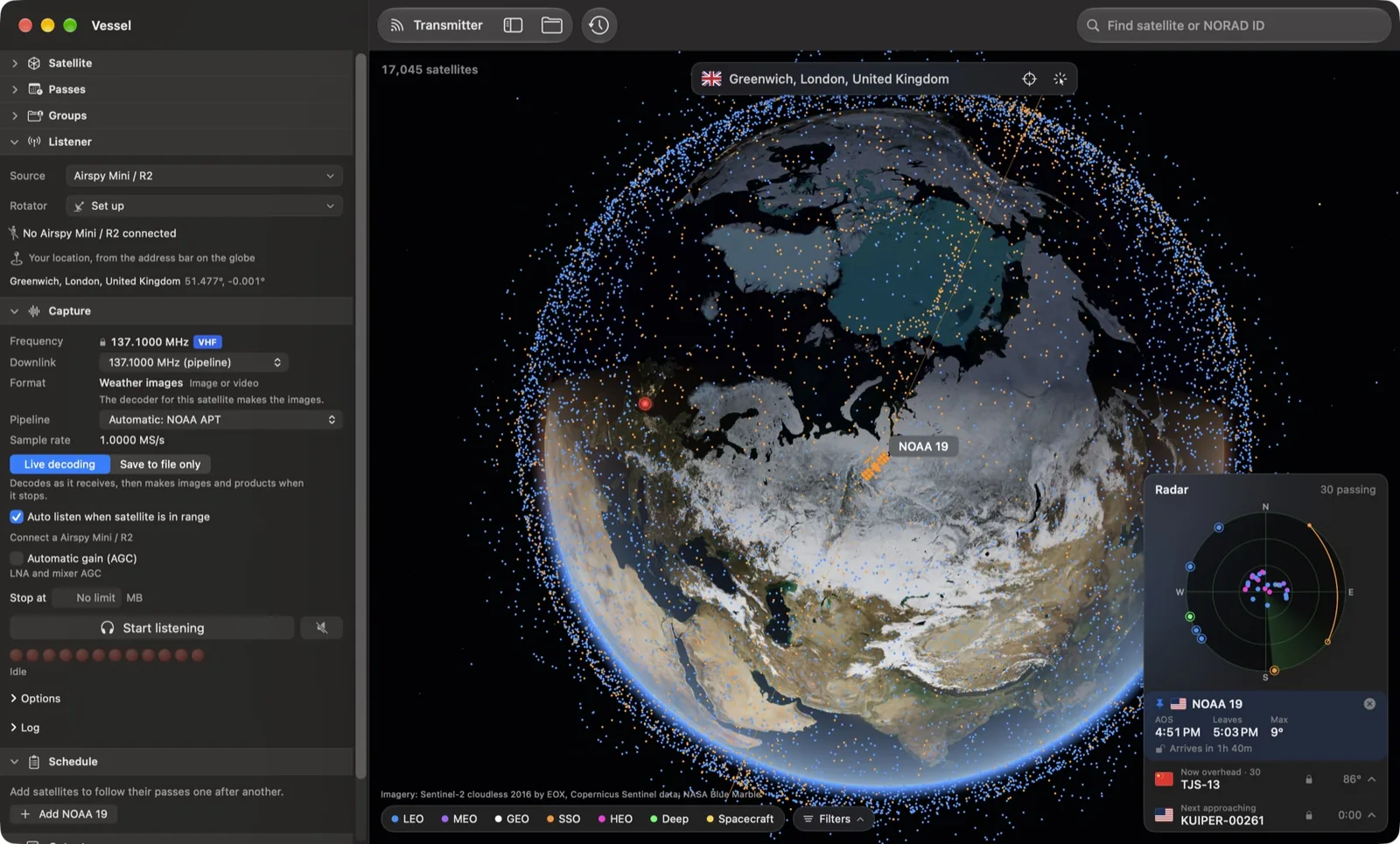
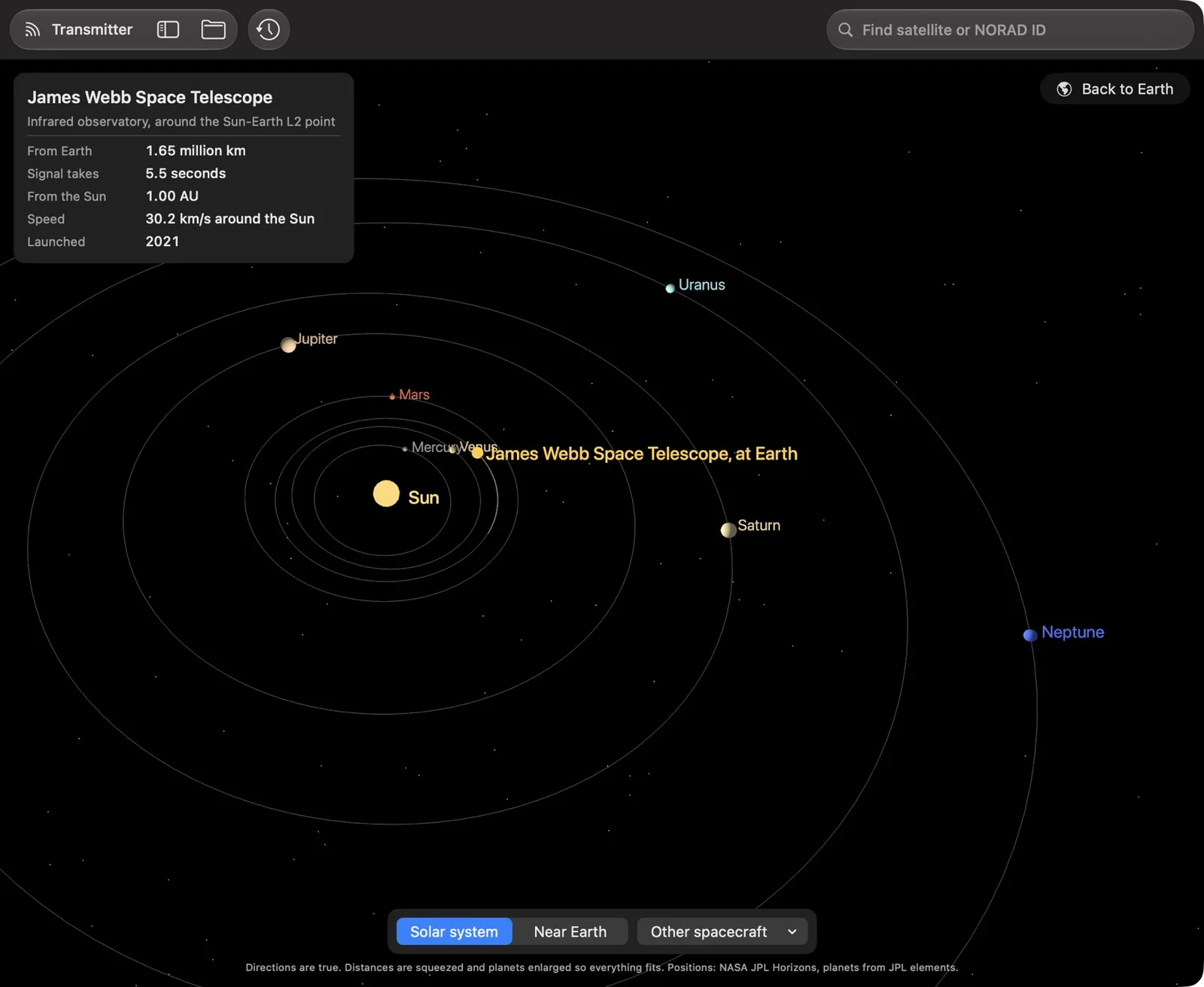
Most trackers stop at Earth orbit. Vessel adds a second view for missions tracked with NASA JPL Horizons, including the James Webb Space Telescope, Hubble, Voyager 1 and 2, New Horizons, Juno, Europa Clipper, JUICE and Psyche, each drawn in its own view of where it sits in the solar system.
The wider catalogue is fed from CelesTrak’s active group, refreshed every two hours because that is the interval CelesTrak asks clients to respect. Satellites that SatNOGS hears before they receive an official catalogue number appear too, flagged as reported rather than catalogued. Categories cover communications, weather, navigation, Earth observation, science, amateur and space stations, with filters for each.
Transmit: the narrow door
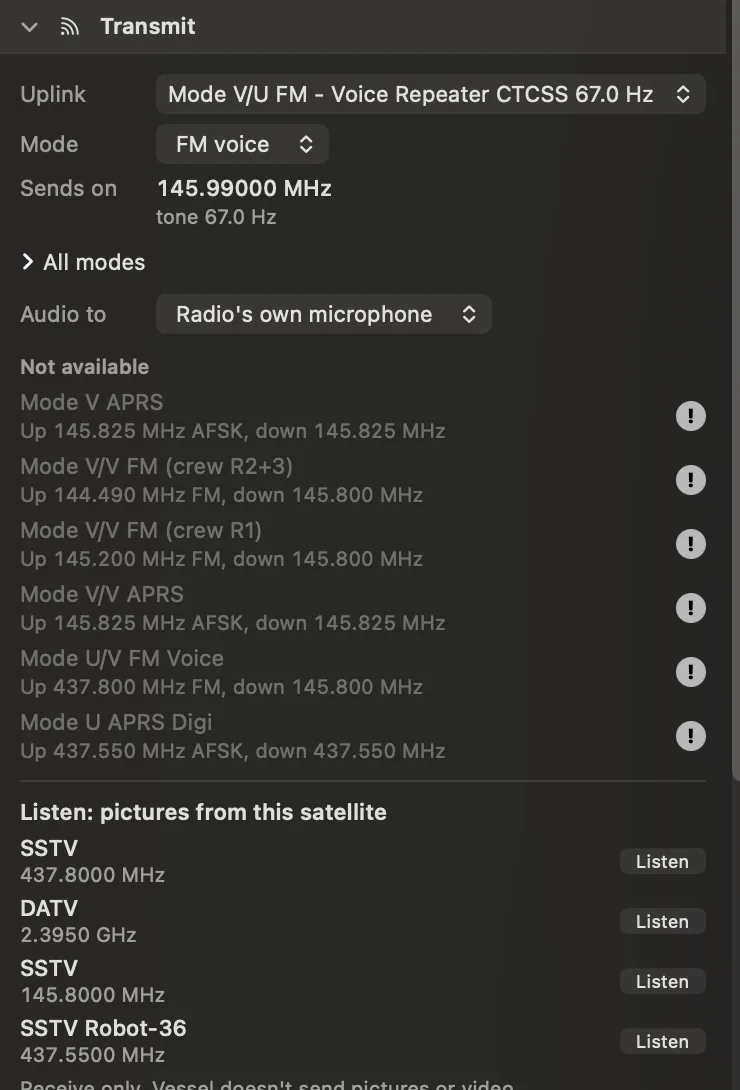
Vessel can transmit, but the user cannot type a frequency into it. In the source, a transmit target exists only for an uplink that passed the eligibility policy, and the dial frequency is always derived from that object, so there’s no code path that can put the radio anywhere else.
An uplink qualifies only when SatNOGS lists it as an active amateur service with no frequency violation, not declined or uncoordinated by IARU, inside 145.8 to 146, 435 to 438, 1260 to 1270 or 2400 to 2450 MHz, and marked for public use. Command, telemetry and beacon links are excluded by rule, and each rejection carries a reason string such as “Command or telemetry link, not for public use”.
| Mode | Audio centre | Occupied bandwidth | Notes |
|---|---|---|---|
| FM voice | Carrier | Narrowband FM | With CTCSS where the uplink specifies a tone |
| SSB voice | 1500 Hz | 3 kHz | Dial offset so the whole signal stays inside a linear transponder |
| CW | 700 Hz | 200 Hz | Keyed from the app, not the paddles |
| APRS | 1200 baud | Packet | Position or message, with the callsign in the frame |
| Packet | 1200 or 9600 baud | AX.25 | 9600 only where the listing says AX.25 |
| PSK31 | 1000 Hz | 100 Hz | Text with DE callsign added when missing |
| RTTY | 2210 Hz | 400 Hz | Text, same convention |
| FT8 | 1521.25 Hz | 80 Hz | Keys on the next 15 second UTC slot |
| FT4 | 1531.25 Hz | 120 Hz | Keys on the next 7.5 second UTC slot |
Vessel transmits only while the button is held, and only after you have entered a callsign that passes an amateur callsign regex, including SSIDs, and confirmed you hold a licence. It stops on release, on timeout, at low elevation, on stale orbit data, on a lost radio link, on a change of satellite or uplink, and when the app loses focus. Every transmission is written to ~/Documents/Vessel/transmit_log.csv.
The last layer is a guard process outside the app. Vessel spawns a small shell script that blocks on a pipe; if the app crashes or is force quit, the pipe closes, cat returns, and the script sends an unkey command to rigctld up to three times. The mechanism is crude on purpose. It shares no state with the app, so it cannot fail the same way the app just failed.
Radio control runs through USB hardware the app found, or any transceiver Hamlib’s rigctld can drive, started with rigctld -m MODEL -r /dev/cu.USB -T 127.0.0.1. Vessel follows Doppler once a second by computing the range rate from SGP4 state vectors and applying f * (1 + v/c) on uplink and f * (1 - v/c) on downlink, with the dial rounded to 10 Hz so the radio isn’t chattered. On linear transponders the dial is offset so the whole signal stays inside the passband, the same housekeeping people miss on FO-29 style birds.
To test transmit without radiating, the repository includes a self test that drives a dummy rigctld (-m 1 -T 127.0.0.1 -t 14532) and asserts on the transmit plan. For real hardware, the README’s advice is blunt: use a dummy load first, because no real radio has been tested with this path yet.
Finding frequencies nobody published
New satellites often launch before anyone publishes a downlink. Vessel gives those a Scan button. It listens through whatever source the Listener panel has selected, sweeps likely bands, and tests every candidate against the Doppler shift the satellite’s orbit predicts. A signal that moves the way the orbit says it should is a strong lead; only a successful decode confirms it, which the UI says plainly.
The scanner is receive only by construction. SpyServer hosts are the fastest target because they stream a waterfall directly, while local radios must restart the engine for each tuning window, so a full sweep takes longer.
Satellite details and where they come from
Each satellite carries as much published information as Vessel can assemble, cached on the Mac and refreshed at the interval each service asks for. That politeness is enforced in code rather than promised in a readme.
| Data | Source | Refresh |
|---|---|---|
| Orbital elements and categories | CelesTrak GP | 2 hours |
| Owner country and catalogue data | CelesTrak SATCAT | 7 days |
| Downlink frequencies | SatNOGS DB | 1 day |
| SpyServer hosts | Airspy directory | 1 minute |
| Recent receptions and photos | SatNOGS Network and DB | 10 minutes per locked satellite |
| Operators, builders, mass, bus | GCAT by Jonathan McDowell | 7 days |
| Amateur frequencies | AMSAT satellite index and JE9PEL | 1 to 7 days |
| Amateur operating reports | AMSAT live status | Per locked satellite |
| Telemetry formats | satnogs-decoders | Checked daily |
| Deep space positions | NASA JPL Horizons | As needed |
| Decoder definitions | SatDump on GitHub | At every start |
Where a detail is inferred, the app says so. Encryption is graded Yes, Partly, No or Unknown from the published design of each system, because no public catalogue records it per satellite. Station frequencies for modules and docked vehicles show the station’s radios and label them as such. Signal level falls back to a spectrum estimate when the demodulator reports no SNR. Missing details link out to Orbital Radar in the browser, which the source explicitly doesn’t scrape because that site’s terms forbid automated access.
Install and build
The prebuilt download is a single zip, Vessel-1.0.0-macOS-arm64.zip, from the releases page. Unzip it, move Vessel.app to Applications, and open it. The app isn’t notarised by Apple yet, so the first launch is refused and you must allow it under System Settings, Privacy and Security, Open Anyway. The published binary targets Apple silicon and macOS 27.2 or later.
Building from source is the route for Intel Macs and older systems, and it needs macOS 14 or later with Xcode and Homebrew:
tools/build_satdump.shcompiles SatDump and the radio libraries from source intovendor/satdump. This is the long step, and the build script then seals the engine inside the app bundle.tools/build_gnss_sdr.shis optional, and only needed if you want to find your position by scanning GPS satellites with your own SDR../build_app.shbuilds and assembles the app, andopen Vessel.appstarts it.swift testruns the unit tests.
Continuous integration does the same sequence on a macOS 15 runner, because GitHub retired its macOS 14 machines, caching the SatDump dependencies and the GNSS-SDR build between runs. It builds for macOS 14 and later, runs the tests, runs a smoke test that launches the app and checks it works, then packages the zip. The repository also carries a scripted harness for repeatable screenshots and transmit checks: VESSEL_TEST="--lock 25544 --test-mouse --snapshot /tmp/shot" opens the app in a known state with the ISS locked.
Hardware reality check
The README draws a line that reviewers should respect. Vessel has been tested with RTL-SDR dongles built on the RTL2832U with R820T or R828D tuners, including the Blog V4, and with the Airspy Mini and R2. Everything else in the table above is recognised over USB and configured for the engine, but hasn’t been run on real hardware by the author.
So the common cheap starting point works today. If you have an Airspy HF+, an SDRplay RSP, a PlutoSDR or a LimeSDR, your bug report is worth more than your feature request right now.
Vessel against the stack you already run
| Vessel | SDR++, Gpredict and SatDump | SatDump alone | GQRX plus rig control | |
|---|---|---|---|---|
| Cost | Free, GPL-3.0 | Free | Free | Free |
| Platform | macOS only, native Swift and Metal | Windows, macOS, Linux | Windows, macOS, Linux | Windows, macOS, Linux |
| Tracker, receiver and decoder in one window | Yes | No, three programs | Decoder and receiver, no globe | Receiver only, tracker external |
| Automatic Doppler | Yes, from SGP4 range rate | Only when you link the tools | Yes, with a rotator setup | Manual or via external scripts |
| Decoder choice | Per satellite, automatic, upstream definitions | Manual | Manual pipeline selection | None |
| Public SpyServer listening | Yes, built in | Yes, in SDR++ | Limited | Yes |
| Amateur transmit with policy checks | Yes, uplinks only, guarded | Not in one place | No | Via radio CAT only |
| Maturity | Version 1.0.0, days old | Years | Years | Years |
What the table does not measure is the cost of switching between three windows during a ten minute pass, and whether the tools agree with each other without you in the middle.
What it means for a shack
On a Mac, three jobs get shorter. An ISS SSTV event becomes: lock the station, let the radar count down, let auto listen start, and collect the pictures in ~/Documents/Vessel afterwards. A NOAA or Meteor pass becomes a scheduled capture you can leave running while you do something else, with the image waiting when you come back. Linear transponder work gets Doppler correction for the uplink and downlink without a second program, and the transmit policy means you can’t accidentally key a telemetry channel.
It works as a teaching tool too. The globe answers “where is it”, the radar answers “when”, the waterfall answers “what does it sound like”, and the decoder answers “what did it send” in one screen, which is exactly the sequence a new operator needs to see. Club demos and school contacts benefit from that more than from any single feature.
This is version 1 software released in November 2026, macOS only, Apple silicon for the prebuilt binary, not notarised, with transmit untested on real radios and a scanner that only listens. If you need Windows or Linux today, SatDump and Gpredict remain the answer, and SDR++ remains the receiver.
Licence, author and contributing
Vessel is dual licensed. The open source option is GPL-3.0, which covers personal use, study, modification and sharing, and requires anything you distribute built from Vessel to stay open source. A commercial licence exists for closed source use, arranged through the author. Contributions are accepted under a Contributor Licence Agreement, which is what makes the dual licence possible.
Ryvan Prabhu builds it as afterplanet on GitHub, and the repository takes bug reports with the details that actually help: what you did, what you expected, your radio and your macOS version. Owners of hardware outside RTL-SDR and Airspy are the most useful testers right now, and the source is laid out well enough to read, with Sources/Vessel/Globe for the renderer, Sources/Vessel/Radio for the engine and pipeline control, Sources/Vessel/Transmit for the uplink policy and keying, and Sources/Vessel/Passes for the orbital work.
Sources and Further Reading
- Vessel on GitHub
- Vessel latest release
- Vessel user guide
- SatDump
- SDR++
- Gpredict
- SatNOGS
- CelesTrak
- AMSAT
- AMSAT-EA and HADES-SA
- GCAT by Jonathan McDowell
- NASA JPL Horizons
- GNSS-SDR
- Hamlib
- Airspy and the SpyServer directory
- Sentinel-2 cloudless by EOX
- NASA 3D Resources
- Codec 2
- ft8_lib by Karlis Goba
- Draco by Google
- Yams YAML parser
- Inside BrowSDR, the browser SDR receiver
- FoxSDR, the all in one SDR suite
- QSSTV Experimental 10.0 for SSTV and HAMDRM
- ESP-SDR, raw I/Q from an ESP32
73 de 9M2PJU.


Post Comment